
Hello people!
In this article I would like to demonstrate a very old feature (available since SQL Server 2005 – or before) that few people use or know exists, which is Column Level Security (CLS). Different from Row Level Security, where the user views all columns but only some rows, in CLS the restriction is made on certain columns that the user will or will not have access to view.
This feature is also available in Azure SQL Datawarehouse, but as of this writing, no is available for Azure SQL Database.
A classic example to demonstrate the use of this feature is an Employee table, in an HR database, for example:
CREATE TABLE dbo.Funcionario (
    Codigo INT IDENTITY(1,1) NOT NULL PRIMARY KEY CLUSTERED,
    Nome VARCHAR(50) NOT NULL,
    Cargo VARCHAR(50) NOT NULL,
    Salario NUMERIC(18, 2) NOT NULL
)

INSERT INTO dbo.Funcionario
(
    Nome,
    Cargo,
    Salario
)
VALUES
    ( 'João', 'DBA JR', 7259.87 ),
    ( 'José', 'DBA PL', 11022.91 ),
    ( 'Matheus', 'DBA SR', 18751.22 )
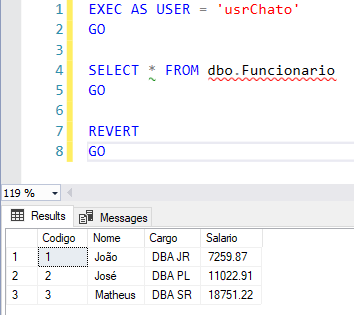
In this scenario, a DBA more unconcerned with the security of the environment would give read access (SELECT) to this table to the requesting user, and the user would be able to query all the data in the table:
GRANT SELECT ON dbo.Funcionario TO [usrChato]

-- Ou se você for um DBA que não tá nem aí com a segurança mesmo
ALTER ROLE [db_datareader] ADD MEMBER [usrChato]
GRANT SELECT TO [usrChato]
GRANT SELECT ON SCHEMA::dbo TO [usrChato]
When trying to query the table, we were able to look at all the rows and columns:
Using view to restrict columns
Click to view contentIn other words, if I want our usrChato to have access to all columns in the Employee table, except Salary, I can create a view without this column and give select access to the view for this user:
CREATE VIEW dbo.vwFuncionario_Sem_Salario
AS
SELECT
    Codigo,
    Nome,
    Cargo
FROM
    dbo.Funcionario
GO

GRANT SELECT ON dbo.vwFuncionario_Sem_Salario TO [usrChato]
GO
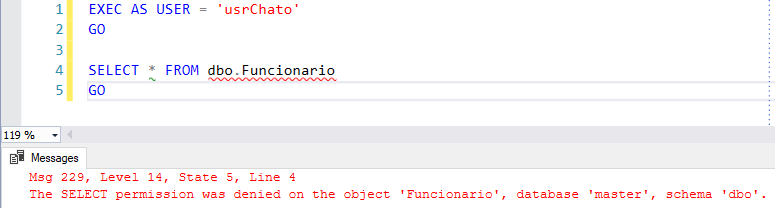
Therefore, if the user tries to directly access the Employee table, they will receive a lack of permission error message:
While he will have access to the view, which has all the fields, except Salary:

And now, whenever I have a user who needs to view all the columns in this table, except the salary, I grant SELECT access to this view (or manage access through roles).
But what happens when I have several users, with different needs to control which columns they will access? Will I create a bunch of views in my environment to meet each need?
Using Column Level Security (CLS) to restrict columns
Click to view contentThe great advantage of this approach is that in no way will the user have access to this column, even if views are created querying the table in question and he has access to this view (in this case, we will have to use DENY). Furthermore, you avoid creating multiple objects and views to exclusively meet security needs.
However, a major disadvantage of this approach is that the user will need to know very well the structure of the table and the specific columns that he will need to consult, as a SELECT * will no longer work.
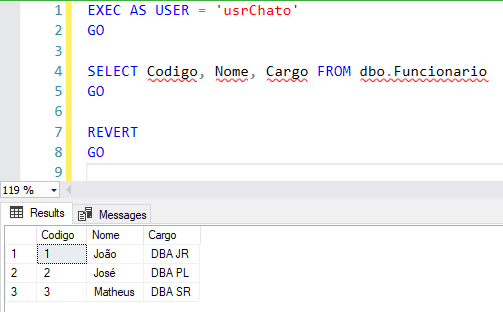
In the example of this article, I will define that the usrChato only have permission to view the columns Code, Name and Position in the table Employee:
GRANT SELECT ON dbo.Funcionario(Codigo, Nome, Cargo) TO [usrChato]
GO
And now, I will be able to consult these columns with the user usrChato:
The same is no longer possible if I try to include the Salary column:
EXEC AS USER = 'usrChato'
GO

SELECT Codigo, Nome, Cargo, Salario FROM dbo.Funcionario
GO

REVERT
GO
The SELECT permission was denied on the column ‘Salario’ of the object ‘Funcionario’, database ‘master’, schema ‘dbo’.
Or when trying to perform the famous SELECT * FROM:
EXEC AS USER = 'usrChato'
GO

SELECT * FROM dbo.Funcionario
GO

REVERT
GO
The SELECT permission was denied on the column ‘Salario’ of the object ‘Funcionario’, database ‘master’, schema ‘dbo’.
What if I create a view that has this column? Will the user be able to view the data, even if he does not have permission on the Table?
CREATE VIEW dbo.vwFuncionario_Completo
AS
SELECT
    Codigo,
    Nome,
    Cargo,
    Salario
FROM
    dbo.Funcionario
GO

GRANT SELECT ON dbo.vwFuncionario_Completo TO [usrChato]
GO
And now I'm going to try to access the view:
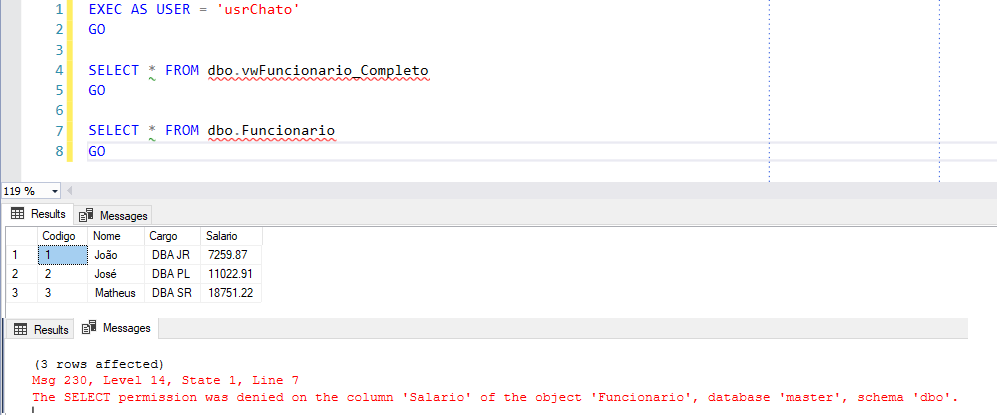
Ouch!! The user was able to view the salary!! And now?
Well, to resolve this we need to apply a DENY command to the salary column IN THE VIEW (in the original table there is no use, as the user has full access to the view):
DENY SELECT ON dbo.vwFuncionario_Completo(Salario) TO [usrChato] -- poderia ser public aqui, caso queira que ninguém acesse
The SELECT permission was denied on the column ‘Salario’ of the object ‘vwFuncionario_Completo’, database ‘master’, schema ‘dbo’.
It is important to note that you can use Column Level Security (CLS) (also known as Column Level Permission) in conjunction with the following permissions:
- SELECT
- UPDATE
- REFERENCES
How to identify column-level permissions
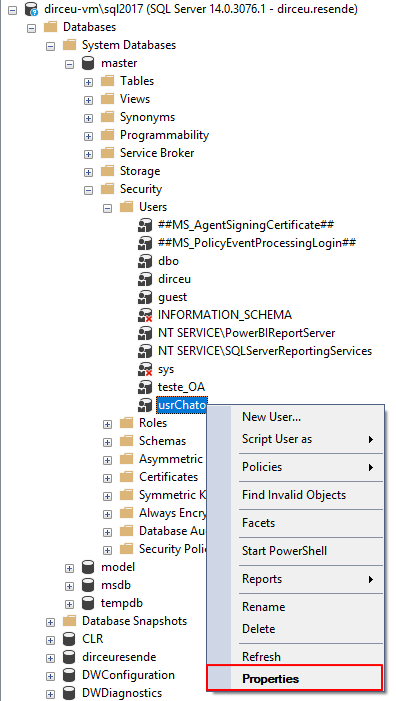
Click to view contentOpen the database where your table is, expand the “Security” folder and then “Users”, right-click and click on the “Properties” option:
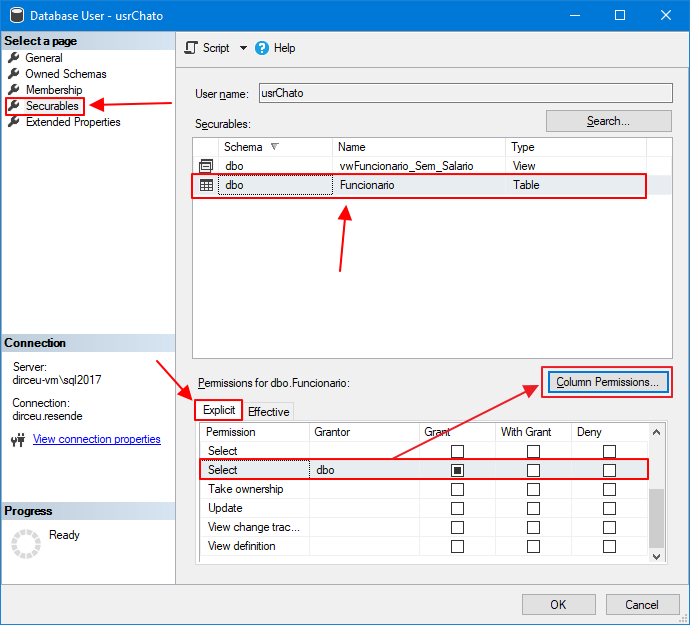
In the window that opens, click on the “Securables” option, select the table you want to view, click on the “Explicit” tab to view the permissions and scroll down the list until you find the Select permission. When you click on this item, you will see that the “Columns Permissions” button is now enabled.
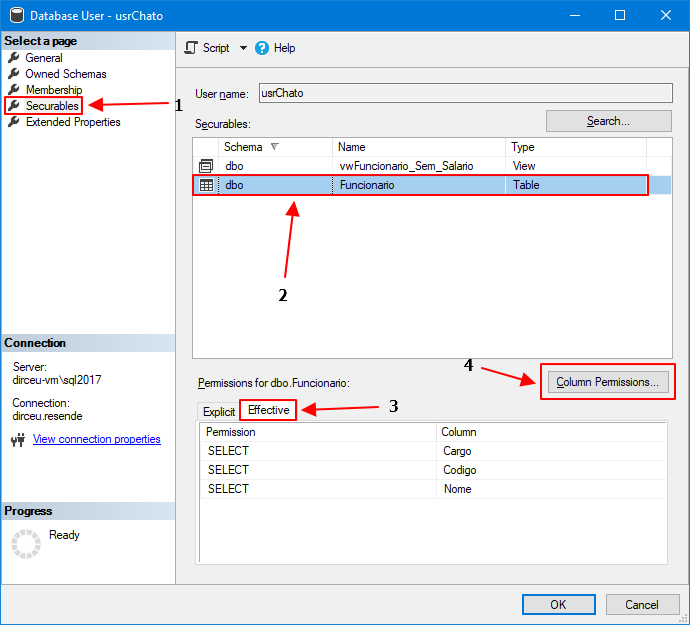
To view the columns, click on the “Effective” tab
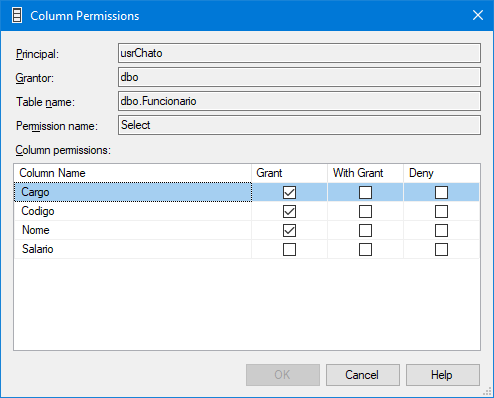
And if you want to see more details about column permissions, click on the “Columns Permissions” button
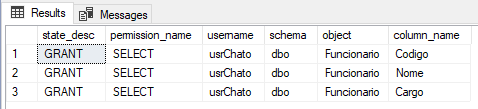
Another way to identify column-level permissions is through a database query:
SELECT
    A.state_desc,
    A.[permission_name],
    B.[name] AS username,
    E.[name] AS [schema],
    C.[name] AS [object],
    D.[name] AS [column_name]
FROM
    sys.database_permissions A
    JOIN sys.database_principals B ON A.grantee_principal_id = B.principal_id
    JOIN sys.objects C ON A.major_id = C.[object_id]
    JOIN sys.columns D ON C.[object_id] = D.[object_id] AND A.minor_id = D.column_id
    JOIN sys.schemas E ON C.[schema_id] = E.[schema_id]
WHERE
    A.class_desc = 'OBJECT_OR_COLUMN'
    AND A.[permission_name] = 'SELECT'
    AND A.minor_id > 0
Result:
Control by views or permission
Here we come to a very personal point of view... I personally prefer to manage permissions through views, as management is simpler than having a table or view where each user accesses in a different way. As I had already mentioned in this article, using permission at the column level, we avoid creating several objects in the database just for data security and privacy purposes, but at the same time, the user will need to know very well the structure of the table and the specific columns that he will need to consult, since a SELECT * will no longer work.
I believe that the 2 solutions serve very well when it comes to restricting unauthorized users' access to sensitive columns, it is up to the bank team to choose which method they will get used to working best with.
That's it, folks!
I hope you liked this tip and see you next time!

Comentários (0)
Carregando comentários…