Hey guys!
In this article, I would like to address a topic that is very popular in the area of technology in general, which is General Personal Data Protection Law (LGPDP or LGPD), a “cousin” of the GDPR that is in force in Europe, and should become a reality in Brazil from August 2020, bringing several changes to the way IT professionals work in their daily lives and the way products (Software, databases, etc.) are developed.
Unlike everything I've read on this topic, the objective is to focus this analysis specifically on SQL Server databases, demonstrating how we can improve the security of our database and comply with this new law.
Summary of what LGDP is
Click to view contentThe creation of this law places Brazil on the list of more than 100 countries that, today, can be considered adequate to protect privacy and the use of data on the global stage.
The issue mobilized Congress mainly after the leak of data from Facebook users, one of the largest social networks, collected by the company Cambrigde Analytica and used in the last elections in the United States.
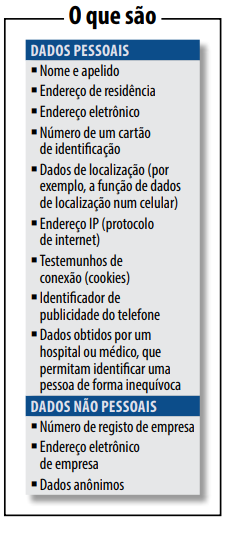
What are personal data?
According to the law, personal data is “information related to an identified or identifiable natural person” and sensitive personal data is “personal data on racial or ethnic origin, religious conviction, political opinion, membership of a trade union or organization of a religious, philosophical or political nature, data relating to health or sexual life, genetic or biometric data, when linked to a natural person”.
However, this concept is still very broad. Personal data can be any information that identifies a person, such as first and last name, mother's name, CPF, ID, email, among others. Furthermore, personal data is also considered if information, when crossed with other data, allows a person to be identified. In other words, the account ID of a social network, such as Facebook, for example, can also be considered personal data.
What is the objective of the LGDP?
The main goal of the LGPD is to guarantee the privacy of personal data (especially sensitive data) and force companies to use more controls to protect this information against intrusions, improper access and leaks of sensitive personal data.
Furthermore, the law creates clear rules on the processes of collecting (user must agree to this), storing (in secure and encrypted locations) and sharing this information (only with the user's authorization). This consent must be provided in writing or by other means that demonstrates the holder's will and may be revoked at any time.
Among its principles, transparency for the use of personal data and the respective accountability is particularly relevant, adequacy, that is, the compatibility of the use of personal data with the stated purposes, user protection throughout the business architecture (privacy by design), purpose, according to which data should only be used for the specific purposes for which it was collected and previously informed to its holders, and also the principle of necessity, which means limiting the use of data to the minimum necessary to achieve the purpose. intended, from which the indispensable immediate deletion of data arises, after achieving this purpose.
Data Protection Officer
With the LGDP, organizations must establish an Information Security Committee in order to analyze internal procedures and how data is being stored, collected, protected and shared. Within this body, it is suggested that there be an exclusive professional for data protection (Data Protection Officer), thus being responsible for complying with this new law, responding to complaints from data subjects and dealing with any problems relating to data protection.
Controller, Operator and Person in Charge
The law created so-called Personal Data Processing Agents – in the form of the Controller and the Operator – who can be a natural or legal person, under public or private law. The first (controller) is responsible for making decisions regarding the processing of personal data, while the second (operator) is responsible for carrying out the processing on behalf of the first.
The figure of the Person in Charge was also defined, who also as a natural or legal person, under public or private law, will act as a communication channel between the Controller and holders of personal data and the National Data Protection Authority (ANPD).
And what changes for users with this new law?
For users of services, whether online or offline, the biggest change is access to information about their data. When the law is already in force, citizens will be able to know how companies, public or private, treat personal data:
- how the data was collected
- why they collect your data
- how the collected data is stored
- How long do they keep your data?
- with whom they share
What changes for companies with this new law?
With the new Brazilian General Data Protection Law, all small, medium and large companies will have to invest in cybersecurity and implement effective compliance systems to prevent, detect and remedy personal data breaches, notably because the law provides that the adoption of a good practice policy will be considered as a mitigating criterion for penalties.
They are also guaranteed the right to revocation, portability and rectification of data.
Furthermore, companies must provide user information to them in a clear and simple way, where many already adopt this practice on their websites, but as of the LGDP, this will be mandatory and no longer an option.
Exceptions to the LGDP
The only exceptions to the application of the LGDP are the processing of personal data carried out by a natural person for exclusively private and non-economic purposes, in addition to those carried out exclusively for (i) journalistic, artistic or academic purposes (in this case, consent is not required), (ii) public security, national defense, State security or investigation and repression activities for criminal offenses or (iii) data in transit, that is, those that are not destined for Processing Agents in Brazil.
Information from minors
When dealing with a service or product aimed at children, the language must be appropriate for the age group, being even clearer and more understandable, but also addressed to parents or guardians – including because it is required in article 20, item 2, the consent of at least one of the parents or legal guardian for the processing of data from children and adolescents.
Targeted advertising
With the LGDP, digital business models based on targeted advertising will need to be audited. For example, if a person buys a smart bracelet that measures heart rate, the purpose is to obtain information about their health. If the bracelet company decides to share the data with an insurance brand, the purpose of consent conflicts with the business interest.
Under today's regulations, health insurance could offer a more expensive plan to a client because it knows he has heart problems, for example, and with the LGDP this can no longer occur without the user's explicit consent.
Subcontractors (outsourced companies or people)
The LGPD also applies to these professionals, such as technology suppliers and partners. They are also subject to obligations and can make compensation payments, for example.
What if my company doesn't adapt? What happens?
The LGDP provides for sanctions for those who do not comply with good practices. They include warnings, fines and, in the worst case, the total or partial prohibition of activities related to data processing. Fines can range from 2% of the company's previous year's revenue, up to R$50 million, including daily penalties.
What if, even with all the protections, there are data leaks in the company?
The LGPD requires companies to collect only the data necessary for the services they provide. In cases of data leaks, the person in charge must inform the competent body and the data subjects (owners of the leaked data), which is already a recommended practice in this situation (even before the law), although companies often try to omit the leak, further aggravating the situation.
When does this law come into force?
From the date of publication of the law (14 August 2018), companies have 24 months to adapt to the law, which will be in August 2020.
It will take 24 months for companies to adapt and the main challenges that already arise are:
- appointment of a person in charge
- performing a data audit
- data map creation
- review of security policies
- contract review
- preparation of a Privacy Impact Report
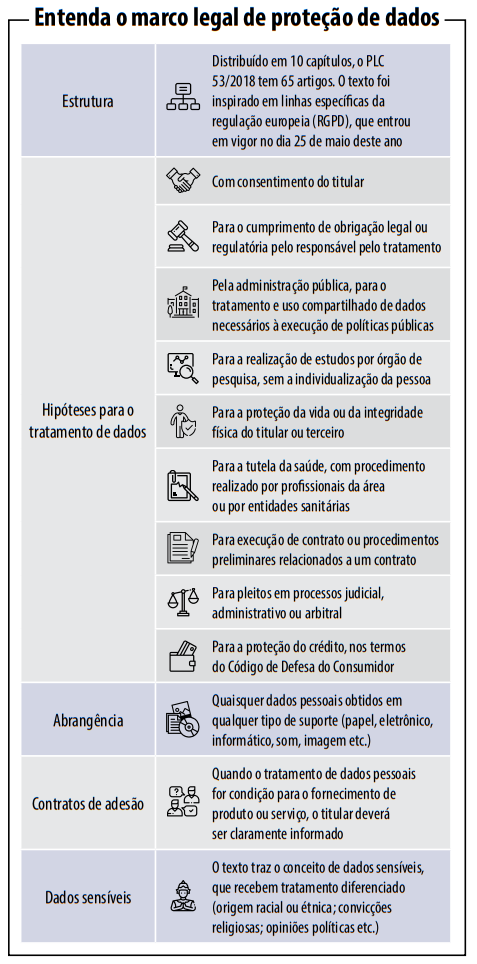
A summary of the LGPD
LGPD applied to SQL Server database
Unfortunately, even though several IT technical professionals helped write this law, there is no technical term or anything specific to IT in this project. The text is very generic and we, IT professionals, are at the mercy of legal terms outside our operating context, making it difficult to interpret what must be done to meet the requirements of this law.
After a very complete summary of the LGPD, we will finally talk about how it affects SQL Server DBAs and in this article, I will use my understanding of the law to guide you on what tools and resources we can use to adapt to the needs of the LGPD.
A very important point for the success of a project to adapt a system to LGPD standards is to consider that this demand is not in the database or system area. Not even from the IT area. This project is a demand from the entire company, as several sectors in addition to IT will need to be activated and support this initiative.
Analyzing the context of the LGPD, we can observe that many of the changes encompass the area of development/systems, which will have to be adapted to comply with the law. Although the law does not clearly mention the role of the database, we can use our knowledge to think of solutions that help avoid the negative situations that the LGPD wants to put an end to, such as data leaks.
Limiting database access
Click to view contentfirewall
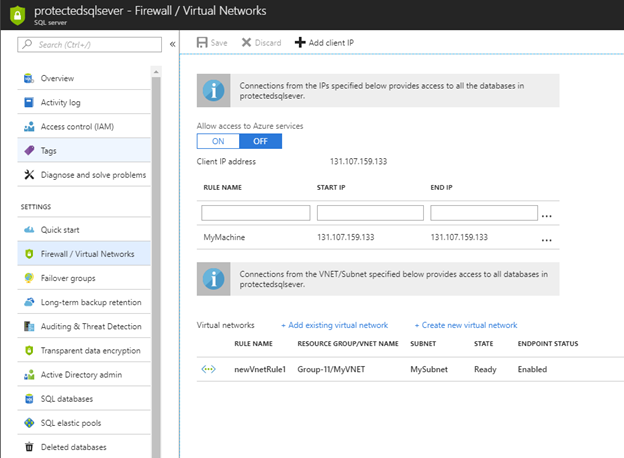
A very important resource to prevent attacks and unauthorized access, the Firewall is available in On-Premises environments (Windows Firewall and third-party Firewall) and in Cloud environments and serves to prevent unauthorized access to your database.
The idea of the Firewall is to block access from IPs that are not on the list of allowed IPs, meaning that attackers cannot gain any type of access, regardless of the technique used, which in practice is very effective security against various types of attacks.
Although it is not specifically a DBA activity (it is more infrastructural), the DBA must have knowledge about how a Firewall works, how to configure it and analyze the logs. Especially in Cloud environments, scenarios in which the DBA ends up “inheriting” this responsibility for managing database Firewall rules are common.
Beware of brute force attacks
Because they store practically all customer and company data as a whole, databases are potentially one of the most popular targets for attackers trying to steal information or simply gain privileged access to this database for any other purpose.
Speaking specifically about SQL Server, there are some ways to identify the occurrence of this type of attack and protect yourself so that it is not possible to try to log in to the bank using incorrect passwords over and over again without a penalty for doing so. One of these ways is to enable SQL Server logging to record all failed login attempts due to incorrect password. Keep an eye on the SQL log and always look for scenarios where there are a lot of login failures!
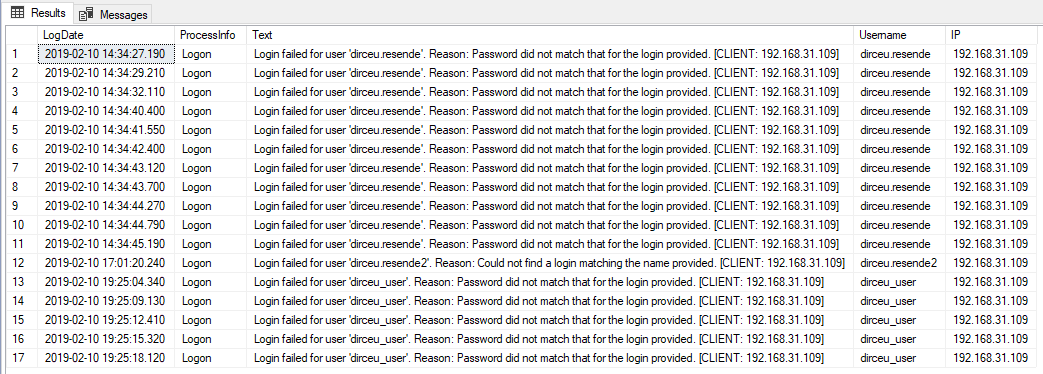
To learn more about brute force attacks on SQL Server and prevent this type of attack, be sure to check out my article SQL Server – How to avoid brute force attacks on your database.
Permissions care
Another very important point is regarding permissions on the database. You, as a DBA, must always adhere to the rule of least possible access for all users. Forget sysadmin and db_owner, always reinforce the security of your environment by granting the specific permission that a user needs to perform their task (and review permissions periodically). If a system needs read access to 10 tables and write access to 5, this is the access you should grant, especially for integration users.
A scenario that makes information leaks much easier are applications that share the same database server and all of them have full access to the data. In the event of any security breach in one of these applications, the attacker will have access to all data from all applications on that database server, exponentially increasing the damage caused by this invasion.
Some articles that can help you increase the security of your environment:
- Checking a user's permissions in SQL Server
- SQL Server – Understanding the risks of the TRUSTWORTHY property enabled in a database
- SQL Server – How to use auditing to map actual required permissions to a user
- SQL Server – How to disable the “sa” login minimizing impacts
- SQL Server – How to hide databases from unauthorized users
Care with user passwords
Another extremely important topic for preventing data leaks in your company is ensuring the security of database users' passwords. Although this is obvious in theory, in practice we see a great deal of neglect regarding this topic.
Although Microsoft recommends the use of Windows authentication as a good practice, as all password control is handled by Active Directory (AD) or the operating system (OS), in practice system users almost always use SQL Server authentication.
During consultations at the consultancy where I work, it is very common to see bank users who have not changed their password for more than 5 years. In other words, everyone who has had access to this password during this time, even if they have already left the company, STILL KNOWS THE PASSWORD. I've seen cases where the company went more than 10 years without changing the password of the main user, used by ALL applications and even business users had Excel spreadsheets with that username and password fixed there... lol
To solve this problem of old passwords, I recommend activating the Expiration property for all logins, so that SQL Server itself takes care of assigning an expiration date to the users' password and forces them to change their password periodically (default is every 180 days).
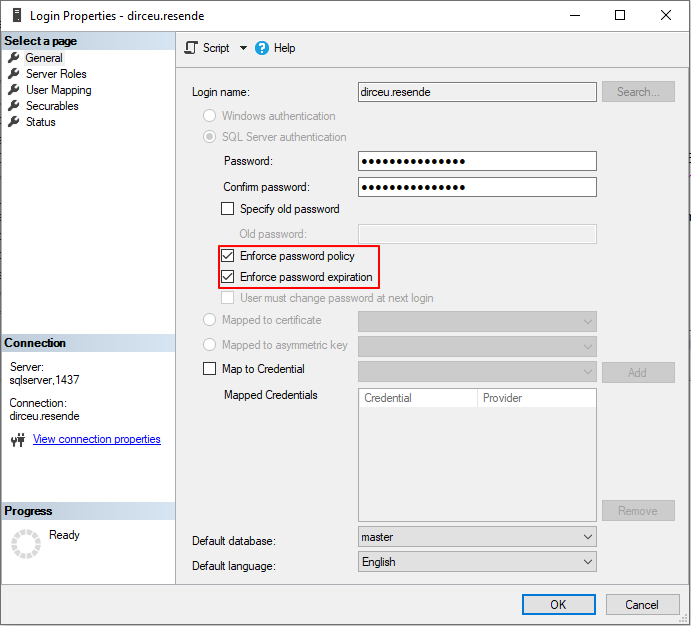
To prevent application users' passwords from expiring in the middle of the day and impacting the environment, the DBA must create a schedule and plan to change these passwords periodically.
In addition to old passwords, we must pay attention to the complexity of passwords. No 123456 in database user passwords. Passwords must be large, complex and difficult to crack by brute force attacks. Preferably, use password generators, including letters (upper and lower case), numbers, symbols and lengths above 50 characters.
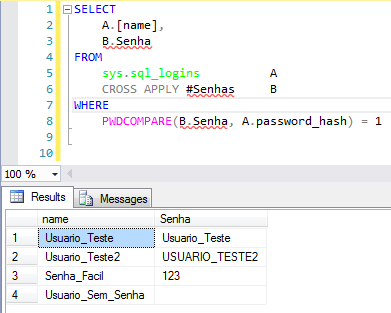
Need help identifying possible weak passwords in your SQL Server? See how I can help you in the article SQL Server – How to identify weak, empty passwords or those that are the same as the user name.
Data security and protection: Preventing leaks
Click to view contentColumn encryption with Always Encrypted
Feature present since SQL Server 2016 in Express, Standard, Enterprise and Developer editions (Express and Standard from 2016 SP1), the Always Encrypted allows you to encrypt certain columns that contain physically sensitive data and customer data. Unlike Dynamic Data Masking, this solution is not simple data masking but rather an encryption solution applied to the original data, remaining encrypted in memory, physical files (MDF, LDF and NDF) and backup files.
Once Always Encrypted is applied, only users who have the encryption key can view the original data. This is the only protection that prevents even database administrator users (sysadmin) from viewing the original data.
Due to all the security features, this solution is ideal for guaranteeing the privacy of your users' data, as the data is always encrypted and is never transmitted in an insecure way (plain-text), that is, even if a person who manages to access your data files (MDF), log (LDF) or backup (BAK), they will not be able to access the data that was encrypted by this technology, even if they try to restore the files to use them in another environment.
This avoids a scenario of information leakage due to physical access to database files. Another important factor that is avoided are internal data leaks, where employees themselves provide information. Using Always Encrypted, they will not be able to access this sensitive data even with full database access.
And finally, this feature will ensure that another application using the same server will not be able to view the original data.
Always Encrypted example
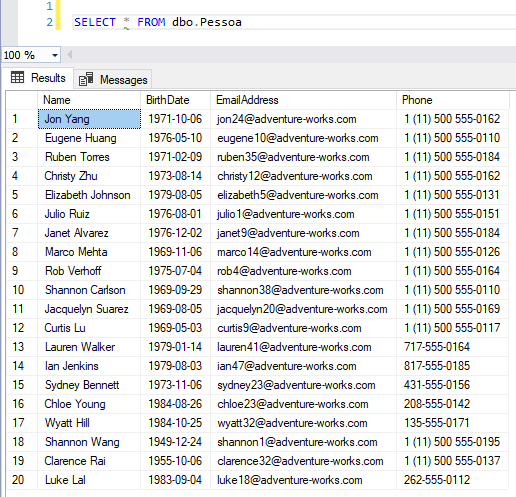
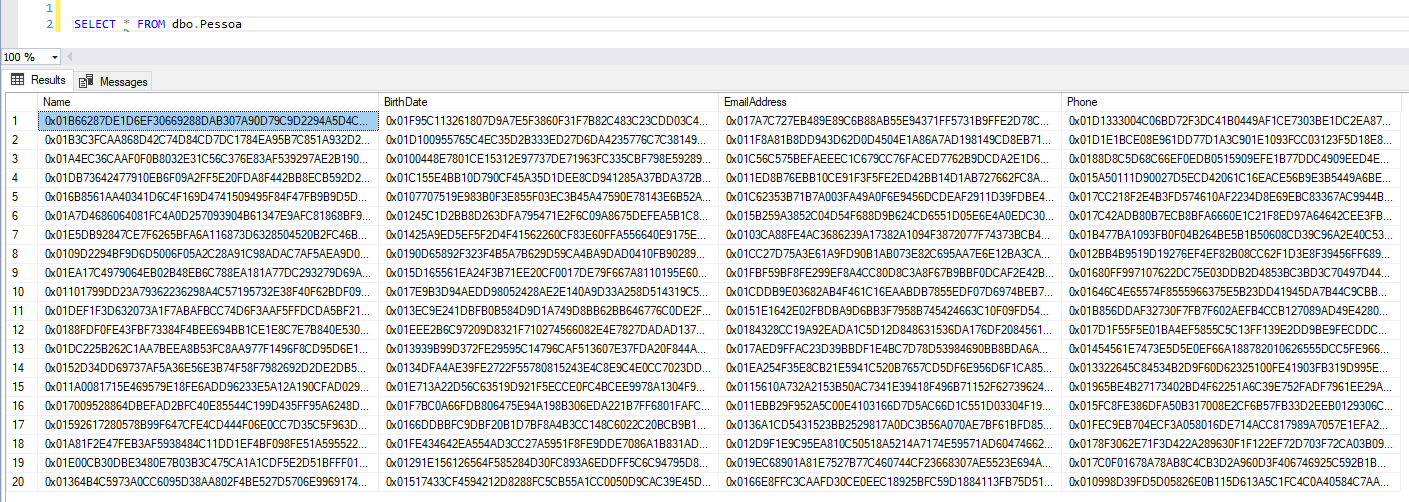
To learn more about Always Encrypted, be sure to check out my article SQL Server 2016 – How to encrypt your data using Always Encrypted.
Data masking (Dynamic Data Masking)
Feature present from SQL Server 2016, the Dynamic Data Masking allows you to mask data from certain database columns and prevent applications and users from having access to sensitive and personal user data.
Although the best option is to mask this in the application (because Dynamic Data Masking is not that secure), masking the data in the database is something very quick to implement and will certainly make it difficult to access personal data improperly, both through an application and internal access made by other users, routines or tools.
By applying masking of this data, we are preventing this information from circulating both outside the company (in an application, for example) and within the company (a BI area creating a report, for example), since these users will not have UNMASK permission.
Note: This data masking does not change the original data, it just masks it in the view (SELECT).
Dynamic Data Masking Example

To learn more about Dynamic Data Masking, be sure to check out my article SQL Server 2016 – Data masking with Dynamic Data Masking (DDM).
Row Level Security (RLS)
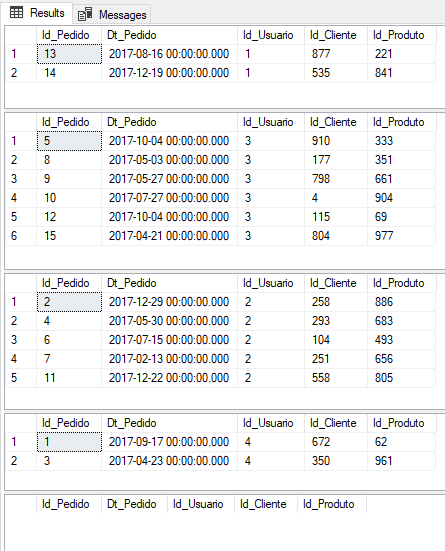
Another important feature of SQL Server that can help us reduce the likelihood of information leaks is the Row Level Security (RLS), available since SQL Server 2016, which allows you to limit the records that will be returned according to each user. This means that a manager, for example, only has access to data on customers who purchase from that branch.
This type of restriction is described in the LGPD as the principle of necessity, which means limiting the use of data to the minimum necessary to achieve the intended purpose. If someone else gains access to the manager's credentials in this example, the scope of clients he will have access to is much smaller than if he had access to the entire base.
EXEC('SELECT * FROM dbo.Pedidos') AS USER = 'dirceu.resende'
EXEC('SELECT * FROM dbo.Pedidos') AS USER = 'fabricio.lima'
EXEC('SELECT * FROM dbo.Pedidos') AS USER = 'tiago.neves'
EXEC('SELECT * FROM dbo.Pedidos') AS USER = 'vithor.silva'

-- Consulta utilizando um login sysadmin (Sem personificar outro usuário)
SELECT * FROM dbo.Pedidos
Result:
Cautions with SQL Injection
It is not new that attacks SQL Injection concern companies around the world. Since the 90s, this technique has been used by attackers to invade systems, change and access customer data, orders, etc., using programming holes in systems to force malicious commands and gain direct access to the database.
This very old and simple technique (both in execution and correction) still causes many problems even in large companies today and with the LGPD this tends to be a risk to the privacy of user data, since when using SQL Injection, an attacker can have access to the personal data of all customers in the base, if they are not properly masked/encrypted.
If you want to comply with audits and prevent your company from suffering from data leaks and system intrusions, this is a very critical point that must be checked urgently in all your systems (especially if the system dynamically assembles queries into a string, without input validation and sends the string directly to the bank), since the effects of this type of attack can be devastating.
After conversations with the security expert and also MVP, Alberto Oliveira, he warned me that to avoid SQL Injection attacks on the application side, just validating data input is not enough and, therefore, more accurate criteria are needed when building code, and can even count on a WAF to guarantee protection beyond the code.
SELECT cpfcnpj, FirstName, [Uid], ID
FROM dbo.Tabela
WHERE cpfcnpj = ''; SELECT name, name, name, name FROM sys.tables; --'
Result:

To learn more about SQL Injection and how to identify possible loopholes and avoid this type of attack, be sure to check out my article SQL Server – How to avoid SQL Injection? Stop using Dynamic Query like EXEC(@Query). Now..
Data discovery and classification
Very interesting feature that was made available in SQL Server Management Studio (SSMS) from version 17.5 onwards, the Data discovery and classification (SQL Data Discovery and Classification) allows you to generate a report with possible sensitive data identified using an internal SSMS algorithm, where you define the level of criticality of that information and what that information refers to, so that you could identify columns that could contain confidential information or interfere with compliance with various standards (HIPAA, SOX, PCI and, of course, GDPR).
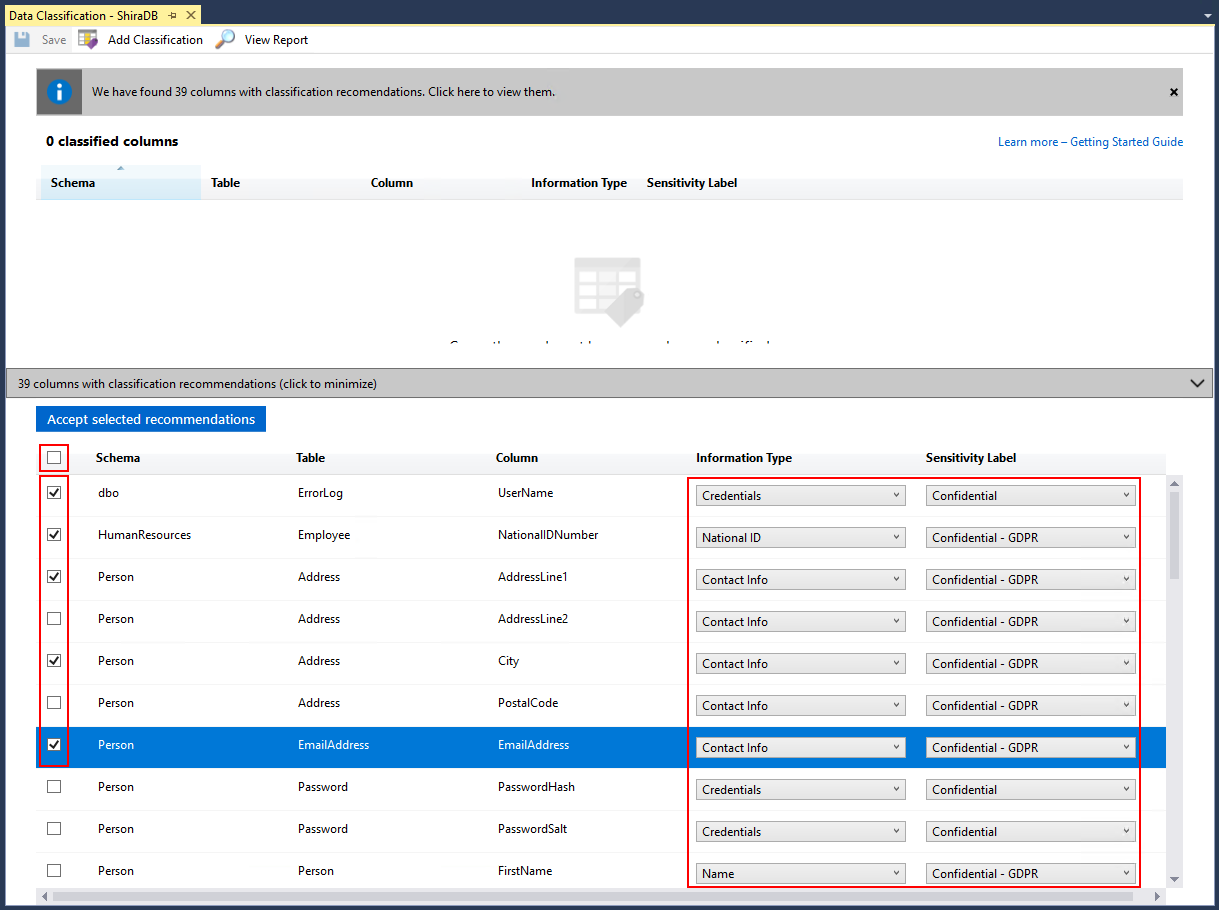
The wizard uses an algorithm to suggest columns that are likely to cause compliance issues, but you can add your own, adjust its suggestions, and eliminate any columns from the list. It stores these classiciations using extended properties; an SSMS-based report uses this same information to display the columns that have been identified. Outside of the report, these properties are not highly visible.
In SQL Server 2019, there is a new command for this metadata, now available in Azure SQL Database, called ADD SENSITIVITY CLASSIFICATION. This allows you to do the same kind of wizard as SSMS, but the information is no longer stored as an extended property, and any access to this data is automatically displayed in audits in a new XML column called data_sensitivity_information. Contains all types of information that were accessed during the audited event.
Connection encryption (TLS)
Another way to protect against possible information leaks is to use encryption when connecting to the database and, for this, we can use the TLS feature so that the data transmitted between the bank and the customer is not made available in plain-text form.
In particular, companies involved in processing customer payments especially must adhere to the PCI DSS (Payment Card Industry Data Security Standard). For PCI compliance, enterprise application needs to start using TLS 1.2 (Transport Layer Security) protocol before June 30, 2018.
Before TLS 1.2, there were two other versions 1.1 and 1.0, also known as SSL (Secured Socket Layer), developed by Netscape. Particularly TLS 1.1 was referred to by many as SSL V3. The need to move to the new TLS 1.2 is to address the vulnerabilities posed by the previous protocols.
To move applications using SQL Server to the new protocol, we would need to involve application developers along with DBAs to make the transition.
There are 2 methods of encrypting connections:
- Use of self-certification: prone to MIM (Man-In-Middle) attacks and should only be used in scenarios where all clients reside with the same domain.
- CA Certificates: These are certificates issued by the CA and should always be the preferred method
To learn more about how to configure TLS on your SQL Server, I recommend reading of this article.
Azure Advanced Threat Protection
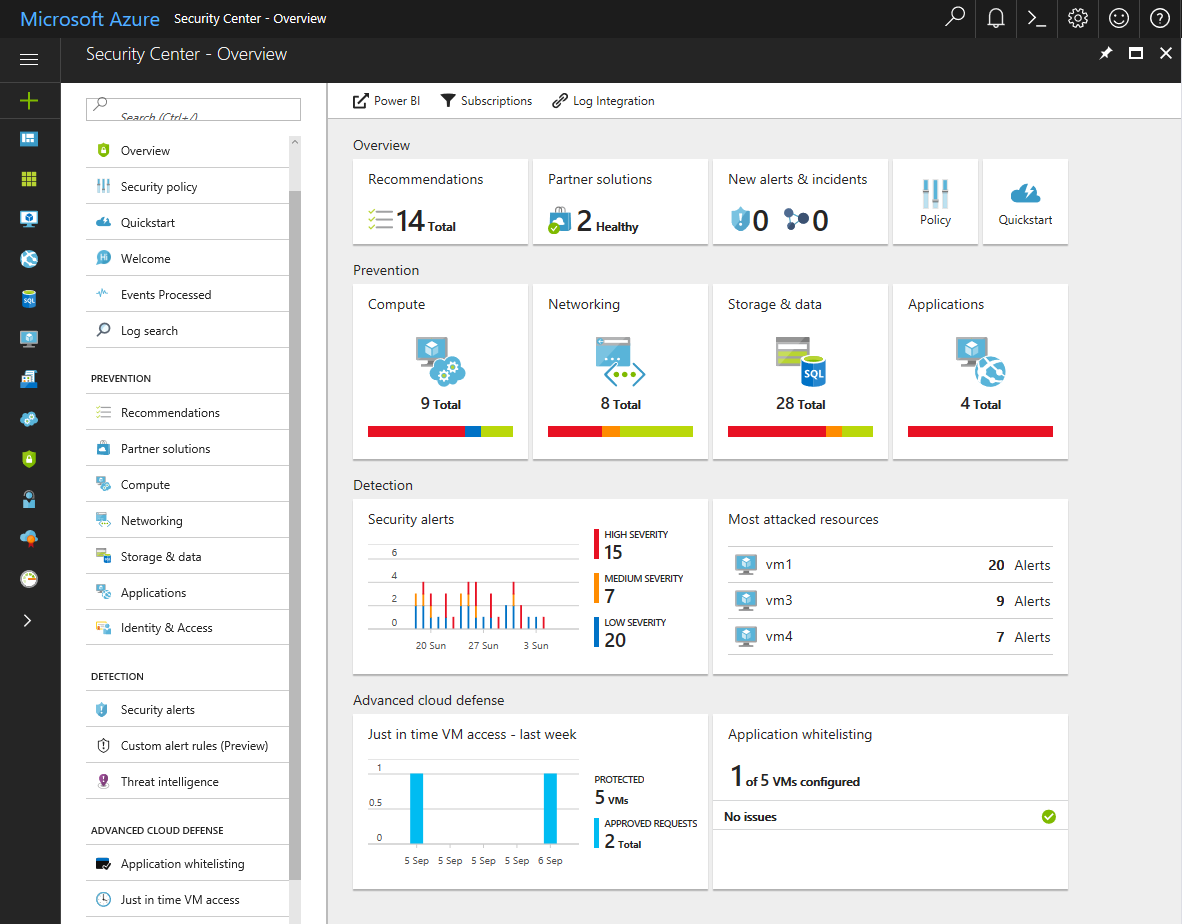
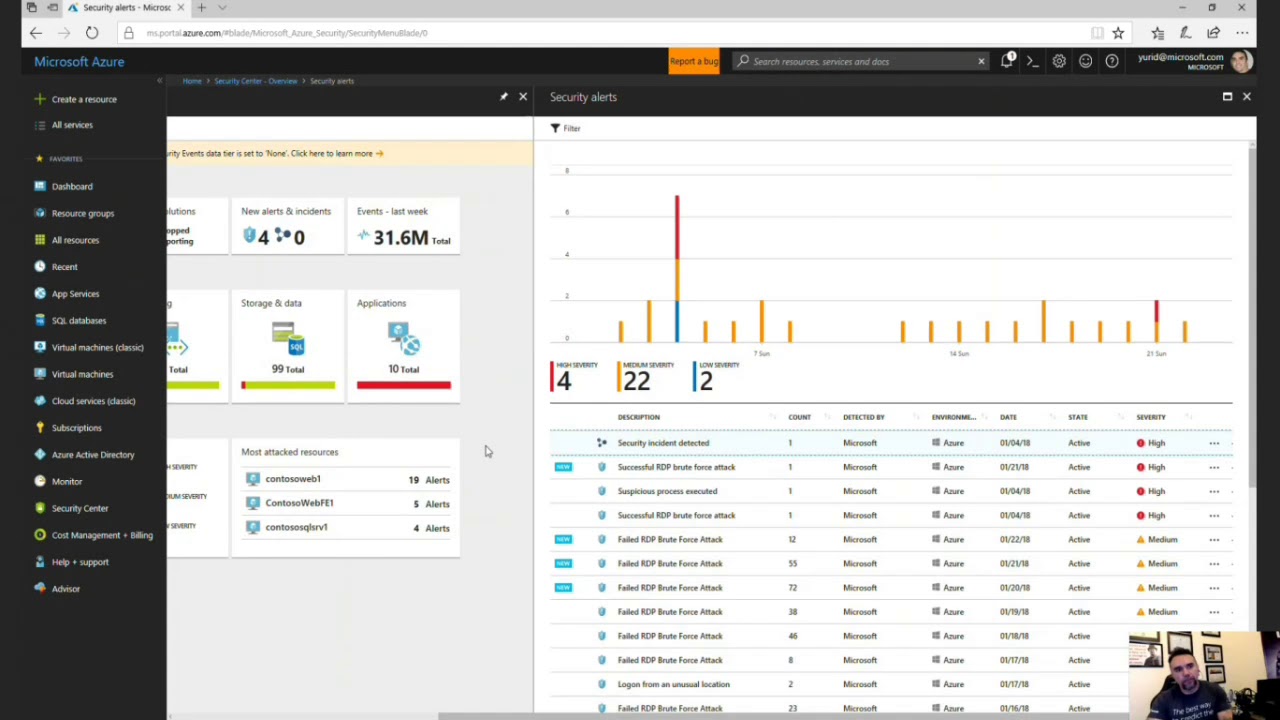
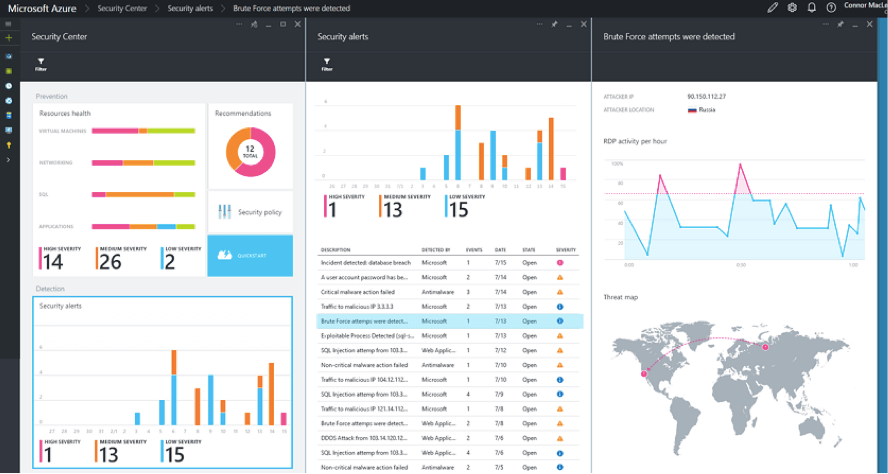
A really cool feature of Azure, which fits the requirement of notifying stakeholders and regulatory orphans about data leaks, is the Azure Advanced Threat Protection, which in addition to having a series of defenses against potential attacks, allows you to monitor users and their behavior.
Azure ATP (Advanced Threat Protection) is a cloud-based security solution that identifies, detects, and helps you investigate advanced threats, compromised identities, and malicious insider actions targeting your organization. Azure ATP enables SecOp analysts and security professionals struggling to detect advanced attacks in hybrid environments:
- Monitor users, entity behavior, and activities with learning-based analytics
- Protect user identities and credentials stored in Active Directory
- Identify and investigate suspicious user activity and advanced attacks across the cyberattack chain
- Provide clear incident information in a simple timeline for quick triage
Azure ATP interface:
Data manipulation
Click to view contentMaster Data Services (MDS)
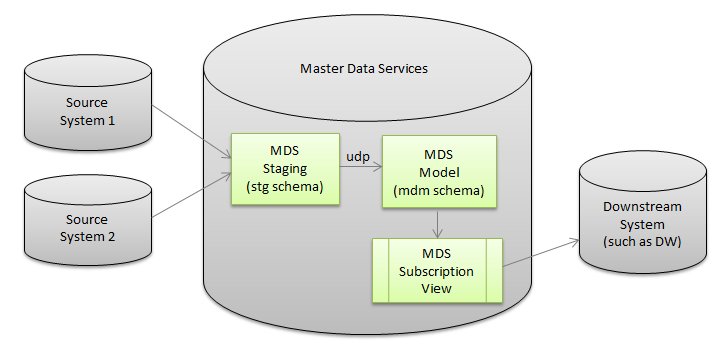
Maintains complete personal data and ensures that requests to edit, delete, or discontinue data processing are propagated throughout the system using the Master Data Services with Microsoft SQL Server.
Using the concept of “golden record”, the idea of this service is to guarantee a single base of customers and their personal data, so that all systems use and always keep this base updated. In case of request for rectification or deletion of data at the customer's request, simply apply this change in just one place for it to be applied to all of the company's systems and routines.
Data audit
One of the pillars of the LGPD is that all activity that manipulates personal data must be logged and your company needs to answer the question of how user data was collected. Well, to answer this question, we can use Audit or Triggers resources to identify data changes in tables and thus track when a particular client's data was registered/changed/deleted in the database, as well as the changes made, the system that registered, hostname, IP and other information relating to the change made to this client's data.
Some articles that can help you use these resources:
- SQL Server – How to create a data change history for your tables (audit logs)
- Audit in SQL Server (Server Audit)
- SQL Server – How to monitor and audit data changes in tables using Change Data Capture (CDC)
- SQL Server 2016 – How to “travel in time” using the Temporal Tables feature
Data audit in Azure SQL Database
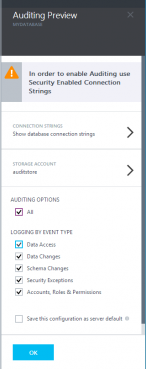
Available for both Azure SQL Database and Azure SQL Data Warehouse, database audit is an Azure Portal feature that allows you to define filters and metrics to audit various information in your data and groups it into audit categories (LoginFailed, LoginSucess, DataChanges, etc).
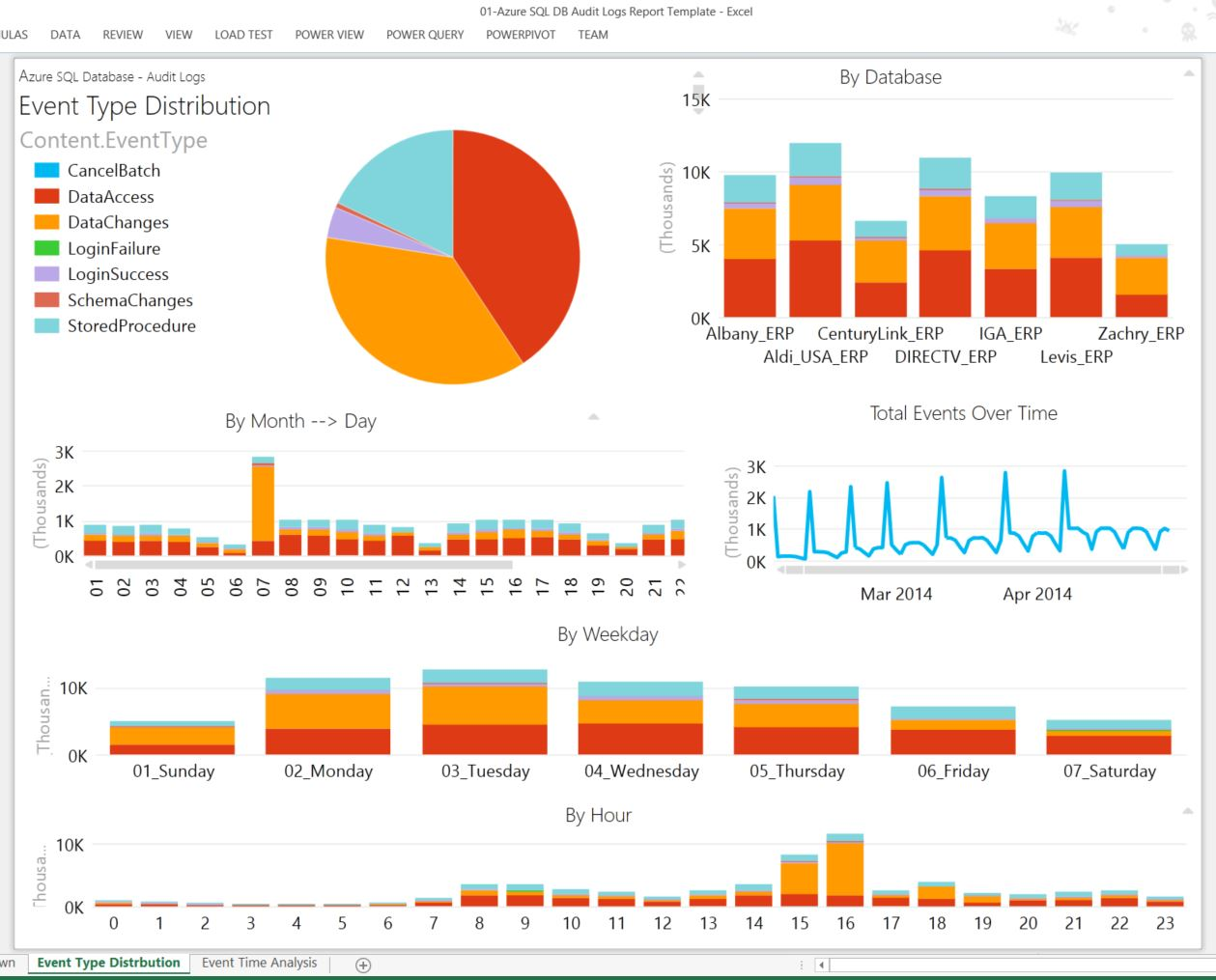
More information in this link.
Data storage
After all the items mentioned above, there is no point in applying all these practices if the data is physically stored in an insecure manner, allowing a person with access to the files to access customer data. To show how we can avoid this type of problem, I have separated some SQL Server resources that certainly help us with this task.
Click to view contentReferences:
- http://www.planalto.gov.br/ccivil_03/_Ato2015-2018/2018/Lei/L13709.htm
- Chamber Bill No. 53 of 2018
- https://www12.senado.leg.br/noticias/materias/2018/07/10/projeto-de-lei-geral-de-protecao-de-dados-pessoais-e-aprovado-no-senado
- https://pt.wikipedia.org/wiki/Lei_Geral_de_Prote%C3%A7%C3%A3o_de_Dados_Pessoais
- https://www.migalhas.com.br/dePeso/16,MI286235,31047-O+que+muda+com+a+Lei+Geral+de+Protecao+de+Dados+LGPD
- https://www1.folha.uol.com.br/mercado/2018/08/saiba-o-que-muda-com-a-lei-geral-de-protecao-de-dados-pessoais.shtml
- https://www.contabeis.com.br/noticias/39099/a-nova-lei-geral-de-protecao-de-dados-no-ambiente-corporativo/
- https://blog.sajadv.com.br/direito-digital-lei-de-protecao-de-dados/
- https://computerworld.com.br/2018/09/19/lgpd-10-pontos-para-entender-a-nova-lei-de-protecao-de-dados-no-brasil/
As I said at the beginning, this LGPD responsibility belongs to the entire company and not just IT. I believe that we will have more adaptation needs on the part of developers in terms of user consent, where DEVs will have to create several screens for the user to fix, in addition to other screens so that the user can consult/remove/rectify their own data on company websites and systems, in addition to preventing and protecting applications against attacks such as SQL Injection, for example.
The DBA's role here is to keep the data secure in the database, masked, encrypted and duly identified as to its criticality and confidentiality, in addition to being stored in a secure, consistent and private way.
And we will still have many demands in different sectors of companies to ensure that the marketing sector does not carry out campaigns that could expose users' personal data, for example, in addition to new charges that will probably need to be created in the company, and new responsibilities assigned.
UPDATE: On 03/20/2019, I participated in a Live on this topic
Well guys, I hope you enjoyed this post and see you next time!

Comments (0)
Loading comments...