
Hey guys!
Ready for another article?
Introduction
With the advent of GDPR, companies' concern with data security is growing more and more, and an area that was previously sometimes left aside is now in the spotlight more than ever. As a result, IT professionals, especially DBAs, have been looking for ways to reduce the risks of data exposure and one of the ways to do this is by encrypting data to prevent unauthorized access by third parties.
My idea in this article is to demonstrate a SQL Server solution that allows you to encrypt data, which is what Always Encrypted, available starting with SQL Server 2016 in Express, Standard, Enterprise, and Developer editions (Express and Standard starting with 2016 SP1).
Don't forget to check out my post SQL Server 2008 – How to encrypt your data using Transparent Data Encryption (TDE), another SQL Server data encryption solution.
For the examples below, I will use the following script to generate the base:
IF (OBJECT_ID('dbo.Pessoa') IS NOT NULL) DROP TABLE dbo.Pessoa
CREATE TABLE dbo.Pessoa
(
    [Name] NVARCHAR(101),
    [BirthDate] DATE,
    [EmailAddress] NVARCHAR(50),
    [Phone] NVARCHAR(20)
)

INSERT INTO dbo.Pessoa
VALUES
( N'Jon Yang', N'1971-10-06T00:00:00', N'[email protected]', N'1 (11) 500 555-0162' ),
( N'Eugene Huang', N'1976-05-10T00:00:00', N'[email protected]', N'1 (11) 500 555-0110' ),
( N'Ruben Torres', N'1971-02-09T00:00:00', N'[email protected]', N'1 (11) 500 555-0184' ),
( N'Christy Zhu', N'1973-08-14T00:00:00', N'[email protected]', N'1 (11) 500 555-0162' ),
( N'Elizabeth Johnson', N'1979-08-05T00:00:00', N'[email protected]', N'1 (11) 500 555-0131' ),
( N'Julio Ruiz', N'1976-08-01T00:00:00', N'[email protected]', N'1 (11) 500 555-0151' ),
( N'Janet Alvarez', N'1976-12-02T00:00:00', N'[email protected]', N'1 (11) 500 555-0184' ),
( N'Marco Mehta', N'1969-11-06T00:00:00', N'[email protected]', N'1 (11) 500 555-0126' ),
( N'Rob Verhoff', N'1975-07-04T00:00:00', N'[email protected]', N'1 (11) 500 555-0164' ),
( N'Shannon Carlson', N'1969-09-29T00:00:00', N'[email protected]', N'1 (11) 500 555-0110' ),
( N'Jacquelyn Suarez', N'1969-08-05T00:00:00', N'[email protected]', N'1 (11) 500 555-0169' ),
( N'Curtis Lu', N'1969-05-03T00:00:00', N'[email protected]', N'1 (11) 500 555-0117' ),
( N'Lauren Walker', N'1979-01-14T00:00:00', N'[email protected]', N'717-555-0164' ),
( N'Ian Jenkins', N'1979-08-03T00:00:00', N'[email protected]', N'817-555-0185' ),
( N'Sydney Bennett', N'1973-11-06T00:00:00', N'[email protected]', N'431-555-0156' ),
( N'Chloe Young', N'1984-08-26T00:00:00', N'[email protected]', N'208-555-0142' ),
( N'Wyatt Hill', N'1984-10-25T00:00:00', N'[email protected]', N'135-555-0171' ),
( N'Shannon Wang', N'1949-12-24T00:00:00', N'[email protected]', N'1 (11) 500 555-0195' ),
( N'Clarence Rai', N'1955-10-06T00:00:00', N'[email protected]', N'1 (11) 500 555-0137' ),
( N'Luke Lal', N'1983-09-04T00:00:00', N'[email protected]', N'262-555-0112' )
What is Always Encrypted
Always Encrypted is a feature designed to protect sensitive data, available starting in SQL Server 2016, such as credit card numbers or national identification numbers (for example, US Social Security numbers), stored in Azure SQL Database or SQL Server databases. Always Encrypted allows customers to encrypt sensitive data in client applications and never reveal the encryption keys to the Database Engine. As a result, Always Encrypted provides a separation between those who own the data (and can view it) and those who manage the data (but should not have access).
One of the biggest advantages of Always Encrypted is that only users and applications that have the master encryption key have access to the original data. Not even DBAs and other sysadmin users can view the original data. This guarantees data and information security at a level rarely seen in other solutions. Another great advantage of this solution is that the data is encrypted as well as the logs, backups and data transmitted over the network, guaranteeing total security in all means of communication, even if someone intercepts packets during their transmission. In view of this, the loss of the master key can be fatal for your data, as its recovery is no longer possible, since a backup made to a database with Always Encrypted can only be restored in another instance if the master key is restored first.
Always Encrypted makes encryption nearly transparent to applications. An Always Encrypted-enabled driver installed on the client computer accomplishes this by automatically encrypting and decrypting sensitive data in the client application. The driver encrypts sensitive data columns before passing the data to the Database Engine and automatically reconfigures queries so that application semantics are preserved. Likewise, the driver transparently decrypts data stored in encrypted database columns that are contained in query results.
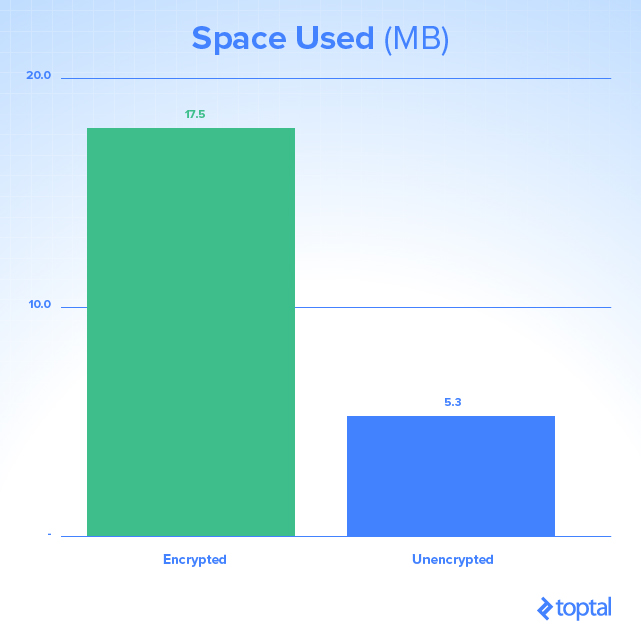
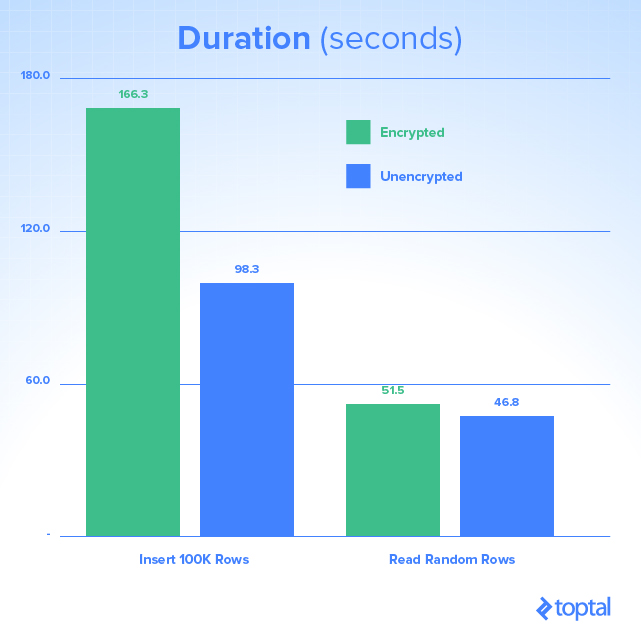
However, although this feature guarantees an excellent level of security, be aware of possible performance problems when using it and increased space consumption:
Always Encrypted vs Transparent Data Encryption (TDE)
Below, I will list some similarities and differences between these two SQL Server encryption solutions:
| Always Encrypted | Transparent Data Encryption (TDE) |
|---|---|
| Column Level | Database level |
| Encryption on the client (using a driver) | Server-side encryption (Database Engine) |
| Server does not know encryption keys | Server knows the encryption keys |
| Data in memory is encrypted | Data in memory is unprotected (plain-text) |
| Data on the network is encrypted | Data on the network is unprotected (plain-text) |
| Only users with access to the key can view the original data. Not even the DBA can view the original data without the key. | DBA can view the original data without the key |
| Backups and log files are encrypted | Backups and log files are encrypted |
| Requires changes to the application (can be small or large, depending on the chosen encryption algorithm) | Does not require changes to the application |
| Available starting with SQL Server 2016 - All editions up to Express (Express and Standard starting with 2016 SP1) | Available starting with SQL Server 2008 - Enterprise and Developer only |
Deterministic or Random Encryption
When using Always Encrypted, you will see that there are 2 ways to encrypt columns in this solution:
- Deterministic: Deterministic encryption always generates the same encrypted value for the same text. Using deterministic encryption provides lookups, joins, grouping, and indexing on encrypted columns. However, it can also allow unauthorized users to estimate information about encrypted values by examining patterns in the encrypted column, especially if there is a small set of possible encrypted values, such as True/False or North/South/East/West region.
- Randomized: Random encryption uses a method that encrypts data in a less predictable way, that is, for the same text the encrypted value is different. Random encryption is more secure, but prevents the use of searches, grouping, indexing, and joins on encrypted columns.
How to install and configure Always Encrypted on SQL Server
Now that I've explained a little about the Always Encrypted theory, let's move on to the practical part.
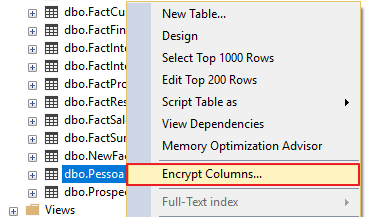
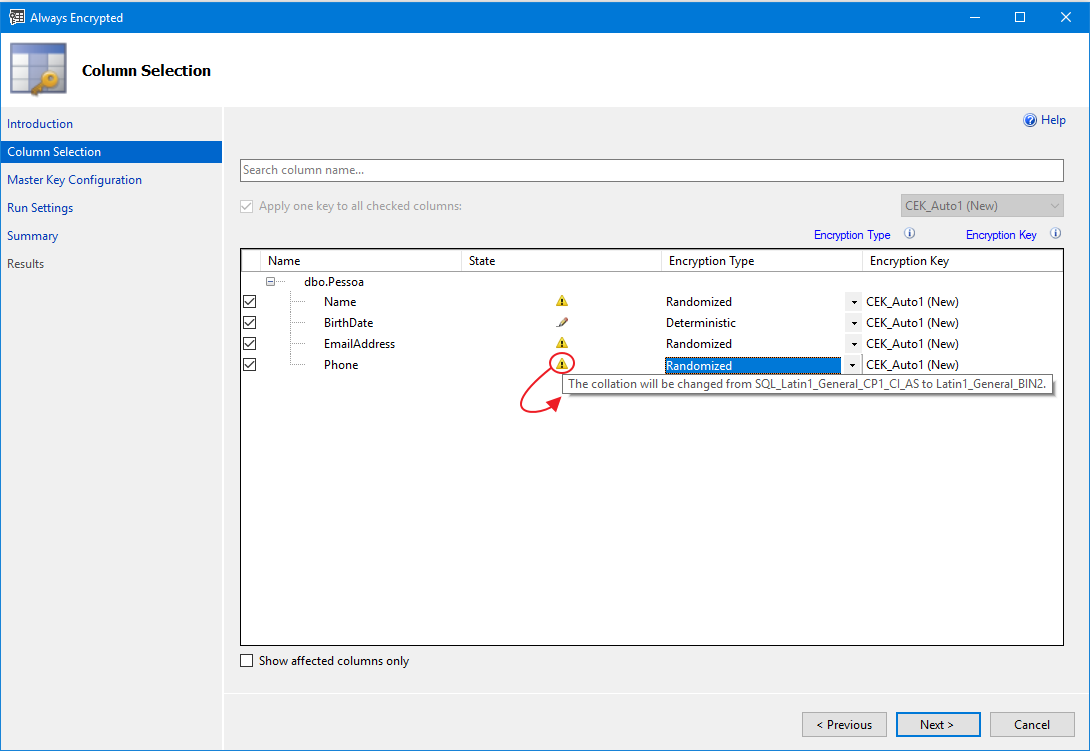
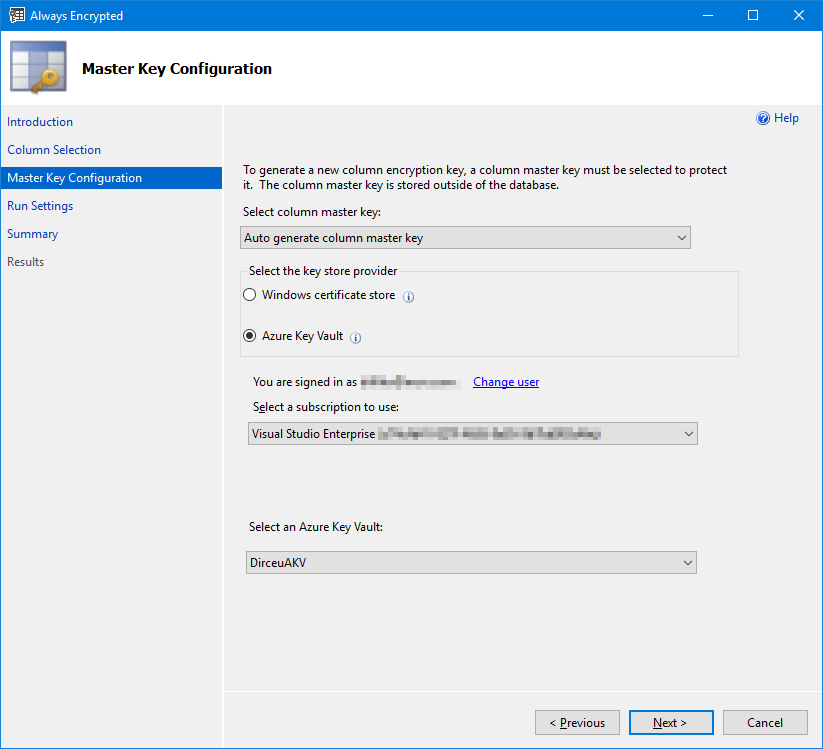
The most practical way to encrypt a column is using SQL Server Management Studio (SSMS):
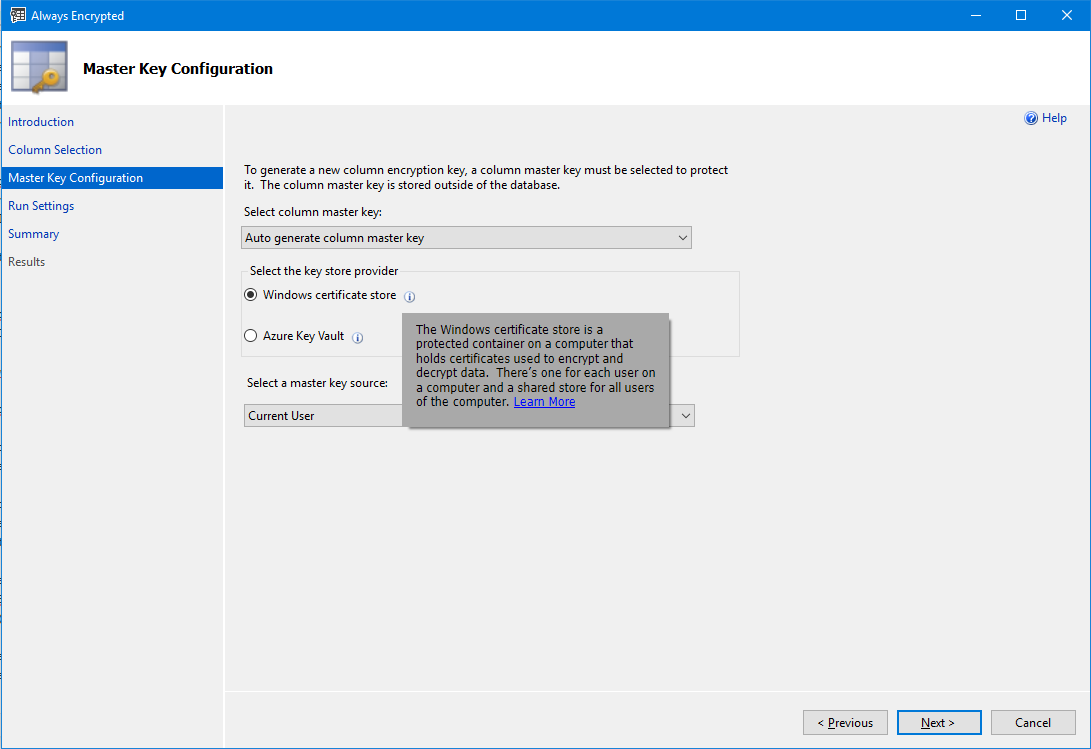
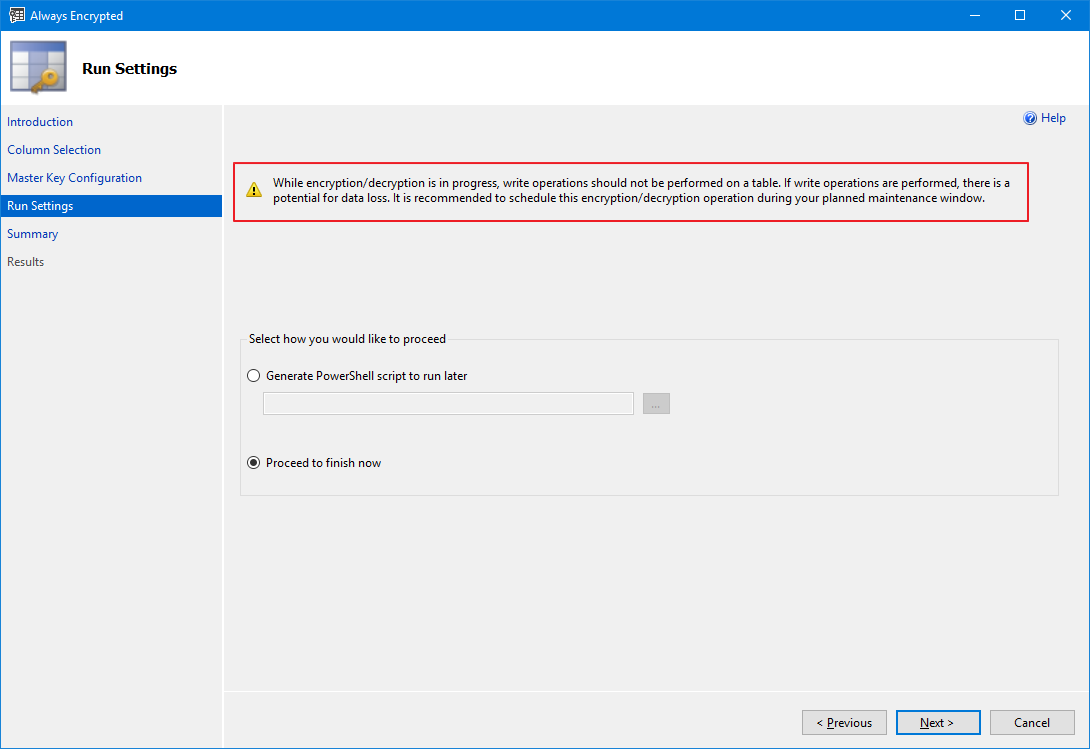
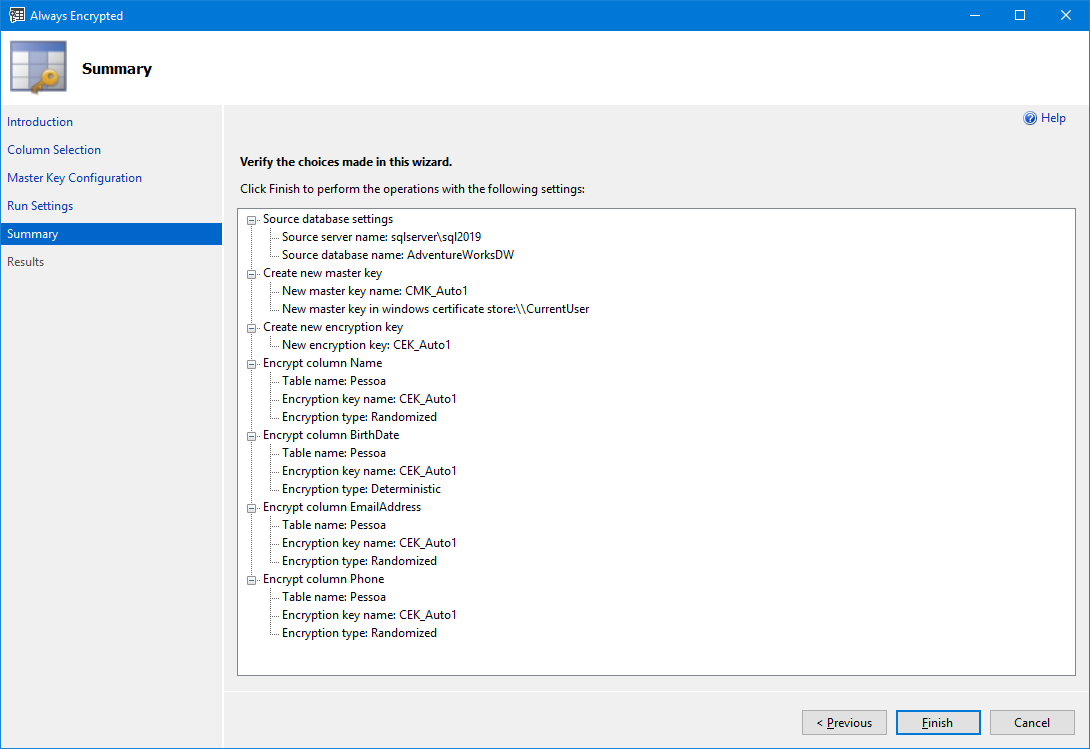
And changing existing tables can also be done using PowerShell:
Import-Module SqlServer
$sqlConnectionString = "Data Source=sqlserver\sql2017;Initial Catalog=AdventureWorksDW;User ID=dirceu.resende;MultipleActiveResultSets=False;Connect Timeout=30;Encrypt=False;TrustServerCertificate=False;Packet Size=4096;Application Name=`"Microsoft SQL Server Management Studio`""
$smoDatabase = Get-SqlDatabase -ConnectionString $sqlConnectionString

# If your encryption changes involve keys in Azure Key Vault, uncomment one of the lines below in order to authenticate:
#   * Prompt for a username and password:
#Add-SqlAzureAuthenticationContext -Interactive

#   * Enter a Client ID, Secret, and Tenant ID:
#Add-SqlAzureAuthenticationContext -ClientID '<Client ID>' -Secret '<Secret>' -Tenant '<Tenant ID>'

$encryptionChanges = @()

# Add changes for table [dbo].[Pessoa]
$encryptionChanges += New-SqlColumnEncryptionSettings -ColumnName dbo.Pessoa.Name -EncryptionType Randomized -EncryptionKey "CEK_Auto1"
$encryptionChanges += New-SqlColumnEncryptionSettings -ColumnName dbo.Pessoa.BirthDate -EncryptionType Deterministic -EncryptionKey "CEK_Auto1"
$encryptionChanges += New-SqlColumnEncryptionSettings -ColumnName dbo.Pessoa.EmailAddress -EncryptionType Randomized -EncryptionKey "CEK_Auto1"
$encryptionChanges += New-SqlColumnEncryptionSettings -ColumnName dbo.Pessoa.Phone -EncryptionType Randomized -EncryptionKey "CEK_Auto1"

Set-SqlColumnEncryption -ColumnEncryptionSettings $encryptionChanges -InputObject $smoDatabase
However, it is not possible to encrypt columns of existing tables using Transact-SQL, just create a new encrypted table (you can create a new encrypted table and migrate the data from the previous table), which would have this syntax:
USE [dirceuresende]
GO

CREATE COLUMN MASTER KEY [CMK_Auto1]
WITH
(
    KEY_STORE_PROVIDER_NAME = N'MSSQL_CERTIFICATE_STORE',
    KEY_PATH = N'CurrentUser/my/D8CDCC7BC22069DEC1FCF32A5C349FCD33424FAA'
)
GO

CREATE COLUMN ENCRYPTION KEY [CEK_Auto1]
WITH VALUES
(
    COLUMN_MASTER_KEY = [CMK_Auto1],
    ALGORITHM = 'RSA_OAEP',
    ENCRYPTED_VALUE = 0x016E000001630075007200720065006E00740075007300650072002F006D0079002F006400380063006400630063003700620063003200320030003600390064006500630031006600630066003300320061003500630033003400390066006300640033003300340032003400660061006100435052EEFF25542A375E23CC9E0BE2B79116313A2A14F3F3AE362B4075368EADB9EB3AB7BC19B14972204CD1E092B6DF0AC9C6BB0067F96AF7EED7C6360273B947EDAE5643932262E43D3C412B1F680929C263C9DD1839D86EDEBCCC6F2F307910CBD123ADB761BFD167F44C77BF6355114955DF371332D429A4DD79C9C51E02A781A977987947CAEF8FED3A30B4B3E9C8EE400F2F416289FE76DCC24B7D509D8ABA35C34959678CF31A704CD4E4C5105CA23CA09F4DD05AEABF413113E093FF7F398C859CA90C05F42DA5C43871DD0DDD95C555B524E342E6125DEA069C6ABF80F7A741B1ADCC73408B3A98C08CAEAC9325079F66256AC8835574FA5E38BCD634ED0BC71DE05EF61E1FEB4ACC1E62DEDDFFC5E86D2E6B3CBE1BEE22588FE29BA3AEB94FA46AF77C22AD7421F606836EC4BC1A3353019106E9B55E20A7DB72A06C63ADB4F438C191DCBA891FEF0F874AAF569C42730EF18E7E84754640D0EC37F48BA8E0455569E59F497849F9295962725D71769FE806B15556A7716341B7560B5E28323FB00846D4EEC0DF2C50339693EF29D83667EE88781FEB079460CB6A2FA49CD5418226D8465957DD5B95EECAF12B0AD436B40FE2F70F7E96A506E3ECACC94C4394A6D103532546541950D58D0057185BB024A98204006697BCB30CE8077CD2A39C7BAED5D76391294A35914B132C798173ED5AE4EDC7551D97F7C5B6
)
GO

CREATE TABLE [dbo].[Pessoa](
    [Name] [NVARCHAR](101) COLLATE Latin1_General_BIN2 ENCRYPTED WITH (COLUMN_ENCRYPTION_KEY = [CEK_Auto1], ENCRYPTION_TYPE = RANDOMIZED, ALGORITHM = 'AEAD_AES_256_CBC_HMAC_SHA_256') NULL,
    [BirthDate] [DATE] ENCRYPTED WITH (COLUMN_ENCRYPTION_KEY = [CEK_Auto1], ENCRYPTION_TYPE = DETERMINISTIC, ALGORITHM = 'AEAD_AES_256_CBC_HMAC_SHA_256') NULL,
    [EmailAddress] [NVARCHAR](50) COLLATE Latin1_General_BIN2 ENCRYPTED WITH (COLUMN_ENCRYPTION_KEY = [CEK_Auto1], ENCRYPTION_TYPE = RANDOMIZED, ALGORITHM = 'AEAD_AES_256_CBC_HMAC_SHA_256') NULL,
    [Phone] [NVARCHAR](20) COLLATE Latin1_General_BIN2 ENCRYPTED WITH (COLUMN_ENCRYPTION_KEY = [CEK_Auto1], ENCRYPTION_TYPE = RANDOMIZED, ALGORITHM = 'AEAD_AES_256_CBC_HMAC_SHA_256') NULL
)
GO
Viewing Always Encrypted data in SQL Server
Now that we have encrypted the columns of the dbo.Pessoa table, let's try to view the original data, logged in with a sysadmin user:
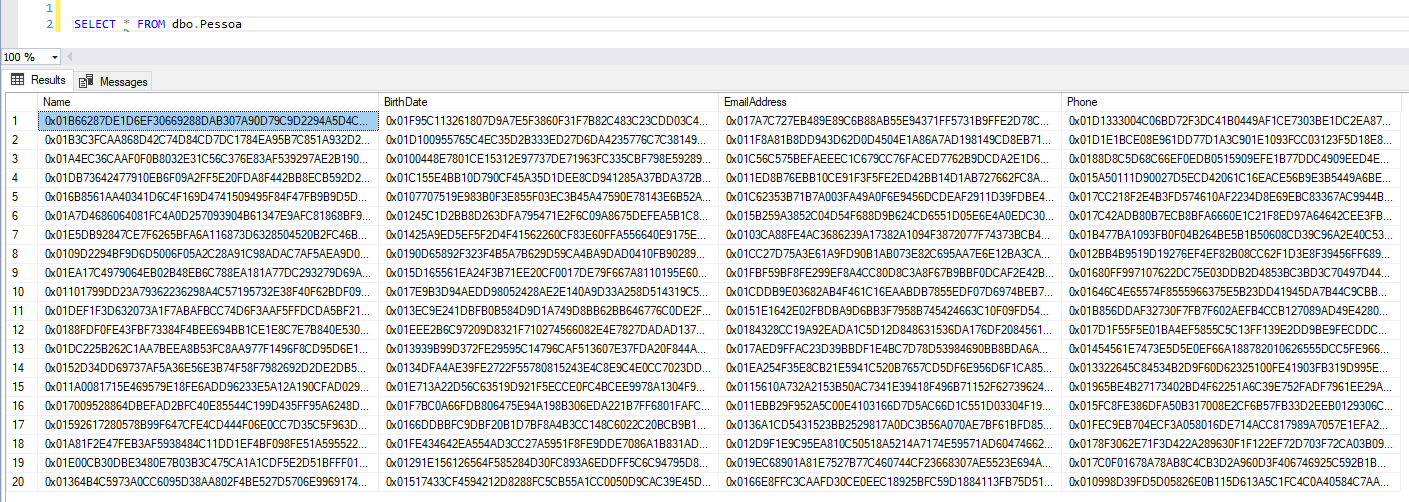
To view the original data in SSMS again, you will need to enter the parameter column encryption setting=enabled in the connection string:
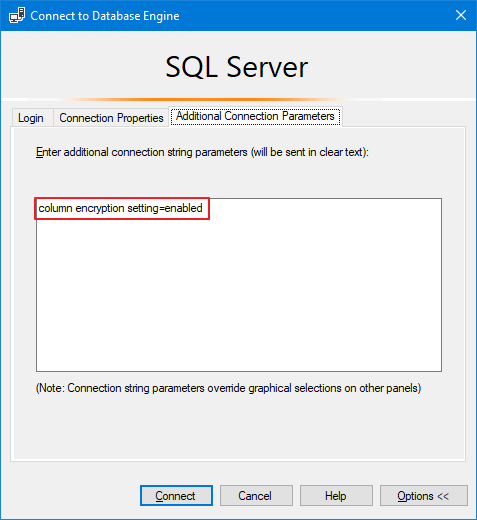
After changing this setting, you will be able to view the original data again.
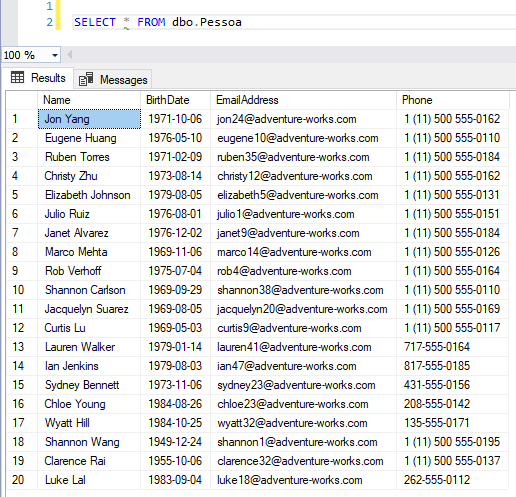
It is worth remembering that the user will only be able to see the original data if he has the VIEW ANY COLUMN MASTER KEY DEFINITION and VIEW ANY COLUMN ENCRYPTION KEY DEFINITION permissions or if you are storing the Master Encryption Key and Column Encryption Key on the database server (Windows Certification Store) and the certificate is stored on your machine or your user. If you want to use a more secure way, opt for Azure Key Vault (AKV).
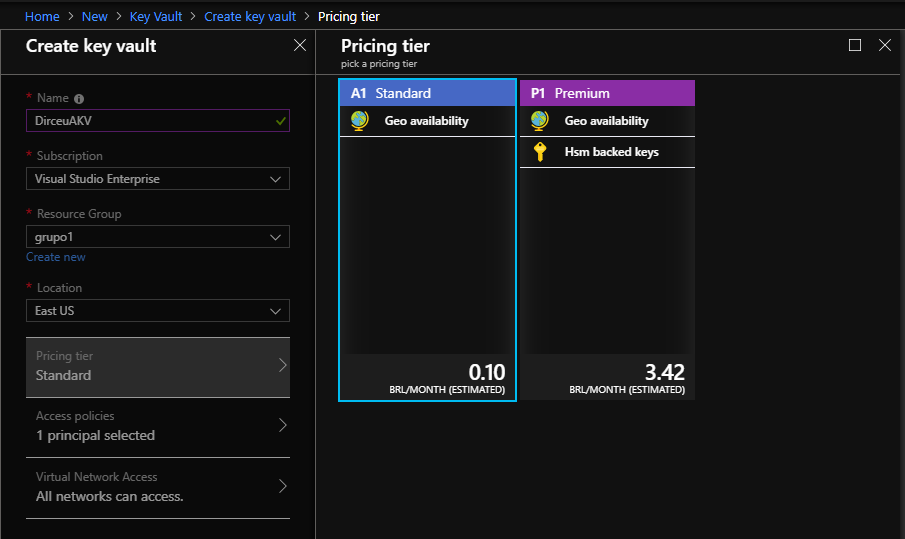
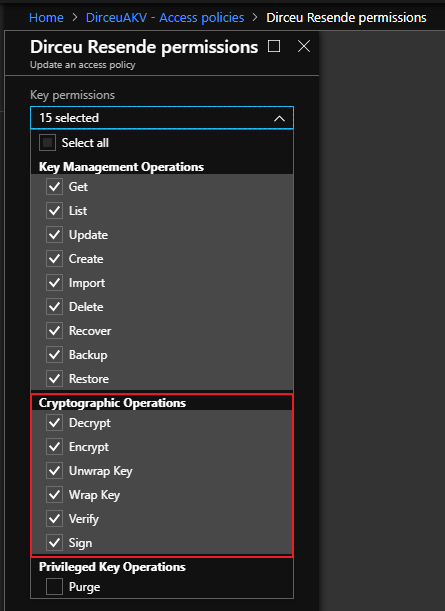
To help you configure Always Encrypted in your applications, I have separated 2 more articles that can help DEVs configure this feature with Azure Key Vault (AKV):
- https://docs.microsoft.com/en-us/azure/sql-database/sql-database-always-encrypted-azure-key-vault
- https://blogs.msdn.microsoft.com/sqlsecurity/2015/11/10/using-the-azure-key-vault-key-store-provider-for-always-encrypted/
How to identify which columns are encrypted with Always Encrypted
To identify which columns are encrypted with Always Encrypted and which encryption algorithm is used, simply use the query below:
SELECT
    DB_NAME() AS [database],
    t.[name] AS [table],
    c.[name] AS [column],
    c.encryption_algorithm_name,
    c.[encryption_type],
    c.encryption_type_desc
FROM
    sys.columns c
    JOIN sys.tables t ON t.[object_id] = c.[object_id]
WHERE
    c.encryption_algorithm_name IS NOT NULL
Result:

Always Encrypted restrictions
Always Encrypted is not supported for columns with the following characteristics (for example, the Encrypted WITH clause cannot be used in the CREATE TABLE/ALTER TABLE of a column if one of the following conditions applies to the column):
- Columns using one of the following data types: xml, timestamp/rowversion, image, ntext, text, sql_variant, hierarchyid, geography, geometry, alias, and user-defined types.
- FILESTREAM columns
- Columns with the IDENTITY property
- Columns with the ROWGUIDCOL property.
- String columns (varchar, char, etc.) with non-bin2 collations
- Columns that are keys for nonclustered indexes using a randomly encrypted column as a key column (deterministically encrypted columns are allowed)
- Columns that are keys for clustered indexes using a randomly encrypted column as a key column (deterministically encrypted columns are allowed)
- Columns that are keys for fulltext indexes containing encrypted, random, and deterministic columns
- Columns referenced by computed columns (when the expression performs operations not supported by Always Encrypted)
- Sparse Column Set
- Columns that are referenced by statistics
- Columns using alias type
- Partitioning Columns
- Columns with default constraint
- Columns referenced by unique constraints when using random encryption (deterministic encryption is supported)
- Primary key columns when using random encryption (deterministic encryption is supported)
- Referencing columns in foreign key constraints when using random encryption, or when using deterministic encryption, if the referenced and referencing columns use different algorithms or keys
- Columns referenced by check constraint
- Columns in tables that use Change Data Capture (CDC)
- Primary key columns in tables with Change Tracking
- Masked columns (using Dynamic Data Masking)
- Columns in Stretch Database tables (Tables with columns encrypted with Always Encrypted can be Stretch-enabled.)
- Columns in external tables (PolyBase) (Note: Using external tables and tables with encrypted columns is supported in the same query)
- Table-valued parameters targeting encrypted columns are not supported.
The following clauses cannot be used for encrypted columns:
- FOR XML
- FOR JSON PATH
The following features do not work on encrypted columns:
- Transactional replication or merge replication
- Distributed queries (linked servers)
Dynamic Data Masking
After demonstrating the use of this encryption solution, you may be wondering: “What about Dynamic Data Masking (DDM)???”. Well, to begin with, DDM is not a data encryption solution but rather a data masking solution.
While data encryption effectively prevents your data from being restored (including from backups) and accessed improperly, data masking with Dynamic Data Masking only restricts the content that is shown at the end of a SELECT command, that is, if you have access to a backup file, you can restore it in an instance where you are a sysadmin and will have free access to the previously masked data.
To learn more about Dynamic Data Masking, see the article SQL Server 2016 – Data masking with Dynamic Data Masking (DDM), where I demonstrate how to use it, restrictions and even how to “break” the masking and access the original data (even without having permission to do so).
Well guys, I hope you enjoyed this article and now start protecting your data better!
Big hug and see you next time!

Comments (0)
Loading comments...