
Hey guys!
Today's topic is about the little used Change Tracking, a lightweight data tracking to identify which rows of a table were inserted/changed, very useful for incremental loads, for example.
One of the most common suggestions is to use Triggers, but as you know, Triggers on large tables can generate many performance problems and a drastic increase in LCK_M_IX and WRITELOG.
Another option is CDC, but the overhead of reading the Log and storing shadow tables can greatly increase disk consumption.
It is in this scenario that Change Tracking (CT) can be very useful in being able to track all changes with an almost imperceptible impact on the application's Throughput.
What is Change Tracking (CT)?
Change Tracking is a lightweight solution designed specifically for one-way or two-way sync scenarios. Unlike CDC, which captures the “before” and “after” of each column, CT only marks that a row has changed. It answers the question: “Which records have changed since my last check?”
Unlike other solutions, Change Tracking does not change the structure of your tables and does not create triggers. It works integrated with the SQL Server engine. When you enable CT, SQL starts recording DML changes (INSERT, UPDATE, DELETE) in an internal structure.
The big secret here is what it stores: just metadata of the change and the values of the Primary Key of the changed lines. If you updated a description column, CT only records that “PK X changed in version Y”. To get the new data, your application will JOIN the tracking table with the original table.
When to use Change Tracking?
- Data Synchronization for Cache: If you need to update Redis or ElasticSearch only with what changed in SQL.
- Incremental ETL: To feed a Data Warehouse without having to read gigantic tables via “Full Load” or depend on Data_Update columns, which often do not have an index or it is technically not possible to implement this column, as in the case of third-party systems. In addition to being able to address the problem of how to handle deleted records.
- Offline Mobile Applications: Where the device only needs to download the “delta” of changes since the last synchronization.
Change Tracking vs. CDC vs. Temporal Tables
It is critical to understand where Change Tracking sits in the SQL Server ecosystem:
| Feature | Mechanism | Store Old Value? | Full History | Log Overhead | Extra Storage | Ideal for | Can you lose history? | Incremental consumption | Impact |
|---|---|---|---|---|---|---|---|---|---|
| Change Tracking | Synchronous (Commit) | No | No | Minimum | Very low | Sync/Lakehouse/Replication | Yes (retention window) | Watermark (CHANGETABLE) | Very low |
| CDC | Asynchronous (Log Reader) | Yes | Yes | High | High | Audit / Replay / Compliance | No | LSN | High |
| Temporal Tables | Synchronous (Versioning) | Yes | Yes | Average | Very high | Functional history / SCD2 | No | Time (ValidFrom / ValidTo) | Average |
Advantages of Change Tracking
- Low Transactional Overhead: Unlike CDC, it does not read the transaction log asynchronously; the marking is done in the transaction commit in a very optimized way.
- Simplicity of Consumption: The CHANGETABLE function makes life absurdly easier for developers who only need Delta.
- Automatic Cleaning: AUTO_CLEANUP manages the purging of old data without the need for complex maintenance Jobs.
Disadvantages of Change Tracking
- Lack of History: If a record was changed 10 times between two of your queries, the CT will just say that it changed. You lose the intermediate states.
- Primary Key Requirement: If you have legacy tables without PK (a classic modeling error), forget the CT in them.
- Writing Cost: Although light, there is additional synchronous writing. In environments with extremely high writing pressure, every millisecond counts.
How do I know if Change Tracking is active?
To know if Change Tracking is active, we can consult the system metadata to validate both the database and specific tables:
-- VERIFICA CONFIGURAÇÃO EM NÍVEL DE DATABASE
SELECT
    DB_NAME( [database_id] )      AS [Nm_Database],
    [is_auto_cleanup_on]          AS [Fl_Auto_Cleanup],
    [retention_period]            AS [Nr_Periodo_Retencao],
    [retention_period_units_desc] AS [Ds_Unidade_Retencao]
FROM
    [sys].[change_tracking_databases];


-- VERIFICA CONFIGURAÇÃO POR TABELA
SELECT
    SCHEMA_NAME( [T].[schema_id] )     AS [Nm_Schema],
    [T].[name]                         AS [Nm_Tabela],
    [CT].[is_track_columns_updated_on] AS [Fl_Track_Colunas]
FROM
    [sys].[change_tracking_tables] AS [CT]
    INNER JOIN [sys].[tables]      AS [T] ON [CT].[object_id] = [T].[object_id];
How to activate Change Tracking in the Database
To use the feature, we first enable it at the database level. Here we define the retention period (how long SQL will keep the change history) and whether Auto Cleanup will be active.
-- HABILITA O CHANGE TRACKING NO DATABASE
-- RETENÇÃO DE 2 DIAS E CLEANUP ATIVADO
IF NOT EXISTS (SELECT 1 FROM [sys].[change_tracking_databases] WHERE [database_id] = DB_ID())
BEGIN
    ALTER DATABASE CURRENT SET CHANGE_TRACKING = ON (CHANGE_RETENTION = 2 DAYS, AUTO_CLEANUP = ON);
ENDHow to enable Change Tracking in Tables
After enabling it in the database, we need to define which tables will be monitored.
-- HABILITA O RASTREAMENTO NA TABELA DE CLIENTES
-- O PARÂMETRO TRACK_COLUMNS_UPDATED PERMITE SABER QUAIS COLUNAS ESPECÍFICAS FORAM ALTERADAS
IF NOT EXISTS (SELECT 1 FROM [sys].[change_tracking_tables] WHERE [object_id] = OBJECT_ID('[dbo].[Clientes]'))
BEGIN
    ALTER TABLE [dbo].[Clientes] ENABLE CHANGE_TRACKING WITH (TRACK_COLUMNS_UPDATED = ON);
END
If you want to disable Change Tracking for all tables in the current database and also disable it at the database level, you can use the script below:
SET NOCOUNT ON;

-----------------------------------------------------------------------
-- 1) Desliga CT de todas as tabelas (se existir alguma)
-----------------------------------------------------------------------
DECLARE @sql NVARCHAR(MAX) = N'';

SELECT
    @sql = @sql + N'
ALTER TABLE ' + QUOTENAME(OBJECT_SCHEMA_NAME(ctt.object_id)) + N'.' + QUOTENAME(OBJECT_NAME(ctt.object_id)) + N'
DISABLE CHANGE_TRACKING;'
FROM sys.change_tracking_tables AS ctt;

IF (@sql <> N'')
BEGIN
    EXEC sys.sp_executesql @sql;
END;

-----------------------------------------------------------------------
-- 2) Desliga CT do banco SOMENTE se estiver ligado
-----------------------------------------------------------------------
IF EXISTS (SELECT 1 FROM sys.change_tracking_databases WHERE database_id = DB_ID())
BEGIN
    DECLARE @db SYSNAME = DB_NAME();
    DECLARE @sqlDb NVARCHAR(MAX) =
        N'ALTER DATABASE ' + QUOTENAME(@db) + N' SET CHANGE_TRACKING = OFF;';
    EXEC sys.sp_executesql @sqlDb;
END;
The Concept of Watermark (Watermark) with Change Tracking
In the traditional model, we use a date or sequential ID as a “watermark”. In Change Tracking, our watermark is the Change Tracking version number, which is incremental and global to the database (not sequential per table), which basically means something like “so far I've read everything and I can forget the past”.
Think of SQL as keeping a running tape of commits:
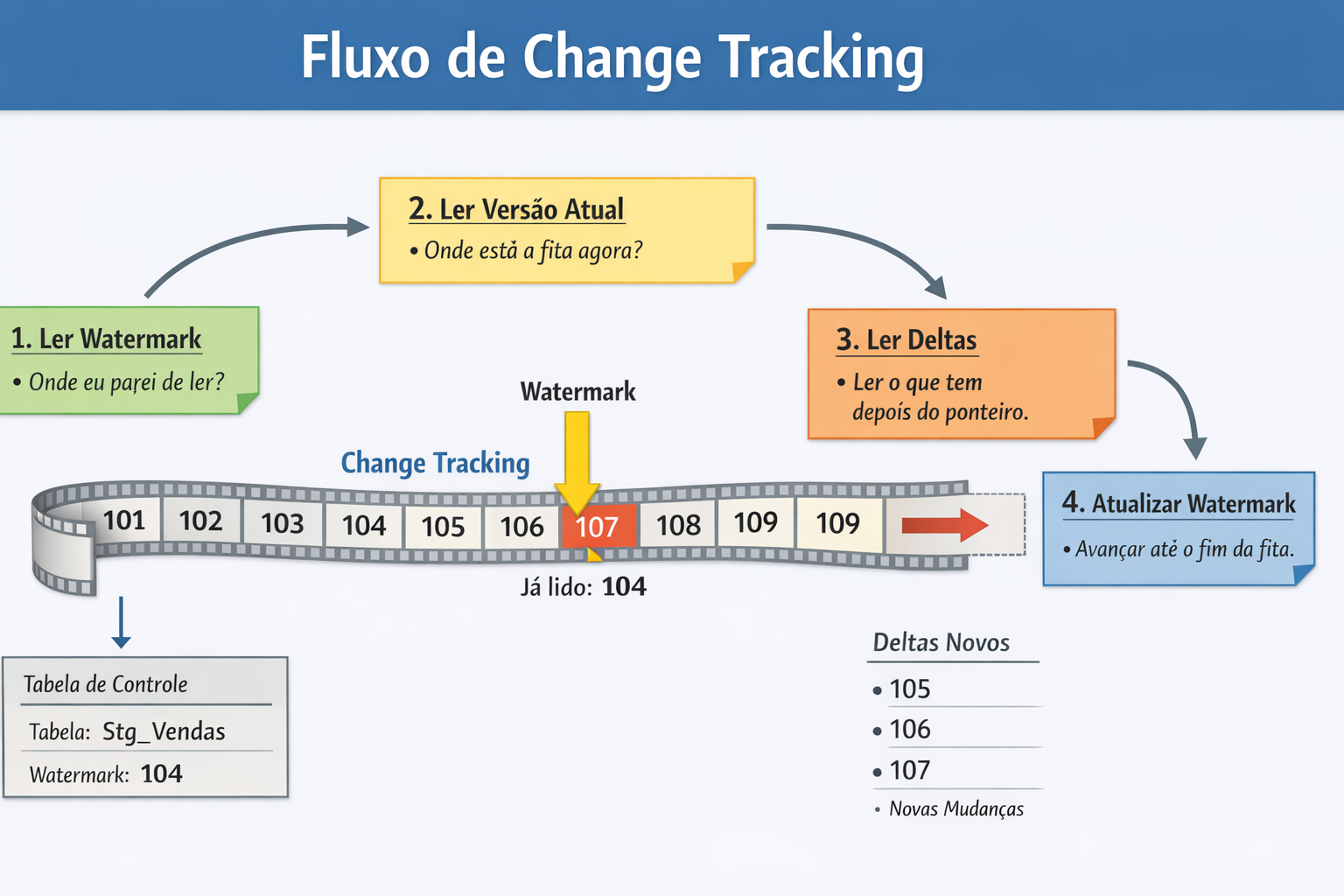
Each number is a commit that changed any table with Change Tracking enabled. This tape moves forward on its own, you don't control it. The watermark is simply “where I stopped reading” and the control table does not store data, only the last number on the tape that was successfully read.
When you run:
CHANGETABLE(CHANGES dbo.Stg_Sales, 104)
This basically means: “Bring me everything that happened after commit 104 in this table.”
Watermark control is important, especially if you are going to use multiple tables, because if the table's watermark falls behind and leaves this window, SQL physically erases that piece of tape. When you request data from version 104 and the tape starts at 108, SQL no longer has commits 105–107, and you will have permanent data loss, requiring a FULL load.
This is why it is important to execute the CHANGE_TRACKING_CURRENT_VERSION() command only after successfully consuming all the data from this table.
The logical flow of an incremental read follows these steps:
- Get the last processed version: We consult a control table where we store the version that has already been read.
- Get the current version of the database: We call the CHANGE_TRACKING_CURRENT_VERSION() function.
- Read the Delta: We use the CHANGETABLE function passing the old version to start reading changes from that version.
- Update the control table: We save the new version for the next run.
To check the lowest valid version of the table watermark, you can use the command SELECT CHANGE_TRACKING_MIN_VALID_VERSION(OBJECT_ID(N’dbo.MinhaTable’))
Hands-On: Complete Example Script
Below, a script structured following best naming and performance practices, simulating an incremental loading and extraction environment.
Creation of the test table, load control table and activation of Change Tracking
--------------------------------------------------------------------------------------
-- 1) Habilitar Change Tracking no DATABASE
--------------------------------------------------------------------------------------
IF NOT EXISTS (SELECT 1 FROM [sys].[change_tracking_databases] WHERE [database_id] = DB_ID())
BEGIN
    ALTER DATABASE CURRENT SET CHANGE_TRACKING = ON(CHANGE_RETENTION = 2 DAYS, AUTO_CLEANUP = ON);
END

--------------------------------------------------------------------------------------
-- 2) Reset do ambiente (apaga a tabela caso já exista)
--------------------------------------------------------------------------------------
IF ( OBJECT_ID( '[dbo].[Stg_Vendas]' ) IS NOT NULL )
BEGIN

    -- VERIFICA SE O CHANGE TRACKING ESTÁ ATIVADO NA TABELA
    IF EXISTS (SELECT 1 FROM [sys].[change_tracking_tables] WHERE [object_id] = OBJECT_ID('[dbo].[Stg_Vendas]'))
    BEGIN

        -- DESATIVA O CHANGE TRACKING
        ALTER TABLE [dbo].[Stg_Vendas] DISABLE CHANGE_TRACKING;

    END

    DROP TABLE [dbo].[Stg_Vendas];

END


--------------------------------------------------------------------------------------
-- 3) Criar tabela de teste
--------------------------------------------------------------------------------------
CREATE TABLE [dbo].[Stg_Vendas]
(
    [Nr_Id_Venda]   INT            IDENTITY(1, 1) NOT NULL,
    [Dt_Venda]      DATETIME       NOT NULL CONSTRAINT [DF_Stg_Vendas_Dt_Venda] DEFAULT (GETDATE()),
    [Nm_Produto]    VARCHAR(100)   COLLATE Latin1_General_CI_AS NOT NULL,
    [Vl_Venda]      DECIMAL(18, 2) NOT NULL,
    [Fl_Processado] BIT            NOT NULL CONSTRAINT [DF_Stg_Vendas_Fl_Processado] DEFAULT (0),
    CONSTRAINT [PK_Stg_Vendas] PRIMARY KEY CLUSTERED ([Nr_Id_Venda])
);

--------------------------------------------------------------------------------------
-- 4) Habilitar Change Tracking na tabela
--------------------------------------------------------------------------------------
ALTER TABLE [dbo].[Stg_Vendas]
ENABLE CHANGE_TRACKING
WITH (TRACK_COLUMNS_UPDATED = ON);

--------------------------------------------------------------------------------------
-- 5) Criar tabela de controle (watermark por tabela)
--------------------------------------------------------------------------------------
IF ( OBJECT_ID( '[dbo].[CT_Watermark]' ) IS NULL )
BEGIN

    CREATE TABLE [dbo].[CT_Watermark]
    (
        [Tabela]      SYSNAME NOT NULL CONSTRAINT [PK_CT_Watermark] PRIMARY KEY,
        [LastVersion] BIGINT  NOT NULL
    );

    -- Inicializa watermark
    INSERT INTO [dbo].[CT_Watermark] ([Tabela], [LastVersion])
    SELECT
        'dbo.Stg_Vendas',
        CHANGE_TRACKING_CURRENT_VERSION();

END
Make some changes to the table to test:
INSERT INTO [dbo].[Stg_Vendas] ([Nm_Produto], [Vl_Venda])
VALUES
    ('SQL Server License', 50000.00),
    ('Azure Subscription', 1200.50);

UPDATE [dbo].[Stg_Vendas]
SET [Vl_Venda] = 55000.00
WHERE [Nr_Id_Venda] = 1;

DELETE FROM [dbo].[Stg_Vendas]
WHERE [Nr_Id_Venda] = 2;
Now I will read the changes and update the control table with the current version of the table:
DECLARE @Tabela SYSNAME = N'dbo.Stg_Vendas';
DECLARE @ObjectId INT = OBJECT_ID(@Tabela);
DECLARE @LastVersion BIGINT;
DECLARE @MinValid BIGINT;
DECLARE @Current BIGINT;

SELECT @LastVersion = [LastVersion]
FROM [dbo].[CT_Watermark]
WHERE [Tabela] = @Tabela;

SELECT @MinValid = CHANGE_TRACKING_MIN_VALID_VERSION(@ObjectId);
SELECT @Current  = CHANGE_TRACKING_CURRENT_VERSION();

-- Diagnóstico
SELECT
    [Tabela]      = @Tabela,
    [LastVersion] = @LastVersion,
    [MinValid]    = @MinValid,
    [Current]     = @Current;

-- Se seu @LastVersion estiver abaixo do mínimo válido, você perdeu histórico (retenção)
IF (@LastVersion < @MinValid)
BEGIN
    PRINT '*** ATENCAO: LastVersion < MinValid. Precisa FULL LOAD e reset do watermark. ***';
END
ELSE
BEGIN

    -- Deltas (o que mudou desde o watermark)
    SELECT
        CT.[Nr_Id_Venda],
        CT.[SYS_CHANGE_VERSION],
        CT.[SYS_CHANGE_OPERATION],     -- Insert, Update, Delete
        CT.[SYS_CHANGE_COLUMNS]        -- bitmap (só faz sentido com TRACK_COLUMNS_UPDATED = ON)
    FROM
        CHANGETABLE(CHANGES [dbo].[Stg_Vendas], @LastVersion) AS CT
    ORDER BY
        CT.[SYS_CHANGE_VERSION];

END;

-- Avança watermark SOMENTE após processar com sucesso
UPDATE [dbo].[CT_Watermark]
SET [LastVersion] = CHANGE_TRACKING_CURRENT_VERSION()
WHERE [Tabela] = @Tabela;

SELECT * FROM [dbo].[CT_Watermark];
You will see this result:
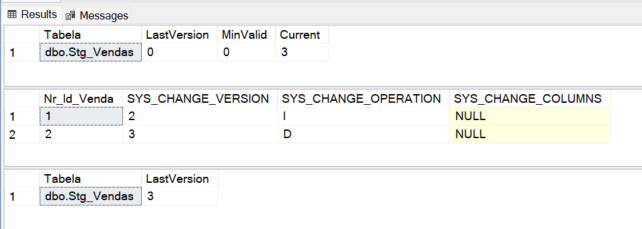
SYS_CHANGE_OPERATION column values:
- I = Insert
- U = Update
- D = Delete
Observation: You may have noticed that the UPDATE operation did not appear in the Change Tracking changes. This happened because Change Tracking does not record a complete history of all operations, it returns the final result by key since the last synchronized version. Therefore, if a row was updated and then deleted before reading the CHANGETABLE, you will only see the D operation, as the intermediate UPDATE is not necessary to apply the synchronization.
Let's make a few more changes to the table:
-- Novas mudanças
INSERT INTO [dbo].[Stg_Vendas] ([Nm_Produto], [Vl_Venda])
VALUES ('Dirceu Resende', 999.99);

UPDATE [dbo].[Stg_Vendas]
SET [Fl_Processado] = 1
WHERE [Nr_Id_Venda] = 1;
Reading the changes again with the same script used previously, you will see this result:
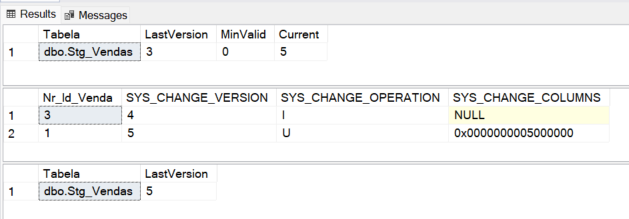
As the UPDATE is still valid, and the line was not deleted, as happened in the first example, we can view the change record (UPDATE) in the Change Tracking logs.
Performance Analysis and Internals
When Change Tracking is active, SQL Server uses an internal table to store change information. Committing any transaction to the tracked table now includes an additional write to that internal table.
Main Related Wait Types:
- WRITELOG: Since CT is synchronous, the cost of writing the change must be accounted for in the transaction log. If your log disk is already saturated, CT can worsen write latency.
- CHECKPOINT: The CT cleanup process (which removes old records as retained) runs in the background and can generate IO.
Monitoring disk space used by Change Tracking
To ensure that Change Tracking is not becoming a villain and consuming a lot of disk space, use the query below:
SELECT
    QUOTENAME(OBJECT_SCHEMA_NAME(T.object_id)) + N'.' + QUOTENAME(T.name) AS [Nm_Tabela],
    IT.name                                                              AS [Nm_Tabela_Interna],
    CAST(SUM(A.total_pages) * 8.0 / 1024 AS DECIMAL(18,2))               AS [Nr_Tamanho_MB],
    CAST(SUM(A.used_pages)  * 8.0 / 1024 AS DECIMAL(18,2))               AS [Nr_Usado_MB],
    CAST(SUM(A.data_pages)  * 8.0 / 1024 AS DECIMAL(18,2))               AS [Nr_Dados_MB]
FROM
    sys.internal_tables AS IT
    JOIN sys.objects         AS T  ON T.object_id = IT.parent_id
    JOIN sys.partitions      AS P  ON P.object_id = IT.object_id
    JOIN sys.allocation_units AS A ON A.container_id = P.hobt_id
WHERE
    IT.internal_type_desc = N'CHANGE_TRACKING'
GROUP BY
    OBJECT_SCHEMA_NAME(T.object_id),
    T.name,
    IT.name
ORDER BY
    [Nr_Usado_MB] DESC;
Change Tracking in High Availability (GA) and Replication Environments
This is a very common question. How does CT behave when we have Always On Availability Groups or Restore operations?
Always On (AG)
Change Tracking is fully compatible with Always On. Internal tracking tables are internal structures that are persisted and replicated via log, and therefore change data is replicated to secondaries via transaction log as normal.
Golden Tip: The AUTO_CLEANUP process only runs on the Primary, but AUTO_CLEANUP is NOT guaranteed on the secondary replicas, because the cleanup is not a normal DELETE: It uses an internal GC mechanism (garbage collector), non-logged commands in a replicable way and local physical operations.
Because of this, the internal CT tables grow infinitely on the secondary and you can have large sys.syscommittab, sys.change_tracking_tables growing, REDO delay, eventual replica failure and other problems.
One way to fix this is to create a job on the replicas with this code:
IF sys.fn_hadr_is_primary_replica(DB_NAME()) = 0
BEGIN
    EXEC sys.sp_flush_commit_table_on_demand;
END
Backup and Restore / Attach Database
When restoring a database with active CT on another server, the resource remains active. However, if you restore an old backup, the tracking version (CHANGE_TRACKING_CURRENT_VERSION) will be out of date with what your sync application has already processed, which may require an initial “Full Sync”.
WITH CHANGE_TRACKING_CONTEXT
A little explored feature is WITH CHANGE_TRACKING_CONTEXT. Imagine that you have an integration process that changes data and you don't want that same process to “re-process” these changes.
You can send a context:
DECLARE @Ds_Contexto VARBINARY(128) = CONVERT(VARBINARY(128), N'Integracao_Sistema_A');

WITH CHANGE_TRACKING_CONTEXT(@Ds_Contexto)
UPDATE [dbo].[Stg_Vendas]
SET [Vl_Venda] = [Vl_Venda] * 1.1
WHERE [Nr_Id_Venda] = 1;

-- Ignorar mudanças geradas por esse contexto
SELECT
    CT.[Nr_Id_Venda],
    CT.[SYS_CHANGE_OPERATION],
    CT.[SYS_CHANGE_VERSION],
    CT.[SYS_CHANGE_CONTEXT]
FROM
    CHANGETABLE(CHANGES [dbo].[Stg_Vendas], 0) AS CT
WHERE
    ISNULL(CT.[SYS_CHANGE_CONTEXT], 0x) <> @Ds_Contexto;
This avoids infinite synchronization loops where System A sends it to B, which returns it to A. It is worth remembering that the context is recorded in the commit, if your pipeline performs multiple operations in the same transaction, they all inherit the same context.
Technical Limitations
Before implementing, especially in production, you need to know the limitations of Change Tracking:
- Changing Primary Key: Change Tracking does not allow you to directly update the value of a PK. In practice, an UPDATE on a column that is part of the primary key is treated internally as a DELETE of the old key followed by an INSERT of the new key, and the CT will reflect this behavior.
- TRUNCATE TABLE: The TRUNCATE TABLE command does not generate Change Tracking events. If you truncate the table, CT will not record the individual deletes and will require a full load of that table.
- Large Object (LOB) Columns: CT does not track which LOB columns (VARCHAR(MAX), VARBINARY(MAX)) were changed, so even with TRACK_COLUMNS_UPDATED = ON, Change Tracking does not include LOB columns in the bitmap of changed columns (SYS_CHANGE_COLUMNS). So you know the row has changed, but you can't identify exactly which LOB columns have changed.
I hope you enjoyed this article, a big hug and see you next time!

Comentários (0)
Carregando comentários…