
Hey guys! How are you?
Today the subject will be one of the most interesting: Regular expressions!
Introduction
Anyone who has been following me for a long time knows that I always insisted that support for regular expressions in SQL Server was a huge gap. In 2018, I wrote the article SQL Server – How to use regular expressions (RegExp) in your database, detailing how to get around this limitation using LIKE from WHERE (it works, but is limited), SQLCLR, creating a DLL in C# and embedding it within the database to have the power of Regex or using OLE Automation.
It worked for years, but always with that “overhead” of context between the SQL engine and the CLR, in addition to security restrictions (PERMISSION_SET) that often prevented implementation in more restricted environments, such as Azure SQL Database.
With the arrival of SQL Server 2025 and the May 2024 updates on Azure SQL Database, Microsoft finally listened to the community and brought support native for regular expressions. We are talking about functions integrated directly into the engine, optimized and ready to use without the need for external configurations.
In this post, I will demonstrate these new functions, understand the syntax and, of course, compare with our old method via SQLCLR to see what really changes in the lives of the DBA and Developer.
Video about regular expressions:
The New Regular Expression Functions
Different from the old LIKE (which is extremely limited), the new functions use the standard RE2, developed by Google, allowing complex searches, extractions and replacements of strings in a much more performant way.
The introduced functions, as we can see in official documentation, they are:
Scalar Functions:
- REGEXP_LIKE: Validates whether the string matches the pattern (BIT returns).
- REGEXP_COUNT: Counts the occurrences of the pattern.
- REGEXP_INSTR: Finds the position of a pattern.
- REGEXP_REPLACE: Replaces patterns with new texts.
- REGEXP_SUBSTR: Extracts a part of the string.
Table Functions (Rowsets):
- REGEXP_MATCHES: Extracts all occurrences of a pattern and returns them as rows of a table, including separating the capture groups.
- REGEXP_SPLIT_TO_TABLE: Splits a string into multiple lines using a Regex pattern as a delimiter (the dream STRING_SPLIT).
Feature Comparison Table
Below, I prepared a comparative table to make it easier to see how each function behaves in relation to common parameters:
| Function | Type | Main Objective | Main Return |
|---|---|---|---|
| REGEXP_LIKE | Climb | Validate whether a text follows a pattern (Email, CPF, etc.) | Boolean (1 or 0) |
| REGEXP_COUNT | Climb | Count how many times a pattern occurs in a text | Integer |
| REGEXP_INSTR | Climb | Find the start/end position of a pattern | Integer (Position) |
| REGEXP_REPLACE | Climb | Replace occurrences of a pattern with new text | VARCHAR/NVARCHAR |
| REGEXP_SUBSTR | Climb | Extract a specific part (substring) based on the pattern | VARCHAR/NVARCHAR |
| REGEXP_MATCHES | Tabular | Extract all occurrences and their capture groups | Table (Rowset) |
| REGEXP_SPLIT_TO_TABLE | Tabular | Split a string into multiple lines using Regex as delimiter | Table (Rowset) |
To check the compatibility level of your databases, you can use the T-SQL script below:
-- CONSULTA DE COMPATIBILIDADE DAS BASES DE DADOS
SELECT
    [A].[name]                AS [Nm_Banco_Dados],
    [A].[compatibility_level] AS [Nr_Nivel_Compatibilidade],
    CASE [A].[compatibility_level]
        WHEN 100 THEN 'SQL Server 2008 / 2008 R2'
        WHEN 110 THEN 'SQL Server 2012'
        WHEN 120 THEN 'SQL Server 2014'
        WHEN 130 THEN 'SQL Server 2016'
        WHEN 140 THEN 'SQL Server 2017'
        WHEN 150 THEN 'SQL Server 2019'
        WHEN 160 THEN 'SQL Server 2022'
        WHEN 170 THEN 'SQL Server 2025'
        ELSE 'Versão Desconhecida / Legacy'
    END                       AS [Ds_Versao_Correspondente]
FROM
    [sys].[databases] AS [A]
ORDER BY
    [A].[compatibility_level] DESC,
    [A].[name] ASC;
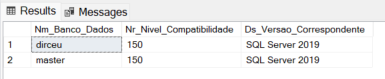
If you want to change the compatibility level to 170 (SQL Server 2025) and you can use regular expression functions, use the command below:
ALTER DATABASE [SeuBanco] SET COMPATIBILITY_LEVEL = 170
Msg 19304, Level 16, State 5, Line 35
Currently, ‘REGEXP_MATCHES’ function does not support NVARCHAR(max)/VARCHAR(max) inputs.
Why RE2 and not pure PCRE or POSIX?
Most Regex libraries (like the PCRE used in PHP/Python or the .NET library itself that we use in SQLCLR) use a Backtracking.
This is powerful but dangerous for a database. If a developer writes a poorly formatted regular expression, it can cause what we call ReDoS (Regular Expression Denial of Service). The search engine enters an exponential loop of retries (catastrophic backtracking), locks a CPU core at 100% and can bring down the performance of the entire instance.
THE RE2 was designed to be insurance:
- Linear Time: RE2 guarantees that the execution time is linear with respect to the size of the input string ($O(n)$).
- Predictability: It does not allow backtracking, which means it will never “crash” your server, no matter how complex the expression.
- Memory Security: Memory consumption is controlled and finite, ideal for those who manage Buffer Pool and Memory Clerks.
When we look at the Wait Types, using native RE2 tends to focus effort purely on SOS_SCHEDULER_YIELD (if the query is too long) instead of crashing external resources or generating WAIT events from CLR_AUTO_EVENT.
Want more information?
Basic syntax:
| Metacharacter | Description |
|---|---|
| . | Matches any single character (many applications exclude line breaks, and exactly which characters are considered line breaks is specific to the “flavor” of the regex, the character encoding, and the platform, but it is safe to assume that the line feed character is included). Within POSIX bracket expressions, the period character corresponds to a literal period. For example, B.C corresponds to “abc”, etc., but [B.C] matches only “a”, “.”, or “c”. |
| [ ] | A bracket expression. Matches a single character contained within the square brackets. For example, [ABC] corresponds to “a”, “b”, or “c”, and [a-z] specifies a range that matches any lowercase letter from “a” to “z”. These forms can be mixed: [abcx-z] corresponds to “a”, “b”, “c”, “x”, “y”, or “z”, as well as [a-cx-z].
The character – is treated as a literal character if it is the last or first character within the brackets: [ABC-], [-ABC]. The character ] can be included in a bracket expression if it is the first character: []ABC]. The bracket expression can also contain character classes, equivalence classes, and collating characters. |
| [^ ] | Matches a single character that no is contained within the square brackets. For example, [^abc] matches any character other than “a”, “b”, or “c”, and [^a-z] matches any single character other than a lowercase letter from “a” to “z”. These forms can be mixed: [^abcx-z] matches any character except “a”, “b”, “c”, “x”, “y”, or “z”.
The character – is treated as a literal character if it is the last character or the first character after the ^: [^abc-], [^-abc]. The character ] is treated as a literal character if it is the first character after the ^: [^]abc]. The expression can also contain character classes, equivalence classes, and grouping characters. |
| ^ | Matches the starting position within the string, if it is the first character of the regular expression. |
| $ | Matches the end position of the string if it is the last character of the regular expression. |
| * | Matches the previous element zero or more times. For example, ABC matches “ac”, “abc”, “abbbc”, etc. [xyz]* matches “”, “x”, “y”, “z”, “zx”, “zyx”, “xyzzy”, and so on. |
Examples:
- .at matches any three-character string ending in “at”, including “hat”, “cat” and “bat”.
- [hc]at corresponds to “hat” and “cat”.
- [^b]at matches all strings identified by .at, except “bat”.
- ^[hc]at matches “hat” and “cat”, but only at the beginning of the string or line.
- [hc]at$ matches “hat” and “cat”, but only at the end of the string or line.
- \[.\] matches any single character surrounded by “[” and “]” since the square brackets are escaped; for example: “[a]” and “[b]”.
POSIX Classes:
| POSIX class | Similar to | Meaning |
|---|---|---|
| [:upper:] | [A-Z] | Capital letters |
| [:lower:] | [a-z] | Lowercase letters |
| [:alpha:] | [A-Za-z] | Uppercase and lowercase letters |
| [:digit:] | [0-9] | Digits |
| [:xdigit:] | [0-9A-Fa-f] | Hexadecimal digits |
| [:alnum:] | [A-Za-z0-9] | Digits, uppercase and lowercase letters |
| [:punct:] | Punctuation (all graphic characters except letters and digits) | |
| [:blank:] | [\t] | Space and Tab |
| [:space:] | [ \t\n\r\f\v] | Whitespace (empty) characters |
| [:cntrl:] | Control characters | |
| [:graph:] | Graphic characters (excludes spaces) | |
| [:print:] | [[:graph:] ] | Printable characters (includes spaces) |
Practical examples of each function for regular expression
To facilitate understanding, I will demonstrate some examples of each function to understand some useful applications in everyday life.
REGEXP_LIKE
Validates whether the string matches the pattern (BIT returns).
The Syntax is REGEXP_LIKE ( string_expression, pattern_expression [ , flags ] ), where the values for the flags are:
- i: Case insensitive (default false)
- m: Multi-line mode: “^” and “$” match the start/end line in addition to the start/end text (default false)
- s: Allow “.” match “\n” (default false)
- c: Case sensitive (default true)
Official documentation: REGEXP_LIKE
Example 1: Validating zip code masks
SELECT
    -- Caso 1: Formato padrão 00000-000
    CASE
        WHEN REGEXP_LIKE('29090-270', '^[0-9]{5}-[0-9]{3}$') THEN 1
        ELSE 0
    END AS Fl_Cep_Valido_1,

    -- Caso 2: Formato pontuado 00.000-000
    -- Nota: O caractere '.' precisa de escape (\\ ou \) pois em Regex ele significa "qualquer caractere"
    CASE
        WHEN REGEXP_LIKE('29.090-270', '^[0-9]{2}\.[0-9]{3}-[0-9]{3}$') THEN 1
        ELSE 0
    END AS Fl_Cep_Valido_2,

    -- Caso 3: Formato apenas números 00000000
    CASE
        WHEN REGEXP_LIKE('29090270', '^[0-9]{8}$') THEN 1
        ELSE 0
    END AS Fl_Cep_Valido_3
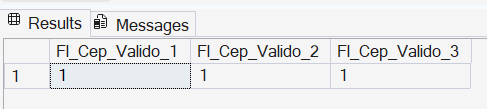
Example 2: Validating whether the ZIP code mask matches the tested value
-- Objetivo: Validar máscara de CEP no formato 99999-999.

SELECT
    -- Caso 1: Válido (Atende exatamente ao padrão)
    CASE
        WHEN REGEXP_LIKE('29090-270', '^[0-9]{5}-[0-9]{3}$') THEN 1
        ELSE 0
    END AS Fl_Cep_Valido1,

    -- Caso 2: Inválido (Possui ponto extra)
    CASE
        WHEN REGEXP_LIKE('29.090-270', '^[0-9]{5}-[0-9]{3}$') THEN 1
        ELSE 0
    END AS Fl_Cep_Valido2,

    -- Caso 3: Inválido (Apenas números, sem o traço)
    CASE
        WHEN REGEXP_LIKE('29090270', '^[0-9]{5}-[0-9]{3}$') THEN 1
        ELSE 0
    END AS Fl_Cep_Valido3;

-- Dica: Se você não estiver no SQL Server 2022, a alternativa nativa é o LIKE:
-- WHERE coluna LIKE '[0-9][0-9][0-9][0-9][0-9]-[0-9][0-9][0-9]'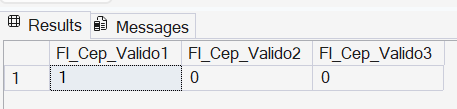
Example 3: Validating CPF and CNPJ
-- 1. VALIDAÇÃO DE CPF (999.999.999-99)
SELECT
    -- Exemplo 1: Formato Válido
    CASE
        WHEN REGEXP_LIKE('123.456.789-09', '^\d{3}\.\d{3}\.\d{3}\-\d{2}$') THEN 1
        ELSE 0
    END AS CPF_Valido,

    -- Exemplo 2: Inválido (Letra X presente)
    CASE
        WHEN REGEXP_LIKE('12X.456.789-09', '^\d{3}\.\d{3}\.\d{3}\-\d{2}$') THEN 1
        ELSE 0
    END AS CPF_Invalido_Caractere,

    -- Exemplo 3: Inválido (Sem máscara/apenas números)
    CASE
        WHEN REGEXP_LIKE('12345678909', '^\d{3}\.\d{3}\.\d{3}\-\d{2}$') THEN 1
        ELSE 0
    END AS CPF_Invalido_Formato;

-- 2. VALIDAÇÃO DE CNPJ (99.999.999/9999-99)
SELECT
    -- Exemplo 1: Formato Válido
    CASE
        WHEN REGEXP_LIKE('12.345.678/1234-09', '^\d{2}\.\d{3}\.\d{3}\/\d{4}\-\d{2}$') THEN 1
        ELSE 0
    END AS CNPJ_Valido,

    -- Exemplo 2: Inválido (Letra X presente)
    CASE
        WHEN REGEXP_LIKE('12.3X5.678/1234-09', '^\d{2}\.\d{3}\.\d{3}\/\d{4}\-\d{2}$') THEN 1
        ELSE 0
    END AS CNPJ_Invalido_Caractere,

    -- Exemplo 3: Inválido (Sem máscara/apenas números)
    CASE
        WHEN REGEXP_LIKE('12345678123409', '^\d{2}\.\d{3}\.\d{3}\/\d{4}\-\d{2}$') THEN 1
        ELSE 0
    END AS CNPJ_Invalido_Formato;
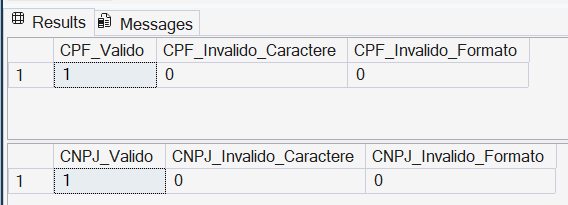
Example 4: Searching for repeated words
Here we encounter a barrier of the RE2 dialect, which is the absence of Backtracking. With the SQLCLR function, which uses the .NET dialect, I could use regular expressions to search for repeated words using the expression \1, as in the example below:
-- Identificando palavras repetidas
SELECT
    CLR.dbo.fncRegex_Match('Essa frase frase contém palavras repetidas', '\b(\w+)\s+\1\b'),
    CLR.dbo.fncRegex_Match('Essa frase NÃO contém palavras repetidas', '\b(\w+)\s+\1\b')
If we try to adapt this code to native regular expression, it would look something like:
-- Identificando palavras repetidas
SELECT
    CASE WHEN REGEXP_LIKE('Essa frase frase contém palavras repetidas', '\b(\w+)\s+\1\b') THEN 1 ELSE 0 END,
    CASE WHEN REGEXP_LIKE('Essa frase NÃO contém palavras repetidas', '\b(\w+)\s+\1\b') THEN 1 ELSE 0 END
And trying to do this will generate an error message like this:
An invalid Pattern ‘\b(\w+)\s+\1\b’ was provided. Error ‘invalid escape sequence: \1’ occurred during evaluation of the Pattern.
Using the RE2 dialect, it is not possible to do the same thing using just a regular expression. In this case, we encountered a technical limitation of the regular expression processing engine of SQL Server 2025 and Azure SQL Database.
An alternative to solving this problem is using STRING_SPLIT:
DECLARE @exemplo2 VARCHAR(2000) = 'nesse exemplo exemplo eu gostaria de eu demonstrar como identificar palavras palavras repetidas repetidas eu';

WITH Palavras AS (
    -- O parâmetro '1' habilita a coluna [value] e [ordinal] (posição)
    SELECT
        value AS Palavra,
        ordinal AS Posicao
    FROM
        STRING_SPLIT(@exemplo2, ' ', 1)
)
SELECT
    p1.Palavra
FROM
    Palavras p1
    JOIN Palavras p2 ON p1.Posicao = p2.Posicao - 1 -- Compara com a próxima palavra
WHERE
    p1.Palavra = p2.Palavra
    AND p1.Palavra <> ''; -- Evita espaços vazios se houver espaços duplos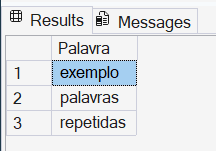
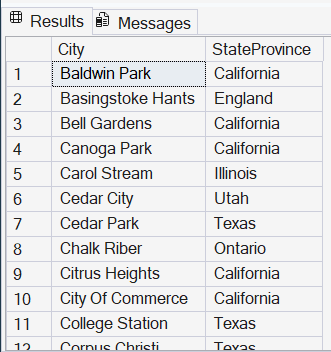
Example 5: Searches for names that contain at least one space between alphabetic characters
SELECT
    City,
    StateProvince
FROM
    SalesLT.Address
WHERE
    REGEXP_LIKE(City, '[[:alpha:]]+[[:space:]]+[[:alpha:]]+')
ORDER BY
    City;
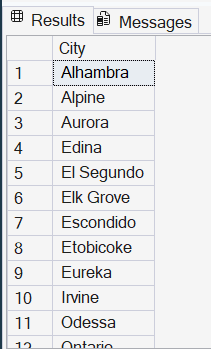
Example 6: Cities that start or end with vowels
SELECT DISTINCT
    City
FROM
    SalesLT.Address
WHERE
    REGEXP_LIKE(City, '^[AEIOU].*[aeiou]$');
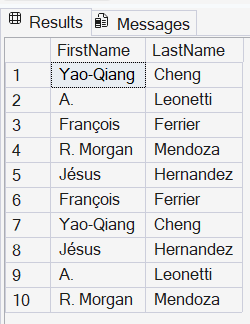
Example 7: People whose first name has accents or special characters
SELECT
    FirstName,
    LastName
FROM
    SalesLT.Customer
WHERE
    REGEXP_LIKE(FirstName, '[^a-zA-Z ]')
Example 8: Case sensitive and insensitive
By default, regular expressions are always case sensitive by default, but you can control this behavior using flags.
Force query with case sensitive and search for “mountain”:
SELECT
    Name,
    ProductNumber
FROM
    SalesLT.Product
WHERE
    REGEXP_LIKE(Name, 'mountain', 'c'); -- 'c' força Case Sensitivity
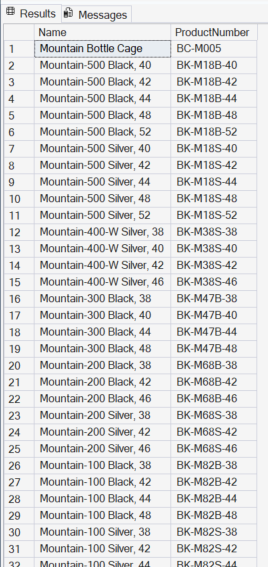
Force query with case INsensitive and search for “mountain”:
SELECT
    Name,
    ProductNumber
FROM
    SalesLT.Product
WHERE
    REGEXP_LIKE(Name, 'mountain', 'i'); -- 'i' força Case IN-Sensitivity
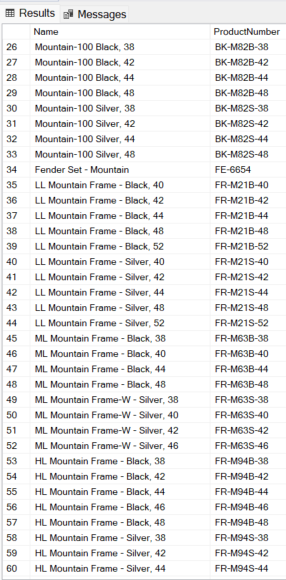
It's worth remembering that REGEXP_LIKE searches any part of the string, not just the beginning:
REGEXP_INSTR
Returns the starting or ending position of the corresponding substring, depending on the value of the return_option argument.
The syntax is REGEXP_INSTR ( string_expression, pattern_expression [ , start [ , occurrence [ , return_option [ , flags [ , group ] ] ] ] ] ).
Official documentation: REGEXP_INSTR
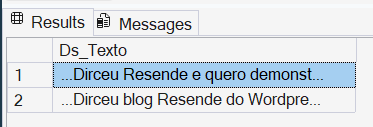
Example 1: Recover passages where the word “Dirceu” appears in the text
DECLARE @exemplo1 VARCHAR(2000) = 'Olá pessoal! Meu nome é Dirceu Resende e quero demonstrar como o Regexp é útil nesse artigo do Dirceu blog Resende do Wordpress';

WITH Trechos AS (
    -- Localiza a primeira ocorrência
    SELECT
        REGEXP_INSTR(@exemplo1, 'Dirceu', 1, 1) AS Posicao,
        1 AS Ocorrencia
    UNION ALL
    -- Busca as próximas ocorrências recursivamente
    SELECT
        REGEXP_INSTR(@exemplo1, 'Dirceu', Posicao + 1, 1),
        Ocorrencia + 1
    FROM Trechos
    WHERE REGEXP_INSTR(@exemplo1, 'Dirceu', Posicao + 1, 1) > 0
)
SELECT
    -- Como não temos SUBSTR nativo com Regex, usamos SUBSTRING tradicional
    -- Pegando "Dirceu" + 25 caracteres para simular o contexto dos próximos termos
    '...' + SUBSTRING(@exemplo1, Posicao, 30) + '...' AS Ds_Texto
FROM Trechos;
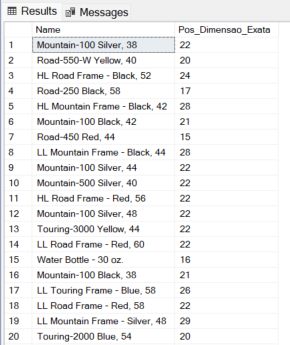
Example 2: Find the number at the end of the string consisting of 2 digits (Ex: “42”, “58”, “70”)
-- O CHARINDEX não consegue achar "a posição do primeiro número que tenha exatamente 2 dígitos".
-- Ele acharia o '2' em '2005' ou o '1' em 'Road-150'.
SELECT
    [Name],
    REGEXP_INSTR([Name], '\b[0-9]{2}\b') AS Pos_Dimensao_Exata
FROM
    SalesLT.[Product]
WHERE
    REGEXP_INSTR([Name], '\b[0-9]{2}\b') > 0
ORDER BY
    NEWID()
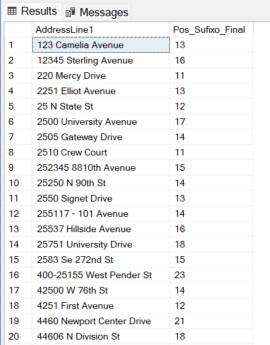
Example 3: Position of multiple suffixes in addresses
-- Queremos a posição de 'Drive', 'Court' ou 'Avenue', mas apenas se forem a última palavra.
-- Fazer isso com CHARINDEX exige inverter a string ou cálculos complexos de LEN.
SELECT
    AddressLine1,
    REGEXP_INSTR(AddressLine1, '\b(Drive|Court|Avenue|St|St\.)\b$') AS Pos_Sufixo_Final
FROM
    SalesLT.Address
WHERE
    REGEXP_INSTR(AddressLine1, '\b(Drive|Court|Avenue|St|St\.)\b$') > 0;
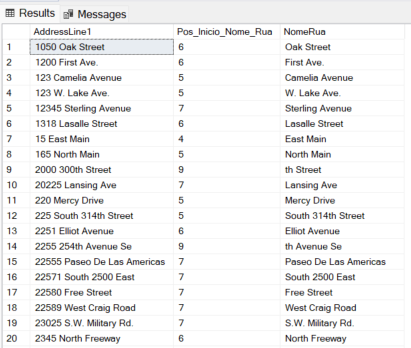
Example 4: Retrieve the street name and ignore the number
-- Localiza a posição da primeira LETRA que aparece após uma sequência de NÚMEROS.
-- Essencial para separar '1234 Main St' em '1234' e 'Main St'.
SELECT
    AddressLine1,
    REGEXP_INSTR(AddressLine1, '[a-zA-Z]', 1, 1) AS Pos_Inicio_Nome_Rua,
    SUBSTRING(AddressLine1, REGEXP_INSTR(AddressLine1, '[a-zA-Z]', 1, 1), LEN(AddressLine1)) AS NomeRua
FROM
    SalesLT.Address
WHERE
    REGEXP_INSTR(AddressLine1, '^[0-9]+') > 0;
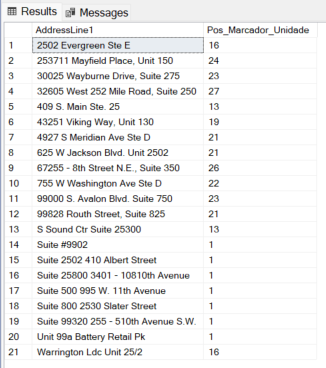
Example 5: Identifying apartments or units
-- Localiza a posição de qualquer marcador de unidade (Apt, Unit, #, Ste)
-- O CHARINDEX precisaria de 4 buscas separadas com OR.
SELECT
    AddressLine1,
    REGEXP_INSTR(AddressLine1, '\b(Apt|Unit|#|Ste|Suite)\b', 1, 1, 0, 'i') AS Pos_Marcador_Unidade
FROM
    SalesLT.Address
WHERE
    REGEXP_INSTR(AddressLine1, '\b(Apt|Unit|#|Ste|Suite)\b', 1, 1, 0, 'i') > 0;
REGEXP_COUNT
Counts the number of times a regular expression pattern is matched in a string.
The syntax is REGEXP_COUNT ( string_expression, pattern_expression [ , start [ , flags ] ] ), where the values for the flags are:
- i: Case insensitive (default false)
- m: Multi-line mode: “^” and “$” match the start/end line in addition to the start/end text (default false)
- s: Allow “.” match “\n” (default false)
- c: Case sensitive (default true)
Official documentation: https://learn.microsoft.com/pt-br/sql/t-sql/functions/regexp-count-transact-sql
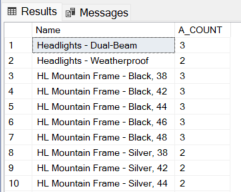
Example 1: Count how many times the letter a appears in each product name.
SELECT
    Name,
    REGEXP_COUNT( Name, 'a' ) AS A_COUNT
FROM
    SalesLT.Product
WHERE
    REGEXP_COUNT( Name, 'a' ) > 1;
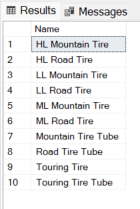
Example 2: Returns products that end with “tire” or “ube”, ignoring uppercase and lowercase letters.
SELECT
    Name
FROM
    SalesLT.Product
WHERE
    REGEXP_COUNT(Name, 'tire|ube$', 1, 'i') > 0;
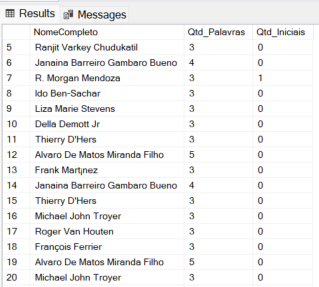
Example 3: Counting the number of words and names with initials
SELECT
    FirstName + ' ' + LastName                              AS NomeCompleto,
    REGEXP_COUNT( FirstName + ' ' + LastName, '\w+' )       AS Qtd_Palavras,
    -- Conta quantas iniciais seguidas de ponto existem (Ex: "J. R. R. Tolkien")
    REGEXP_COUNT( FirstName + ' ' + LastName, '\b[A-Z]\.' ) AS Qtd_Iniciais
FROM
    SalesLT.Customer
WHERE
    REGEXP_COUNT( FirstName + ' ' + LastName, '\w+' ) > 2
REGEXP_REPLACE
Returns a modified string, in which the occurrence of the regular expression pattern was found. If no match is found, the function returns the original string.
The syntax is REGEXP_REPLACE( string_expression, pattern_expression [ , string_replacement [ , start [ , occurrence [ , flags ] ] ] ] ), where the values for the flags are:
- i: Case insensitive (default false)
- m: Multi-line mode: “^” and “$” match the start/end line in addition to the start/end text (default false)
- s: Allow “.” match “\n” (default false)
- c: Case sensitive (default true)
Official documentation: https://learn.microsoft.com/pt-br/sql/t-sql/functions/regexp-replace-transact-sql
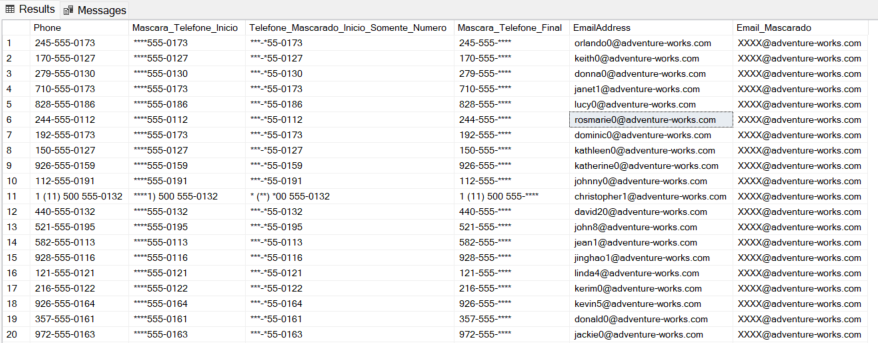
Example 1: Masking phones and emails
SELECT
    Phone,

    -- Mascarar exatamente os primeiros 4 caracteres
    -- ^.{4} -> O início da string (^) seguido de qualquer caractere (.) repedido 4 vezes {4}
    REGEXP_REPLACE(Phone, '^.{4}', '****') AS Mascara_Telefone_Inicio,

    -- Mascarar exatamente os primeiros 4 NÚMEROS, mantendo formatação
    REGEXP_REPLACE(
        REGEXP_REPLACE(
            REGEXP_REPLACE(
                REGEXP_REPLACE(Phone, '\d', '*', 1, 1), -- Mascara o 1º número
            '\d', '*', 1, 1),                           -- Mascara o novo 1º número
        '\d', '*', 1, 1),                               -- E assim por diante...
    '\d', '*', 1, 1) AS Telefone_Mascarado_Inicio_Somente_Numero,

    REGEXP_REPLACE(Phone, '\d{4}$', '****') AS Mascara_Telefone_Final,

    EmailAddress,
    REGEXP_REPLACE(EmailAddress, '^[^@]+', 'XXXX') AS Email_Mascarado
FROM
    SalesLT.Customer
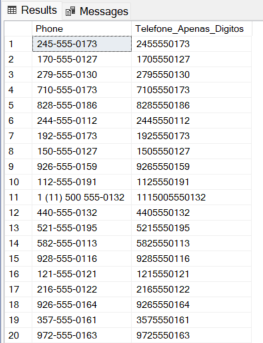
Example 2: Return only numbers from a string
-- Remove parênteses, traços e espaços de uma só vez para deixar apenas os dígitos.
-- Tente fazer isso com REPLACE comum e veja o tamanho do código!
SELECT
    Phone,
    REGEXP_REPLACE(Phone, '[^0-9]', '') AS Telefone_Apenas_Digitos
FROM
    SalesLT.Customer
Example 3: Replacing multiple expressions to normalize a name
-- Exemplo 2: Substituindo múltiplos "ruídos" por um nome de categoria único
DECLARE @Descricao VARCHAR(100) = 'Este item é uma Bicycle, também chamada de Cycle ou Velo';

SELECT
    @Descricao AS Original,
    -- Substitui qualquer uma das palavras no grupo por 'Bike'
    REGEXP_REPLACE(@Descricao, '\b(Bicycle|Cycle|Velo)\b', 'Bike', 1, 0, 'i') AS Descricao_Limpa;

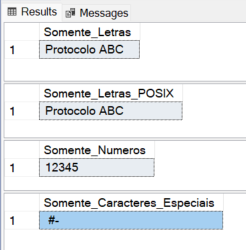
Example 4: Miscellaneous transformations
-- 1. REGEXP_REPLACE substituirá tudo que NÃO é letra ([^A-Za-z]) por nada ('')
SELECT REGEXP_REPLACE('Protocolo #12345-ABC', '[^A-Za-z ]', '') AS Somente_Letras

-- 2. Usando classes POSIX para maior elegância e suporte a acentos (se necessário)
SELECT REGEXP_REPLACE('Protocolo #12345-ABC', '[^[:alpha:] ]', '') AS Somente_Letras_POSIX

-- 3. Retornando apenas números
SELECT REGEXP_REPLACE('Protocolo #12345-ABC', '[^0-9]', '') AS Somente_Numeros

-- 4. Retornando apenas os caracteres especiais
SELECT REGEXP_REPLACE('Protocolo #12345-ABC', '[[:alnum:]]', '') AS Somente_Caracteres_Especiais
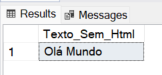
Example 5: Return text without HTML tags
SELECT
    REGEXP_REPLACE('<div><p>Olá</p> <span>Mundo</span></div>', '<[^>]+>', '') AS Texto_Sem_Html
REGEXP_SUBSTR
Returns an occurrence of a string that matches the regular expression pattern. If no match is found, it returns NULL.
The syntax is REGEXP_SUBSTR( string_expression, pattern_expression [ , string_replacement [ , start [ , occurrence [ , flags ] ] ] ] ), where the values for the flags are:
- i: Case insensitive (default false)
- m: Multi-line mode: “^” and “$” match the start/end line in addition to the start/end text (default false)
- s: Allow “.” match “\n” (default false)
- c: Case sensitive (default true)
Official documentation: https://learn.microsoft.com/pt-br/sql/t-sql/functions/regexp-substr-transact-sql
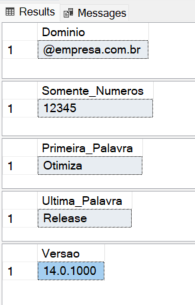
Example 1: Retrieve parts of a string
-- 1. Extraindo o domínio de um e-mail (Tudo após o @)
DECLARE @email VARCHAR(100) = '[email protected]'
SELECT REGEXP_SUBSTR(@email, '@[a-z0-9.-]+') AS Dominio

-- 2. Extraindo apenas os números de uma string suja
SELECT REGEXP_SUBSTR('Protocolo #12345-ABC', '[0-9]+') AS Somente_Numeros

-- 3. Extraindo a primeira palavra de uma frase
SELECT REGEXP_SUBSTR('Otimização de Performance SQL', '^\w+') AS Primeira_Palavra

-- 4. Extraindo a última palavra de uma frase
SELECT REGEXP_SUBSTR('SQL Server 2022 Release', '\w+$') AS Ultima_Palavra

-- 5. Extraindo versão de software (Padrão X.X.X)
DECLARE @log VARCHAR(100) = 'Build version 14.0.1000 patch applied'
SELECT REGEXP_SUBSTR(@log, '[0-9]+\.[0-9]+\.[0-9]+') AS Versao
Result:
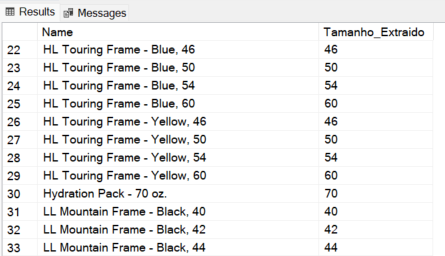
Example 2: Return a number made up of 2 digits in the string
SELECT
    Name,
    REGEXP_SUBSTR(Name, '\b[0-9]{2}\b') AS Tamanho_Extraido
FROM
    SalesLT.Product
WHERE
    REGEXP_LIKE(Name, '\b[0-9]{2}\b')
Example 3: Extracting only the User name from the Email
-- Usamos o 6º parâmetro para retornar apenas o que está dentro do primeiro parêntese
SELECT
    EmailAddress,
    REGEXP_SUBSTR(EmailAddress, '^([^@]+)', 1, 1, 'i', 1) AS Usuario_Email
FROM
    SalesLT.Customer;
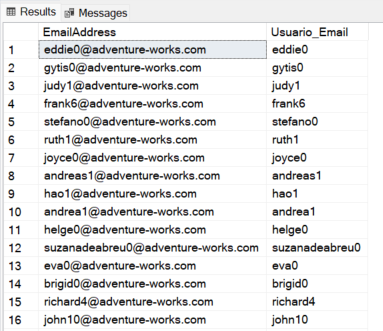
Unlike traditional SUBSTRING, which may return an empty string or error if the indices are wrong, REGEXP_SUBSTR will return NULL if the pattern is not found. Use this to your advantage in your cleanup queries: WHERE REGEXP_SUBSTR(column, pattern) IS NOT NULL
This ensures that your extraction is clean and that you do not attempt to perform math or JOIN operations on non-existent values.
REGEXP_MATCHES
Returns a table of captured substrings that match a regular expression pattern to a string. If no match is found, the function returns no rows.
The syntax is REGEXP_MATCHES( string_expression, pattern_expression [ , flags ] ), where the values for the flags are:
- i: Case insensitive (default false)
- m: Multi-line mode: “^” and “$” match the start/end line in addition to the start/end text (default false)
- s: Allow “.” match “\n” (default false)
- c: Case sensitive (default true)
Official documentation: https://learn.microsoft.com/pt-br/sql/t-sql/functions/regexp-matches-transact-sql
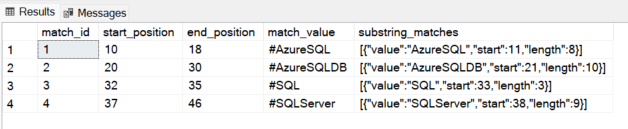
Example 1: Returning a table with the hashtags of a sentence.
-- Opção 1: Especificando manualmente o conjunto de caracteres
SELECT * FROM REGEXP_MATCHES ('Learning #AzureSQL #AzureSQLDB #SQL #SQLServer', '#([A-Za-z0-9_]+)');

-- Opção 2: Utilizando o padrão \w+ para capturar a palavra após o #
SELECT * FROM REGEXP_MATCHES('Learning #AzureSQL #AzureSQLDB #SQL #SQLServer', '#(\w+)');
Example 2: Returning a table of protocols in the string
-- 2. Localizando todos os protocolos (Formato: 3 letras - 4 números)
-- Ex: ABC-1234, XYZ-9999
SELECT * FROM REGEXP_MATCHES('Protocolos: ABC-1234 e XYZ-9999', '[A-Z]{3}-[0-9]{4}');

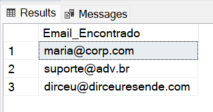
Example 3: Retrieving all emails from a string
SELECT
    m.match_value AS Email_Encontrado
FROM (VALUES ('Contatos: [email protected]; [email protected]. Email do Dirceu: [email protected]')) AS t(Texto)
CROSS APPLY REGEXP_MATCHES(t.Texto, '[a-z0-9._%+-]+@[a-z0-9.-]+\.[a-z]{2,}', 'i') m;
Example 4: Varied queries
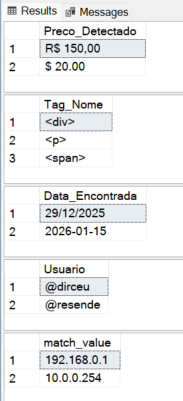
-- 1. IDENTIFICANDO TODOS OS VALORES MONETÁRIOS (R$, $)
SELECT
    m.match_value AS Preco_Detectado
FROM (VALUES ('Item A: R$ 150,00 | Item B: $ 20.00')) AS t(Texto)
CROSS APPLY REGEXP_MATCHES(t.Texto, '(R\$|\$)\s?[0-9,.]+') m;

-- 2. EXTRAINDO TODAS AS TAGS HTML (Nome da Tag)
-- Usamos grupos de captura para pegar apenas o que está dentro de < >
SELECT
    m.match_value AS Tag_Nome
FROM (VALUES ('<div><p>Texto</p><span>Item</span></div>')) AS t(Html)
CROSS APPLY REGEXP_MATCHES(t.Html, '<([a-z1-6]+)>') m;

-- 3. LOCALIZANDO TODAS AS DATAS EM FORMATOS VARIADOS
SELECT
    m.match_value AS Data_Encontrada
FROM (VALUES ('Início: 29/12/2025 - Fim: 2026-01-15')) AS t(Texto)
CROSS APPLY REGEXP_MATCHES(t.Texto, '\b(\d{2}/\d{2}/\d{4}|\d{4}-\d{2}-\d{2})\b') m;

-- 4. EXTRAINDO MENÇÕES DE USUÁRIOS (@usuario)
SELECT
    m.match_value AS Usuario
FROM (VALUES ('Relatório enviado por @dirceu e revisado por @resende')) AS t(Msg)
CROSS APPLY REGEXP_MATCHES(t.Msg, '@(\w+)') m;

-- 5. ISOLANDO ENDEREÇOS IP DE UM LOG ESCALAR
DECLARE @log VARCHAR(100) = 'Erro de rede nos IPs 192.168.0.1 e 10.0.0.254';
SELECT match_value FROM REGEXP_MATCHES(@log, '\b(?:\d{1,3}\.){3}\d{1,3}\b');
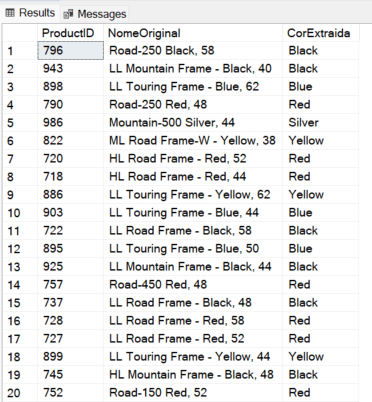
Example 5: Extract colors from a string
SELECT
    p.ProductID,
    p.Name AS NomeOriginal,
    m.match_value AS CorExtraida
FROM
    SalesLT.Product p
    CROSS APPLY REGEXP_MATCHES(p.Name, '\b(Black|Silver|Red|Blue|Yellow|White|Grey|Multi)\b', 'i') m;
REGEXP_SPLIT_TO_TABLE
Returns a split table of strings, delimited by the regex pattern. If there is no match to the pattern, the function returns the string.
The syntax is REGEXP_SPLIT_TO_TABLE( string_expression, pattern_expression [ , flags ] ), where the values for the flags are:
- i: Case insensitive (default false)
- m: Multi-line mode: “^” and “$” match the start/end line in addition to the start/end text (default false)
- s: Allow “.” match “\n” (default false)
- c: Case sensitive (default true)
Official documentation: https://learn.microsoft.com/pt-br/sql/t-sql/functions/regexp-split-to-table-transact-sql
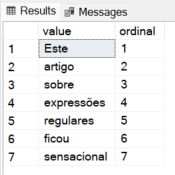
Example 1: Returning a table with each word in the text as a line
SELECT *
FROM REGEXP_SPLIT_TO_TABLE ('Este artigo sobre expressões regulares ficou sensacional', '\s+');
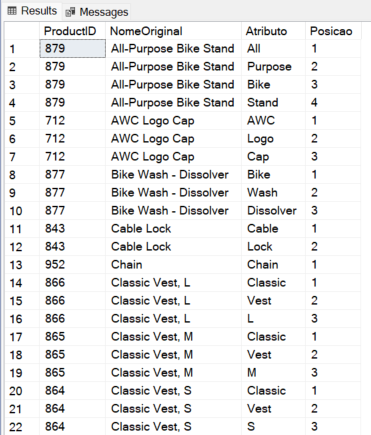
Example 2: Break text into multiple lines with multiple delimiters
SELECT
    p.ProductID,
    p.Name AS NomeOriginal,
    s.value AS Atributo,
    s.ordinal AS Posicao
FROM
    SalesLT.Product p
    CROSS APPLY REGEXP_SPLIT_TO_TABLE(p.Name, '[- ,/]+') s;
This function is very similar to the STRING_SPLIT:
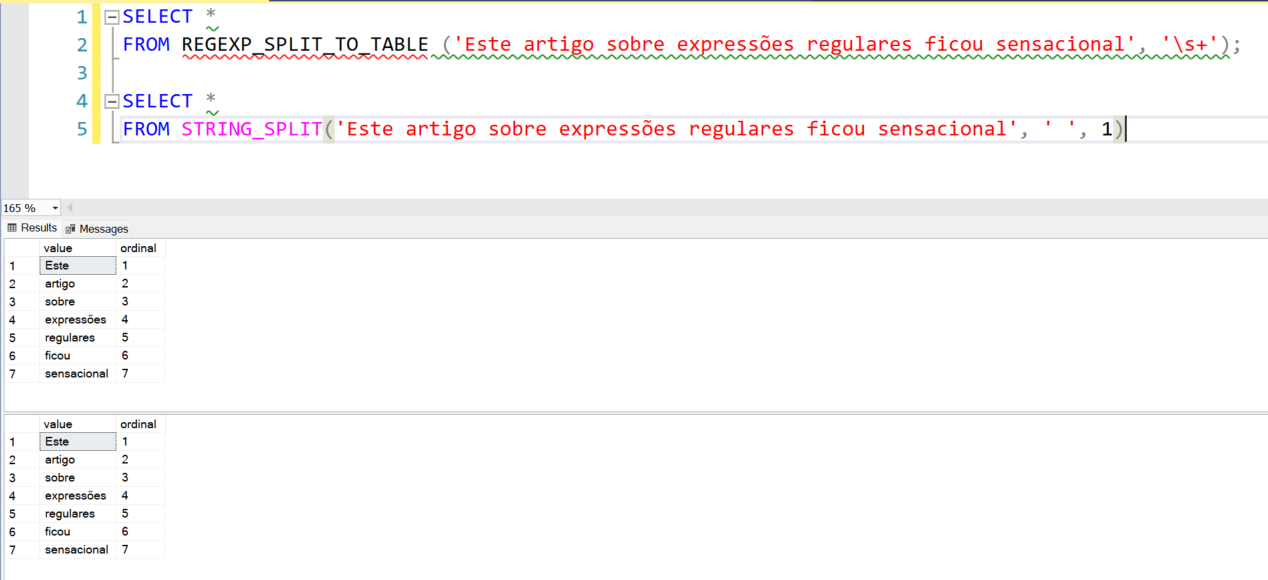
However, it has a subtle difference, which is the fact that the STRING_SPLIT function accepts only 1 separator character, while REGEXP_SPLIT_TO_TABLE does not have this limit.
I can separate my string using 3 characters as a separator (-=-):
SELECT *
FROM REGEXP_SPLIT_TO_TABLE ('Este-=-artigo-=-sobre-=-expressões-=-regulares-=-ficou-=-sensacional', '-=-');
But when trying to do the same thing using STRING_SPLIT, we came across this error message:
SELECT *
FROM STRING_SPLIT('Este-=-artigo-=-sobre-=-expressões-=-regulares-=-ficou-=-sensacional', '-=-', 1)
Procedure expects parameter ‘separator’ of type ‘nchar(1)/nvarchar(1)’.
Comparison: Native vs SQLCLR
Now we come to the point that everyone wanted to know: Is it worth migrating what we already have in SQLCLR to native functions?
Syntax and Maintenance
In SQLCLR, each function needed to be mapped to a C# method. If you needed new behavior, you needed to recompile the DLL, deploy it to the server (often depending on user privileges). sysadmin) and hope there are no .NET Framework version issues. With native functions, the syntax is standard T-SQL. Any SQL developer can read and understand what is happening without having to open a project in Visual Studio.
Performance and Resource Wait Types
When we use SQLCLR, SQL Server needs to manage the AppDomain and perform data “marshaling” between the relational engine and the CLR. This generates processing waits that often translate into CLR_AUTO_EVENT ou CLR_MANUAL_EVENT.
With native functions:
- CPU: Processing occurs within the SQL execution engine itself, allowing for better parallelism.
- Memory: There is no need to reserve additional memory for the CLR Garbage Collector.
- IOPS: Although the direct impact on IO is smaller, the efficiency in reading LOB columns (VARCHAR(MAX)) with native Regex is superior as it does not require copying the data to the managed environment.
A point of attention: Both SQLCLR and Native Regex are not SARGABLE. That is, if you put a WHERE REGEXP_LIKE(…) in a column, SQL Server will probably do a Index Scan ou Table Scan. The regex is processed line by line.
Additionally, when using REGEXP_MATCHES ou REGEXP_SPLIT_TO_TABLE, SQL Server does not need to perform “Marshaling” (copying data) to the SQLCLR .NET environment and this significantly improves the performance of the native function.
Performance comparison between SQLCLR and native functions:

If you want to create the functions in your environment, just run the script below:
CREATE ASSEMBLY [Regexp]
FROM 0x4D5A90000300000004000000FFFF0000B800000000000000400000000000000000000000000000000000000000000000000000000000000000000000800000000E1FBA0E00B409CD21B8014CCD21546869732070726F6772616D2063616E6E6F742062652072756E20696E20444F53206D6F64652E0D0D0A2400000000000000504500004C0103008C57115B0000000000000000E00022200B013000000E00000006000000000000BE2C00000020000000400000000000100020000000020000040000000000000006000000000000000080000000020000000000000300608500001000001000000000100000100000000000001000000000000000000000006C2C00004F00000000400000A002000000000000000000000000000000000000006000000C000000342B00001C0000000000000000000000000000000000000000000000000000000000000000000000000000000000000000200000080000000000000000000000082000004800000000000000000000002E74657874000000C40C000000200000000E000000020000000000000000000000000000200000602E72737263000000A0020000004000000004000000100000000000000000000000000000400000402E72656C6F6300000C0000000060000000020000001400000000000000000000000000004000004200000000000000000000000000000000A02C00000000000048000000020005004C220000E808000001000000000000000000000000000000000000000000000000000000000000000000000000000000000000000000000000000000000000001B3002006A00000001000011000F00280500000A2D090F01280500000A2B01170A062C087E0600000A0B2B4800000F00280700000A0F01280700000A280800000A0C086F0900000A2D077E0600000A2B16086F0A00000A166F0B00000A6F0C00000A280D00000A0BDE0A0D007E0600000A0BDE00072A000001100000000021003D5E000A090000011B3003005900000002000011000F00280500000A2D120F01280500000A2D090F02280500000A2B01170A062C087E0600000A0B2B2E00000F00280700000A0F01280700000A0F02280700000A280E00000A280D00000A0BDE0A0C007E0600000A0BDE00072A0000000110000000002A00234D000A090000011B3003008D0000000300001100730F00000A0A02281000000A2D0803281000000A2B01170D092C050613042B69170B020316281100000A0C00086F1200000A13052B2D11056F1300000A1306000607281400000A11066F1500000A280D00000A73060000066F1600000A260717580B0011056F1700000A2DCADE1611057510000001130711072C0811076F1800000A00DC0613042B0011042A00000001100000020035003A6F001600000000133002002100000004000011000274030000020A03067B01000004811100000104067B0200000481070000012A2202281900000A002A5E02281900000A000002037D0100000402047D020000042A000042534A4201000100000000000C00000076342E302E33303331390000000005006C000000C8020000237E0000340300002403000023537472696E6773000000005806000004000000235553005C0600001000000023475549440000006C0600007C02000023426C6F620000000000000002000001571502000902000000FA01330016000001000000170000000300000002000000060000000C00000019000000060000000400000001000000030000000100000000005A010100000000000600F00024020600100124020600C70011020F00440200000600DB0279010A00DB00C8010A0038015B020E00540170020600A00179010A007F00C8010A007900C80106009F008F020600FA028F020E00800170020600F1018F020600AB0079010A0001005B020E000D0370020E00BB0170020E00900170020E00B70070020600440179010E00B7027002000000000A00000000000100010001001000A2020000150001000100030010006E000000150001000600060013008D000600AA011E0050200000000096004B0191000100D8200000000096008E009A00030050210000000096005C00A5000600FC210000000094004800AC00080029220000000086180B0206000B0032220000000086180B02B7000B0000000100AA0100000200240000000100AA0100000200240000000300E30100000100AA01000002002400000001006B00020002001C0002000300B301000001001C0000000200B30109000B02010011000B02060019000B020A0031000B020600390065011A0039006B011E0039002E0122009100540126009900CF021A004100C4022D00A10070013200A9002E0122003900E202380091009700460069000B020600B10013035D009100530262007100FD016B007900EE0270008900E2027400290042012200690044007A00790004031A008100BF00060029000B02060020002300F0002E000B00BF002E001300C8002E001B00E70040002300F00060002300F50010003E004D007F00048000000000000000000000000000000000C101000004000000000000000000000084003B000000000004000000000000000000000084002F000000000004000000000000000000000084007901000000000300020000000053716C496E743332003C4D6F64756C653E004E725F4C696E6861006E724C696E68610044735F4D6173636172610053797374656D2E44617461006D73636F726C6962004164640046696C6C526F775F5265676578705F46696E6400666E635265676578705F46696E64006F626A52656765787046696E640053797374656D446174614163636573734B696E6400666E6352656765785F5265706C6163650049456E756D657261626C650049446973706F7361626C65004361707475726500446973706F73650044656275676761626C654174747269627574650053716C46756E6374696F6E41747472696275746500436F6D70696C6174696F6E52656C61786174696F6E734174747269627574650052756E74696D65436F6D7061746962696C697479417474726962757465006765745F56616C75650053716C537472696E6700546F537472696E6700666E6352656765785F4D61746368005265676578702E646C6C006765745F49734E756C6C006765745F4974656D0053797374656D004D61746368436F6C6C656374696F6E0047726F7570436F6C6C656374696F6E00457863657074696F6E0044735F546578746F006473546578746F0047726F757000526567657870004D6963726F736F66742E53716C5365727665722E5365727665720044735F537562737469747569720049456E756D657261746F7200476574456E756D657261746F72002E63746F720053797374656D2E446961676E6F73746963730053797374656D2E52756E74696D652E436F6D70696C6572536572766963657300446562756767696E674D6F646573004D6174636865730053797374656D2E446174612E53716C54797065730053797374656D2E546578742E526567756C617245787072657373696F6E730053797374656D2E436F6C6C656374696F6E730055736572446566696E656446756E6374696F6E730052656765784F7074696F6E73006765745F47726F757073006765745F53756363657373004F626A656374006F705F496D706C69636974006765745F43757272656E740041727261794C697374004D6F76654E6578740052656765780049734E756C6C4F72456D70747900000000000000000C14EAF7F46A2245B903BE327055CEBE0004200101080320000105200101111109070402111D12211225032000020306111D0320000E06000212210E0E0420001251052001124D08050001111D0E07070302111D12250600030E0E0E0E0F07081235081239021231123D1C1241040001020E08000312390E0E115D042000123D0320001C050001114508042001081C040701120C08B77A5C561934E08903061145080002111D111D111D0A0003111D111D111D111D06000212310E0E0A0003011C10114510111D072002011145111D0801000800000000001E01000100540216577261704E6F6E457863657074696F6E5468726F7773010801000701000000000401000000818501000400540E1146696C6C526F774D6574686F644E616D651346696C6C526F775F5265676578705F46696E64540E0F5461626C65446566696E6974696F6E244E725F4C696E686120494E542C2044735F546578746F204E56415243484152284D4158295455794D6963726F736F66742E53716C5365727665722E5365727665722E446174614163636573734B696E642C2053797374656D2E446174612C2056657273696F6E3D342E302E302E302C2043756C747572653D6E65757472616C2C205075626C69634B6579546F6B656E3D623737613563353631393334653038390A446174614163636573730100000054557F4D6963726F736F66742E53716C5365727665722E5365727665722E53797374656D446174614163636573734B696E642C2053797374656D2E446174612C2056657273696F6E3D342E302E302E302C2043756C747572653D6E65757472616C2C205075626C69634B6579546F6B656E3D623737613563353631393334653038391053797374656D4461746141636365737301000000000000008C57115B00000000020000001C010000502B0000500D000052534453A6F053CD17E4E94A923D821619E3D25F01000000433A5C55736572735C646966696C5C446F63756D656E74735C56697375616C2053747564696F20323031375C50726F6A656374735C5265676578705C5265676578705C6F626A5C44656275675C5265676578702E7064620000000000000000000000000000000000000000000000000000000000000000000000000000000000000000000000000000000000000000000000000000000000000000000000000000000000000000000000000000000000000000000000000000000000000000000000000000000000000000000000000000000000000000000000000000000000000000000000000000000000000000000000000000000000000000000000000000000000942C00000000000000000000AE2C0000002000000000000000000000000000000000000000000000A02C0000000000000000000000005F436F72446C6C4D61696E006D73636F7265652E646C6C0000000000FF25002000100000000000000000000000000000000000000000000000000000000000000000000000000000000000000000000000000000000000000000000000000000000000000000000000000000000000000000000000000000000000000000000000000000000000000000000000000000000000000000000000000000000000000000000000000000000000000000000000000000000000000000000000000000000000000000000000000000000000000000000000000000000000000000000000000000000000000000000000000000000000000000000000000000000000000000000000000000000000000000000000000000000000000000000000000000000000000000000000000000000000000000000000000000000000000000000000000000000000000000000000000000000000000000000000000000000000000000000000000000000000000100100000001800008000000000000000000000000000000100010000003000008000000000000000000000000000000100000000004800000058400000440200000000000000000000440234000000560053005F00560045005200530049004F004E005F0049004E0046004F0000000000BD04EFFE00000100000000000000000000000000000000003F000000000000000400000002000000000000000000000000000000440000000100560061007200460069006C00650049006E0066006F00000000002400040000005400720061006E0073006C006100740069006F006E00000000000000B004A4010000010053007400720069006E006700460069006C00650049006E0066006F0000008001000001003000300030003000300034006200300000002C0002000100460069006C0065004400650073006300720069007000740069006F006E000000000020000000300008000100460069006C006500560065007200730069006F006E000000000030002E0030002E0030002E003000000036000B00010049006E007400650072006E0061006C004E0061006D00650000005200650067006500780070002E0064006C006C00000000002800020001004C006500670061006C0043006F0070007900720069006700680074000000200000003E000B0001004F0072006900670069006E0061006C00460069006C0065006E0061006D00650000005200650067006500780070002E0064006C006C0000000000340008000100500072006F006400750063007400560065007200730069006F006E00000030002E0030002E0030002E003000000038000800010041007300730065006D0062006C0079002000560065007200730069006F006E00000030002E0030002E0030002E00300000000000000000000000000000000000000000000000000000000000000000000000000000000000000000000000000000000000000000000000000000000000000000000000000000000000000000000000000000000000000000000000000000000000000000000000000000000000000000000000000000000000000000000000000000000000000000000000000000000000000000000000000000000000000000000000000000000000000000000000000000000000000000000000000000000000000000000000000000000000000000000000000000000000000000000000000000000000000000000000000000000000000000000000000000000000000000000000000000000000000000000000000000000000000000000000000000000000000000000000000000000000000000000000000000000000000000000000000000000000000000000000000000000000000000000000000000000000000000000000002000000C000000C03C00000000000000000000000000000000000000000000000000000000000000000000000000000000000000000000000000000000000000000000000000000000000000000000000000000000000000000000000000000000000000000000000000000000000000000000000000000000000000000000000000000000000000000000000000000000000000000000000000000000000000000000000000000000000000000000000000000000000000000000000000000000000000000000000000000000000000000000000000000000000000000000000000000000000000000000000000000000000000000000000000000000000000000000000000000000000000000000000000000000000000000000000000000000000000000000000000000000000000000000000000000000000000000000000000000000000000000000000000000000000000000000000000000000000000000000000000000000000000000000000000000000000000000000000000000000000000000000000000000000000000000000000000000000000000000000000000000000000000000000000000000000000000000000000000000000000000000000000000000000000000000000000000000000000000000000000000000000000000000000000000000000000000000000000000000000000000000000
WITH PERMISSION_SET = SAFE
GO

CREATE FUNCTION [dbo].[fncRegex_Match] (@Ds_Texto [nvarchar](MAX), @Ds_Mascara [nvarchar](MAX))
RETURNS [nvarchar](MAX)
AS EXTERNAL NAME [Regexp].[UserDefinedFunctions].[fncRegex_Match];
GO

CREATE FUNCTION [dbo].[fncRegex_Replace] (@Ds_Texto [nvarchar](MAX), @Ds_Mascara [nvarchar](MAX), @Ds_Substituir [nvarchar](MAX))
RETURNS [nvarchar](MAX)
AS EXTERNAL NAME [Regexp].[UserDefinedFunctions].[fncRegex_Replace];
GO

CREATE FUNCTION [dbo].[fncRegexp_Find](@Ds_Texto [nvarchar](max), @Ds_Mascara [nvarchar](max))
RETURNS  TABLE (
    [Nr_Linha] [int] NULL,
    [Ds_Texto] [nvarchar](max) NULL
) WITH EXECUTE AS CALLER
AS
EXTERNAL NAME [Regexp].[UserDefinedFunctions].[fncRegexp_Find]
GO
For example: WHERE [Column] LIKE ‘192%’ AND REGEXP_LIKE([Column], ‘complex_pattern’). Simple LIKE does the first filter using index, and Regex only processes what's left.
To demonstrate that LIKE is faster than REGEXP, even using LIKE ‘%texto%’, we can use the script below:
SELECT
    Name,
    ProductNumber
FROM
    SalesLT.Product
WHERE
    REGEXP_LIKE(Name, 'mountain', 'i'); -- 'c' força Case In-Sensitivity

SELECT
    Name,
    ProductNumber
FROM
    SalesLT.Product
WHERE
    Name LIKE '%mountain%' collate SQL_Latin1_General_CP1_CI_AI -- Forçar ser Case In-Sensitivity
Result:

Security
This is the biggest gain. Many Azure SQL Managed Instance instances or extremely locked-down On-Premise environments do not allow you to run clr enabled. With native functions, this barrier disappears. You have the power of Regex by keeping the instance in SURFACE AREA CONFIGURATION safe.
Conclusion
The introduction of native Regex functions in SQL Server 2025 is a maturity milestone for the platform. They eliminate the need for technical “workarounds” with SQLCLR for everyday string manipulation tasks and provide much more predictable and integrated performance. If you are starting a new project or planning to upgrade to SQL 2025, using these functions is the official and recommended path.
I hope you liked this tip, a big hug and see you next time!

Comments (0)
Loading comments...