
Hey guys!
In this post, I would like to show you how to create a login audit using the instance logs, which is a native option of SQL Server and does not require the creation of any additional resources such as trigger, Extended Events, Audit, etc..
I had already published the article SQL Server – How to implement auditing and control of logins (Logon Trigger) using a trigger and it was a very interesting solution, but, like all logon triggers, it can pose some risks if not well implemented and prevent users from logging in.
I also showed a similar solution in the article SQL Server – How to avoid brute force attacks on your database, but the focus was only on connection failures due to non-existent user or incorrect password.
How to enable login auditing in SQL Server
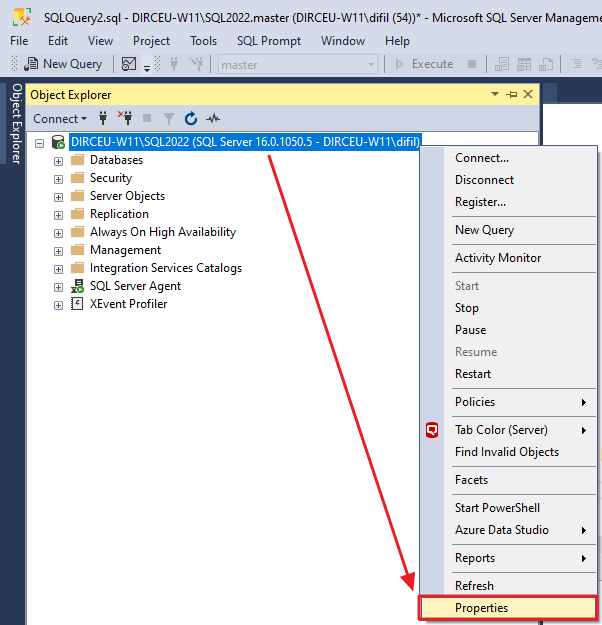
To activate login auditing in SQL Server, first open the instance in “Object Explorer”, right-click and select the “Properties” option
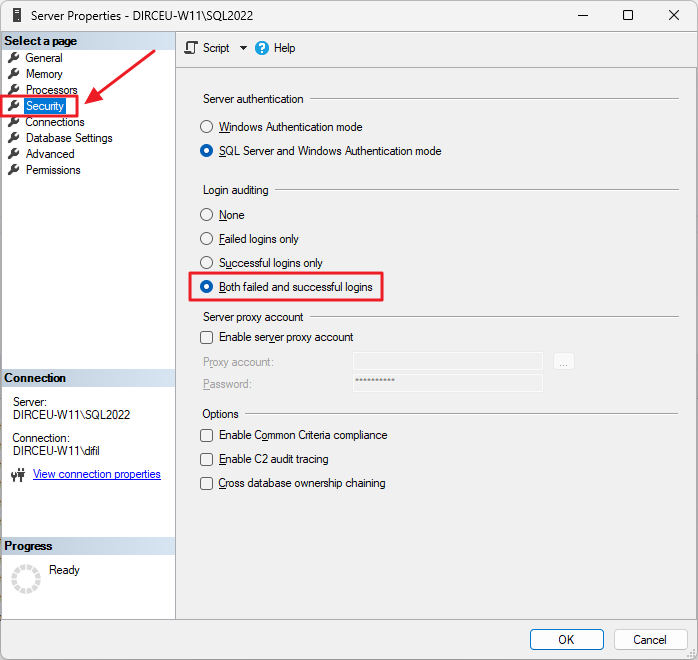
Click on the “Security” tab and then in the “Login Auditing” category, check the option “Both failed and successful logins”
Another way to activate this is using this T-SQL script:
USE [master]
GO
EXEC xp_instance_regwrite N'HKEY_LOCAL_MACHINE', N'Software\Microsoft\MSSQLServer\MSSQLServer', N'AuditLevel', REG_DWORD, 3
GO
After making this change, restart the SQL Server service through SQL Server Configuration Manager.
How to read collected audit data
To read the collected audit data, we will use the internal procedure xp_readerrorlog, which reads the data in the SQL Server logs.
Below is the script that you can use to capture this data from SQL Server logs and store it in a physical table in your database, to maintain history.
--------------------------------------------------------------
-- Cria as tabelas temporárias
--------------------------------------------------------------

IF (OBJECT_ID('tempdb..#Arquivos_Log') IS NOT NULL) DROP TABLE #Arquivos_Log
CREATE TABLE #Arquivos_Log (
    [idLog] INT,
    [dtLog] NVARCHAR(30) COLLATE SQL_Latin1_General_CP1_CI_AI,
    [tamanhoLog] INT
)

IF (OBJECT_ID('tempdb..#Audit_Login') IS NOT NULL) DROP TABLE #Audit_Login
CREATE TABLE #Audit_Login (
    [LogNumber] TINYINT NULL,
    [LogDate] DATETIME NOT NULL,
    [ProcessInfo] NVARCHAR(50) COLLATE SQL_Latin1_General_CP1_CI_AI NOT NULL,
    [Username] VARCHAR(200) NULL,
    [AuthenticationType] VARCHAR(20) NULL,
    [Result] VARCHAR(20) NULL,
    [IP] VARCHAR(100) NULL,
    [Reason] VARCHAR(500) NULL,
    [Text] NVARCHAR(MAX) COLLATE SQL_Latin1_General_CP1_CI_AI NOT NULL
)


IF (OBJECT_ID('dbo.Login_Audit') IS NULL)
BEGIN

    -- DROP TABLE [dbo].[Login_Audit]
    CREATE TABLE [dbo].[Login_Audit]
    (
        [LogNumber] TINYINT NOT NULL,
        [LogDate] DATETIME NOT NULL,
        [ProcessInfo] NVARCHAR(50) NOT NULL,
        [Username] VARCHAR(200) NOT NULL,
        [AuthenticationType] VARCHAR(20) NULL,
        [Result] VARCHAR(20) NULL,
        [IP] VARCHAR(100) NOT NULL,
        [Reason] VARCHAR(500) NULL
    ) WITH(DATA_COMPRESSION=PAGE)

    CREATE CLUSTERED INDEX SK01_Login_Audit ON dbo.Login_Audit(LogDate) WITH(DATA_COMPRESSION=PAGE)

END


--------------------------------------------------------------
-- Importa os arquivos do ERRORLOG
--------------------------------------------------------------

INSERT INTO #Arquivos_Log
EXEC sys.sp_enumerrorlogs


--------------------------------------------------------------
-- Loop para procurar por tentativas de login
--------------------------------------------------------------

DECLARE
    @Contador INT = 0,
    @Total INT = (SELECT COUNT(*) FROM #Arquivos_Log),
    @Ultima_Hora VARCHAR(19) = FORMAT(ISNULL((SELECT DATEADD(SECOND, 1, MAX([LogDate])) FROM dbo.Login_Audit), '1990-01-01'), 'yyyy-MM-dd HH:mm:ss'),
    @Agora VARCHAR(19) = CONVERT(VARCHAR(19), GETDATE(), 121)


WHILE(@Contador < @Total)
BEGIN


    -- Pesquisa por falha de login
    INSERT INTO #Audit_Login (LogDate, ProcessInfo, [Text])
    EXEC master.dbo.xp_readerrorlog @Contador, 1, N'Login failed for user ', NULL, @Ultima_Hora, @Agora


    -- Pesquisa por tentiva de login com sucesso
    INSERT INTO #Audit_Login (LogDate, ProcessInfo, [Text])
    EXEC master.dbo.xp_readerrorlog @Contador, 1, N'Login succeeded for user ', NULL, @Ultima_Hora, @Agora


    -- Atualiza o número do arquivo de log
    UPDATE #Audit_Login
    SET LogNumber = @Contador
    WHERE LogNumber IS NULL


    SET @Contador += 1

END


-------------------------------------------------------
-- Popula as colunas adicionais
-------------------------------------------------------

UPDATE [#Audit_Login]
SET
    [Username] = (CASE
        WHEN [Text] LIKE '%Login failed%' THEN LTRIM(RTRIM(REPLACE(REPLACE(SUBSTRING(REPLACE([Text], 'Login failed for user ''', ''), 1, CHARINDEX('. Reason:', REPLACE([Text], 'Login failed for user ''', '')) - 2), CHAR(10), ''), CHAR(13), '')))
        ELSE LTRIM(RTRIM(REPLACE(REPLACE(SUBSTRING(REPLACE([Text], 'Login succeeded for user ''', ''), 1, CHARINDEX('''', REPLACE([Text], 'Login succeeded for user ''', '')) - 1), CHAR(10), ''), CHAR(13), '')))
    END),

    [IP] = LTRIM(RTRIM(REPLACE(REPLACE(REPLACE((SUBSTRING([Text], CHARINDEX('[CLIENT: ', [Text]) + 9, LEN([Text]))), ']', ''), CHAR(10), ''), CHAR(13), '')))


UPDATE [#Audit_Login]
SET
    [AuthenticationType] = (CASE
        WHEN [Text] LIKE '%Connection made using Integrated authentication.%' THEN 'Windows'
        WHEN [Text] LIKE '%Connection made using SQL Server authentication.%' THEN 'SQL Server'
        ELSE (CASE WHEN [Username] NOT LIKE '%@%' AND [Username] NOT LIKE '%\%' THEN 'SQL Server' ELSE 'Windows' END)
    END),

    [Result] = (CASE
        WHEN [Text] LIKE 'Login failed for user%' THEN 'Fail'
        WHEN [Text] LIKE 'Login succeeded for user%' THEN 'Sucess'
    END)


UPDATE [#Audit_Login]
SET
    [Reason] = (CASE
        WHEN [Text] LIKE '%Login failed%' THEN LTRIM(RTRIM(SUBSTRING([Text], CHARINDEX('. Reason:', [Text]) + 9, LEN([Text]))))
    END)
WHERE
    [Result] = 'Fail'


UPDATE [#Audit_Login]
SET
    [Reason] = SUBSTRING([Reason], 1, CHARINDEX(' [CLIENT', [Reason]) - 1)
WHERE
    [Result] = 'Fail'


INSERT INTO dbo.Login_Audit
SELECT
    [LogNumber],
    [LogDate],
    [ProcessInfo],
    [Username],
    [AuthenticationType],
    [Result],
    [IP],
    [Reason]
FROM
    [#Audit_Login]
Audit result:
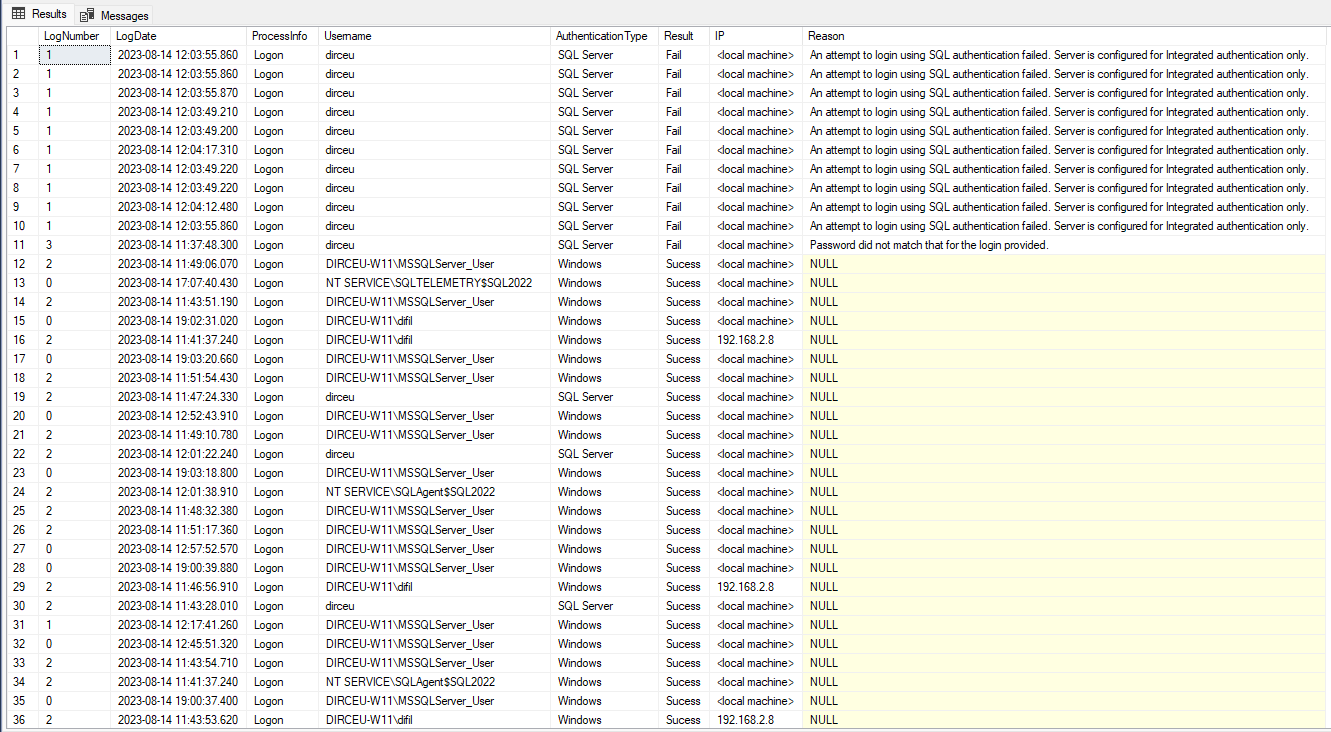
With this data, you can now create various monitoring, analysis, monitor the number of logins, check if you are having a brute force attack or find out whether a certain user is logging into the database or not.
I hope you liked this tip and see you next time!

Comentários (0)
Carregando comentários…