
Hey guys!!
On Thursday (09/04), I saw a really cool question in the Telegram group SQL Server – DBA, the largest group of DBA's and SQL Server Developers in the world, where the person had a table in the bank, where a column was of XML type, and he would like to export to disk, each row of that table as a separate XML file and I thought it would make a cool article to demonstrate this solution.
To export table data to text files on disk, I will use the solutions shared in the article SQL Server – How to export database data to text file (CLR, OLE, BCP).
If you are interested in learning better how to manipulate and treat XML files within SQL Server, I suggest reading the article SQL Server – How to read, import and export data from XML files.
For this example, I will use the script below to create a demonstration table, simulating the original table in the problem:
-- Criação da base de testes
IF (OBJECT_ID('dbo.Dados') IS NOT NULL) DROP TABLE dbo.Dados
CREATE TABLE dbo.Dados (
    Nome VARCHAR(100),
    Cidade VARCHAR(100),
    Conteudo XML
)

INSERT INTO dbo.Dados
(
    Nome,
    Cidade,
    Conteudo
)
VALUES
('Dirceu Resende', 'Bridgetown','<Pessoa><Nome>Dirceu Resende</Nome><Conteudo>Teste</Conteudo></Pessoa>'),
('Lya', 'Vila Velha', '<Pessoa><Nome>Lya</Nome><Conteudo>Teste 1</Conteudo></Pessoa>'),
('Sula', 'Belo Hozionte', '<Pessoa><Nome>Sula</Nome><Conteudo>Teste 2</Conteudo></Pessoa>'),
('Letícia', 'Vitória', '<Pessoa><Nome>Lele</Nome><Conteudo>Teste 3</Conteudo></Pessoa>'),
('Rafael', 'Fortaleza', '<Pessoa><Nome>Rafa</Nome><Conteudo>Teste 4</Conteudo></Pessoa>'),
('Leandro', 'São Paulo', '<Pessoa><Nome>Mongo</Nome><Conteudo>Teste 5</Conteudo></Pessoa>'),
('Arthur', 'Brasília', '<Pessoa><Nome>iFan</Nome><Conteudo>Teste 6</Conteudo></Pessoa>'),
('Jhonathan', 'São Paulo', '<Pessoa><Nome>Jon</Nome><Conteudo>Teste 7</Conteudo></Pessoa>');
Table example:
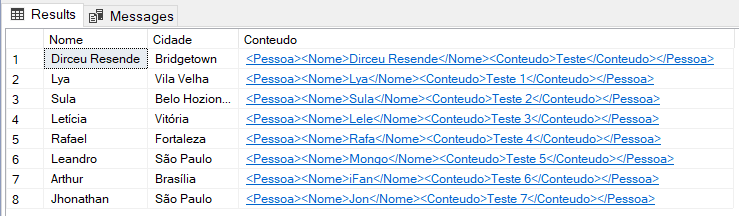
How to export the contents of a column to XML files
As part of the proposed solution for this scenario, I will use the Stored Procedure stpWrite_File_FSO, available in the article File operations using OLE Automation in SQL Server, to create text files with the contents of the columns:
Click to view the Stored Procedure codeAfter creating this Stored Procedure, create destination directory for XML files that will be generated and run the script below:
-- Cria uma tabela temporária rankeada
IF (OBJECT_ID('tempdb..#Temporario_Ranking') IS NOT NULL) DROP TABLE #Temporario_Ranking
SELECT
    *,
    ROW_NUMBER() OVER(ORDER BY Nome) AS Ranking
INTO
    #Temporario_Ranking
FROM
    dbo.Dados


-- Cria o looping para iterar em casa linha da tabela, recuperar as informações e gravar os arquivos
DECLARE
    @Contador INT = 1, -- Variável para iterar entre cada linha da linha
    @Total INT = (SELECT COUNT(*) FROM #Temporario_Ranking), -- Variável que vai guardar o total de linhas da tabela
    @Nome VARCHAR(100) -- Variável que vai guardar o valor da coluna "Nome" da linha atual da iteração
    @Conteudo VARCHAR(MAX) -- Variável que vai guardar o valor da coluna "Conteúdo" da linha atual da iteração,
    @Diretorio VARCHAR(500) = 'C:\Temporario\XML\', -- Diretório de destinos dos arquivos (deve ser criado previamente)
    @Nome_Arquivo VARCHAR(255) -- Nome do arquivo que será criado na iteração atual

WHILE (@Contador <= @Total)
BEGIN


    -- Recupera as informações a partir da linha atual
    SELECT
        @Nome = Nome,
        @Conteudo = CONVERT(VARCHAR(MAX), Conteudo),
        @Nome_Arquivo = @Diretorio + Nome + '.xml'
    FROM
        #Temporario_Ranking
    WHERE
        Ranking = @Contador


    -- Executa a Stored Procedure para criar o arquivo XML com o conteúdo recuperado na instrução anterior
    EXEC dbo.stpEscreve_Arquivo_FSO
        @String = @Conteudo,    -- varchar(max)
        @Ds_Arquivo = @Nome_Arquivo -- varchar(1501)


    -- Incrementa o contador de iterações
    SET @Contador += 1

END
After executing the script below, making the necessary adjustments for your scenario, the destination directory must have been populated with column content of type XML, with one file for each row of the table.
I hope you enjoyed this quick and very useful tip in everyday life, especially for those just starting out.
A big hug and see you next time!

Comentários (0)
Carregando comentários…