
Hey guys!
All in peace??
With this article, I would like to demonstrate to you how to find out how long the instance has been online or when the instance was launched. This information can be used in different ways, such as creating a monitor of when the SQL service was restarted and then starting an audit of who restarted it or the reason why the service was restarted, for example.
I will demonstrate some solutions that I know below and note that, generally, the dates have small differences with the date/time returned between the methods.
Alternative #1: dm_os_sys_info
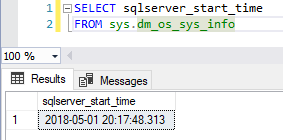
A practical and simple way to find out when the SQL Server service was last started is by consulting the DMV sys.dm_os_sys_info, available from SQL Server 2008 onwards. This is the most reliable way to obtain this information.
Permission required: VIEW SERVER STATE
SELECT sqlserver_start_time FROM sys.dm_os_sys_infoResult:
Alternative #2: sys.databases
Another way to obtain when the service was last started is by consulting the sys.databases system view (available from SQL Server 2008) and looking at the creation date of the tempdb database. As you know, this database is recreated every time the instance is started.
Permission required: VIEW SERVER STATE
SELECT create_date
FROM sys.databases
WHERE [name] = 'tempdb'
Result:
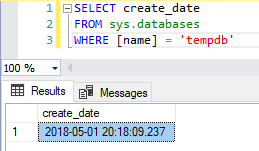
However, recreating tempdb is not the first thing that SQL Server does during the SQL service upload process, in fact, user databases are started (recovery process) before recreating tempdb. In scenarios where the database recovery routine takes a long time, there may be a large difference between the instance startup time and the tempdb recreation date.
Alternative #3: sys.sysdatabases
Another view that we can use to meet the needs of this post is sys.sysdatabases, available since SQL Server 2000. The idea is the same as sys.databases (Alternative #2).
Permission required: VIEW SERVER STATE
SELECT crdate
FROM sys.sysdatabases
WHERE [name] = 'tempdb'
Result:
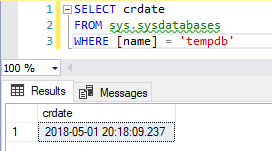
It is worth noting that this view is marked as deprecated and will be removed in future versions of SQL Server, therefore, I recommend using this alternative only in cases of backward compatibility.
Alternative #4: sys.dm_exec_sessions
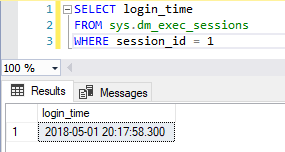
Using the sys.dm_exec_sessions view (available from SQL Server 2008 onwards) we can also meet the needs of this post by filtering by session 1 (sessions with sid < 50 are all internal to SQL).
Permission required: VIEW SERVER STATE
SELECT login_time
FROM sys.dm_exec_sessions
WHERE session_id = 1
Result:
Alternative #5: sys.traces
Using the sys.traces view (available from SQL Server 2005) filtering by the column is_default = 1, you will see the creation date of the default SQL Server trace, which is recreated whenever the instance is restarted.
Permission required: VIEW SERVER STATE and ALTER TRACE
SELECT start_time
FROM sys.traces
WHERE is_default = 1
Result:
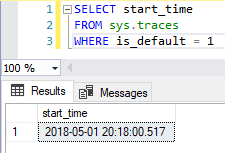
It is worth remembering that this feature was marked as deprecated as of SQL Server 2012, and should be replaced in future versions of the product by system_health, which implements this feature using Extended Events (XE).
Alternative #6: sys.dm_io_virtual_file_stats
Presenting yet another alternative, we have the DMV sys.dm_io_virtual_file_stats, which brings us I/O statistics regarding data files and database logs.
Permission required: VIEW SERVER STATE
SELECT DATEADD(ms, -sample_ms, GETDATE()) AS StartTime
FROM sys.dm_io_virtual_file_stats(1,1)
Result:
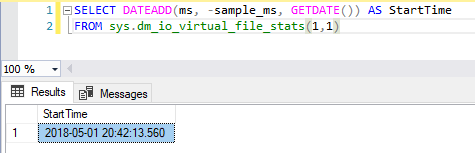
To meet our needs, we will use the sample_ms column, which, according to BOL, returns the number of milliseconds since the computer started. In other words, with this query, we have information even before the start of SQL Server, which is when the server that is running the SQL Server service was started.
As you may have noticed in the screenshot above, there was probably a bug in this DMV, as the theoretical server startup date is well after the other SQL Server service startup dates, using the other alternatives in this post.
Alternative #7: xp_readerrorlog or sp_readerrorlog
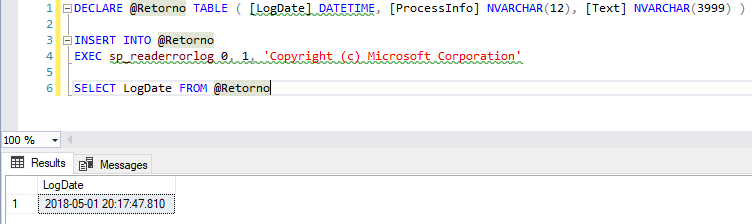
Using the xp_readerrorlog system stored procedure (available from SQL Server 2005 onwards), we can read the SQL Server log file and search for the string that contains the log record when the service was started.
This information, despite being a little more difficult to obtain, is one of the most reliable, although Microsoft's documentation informs us that the sp_cycle_errorlog system SP can be used internally to recycle the log files, without needing to restart the instance, meaning that you will not be able to recover this information, if this happens.
Permission required: VIEW SERVER STATE and be a member of the server role securityadmin
DECLARE @Retorno TABLE ( [LogDate] DATETIME, [ProcessInfo] NVARCHAR(12), [Text] NVARCHAR(3999) )

INSERT INTO @Retorno
EXEC xp_readerrorlog 0, 1, N'Copyright (c) Microsoft Corporation'

SELECT LogDate FROM @Retorno
Results:
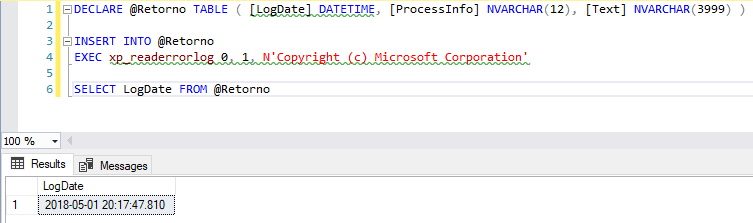
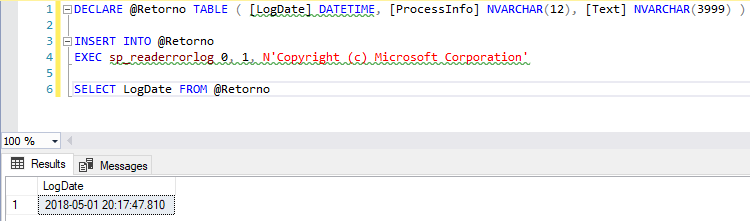
The system SP xp_readerrorlog and sp_readerrorlog are very similar to each other. In fact, sp_readerrorlog performs some processing on data entry and internally, it executes xp_readerrorlog.
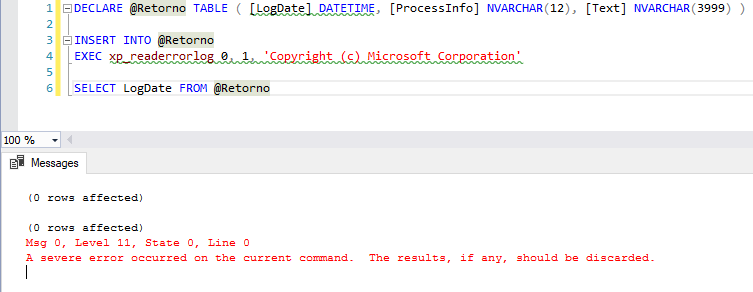
It is worth noting that there are some bug reports in versions 2012 and above, when trying to use a varchar value in the 3rd and 4th parameters of xp_readerrorlog (only works with NVARCHAR), and that does not occur in sp_readerrorlog.
Error examples:
If you want to know a little more about these system SP’s, read my post SQL Server undocumented extended procedures.
Alternative #8: sys.dm_server_services
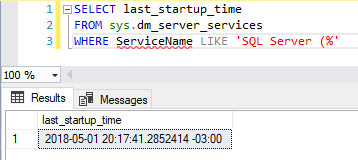
Using the sys.dm_server_services DMV (available from SQL Server 2008 R2 SP1 onwards), we can check information regarding the instance's services, such as the SQL Server service itself and also SQL Agent, Full-text search and others.
Permission required: VIEW SERVER STATE
SELECT last_startup_time
FROM sys.dm_server_services
WHERE ServiceName LIKE 'SQL Server (%'
Result:
Alternative #9: sys.sysprocesses
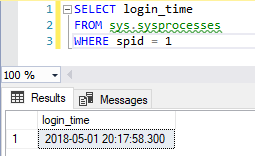
Using the sys.sysprocesses system view (available from SQL Server 2000 onwards), we can check information regarding open processes in the instance. To try to identify the date the instance came online, let's take the first open process (spid = 1), in a technique similar to alternative #4
Permission required: VIEW SERVER STATE
SELECT login_time
FROM sys.sysprocesses
WHERE spid = 1
Result:
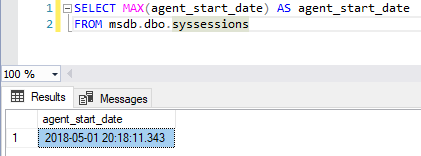
Alternative #10: msdb.dbo.syssessions
Every time the SQL Agent service starts, a record in the msdb.dbo.syssessions table is added with the ID of the new Agent session and the timestamp of this event. This way, this table records the history of when the Agent was started.
Typically this service starts together with the SQL Server service, but this is a point of failure for this alternative (when it doesn't). Another weak point of this solution is that the Agent takes a few seconds to start, meaning that the time is not as synchronized with the SQL Server service startup time.
If you want to see some more examples of syssessions, read my post How to query SQL Agent startup history in SQL Server.
Permission required: VIEW SERVER STATE
SELECT MAX(agent_start_date) AS agent_start_date
FROM msdb.dbo.syssessions
Result:
That's it, folks!
I hope you enjoyed this post and see you next time!
sql server how long has the instance been online when the service was started
sql server how long has the instance been online when the service was started
sql server when datetime time instance service became online up bring online
sql server when datetime time instance service became online up bring online

Comentários (0)
Carregando comentários…