
Hey guys,
Are you all right? I hope so!
In this post I would like to share with you a situation where a deadlock occurred in the early hours of the morning, interrupting a critical routine, and I needed to identify which session caused the deadlock to plan actions to avoid this situation. To help identify these situations and have a history of deadlocks, I will present some solutions to achieve this goal.
What is a deadlock?
A deadlock is generated when two or more processes try to access the same object, applying locks to that resource. Therefore, these processes try to perform the same action, at the same time, on the same object, and one process waits for the other to remove the lock to continue the operation.
Example, process A applies a lock to the client table to perform an update. Process B also applies a lock to the client table to perform a delete, at the same time as process A. Therefore, process A is waiting for process B to finish the delete and remove the lock to continue and process B is waiting for process A to finish the update and remove the lock to continue.
Illustrated Deadlock

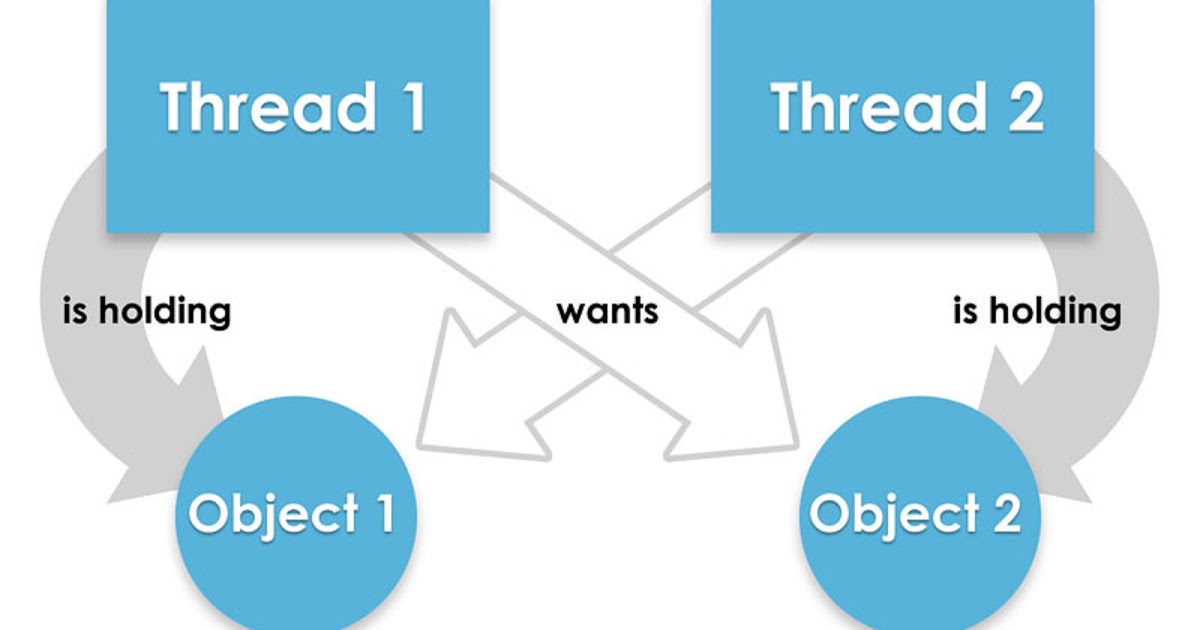
If SQL Server does not take action, they would wait for each other infinitely, and this is called a deadlock.
How to generate/simulate a deadlock
To understand in practice what a deadlock is and how it works, I will show you how it happens on a daily basis and how SQL Server behaves when the deadlock is identified.
USE [dirceuresende]
GO

IF (OBJECT_ID('dbo.Tabela1') IS NOT NULL) DROP TABLE dbo.Tabela1
CREATE TABLE dbo.Tabela1 (
    Id INT IDENTITY(1, 1),
    Nome VARCHAR(100)
)

INSERT INTO dbo.Tabela1 ( Nome )
VALUES ('Dirceu'), ('Resende')

IF (OBJECT_ID('dbo.Tabela2') IS NOT NULL) DROP TABLE dbo.Tabela2
CREATE TABLE dbo.Tabela2 (
    Id INT IDENTITY(1, 1),
    Nome VARCHAR(100)
)

INSERT INTO dbo.Tabela2 ( Nome )
VALUES ('DBA'), ('SQL Server')
Now let's generate the deadlocks:
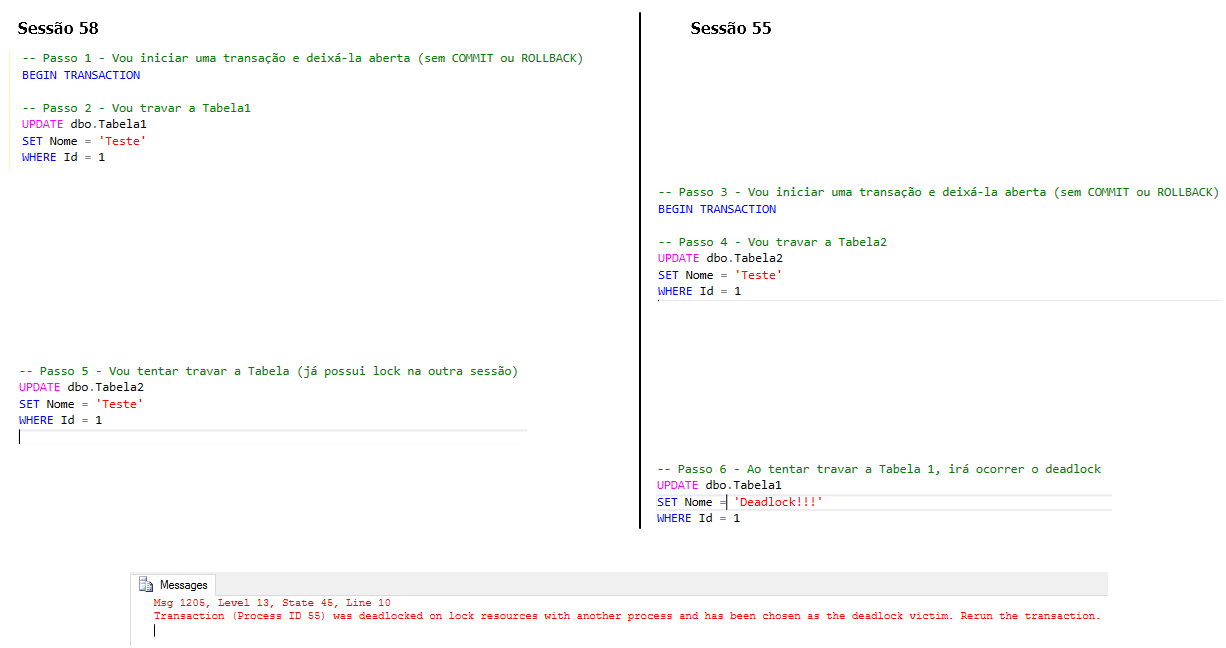
Deadlock generated:

Msg 1205, Level 13, State 45, Line 10
Transaction (Process ID 55) was deadlocked on lock resources with another process and has been chosen as the deadlock victim. Rerun the transaction.
As soon as the Deadlock Monitor Thread identified that a deadlock was occurring in the instance, it tried to eliminate the most recent session (55), allowing session 58 to be processed, thus “resolving” the generated deadlock.
How the Deadlock Monitor Thread works
In SQL Server there is a feature called Deadlock Monitor Thread, which runs in the background to identify and “help” resolve deadlocks in the instance, thus preventing sessions from waiting infinitely for each other.
If you query the DMV sys.dm_os_waiting_tasks, you will notice that there is always a system task with the REQUEST_FOR_DEADLOCK_SEARCH event.

This thread is triggered every 5 seconds to check if there are deadlocks in the instance. If it encounters a deadlock, it will kill one of the deadlocked sessions to release the locked resources to the other waiting session.
How does SQL Server decide which session it will kill? It's very simple, it will always eliminate the session that has the lowest cost (generally, the one that was “locked” last), thus facilitating the rollback of transactions carried out by the session that was chosen to be disconnected (victim of the deadlock) – As long as they have the same priority. If the sessions have the same priority and the same cost, the deadlock victim will be chosen randomly.
When the Deadlock Monitor Thread kills a session due to deadlock, it immediately runs again to verify that the deadlock has been resolved. If deadlocks continue to exist in the instance, it will eliminate more sessions and reduce the time of the next execution cycles by 100ms (each cycle), until no deadlocks are detected.
How to set the priority of a session
When the Deadlock Monitor Thread identifies that a deadlock has occurred and begins to evaluate which session it will kill to “resolve” it, the first criterion to be considered is the session priority. By default, all sessions in SQL Server have priority value = 0 (NORMAL). To change the priority of a session, we use the SET DEADLOCK_PRIORITY command.
Parameters:
– LOW: Priority below NORMAL, whose value is -5.
– NORMAL: Default priority, whose value is 0.
– HIGH: Priority above NORMAL, whose value is 5.
–
Examples:
SET DEADLOCK_PRIORITY HIGH -- Comando equivalente a SET DEADLOCK_PRIORITY 5
SET DEADLOCK_PRIORITY -5
SET DEADLOCK_PRIORITY 10 -- Valor máximo
Do you remember the example I created above to simulate deadlock? What if we ran it again, but changing the priority of the session that was eliminated as a victim of the deadlock? What would happen?
Here is the excerpt that I managed to finish processing – Now you have become the victim of Deadlock
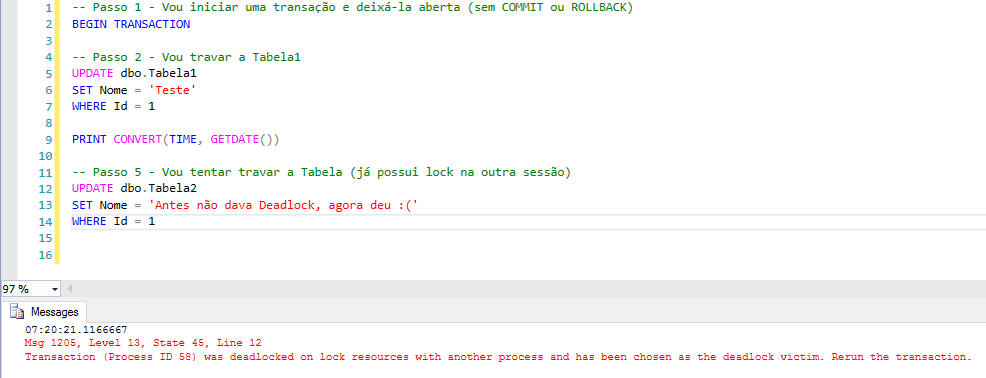
This section was the victim of the deadlock in the previous example, as the two sessions had the same priority, but the second session was chosen as the victim of the deadlock, because it had been locked for less time.
See that by increasing its priority, we were able to change the behavior of the Deadlock Monitor Thread so that this command, which I consider very important, does not fall victim to deadlocks due to other commands that are not so relevant to my business, in this example.
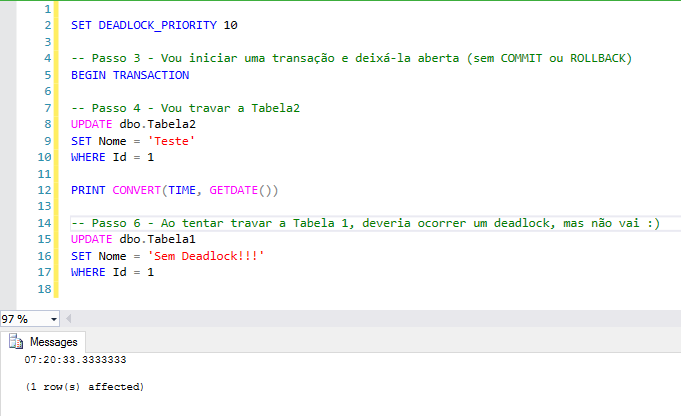
How to identify deadlocks that occurred on the instance
There are several methods that can be used to identify locks that occurred in the instance, so that you can identify and evaluate the locks after they have occurred, since the DBA will not be manually monitoring all deadlocks, in all instances in the environment, all the time.
How to identify deadlocks using Trace
An easy and practical way to identify the instance's locks is to activate a trace using trace flag 1222, as shown below:
DBCC TRACEON (1222,-1)If you want to check if this traceflag is active, just run the command below:
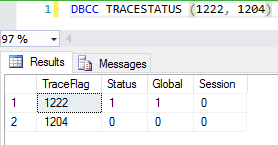
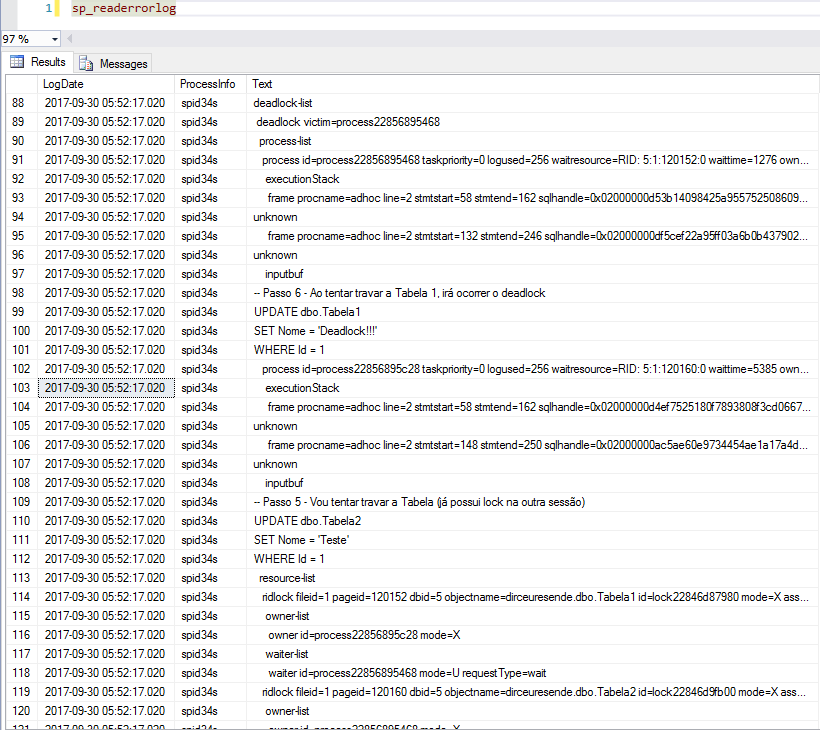
Once this trace is active, whenever a deadlock occurs on the instance, this event will be recorded in the SQL Server log, which you can consult using sp_readerrorlog:
How to identify deadlocks using System Health DMVs
System Health is monitoring using Extended Events (XE), like a Default Trace, which runs in the background and collects information from the instance. It is available from SQL Server 2008 and its information can only be accessed using query.
It's just important to note that System Health does not save deadlock records for a long time. For this reason, you can create a routine that does this for you or use another method to collect your deadlock logs, such as Extended Events.
DECLARE @TimeZone INT = DATEDIFF(HOUR, GETUTCDATE(), GETDATE())

SELECT
    DATEADD(HOUR, @TimeZone, xed.value('@timestamp', 'datetime2(3)')) AS CreationDate,
    xed.query('.') AS XEvent
FROM
(
    SELECT
        CAST(st.[target_data] AS XML) AS TargetData
    FROM
        sys.dm_xe_session_targets AS st
        INNER JOIN sys.dm_xe_sessions AS s ON s.[address] = st.event_session_address
    WHERE
        s.[name] = N'system_health'
        AND st.target_name = N'ring_buffer'
) AS [Data]
CROSS APPLY TargetData.nodes('RingBufferTarget/event[@name="xml_deadlock_report"]') AS XEventData (xed)
ORDER BY
    CreationDate DESC
Result:
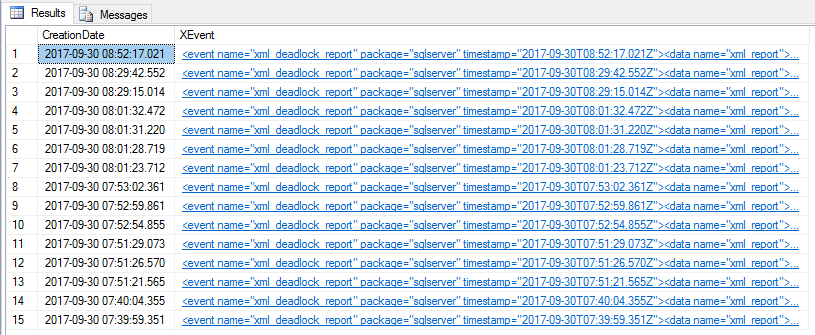
Example of XML:
<event name="xml_deadlock_report" package="sqlserver" timestamp="2017-09-30T08:52:17.021Z">
  <data name="xml_report">
    <type name="xml" package="package0" />
    <value>
      <deadlock>
        <victim-list>
          <victimProcess id="process22856895468" />
        </victim-list>
        <process-list>
          <process id="process22856895468" taskpriority="0" logused="256" waitresource="RID: 5:1:120152:0" waittime="1276" ownerId="100827" transactionname="user_transaction" lasttranstarted="2017-09-30T05:52:09.267" XDES="0x22852874ef8" lockMode="U" schedulerid="3" kpid="4972" status="suspended" spid="55" sbid="0" ecid="0" priority="0" trancount="2" lastbatchstarted="2017-09-30T05:52:15.733" lastbatchcompleted="2017-09-30T05:52:15.733" lastattention="2017-09-30T05:51:56.183" clientapp="Microsoft SQL Server Management Studio - Query" hostname="VM-DBA" hostpid="2200" loginname="dirceu.resende" isolationlevel="read committed (2)" xactid="100827" currentdb="5" lockTimeout="4294967295" clientoption1="671090784" clientoption2="390200">
            <executionStack>
              <frame procname="adhoc" line="2" stmtstart="58" stmtend="162" sqlhandle="0x02000000d53b14098425a955752508609e778b8d1cad4e760000000000000000000000000000000000000000">
unknown    </frame>
              <frame procname="adhoc" line="2" stmtstart="132" stmtend="246" sqlhandle="0x02000000df5cef22a95ff03a6b0b4379023f56344638fab40000000000000000000000000000000000000000">
unknown    </frame>
            </executionStack>
            <inputbuf>
-- Passo 6 - Ao tentar travar a Tabela 1, irá ocorrer o deadlock
UPDATE dbo.Tabela1
SET Nome = 'Deadlock!!!'
WHERE Id = 1

   </inputbuf>
          </process>
          <process id="process22856895c28" taskpriority="0" logused="256" waitresource="RID: 5:1:120160:0" waittime="5384" ownerId="100823" transactionname="user_transaction" lasttranstarted="2017-09-30T05:52:05.730" XDES="0x2285dcd12c8" lockMode="U" schedulerid="3" kpid="7140" status="suspended" spid="58" sbid="0" ecid="0" priority="0" trancount="2" lastbatchstarted="2017-09-30T05:52:11.623" lastbatchcompleted="2017-09-30T05:52:11.623" lastattention="1900-01-01T00:00:00.623" clientapp="Microsoft SQL Server Management Studio - Query" hostname="VM-DBA" hostpid="2200" loginname="dirceu.resende" isolationlevel="read committed (2)" xactid="100823" currentdb="5" lockTimeout="4294967295" clientoption1="671090784" clientoption2="390200">
            <executionStack>
              <frame procname="adhoc" line="2" stmtstart="58" stmtend="162" sqlhandle="0x02000000d4ef7525180f7893808f3cd0667e81ca40a029cc0000000000000000000000000000000000000000">
unknown    </frame>
              <frame procname="adhoc" line="2" stmtstart="148" stmtend="250" sqlhandle="0x02000000ac5ae60e9734454ae1a17a4d4a6483a8c4c981d30000000000000000000000000000000000000000">
unknown    </frame>
            </executionStack>
            <inputbuf>
-- Passo 5 - Vou tentar travar a Tabela (já possui lock na outra sessão)
UPDATE dbo.Tabela2
SET Nome = 'Teste'
WHERE Id = 1
   </inputbuf>
          </process>
        </process-list>
        <resource-list>
          <ridlock fileid="1" pageid="120152" dbid="5" objectname="dirceuresende.dbo.Tabela1" id="lock22846d87980" mode="X" associatedObjectId="72057594052280320">
            <owner-list>
              <owner id="process22856895c28" mode="X" />
            </owner-list>
            <waiter-list>
              <waiter id="process22856895468" mode="U" requestType="wait" />
            </waiter-list>
          </ridlock>
          <ridlock fileid="1" pageid="120160" dbid="5" objectname="dirceuresende.dbo.Tabela2" id="lock22846d9fb00" mode="X" associatedObjectId="72057594052345856">
            <owner-list>
              <owner id="process22856895468" mode="X" />
            </owner-list>
            <waiter-list>
              <waiter id="process22856895c28" mode="U" requestType="wait" />
            </waiter-list>
          </ridlock>
        </resource-list>
      </deadlock>
    </value>
  </data>
</event>
To create a deadlock history manually, simply create a Job that runs this command:
USE [dirceuresende]
GO

IF (OBJECT_ID('dbo.Historico_Deadlocks_Resumido') IS NULL)
BEGIN

    CREATE TABLE dbo.Historico_Deadlocks_Resumido (
        Dt_Log DATETIME,
        Ds_Log XML
    )

END


DECLARE @Ultimo_Log DATETIME = ISNULL((SELECT MAX(Dt_Log) FROM dbo.Historico_Deadlocks_Resumido WITH(NOLOCK)), '1900-01-01')

INSERT INTO dbo.Historico_Deadlocks_Resumido
SELECT
    xed.value('@timestamp', 'datetime2(3)') as CreationDate,
    xed.query('.') AS XEvent
FROM
(
    SELECT
        CAST([target_data] AS XML) AS TargetData
    FROM
        sys.dm_xe_session_targets AS st
        INNER JOIN sys.dm_xe_sessions AS s ON s.[address] = st.event_session_address
    WHERE
        s.[name] = N'system_health'
        AND st.target_name = N'ring_buffer'
) AS [Data]
CROSS APPLY TargetData.nodes('RingBufferTarget/event[@name="xml_deadlock_report"]') AS XEventData (xed)
WHERE
    xed.value('@timestamp', 'datetime2(3)') > @Ultimo_Log
ORDER BY
    CreationDate DESC
How to identify deadlocks using Extended Events (XE)
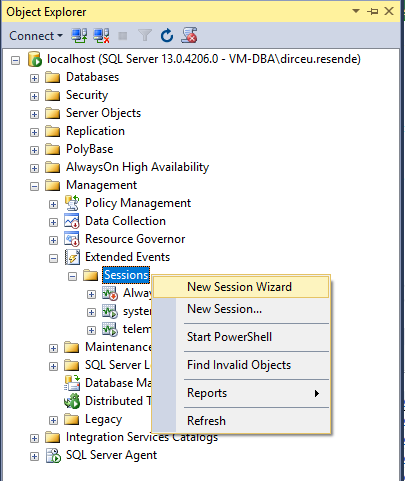
The Extended Events feature is very useful for various activities in a DBA's day-to-day life, and identifying deadlocks is an excellent justification for starting to use them. As the interface for configuring a new session is only available from the 2012 version of SSMS, I will demonstrate how to create the session using the GUI and also via the command line.
Start a new XE session from the SSMS interface
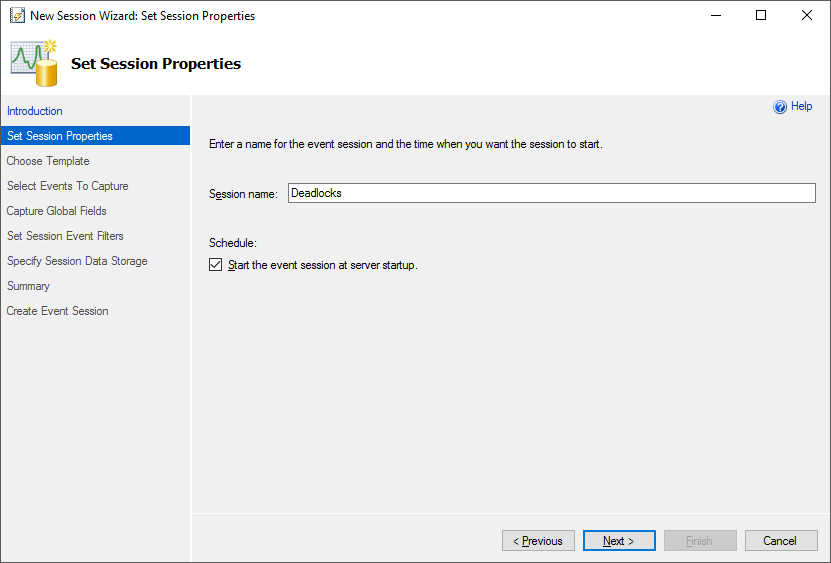
Name the XE session you are creating
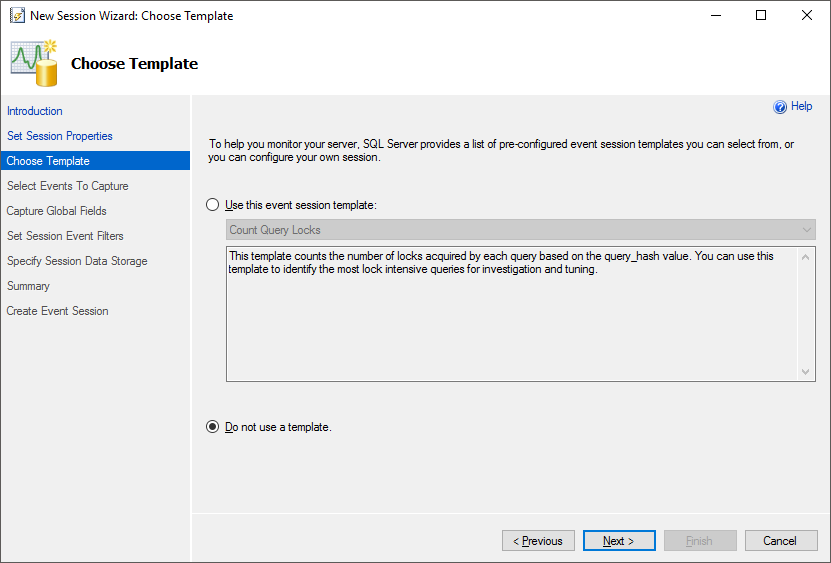
Select the option to not use template
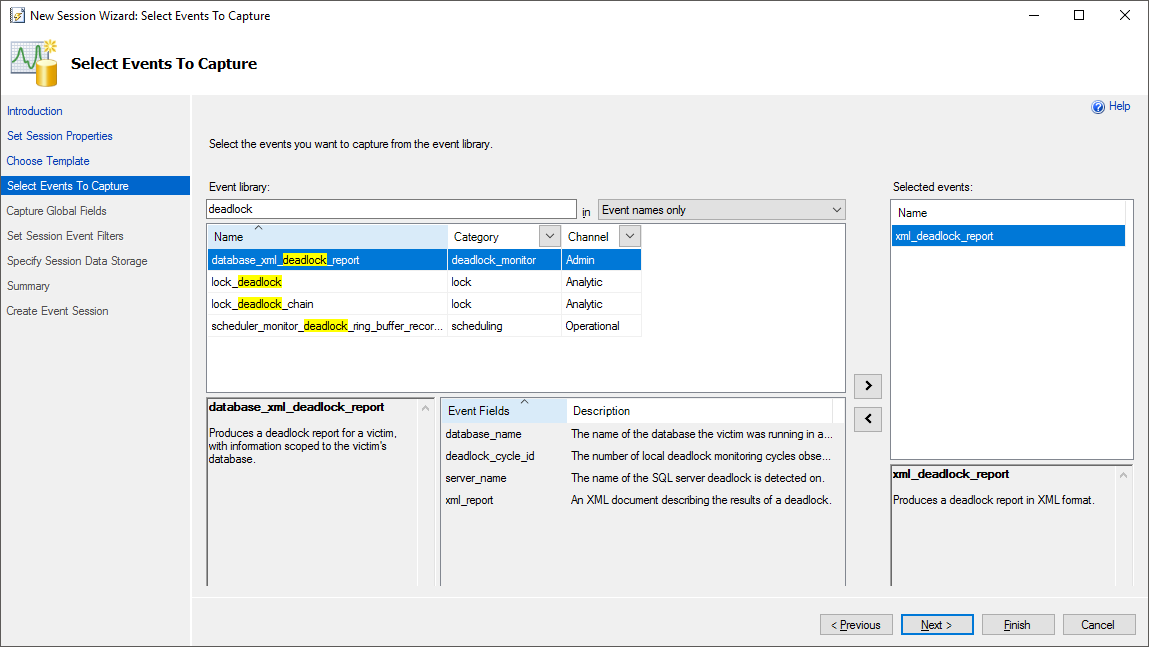
Select the “xml_deadlock_report” event
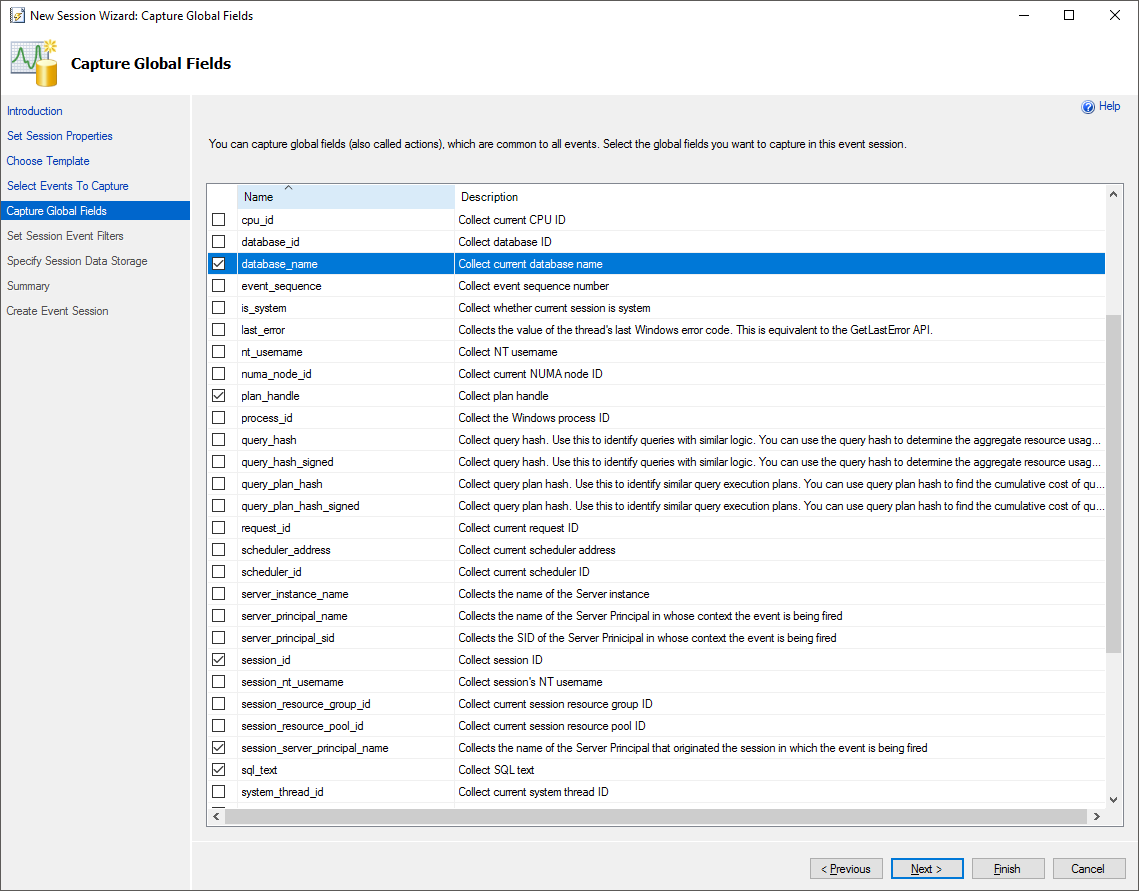
Select the global fields you want to include in the session (feel free)
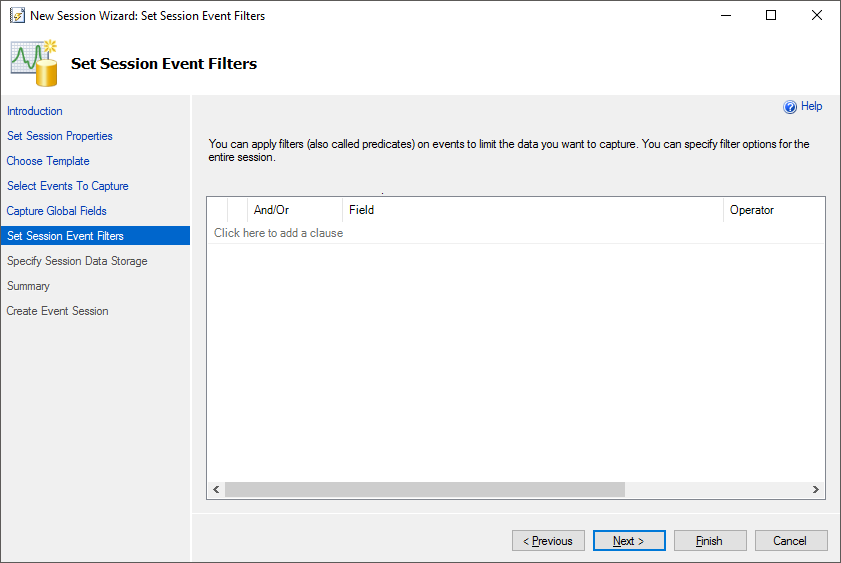
Apply the filters you want (or leave it blank to not use filters)
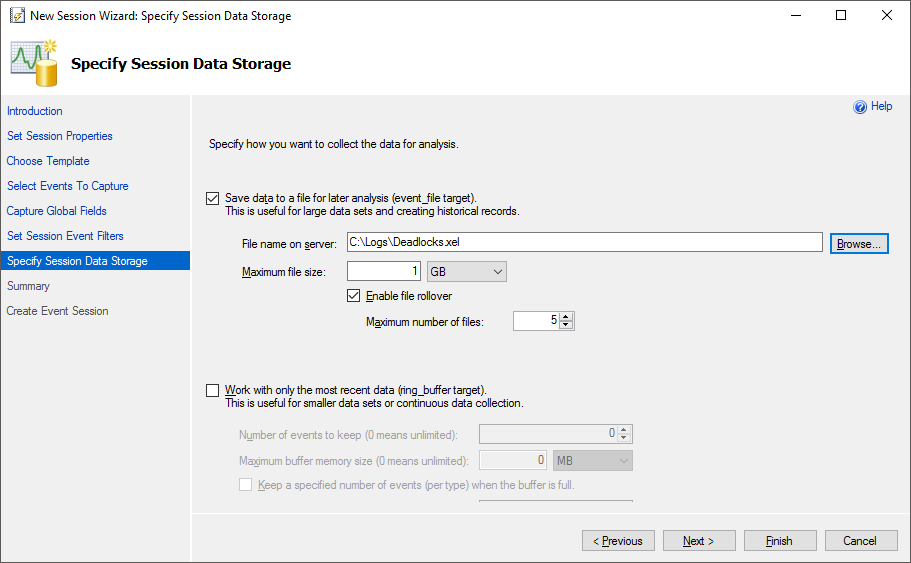
Select where you want to save logs, the maximum size and other settings for your session
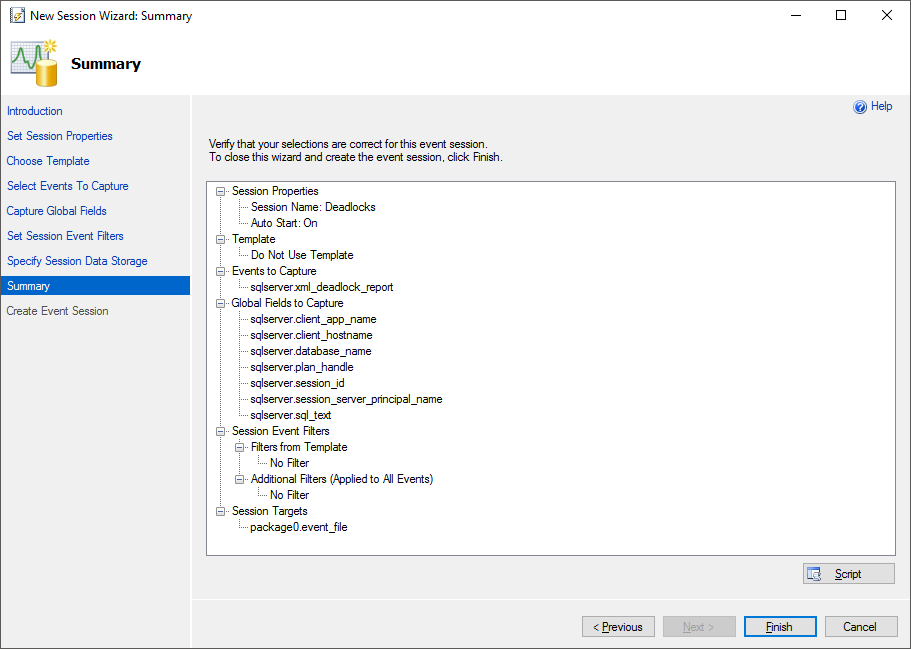
Session Settings Summary
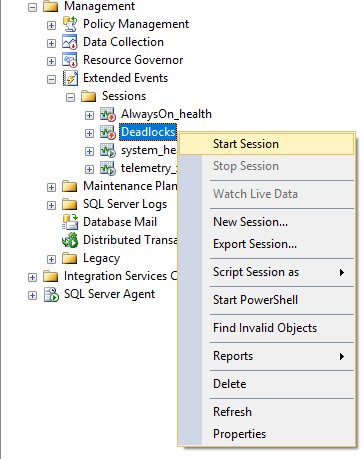
After you finish creating the session, remember to activate it.
Generated script:
CREATE EVENT SESSION [Deadlocks] ON SERVER
ADD EVENT sqlserver.xml_deadlock_report(
    ACTION(sqlserver.client_app_name, sqlserver.client_hostname, sqlserver.database_name, sqlserver.plan_handle, sqlserver.session_id, sqlserver.session_server_principal_name, sqlserver.sql_text)
)
ADD TARGET package0.event_file(SET filename = N'C:\Logs\Deadlocks.xel')
WITH (MAX_MEMORY=4096 KB, EVENT_RETENTION_MODE=ALLOW_SINGLE_EVENT_LOSS, MAX_DISPATCH_LATENCY=30 SECONDS, MAX_EVENT_SIZE=0 KB, MEMORY_PARTITION_MODE=NONE, TRACK_CAUSALITY=OFF, STARTUP_STATE=ON)
GO

ALTER EVENT SESSION Deadlocks ON SERVER STATE = START
GO
To query event data generated by the XE session, simply run the query below:
SELECT event_data = CONVERT(XML, event_data)
FROM sys.fn_xe_file_target_read_file(N'C:\Logs\Deadlocks*.xel', NULL, NULL, NULL);

Or if you want to record the data extracted from the XML in the table, follow my suggested query:
IF (OBJECT_ID('dbo.Historico_Deadlocks') IS NULL)
BEGIN

    -- DROP TABLE dbo.Historico_Deadlocks
    CREATE TABLE dbo.Historico_Deadlocks
    (
        [Dt_Log] DATETIME2,
        [isVictim] INT,
        [processId] VARCHAR(100),
        [processSqlCommand] XML,
        [resourceDBId] INT,
        [resourceDBName] NVARCHAR(128),
        [resourceObjectName] VARCHAR(128),
        [processWaitResource] VARCHAR(100),
        [processWaitTime] INT,
        [processTransactionName] VARCHAR(60),
        [processStatus] VARCHAR(60),
        [processSPID] INT,
        [processClientApp] VARCHAR(256),
        [processHostname] VARCHAR(256),
        [processLoginName] VARCHAR(256),
        [processIsolationLevel] VARCHAR(256),
        [processCurrentDb] VARCHAR(256),
        [processCurrentDbName] NVARCHAR(128),
        [processTranCount] INT,
        [processLockMode] VARCHAR(10),
        [resourceFileId] INT,
        [resourcePageId] INT,
        [resourceLockMode] VARCHAR(2),
        [resourceProcessOwner] VARCHAR(128),
        [resourceProcessOwnerMode] VARCHAR(2)
    )

END


DECLARE
    @Ultimo_Log DATETIME2 = ISNULL((SELECT MAX(Dt_Log) FROM dbo.Historico_Deadlocks WITH(NOLOCK)), '1900-01-01'),
    @TimeZone INT = DATEDIFF(HOUR, GETUTCDATE(), GETDATE())

IF (OBJECT_ID('tempdb..#xml_deadlock') IS NOT NULL) DROP TABLE #xml_deadlock
SELECT
    *
INTO
    #xml_deadlock
FROM
(
    SELECT
        module_guid,
        package_guid,
        [object_name],
        [file_name],
        [file_offset],
        DATEADD(HOUR, @TimeZone, CAST(timestamp_utc AS DATETIME2)) AS Dt_Evento,
        CAST(event_data AS XML) AS TargetData
    FROM
        sys.fn_xe_file_target_read_file(N'C:\Logs\Deadlocks*.xel', NULL, NULL, NULL)
) AS [dados]
WHERE
    Dt_Evento > @Ultimo_Log
ORDER BY
    Dt_Evento DESC


INSERT INTO dbo.Historico_Deadlocks
SELECT
    DATEADD(HOUR, @TimeZone, dados.event_data.value('@timestamp', 'datetime2')) AS [timestamp],
    (CASE WHEN vitima.dados.value('@id', 'varchar(100)') = processo.dados.value('@id', 'varchar(100)') THEN 1 ELSE 0 END) AS isVictim,
    processo.dados.value('@id', 'varchar(100)') AS [processId],
    processo.dados.query('(inputbuf/text())') AS [processSqlCommand],
    recurso.resourceDBId,
    DB_NAME(recurso.resourceDBId) AS resourceDBName,
    recurso.resourceObjectName,
    processo.dados.value('@waitresource', 'varchar(100)') AS [processWaitResource],
    processo.dados.value('@waittime', 'int') AS [processWaitTime],
    processo.dados.value('@transactionname', 'varchar(60)') AS [processTransactionName],
    processo.dados.value('@status', 'varchar(60)') AS [processStatus],
    processo.dados.value('@spid', 'int') AS [processSPID],
    processo.dados.value('@clientapp', 'varchar(256)') AS [processClientApp],
    processo.dados.value('@hostname', 'varchar(256)') AS [processHostname],
    processo.dados.value('@loginname', 'varchar(256)') AS [processLoginName],
    processo.dados.value('@isolationlevel', 'varchar(256)') AS [processIsolationLevel],
    processo.dados.value('@currentdb', 'varchar(256)') AS [processCurrentDb],
    DB_NAME(processo.dados.value('@currentdb', 'varchar(256)')) AS [processCurrentDbName],
    processo.dados.value('@trancount', 'int') AS [processTranCount],
    processo.dados.value('@lockMode', 'varchar(10)') AS [processLockMode],
    recurso.resourceFileId,
    recurso.resourcePageId,
    recurso.resourceLockMode,
    recurso.resourceProcessOwner,
    recurso.resourceProcessOwnerMode
FROM
    #xml_deadlock A
    CROSS APPLY A.TargetData.nodes('//event') AS dados(event_data)
    CROSS APPLY dados.event_data.nodes('data/value/deadlock/victim-list/victimProcess') AS vitima(dados)
    OUTER APPLY dados.event_data.nodes('data/value/deadlock/process-list/process') AS processo(dados)
    LEFT JOIN (
        SELECT
            A.Dt_Evento,
            recurso.dados.value('@fileid', 'int') AS [resourceFileId],
            recurso.dados.value('@pageid', 'int') AS [resourcePageId],
            recurso.dados.value('@dbid', 'int') AS [resourceDBId],
            recurso.dados.value('@objectname', 'varchar(128)') AS [resourceObjectName],
            recurso.dados.value('@mode', 'varchar(2)') AS [resourceLockMode],
            [owner].dados.value('@id', 'varchar(128)') AS [resourceProcessOwner],
            [owner].dados.value('@mode', 'varchar(2)') AS [resourceProcessOwnerMode]
        FROM
            #xml_deadlock A
            CROSS APPLY A.TargetData.nodes('//ridlock') AS recurso(dados)
            OUTER APPLY recurso.dados.nodes('owner-list/owner') AS owner(dados)
    ) AS recurso ON recurso.resourceProcessOwner = processo.dados.value('@id', 'varchar(100)') AND recurso.Dt_Evento = A.Dt_Evento
Result:

That's it, folks!
I hope you enjoyed the post and see you next time.

Comentários (0)
Carregando comentários…