
Hey guys!
In this quick post today, I would like to share with you how to use DMV's to identify the data type of columns in tables, views and return tables in Table Valued Functions (TVF) type functions and also the data type in parameters of Functions and Stored Procedures in SQL Server, both custom and primitive types. Through a question they sent me on Whatsapp, I had the idea of creating this post and I hope it is useful for you.
How to identify the data type of view and table columns
Code used to create the table and test types
View source code
Query to identify the data types of columns
SELECT
    A.[name] AS tabela,
    B.[name] AS coluna,
    C.[name] AS tipo,
    D.[name] AS tipo_primitivo,
    B.max_length,
    (CASE WHEN B.max_length < 1 THEN 'MAX' ELSE CAST(B.max_length AS VARCHAR(10)) END) AS ds_max_length,
    B.[precision],
    B.scale,
    B.collation_name,
    B.is_nullable,
    B.is_identity,
    B.is_computed,
    B.is_xml_document
FROM
    sys.objects A
    JOIN sys.columns B ON B.[object_id] = A.[object_id]
    JOIN sys.types C ON B.user_type_id = C.user_type_id
    JOIN sys.types D ON B.system_type_id = D.user_type_id
WHERE
    A.is_ms_shipped = 0
    -- AND B.collation_name <> DATABASEPROPERTYEX(DB_NAME(), 'Collation') -- Collation da coluna diferente da collation do database
    -- AND B.collation_name <> DATABASEPROPERTYEX('tempdb', 'Collation') -- Collation da coluna diferente da collation do tempdb
    -- AND B.max_length < 1 AND D.[name] = 'varchar' -- colunas varchar(MAX)
Result
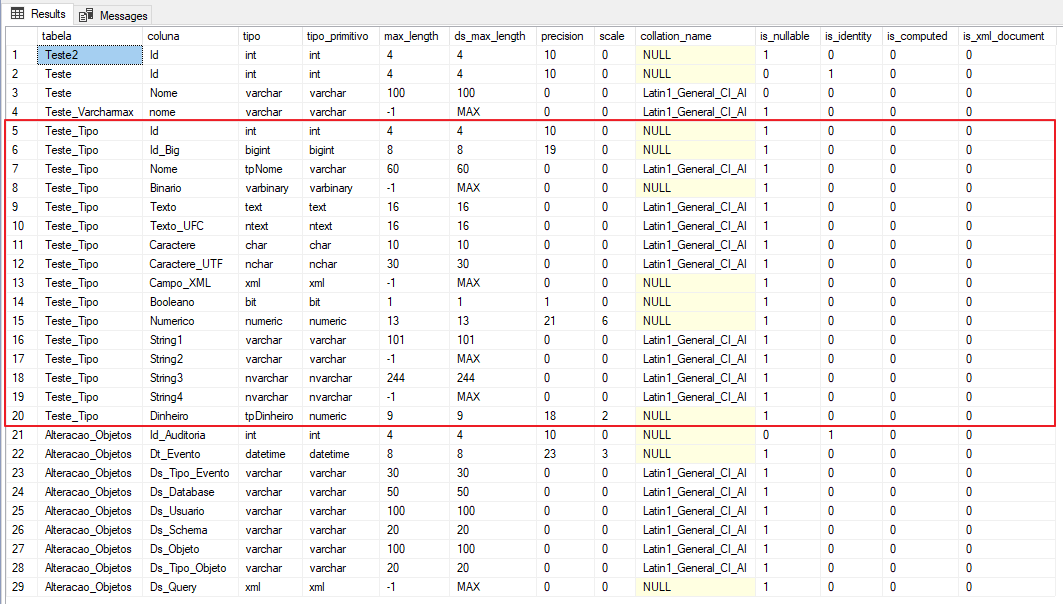
Some points I would like to highlight about this consultation:
- Identifies the data types of table columns and also views and return tables in Table Valued Function (TVF) functions
- Returns the collation used by each column of the tables. Very useful for identifying columns that use a collation other than the default. Speaking of Collation, it’s always good to remember this post by Fabrício Lima – Improve the performance of a query that uses ” like ‘%String%’ ” by changing only the collation, which shows the stark difference in performance when using Windows collation (Latin1_%) and SQL Server collation (SQL_Latin1_%)
- Allows you to search for varchar(max) columns to later try to identify the largest record and change the maximum size
- Allows you to search for the nvarchar and nchar columns and later change the type to varchar or char (or vice versa), avoiding implicit conversion, something very common when using the Entity Framework
- Allows you to search for text and ntext columns, data types already marked as deprecated, to analyze the replacement with other more recommended data types
- Returns some column properties, such as whether it is identity, NULLable or calculated
- Returns the name of the column's data type and also the primitive type (if the column uses custom types)
- In addition to returning the maximum column size, it also returns precision and scale for data types such as numeric
How to identify the data type of parameters in SP and functions
Just as it is possible to identify the data type of Views and Tables columns, it is also possible to identify the data type of parameters in Stored Procedures and Functions.
Code used to create the test objects
View source code
If you want to analyze the data types of parameters in Stored Procedures and Functions, you can use the script below:
SELECT
    C.[name] AS [schema],
    A.[name] AS [objeto],
    A.[type_desc] AS [tipo],
    B.parameter_id AS [parametro_numero],
    B.[name] AS [parametro_nome],
    D.[name] AS [tipo],
    E.[name] AS [tipo_primitivo],
    B.max_length AS [parametro_tamanho],
    B.is_output AS [output]
FROM
    sys.objects A
    JOIN sys.parameters B ON A.[object_id] = B.[object_id]
    JOIN sys.schemas C ON C.[schema_id] = A.[schema_id]
    JOIN sys.types D ON B.user_type_id = D.user_type_id
    JOIN sys.types E ON B.system_type_id = E.user_type_id
WHERE
    A.[type] IN ( 'P', 'FN', 'AF', 'FS', 'FT', 'PC', 'TF' )
ORDER BY
    [Schema],
    A.[name],
    B.parameter_id
Result:

Some points I would like to highlight about this consultation:
- Identifies the data types of Stored Procedures (T-SQL and CLR) and Functions (Scalar, Table-Valued, Aggregate and CLR)
- Returns the name of the column's data type and also the primitive type (if the column uses custom types)
- Functions of the Scalar Function type will always have parameter 0, which is the return of the function and is therefore classified as OUTPUT
- The Table Valued Function return table does not appear in the list of parameters (obviously), but it does, in the previous query, which lists views and tables

- Stored Procedures with output parameters (OUTPUT) are correctly identified by the flag. Unlike what happens in the Scalar Function, these parameters follow the normal order of declaration and there is no parameter 0
Well guys, I warned you that the post would be short and objective... lol
I hope it is useful to you in your daily life and see you in the next article!
Big hug!

Comentários (0)
Carregando comentários…