How to identify the query that triggered a DML trigger on a table? I read this question in a Telegram group and decided to write an article about it.
Introduction
As you know, there are several solutions to implement an audit log with data changes in a given table:
- SQL Server – How to monitor and audit data changes in tables using Change Data Capture (CDC)
- SQL Server 2016 – How to “travel in time” using the Temporal Tables feature
- SQL Server – How to create a data change history for your tables (audit logs)
- Audit in SQL Server (Server Audit)
One of the most used solutions for this is the use of DML triggers (Learn how to implement this clicking here)
In some scenarios, it is important to identify which query ended up triggering the trigger to perhaps identify the origin of the data being inserted from SQL. And that's what we'll learn how to do in this post.
If you want more details on the origin of this command and identify the entire trigger execution chain, I suggest reading the article SQL Server – How to identify and monitor trigger execution.
Creating the test base
To demonstrate the codes in this article, I will share with you the script I used to assemble this table and the trigger used to audit the changes. I will use the same example as in the article SQL Server – How to create a data change history for your tables (audit logs).
Creation of tables
Click here to view the table creation code
Trigger creation:
Click here to view the trigger code
I make some changes to the original table:
INSERT INTO dbo.Cliente
VALUES ('Bartolomeu', '1975-05-28', 6158.74)

UPDATE dbo.Cliente
SET Salario = Salario * 1.5
WHERE Nome = 'Bartolomeu'

DELETE FROM dbo.Cliente
WHERE Nome = 'André'

UPDATE dbo.Cliente
SET Salario = Salario * 1.1
WHERE Id_Cliente = 2

UPDATE dbo.Cliente
SET Salario = 10, Nome = 'Judas Iscariodes', Data_Nascimento = '06/06/2066'
WHERE Id_Cliente = 1
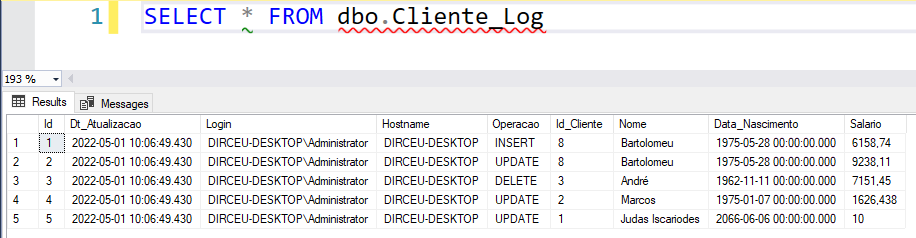
And we can see that the audit is working as expected:
How to identify the query that triggered the trigger
Now we will discover how to identify the query that triggered the trigger.
To do this, we will change the trigger and include the INPUTBUFFER command to capture the query and store this information in the log table.
The syntax for using the command is like this:
DECLARE @SqlQuery VARCHAR(MAX)

DECLARE @TableSqlQuery TABLE (
    EventType NVARCHAR(30),
    [Parameters] INT,
    EventInfo NVARCHAR(MAX)
)

INSERT INTO @TableSqlQuery
EXEC('DBCC INPUTBUFFER(@@SPID)')

SET @SqlQuery = (SELECT TOP(1) EventInfo FROM @TableSqlQuery)
We will add the field that will store the query in the table:
ALTER TABLE dbo.Cliente_Log ADD Ds_Query VARCHAR(MAX)
And now we change the trigger:
Click here to view trigger code
And let's test again by running the command below:
INSERT INTO dbo.Cliente
VALUES('Dirceu', '1987-05-28', 0)

INSERT INTO dbo.Cliente
SELECT
    'Resende' AS Nome,
    '1987-05-28' AS Dt_Nascimento,
    9999 AS Vl_Salario
Result:

As the 2 SQL statements were executed together, in the same batch, the INPUTBUFFER command captured the 2 commands at once. If I try to execute it again, but using a GO to separate the blocks or even executing it separately, we can see that the trigger will now correctly identify the commands of each instruction:
INSERT INTO dbo.Cliente
VALUES('Dirceu - Teste 2', '1987-05-28', 0)
GO

INSERT INTO dbo.Cliente
SELECT
    'Resende - Teste 2' AS Nome,
    '1987-05-28' AS Dt_Nascimento,
    9999 AS Vl_Salario
GO
Result:

What if there is another trigger, in another table, that is changing the Customer table and you are unable to identify where this command comes from?
First, we will create a table with employee data:
IF (OBJECT_ID('dbo.Funcionario') IS NOT NULL) DROP TABLE dbo.Funcionario
GO

CREATE TABLE dbo.Funcionario (
    Id_Funcionario INT IDENTITY(1,1) NOT NULL PRIMARY KEY CLUSTERED,
    Nome VARCHAR(100)
)
GO

INSERT INTO dbo.Funcionario
(
    Nome
)
VALUES
    ( 'Dirceu' ), ('Resende')
Now I will create a trigger in this new table that updates the Customer table if the customer and employee have the same name:
CREATE TRIGGER trgFuncionario ON dbo.Funcionario -- Tabela que a trigger será associada
AFTER UPDATE AS
BEGIN

    SET NOCOUNT ON

    UPDATE A
    SET A.Nome = B.Nome
    FROM dbo.Cliente A
    JOIN Inserted B ON A.Nome = B.Nome

END
GO
When executing a simple UPDATE command, we will see that the trigger was fired on both tables
UPDATE dbo.Funcionario
SET Nome = 'Dirceu Resende'
WHERE Id_Funcionario = 1
Result:
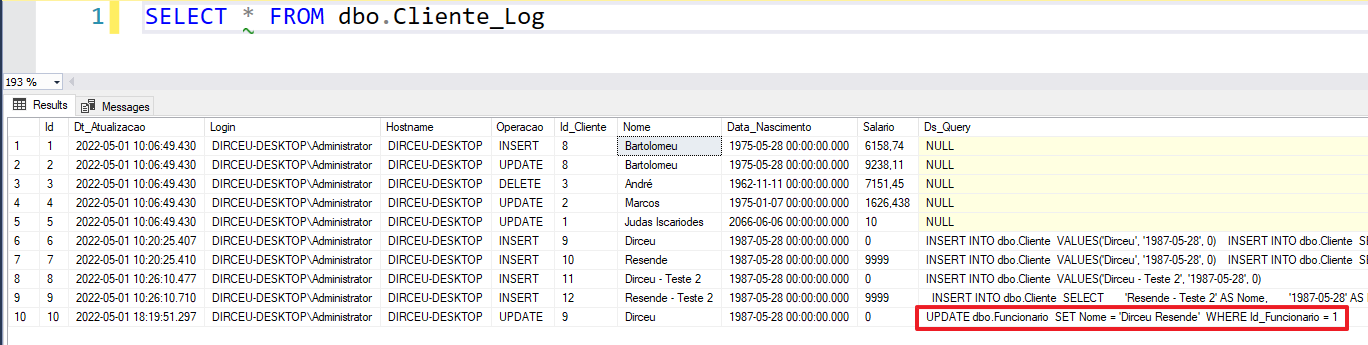
Cool! Even though the command came from another trigger, it was possible to identify the origin of this change.
But what if you want more details about the origin of this command and identify the entire trigger execution chain? Well, in this case, I suggest reading the article SQL Server – How to identify and monitor trigger execution.
I hope you enjoyed this article and see you next time 🙂
Hugs!

Comentários (0)
Carregando comentários…