
In an environment with many triggers being fired, it is often necessary to be able to identify and monitor the execution of triggers to analyze a certain behavior or understand how data is being changed.
This ends up becoming even more complex when a trigger changes data from another table(s) and several triggers are fired in sequence, nested, from a single SQL command.
That's what you will learn in this article.
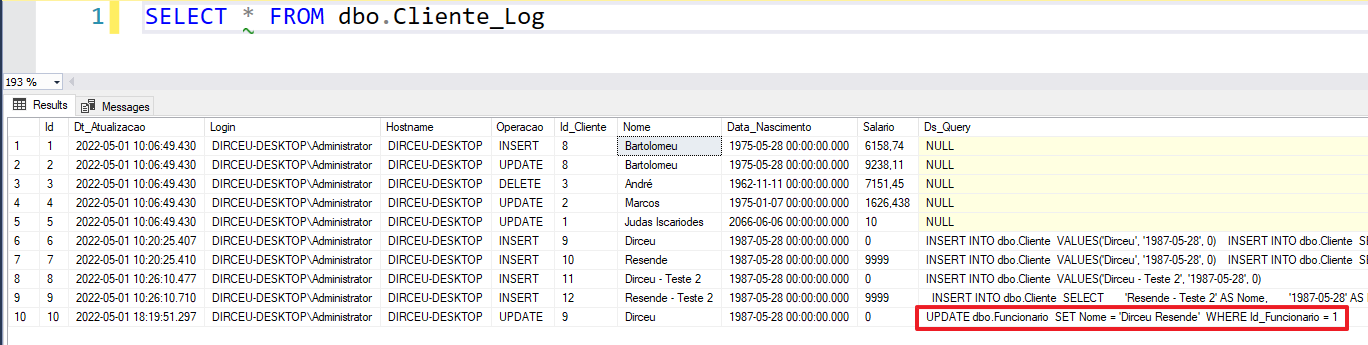
One of the ways to identify the DML command that triggered a trigger is to change the trigger itself to capture the SQL command.
See how to do this in the articles below:
- SQL Server – How to create a data change history for your tables (audit logs)
- SQL Server – How to identify the query that triggered a DML trigger on a table
Example:
Creation of the test base
For the demonstration of this post, I will share the scripts used so that you can test in your environment too.
Creation of tables
Click here to view the table code
Creating triggers
Click here to view the trigger code
How to identify and monitor trigger execution
Now that we have the tables and triggers created, let's start our monitoring, change some data and test if everything is working as expected.
Let's create an Extended Event (XE) to capture the execution of the triggers:
IF (EXISTS(SELECT TOP(1) NULL FROM sys.server_event_sessions WHERE [name] = 'trcMonitorTriggers'))
    DROP EVENT SESSION [trcMonitorTriggers] ON SERVER;
GO

CREATE EVENT SESSION [trcMonitorTriggers]
ON SERVER
ADD EVENT sqlserver.sp_statement_completed (
    ACTION (
        sqlserver.server_instance_name,
        sqlserver.session_id,
        sqlserver.client_app_name,
        sqlserver.client_hostname,
        sqlserver.[database_name],
        sqlserver.username,
        sqlserver.nt_username,
        sqlserver.session_nt_username,
        sqlserver.session_server_principal_name,
        sqlserver.server_principal_name,
        sqlserver.sql_text
    )
    WHERE ([object_type] = 'TRIGGER')
)
ADD TARGET package0.event_file (
    -- Lembre-se de criar a pasta antes de executar
    SET filename=N'C:\Traces\TriggerMonitor',
    max_file_size=(20),
    max_rollover_files=(10)
)
WITH (STARTUP_STATE=ON)
GO

ALTER EVENT SESSION [trcMonitorTriggers] ON SERVER STATE = START
GO
Let's perform some data changes to test our trigger monitor:
INSERT INTO dbo.Cliente
VALUES('Dirceu', '1987-05-28', 0)
GO

INSERT INTO dbo.Cliente
SELECT
    'Resende' AS Nome,
    '1987-05-28' AS Dt_Nascimento,
    9999 AS Vl_Salario
GO

INSERT INTO dbo.Cliente
VALUES('Dirceu - Teste 2', '1987-05-28', 0)
GO

INSERT INTO dbo.Cliente
SELECT
    'Resende - Teste 2' AS Nome,
    '1987-05-28' AS Dt_Nascimento,
    9999 AS Vl_Salario
GO

UPDATE dbo.Funcionario
SET Nome = 'Dirceu Resende'
WHERE Id_Funcionario = 1
GO
And now let's read the data collected from the Extended Event to view the trigger execution history
DECLARE
    @TimeZone INT = DATEDIFF(HOUR, GETUTCDATE(), GETDATE())

IF (OBJECT_ID('tempdb..#Events') IS NOT NULL) DROP TABLE #Events
;WITH CTE AS (
    SELECT CONVERT(XML, event_data) AS event_data
    FROM sys.fn_xe_file_target_read_file(N'C:\Traces\TriggerMonitor*.xel', NULL, NULL, NULL)
)
SELECT
    DATEADD(HOUR, @TimeZone, CTE.event_data.value('(//event/@timestamp)[1]', 'datetime')) AS eventDate,
    CTE.event_data
INTO
    #Events
FROM
    CTE

SELECT
    A.eventDate,
    xed.event_data.value('(data[@name="object_id"]/value)[1]', 'int') AS [object_id],
    OBJECT_NAME(xed.event_data.value('(data[@name="object_id"]/value)[1]', 'int')) AS [trigger_name],
    xed.event_data.value('(action[@name="session_id"]/value)[1]', 'int') AS session_id,
    xed.event_data.value('(action[@name="database_name"]/value)[1]', 'varchar(128)') AS [database_name],
    xed.event_data.value('(action[@name="nt_username"]/value)[1]', 'varchar(128)') AS nt_username,
    xed.event_data.value('(action[@name="session_server_principal_name"]/value)[1]', 'varchar(128)') AS session_server_principal_name,
    xed.event_data.value('(action[@name="client_hostname"]/value)[1]', 'varchar(128)') AS [client_hostname],
    xed.event_data.value('(action[@name="client_app_name"]/value)[1]', 'varchar(128)') AS [client_app_name],
    xed.event_data.value('(data[@name="nest_level"]/value)[1]', 'int') AS [nest_level],
    xed.event_data.value('(data[@name="statement"]/value)[1]', 'varchar(max)') AS [statement],
    TRY_CAST(xed.event_data.value('(//action[@name="sql_text"]/value)[1]', 'varchar(max)') AS XML) AS sql_text
FROM
    #Events A
    CROSS APPLY A.event_data.nodes('//event') AS xed (event_data)
Result:
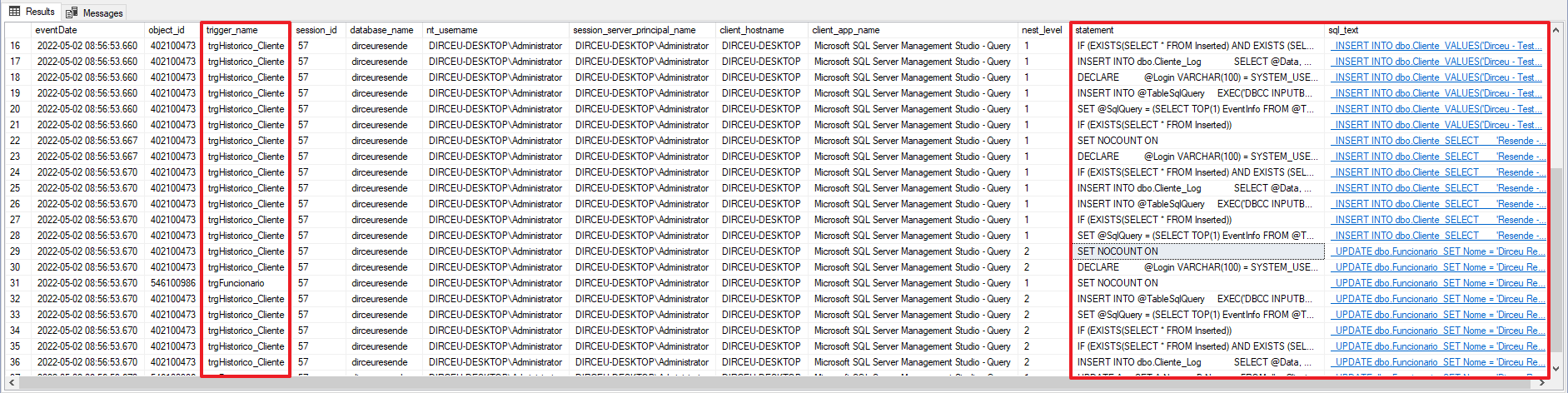
With this script, you can identify each command executed within the trigger (statement column) or the command that triggered the trigger (sql_text column).
If you want something simpler and more summarized, to only know when the triggers were fired, you can use this script here:
DECLARE
    @TimeZone INT = DATEDIFF(HOUR, GETUTCDATE(), GETDATE())

IF (OBJECT_ID('tempdb..#Events') IS NOT NULL) DROP TABLE #Events
;WITH CTE AS (
    SELECT CONVERT(XML, event_data) AS event_data
    FROM sys.fn_xe_file_target_read_file(N'C:\Traces\TriggerMonitor*.xel', NULL, NULL, NULL)
)
SELECT
    DATEADD(HOUR, @TimeZone, CTE.event_data.value('(//event/@timestamp)[1]', 'datetime')) AS eventDate,
    CTE.event_data
INTO
    #Events
FROM
    CTE

SELECT DISTINCT
    A.eventDate,
    xed.event_data.value('(data[@name="object_id"]/value)[1]', 'int') AS [object_id],
    OBJECT_NAME(xed.event_data.value('(data[@name="object_id"]/value)[1]', 'int')) AS [trigger_name],
    xed.event_data.value('(action[@name="session_id"]/value)[1]', 'int') AS session_id,
    xed.event_data.value('(action[@name="database_name"]/value)[1]', 'varchar(128)') AS [database_name],
    xed.event_data.value('(action[@name="nt_username"]/value)[1]', 'varchar(128)') AS nt_username,
    xed.event_data.value('(action[@name="session_server_principal_name"]/value)[1]', 'varchar(128)') AS session_server_principal_name,
    xed.event_data.value('(action[@name="client_hostname"]/value)[1]', 'varchar(128)') AS [client_hostname],
    xed.event_data.value('(action[@name="client_app_name"]/value)[1]', 'varchar(128)') AS [client_app_name],
    xed.event_data.value('(data[@name="nest_level"]/value)[1]', 'int') AS [nest_level],
    xed.event_data.value('(//action[@name="sql_text"]/value)[1]', 'varchar(max)') AS sql_text
FROM
    #Events A
    CROSS APPLY A.event_data.nodes('//event') AS xed (event_data)
ORDER BY
    A.eventDate, nest_level
Result:

In this shorter version, it is very easy to identify that a single update activated 2 triggers when looking at the eventDate, nest_level and sql_text columns. After the UPDATE command, the “trgFuncionario” trigger was fired and as this trigger makes another UPDATE in the “Cliente” table, it activated the “trgHistorico_Cliente” trigger.
It is now easy to identify triggers being fired in the environment, especially nested triggers like this example, where a single command can end up triggering several triggers, making it difficult to track in a large environment.
I hope you liked this tip and see you in the next article!
Hugs.

Comments (0)
Loading comments...