
Hey guys,
Good morning!
Today I will show you how to update or delete a fixed number of records from a table, which can be used to manipulate the table's data without locking it for a long time during query execution.
Generation of a simple base
I will demonstrate how to create the test base that we will use in this post
IF (OBJECT_ID('tempdb..#Teste') IS NOT NULL) DROP TABLE #Teste
CREATE TABLE #Teste (
    Linha INT IDENTITY(1, 1),
    Valor FLOAT,
    Processado BIT DEFAULT 0
)

INSERT INTO #Teste(Valor)
SELECT 125.99

INSERT INTO #Teste(Valor)
SELECT 457.64

INSERT INTO #Teste(Valor)
SELECT 124.77

INSERT INTO #Teste(Valor)
SELECT 3687.48

INSERT INTO #Teste(Valor)
SELECT 14.47

INSERT INTO #Teste(Valor)
SELECT 758.51

INSERT INTO #Teste(Valor)
SELECT 288.05
UPDATE TOP
Many people don't know, but the UPDATE statement supports the use of TOP to delimit the number of records to be updated:
UPDATE TOP (1) #Teste
SET Processado = 1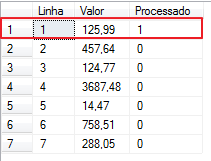
Although very simple, this command can end up tricking you. This happens because when you use a TOP command without using ORDER BY, the result is not deterministic. Every time you use a TOP, you must use an ORDER BY to indicate to the database how you will order the results and then filter using the TOP. Even if the table has a clustered index, this does not guarantee that the data will be ordered using the clustered index or with the RowID in the case of HEAP tables.
Although UPDATE supports TOP, it does not support ORDER BY. To resolve this situation, we can perform the same update in this way:
UPDATE A
SET Processado = 1
FROM #Teste A
JOIN (
    SELECT TOP 2 *
    FROM #Teste WITH(NOLOCK)
    ORDER BY Linha DESC
) B ON B.Linha = A.Linha
Or it can be done with CTE (Common Table Expressions), which is a more elegant and efficient way:
;WITH CTE AS
(
    SELECT TOP 2 *
    FROM #Teste	WITH(NOLOCK)
    ORDER BY Linha DESC
)
UPDATE CTE
SET Processado = 1
Result:
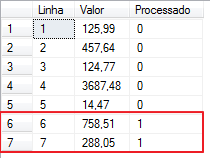
Comparing the execution plan:
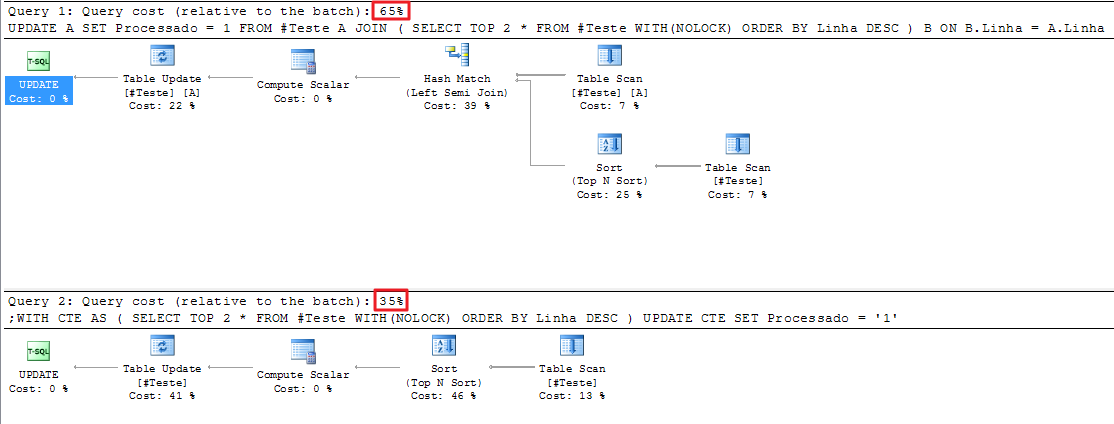

As indicated above, the solution using CTE is more elegant and performant, running in less time and consuming less disk and CPU
DELETE TOP
Just as we use in UPDATE, we can use TOP in DELETE itself, running the risk of deleting random records and we can also use ORDER BY, both JOIN in update and CTE to filter and limit the records that will be removed:
-- Apagando o primeiro registro (não há garantias de ser o primeiro registro)
DELETE TOP(1)
FROM #Teste A

-- Apagando o último registro utilizando JOIN
DELETE A FROM #Teste A
JOIN (
    SELECT TOP 1 *
    FROM #Teste WITH(NOLOCK)
    ORDER BY Linha DESC
) B ON B.Linha = A.Linha

-- Apagando o último registro utilizando CTE
;WITH CTE AS
(
    SELECT TOP 1 *
    FROM #Teste WITH(NOLOCK)
    ORDER BY Linha DESC
)
DELETE CTE
Example:
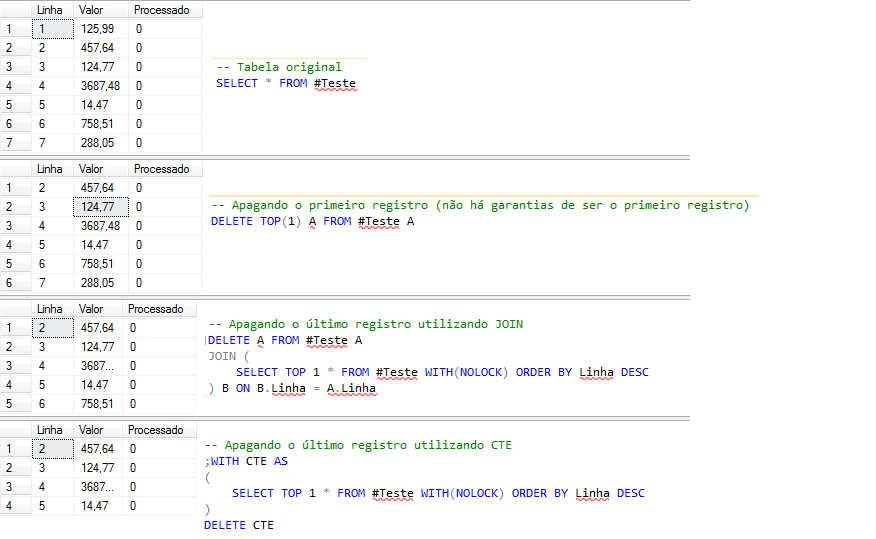
That's it, folks!
A hug and see you in the next post.

Comentários (0)
Carregando comentários…