
Hey guys,
Good morning!
In this post I will show you how to list, read, write, copy, delete and move files using the CLR (C#), which is a powerful tool to increase the range of SQL Server functionalities. As I create many file exchange routines in my work, whether importing data from an external database or exporting data to files, I decided to create this post to help people who have the same needs and who can easily resolve these issues using SQL Server itself, which is very performant and simple to create, implement and maintain.
Before starting, I would like to mention two posts related to this subject:
- File operations using OLE Automation in SQL Server, where I had made a post similar to this, where I used OLE Automation, a really cool feature of SQL Server, but which has some limitations and risks for the server. For these reasons, the CLR is seen as the great replacement for OLE Automation routines.
- Introduction to SQL CLR (Common Language Runtime) in SQL Server is the post I made talking about the CLR, its advantages and disadvantages, I compared it with OLE Automation and I explain how to create your first SP’s and functions in the CLR (C#)
- SQL Server – File operations using xp_cmdshell (How to list, read, write, copy, delete and move files)
How to list files in SQL Server
To list files, I use a table-valued function, which is very useful for listing files already filtering with WHERE, I can sort the results, use SELECT * INTO to save the results in a table.. Anyway, it's a very flexible and practical solution:
Example of use:

Source code:
using System.IO;
using System.Collections;
using System.Data.SqlTypes;

public partial class UserDefinedFunctions
{

    private class FileProperties
    {

        public SqlInt32 NrLinha;
        public SqlString Tipo;
        public SqlString FileName;
        public SqlString FileNameWithoutExtension;
        public SqlString DirectoryName;
        public SqlString Extension;
        public SqlString FullName;
        public SqlInt64 FileSize;
        public SqlBoolean IsReadOnly;
        public SqlDateTime CreationTime;
        public SqlDateTime LastAccessTime;
        public SqlDateTime LastWriteTime;


        public FileProperties(SqlInt32 nrLinha, SqlString tipo, SqlString fileName, SqlString fileNameWithoutExtension, SqlString directoryName, SqlString extension, SqlString fullName, SqlInt64 fileSize, SqlBoolean isReadOnly, SqlDateTime creationTime, SqlDateTime lastAccessTime, SqlDateTime lastWriteTime)
        {

            NrLinha = nrLinha;
            Tipo = tipo;
            FileNameWithoutExtension = fileNameWithoutExtension;
            FileName = fileName;
            DirectoryName = directoryName;
            Extension = extension;
            FullName = fullName;
            FileSize = fileSize;
            IsReadOnly = isReadOnly;
            CreationTime = creationTime;
            LastAccessTime = lastAccessTime;
            LastWriteTime = lastWriteTime;

        }
    }

    [Microsoft.SqlServer.Server.SqlFunction(
        FillRowMethodName = "listarArquivos",
        TableDefinition = "Nr_Linha int, Fl_Tipo nvarchar(50), Nm_Arquivo nvarchar(500), Nm_Arquivo_Sem_Extensao nvarchar(500), Nm_Diretorio nvarchar(500), " +
                          "Nm_Extensao nvarchar(20), Nm_Completo nvarchar(500), Qt_Tamanho bigint, Fl_Somente_Leitura bit, Dt_Criacao datetime, " +
                          "Dt_Ultimo_Acesso datetime, Dt_Modificacao datetime"
    )]
    public static IEnumerable fncArquivo_Listar(string Ds_Diretorio, string Ds_Filtro)
    {

        var FilePropertiesCollection = new ArrayList();
        var dirInfo = new DirectoryInfo(Ds_Diretorio);
        var files = dirInfo.GetFiles(Ds_Filtro);
        var directories = dirInfo.GetDirectories(Ds_Filtro);
        var contador = 1;


        foreach (var fileInfo in directories)
        {

            FilePropertiesCollection.Add(new FileProperties(
                contador,
                "Diretorio",
                fileInfo.Name,
                fileInfo.Name,
                fileInfo.Name,
                "",
                fileInfo.FullName + "\\",
                0,
                false,
                fileInfo.CreationTime,
                fileInfo.LastAccessTime,
                fileInfo.LastWriteTime
            ));

            contador++;

        }

        foreach (var fileInfo in files)
        {

            FilePropertiesCollection.Add(new FileProperties(
                contador,
                "Arquivo",
                fileInfo.Name,
                (fileInfo.Extension.Length > 0) ? fileInfo.Name.Replace(fileInfo.Extension, "") : "",
                fileInfo.DirectoryName,
                fileInfo.Extension.ToLower(),
                fileInfo.FullName,
                fileInfo.Length,
                fileInfo.IsReadOnly,
                fileInfo.CreationTime,
                fileInfo.LastAccessTime,
                fileInfo.LastWriteTime
            ));

            contador++;

        }

        return FilePropertiesCollection;

    }

    protected static void listarArquivos(object objFileProperties, out SqlInt32 nrLinha, out SqlString tipo, out SqlString fileName, out SqlString fileNameWithoutExtension, out SqlString directoryName, out SqlString extension, out SqlString fullName, out SqlInt64 fileSize, out SqlBoolean isReadOnly, out SqlDateTime creationTime, out SqlDateTime lastAccessTime, out SqlDateTime lastWriteTime)
    {

        var fileProperties = (FileProperties) objFileProperties;

        nrLinha = fileProperties.NrLinha;
        tipo = fileProperties.Tipo;
        fileName = fileProperties.FileName;
        fileNameWithoutExtension = fileProperties.FileNameWithoutExtension;
        directoryName = fileProperties.DirectoryName;
        extension = fileProperties.Extension;
        fullName = fileProperties.FullName;
        fileSize = fileProperties.FileSize;
        isReadOnly = fileProperties.IsReadOnly;
        creationTime = fileProperties.CreationTime;
        lastAccessTime = fileProperties.LastAccessTime;
        lastWriteTime = fileProperties.LastWriteTime;

    }

}
How to read a text file line by line in SQL Server
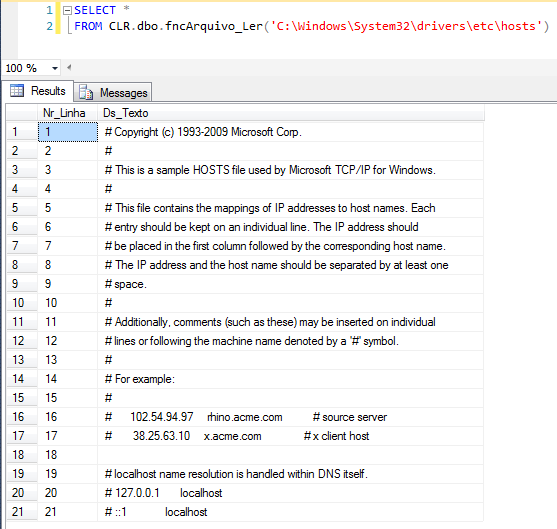
For the task of reading a file line by line, I will again use a table-valued function from the CLR, which will allow me to perform a select in the view and return the contents of the file. I can export this data to a table, filter, sort, etc.. all with great flexibility.
Usage example:
Source code:
using System.IO;
using System.Collections;
using System.Data.SqlTypes;

public partial class UserDefinedFunctions
{

    private class ArquivoLer
    {

        public SqlInt32 Nr_Linha;
        public SqlString Ds_Texto;

        public ArquivoLer(SqlInt32 nrLinha, SqlString dsTexto)
        {

            Nr_Linha = nrLinha;
            Ds_Texto = dsTexto;

        }

    }

    [Microsoft.SqlServer.Server.SqlFunction(
            FillRowMethodName = "FillRow_Arquivo_Ler",
            TableDefinition = "Nr_Linha INT, Ds_Texto NVARCHAR(MAX)"
        )]
    public static IEnumerable fncArquivo_Ler(string Ds_Caminho)
    {

        var ArquivoLerCollection = new ArrayList();

        if (string.IsNullOrEmpty(Ds_Caminho))
            return ArquivoLerCollection;

        var contador = 1;

        using (var sr = new StreamReader(Ds_Caminho))
        {

            while (sr.Peek() >= 0)
            {

                ArquivoLerCollection.Add(new ArquivoLer(
                    contador,
                    sr.ReadLine()
                ));

                contador++;

            }

            sr.Close();

        }

        return ArquivoLerCollection;

    }

    protected static void FillRow_Arquivo_Ler(object objArquivoLer, out SqlInt32 nrLinha, out SqlString dsTexto)
    {

        var ArquivoLer = (ArquivoLer) objArquivoLer;

        nrLinha = ArquivoLer.Nr_Linha;
        dsTexto = ArquivoLer.Ds_Texto;

    }

}How to read a file and return as a string in SQL Server
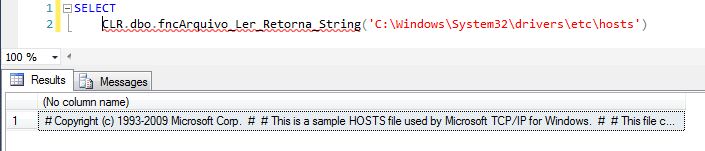
For this need I chose to create a scalar function for a very common use when creating routines is the need to import a file and not return line by line, but rather a string with the entire contents of the file. I use this a lot when importing XML files, for example.
Example of use:
Source code:
using System.Data.SqlTypes;
using System.IO;

public partial class UserDefinedFunctions
{

    [Microsoft.SqlServer.Server.SqlFunction]
    public static SqlString fncArquivo_Ler_Retorna_String(SqlString Ds_Caminho)
    {

        if (Ds_Caminho.IsNull)
            return SqlString.Null;


        if (!File.Exists(Ds_Caminho.Value))
            return SqlString.Null;


        using (var sr = new StreamReader(Ds_Caminho.Value))
        {
            return sr.ReadToEnd();
        }

    }
}
How to check if a file or directory exists in SQL Server
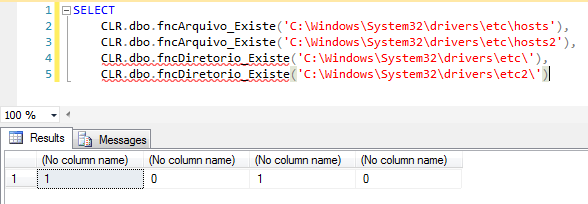
Scalar functions with Boolean return (BIT), they allow you to check whether a file or directory exists in the filesystem. Its source code is as simple as its use.
Example of use:
Source code of fncFile_Exists:
using System.Data.SqlTypes;
using System.IO;

public partial class UserDefinedFunctions
{
    [Microsoft.SqlServer.Server.SqlFunction]
    public static SqlBoolean fncArquivo_Existe(SqlString Ds_Arquivo)
    {
        return (File.Exists(Ds_Arquivo.ToString()));
    }
};
fncDiretorio_Existe source code:
using System.Data.SqlTypes;
using System.IO;

public partial class UserDefinedFunctions
{
    [Microsoft.SqlServer.Server.SqlFunction]
    public static SqlBoolean fncDiretorio_Existe(SqlString Ds_Diretorio)
    {
        return (Directory.Exists(Ds_Diretorio.ToString()));
    }
};
How to export data from a SQL Server table to file
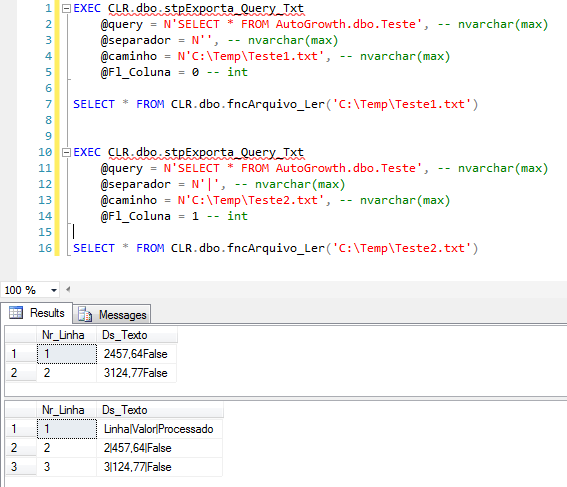
With this Stored Procedure, we can easily export data from a SQL Server table or view to a delimited or non-delimited text file, where each record will be a line of the created file
Example of use:
Source code:
using System;
using System.Data;
using System.Data.SqlClient;
using System.IO;
using System.Globalization;
using System.Text;

public partial class StoredProcedures
{
    [Microsoft.SqlServer.Server.SqlProcedure]
    public static void stpExporta_Query_Txt(string query, string separador, string caminho, int Fl_Coluna)
    {

        var fileStream = new FileStream(caminho, FileMode.Create);
        var sw = new StreamWriter(fileStream, Encoding.Default);

        try
        {
            using (var conn = new SqlConnection("context connection=true"))
            {

                var getOutput = new SqlCommand
                {
                    CommandText = query,
                    CommandType = CommandType.Text,
                    CommandTimeout = 120,
                    Connection = conn
                };


                conn.Open();

                var exportData = getOutput.ExecuteReader();

                if (Fl_Coluna == 1)
                {
                    for (var i = 0; i < exportData.FieldCount; i++)
                    {
                        sw.Write(exportData.GetName(i));
                        if (i < exportData.FieldCount - 1)
                            sw.Write(separador);
                    }
                    sw.WriteLine();
                }

                if (string.IsNullOrEmpty(separador))
                {
                    while (exportData.Read())
                    {
                        for (var i = 0; i < exportData.FieldCount; i++)
                        {
                            sw.Write(Convert.ToString(exportData.GetValue(i), CultureInfo.GetCultureInfo("pt-BR")));
                            if (i < exportData.FieldCount - 1)
                                sw.Write(separador);
                        }
                        sw.WriteLine();
                    }
                }
                else
                {
                    var separadorTroca = new string(' ', separador.Length);

                    while (exportData.Read())
                    {
                        for (var i = 0; i < exportData.FieldCount; i++)
                        {
                            sw.Write(Convert.ToString(exportData.GetValue(i), CultureInfo.GetCultureInfo("pt-BR")).Replace(separador, separadorTroca));
                            if (i < exportData.FieldCount - 1)
                                sw.Write(separador);
                        }
                        sw.WriteLine();
                    }
                }


                conn.Close();
                sw.Close();
                conn.Dispose();
                getOutput.Dispose();

            }

        }
        catch (Exception e)
        {
            sw.Close();
            throw new ApplicationException(e.Message);
        }
    }
};
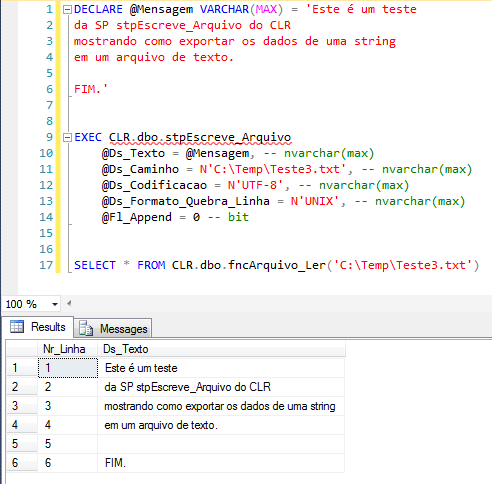
How to export a string from SQL Server to file
With this Stored Procedure, we can easily export string data from SQL Server and export that string to a text file. No line break will be forced in the file, only if the string hears line break characters (line feed and/or carriage return).
The Ds_Codificacao parameter allows you to vary between UTF-8, ISO-8859-1 and several others supported by the .NET Framework. The full list of encodings can be found here: Encoding.GetEncodings Method
The Ds_Formato_Quebra_Linha parameter allows you to switch between the line break formats for each operating system, making it possible to use Windows, Unix and MAC values.
The Fl_Append parameter allows if the file already exists, it is deleted and overwritten (Fl_Append = 0) or the content is added to the end of the file (Fl_Append = 1)
Example of use:
Source code:
using System;
using System.Data.SqlTypes;
using System.IO;
using System.Text;

public partial class StoredProcedures
{
    [Microsoft.SqlServer.Server.SqlProcedure]
    public static void stpEscreve_Arquivo(SqlString Ds_Texto, SqlString Ds_Caminho, SqlString Ds_Codificacao, SqlString Ds_Formato_Quebra_Linha, SqlBoolean Fl_Append)
    {


        if (!Ds_Texto.IsNull && !Ds_Caminho.IsNull && !Fl_Append.IsNull)
        {

            try
            {

                var dir = Path.GetDirectoryName(Ds_Caminho.Value);

                if (!Directory.Exists(dir))
                    Directory.CreateDirectory(dir);

            }
            catch (Exception e)
            {
                throw new ApplicationException(e.Message);
            }


            var encoding = (Ds_Codificacao.IsNull) ? "UTF-8" : Ds_Codificacao.Value;
            if (Ds_Codificacao.Value.Trim() == "")
                encoding = "UTF-8";

            var sb = new StringBuilder(Ds_Texto.Value);

            var fileStream = new FileStream(Ds_Caminho.Value, ((Fl_Append) ? FileMode.Append : FileMode.Create));
            var sw = new StreamWriter(fileStream, Encoding.GetEncoding(encoding));

            switch (Ds_Formato_Quebra_Linha.Value.ToLower())
            {
                case "unix":
                    sw.NewLine = "\n";
                    sb.Replace("\r", "");
                    break;
                case "mac":
                    sw.NewLine = "\r";
                    sb.Replace("\n", "");
                    break;
                default:
                    sw.NewLine = "\r\n";
                    break;
            }


            try
            {

                var texto = sb.ToString();

                sw.Write(texto);
                sw.Close();

            }
            catch (Exception e)
            {
                sw.Close();
                throw new ApplicationException(e.Message);
            }

        }
        else
            throw new ApplicationException("Os parâmetros de input estão vazios");

    }
};
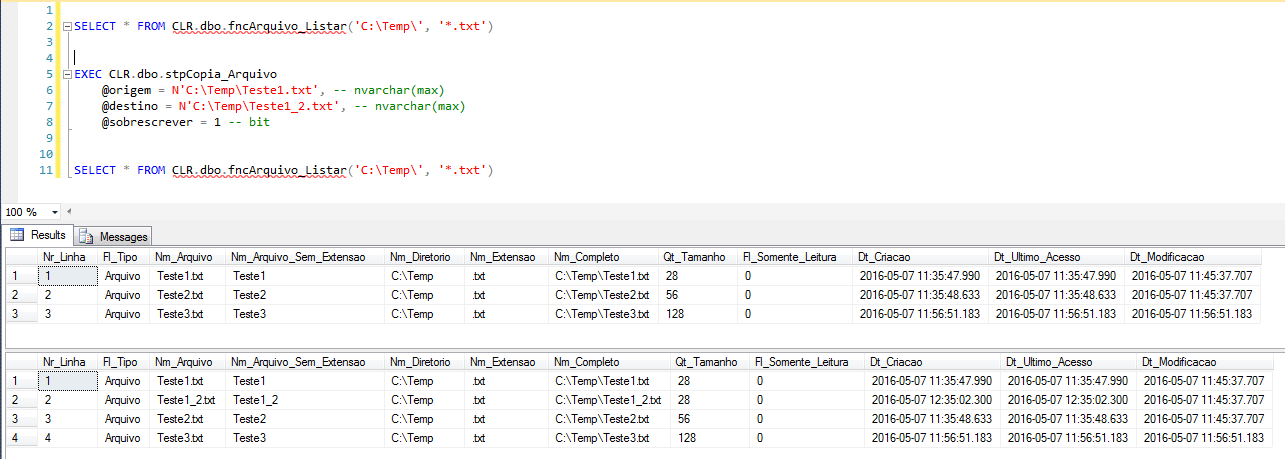
How to copy files in SQL Server
Procedure that can be used to copy a file from one directory to another
Example of use:
Source code:
using System;
using System.IO;

public partial class StoredProcedures
{
    [Microsoft.SqlServer.Server.SqlProcedure]
    public static void stpCopia_Arquivo(string origem, string destino, bool sobrescrever)
    {
        try
        {
            File.Copy(@origem, @destino, sobrescrever);
        }
        catch (Exception e)
        {
            throw new ApplicationException("Erro : " + e.Message);
        }
    }
};
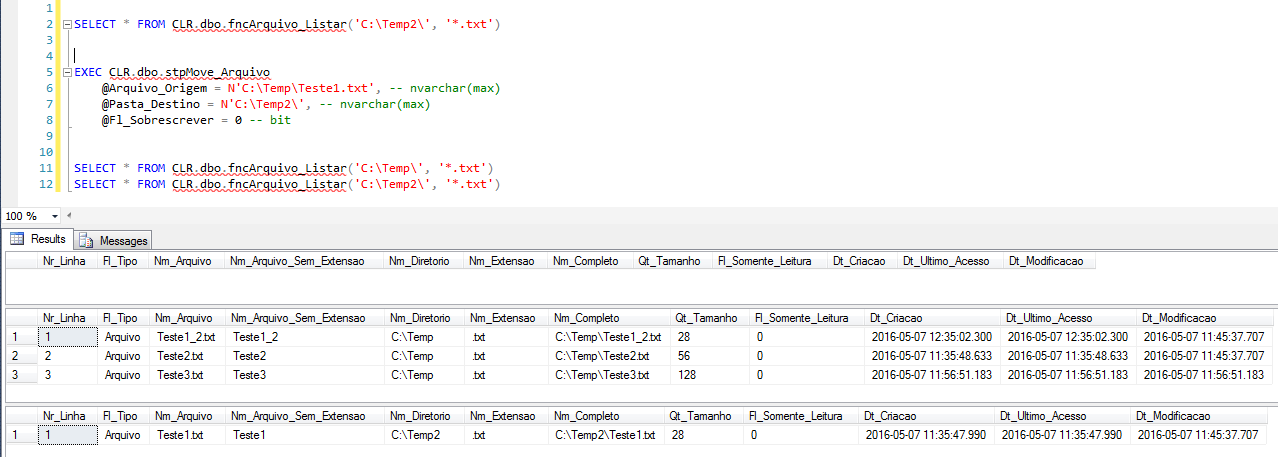
How to Move Files in SQL Server
Procedure that can be used to move a file from one directory to another, keeping the same file name
Example of use:
Source code:
using System;
using System.Data.SqlTypes;
using System.IO;

public partial class StoredProcedures
{
    [Microsoft.SqlServer.Server.SqlProcedure]
    public static void stpMove_Arquivo(SqlString Arquivo_Origem, SqlString Pasta_Destino, SqlBoolean Fl_Sobrescrever)
    {

        if (Arquivo_Origem.IsNull)
            throw new ApplicationException("Favor informar o arquivo de origem");

        if (Pasta_Destino.IsNull)
            throw new ApplicationException("Favor informar a pasta de destino");


        try
        {

            var _pasta = new DirectoryInfo(Pasta_Destino.Value);
            var _arquivo = new FileInfo(Arquivo_Origem.Value);
            var _aquivoNovo = new FileInfo(_pasta.FullName + "\\" +  _arquivo.Name);

            if (!_pasta.Exists)
                throw new ApplicationException("A pasta de destino " + _pasta.FullName + " não existe.");

            if (!_arquivo.Exists)
                throw new ApplicationException("O arquivo de origem " + _arquivo.FullName + " não existe.");

            if (_aquivoNovo.FullName == _arquivo.FullName)
                throw new ApplicationException("O caminho de origem e destino não podem ser iguais.");

            if (Fl_Sobrescrever)
                if (_aquivoNovo.Exists)
                    _aquivoNovo.Delete();

            _arquivo.MoveTo(_aquivoNovo.FullName);

        }
        catch (Exception e)
        {
            throw new ApplicationException("Erro : " + e.Message);
        }
    }
};
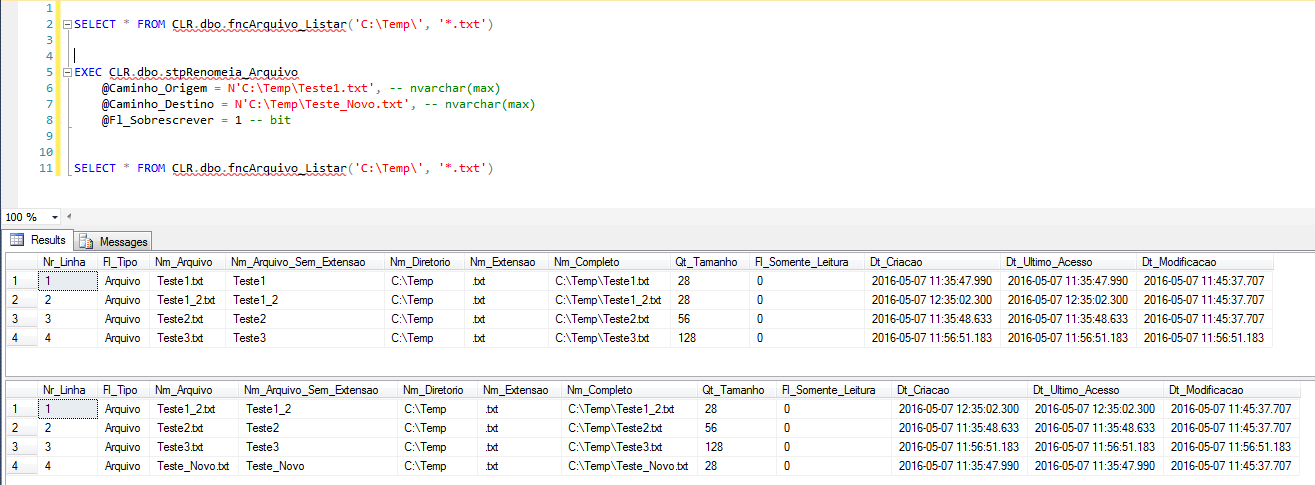
How to rename files in SQL Server
Procedure that can be used to rename a file, even allowing it to be moved to another name
Example of use:
Source code:
using System;
using System.Data.SqlTypes;
using System.IO;

public partial class StoredProcedures
{
    [Microsoft.SqlServer.Server.SqlProcedure]
    public static void stpRenomeia_Arquivo(SqlString Caminho_Origem, SqlString Caminho_Destino, SqlBoolean Fl_Sobrescrever)
    {
        try
        {
            if (Fl_Sobrescrever.Value)
                if (File.Exists(Caminho_Destino.Value))
                        File.Delete(Caminho_Destino.Value);

            File.Move(Caminho_Origem.Value, Caminho_Destino.Value);
        }
        catch (Exception e)
        {
            throw new ApplicationException("Erro : " + e.Message);
        }
    }
};
How to delete files in SQL Server
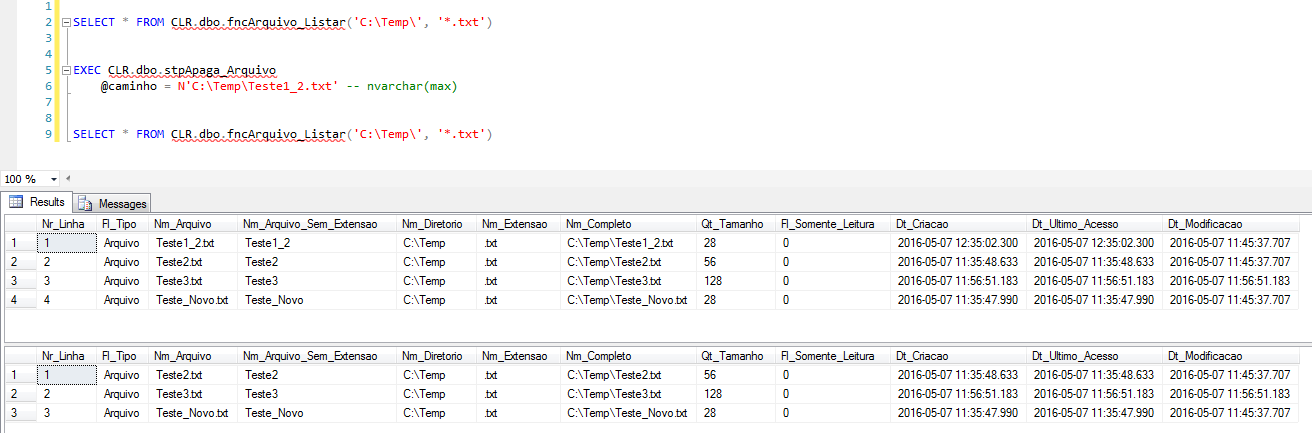
Procedure that can be used to physically delete a file
Example of use:
Source code:
using System;
using System.IO;

public partial class StoredProcedures
{
    [Microsoft.SqlServer.Server.SqlProcedure]
    public static void stpApaga_Arquivo(string caminho)
    {
        try
        {

            var Arquivo = new FileInfo(caminho);

            if (Arquivo.Exists)
            {
                Arquivo.Delete();
            }
            else
            {
                throw new ApplicationException("O Arquivo especificado não existe.");
            }
        }
        catch (Exception e)
        {
            throw new ApplicationException("Erro : " + e.Message);
        }
    }
};
How to delete all files from a directory in SQL Server
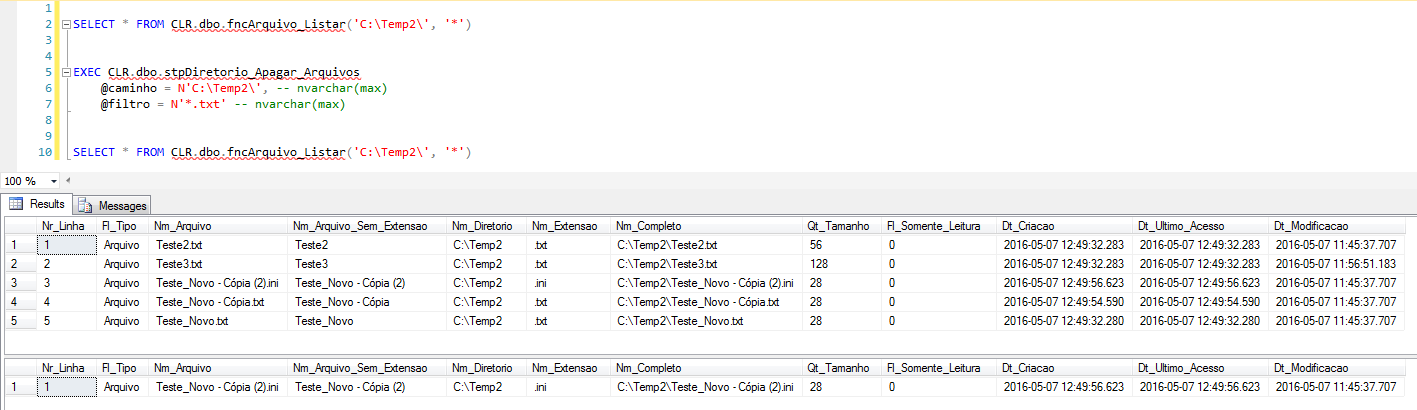
Procedure that can be used to delete all files from a given directory
Example of use:
Source code:
using System;
using System.IO;

public partial class StoredProcedures
{
    [Microsoft.SqlServer.Server.SqlProcedure]
    public static void stpDiretorio_Apagar_Arquivos(string caminho, string filtro)
    {

        try
        {
            if (!Directory.Exists(caminho))
            {
                throw new ApplicationException("Caminho especificado ('" + caminho + "') não existe ou inacessivel.");
                return;
            }
        }
        catch
        {
            throw new ApplicationException("Erro ao converter caminho especificado ('" + caminho + "').");
            return;
        }


        try
        {

            var diretorio = new DirectoryInfo(caminho);

            foreach (var arquivo in diretorio.GetFiles(filtro))
            {
                arquivo.Delete();
            }
        }
        catch (Exception e)
        {
            throw new ApplicationException("Erro : " + e.Message);
        }
    }

};
How to delete a directory in SQL Server
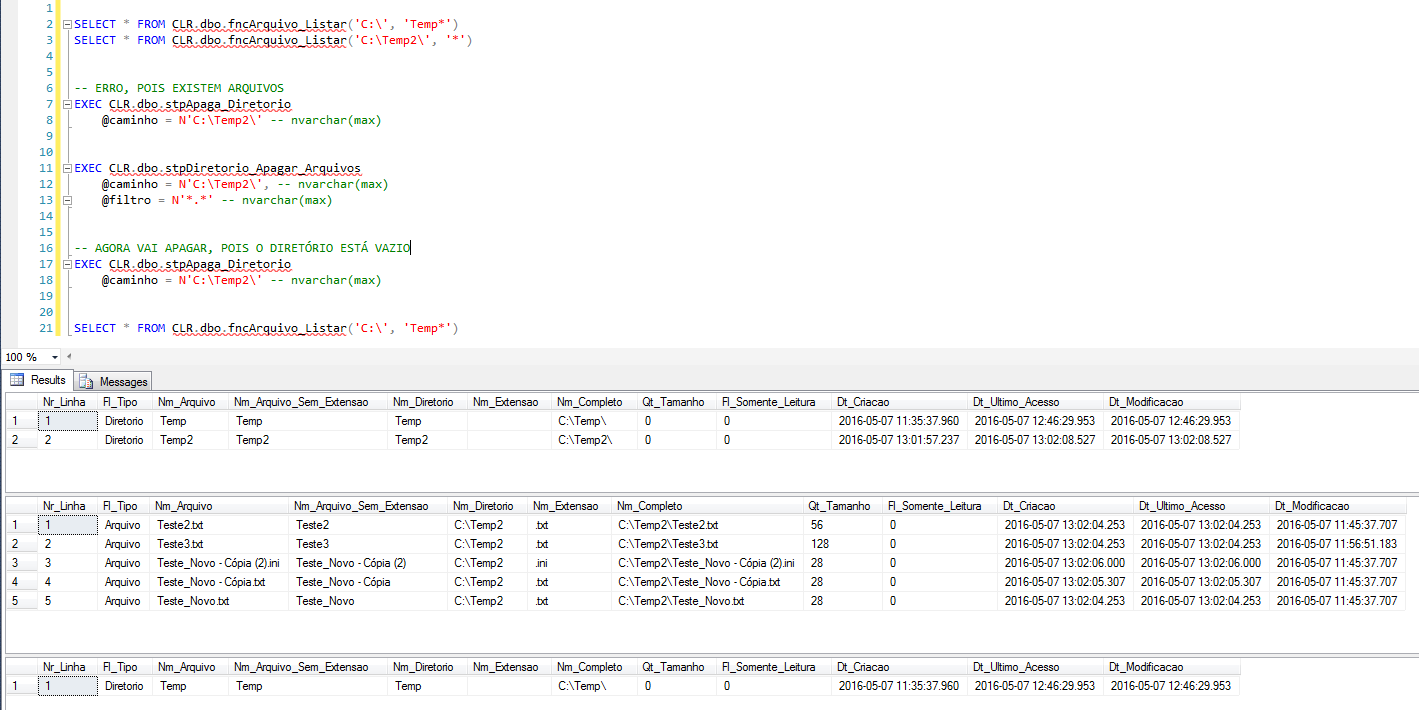
Procedure that can be used to delete a specific directory in SQL Server. If this directory has files, they must be deleted before deleting the directory.
Example of use:
Source code:
using System;
using System.IO;

public partial class StoredProcedures
{
    [Microsoft.SqlServer.Server.SqlProcedure]
    public static void stpApaga_Diretorio(string caminho)
    {

        try
        {

            var Diretorio = new DirectoryInfo(caminho);

            if (Diretorio.Exists)
            {
                if (Diretorio.GetFiles().Length > 0 || Diretorio.GetDirectories().Length > 0)
                {
                    throw new ApplicationException("Não é possível apagar um diretório que possua arquivos.");
                }
                else
                {
                    Diretorio.Delete();
                }
            }
            else
            {
                throw new ApplicationException("O Diretório especificado não existe.");
            }
        }
        catch (Exception e)
        {
            throw new ApplicationException("Erro : " + e.Message);
        }
    }
};
And that's it, folks!
I hope you liked the post and that it was useful to you.
Hug!

Comments (0)
Loading comments...