
Hey guys,
Good afternoon!
In today's post, I will demonstrate how to manage (read, list, create, change and delete) Windows Registry keys through the database, using SQL CLR and the C# programming language (CSharp), which allows us to greatly extend the capabilities and functionalities of the SQL Server database.
This type of functionality is very useful when you need to quickly consult some information in the Windows registry of a server or make a change to the registry without having to connect to the server, just by executing a Stored Procedure, or even to apply a registry change to several machines or servers in an automated way.
It's worth remembering that I had already made a post (SQL Server – Querying instance information in the Windows Registry using sys.dm_server_registry and xp_instance_regread) where it was possible to read some information from the Windows registry without using the CLR, but relating only to information about the SQL Server instance and not the general reading of any registry key, much less the manipulation of this information, which motivated me to create this new post for this need.
Some Stored Procedures below require the use of the Return class, which I use to send alert and/or error messages from the CLR to the database. The source code of this class can be viewed in the post SQL Server – How to send warnings and error messages to the database using the CLR (C#)
How to Read and List Windows Registry KeysHow to Read and List Windows Registry Keys
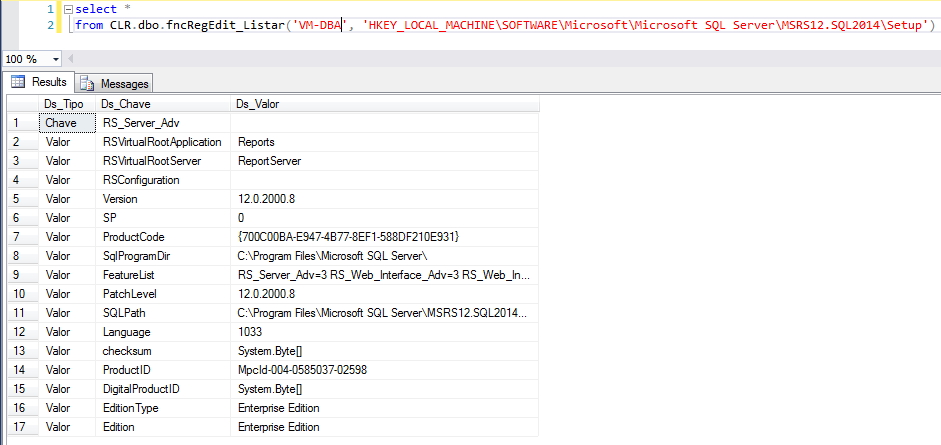
To list Windows registries, I will use the RegistryRow class, which encapsulates several methods from the Microsoft.Win32.RegistryKey library and I use it in the table-valued function fncRegEdit_Listar, as per the example above, where I enter as parameters the name of the machine and the registry key that will be read.
RegEdit.cs
using System;
using System.Collections;
using Microsoft.Win32;

namespace Bibliotecas.Model
{


    public class RegistryRow
    {

        public string Tipo;
        public string Chave;
        public string Valor;

        public RegistryRow(string tipo, string chave, string valor)
        {

            Tipo = tipo;
            Chave = chave;
            Valor = valor;

        }

        public static ArrayList RegEdit_Listar(string Ds_Servidor, string Ds_Chave)
        {

            var RegistryRowCollection = new ArrayList();


            if (string.IsNullOrEmpty(Ds_Servidor))
                Ds_Servidor = Environment.MachineName;


            var registryHive = RegistryHive.LocalMachine;

            if (Ds_Chave.Substring(0, 5).ToUpper() == "HKEY_")
            {

                var palavras = Ds_Chave.Split('\\');
                var raiz = palavras[0];

                switch (raiz)
                {

                    case "HKEY_CURRENT_CONFIG":
                        registryHive = RegistryHive.CurrentConfig;
                        break;

                    case "HKEY_CURRENT_USER":
                        registryHive = RegistryHive.CurrentUser;
                        break;

                    case "HKEY_USERS":
                        registryHive = RegistryHive.Users;
                        break;

                    case "HKEY_CLASSES_ROOT":
                        registryHive = RegistryHive.ClassesRoot;
                        break;

                    case "HKEY_LOCAL_MACHINE":
                    default:
                        registryHive = RegistryHive.LocalMachine;
                        break;

                }

                Ds_Chave = string.Join("\\", palavras, 1, palavras.Length - 1);

            }


            var myRegChave = RegistryKey.OpenRemoteBaseKey(registryHive, Ds_Servidor).OpenSubKey(Ds_Chave);
            var subKeys = myRegChave?.GetSubKeyNames();
            if (subKeys != null)
            {

                foreach (var key in subKeys)
                {

                    try
                    {

                        RegistryRowCollection.Add(new RegistryRow(
                            "Chave",
                            key,
                            ""
                        ));

                    }
                    catch (Exception e)
                    {
                        // ignored
                    }
                }

            }


            myRegChave = RegistryKey.OpenRemoteBaseKey(registryHive, Ds_Servidor).OpenSubKey(Ds_Chave);


            var valorNames = myRegChave?.GetValueNames();
            if (valorNames == null) return RegistryRowCollection;

            foreach (var chave in valorNames)
            {

                try
                {

                    var valor = myRegChave.GetValue(chave).ToString();

                    RegistryRowCollection.Add(new RegistryRow(
                        "Valor",
                        chave,
                        valor
                    ));

                }
                catch (Exception e)
                {
                    // ignored
                }

            }


            return RegistryRowCollection;


        }

    }

}
fncRegEdit_Listar.cs
using System.Collections;
using System.Data.SqlTypes;
using Bibliotecas.Model;

public partial class UserDefinedFunctions
{

    [Microsoft.SqlServer.Server.SqlFunction(
        FillRowMethodName = "FillRegistryRow",
        TableDefinition = "Ds_Tipo nvarchar(50), Ds_Chave nvarchar(max), Ds_Valor nvarchar(max)"
    )]
    public static IEnumerable fncRegEdit_Listar(string Ds_Servidor, string Ds_Chave)
    {
        var RegistryRowCollection = RegistryRow.RegEdit_Listar(Ds_Servidor, Ds_Chave);
        return RegistryRowCollection;
    }

    protected static void FillRegistryRow(object objRegistryRow, out SqlString tipo, out SqlString key, out SqlString value)
    {

        var registryRow = (RegistryRow) objRegistryRow;

        tipo = registryRow.Tipo;
        key = registryRow.Chave;
        value = registryRow.Valor;

    }

}
How to Create Windows Registry Folders
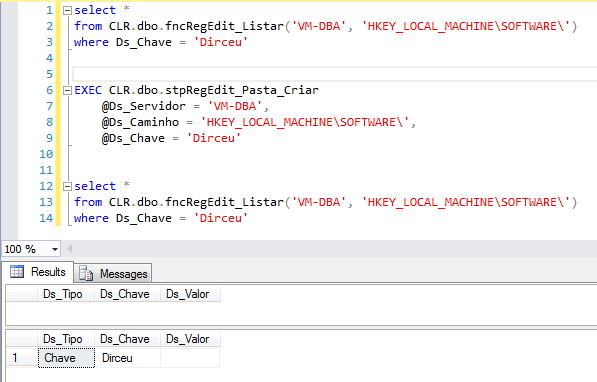
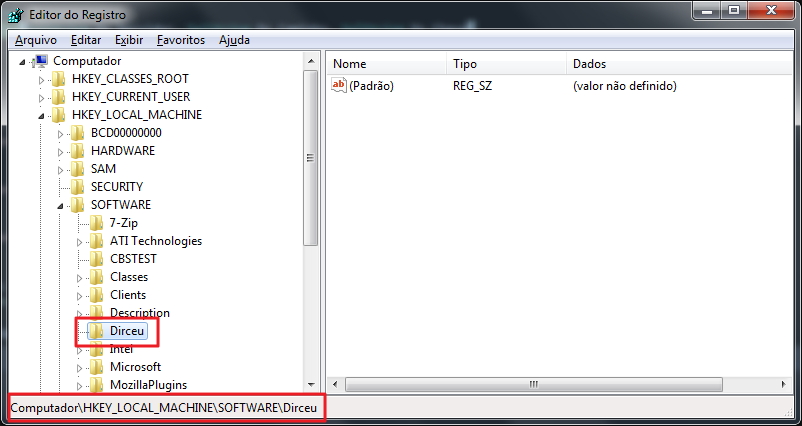
To create folders in the Windows registry, I use the Stored Procedure stpRegEdit_Folder_Criar, as in the example above, which allows you to create directories in a Windows registry key.
stpRegEdit_Folder_Criar.cs
using System;
using System.Data.SqlTypes;
using Bibliotecas.Model;
using Microsoft.Win32;

public partial class StoredProcedures
{
    [Microsoft.SqlServer.Server.SqlProcedure]
    public static void stpRegEdit_Pasta_Criar(SqlString Ds_Servidor, SqlString Ds_Caminho, SqlString Ds_Chave)
    {

        try
        {

            if (Ds_Servidor.IsNull)
                Retorno.Erro("Favor informar o servidor");

            if (Ds_Caminho.IsNull)
                Retorno.Erro("Favor informar o caminho");

            if (Ds_Chave.IsNull)
                Retorno.Erro("Favor informar a chave");


            var caminho = Ds_Caminho.Value;
            var registryHive = RegistryHive.LocalMachine;

            if (caminho.Substring(0, 5).ToUpper() == "HKEY_")
            {

                var palavras = caminho.Split('\\');
                var raiz = palavras[0];

                switch (raiz)
                {

                    case "HKEY_CURRENT_CONFIG":
                        registryHive = RegistryHive.CurrentConfig;
                        break;

                    case "HKEY_CURRENT_USER":
                        registryHive = RegistryHive.CurrentUser;
                        break;

                    case "HKEY_USERS":
                        registryHive = RegistryHive.Users;
                        break;

                    case "HKEY_CLASSES_ROOT":
                        registryHive = RegistryHive.ClassesRoot;
                        break;

                    case "HKEY_LOCAL_MACHINE":
                    default:
                        registryHive = RegistryHive.LocalMachine;
                        break;

                }

                caminho = string.Join("\\", palavras, 1, palavras.Length - 1);

            }

            var registro = RegistryKey.OpenRemoteBaseKey(registryHive, Ds_Servidor.Value).OpenSubKey(caminho, true);
            registro?.CreateSubKey(Ds_Chave.Value);
            registro?.Close();

        }
        catch (Exception e)
        {
            Retorno.Erro("Erro : " + e.Message);
        }

    }

}
How to Delete Windows Registry Folders
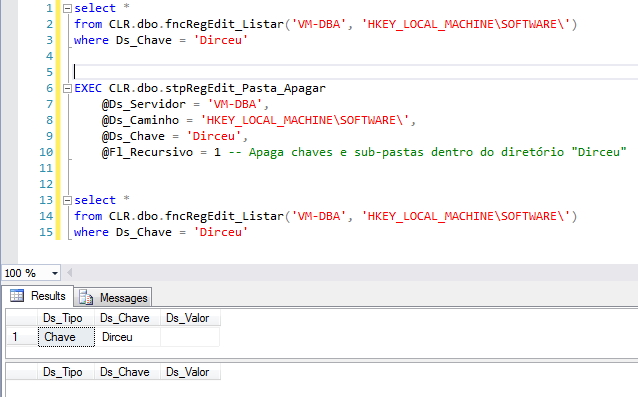
To delete folders in the Windows registry, I use the Stored Procedure stpRegEdit_Folder_Apagar, as in the example above, which allows you to delete directories from the Windows registry. The binary flag @Fl_Recursive = 1 allows you to recursively delete keys and subdirectories from a given directory.
If the @Fl_Recursive flag = 0, it will only be possible to delete directories that do not have subdirectories and if you try, you will be faced with the error message “System.ApplicationException: Error: Registry key has subkeys and recursive removes are not supported by this method.”.
stpRegEdit_Folder_Delete.cs
using System;
using System.Data.SqlTypes;
using Bibliotecas.Model;
using Microsoft.Win32;


public partial class StoredProcedures
{
    [Microsoft.SqlServer.Server.SqlProcedure]
    public static void stpRegEdit_Pasta_Criar(SqlString Ds_Servidor, SqlString Ds_Caminho, SqlString Ds_Chave)
    {

        try
        {

            if (Ds_Servidor.IsNull)
                Retorno.Erro("Favor informar o servidor");

            if (Ds_Caminho.IsNull)
                Retorno.Erro("Favor informar o caminho");

            if (Ds_Chave.IsNull)
                Retorno.Erro("Favor informar a chave");


            var caminho = Ds_Caminho.Value;
            var registryHive = RegistryHive.LocalMachine;

            if (caminho.Substring(0, 5).ToUpper() == "HKEY_")
            {

                var palavras = caminho.Split('\\');
                var raiz = palavras[0];

                switch (raiz)
                {

                    case "HKEY_CURRENT_CONFIG":
                        registryHive = RegistryHive.CurrentConfig;
                        break;

                    case "HKEY_CURRENT_USER":
                        registryHive = RegistryHive.CurrentUser;
                        break;

                    case "HKEY_USERS":
                        registryHive = RegistryHive.Users;
                        break;

                    case "HKEY_CLASSES_ROOT":
                        registryHive = RegistryHive.ClassesRoot;
                        break;

                    case "HKEY_LOCAL_MACHINE":
                    default:
                        registryHive = RegistryHive.LocalMachine;
                        break;

                }

                caminho = string.Join("\\", palavras, 1, palavras.Length - 1);

            }

            var registro = RegistryKey.OpenRemoteBaseKey(registryHive, Ds_Servidor.Value).OpenSubKey(caminho, true);
            registro?.CreateSubKey(Ds_Chave.Value);
            registro?.Close();

        }
        catch (Exception e)
        {
            Retorno.Erro("Erro : " + e.Message);
        }

    }

}
How to create/change Windows registry keys
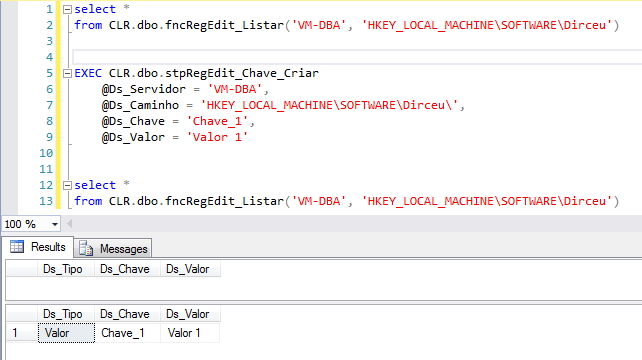
How to create keys and values in the Windows Registry:
How to change keys and values in the Windows Registry:
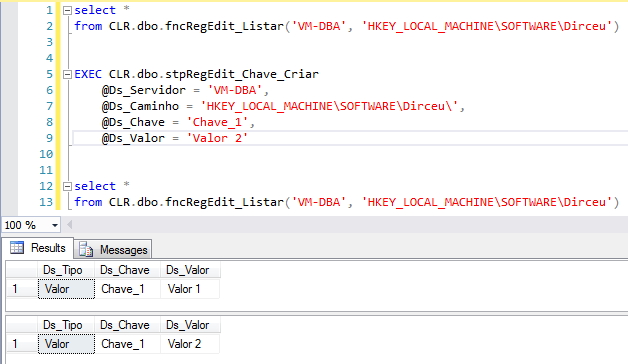
To create/change Windows registries, I use the Stored Procedure stpRegEdit_Chave_Criar, as shown above and the source code is available below:
stpRegEdit_Chave_Criar.cs
using System;
using System.Data.SqlTypes;
using Bibliotecas.Model;
using Microsoft.Win32;

public partial class StoredProcedures
{
    [Microsoft.SqlServer.Server.SqlProcedure]
    public static void stpRegEdit_Chave_Criar(SqlString Ds_Servidor, SqlString Ds_Caminho, SqlString Ds_Chave, SqlString Ds_Valor)
    {

        try
        {

            if (Ds_Servidor.IsNull)
                Retorno.Erro("Favor informar o servidor");

            if (Ds_Caminho.IsNull)
                Retorno.Erro("Favor informar o caminho");

            if (Ds_Chave.IsNull)
                Retorno.Erro("Favor informar a chave");

            if (Ds_Valor.IsNull)
                Retorno.Erro("Favor informar o valor");


            var caminho = Ds_Caminho.Value;
            var registryHive = RegistryHive.LocalMachine;

            if (caminho.Substring(0, 5).ToUpper() == "HKEY_")
            {

                var palavras = caminho.Split('\\');
                var raiz = palavras[0];

                switch (raiz)
                {

                    case "HKEY_CURRENT_CONFIG":
                        registryHive = RegistryHive.CurrentConfig;
                        break;

                    case "HKEY_CURRENT_USER":
                        registryHive = RegistryHive.CurrentUser;
                        break;

                    case "HKEY_USERS":
                        registryHive = RegistryHive.Users;
                        break;

                    case "HKEY_CLASSES_ROOT":
                        registryHive = RegistryHive.ClassesRoot;
                        break;

                    case "HKEY_LOCAL_MACHINE":
                    default:
                        registryHive = RegistryHive.LocalMachine;
                        break;

                }

                caminho = string.Join("\\", palavras, 1, palavras.Length - 1);

            }

            var registro = RegistryKey.OpenRemoteBaseKey(registryHive, Ds_Servidor.Value).OpenSubKey(caminho, true);
            registro?.SetValue(Ds_Chave.Value, Ds_Valor.Value);
            registro?.Close();

        }
        catch (Exception e)
        {
            Retorno.Erro("Erro : " + e.Message);
        }

    }

}
How to delete Windows registry keys
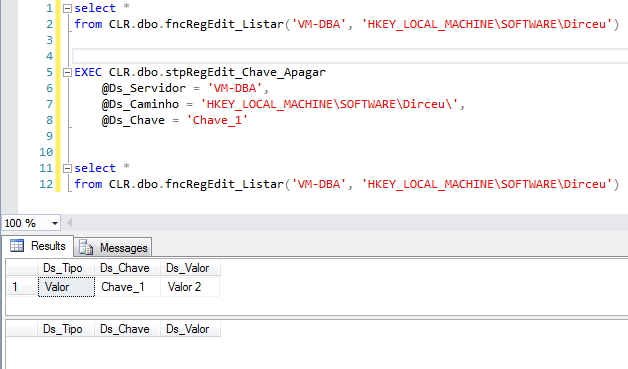
To delete Windows registry keys, I use the Stored Procedure stpRegEdit_Chave_Apagar, using the same standards as the Stored Procedures above.
stpRegEdit_Chave_Apagar.cs
using System;
using System.Data.SqlTypes;
using Bibliotecas.Model;
using Microsoft.Win32;

public partial class StoredProcedures
{
    [Microsoft.SqlServer.Server.SqlProcedure]
    public static void stpRegEdit_Chave_Apagar(SqlString Ds_Servidor, SqlString Ds_Caminho, SqlString Ds_Chave)
    {

        try
        {

            if (Ds_Servidor.IsNull)
                Retorno.Erro("Favor informar o servidor");

            if (Ds_Caminho.IsNull)
                Retorno.Erro("Favor informar o caminho");

            if (Ds_Chave.IsNull)
                Retorno.Erro("Favor informar a chave");


            var caminho = Ds_Caminho.Value;
            var registryHive = RegistryHive.LocalMachine;

            if (caminho.Substring(0, 5).ToUpper() == "HKEY_")
            {

                var palavras = caminho.Split('\\');
                var raiz = palavras[0];

                switch (raiz)
                {

                    case "HKEY_CURRENT_CONFIG":
                        registryHive = RegistryHive.CurrentConfig;
                        break;

                    case "HKEY_CURRENT_USER":
                        registryHive = RegistryHive.CurrentUser;
                        break;

                    case "HKEY_USERS":
                        registryHive = RegistryHive.Users;
                        break;

                    case "HKEY_CLASSES_ROOT":
                        registryHive = RegistryHive.ClassesRoot;
                        break;

                    case "HKEY_LOCAL_MACHINE":
                    default:
                        registryHive = RegistryHive.LocalMachine;
                        break;

                }

                caminho = string.Join("\\", palavras, 1, palavras.Length - 1);

            }

            var registro = RegistryKey.OpenRemoteBaseKey(registryHive, Ds_Servidor.Value).OpenSubKey(caminho, true);
            registro?.DeleteValue(Ds_Chave.Value);
            registro?.Close();

        }
        catch (Exception e)
        {
            Retorno.Erro("Erro : " + e.Message);
        }

    }

}
If you didn't know what CLR is and would like to know more about it, visit my post Introduction to SQL CLR (Common Language Runtime) in SQL Server.
That's it, folks!
Until the next post.
sql server c# csharp access access list list view view read windows registry registry regedit
sql server c# csharp access access list list view view read windows registry registry regedit

Comentários (0)
Carregando comentários…