Hey guys!!
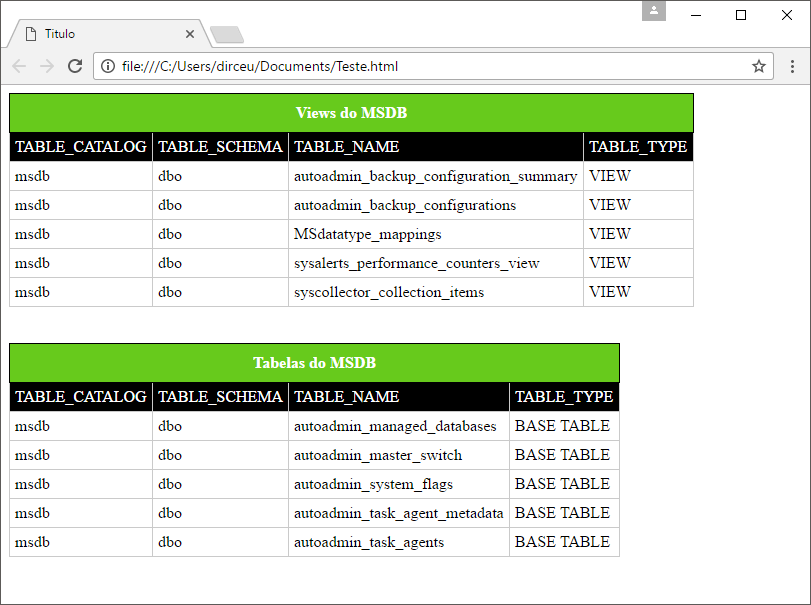
In this post I come to bring a solution to a problem that I see almost every day in Whatsapp and Telegram groups: Sending the content of one or more tables or queries in the body of an email as HTML.
The procedure we are going to use in this post to take the contents of the table and transform it into HTML I had already shared in the article How to export data from a SQL Server table to HTML, but I see that whenever I sent the article, people still had difficulty sending the email, so I decided to create this article to resolve this doubt once and for all.
If you don't know how to configure Database Mail to start sending emails through SQL Server or are having difficulty sending simple emails, access the article SQL Server – How to activate and configure Database mail to send and monitor emails through the database (sp_send_dbmail).
Using sp_send_dbmail itself and the @query parameter
Probably one of the most used ways to send the result of a table by email is using the @query parameter of sp_send_dbmail.
Example:
EXEC msdb.dbo.sp_send_dbmail
    @profile_name = 'ProfileEnvioEmail', -- sysname
    @recipients = 'meu@email.com', -- varchar(max)
    @subject = N'Teste', -- nvarchar(255)
    @body = N'Teste', -- nvarchar(max)
    @body_format = 'html',

    -- Parâmetros específicos do envio da query
    @query = N'select top 20 * from [dirceuresende].[dbo].[Clientes]', -- nvarchar(max)
    @query_result_header = 1, -- bit
    @exclude_query_output = 1, -- bit
    @query_result_width = 50, -- int
    @query_result_separator = '|' -- char(1)
Result:

As you can see, although it is extremely simple to use, the result is very poor for data visualization.
Using sp_send_dbmail itself and the @attach_query_result_as_file parameter
I'll try sending this content as an attachment to see if it improves. Maybe by exporting to file, the output will be a little better...
Example:
EXEC msdb.dbo.sp_send_dbmail
    @profile_name = 'ProfileEnvioEmail', -- sysname
    @recipients = 'meu@email.com', -- varchar(max)
    @subject = N'Teste', -- nvarchar(255)
    @body = N'Teste', -- nvarchar(max)
    @body_format = 'html',

    -- Parâmetros específicos do envio da query
    @query = N'select top 20 * from [dirceuresende].[dbo].[Clientes]', -- nvarchar(max)
    @query_result_header = 1, -- bit
    @exclude_query_output = 1, -- bit
    @query_result_width = 50, -- int
    @query_result_separator = '|', -- char(1)

    -- Transformando em arquivo
    @attach_query_result_as_file = 1,
    @query_attachment_filename = 'arquivo.txt'
Result:
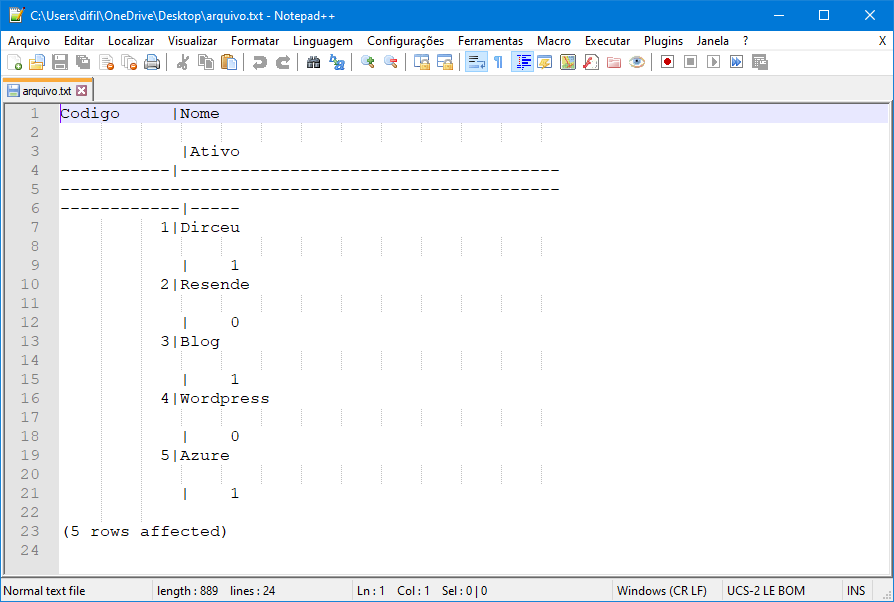
Another very bad result... It didn't improve much.
Using XML to create a variable with the result in HTML
Let's use another approach then to try to export the data from the table and send it in an email so that it is easy to view the data.
Example:
-- Transforma o conteúdo da query em HTML
DECLARE @HTML VARCHAR(MAX);

SET @HTML = '
<table border="1">
    <tr>
        <th>Codigo</th>
        <th>Nome</th>
        <th>Ativo?</th>
    </tr>' +
    CAST (
    (
        SELECT TOP 20
            td = Codigo, '',
            td = Nome, '',
            td = Ativo
        FROM [dirceuresende].[dbo].[Clientes]
        FOR XML PATH('tr'), TYPE
    ) AS NVARCHAR(MAX) ) + '
</table>';


-- Envia o e-mail
EXEC msdb.dbo.sp_send_dbmail
    @profile_name = 'ProfileEnvioEmail', -- sysname
    @recipients = 'meu@email.com', -- varchar(max)
    @subject = N'Teste', -- nvarchar(255)
    @body = @HTML, -- nvarchar(max)
    @body_format = 'html'
Result:
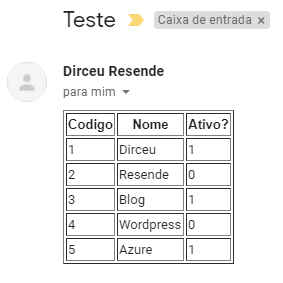
Oops!! It's already getting much better! Now I'm going to customize it a little just to show you that you can play with the design of the messages.
Example:
-- Transforma o conteúdo da query em HTML
DECLARE @HTML VARCHAR(MAX);

SET @HTML = '
<html>
<head>
    <title>Titulo</title>
    <style type="text/css">
        table { padding:0; border-spacing: 0; border-collapse: collapse; }
        thead { background: #00B050; border: 1px solid #ddd; }
        th { padding: 10px; font-weight: bold; border: 1px solid #000; color: #fff; }
        tr { padding: 0; }
        td { padding: 5px; border: 1px solid #cacaca; margin:0; text-align: center; }
    </style>
</head>

<h2>Lista de Usuários do Sistema</h2>
Veja a lista dos usuários permitidos no sistema:<br/><br/>

<table>
    <thead>
        <tr>
            <th>Codigo</th>
            <th>Nome</th>
            <th>Ativo?</th>
        </tr>
    </thead>

    <tbody>' +
    CAST (
    (
        SELECT TOP 20
            td = Codigo, '',
            td = Nome, '',
            td = Ativo
        FROM [dirceuresende].[dbo].[Clientes]
        FOR XML PATH('tr'), TYPE
    ) AS NVARCHAR(MAX) ) + '
    </tbody>
</table>

<br/><br/>
Em caso de dúvidas, favor entrar em contato<br/><br/>
Atenciosamente,<br/>

<img src="https://www.sqlsaturday.com/images/speakers/6984-e5594a7e.jpg" /><br/>
DBA';


-- Envia o e-mail
EXEC msdb.dbo.sp_send_dbmail
    @profile_name = 'ProfileEnvioEmail', -- sysname
    @recipients = 'meu@email.com', -- varchar(max)
    @subject = N'Teste', -- nvarchar(255)
    @body = @HTML, -- nvarchar(max)
    @body_format = 'html'
Result:
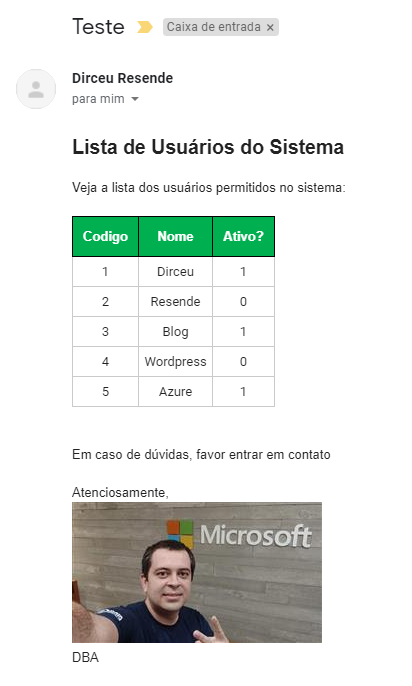
This email is turning out pretty cool, huh?? What if I want to send more than one table in the same email? Is there any way???
Example:
-- Transforma o conteúdo da query em HTML
DECLARE @HTML VARCHAR(MAX);

SET @HTML = '
<html>
<head>
    <title>Titulo</title>
    <style type="text/css">
        table { padding:0; border-spacing: 0; border-collapse: collapse; }
        thead { background: #00B050; border: 1px solid #ddd; }
        th { padding: 10px; font-weight: bold; border: 1px solid #000; color: #fff; }
        tr { padding: 0; }
        td { padding: 5px; border: 1px solid #cacaca; margin:0; text-align: center; }
    </style>
</head>

<h2>Lista de Usuários do Sistema</h2>
Veja a lista dos usuários permitidos no sistema:<br/><br/>

<table>
    <thead>
        <tr>
            <th>Codigo</th>
            <th>Nome</th>
            <th>Ativo?</th>
        </tr>
    </thead>

    <tbody>' +
    CAST (
    (
        SELECT TOP 20
            td = Codigo, '',
            td = Nome, '',
            td = Ativo
        FROM [dirceuresende].[dbo].[Clientes]
        FOR XML PATH('tr'), TYPE
    ) AS NVARCHAR(MAX) ) + '
    </tbody>
</table>

<br/><br/>
<h2>Lista de dos Objetos no Banco</h2>
Veja a lista dos objetos que existem nesse banco:<br/><br/>

<table>
    <thead>
        <tr>
            <th>Nome</th>
            <th>ID do Objeto</th>
            <th>Data de Criação</th>
            <th>Objeto de Sistema?</th>
            <th>Lock Escalation</th>
            <th>Durability</th>
            <th>Temporal Type</th>
        </tr>
    </thead>

    <tbody>' +


    CAST (
    (
        SELECT TOP 20
            td = [name] , '',
            td = [object_id], '',
            td = CONVERT(VARCHAR(19), create_date, 103), '',
            td = (CASE WHEN is_ms_shipped = 1 THEN 'true' ELSE 'false' END), '',
            td = lock_escalation_desc, '',
            td = durability_desc, '',
            td = temporal_type_desc
        FROM dirceuresende.sys.tables
        FOR XML PATH('tr'), TYPE
    ) AS NVARCHAR(MAX) ) + '
    </tbody>
</table>

<br/><br/>
Em caso de dúvidas, favor entrar em contato<br/><br/>
Atenciosamente,<br/>

<img src="https://www.sqlsaturday.com/images/speakers/6984-e5594a7e.jpg" /><br/>
DBA';


-- Envia o e-mail
EXEC msdb.dbo.sp_send_dbmail
    @profile_name = 'ProfileEnvioEmail', -- sysname
    @recipients = 'meu@email.com', -- varchar(max)
    @subject = N'Teste', -- nvarchar(255)
    @body = @HTML, -- nvarchar(max)
    @body_format = 'html'
Result:

Easy Mode: stpExporta_Table_HTML_Output
Thinking about making it easier to send the content of a table or query via email as HTML, I decided to create the Stored Procedure stpExporta_Table_HTML_Output to automate the transformation of the result of a table or query to HTML and be able to use this to create a file or send the generated HTML as the body of an email.
This procedure had already been shared in the article How to export data from a SQL Server table to HTML, but I decided to share it again here, focusing on sending HTML emails.
stpExporta_Table_HTML_Output code:
Click here to view the source code
Its use is very simple:
-- Transforma o conteúdo da query em HTML
DECLARE @HTML VARCHAR(MAX)

EXEC dbo.stpExporta_Tabela_HTML_Output
    @Ds_Tabela = 'dirceuresende.dbo.Clientes', -- varchar(max)
    @Ds_Saida = @HTML OUTPUT -- varchar(max)


-- Envia o e-mail
EXEC msdb.dbo.sp_send_dbmail
    @profile_name = 'ProfileEnvioEmail', -- sysname
    @recipients = 'meu@email.com', -- varchar(max)
    @subject = N'Teste', -- nvarchar(255)
    @body = @HTML, -- nvarchar(max)
    @body_format = 'html'
Result:
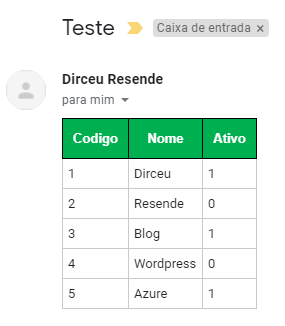
If I want to change the horizontal alignment, just use the @Ds_Alinhamento parameter:
-- Transforma o conteúdo da query em HTML
DECLARE @HTML VARCHAR(MAX)

EXEC dbo.stpExporta_Tabela_HTML_Output
    @Ds_Tabela = 'dirceuresende.dbo.Clientes', -- varchar(max)
    @Ds_Saida = @HTML OUTPUT, -- varchar(max)
    @Ds_Alinhamento = 'center' -- parâmetros: left, center e right


-- Envia o e-mail
EXEC msdb.dbo.sp_send_dbmail
    @profile_name = 'ProfileEnvioEmail', -- sysname
    @recipients = 'meu@email.com', -- varchar(max)
    @subject = N'Teste', -- nvarchar(255)
    @body = @HTML, -- nvarchar(max)
    @body_format = 'html'
Result:
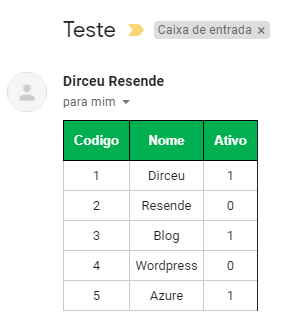
If you want to use the result of a query instead of the contents of an entire table, simply use a global temporary table (##table), as the local temporary table (#table) will not work:
-- Cria uma nova tabela com o resultado da query desejada
IF (OBJECT_ID('tempdb..##Teste') IS NOT NULL) DROP TABLE ##Teste
SELECT Codigo, Nome
INTO ##Teste
FROM dirceuresende.dbo.Clientes
WHERE Codigo > 2


-- Transforma o conteúdo da query em HTML
DECLARE @HTML VARCHAR(MAX)

EXEC dbo.stpExporta_Tabela_HTML_Output
    @Ds_Tabela = '##Teste', -- varchar(max)
    @Ds_Saida = @HTML OUTPUT -- varchar(max)
And to send the same email as the example using XML, it would look like this:
DECLARE
    @HTML VARCHAR(MAX),
    @HTML1 VARCHAR(MAX),
    @HTML2 VARCHAR(MAX)


-- Transforma o conteúdo da query em HTML
EXEC dbo.stpExporta_Tabela_HTML_Output
    @Ds_Tabela = 'dirceuresende.dbo.Clientes', -- varchar(max)
    @Ds_Saida = @HTML1 OUTPUT -- varchar(max)


IF (OBJECT_ID('tempdb..##Tabela2') IS NOT NULL) DROP TABLE ##Tabela2
SELECT TOP 20
    [name],
    [object_id],
    CONVERT(VARCHAR(19), create_date, 103) AS create_date,
    (CASE WHEN is_ms_shipped = 1 THEN 'true' ELSE 'false' END) AS is_ms_shipped,
    lock_escalation_desc,
    durability_desc,
    temporal_type_desc
INTO
    ##Tabela2
FROM
    dirceuresende.sys.tables


EXEC dbo.stpExporta_Tabela_HTML_Output
    @Ds_Tabela = '##Tabela2', -- varchar(max)
    @Ds_Saida = @HTML2 OUTPUT, -- varchar(max)
    @Fl_Aplica_Estilo_Padrao = 0 -- Utilizar 0 se for utilizar a Procedure mais de 1x


SET @HTML = '
<h2>Lista de Usuários do Sistema</h2>
Veja a lista dos usuários permitidos no sistema:<br/><br/>' + ISNULL(@HTML1, '') + '

<br/><br/>
<h2>Lista de dos Objetos no Banco</h2>
Veja a lista dos objetos que existem nesse banco:<br/><br/>' + ISNULL(@HTML2, '') + '


<br/><br/>
Em caso de dúvidas, favor entrar em contato<br/><br/>
Atenciosamente,<br/>

<img src="https://www.sqlsaturday.com/images/speakers/6984-e5594a7e.jpg" /><br/>
DBA';


-- Envia o e-mail
EXEC msdb.dbo.sp_send_dbmail
    @profile_name = 'ProfileEnvioEmail', -- sysname
    @recipients = 'meu@email.com', -- varchar(max)
    @subject = N'Teste', -- nvarchar(255)
    @body = @HTML, -- nvarchar(max)
    @body_format = 'html'
Result:
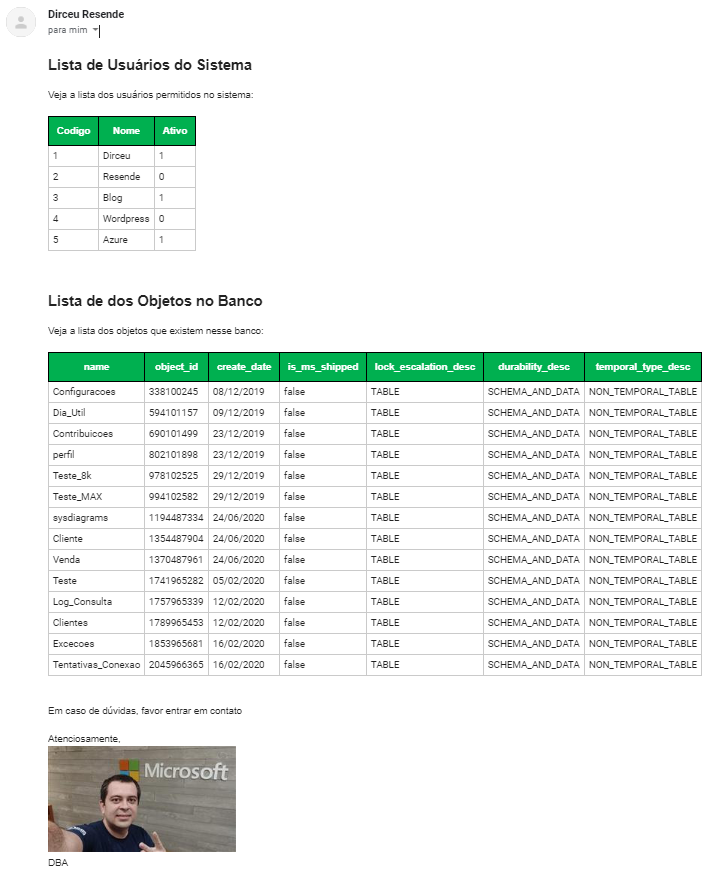
And that's it, folks!
I hope you liked this tip and see you in the next post.

Comentários (0)
Carregando comentários…