
Hey guys,
Good afternoon!
In this post I will demonstrate how to manage Windows services from the SQL Server database, using SQLCLR to perform these operations. This can be especially useful when creating monitoring for certain services.
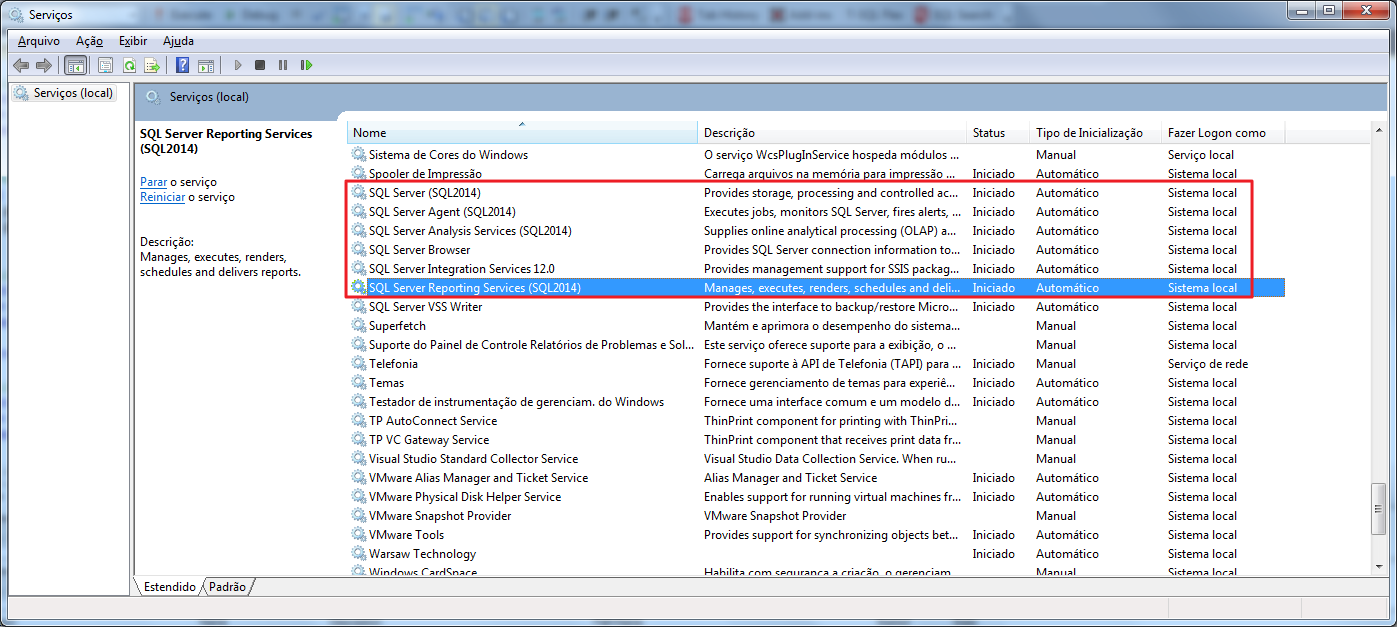
Currently where I work, I created a service monitoring configuration table, where I determine the data of the services I intend to monitor, such as the server name, service name, whether it needs to send an SMS upon failure and whether the routine itself should be responsible for starting the service automatically upon failure. The email with the list of services that have changed their status is always sent. Once configured, collections are performed via job every X minutes of the status of these services and this data is stored in a history table.
With this, it is possible to measure the availability of services and using Reporting Services 2016 to create reports reading from the history table, you can retrieve the current data from this table and monitor the status of different services, on different servers, from anywhere: Either through the Browser (accessing the Reporting Services path) or on your cell phone (using the PowerBI application), without the need to have a computer nearby, connect to the company's VPN or buy a monitoring system, which in addition to having high costs, does not always offer this flexibility.
To perform these operations with the CLR, I will list two different ways to obtain this information, and after reading, you will understand why. In the source code that you will read below, I used the Retorno class to manage warnings and error messages that I send to the database and it is a prerequisite for using Stored Procedures for service management. You can find the source code of the Return class in the post SQL Server – How to send warnings and error messages to the database using the CLR (C#).
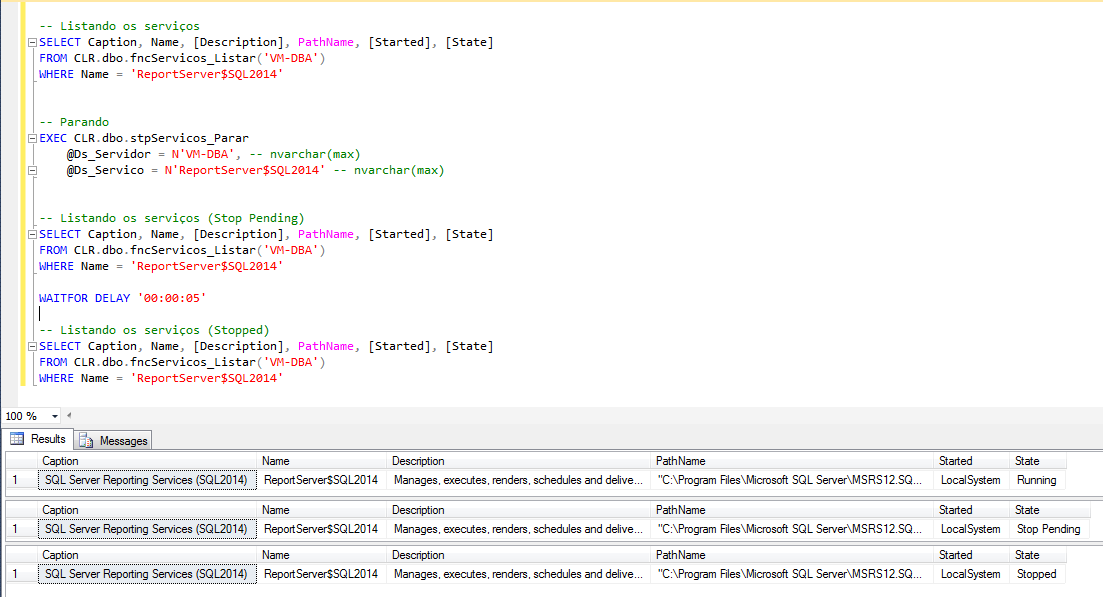
I will demonstrate two different ways of doing the same thing. The first of them uses native binaries from the operating system itself and, mainly in the service listing part, there are manual manipulations of information, which in the case of the other class I will present, this is already encapsulated in the .NET framework. What most motivates me to use this first alternative is that it does not have any DLL dependencies outside of the standard DLLs supported and recommended by Microsoft. The System.ServiceProcess library requires several other unsupported DLLs that it has dependencies on.
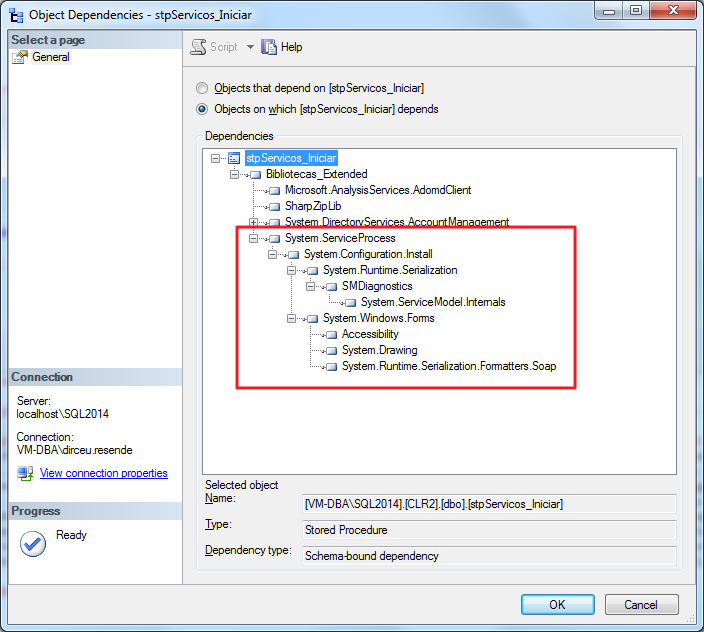
When your bank presents a problem and you send the error DUMP to Microsoft, the first thing the consultant will point out as a problem are CLR DLLs not supported by Microsoft, such as System.ServiceProcess, so I prefer to avoid them. These unsupported DLLs are DLLs that can be registered manually, but not in SAFE mode, as I already talked about this in the post Introduction to SQL CLR (Common Language Runtime) in SQL Server.
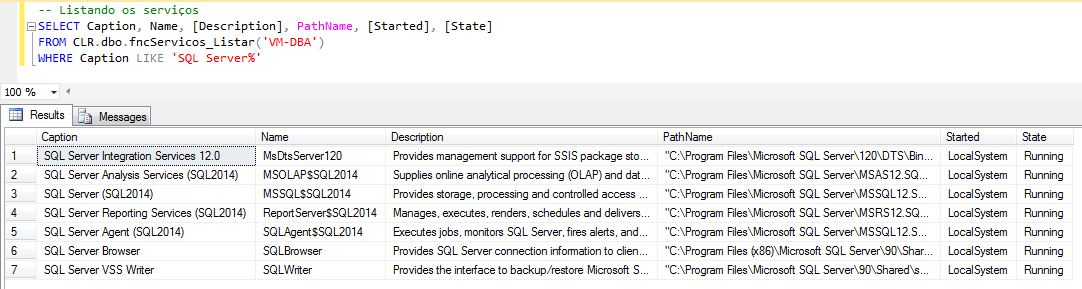
Using the Process class from the System.Diagnostics libraryHow to list a server's services:
using System.Collections;
using System.Data.SqlTypes;
using System.Diagnostics;
using System.Linq;
using System.Text;

public partial class UserDefinedFunctions
{

    private class ServiceProperties
    {

        public SqlString AcceptPause;
        public SqlString AcceptStop;
        public SqlString Caption;
        public SqlString Description;
        public SqlString DesktopInteract;
        public SqlString ErrorControl;
        public SqlString ExitCode;
        public SqlString Name;
        public SqlString PathName;
        public SqlString ProcessID;
        public SqlString ServiceType;
        public SqlString StartMode;
        public SqlString StartName;
        public SqlString Started;
        public SqlString State;
        public SqlString Status;


        public ServiceProperties(SqlString acceptPause, SqlString acceptStop, SqlString caption, SqlString description, SqlString desktopInteract, SqlString errorControl,
            SqlString exitCode, SqlString name, SqlString pathName, SqlString processID, SqlString serviceType, SqlString startMode, SqlString startName,
            SqlString started, SqlString state, SqlString status)
        {

            AcceptPause = acceptPause;
            AcceptStop = acceptStop;
            Caption = caption;
            Description = description;
            DesktopInteract = desktopInteract;
            ErrorControl = errorControl;
            ExitCode = exitCode;
            Name = name;
            PathName = pathName;
            ProcessID = processID;
            ServiceType = serviceType;
            StartMode = startMode;
            StartName = startName;
            Started = started;
            State = state;
            Status = status;

        }
    }


    [Microsoft.SqlServer.Server.SqlFunction(
        FillRowMethodName = "ListarServicos",
        TableDefinition = "AcceptPause nvarchar(20), AcceptStop nvarchar(20), Caption nvarchar(2048), Description nvarchar(4000), DesktopInteract nvarchar(30), " +
                          "ErrorControl nvarchar(60), ExitCode nvarchar(30), Name nvarchar(1024), PathName nvarchar(1024), ProcessID nvarchar(500), " +
                          "ServiceType nvarchar(30), StartMode nvarchar(30), StartName nvarchar(60), Started nvarchar(256), State nvarchar(60), " +
                          "Status nvarchar(60)"
    )]
    public static IEnumerable fncServicos_Listar(string Ds_Servidor)
    {

        var scriptProc = new Process
        {
            StartInfo =
            {
                FileName = @"wmic",
                Arguments = "/node:\"" + Ds_Servidor + "\" service get Name,Caption,Started,Status,StartMode,StartName,PathName,AcceptPause,AcceptStop,DesktopInteract,ErrorControl,ExitCode,ProcessID,ServiceType,Description,State /FORMAT:list",
                UseShellExecute = false,
                RedirectStandardOutput = true,
                RedirectStandardError = true,
                StandardOutputEncoding = Encoding.GetEncoding(850),
                CreateNoWindow = true
            }
        };


        scriptProc.Start();

        var output = scriptProc.StandardOutput.ReadToEnd();


        var linhas = output.Split('\n');
        var Qt_Linhas = (linhas.Length - 1);
        var contador = 0;

        var palavra = new ArrayList();
        var ServicePropertiesCollection = new ArrayList();

        for (var i = 0; i < Qt_Linhas; i++)
        {

            var linha = linhas[i];


            if (linha.Trim().Length <= 0) continue;
            contador++;


            palavra.Add(linha.Split('=').Last().Trim());


            if (contador != 16) continue;
            ServicePropertiesCollection.Add(new ServiceProperties(
                palavra[0].ToString(),
                palavra[1].ToString(),
                palavra[2].ToString(),
                palavra[3].ToString(),
                palavra[4].ToString(),
                palavra[5].ToString(),
                palavra[6].ToString(),
                palavra[7].ToString(),
                palavra[8].ToString(),
                palavra[9].ToString(),
                palavra[10].ToString(),
                palavra[11].ToString(),
                palavra[12].ToString(),
                palavra[13].ToString(),
                palavra[14].ToString(),
                palavra[15].ToString()
            ));

            palavra.RemoveRange(0, 16);

            contador = 0;
        }


        return ServicePropertiesCollection;

    }

    public static void ListarServicos(object objServiceProperties, out SqlString acceptPause, out SqlString acceptStop, out SqlString caption, out SqlString description,
            out SqlString desktopInteract, out SqlString errorControl, out SqlString exitCode, out SqlString name, out SqlString pathName, out SqlString processID,
            out SqlString serviceType, out SqlString startMode, out SqlString startName, out SqlString started, out SqlString state, out SqlString status)
    {

        var serviceProperties = (ServiceProperties) objServiceProperties;

        acceptPause = serviceProperties.AcceptPause;
        acceptStop = serviceProperties.AcceptStop;
        caption = serviceProperties.Caption;
        description = serviceProperties.Description;
        desktopInteract = serviceProperties.DesktopInteract;
        errorControl = serviceProperties.ErrorControl;
        exitCode = serviceProperties.ExitCode;
        name = serviceProperties.Name;
        pathName = serviceProperties.PathName;
        processID = serviceProperties.ProcessID;
        serviceType = serviceProperties.ServiceType;
        startMode = serviceProperties.StartMode;
        startName = serviceProperties.StartName;
        started = serviceProperties.Started;
        state = serviceProperties.State;
        status = serviceProperties.Status;

    }

};
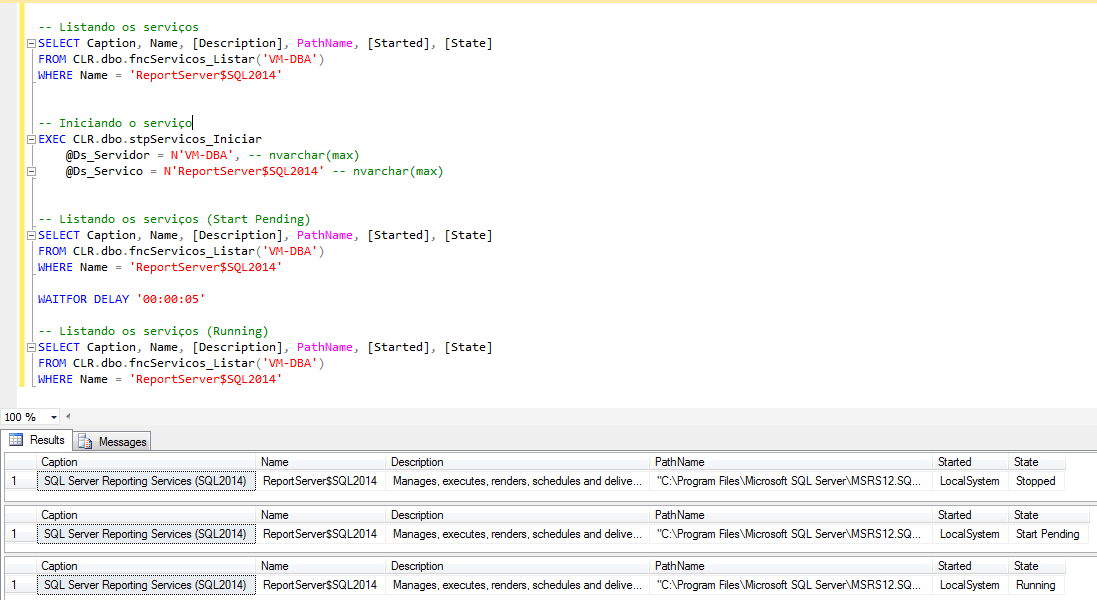
How to start a service:
using System;
using System.Data.SqlTypes;
using System.Diagnostics;
using System.Text;
using Bibliotecas.Model;

public partial class StoredProcedures
{
    [Microsoft.SqlServer.Server.SqlProcedure]
    public static void stpServicos_Iniciar(SqlString Ds_Servidor, SqlString Ds_Servico)
    {

        try
        {

            var scriptProc = new Process
            {
                StartInfo =
                {
                    FileName = @"sc.exe",
                    UseShellExecute = false,
                    Arguments = "\\\\" + Ds_Servidor.Value + " start \"" + Ds_Servico.Value + "\"",
                    RedirectStandardOutput = true,
                    RedirectStandardError = true,
                    StandardOutputEncoding = Encoding.GetEncoding(850),
                    StandardErrorEncoding = Encoding.GetEncoding(850),
                    CreateNoWindow = true
                }
            };


            scriptProc.Start();


            var output = scriptProc.StandardOutput.ReadToEnd();
            var erro = scriptProc.StandardError.ReadToEnd();


            Retorno.Mensagem("Iniciando o serviço " + Ds_Servico.Value + " no servidor " + Ds_Servidor.Value + "...");

            if (output.Length > 0)
            {
                Retorno.Mensagem(output);
            }


            if (erro.Length > 0)
            {
                Retorno.Erro(erro);
            }

        }
        catch (Exception e)
        {
            Retorno.Erro("Erro : " + e.Message);
        }
    }

};
How to stop a service:
using System;
using System.Data.SqlTypes;
using System.Diagnostics;
using Bibliotecas.Model;
using System.Text;

public partial class StoredProcedures
{
    [Microsoft.SqlServer.Server.SqlProcedure]
    public static void stpServicos_Parar(SqlString Ds_Servidor, SqlString Ds_Servico)
    {

        try
        {

            var scriptProc = new Process
            {
                StartInfo =
                {
                    FileName = @"sc.exe",
                    UseShellExecute = false,
                    Arguments = "\\\\" + Ds_Servidor.Value + " stop \"" + Ds_Servico.Value + "\"",
                    RedirectStandardOutput = true,
                    RedirectStandardError = true,
                    StandardOutputEncoding = Encoding.GetEncoding(850),
                    StandardErrorEncoding = Encoding.GetEncoding(850),
                    CreateNoWindow = true
                }
            };


            scriptProc.Start();


            var output = scriptProc.StandardOutput.ReadToEnd();
            var erro = scriptProc.StandardError.ReadToEnd();


            Retorno.Mensagem("Parando o serviço " + Ds_Servico.Value + " no servidor " + Ds_Servidor.Value + "...");

            if (output.Length > 0)
            {
                Retorno.Mensagem(output);
            }


            if (erro.Length > 0)
            {
                Retorno.Erro(erro);
            }

        }
        catch (Exception e)
        {
            Retorno.Erro("Erro : " + e.Message);
        }
    }

};
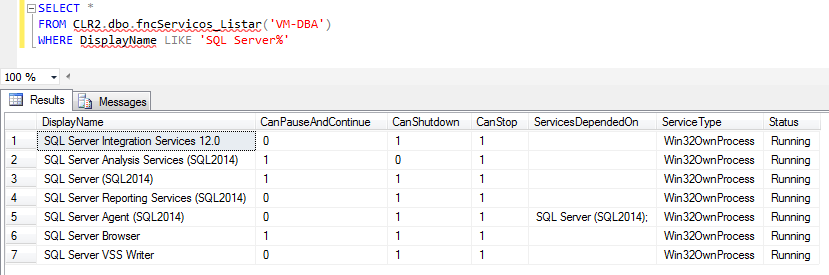
How to list a server's services:
using System;
using System.Data;
using System.Data.SqlTypes;
using System.ServiceProcess;
using System.Text;
using Bibliotecas.Model;
using Microsoft.SqlServer.Server;

public partial class StoredProcedures
{
    [Microsoft.SqlServer.Server.SqlProcedure]
    public static void stpServicos_Listar(SqlString Ds_Servidor, SqlString Ds_Servico)
    {

            string servico = (Ds_Servico.IsNull) ? "" : Ds_Servico.Value;


            SqlMetaData[] colunas = new SqlMetaData[7];

            colunas[0] = new SqlMetaData("DisplayName", SqlDbType.VarChar, 1024);
            colunas[1] = new SqlMetaData("CanPauseAndContinue", SqlDbType.Int);
            colunas[2] = new SqlMetaData("CanShutdown", SqlDbType.Int);
            colunas[3] = new SqlMetaData("CanStop", SqlDbType.Int);
            colunas[4] = new SqlMetaData("ServicesDependedOn", SqlDbType.VarChar, 1024);
            colunas[5] = new SqlMetaData("ServiceType", SqlDbType.VarChar, 1024);
            colunas[6] = new SqlMetaData("Status", SqlDbType.VarChar, 1024);


            SqlDataRecord linhaSQL = new SqlDataRecord(colunas);


            SqlPipe pipe = SqlContext.Pipe;
            pipe.SendResultsStart(linhaSQL);

            ServiceController[] services = ServiceController.GetServices(Ds_Servidor.Value);
            foreach (ServiceController sc in services)
            {

                try
                {

                    if (sc.ServiceName == servico || string.IsNullOrEmpty(servico))
                    {

                        var CanPauseAndContinue = (sc.CanPauseAndContinue) ? 1 : 0;
                        var CanShutdown = (sc.CanShutdown) ? 1 : 0;
                        var CanStop = (sc.CanStop) ? 1 : 0;


                        linhaSQL.SetSqlString(0, new SqlString(sc.ServiceName));
                        linhaSQL.SetSqlInt32(1, new SqlInt32(CanPauseAndContinue));
                        linhaSQL.SetSqlInt32(2, new SqlInt32(CanShutdown));
                        linhaSQL.SetSqlInt32(3, new SqlInt32(CanStop));


                        StringBuilder Ds_Dependencias = new StringBuilder();

                        foreach (ServiceController dependencia in sc.ServicesDependedOn)
                        {
                            Ds_Dependencias.Append(dependencia.DisplayName);
                            Ds_Dependencias.Append(";");
                        }

                        linhaSQL.SetSqlString(4, new SqlString(Ds_Dependencias.ToString()));
                        linhaSQL.SetSqlString(5, new SqlString(sc.ServiceType.ToString()));
                        linhaSQL.SetSqlString(6, new SqlString(sc.Status.ToString()));

                        pipe.SendResultsRow(linhaSQL);
                    }

                }
                catch (InvalidOperationException e)
                {
                    //Retorno.Erro("Erro : " + e.Message);
                }
            }


            pipe.SendResultsEnd();


    }
};
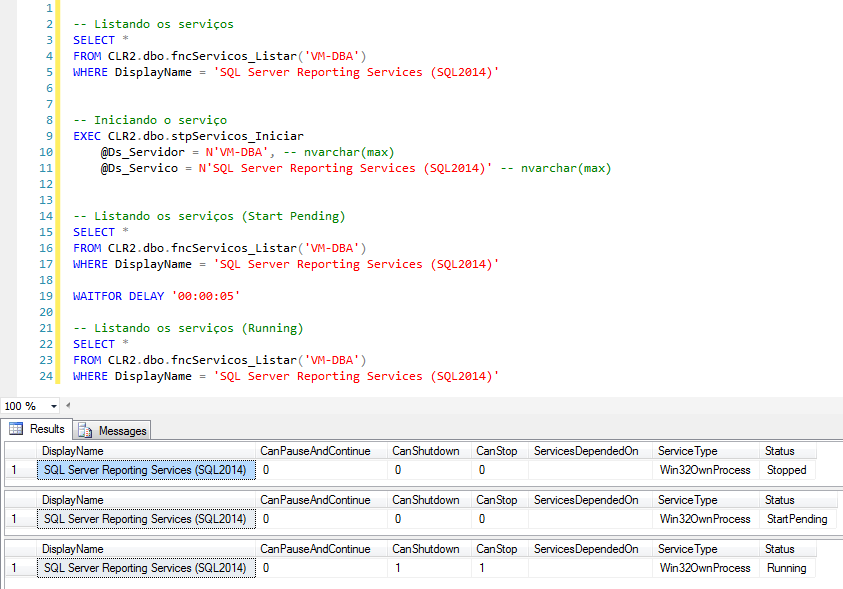
How to start a service:
using System;
using System.Data.SqlTypes;
using System.ServiceProcess;
using Bibliotecas.Model;

public partial class StoredProcedures
{
    [Microsoft.SqlServer.Server.SqlProcedure]
    public static void stpServicos_Iniciar(SqlString Ds_Servidor, SqlString Ds_Servico)
    {
        try
        {
            ServiceController sc = new ServiceController(Ds_Servico.Value, Ds_Servidor.Value);
            sc.Start();
        }
        catch (Exception e)
        {
            Retorno.Erro("Erro : " + e.Message);
        }
    }
};
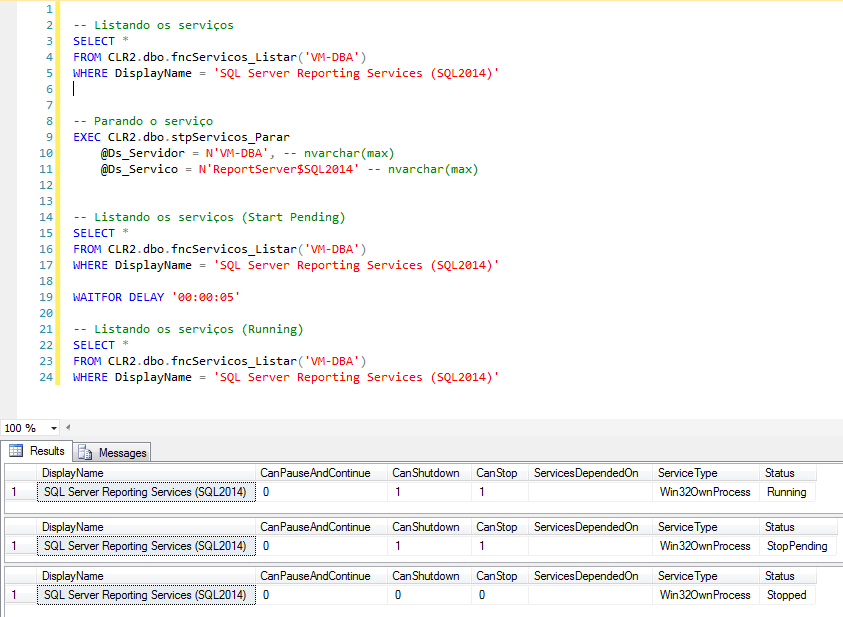
How to stop a service:
using System;
using System.Data.SqlTypes;
using System.ServiceProcess;
using Bibliotecas.Model;

public partial class StoredProcedures
{
    [Microsoft.SqlServer.Server.SqlProcedure]
    public static void stpServicos_Parar(SqlString Ds_Servidor, SqlString Ds_Servico)
    {
        try
        {
            ServiceController sc = new ServiceController(Ds_Servico.Value, Ds_Servidor.Value);
            sc.Stop();
        }
        catch (Exception e)
        {
            Retorno.Erro("Erro : " + e.Message);
        }
    }
};
That's it, folks!
I hope you liked the post. It's really cool to create different things using the database.
If you have any questions, leave them here in the comments.
Hug!
sql server clr sqlclr service controller sc wmic windows services windows services list start stop list view start stop
sql server clr sqlclr service controller sc wmic windows services windows services list start stop list view start stop

Comentários (0)
Carregando comentários…