
Hey guys,
How are you guys??
In this post, which will be the 200th blog post, I would like to talk about two subjects that I particularly like in SQL Server, which is the creation of .NET routines (CLR) within the SQL Server database and performance tuning.
Coincidence or not, my 100th post was Introduction to SQL CLR (Common Language Runtime) in SQL Server, which was my first blog post about the CLR.
My intention in this post is to demonstrate the performance gain that can be obtained when using Scalar functions from the CLR instead of the Scalar function written in T-SQL (UDF – User Defined Function). In the tests carried out, the vast majority of T-SQL functions that were migrated to CLR functions had a large performance gain simply due to the optimizations of the Microsoft .NET Framework compared to the SQL Server engine.
In many situations, we see that the indexes are created correctly, statistics are updated and, without having to rewrite the query, a large performance gain can be achieved simply by changing the scalar function programming language.
Function in the CLR will always be better?
There are those who may have some doubts about the performance of CLR scalar functions, which I will clarify:
– Will CLR scalar functions always perform better than functions?
Definitely not! I have already done several tests comparing different functions, for different purposes and in my experience, scalar functions written in C# in the CLR, GENERALLY present better performance, but I have seen some cases in which even optimizing the code to the maximum, the T-SQL function presents better performance.
– What if we compare the performance of native functions with CLR functions?
Functions, in general, always harm performance when querying the database. However, even though the CLR's scalar functions are very performant, GENERALLY the native SQL Server functions (Ex: CONVERT, CAST, DATEADD, etc.) present better performance when compared.
Comparing performance in practice
After making this introduction to the subject, it's time to actually demonstrate what was said here. And nothing better than carrying out performance tests in practice to convince you that the CLR can, in many cases, provide a huge performance gain in your SQL Server queries.
To generate the mass of test data, I used this script:
IF (OBJECT_ID('dirceuresende.dbo.Teste_Performance') IS NOT NULL) DROP TABLE dirceuresende.dbo.Teste_Performance
CREATE TABLE dirceuresende.dbo.Teste_Performance (
    Id INT IDENTITY(1, 1),
    Nome VARCHAR(200),
    Numero INT,
    [Data] DATETIME,
    Observacao VARCHAR(MAX),
    CPF VARCHAR(11)
)

INSERT INTO dirceuresende.dbo.Teste_Performance ( Nome, Numero, [Data], Observacao, CPF )
SELECT
    CAST(NEWID() AS VARCHAR(50)),
    dbo.fncRand(99999999),
    DATEADD(SECOND, (CAST(RAND() * 31536000 AS INT)), '2017-01-01') AS Dt_Venda,
    CAST(NEWID() AS VARCHAR(50)) + ';' + CAST(NEWID() AS VARCHAR(50)) + ';' + CAST(NEWID() AS VARCHAR(50)),
    RIGHT(REPLICATE('0', 11) + CAST(dbo.fncRand(99999999999) AS VARCHAR(11)), 11) AS CPF


DECLARE @Contador INT = 1, @Total INT = 20


WHILE(@Contador <= @Total)
BEGIN

    INSERT INTO dirceuresende.dbo.Teste_Performance ( Nome, Numero, [Data], Observacao, CPF )
    SELECT
        CAST(NEWID() AS VARCHAR(50)),
        dbo.fncRand(99999999),
        DATEADD(SECOND, (CAST(RAND() * 31536000 AS INT)), '2017-01-01') AS Dt_Venda,
        CAST(NEWID() AS VARCHAR(50)) + ';' + CAST(NEWID() AS VARCHAR(50)) + ';' + CAST(NEWID() AS VARCHAR(50)),
        RIGHT(REPLICATE('0', 11) + CAST(dbo.fncRand(99999999999) AS VARCHAR(11)), 11) AS CPF
    FROM
        dirceuresende.dbo.Teste_Performance


    SET @Contador += 1


END
The source code of the fncRand() function, as well as the explanation of why I use this function instead of RAND(), can be found in the post SQL Server – Msg 443 Invalid use of a side-effecting operator ‘rand’ within a function.
fncFirstDayMonth
View contentCREATE FUNCTION [dbo].[fncPrimeiroDiaMes](@Dt_Referencia DATETIME)
RETURNS DATETIME
AS
BEGIN
RETURN DATEADD(DAY,-(DAY(@Dt_Referencia)-1), CAST(FLOOR(CAST(@Dt_Referencia AS FLOAT)) AS DATETIME))
ENDCLR source code:
using System;
using System.Data.SqlTypes;

public partial class UserDefinedFunctions
{
    [Microsoft.SqlServer.Server.SqlFunction]
    public static SqlDateTime fncPrimeiro_Dia_Mes(SqlDateTime Dt_Referencia)
    {
        if (Dt_Referencia.IsNull)
            return SqlDateTime.Null;

        var data = Dt_Referencia.Value;
        return new DateTime(data.Year, data.Month, 1);
    }
}
Exit:
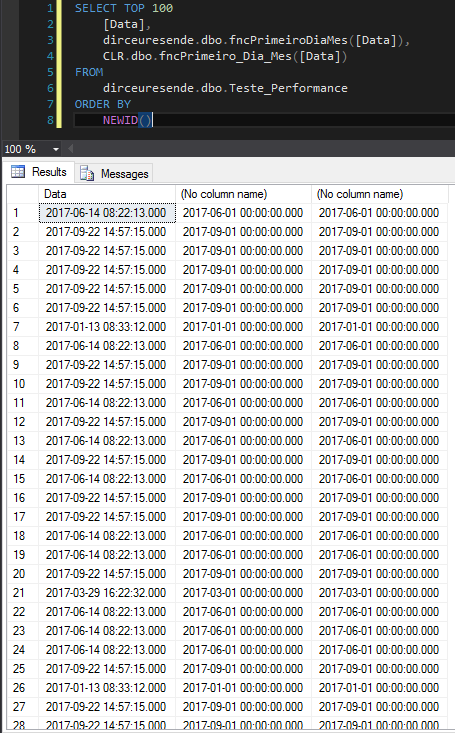
Performance comparison in SELECT

Performance comparison on WHERE

fncLastDayMonth
View contentcreate function [dbo].[fncUltimoDiaMes](@Dt_Referencia datetime)
RETURNS datetime
as
begin
return dateadd(day,-1,dateadd(month,+1,DATEADD(DAY,-(DAY(@Dt_Referencia)-1), CAST(FLOOR(CAST(@Dt_Referencia AS FLOAT)) AS DATETIME))))
end
CLR source code:
using System;

public partial class UserDefinedFunctions
{
    [Microsoft.SqlServer.Server.SqlFunction]
    public static DateTime fncUltimo_Dia_Mes(DateTime data)
    {
        return new DateTime(data.Year, data.Month, DateTime.DaysInMonth(data.Year, data.Month));
    }
}
Exit:
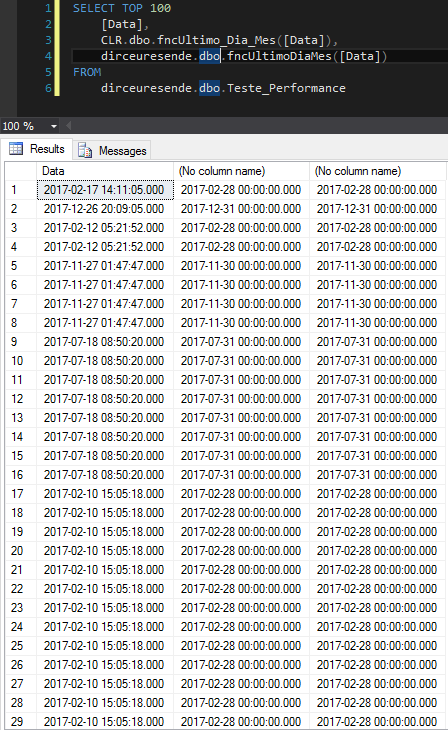
Performance comparison in SELECT

Performance comparison on WHERE

fncSplit
View contentCREATE FUNCTION [dbo].[fncSplit] ( @String varchar(8000), @Separador varchar(8000), @PosBusca int )
RETURNS varchar(8000)
AS BEGIN
DECLARE @Index int, @Max int, @Retorno varchar(8000)
DECLARE @Partes as TABLE ( Id_Parte int identity(1,1), Texto varchar(8000) )
SET @Index = charIndex(@Separador,@String)
WHILE (@Index > 0) BEGIN
INSERT INTO @Partes SELECT SubString(@String,1,@Index-1)
SET @String = Rtrim(Ltrim(SubString(@String,@Index+Len(@Separador),Len(@String))))
SET @Index = charIndex(@Separador,@String)
END
IF (@String != '') INSERT INTO @Partes SELECT @String
SELECT @Max = Count(*) FROM @Partes
IF (@PosBusca = 0) SET @Retorno = Cast(@Max as varchar(5))
IF (@PosBusca < 0) SET @PosBusca = @Max + 1 + @PosBusca
IF (@PosBusca > 0) SELECT @Retorno = Texto FROM @Partes WHERE Id_Parte = @PosBusca
RETURN Rtrim(Ltrim(@Retorno))
END
CLR source code:
using System;
using System.Data.SqlTypes;

public partial class UserDefinedFunctions
{
    [Microsoft.SqlServer.Server.SqlFunction]
    public static SqlString fncSplit(SqlString Ds_Palavra, SqlString Ds_Delimitador, SqlInt32 Qt_Indice)
    {

        if (Ds_Palavra.IsNull || Qt_Indice.IsNull)
            return SqlString.Null;

        if (Ds_Delimitador.IsNull)
            return Ds_Palavra.Value;

        var indice = (Qt_Indice.Value == 0) ? 1 : Qt_Indice.Value;
        var palavra = Ds_Palavra.Value.Split(Ds_Delimitador.Value.ToCharArray());

        if (Qt_Indice.Value == 0)
            return palavra.Length.ToString();

        if (palavra.Length < Qt_Indice.Value)
            return SqlString.Null;

        return indice > 0 ? palavra[indice - 1] : palavra[palavra.Length - Math.Abs(indice)];

    }
}
Exit:

Performance comparison in SELECT
Notice that, after waiting 5 minutes, I ended up canceling and starting the tests again, but with only 10,000 records for the T-SQL function, compared to the CLR function running on 100,000 records. But even though the CLR function was performed 10x longer, look what happened in the results…

Performance comparison on WHERE

fncBase64_Encode
View contentCREATE FUNCTION [dbo].[fncBase64_Encode] (
@string VARCHAR(MAX)
)
RETURNS VARCHAR(MAX)
AS BEGIN
DECLARE
@source VARBINARY(MAX),
@encoded VARCHAR(MAX)
set @source = convert(varbinary(max), @string)
SET @encoded = CAST('' AS XML).value('xs:base64Binary(sql:variable("@source"))', 'varchar(max)')
RETURN @encoded
ENDCLR source code:
using System;
using System.Data.SqlTypes;
using System.Text;

public partial class UserDefinedFunctions
{
    [Microsoft.SqlServer.Server.SqlFunction]
    public static SqlString fncBase64_Encode(SqlString Ds_Texto)
    {
        return Ds_Texto.IsNull ? null : Convert.ToBase64String(Encoding.UTF8.GetBytes(Ds_Texto.Value));
    }
}
Exit:
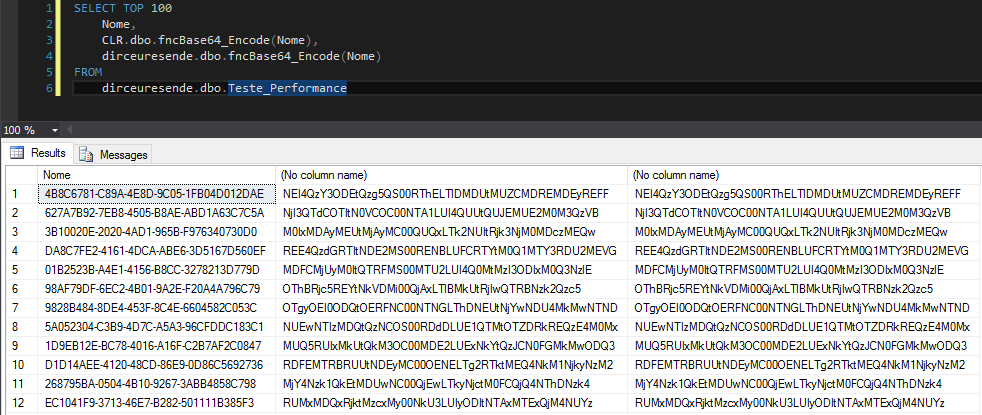
Performance comparison in SELECT

fncBase64_Decode
View contentCREATE FUNCTION [dbo].[fncBase64_Decode] (
@string VARCHAR(MAX)
)
RETURNS VARCHAR(MAX)
AS BEGIN
DECLARE @decoded VARCHAR(MAX)
SET @decoded = CAST('' AS XML).value('xs:base64Binary(sql:variable("@string"))', 'varbinary(max)')
RETURN convert(varchar(max), @decoded)
ENDCLR source code:
using System;
using System.Data.SqlTypes;
using System.Text;

public partial class UserDefinedFunctions
{
    [Microsoft.SqlServer.Server.SqlFunction]
    public static SqlString fncBase64_Decode(SqlString Ds_Texto)
    {
        return Ds_Texto.IsNull ? null : Encoding.UTF8.GetString(Convert.FromBase64String(Ds_Texto.Value));
    }
}
Exit:
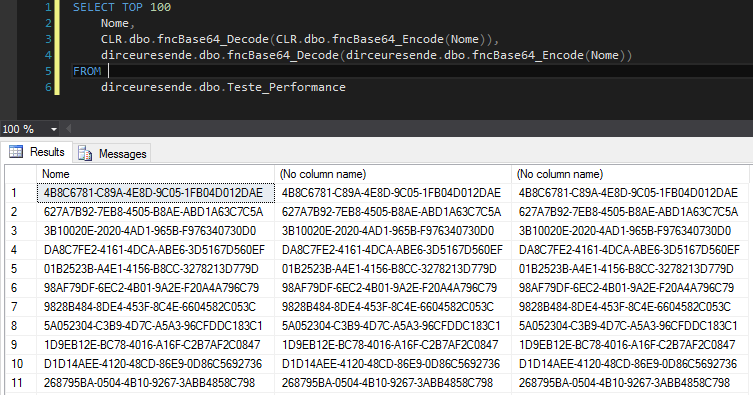
Performance comparison in SELECT

fncValida_CPF
View contentCREATE FUNCTION [dbo].[fncValida_CPF](@Nr_Documento [varchar](11))
RETURNS [bit]
AS
BEGIN
IF (ISNUMERIC(@Nr_Documento) = 0)
RETURN 0
DECLARE
@Contador_1 INT,
@Contador_2 INT,
@Digito_1 INT,
@Digito_2 INT,
@Nr_Documento_Aux VARCHAR(11)
SET @Nr_Documento_Aux = LTRIM(RTRIM(@Nr_Documento))
SET @Digito_1 = 0
IF LEN(@Nr_Documento_Aux) <> 11
RETURN 0
ELSE
BEGIN
-- Cálculo do segundo dígito
SET @Nr_Documento_Aux = SUBSTRING(@Nr_Documento_Aux, 1, 9)
SET @Contador_1 = 2
WHILE @Contador_1 <= 10
BEGIN
SET @Digito_1 = @Digito_1 + ( @Contador_1 * CAST(SUBSTRING(@Nr_Documento_Aux, 11 - @Contador_1, 1) AS INT) )
SET @Contador_1 = @Contador_1 + 1
END
SET @Digito_1 = @Digito_1 - ( @Digito_1 / 11 ) * 11
IF @Digito_1 <= 1
SET @Digito_1 = 0
ELSE
SET @Digito_1 = 11 - @Digito_1
SET @Nr_Documento_Aux = @Nr_Documento_Aux + CAST(@Digito_1 AS VARCHAR(1))
IF @Nr_Documento_Aux <> SUBSTRING(@Nr_Documento, 1, 10)
RETURN 0
ELSE
BEGIN
-- Cálculo do segundo dígito
SET @Digito_2 = 0
SET @Contador_2 = 2
WHILE (@Contador_2 <= 11)
BEGIN
SET @Digito_2 = @Digito_2 + ( @Contador_2 * CAST(SUBSTRING(@Nr_Documento_Aux, 12 - @Contador_2, 1) AS INT) )
SET @Contador_2 = @Contador_2 + 1
END
SET @Digito_2 = @Digito_2 - ( @Digito_2 / 11 ) * 11
IF @Digito_2 < 2
SET @Digito_2 = 0
ELSE
SET @Digito_2 = 11 - @Digito_2
SET @Nr_Documento_Aux = @Nr_Documento_Aux + CAST(@Digito_2 AS VARCHAR(1))
IF @Nr_Documento_Aux <> @Nr_Documento
RETURN 0
END
END
RETURN 1
END
CLR source code:
using System.Data.SqlTypes;

public partial class UserDefinedFunctions
{
    [Microsoft.SqlServer.Server.SqlFunction]
    public static SqlBoolean fncValida_CPF(SqlString Ds_CPF)
    {

        if (Ds_CPF.IsNull)
            return false;


        var valor = Ds_CPF.Value.Replace(".", "").Replace("-", "").Replace(" ", "");


        if (valor.Length != 11)
            return false;


        long resultadoConversaoInt;
        if (!long.TryParse(valor, out resultadoConversaoInt))
            return false;


        var igual = true;
        for (var i = 1; i < 11 && igual; i++)
            if (valor[i] != valor[0])
                igual = false;

        if (igual || valor == "12345678909") return false;


        var numeros = new int[11];
        for (var i = 0; i < 11; i++)
            numeros[i] = int.Parse(valor[i].ToString());


        var soma = 0;
        for (var i = 0; i < 9; i++)
            soma += (10 - i) * numeros[i];


        var resultado = soma % 11;
        if (resultado == 1 || resultado == 0)
        {
            if (numeros[9] != 0)
                return false;
        }
        else if (numeros[9] != 11 - resultado)
            return false;


        soma = 0;
        for (var i = 0; i < 10; i++)
            soma += (11 - i) * numeros[i];


        resultado = soma % 11;
        if (resultado == 1 || resultado == 0)
        {
            if (numeros[10] != 0)
                return false;
        }
        else if (numeros[10] != 11 - resultado)
            return false;


        return true;

    }

}
Exit:
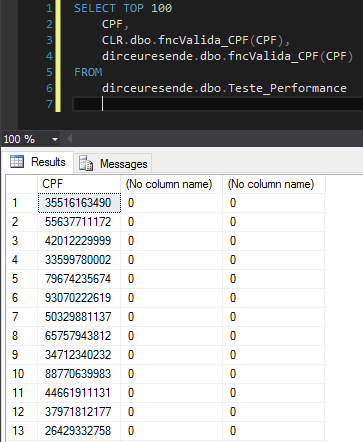
Performance comparison in SELECT

fncRecupera_Numeros
View contentCREATE function [dbo].[fncRecupera_Numeros](@str varchar(500))
returns varchar(500)
begin
declare @startingIndex int
set @startingIndex=0
while 1=1
begin
set @startingIndex= patindex('%[^0-9]%',@str)
if @startingIndex <> 0
begin
set @str = replace(@str,substring(@str,@startingIndex,1),'')
end
else break;
end
return NULLIF(@str, '')
endCLR source code:
using System.Data.SqlTypes;

public partial class UserDefinedFunctions
{
    [Microsoft.SqlServer.Server.SqlFunction]
    public static SqlString fncRecupera_Numeros(SqlString Ds_Texto)
    {


        if (Ds_Texto.IsNull)
            return SqlString.Null;


        var retorno = "";
        var palavra = Ds_Texto.Value;
        var len = palavra.Length;

        for (var i = 0; i < len; ++i)
        {
            var letra = palavra[i];

            if (letra >= '0' && letra <= '9')
                retorno += letra;
        }

        return string.IsNullOrEmpty(retorno) ? SqlString.Null : retorno;
    }
};
Exit:
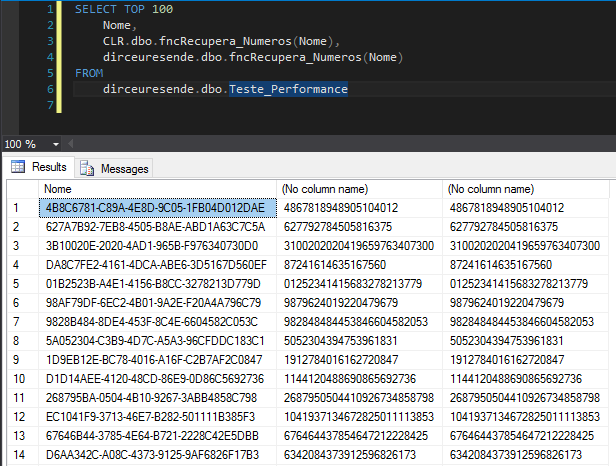
Performance comparison in SELECT

fncMes
View content-- @Fl_Tipo define como é o tipo de formatação
-- 1: Janeiro Fevereiro Marco Abril...
-- 2: JANEIRO FEVEVEIRO MARCO ABRIL
-- 3: Jan Fev Mar Abr
-- 4: JAN FEV MAR ABR
-- 5: January, February ... (cubo)
CREATE FUNCTION [dbo].[fncMes] (@Dt_Referencia DATETIME, @Fl_Tipo TINYINT, @Fl_Incluir_Ano BIT = 0, @Fl_Incluir_Dia BIT = 0)
RETURNS VARCHAR(30)
AS BEGIN
DECLARE @Mes TINYINT
SET @Mes = DATEPART(MONTH, @Dt_Referencia)
DECLARE @Ds_Mes as varchar(30)
SET @Ds_Mes = CASE
WHEN @Mes = 1 THEN 'Janeiro'
WHEN @Mes = 2 THEN 'Fevereiro'
WHEN @Mes = 3 THEN 'Março'
WHEN @Mes = 4 THEN 'Abril'
WHEN @Mes = 5 THEN 'Maio'
WHEN @Mes = 6 THEN 'Junho'
WHEN @Mes = 7 THEN 'Julho'
WHEN @Mes = 8 THEN 'Agosto'
WHEN @Mes = 9 THEN 'Setembro'
WHEN @Mes = 10 THEN 'Outubro'
WHEN @Mes = 11 THEN 'Novembro'
WHEN @Mes = 12 THEN 'Dezembro'
ELSE NULL
END
IF (@Fl_Tipo IN (3,4)) SET @Ds_Mes = SubString(@Ds_Mes,1,3)
IF (@Fl_Tipo IN (2,4)) SET @Ds_Mes = Upper(@Ds_Mes)
IF (@Fl_Tipo = 5) BEGIN
DECLARE @Date datetime
SET @Date = '2001'+Right('0'+Cast(@Mes as varchar(2)),2)+'01'
SET @Ds_Mes = DateName(Month,@Date)
END
IF (@Fl_Incluir_Ano = 1)
SET @Ds_Mes = @Ds_Mes + ' ' + CAST(DATEPART(YEAR, @Dt_Referencia) AS VARCHAR(4))
IF (@Fl_Incluir_Dia = 1)
SET @Ds_Mes = CAST(DATEPART(DAY, @Dt_Referencia) AS VARCHAR(4)) + '/' + @Ds_Mes
RETURN @Ds_Mes
ENDCLR source code:
using System.Data.SqlTypes;

public partial class UserDefinedFunctions
{
    [Microsoft.SqlServer.Server.SqlFunction]
    public static SqlString fncMes(SqlDateTime Dt_Referencia, SqlInt32 Fl_Tipo, SqlBoolean Fl_Incluir_Ano, SqlBoolean Fl_Incluir_Dia)
    {


        #region Validações

        if (Dt_Referencia.IsNull)
            return null;


        if (Fl_Tipo.IsNull)
            Fl_Tipo = 1;


        if (Fl_Incluir_Ano.IsNull)
            Fl_Incluir_Ano = false;


        if (Fl_Incluir_Dia.IsNull)
            Fl_Incluir_Dia = false;

        #endregion


        var mes = Dt_Referencia.Value.Month;
        string retorno;


        if (Fl_Tipo == 5)
        {

            switch (mes)
            {
                case 1:
                    retorno = "January";
                    break;

                case 2:
                    retorno = "February";
                    break;

                case 3:
                    retorno = "March";
                    break;

                case 4:
                    retorno = "April";
                    break;

                case 5:
                    retorno = "May";
                    break;

                case 6:
                    retorno = "June";
                    break;

                case 7:
                    retorno = "July";
                    break;

                case 8:
                    retorno = "August";
                    break;

                case 9:
                    retorno = "September";
                    break;

                case 10:
                    retorno = "October";
                    break;

                case 11:
                    retorno = "November";
                    break;

                case 12:
                    retorno = "December";
                    break;

                default:
                    retorno = null;
                    break;
            }

        }
        else
        {

            switch (mes)
            {
                case 1:
                    retorno = "Janeiro";
                    break;

                case 2:
                    retorno = "Fevereiro";
                    break;

                case 3:
                    retorno = "Março";
                    break;

                case 4:
                    retorno = "Abril";
                    break;

                case 5:
                    retorno = "Maio";
                    break;

                case 6:
                    retorno = "Junho";
                    break;

                case 7:
                    retorno = "Julho";
                    break;

                case 8:
                    retorno = "Agosto";
                    break;

                case 9:
                    retorno = "Setembro";
                    break;

                case 10:
                    retorno = "Outubro";
                    break;

                case 11:
                    retorno = "Novembro";
                    break;

                case 12:
                    retorno = "Dezembro";
                    break;

                default:
                    retorno = null;
                    break;
            }

            if (Fl_Tipo == 3 || Fl_Tipo == 4)
                retorno = retorno?.Substring(0, 3);

            if (Fl_Tipo == 2 || Fl_Tipo == 4)
                retorno = retorno?.ToUpper();

        }


        if (Fl_Incluir_Ano.Value)
            retorno += " " + Dt_Referencia.Value.Year.ToString("0000");


        if (Fl_Incluir_Dia.Value)
            retorno = Dt_Referencia.Value.Day.ToString("00") + "/" + retorno;


        return retorno;

    }
}
Exit:
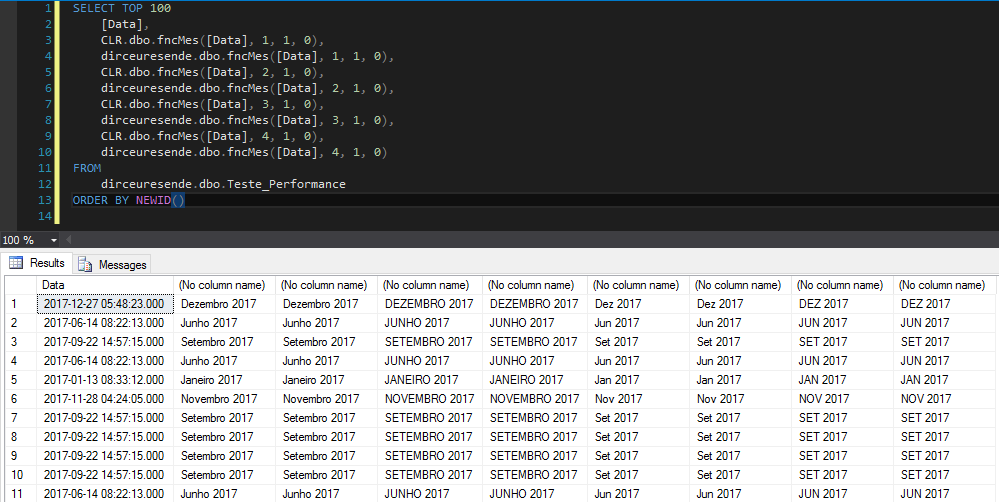
Performance comparison in SELECT

fncConverte_Em_Horas
View contentCREATE FUNCTION [dbo].[fncConverte_Em_Horas] (@Qt_Tempo BIGINT, @Tp_Tempo VARCHAR(10))
RETURNS VARCHAR(MAX)
BEGIN
DECLARE @ResultadoNegativo TINYINT = 0
IF (@Qt_Tempo < 0)
BEGIN
SET @ResultadoNegativo = 1
SET @Qt_Tempo = @Qt_Tempo * (-1)
END
DECLARE @Diferenca BIGINT = @Qt_Tempo,
@Segundos BIGINT = 0,
@Minutos BIGINT = 0,
@Horas BIGINT = 0
IF(@Tp_Tempo IN('ss','second'))
BEGIN
SET @Horas = @Diferenca / 3600
SET @Diferenca = @Diferenca - (@Horas * 3600)
SET @Minutos = @Diferenca / 60
SET @Diferenca = @Diferenca - (@Minutos * 60)
SET @Segundos = @Diferenca
END
IF(@Tp_Tempo IN('mm','minute'))
BEGIN
SET @Horas = @Diferenca / 60
SET @Diferenca = @Diferenca - (@Horas * 60)
SET @Minutos = @Diferenca
SET @Segundos = 0
END
IF(@Tp_Tempo IN('hh','hour'))
BEGIN
SET @Horas = @Diferenca
SET @Minutos = 0
SET @Segundos = 0
END
RETURN
(CASE WHEN @ResultadoNegativo = 1 THEN '-' ELSE '' END) +
(CASE WHEN @Horas <= 9 THEN RIGHT('00' + CAST(@Horas AS VARCHAR(1)), 2) ELSE CAST(@Horas AS VARCHAR(MAX)) END + ':' +
RIGHT('00' + CAST(@Minutos AS VARCHAR(2)), 2) + ':' +
RIGHT('00' + CAST(@Segundos AS VARCHAR(2)), 2))
ENDCLR source code:
using System.Data.SqlTypes;

public partial class UserDefinedFunctions
{
    [Microsoft.SqlServer.Server.SqlFunction]
    public static SqlString fncConverte_Em_Horas(SqlInt64 Qt_Tempo, SqlString Tp_Tempo)
    {

        if (Qt_Tempo.IsNull)
            return SqlString.Null;


        if (Tp_Tempo.IsNull)
            return SqlString.Null;


        var resultadoNegativo = false;
        var tempo = Qt_Tempo.Value;

        if (tempo < 0)
        {
            resultadoNegativo = true;
            tempo = tempo * -1;
        }


        var diferenca = tempo;
        long segundos = 0;
        long minutos = 0;
        long horas = 0;

        switch (Tp_Tempo.Value)
        {

            case "ss":
            case "second":
                horas = diferenca / 3600;
                diferenca -= (horas * 3600);

                minutos = diferenca / 60;
                diferenca -= (minutos * 60);

                segundos = diferenca;

                break;


            case "mm":
            case "minute":
                horas = diferenca / 60;
                diferenca -= (horas * 60);

                minutos = diferenca;

                break;


            case "hh":
            case "hour":
                horas = diferenca;

                break;

        }

        return ((resultadoNegativo) ? "-" : "") + horas.ToString("00") + ":" + minutos.ToString("00") + ":" + segundos.ToString("00");

    }
}
Exit:
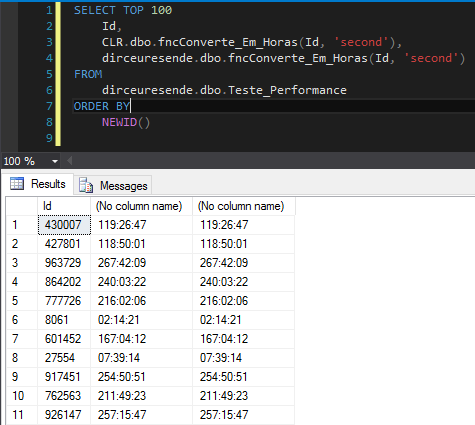
Performance comparison in SELECT

fncFormata_Documento
View contentCREATE FUNCTION [dbo].[fncFormata_Documento](
@Nr_Documento varchar(max)
)
RETURNS varchar(max)
AS BEGIN
SET @Nr_Documento = Replace(@Nr_Documento,'.','')
SET @Nr_Documento = Replace(@Nr_Documento,'/','')
SET @Nr_Documento = Replace(@Nr_Documento,'-','')
DECLARE @Nr_Formatado varchar(max)
IF (LEN(@Nr_Documento) = 14) BEGIN
SET @Nr_Formatado =
substring(@Nr_Documento,1,2) + '.' +
substring(@Nr_Documento,3,3) + '.' +
substring(@Nr_Documento,6,3) + '/' +
substring(@Nr_Documento,9,4) + '-' +
substring(@Nr_Documento,13,2)
END
IF (LEN(@Nr_Documento) = 11) BEGIN
SET @Nr_Formatado =
substring(@Nr_Documento,1,3) + '.' +
substring(@Nr_Documento,4,3) + '.' +
substring(@Nr_Documento,7,3) + '-' +
substring(@Nr_Documento,10,2)
END
IF (@Nr_Formatado IS NULL) SET @Nr_Formatado = @Nr_Documento
RETURN @Nr_Formatado
ENDCLR source code:
using System;
using System.Data.SqlTypes;

public partial class UserDefinedFunctions
{
    [Microsoft.SqlServer.Server.SqlFunction]
    public static SqlString fncFormata_Documento(SqlString Nr_Documento)
    {

        if (Nr_Documento.IsNull)
            return SqlString.Null;


        var documento = Nr_Documento.Value.Replace(".", "").Replace("-", "").Replace("/", "").Replace(" ", "");

        switch (documento.Length)
        {

            case 11:
                return Convert.ToUInt64(documento).ToString(@"000\.000\.000\-00");

            case 14:
                return Convert.ToUInt64(documento).ToString(@"00\.000\.000\/0000\-00");

        }

        return documento;

    }

}
Exit:
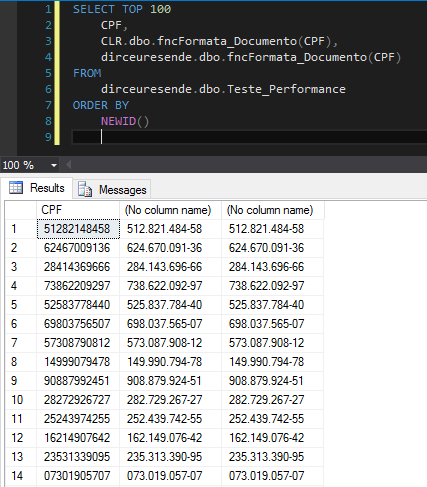
Performance comparison in SELECT

Conclusion
After 10 performance tests between Scalar functions T-SQL x CLR, we can conclude that in all the cases presented (I chose 10 out of 90 functions that I have in both languages, randomly), the CLR function had a huge performance gain, both in CPU and execution time. In the company where I work as a DBA, I tested all 90 functions and in 87 cases, the function written in C# was executed in at least half the time of the T-SQL function.
However, as I said above, this does not mean that in 100% of cases this will occur. As with everything related to performance tuning, there is no perfect tip that applies to 100% of situations. Before changing a T-SQL function to SQL, do several tests to ensure that there really was a significant performance gain when creating the function in the CLR.
In the first 2 examples, where the functions are very simple, I was also able to compare them with native SQL Server functions, without the use of UDF functions. In this case, it was possible to observe that without using the UDF function and applying the native functions directly to the SELECT and/or WHERE, it ends up being faster than the CLR. However, the functions are often quite complex, which ends up making it difficult and even impossible to use them without creating a UDF function.
Functions in SQL Server are a great way to encapsulate and reuse code, but at the same time, they can end up compromising the performance of your queries. In this case, the solution that acts as a middle ground between the native SQL Server function and the T-SQL scalar function would be the CLR scalar function, which has a performance much higher than the T-SQL function (in the vast majority of cases) and close to the native function and at the same time, allows the reuse and encapsulation of code.
Through this post, I hope to have shown you a real way to optimize SQL queries, without having to change 1 line of code, without having to change anything in your instance. In many cases, the indexes are being used as expected, the statistics are updated, there are no warnings in the execution plan, but when using a T-SQL function, the query performance ends up being poor.
In this case, the use of CLR functions can represent a great improvement in your application/routine and save precious seconds/CPU cycles on a daily basis. With this, it was possible to reduce several hours of processing/CPU daily in my work instances, simply replacing T-SQL functions with CLR functions and this can be a big difference in the DBA's life.
I hope you liked this post.
If you have any questions or criticisms, leave them here in the comments.
Hug!

Comentários (0)
Carregando comentários…