
Hey guys,
How are you?
Today I received a very common question that people have when using SQL Server Agent jobs, which is when the execution history of SQL Agent jobs is disappearing after some time. You have several jobs running and when you need to analyze the history of a specific job, it doesn't show anything in the execution history. Has this ever happened to you?
The good news is that understanding and solving this problem is very easy.
The SQL Server Agent job history retention parameters
To view SQL Server Agent job history retention parameters, go to SQL Server Agent properties.
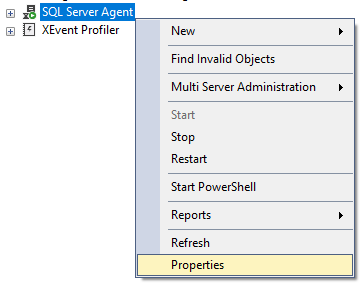
And now select the “History” option in the left panel.
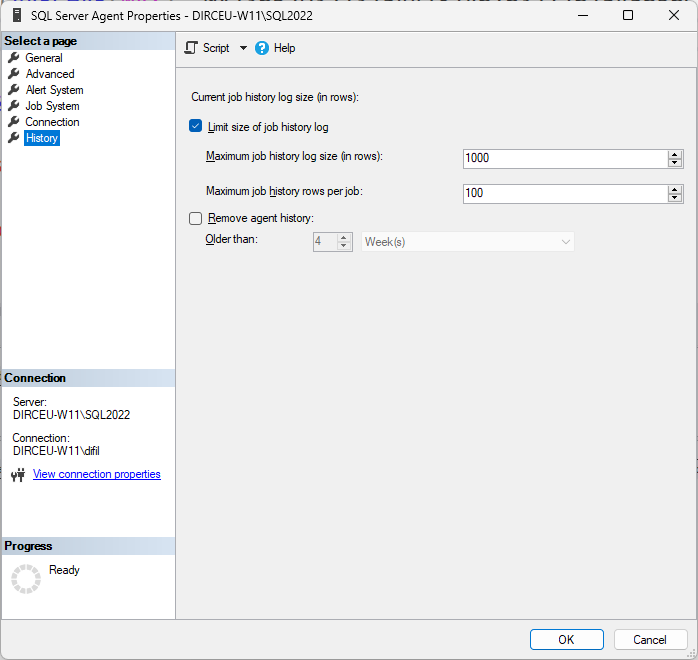
You will see some options for managing your history. Check if the “Limit size of job history log” option is enabled. If it is not, the bank will store the job history indefinitely, unless the “Remove agent history” option is enabled. In this case, the history will be cleared at the defined interval when you click OK on this screen.
This checkbox only marks that you want to delete the logs, within this defined interval, when you click the OK button to confirm, but there is no automatic process that deletes this data, it is manual. You have to enter this screen again, check the box, define the period and click OK to delete again.

You can see that if you click on this checkbox and close this screen and open it again, the checkbox comes back unchecked.
If the “Limit size of job history log” option is enabled, which is the default, you must observe the values of the parameters “Maximum job history log size (in rows)” and “Maximum job history log per job”, whose default values are 1000 and 100, respectively.
This is possibly your problem, especially if you haven't changed the default settings.
Why is the execution history of SQL Agent jobs disappearing?
Imagine that you have 20 jobs running on the instance, and 10 of them run every 1 minute and the rest run once a day.
In an interval of just 100 minutes (1h and 40 minutes), all jobs that are executed once a day will have their execution history erased, because, although the Agent is storing up to 100 records per job, due to the parameter “Maximum job history log per job” = 100, the total limit of history lines “Maximum job history log size (in rows)” is set to 1,000 records, and this second limit may overlap with the limit per job if the total number of rows is reached.
In other words, if 10 jobs run every 1 minute, in 100 minutes they will already reach the limit of 1,000 lines of history and will start to overwrite previous records, and as a result, jobs that run only once a day end up losing their history, because they will be overwritten by other jobs, which run more frequently.
The calculation is simple:
(number of jobs in the instance) x (line limit per jobs) < (total limit of history lines)
With the default settings, in an environment with 20 jobs:
20 x 100 would have to be less than 1000, but this is false, therefore, the configuration of 1000 total lines is not sufficient for an environment with 20 jobs and 100 lines per job, as the job history will overlap at some point.
Although the agent configuration limits each job to store up to 100 rows, this limit is not guaranteed when the total number of history rows exceeds the Agent's general limit (“Maximum job history log size (in rows)”)
How to increase execution history retention of SQL Agent jobs
To solve this problem, it's quite easy: Just change the history retention parameters. What I usually implement in environments is to use the maximum value allowed in the “Maximum job history log size (in rows)” parameter, which is 999999, and limit the number of rows per job to 1000.
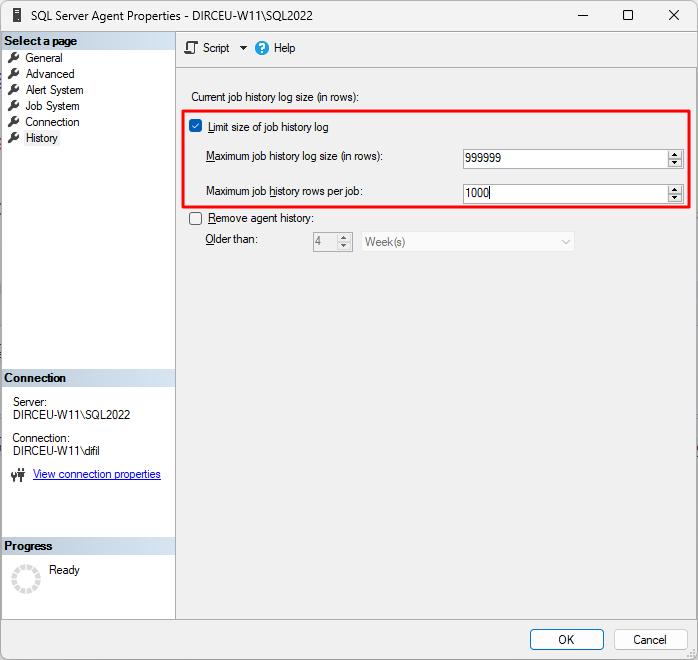
This will mean that each job can store up to 1,000 executions per job and the Agent's maximum limit will not override the value of this parameter (except if you have more than 999 jobs in the instance – in this case, reduce the maximum limit per job according to the number of jobs).
What are the consequences of increasing the size of the job history?
Now that you've learned how to increase the number of history lines stored, we need to understand the consequences of this.
Size on disk
The first point that must be considered is the disk space that will be needed to store this data, since, as you may know, this history is stored in the msdb database. For a quantity of 1,000 records in the history table, the average occupied size is about 1 MB. For the maximum size allowed (999,999), something around 1 GB of disk space should be needed, which is not usually very significant.
Locks
Another point that must be considered is in relation to locks and the potential for a drop in performance due to the increase in the size of the msdb base. For environments with many jobs, this may end up being a problem, mainly because at each job execution, the dbo.sp_agent_log_job_history procedure is executed by SQL Agent to store the execution log, which internally executes msdb.dbo.sp_sqlagent_log_jobhistory and calls the msdb.dbo.sp_jobhistory_row_limiter.
The sp_jobhistory_row_limiter procedure has a check in which it is only executed at each job execution in the instance, if the checkbox for limiting the number of rows (Limit size of job history log) is activated:
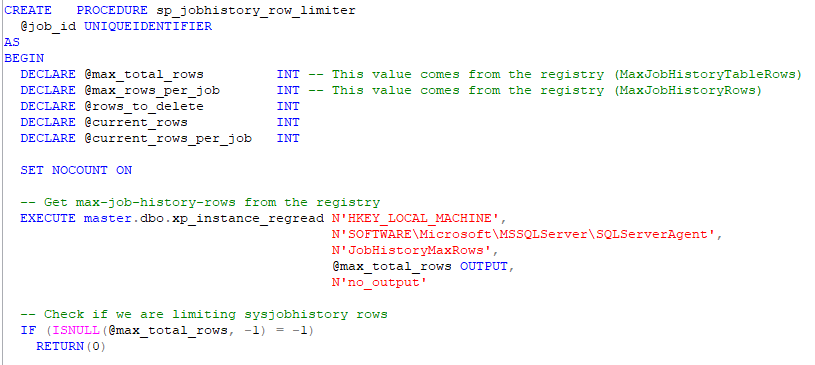
If the checkbox is enabled, the sp_jobhistory_row_limiter procedure will be executed at each job execution, and it starts a transaction to count how many history rows in the msdb.dbo.sysjobhistory table that job has, using a WITH(TABLOCKX) hint, locking the entire table exclusively during this check and deleting records that exceeded the total maximum limit or the maximum limit per job.

Although this is very fast, if the instance has many jobs running at the same time, and with a larger history table (because the total row limit has increased), this could end up generating a locking problem in SQL Server Agent management.
Jobs not running
Another problem that can occur, in environments with many jobs being executed at the same time, is that jobs may not be executed at the scheduled time due to the previous problem (locks), where the Agent is waiting for a long time to be able to allocate the table and record the job execution data, a timeout occurs and the job execution returns an error.
A better alternative to erase job execution history
If you prefer a definitive alternative to this problem, you've come to the right place 🙂
- If you try to limit the job history by number of rows, using the SQL Agent interface, you will run into the problem that, when enabling limitation by rows, each job execution will call the stored procedure sp_jobhistory_row_limiter, which can generate locking problems in the msdb.dbo.sysjobhistory table due to the use of the hint WITH(TABLOCKX) and, therefore, can also harm the execution of jobs at the correct time in environments with a lot of job execution simultaneously.
- If you check the box on the interface to remove the history of jobs older than a defined interval, this process is manual and you will have to go back to this screen every time to clear the data.
- And if you don't activate either of the 2 checkboxes, the data will grow indefinitely, which will increase the space used to store this data and slow down MSDB queries related to job history.
What to do to resolve this?
To solve all these problems at once, the best alternative is to DISABLE the 2 checkboxes on the history retention screen (that's right, remove the history limitation) and create a daily job, which cleans the execution logs using the stored procedure msdb.dbo.sp_purge_jobhistory, which will erase the entire execution history of all jobs prior to a specific date.
Example of use:
DECLARE @Dt_Limite DATETIME = DATEADD(DAY, -180, CONVERT(DATE, GETDATE()));

-- Mantém apenas o histórico de execução dos jobs dos últimos 180 dias
EXEC [msdb].[dbo].[sp_purge_jobhistory]
    @oldest_date = @Dt_Limite -- datetime
The example above will only keep the job execution history for the last 180 days and delete records older than that. Using this T-SQL command, you won't need to worry about the number of rows to keep (which doesn't even make much sense), just worrying about the number of days of history you will keep.
Now SQL Server will not execute the sp_jobhistory_row_limiter stored procedure with each job execution, avoiding possible locking problems and you will still have control over the growth of the size of the job history table.
Do you need to do this for all environments? It would be ideal and recommended, but if your environment doesn't have many jobs or much competition, you can continue leaving this responsibility to the SQL Server Agent limiter itself, but if you start to have problems, don't forget to follow this tip, ok?
I hope you enjoyed this quick tip and see you later!

Comentários (0)
Carregando comentários…