
Hey guys,
How are you?
In this post I'm going to talk about a session-level configuration that many people don't know about and, in many cases, can be of great help in avoiding accidental data loss, which is Autocommit.
In some other DBMSs (Oracle, Postgree, etc.) this is not activated by default, which ends up causing some strangeness for DEVs and DBAs who came from these technologies. Whenever we talk about data changes in Production, we must keep in mind the use of transactions. This is especially useful and safe because, in case of an error in the data update process, we can undo all changes made with a simple ROLLBACK command. If you are not using a transaction and have made several INSERT's, UPDATE's and DELETE's, you will have a lot of work to undo these changes, not to mention the time in which the database will have incorrect information.
According to the official SQL Server documentation, SQL Server's default transaction handling mode is Autocommit, that is, when you execute an UPDATE, INSERT or DELETE without starting an explicit transaction, these operations are automatically committed.
When you start a transaction, SQL Server turns on implicit transaction mode, causing all DML operations to be encapsulated in that transaction. Once you execute COMMIT or ROLLBACK, the SQL engine disables implicit transaction mode and returns to Autocommit mode.
I would also like to point out that my goal in this post is not for you to disable Autocommit just because you read it here. You need to understand what Autocommit is and understand whether it really makes sense to keep it activated or not. There are many cases where the DBA may prefer to continue with this behavior (which is standard) for SQL Server, while in other cases, particularly if you are coming from Oracle or Postgree, where you may want to disable Autocommit. This depends on your profile and your way of working.
Transactions and Compilation and Execution Errors
Many times when we are executing several batch commands, we come across an error message in the middle of the scripts and we do not know what was executed and what was not, because in some cases nothing is executed and in others, everything before the line with the error was executed. I will demonstrate why this occurs.
Compilation Errors
Every time you execute a command in SQL Server, the SQL engine performs a pre-validation of the commands you execute, performing some validations on the command to prevent it from generating unnecessary processing and at the end of the commands it generates an error that could have been avoided. One of these validations is the syntax of the commands.
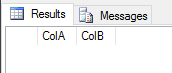
When there is a syntax error in one of the commands, execution stops before executing any SQL statements. In other words, when there are syntax errors, nothing is executed.
USE [Teste];
GO

IF (OBJECT_ID('TestBatch') IS NOT NULL) DROP TABLE TestBatch
CREATE TABLE TestBatch (
    ColA INT PRIMARY KEY,
    ColB CHAR(3)
);
GO

INSERT INTO TestBatch VALUES (1, 'aaa');
INSERT INTO TestBatch VALUES (2, 'bbb');
INSERT INTO TestBatch VALUSE (3, 'ccc'); -- Erro de sintaxe.
GO

SELECT * FROM TestBatch; -- Não retorna linhas.
GO
Msg 102, Level 15, State 1, Line 13
Incorrect syntax near ‘VALUSE’.
Execution Errors
Unlike compilation errors, which are pre-validated before executing the commands in the database, execution errors are not validated before starting processing, since they would require a lot of processing to be able to validate this information. Imagine SQL Server having to validate whether there is a duplicate key in a batch of 10,000 INSERTs before processing the command. It would be almost the same processing as the INSERT operation itself.
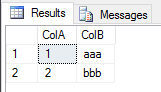
In this case, when there is an execution error, the commands are executed and committed up to the line that generates the error.
USE [Teste];
GO

IF (OBJECT_ID('TestBatch') IS NOT NULL) DROP TABLE TestBatch
CREATE TABLE TestBatch (
    ColA INT PRIMARY KEY,
    ColB CHAR(3)
);
GO

INSERT INTO TestBatch VALUES (1, 'aaa');
INSERT INTO TestBatch VALUES (2, 'bbb');
INSERT INTO TestBatch VALUES (1, 'ccc'); -- Erro de chave duplicada.
GO

SELECT * FROM TestBatch; -- Retorna as linhas 1 e 2.
GO
Msg 2627, Level 14, State 1, Line 13
Violation of PRIMARY KEY constraint ‘PK__TestBatc__A259EE44E0B6221D’. Cannot insert duplicate key in object ‘dbo.TestBatch’. The duplicate key value is (1).
The statement has been terminated.
Another example that generates an execution error is when the object does not exist. SQL Server cannot validate a batch of 10,000 INSERTs whether each object exists in the database or not, as it would consume a lot of processing, since during execution this check is already done.
USE [Teste];
GO

IF (OBJECT_ID('TestBatch') IS NOT NULL) DROP TABLE TestBatch
CREATE TABLE TestBatch (
    ColA INT PRIMARY KEY,
    ColB CHAR(3)
);
GO

INSERT INTO TestBatch VALUES (1, 'aaa');
INSERT INTO TestBatch VALUES (2, 'bbb');
INSERT INTO TestBatch2 VALUES (3, 'ccc'); -- Erro de objeto inexistente.
GO

SELECT * FROM TestBatch; -- Retorna as linhas 1 e 2.
GO
Msg 208, Level 16, State 1, Line 13
Invalid object name ‘TestBatch2’.
Disabling Autocommit in SQL Server
Now that you understand how Autocommit and its validation rules work, I will demonstrate how to disable Autocommit in SQL Server, making it necessary to execute COMMIT or ROLLBACK at the end of the entire batch of DML commands in SQL Server so that the information is committed to the database.
How to disable Autocommit at the session level
To disable Autocommit at the session level and make it necessary to execute COMMIT or ROLLBACK at the end of your commands so that they are actually applied to the database, simply execute the command below:
SET IMPLICIT_TRANSACTIONS ON
GO
Remember that this only applies to the current session. If you open a new query window, this option is not enabled and you will need to run this command every time you open a new window.
How to disable Autocommit in SQL Server Management Studio (SSMS)
To disable Autocommit in SQL Server Management Studio (SSMS) automatically, that is, whenever you open a new query the IMPLICIT_TRANSATIONS mode is activated, simply follow the steps below:
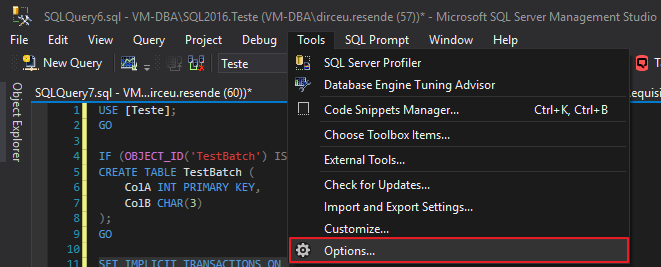
Open the “Tools” menu in SQL Server Management Studio and select the “Options…” option.
On the options screen, navigate to the “Query Execution” > “SQL Server” > “ANSI” category and check the “IMPLICIT_TRANSACTIONS” checkbox
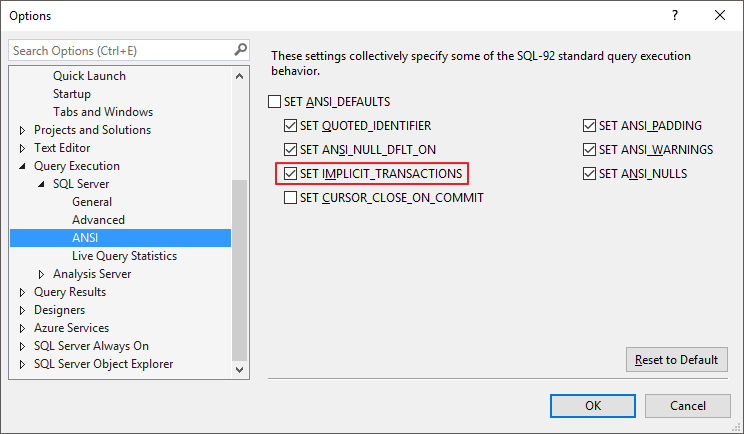
After checking this option and clicking “OK”, whenever you open a new query window (New Query Window), the IMPLICIT_TRANSACTIONS option will be activated by default (you can disable it at the session level, using SET IMPLICIT_TRANSACTIONS OFF).
It is worth remembering that this change is only applied to new windows that will be opened. Windows that are already open are not affected.
That's it, folks!
I hope you enjoyed this post and see you next time.

Comentários (0)
Carregando comentários…