
Hey guys,
All good ?
In this post I would like to show how to calculate the difference in years (age) between two dates in SQL Server, showing some solutions and a performance analysis between these options in order to identify the most performant way to perform this calculation.
As you know, to resolve this issue it is not enough to perform a simple DATEDIFF(YEAR, @Dt_Inicial, @Dt_Final), since the DATEDIFF(YEAR…) function will return the difference in years without considering whether the dates have already “completed their anniversary”.
In a simple explanation, the DATEDIFF(YEAR…) function returns the calculation YEAR(@Dt_Final) – YEAR(@Dt_Inicial).
I will demonstrate why this does not work for age calculation:
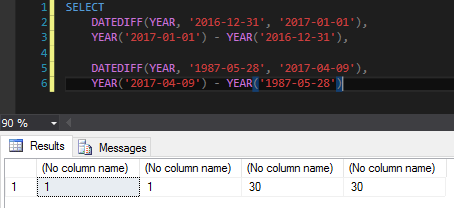
As you can see, it is not enough to use the DATEDIFF(YEAR..) function to calculate age. In the first example, with only 1 day difference between the dates, the function returned me that this difference is 1 year.
In the second example, the function returns 30 years of difference, but the first date is 04/09 and the second is 05/28, that is, it has not yet completed 1 year and the correct value would be 29 years.
How to calculate age using T-SQL
Now I will demonstrate two simple ways to calculate age using Transact-SQL
Age calculation using Transact-SQL and CASE
To perform this calculation, we calculate the difference in years between the dates and decrease by 1 if the month and day of the starting date is smaller than the month and day of the ending date.
CREATE FUNCTION [dbo].[fncCalcula_Idade] (@Dt_Nascimento DATETIME, @Dt_Hoje DATETIME)
RETURNS INT
AS BEGIN
  RETURN DATEDIFF(YEAR, @Dt_Nascimento, @Dt_Hoje) + CASE WHEN (MONTH(@Dt_Nascimento) > MONTH(@Dt_Hoje) OR (MONTH(@Dt_Nascimento) = MONTH(@Dt_Hoje) AND DAY(@Dt_Nascimento) > DAY(@Dt_Hoje))) THEN -1 ELSE 0 END
END
Age calculation using Transact-SQL and division by 365.25
To perform this calculation, we calculate the difference in days between the dates and divide this value by 365.25. But why this 0.25? The answer is simple... Leap years. This “technique” is authored by my friend and BI specialist, Lucas Galon.
CREATE FUNCTION [dbo].[fncCalcula_Idade2] (@Dt_Nascimento DATETIME, @Dt_Hoje DATETIME)
RETURNS INT
AS BEGIN
  RETURN DATEDIFF(DAY, @Dt_Nascimento, @Dt_Hoje) / 365.25
END
How to calculate age using CLR
Now I will demonstrate two simple ways to calculate age using the CLR, which aim to obtain a large performance gain due to the optimizations of the C# language and the Microsoft .NET Framework.
Age calculation using CLR and manual calculations
To perform this calculation, we calculate the difference in years between the dates and decrease by 1 if the month and day of the starting date is smaller than the month and day of the ending date.
using System.Data.SqlTypes;

public partial class UserDefinedFunctions
{
    [Microsoft.SqlServer.Server.SqlFunction]
    public static SqlInt32 fncCalcula_Idade(SqlDateTime Dt_Nascimento, SqlDateTime Dt_Hoje)
    {

        if (Dt_Nascimento.IsNull || Dt_Hoje.IsNull)
            return SqlInt32.Null;

        var anos = Dt_Hoje.Value.Year - Dt_Nascimento.Value.Year;

        if (Dt_Hoje.Value.Month < Dt_Nascimento.Value.Month || (Dt_Hoje.Value.Month == Dt_Nascimento.Value.Month && Dt_Hoje.Value.Day < Dt_Nascimento.Value.Day))
            anos--;

        return anos;
    }
}
Age calculation using CLR and division by 365.25
To perform this calculation, we calculate the difference in days between the dates and divide this value by 365.25, as mentioned above, but now using the CLR.
using System;
using System.Data.SqlTypes;

public partial class UserDefinedFunctions
{
    [Microsoft.SqlServer.Server.SqlFunction]
    public static SqlInt32 fncCalcula_Idade2(SqlDateTime Dt_Nascimento, SqlDateTime Dt_Hoje)
    {
        return (Dt_Nascimento.IsNull || Dt_Hoje.IsNull) ? SqlInt32.Null : Convert.ToInt32(Math.Floor((Dt_Hoje.Value - Dt_Nascimento.Value).TotalDays / 365.25));
    }
}
Results of the presented functions
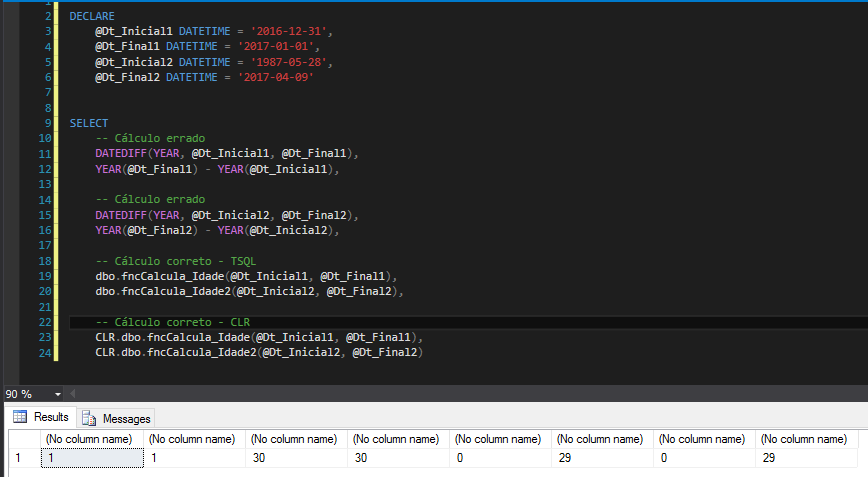
Performance Tests
Now that I have demonstrated some different solutions for calculating age in SQL Server, I will compare the performance of all of them and check which is the most performant.
As I already mentioned in the post SQL Server – Performance comparison between Scalar Function and CLR Scalar Function, CLR functions generally will perform better than T-SQL functions, at the same time as inline functions (without creating UDF) generally perform better than CLR functions. Let's see how each solution fares.
For these tests, I will use a base of 131,072 random dates to calculate age compared to the current date, and the script to generate this base I will make available below:
Script for generating test mass
IF (OBJECT_ID('dbo.fncRand') IS NOT NULL) DROP FUNCTION dbo.fncRand
GO

CREATE FUNCTION dbo.fncRand(@Numero BIGINT)
RETURNS BIGINT
AS
BEGIN
    RETURN (ABS(CHECKSUM(PWDENCRYPT(N''))) / 2147483647.0) * @Numero
END
GO


IF (OBJECT_ID('dbo.Datas') IS NOT NULL) DROP TABLE dbo.Datas
CREATE TABLE dbo.Datas (
    Data_Inicio DATETIME
)

DECLARE
    @Contador INT = 1,
    @Total INT = 17


INSERT INTO dbo.Datas ( Data_Inicio )
VALUES ( '1970-01-01' )


WHILE(@Contador <= @Total)
BEGIN


    INSERT INTO dbo.Datas ( Data_Inicio )
    SELECT
        DATEADD(SECOND, dbo.fncRand(1491696000), '1970-01-01')
    FROM
        dbo.Datas


    SET @Contador += 1


END
Script for carrying out the tests
-- Funções inline
SELECT DATEDIFF(YEAR, Data_Inicio, GETDATE()) + CASE WHEN (MONTH(Data_Inicio) > MONTH(GETDATE()) OR (MONTH(Data_Inicio) = MONTH(GETDATE()) AND DAY(Data_Inicio) > DAY(GETDATE()))) THEN -1 ELSE 0 END
FROM dbo.Datas

SELECT CAST(DATEDIFF(DAY, Data_Inicio, GETDATE()) / 365.25 AS INT)
FROM dbo.Datas

-- Funções T-SQL UDF
SELECT dbo.fncCalcula_Idade(Data_Inicio, GETDATE())
FROM dbo.Datas

SELECT dbo.fncCalcula_Idade2(Data_Inicio, GETDATE())
FROM dbo.Datas

-- Funções CLR
SELECT CLR.dbo.fncCalcula_Idade(Data_Inicio, GETDATE())
FROM dbo.Datas

SELECT CLR.dbo.fncCalcula_Idade2(Data_Inicio, GETDATE())
FROM dbo.Datas
Results:

As expected, the inline functions presented the best performance, with the CLR presenting a similar performance and the T-SQL functions taking much longer than the other 2 solutions. Furthermore, the solution with division by 365.25 was better than using CASE in all 3 scenarios.
That's it, folks!
I hope you learned how to calculate age correctly and with the best possible performance.
A hug and see you next time.

Comments (0)
Loading comments...