
Hey guys!
Today I would like to dedicate this entire post to thank each and every one of you who has visited, liked, commented and/or shared one of my articles. It is thanks to you that many things changed in my life in the last 2 years, especially on my blog, where I write mostly about SQL Server since April 2015.
For me, it is a great honor to be remembered by many of you on a daily basis, to receive messages of thanks on LinkedIn, Whatsapp and other social networks, especially when I go to other cities or states to speak and people come to talk to me, say that they follow my blog, etc.. This gives me immense motivation to continue studying more and more to bring you new content or new views on a certain topic.
In May 2018, I reached the milestone of 500 thousand views and today, 1 year and 3 months later, I finally managed to reach the milestone 1 million blog views, with 372 articles published and 618 thousand people impacted for my articles!!
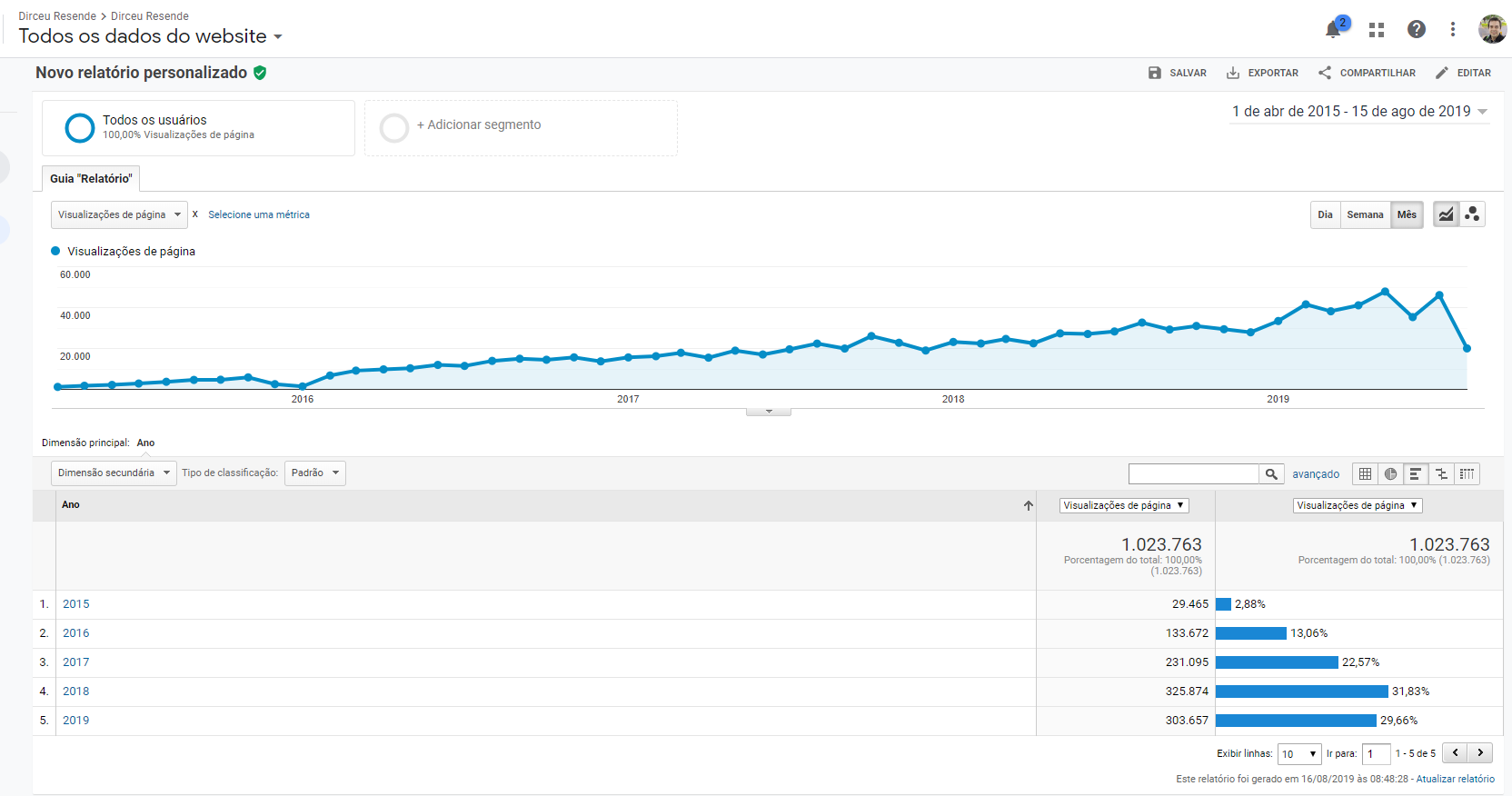
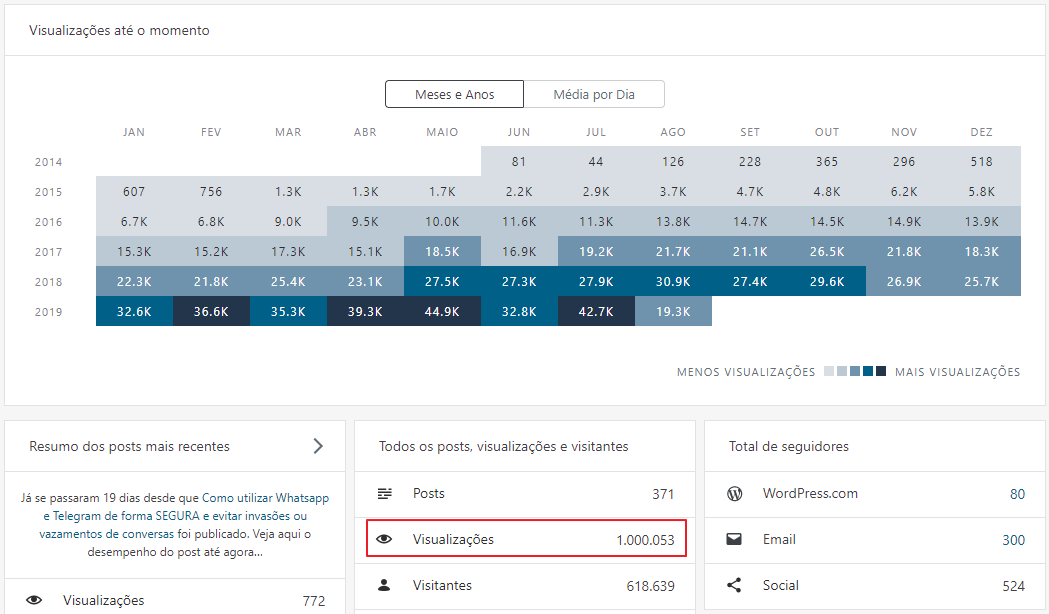
It may not seem like much, especially in comparison to the numbers of Youtubers, but reaching this number with a technical IT blog, talking practically only about databases and, without paying for Adwords, is very difficult. So much so, that I only remember the Fabrício Lima having reached this number with technical database blog, so it's a big milestone, in my opinion 🙂
My idea in this post is, in addition to thanking all of you, to share my motivation to write technical articles, to try to get more people to have this excellent habit (both for themselves and for the community) and help with some tips that I, in my personal experience, would like to provide to those who are starting out and help these people to be more relevant in their articles.
Why I write technical articles
A lot of people ask me why I “waste time” writing on the blog, since “I don’t gain anything from it”. The answer to that is this:
- For each post I make, I generally invest between 30 mins and 4 hours studying more about the subject and specializing in what I'm going to write, and generally around 2 hours (there have been posts that took much longer than that... lol) between creating the content, testing (yes, I test every command and every query I post here), organizing the information and “perfumes” to make the posts pleasant to view. With all this effort, I always stay updated and studying, always motivated to learn more and more.
- I often read and learn about something interesting on other blogs and I don't think it was explained well, because I had to read from several other sites to fully understand a resource or technology, so that's when I see an opportunity to write about something cool that could perhaps have more didactic content for those who would like to learn too.
- Teaching and teaching has always been a passion for me. It's very rewarding when you help someone take the first steps in their career and then follow their growth and evolution, witnessing the birth of an excellent professional.
- Lectures are great for sharing knowledge, but the reach is very low (on average, around 100 people attend a lecture. There is an article of mine that more than 50 thousand people have read), the lecture only affects people in that region and often, 1 year after your presentation, the person no longer remembers what you shared. When you write on the blog, you reach all 4 corners of Brazil and people can review your content whenever they want to remember something or study that content again.
- Writing on my blog has opened many doors for me. And in one of them, I started speaking here in Espírito Santo. After that, I started speaking in several states in Brazil. And this allowed me to meet wonderful people on this journey, who, like me, have a passion for sharing content and helping technical communities
- It is necessary to leave individuality aside and live a philosophy of community and information sharing. Nowadays I can clearly see that around 80% of all the technical knowledge I acquired throughout my career was through forums, Stackoverflow, Blogs, etc. And that is precisely why IT has evolved in the last 15 years, what other areas generally take 100, 200, 1,000 years to achieve. The profile of an IT professional is that of people who like to share knowledge, post innovative solutions to frequent problems, seek improvements in processes, try to create new ways of achieving a goal, innovate, create, improve. This is only possible because there are people who have the idea of sharing information.
- I remember it as if it were yesterday, when I started programming on mIRC at the age of 12, in 1999, and creating my own script (older ones will understand... lol), where you could create screens and various resources using a language similar to C++ (https://en.wikipedia.org/wiki/MIRC_scripting_language). At the age of 15, I was already creating several applications in Visual Basic 6 and Delphi 7 for managing Windows configurations, Multimedia Player (I'll make a post about it later... lol) and several others. All of this was only possible because there were several people on the Internet teaching how to program.
Some tips to improve the relevance of your blog
- Choose a platform to post. A common mistake that I see in people just starting out, especially developers, is wanting to develop their own blog, but what ends up happening is that the person spends so much time creating their own blog that they end up getting discouraged from writing articles, the platform probably won't be as easy as WordPress or Medium and all this work will have been in vain. Why reinvent the wheel? Why spend days creating something that already exists, has themes, plugins for everything you can imagine, frequent updates with new features and security improvements?
- If you don't like writing, there are other ways to share knowledge, such as Podcasts, Lives and recorded videos, which are also excellent tools for teaching.
- Avoid Paywall. There's nothing worse than trying to read an article and having to pay to read it, right? With so much excellent content on the internet, your visitor will probably leave your site and look for other free sites. Unless you really want to work only with paid articles and make a living from it (which I find difficult), avoid platforms that use PayWall. I'm even recommending using WordPress instead of Medium because of this.
- Create interesting and unique articles. No replicating Microsoft documentation. Understand well, a unique article is not writing about something that doesn't exist on the internet (that's almost impossible), but rather writing in a way that's different from everything you've ever seen on this topic. I saw a video by the great Luciano Moreira (Luti) where he complained about the difficulty of finding original topics to write about on the blog.
Perhaps a way to do this, even with topics already covered, is to explain in more detail (and in your own words), giving more examples or more complex examples than the basics found on the Internet, sharing your personal experience with this technology. There are many ways to create something unique with a subject that already has a lot of content. Usually when I have difficulty with a problem, I read several articles and still have difficulty, I end up writing an article about it sharing my experience and sharing my learning
- Use email signature. It is very important that you provide a form so that people can subscribe to your blog and receive new posts by email. It’s an excellent way to “retain” your readers and always have a captive audience for your new articles.
- Publicize your work. There's no point in writing excellent articles if no one knows you're writing them. A fundamental role for your blog to be relevant is that you help promote your work! Whether in Whatsapp groups, Telegram and on your social networks (always remembering SEO, tags, etc.). As the saying goes, “only those who are seen are remembered”. And don't be ashamed to promote your work, because if your content doesn't reach people, there's no point in continuing to write.
- Study SEO (Search Engine Optimization). Knowing how search engines work is extremely important so that you can correctly index your website, rank at the top of Google and, therefore, attract more users and, consequently, more relevance to your blog.
- Think about all audiences. In any technical community, it is normal to find the most varied profiles, from the guy who started yesterday and knows nothing, to the guy who is a “legend” in that technology.
Therefore, it is very common to find blogs that only have basic articles, which have a large volume of views but as people learn more, they end up abandoning them, and other blogs that only have highly advanced content, which tend to have few views, since few professionals really master the technologies they work with and understand these more complex articles.
What I try to do on my blog, and this is a tip for you, is to try to reach all audiences. Mix basic articles with complex articles, so that you end up being a reference for those who are starting out, for those in the middle of the journey and for those who end up becoming a Senior professional.
- Diversify your content. Complementing what I said in the previous tip, in addition to creating articles from basic to advanced, it is important to try not to focus just on one specific subject. If you only write about Backup, for example, you are greatly limiting the reach of your articles. Try talking about other features or technologies. This is even an incentive for you to study different things and become a more complete professional 🙂
- Invest in the look of your website. Seriously, there's nothing worse than accessing a well-written article, but with a confusing layout or one that makes reading difficult, such as a bad color scheme (I don't like the site with a black background in particular), small or difficult-to-read font. Another bad thing is when you have a Wide (or Ultrawide) monitor and the website is small in the center of the screen and a large space on the sides
- Nobody likes slow websites. According to Google, one of the biggest reasons visitors stop visiting websites is the page loading time. If your website takes more than 3 seconds to load, you've probably already lost a lot of visitors.
And how to improve this? If you use WordPress, there are several caching plugins, such as W3 Total Cache, WP Rocker (the best), etc. Hiring a CDN also helps a lot, like CloudFlare, which is free. Avoid using unnecessary plugins. To measure your website's performance and tips on how it can be faster, I recommend the websites Google PageSpeed, GTMetrix and Pingdom
- Avoid WordPress.com. One thing I learned on this blogging journey is that what’s cheap is expensive. WordPress.com, which is where you can hire a blog for free as a SaaS, is very limited, both in plugins, Performance, themes, etc. And then for you to migrate to a paid version, it ends up giving you a lot of work (and possibly, TOTAL loss of relevance, if the URL changes – which will generally happen if you don't use your own domain). Nowadays, you can hire hosting for 8 reais per month and pay 50 reais per year for a custom domain. The cost is not that expensive and you will have many more customization options and ways to improve your visitors' experience
- Make things easier for your reader. When someone is on your site, it's really cool if you can make their experience easier so they stay longer and end up coming back. Some ways to do this is to place a search right at the beginning of the website, so that it searches for something in your articles.
Categorize your articles very well and set up a category tree for your articles, so that they can read more articles on that topic. If you are going to create a large article in several parts, create series, linking the articles, so that in any article in the series, you can easily view all the other articles in that series.
- Create integrations between articles. A really cool way to make your reader's experience richer is to create relationships between articles. If he is reading an article about AlwaysOn and in the middle of the article there is a quote or observation about Backup and you have an article that explains this in detail, instead of explaining everything again in your AlwaysOn article, just put a link “To learn more, click here”, linking this article with your backup article.
Many times I was writing an article and realized that I was explaining so much about a subject that wasn't even the focus of the post, that the article was too long. In this situation, I pause this article, create another article just with this explanation (where I can even go deeper) and then I go back to the article I was writing and create this reference.
- Forget Ads. One of the things I don't like about technical websites is the presence of advertisements. This really bothers those who are reading the article, to the point that it could be a barrier for them to return to your website. You can use an adblock on your computer to avoid ads, but what about on your cell phone? Will you have to root your cell phone just to avoid advertising?
- A lot of people read your articles on their cell phones. One concern that few people who write technical articles have is viewing their website on their cell phone. Nowadays, everyone has a cell phone in their hand and is looking for what to do at lunch, on the bus, on the train, in the subway, in a queue, etc. And it's a good time to read a technical article. But if your website opens all wrong on mobile or isn't well adapted for mobile devices, you've just lost a visitor.
- Use images in examples. One thing that I particularly like when I read an article is when I can visualize the result of an example or a command visually, with a printout or demonstration in the article itself.
Often, through a print I can know if that solution is what I need or not and it makes your explanation more complete for whoever is reading your articles. Trust me: A lot of people won't even try to compile your code or test your script if they don't have an idea of what the result looks like.
- Use Syntax Highlighting. Another feature that helps a lot in visualizing codes in technical articles is Syntax Highlighting, which is the identification and coloring of commands in a string. For anyone reading code, it is much more readable and makes understanding much easier. Point for those who use it. I personally use the Crayon Syntax Highlighter plugin for this.
- Be constant. If you want to have a relevant blog, you need to be consistent in your publications. You don’t need to make 1 post a day, but you also can’t make 2 posts a year. This ends up alienating your audience, your website becomes seen as “abandoned” and ends up falling into oblivion and losing relevance, especially for people who are recently joining the community.
- Your technical blog is technical. Another common mistake that ends up driving many people away from your blog is when it only contains posts about events, advertisements and off-topic articles. Nothing against posting this type of content, I myself have several articles like this, but the problem is when your reader opens your blog and only sees this on the home page. Always try to intersperse your website between technical articles and off-topic subjects, so that people don't lose interest in your website right away.
Well, guys!
I hope you enjoyed these tips I shared with you and THANK YOU SO MUCH for everything!
Until the next article.

Comments (0)
Loading comments...