
Hey guys!
In this article I would like to share a situation that tends to occur from time to time in my day-to-day work as a consultant, serving various clients and different environments, and which occurred again on Friday, which is when there are “strange things” in strings and tables (an allusion to the series “Stranger Things”), which is the occurrence of non-visible characters.
After helping a consultant identify and resolve this, I thought about creating a practical solution to resolve this more quickly next time and also help other people who may have this problem in their daily lives, which usually occurs especially in environments that have just undergone migration or work with importing data from various systems, APIs or files.
Simulating the problem
To demonstrate this problem to you, I'm going to create a very simple table, and fill this table with random values and a fixed line that I'm going to insert. To do this, I will use a function to generate random values, which is fncRand, especially useful for use in functions:
CREATE FUNCTION dbo.fncRand(
    @Numero BIGINT
)
RETURNS BIGINT
AS
BEGIN
    RETURN (ABS(CHECKSUM(PWDENCRYPT(N''))) / 2147483647.0) * @Numero
END
GO
With this function, I will create the table and insert some random values:
IF (OBJECT_ID('tempdb..#Teste') IS NOT NULL) DROP TABLE #Teste
CREATE TABLE #Teste (
    Id INT IDENTITY(1,1) NOT NULL PRIMARY KEY,
    Nome VARCHAR(100) NOT NULL
)


DECLARE
    @Contador INT = 1, @Total INT = 100,
    @Contador2 INT = 1, @Total2 INT = 10,
    @String VARCHAR(100)

WHILE(@Contador <= @Total)
BEGIN


    SET @Contador2 = 1
    SET @String = ''


    WHILE(@Contador2 <= @Total2)
    BEGIN

        IF (@Contador2 <= 8)
            SET @String += CHAR(65 + dbo.fncRand(25))
        ELSE
            SET @String += CHAR(dbo.fncRand(255))


        SET @Contador2 += 1


    END


    INSERT INTO #Teste
    VALUES(@String)

    SET @Contador += 1

END
Example of the generated table:
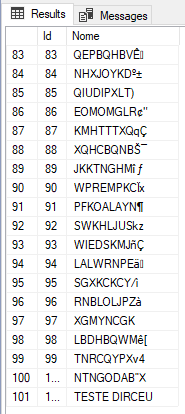
Now that we have created the table, I will demonstrate what the client was trying to do, failed and contacted us to help understand what was happening:
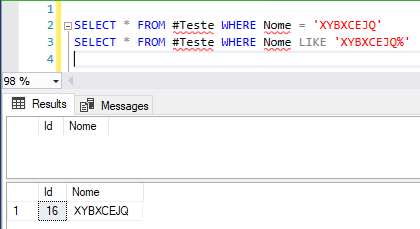
Huh... The equality query didn't return anything, just using the LIKE operator. I copied and pasted the string returned by the LIKE query and it still didn't work. What is happening?
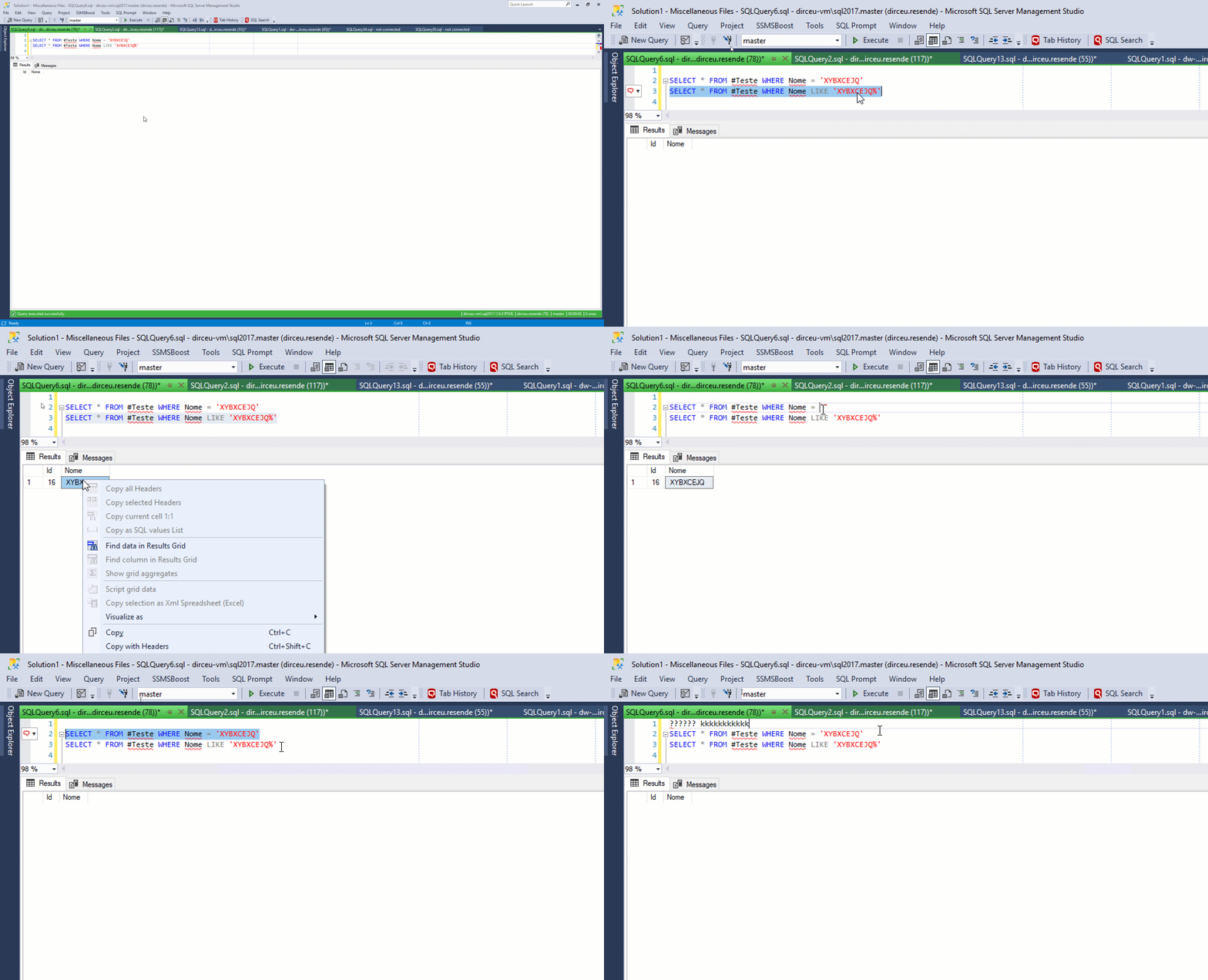
Identifying the Hidden Characters Problem
Well, there must probably be hidden characters in the middle of the string. A very quick way to find out is to count the number of characters in the string and analyze how many characters we can see:

According to the print above, I can see 8 characters, but the string has 10, according to the LEN and DATALENGTH functions, which probably indicates that we have “invisible” characters in our column or string, which could be the control characters of the ASCII table (remembering that the table varies according to the language and collation):
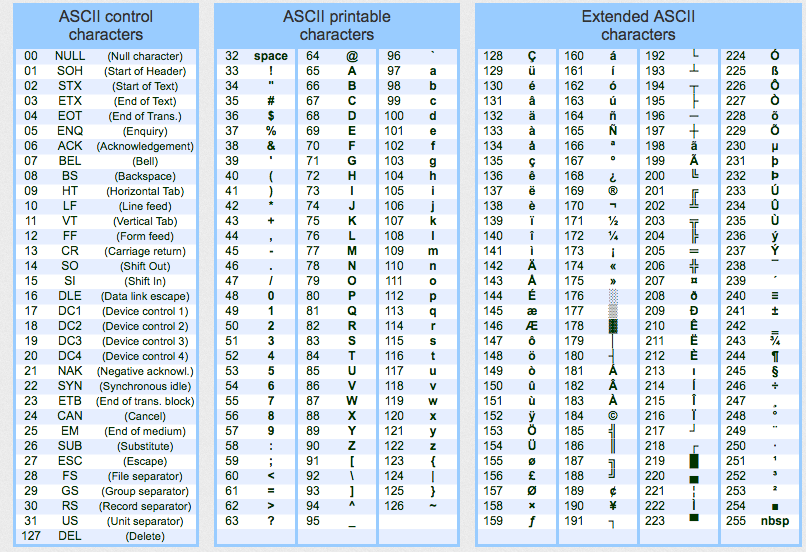
To help with this identification, I created the function below that will help us identify the lines that have these control characters:
CREATE FUNCTION [dbo].[fncPossui_Caractere_Oculto](
@String VARCHAR(MAX)
)
RETURNS BIT
AS
BEGIN
RETURN (CASE WHEN PATINDEX('%[^ !"#$%&''()*+,-./0123456789:;<=>?@ABCDEFGHIJKLMNOPQRSTUVWXYZ\^_`abcdefghijklmnopqrstuvwxyz|{}~€‚ƒ„…†‡ˆ‰Š‹ŒŽ‘’“”•–—˜™š›œžŸ¡¢£¤¥¦§¨©ª«¬®¯°±²³´µ¶·¸¹º»¼½¾¿ÀÁÂÃÄÅÆÇÈÉÊËÌÍÎÏÐÑÒÓÔÕÖ×ØÙÚÛÜÝÞßàáâãäåæçèéêëìíîïðñòóôõö÷øùúûüýþÿ[[]%', REPLACE(@String, ']', '')) > 0 THEN 1 ELSE 0 END)
END
Its use is very simple, and returns records that have “non-visible” characters:
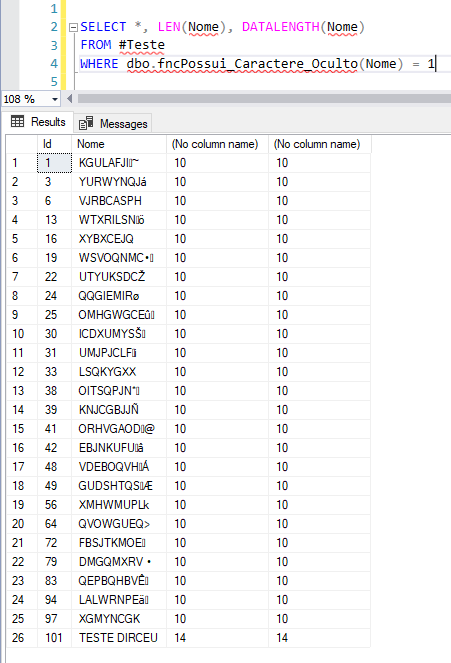
Identifying which characters are hidden
We now need to identify what these hidden characters are to assess whether we are going to try to replace them or not. To make this task easier, I created the function fncMostra_Caracteres_Ocultos, which will receive the original string and return the position and ASCII code of each character hidden in the string:
CREATE FUNCTION [dbo].[fncMostra_Caracteres_Ocultos](
@String VARCHAR(MAX)
)
RETURNS VARCHAR(MAX)
AS
BEGIN
DECLARE
@Result VARCHAR(MAX) = '',
@Contador INT = 1,
@Total INT,
@AdicionarBarra BIT = 0
SET @Total = LEN(@String)
WHILE(@Contador <= @Total)
BEGIN
IF (PATINDEX('%[^ !"#$%&''()*+,-./0123456789:;<=>?@ABCDEFGHIJKLMNOPQRSTUVWXYZ\^_`abcdefghijklmnopqrstuvwxyz|{}~€‚ƒ„…†‡ˆ‰Š‹ŒŽ‘’“”•–—˜™š›œžŸ¡¢£¤¥¦§¨©ª«¬®¯°±²³´µ¶·¸¹º»¼½¾¿ÀÁÂÃÄÅÆÇÈÉÊËÌÍÎÏÐÑÒÓÔÕÖ×ØÙÚÛÜÝÞßàáâãäåæçèéêëìíîïðñòóôõö÷øùúûüýþÿ[[]%', SUBSTRING(REPLACE(@String, ']', ''), @Contador, 1)) > 0)
BEGIN
SET @Result += (CASE WHEN @AdicionarBarra = 1 THEN ' | ' ELSE '' END) + 'Pos ' + CAST(@Contador AS VARCHAR(100)) + ': CHAR(' + CAST(ASCII(SUBSTRING(@String, @Contador, 1)) AS VARCHAR(5)) + ')'
SET @AdicionarBarra = 1
END
SET @Contador += 1
END
RETURN @Result
END
GO
Usage example – Parsing a string

Usage example – Analyzing records from a table
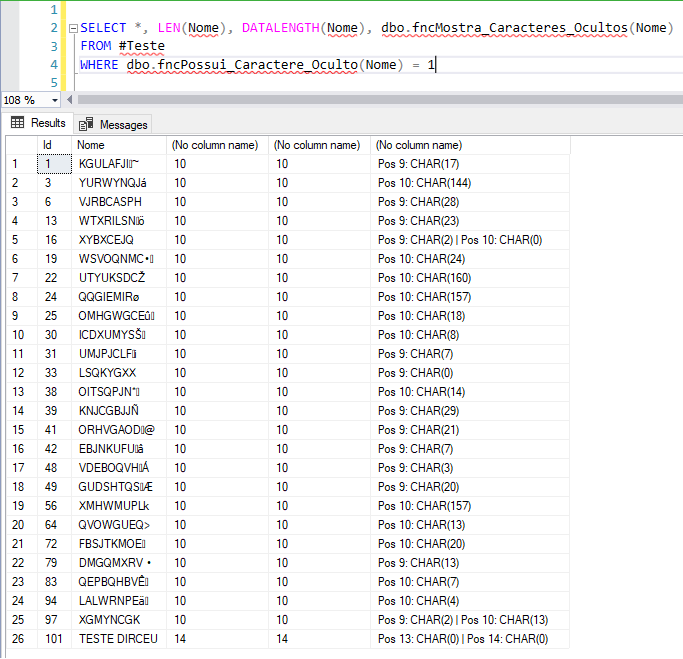
Returning data without hidden characters
With the fncMostra_Caracteres_Ocultos function, I was able to identify which characters in my string are causing my equality select not to return data. I'll test if this is true:
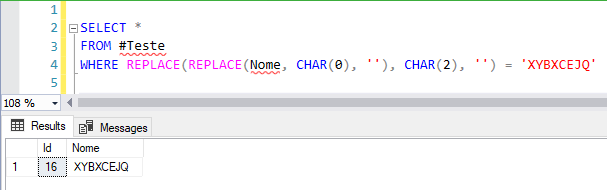
If you want to return the information without the “invisible” characters in an even easier way, you can use the fncRemove_Caracteres_Hidden function:
CREATE FUNCTION [dbo].[fncRemove_Caracteres_Ocultos](
@String VARCHAR(MAX)
)
RETURNS VARCHAR(MAX)
AS
BEGIN
DECLARE
@Result VARCHAR(MAX),
@StartingIndex INT = 0
WHILE (1 = 1)
BEGIN
SET @StartingIndex = PATINDEX('%[^ !"#$%&''()*+,-./0123456789:;<=>?@ABCDEFGHIJKLMNOPQRSTUVWXYZ\^_`abcdefghijklmnopqrstuvwxyz|{}~€‚ƒ„…†‡ˆ‰Š‹ŒŽ‘’“”•–—˜™š›œžŸ¡¢£¤¥¦§¨©ª«¬®¯°±²³´µ¶·¸¹º»¼½¾¿ÀÁÂÃÄÅÆÇÈÉÊËÌÍÎÏÐÑÒÓÔÕÖ×ØÙÚÛÜÝÞßàáâãäåæçèéêëìíîïðñòóôõö÷øùúûüýþÿ[[]%', REPLACE(@String, ']', ''))
IF (@StartingIndex <> 0)
SET @String = REPLACE(@String,SUBSTRING(@String, @StartingIndex,1),'')
ELSE
BREAK
END
SET @Result = REPLACE(@String,'|','')
RETURN @Result
END
GO
Example of using the fncRemove_Caracteres_Hidden function:

Important Note: As with all UDF functions, these functions can cause slowdowns when used on large volumes of data. If you need to use them frequently on large volumes of data, I suggest implementing functions using SQLCLR, since they generally deliver much better performance than UDF T-SQL functions, as I already explained in the article SQL Server – Performance comparison between Scalar Function and CLR Scalar Function.
Well guys, I hope you liked this tip that I'm sharing with you and that these functions can be useful in your daily life.
A big hug and see you in the next article.

Comments (0)
Loading comments...