Hey guys,
Good morning.
In this post I will briefly comment on a UDF (User Defined Function) function that I used to use to remove accents and special characters from a string in SQL Server.
Removing accents
There are several ways to do this, such as using a UDF to do this work, a SQLCLR function or the one I prefer, which is using COLLATION.
Using a UDF function
CREATE FUNCTION [dbo].[fncRemove_Acentuacao2](
    @String VARCHAR(MAX)
)
RETURNS VARCHAR(MAX)
AS
BEGIN

    /****************************************************************************************************************/
    /** RETIRA ACENTUAÇÃO DAS VOGAIS **/
    /****************************************************************************************************************/
    SET @String = REPLACE(REPLACE(REPLACE(REPLACE(REPLACE(@String,'á','a'),'à','a'),'â','a'),'ã','a'),'ä','a')
    SET @String = REPLACE(REPLACE(REPLACE(REPLACE(@String,'é','e'),'è','e'),'ê','e'),'ë','e')
    SET @String = REPLACE(REPLACE(REPLACE(REPLACE(@String,'í','i'),'ì','i'),'î','i'),'ï','i')
    SET @String = REPLACE(REPLACE(REPLACE(REPLACE(REPLACE(@String,'ó','o'),'ò','o'),'ô','o'),'õ','o'),'ö','o')
    SET @String = REPLACE(REPLACE(REPLACE(REPLACE(@String,'ú','u'),'ù','u'),'û','u'),'ü','u')

    /****************************************************************************************************************/
    /** RETIRA ACENTUAÇÃO DAS CONSOANTES **/
    /****************************************************************************************************************/
    SET @String = REPLACE(@String,'ý','y')
    SET @String = REPLACE(@String,'ñ','n')
    SET @String = REPLACE(@String,'ç','c')

    RETURN UPPER(@String)

END
GO
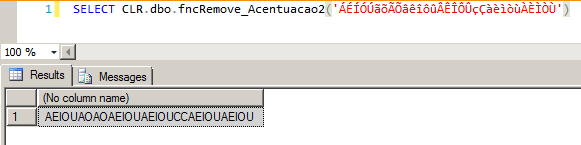
Using a SQLCLR function
using System.Text;
using System.Data.SqlTypes;
using System.Globalization;

public partial class UserDefinedFunctions
{
    [Microsoft.SqlServer.Server.SqlFunction]
    public static SqlString fncRemove_Acentuacao(SqlString Ds_Texto)
    {

        if (Ds_Texto.IsNull)
            return null;

        var s = Ds_Texto.Value.Normalize(NormalizationForm.FormD);
        var sb = new StringBuilder();

        foreach (var t in s)
        {
            var uc = CharUnicodeInfo.GetUnicodeCategory(t);
            if (uc != UnicodeCategory.NonSpacingMark)
            {
                sb.Append(t);
            }
        }

        return sb.ToString();

    }
};

Using Collation
In my opinion, this is the best way to remove accentuation from a string in SQL Server. It is the fastest way to do it and is native to the database itself (that is, universal, it works on any SQL Server database).

To know all types of COLLATION, you can run the command below:
select name, description
from ::fn_helpcollations()
where name like 'SQL_Latin%'
AND NAME NOT LIKE '%1254%'
Removing special characters
Using the function below, you can remove those special characters from a string and return only the alphanumeric characters.
CREATE FUNCTION [dbo].[fncRemove_Caracteres_Especiais](
    @String VARCHAR(MAX)
)
RETURNS VARCHAR(MAX)
AS
BEGIN


    DECLARE
        @Result VARCHAR(MAX),
        @StartingIndex INT = 0


    WHILE (1 = 1)
    BEGIN

        SET @StartingIndex = PATINDEX('%[^a-Z|0-9|^ ]%',@String)

        IF (@StartingIndex <> 0)
            SET @String = REPLACE(@String,SUBSTRING(@String, @StartingIndex,1),'')
        ELSE
            BREAK

    END

    SET @Result = REPLACE(@String,'|','')

    RETURN @Result

END
GO

That's it, folks!
Until next time.

Comments (0)
Loading comments...