
Hey guys,
Goodnight!
In this post I'm going to give you a quick tip on how to consume the Google Maps API using OLE Automation in SQL Server to retrieve more information about a city just by its name.
Don't know how to enable OLE Automation on your instance? See more in the post Enabling OLE Automation via T-SQL on SQL Server.
Implementation of the Stored Procedure:
CREATE PROCEDURE dbo.stpBusca_Informacoes_Cidade(
    @Ds_Cidade VARCHAR(100)
)
AS BEGIN

    -- DECLARE @Ds_Cidade VARCHAR(100) = 'Vitória'

    DECLARE
        @obj INT,
        @Url VARCHAR(255),
        @resposta VARCHAR(8000),
        @xml XML

    SET @Url = 'http://maps.googleapis.com/maps/api/geocode/xml?address=' + @Ds_Cidade + '&sensor=false'

    EXEC sys.sp_OACreate 'MSXML2.ServerXMLHTTP', @obj OUT
    EXEC sys.sp_OAMethod @obj, 'open', NULL, 'GET', @Url, false
    EXEC sys.sp_OAMethod @obj, 'send'
    EXEC sys.sp_OAGetProperty @obj, 'responseText', @resposta OUT
    EXEC sys.sp_OADestroy @obj


    SET @xml = @resposta COLLATE SQL_Latin1_General_CP1251_CS_AS

    -- SELECT @xml

    SELECT
        @xml.value('(/GeocodeResponse/result/address_component/long_name)[1]', 'varchar(200)') AS Cidade,
        @xml.value('(/GeocodeResponse/result/formatted_address)[1]', 'varchar(200)') AS Cidade_Completo,
        @xml.value('(/GeocodeResponse/result/address_component/long_name)[3]', 'varchar(200)') AS Estado,
        @xml.value('(/GeocodeResponse/result/address_component/short_name)[3]', 'varchar(200)') AS Estado_Sigla,
        @xml.value('(/GeocodeResponse/result/address_component/long_name)[4]', 'varchar(200)') AS Pais,
        @xml.value('(/GeocodeResponse/result/address_component/short_name)[4]', 'varchar(200)') AS Pais_Sigla,
        @xml.value('(/GeocodeResponse/result/geometry/location/lat)[1]', 'varchar(200)') AS Latitude,
        @xml.value('(/GeocodeResponse/result/geometry/location/lng)[1]', 'varchar(200)') AS Longitude

END
Using the Created Stored Procedure:
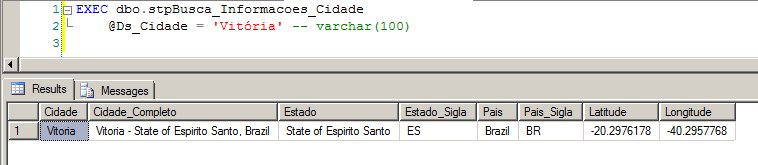
XML Returned by API Call:
<GeocodeResponse>
  <status>OK</status>
  <result>
    <type>locality</type>
    <type>political</type>
    <formatted_address>Vitoria - State of Espirito Santo, Brazil</formatted_address>
    <address_component>
      <long_name>Vitoria</long_name>
      <short_name>Vitoria</short_name>
      <type>locality</type>
      <type>political</type>
    </address_component>
    <address_component>
      <long_name>Vitoria</long_name>
      <short_name>Vitoria</short_name>
      <type>administrative_area_level_2</type>
      <type>political</type>
    </address_component>
    <address_component>
      <long_name>State of Espirito Santo</long_name>
      <short_name>ES</short_name>
      <type>administrative_area_level_1</type>
      <type>political</type>
    </address_component>
    <address_component>
      <long_name>Brazil</long_name>
      <short_name>BR</short_name>
      <type>country</type>
      <type>political</type>
    </address_component>
    <geometry>
      <location>
        <lat>-20.2976178</lat>
        <lng>-40.2957768</lng>
      </location>
      <location_type>APPROXIMATE</location_type>
      <viewport>
        <southwest>
          <lat>-20.3245888</lat>
          <lng>-40.3590796</lng>
        </southwest>
        <northeast>
          <lat>-20.2397943</lat>
          <lng>-40.2134144</lng>
        </northeast>
      </viewport>
      <bounds>
        <southwest>
          <lat>-20.3245888</lat>
          <lng>-40.3590796</lng>
        </southwest>
        <northeast>
          <lat>-20.2397943</lat>
          <lng>-40.2134144</lng>
        </northeast>
      </bounds>
    </geometry>
    <place_id>ChIJ6U43hV09uAARCdgOp35eWZc</place_id>
  </result>
</GeocodeResponse>
That's it, folks!
Until the next post.

Comments (0)
Loading comments...