
Hey guys!
In this post, I will demonstrate to you how to calculate the distance between two locations using latitude and longitude (without API). In March 2017, I demonstrated how to do this using the Google Maps API, in the post SQL Server – How to calculate the distance between two points using the Google API (CEP, address or latitude and longitude), but in today's post, the distance will be calculated only using mathematics and geometry
This calculation, instead of using an API, can be especially useful for calculating the distance between a large volume of geographic points (Google's API has limitations on the number of queries per day, in the free plan).
It is important to note that the calculation without API considers a straight line between the 2 points, while the Google API takes into account routes and routes, according to the chosen means of transport, which can present values closer to the real ones, according to the need, and very different from the geometric calculation.
Introduction
As you know, the measurements we currently use to identify the geographic location of a point on the globe are latitude and longitude, which can be expressed in two ways:
- Latitude: -20.3222, Longitude: -40.3381
- 20° 19′ 20″ South, 40° 20′ 17″ West
Our position on Earth is referenced in relation to the equator and the Greenwich meridian and is expressed in two values: latitude and longitude. So, to know our position on Earth, we just need to know the latitude and longitude.
Latitude is the distance to the Equator measured along the Greenwich meridian. This distance is measured in degrees and can vary between 0º and 90º for North (N) or South (S). Longitude is the distance to the Greenwich meridian measured along the Equator. This distance is measured in degrees and can vary between 0º and 180º for East(E) or West(W).
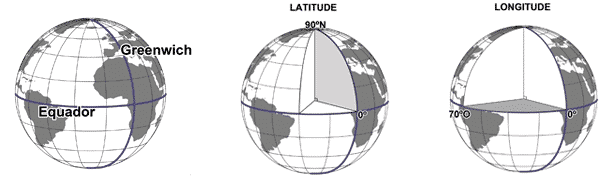
Credits: http://coral.ufsm.br/cartografia/
To identify the latitude and longitude of a location, you can use several ways. One of them is using Google Maps, as shown below:
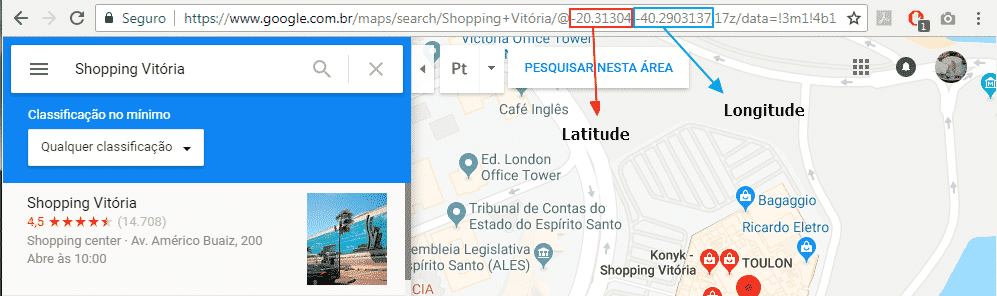
Calculating the distance between two latitudes and longitudes
To perform this calculation, I will use the Haversine formula, an important equation used in navigation, providing distances between two points on a sphere based on their latitudes and longitudes, having as a mathematical basis the Law of Cosines, considering in the model the curvature of the Earth, that is, its radius, which has a value of approximately 6,371 km or 3,959 miles.
To demonstrate this calculation, I will use the latitude and longitude that I sent in the example above (Shopping Vitória / -20.3135958, -40.2893737) and compare it with the coordinates of Shopping Vila Velha (-20.3480338, -40.2975204) using the function proposed in this article, which will return the distance between the two points in KM.
SELECT dbo.fncCalcula_Distancia_Coordenada(-20.3135958, -40.2893737, -20.3480338, -40.2975204)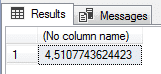
Comparing with Google Maps, we can see that the calculated distance is very close:
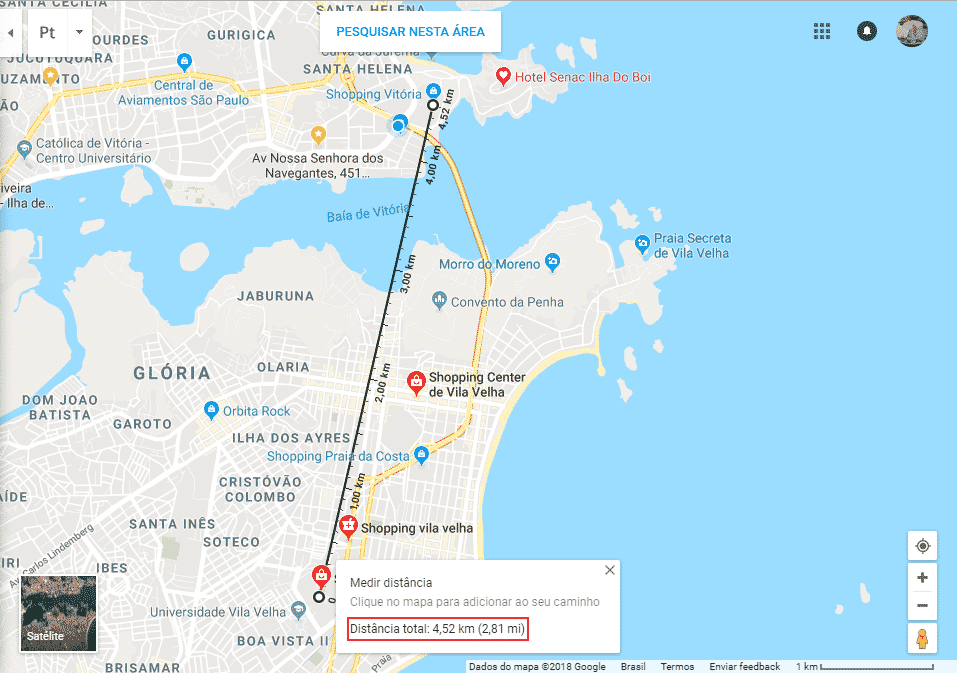
The code for this function is available here:
CREATE FUNCTION dbo.fncCalcula_Distancia_Coordenada (
    @Latitude1 FLOAT,
    @Longitude1 FLOAT,
    @Latitude2 FLOAT,
    @Longitude2 FLOAT
)
RETURNS FLOAT
AS
BEGIN

    DECLARE @PI FLOAT = PI()

    DECLARE @lat1Radianos FLOAT = @Latitude1 * @PI / 180
    DECLARE @lng1Radianos FLOAT = @Longitude1 * @PI / 180
    DECLARE @lat2Radianos FLOAT = @Latitude2 * @PI / 180
    DECLARE @lng2Radianos FLOAT = @Longitude2 * @PI / 180

    RETURN (ACOS(COS(@lat1Radianos) * COS(@lng1Radianos) * COS(@lat2Radianos) * COS(@lng2Radianos) + COS(@lat1Radianos) * SIN(@lng1Radianos) * COS(@lat2Radianos) * SIN(@lng2Radianos) + SIN(@lat1Radianos) * SIN(@lat2Radianos)) * 6371) * 1.15

END
It is worth mentioning that I added an adjustment percentage of 15% to the value to bring the distance closer to the real one.
That's it, folks!
I hope you liked this post.
A hug and see you next time.

Comments (0)
Loading comments...