
What's up, guys!
Ready for another tip?
Introduction
In this article I would like to demonstrate to you some ways to load data quickly and efficiently into the database, using as little log as possible. This is especially useful for staging scenarios in BI/Data warehouse processes, where data must be loaded quickly and possible data loss is acceptable (as the process can be redone in case of failure).
The purpose of this article is to compare the performance of the most diverse forms of data insertion, such as temporary tables, table-type variables, recovery_model combinations, compression types and memory-optimized tables (In-Memory OLTP), aiming to prove how efficient this feature is.
It is worth mentioning that the In-Memory OLTP feature has been available since SQL Server 2014 and has significant improvements in SQL Server 2016 and SQL Server 2017.
Tests using disk-based solutions
View contentBase script used:
SET STATISTICS TIME OFF
SET NOCOUNT ON

IF (OBJECT_ID('dirceuresende.dbo.Staging_Sem_JOIN') IS NOT NULL) DROP TABLE dirceuresende.dbo.Staging_Sem_JOIN
CREATE TABLE dirceuresende.dbo.Staging_Sem_JOIN ( Contador INT, Nome VARCHAR(50), Idade INT, [Site] VARCHAR(200) )
GO

IF (OBJECT_ID('dirceuresende.dbo.Staging_Com_JOIN') IS NOT NULL) DROP TABLE dirceuresende.dbo.Staging_Com_JOIN
CREATE TABLE dirceuresende.dbo.Staging_Com_JOIN ( Contador INT, [Dt_Venda] datetime, [Vl_Venda] float(8), [Nome_Cliente] varchar(100), [Nome_Produto] varchar(100), [Ds_Forma_Pagamento] varchar(100) )
GO

DECLARE
    @Contador INT = 1,
    @Total INT = 100000,
    @Dt_Log DATETIME,
    @Qt_Duracao_1 INT,
    @Qt_Duracao_2 INT


SET @Dt_Log = GETDATE()

WHILE(@Contador <= @Total)
BEGIN

    -- Teste simples
    INSERT INTO dirceuresende.dbo.Staging_Sem_JOIN ( Contador, Nome, Idade, [Site] )
    VALUES (@Contador, 'Dirceu Resende', 31, 'https://dirceuresende.com/')

    SET @Contador += 1

END


SET @Qt_Duracao_1 = DATEDIFF(SECOND, @Dt_Log, GETDATE())


SET @Total = 10000
SET @Contador = 1
SET @Dt_Log = GETDATE()

WHILE(@Contador <= @Total)
BEGIN

    -- Teste com JOIN
    INSERT INTO dirceuresende.dbo.Staging_Com_JOIN
    SELECT @Contador, A.Dt_Venda, A.Vl_Venda, B.Ds_Nome AS Nome_Cliente, C.Ds_Nome AS Nome_Produto, D.Ds_Nome AS Ds_Forma_Pagamento
    FROM dirceuresende.dbo.Fato_Venda A
    JOIN dirceuresende.dbo.Dim_Cliente B ON A.Cod_Cliente = B.Codigo
    JOIN dirceuresende.dbo.Dim_Produto C ON A.Cod_Produto = C.Codigo
    JOIN dirceuresende.dbo.Dim_Forma_Pagamento D ON A.Cod_Forma_Pagamento = D.Codigo

    SET @Contador += 1

END


SET @Qt_Duracao_2 = DATEDIFF(SECOND, @Dt_Log, GETDATE())


SELECT @Qt_Duracao_1 AS Duracao_Sem_JOIN, @Qt_Duracao_2 AS Duracao_Com_JOIN
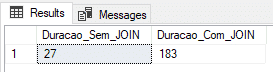
Using physical table (recovery model FULL)
In this test, I will use a physical table with the Recovery Model in FULL.
ALTER DATABASE [dirceuresende] SET RECOVERY FULL
GO
Result:
Using physical table (SIMPLE recovery model)
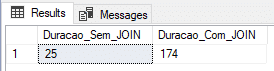
In this test, I will use a physical table with the Recovery Model in SIMPLE, which generates less information in the transaction log and theoretically, should deliver a faster load.
ALTER DATABASE [dirceuresende] SET RECOVERY SIMPLE
GO
Result:
Using physical table (recovery model BULK-LOGGED)
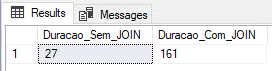
In this test, I will use a physical table with the Recovery Model in BULK-LOGGED, which is optimized for batch processes and data loads.
ALTER DATABASE [dirceuresende] SET RECOVERY BULK_LOGGED
GO
Result:
Using physical table and DELAYED_DURABILITY (recovery model BULK-LOGGED)
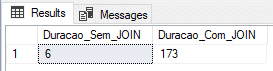
In this test, I will use a physical table with the Recovery Model in BULK-LOGGED, which is optimized for batch processes and data loads and also the DELAYED_DURABILITY = FORCED parameter, which causes log events to be written forcefully asynchronously (learn more about this feature accessing this link ou this post here).
ALTER DATABASE [dirceuresende] SET RECOVERY BULK_LOGGED
GO

ALTER DATABASE dirceuresende SET DELAYED_DURABILITY = FORCED
GO
Result:
Using temporary table (SIMPLE recovery model)
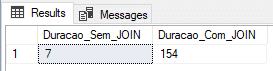
Widely used for dynamically generated tables and fast processes, I will perform the test by inserting the data into a #temporary table (#Staging_Sem_JOIN and #Staging_Com_JOIN). My tempdb is using the SIMPLE Recovery Model.
Result:
Using table type variable
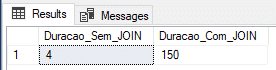
Widely used for dynamically generated tables and fast processes, as well as the #temporary table, I will perform the test by inserting the data into a variable like @tabela (@Staging_Sem_JOIN and @Staging_Com_JOIN).
Result:
In-Memory OLTP (IMO)
View contentImplementing In-Memory OLTP
View contentAdding In-Memory support to your database
In order to test how fast In-Memory OLTP can be compared to other methods used, we first need to add a filegroup to our database optimized for in-memory data. This is a prerequisite for using In-Memory.
To add this “special” filegroup, you can use the SQL Server Management Studio interface:
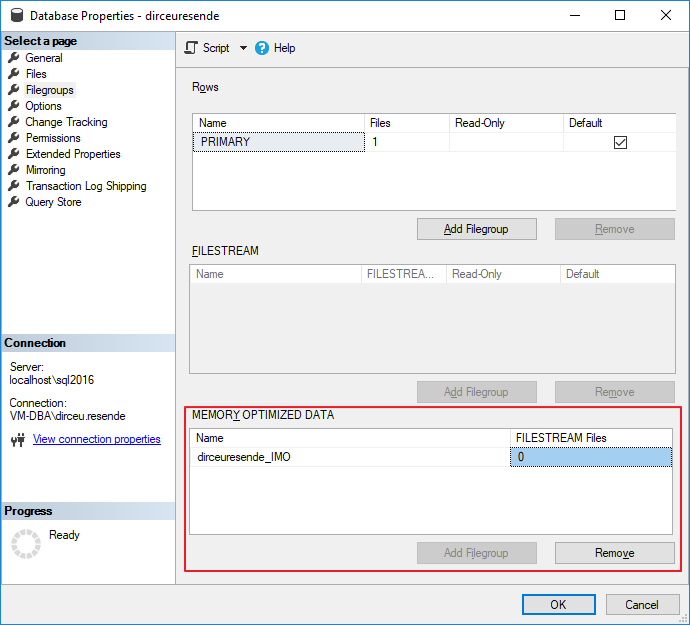
But when adding a file to the filegroup, the SSMS interface (version 17.5) does not support this yet, not showing me the In-Memory filegroup that had already been created, having to add the file using T-SQL commands.
To add the filegroup and also the files, you can use the following T-SQL command:
USE [master]
GO
ALTER DATABASE [dirceuresende] ADD FILEGROUP [dirceuresende_IMO] CONTAINS MEMORY_OPTIMIZED_DATA
GO

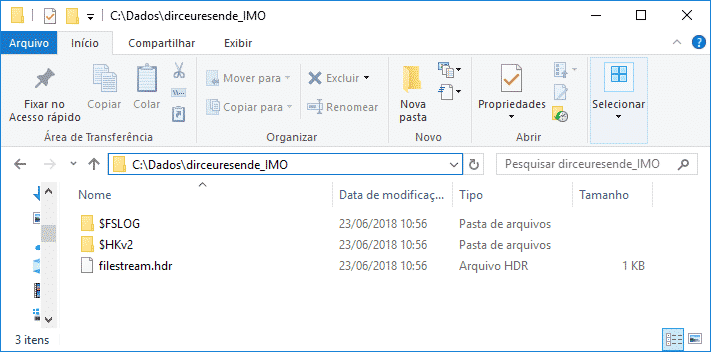
ALTER DATABASE [dirceuresende] ADD FILE ( NAME = [dirceuresende_dados_IMO], FILENAME = 'C:\Dados\dirceuresende_IMO\' ) TO FILEGROUP [dirceuresende_IMO]
GO
Note that in In-Memory, unlike a common filegroup, you do not specify the file extension, because, in fact, a directory is created with several files hosted in it.
IMPORTANT: Until the current version (2017), it is not possible to remove a filegroup of type MEMORY_OPTIMIZED_DATA, that is, once created, it can only be deleted if the entire bank is dropped. Therefore, I recommend creating a new database just for In-Memory tables.
In-Memory OLTP: Durable vs Non-durable
Now that we have created our filegroup and added at least 1 file to it, we can start creating our In-Memory tables. Before we start, I need to explain that there are 2 types of In-Memory tables:
– Durable (DURABILITY = SCHEMA_AND_DATA): Data and structures persisted on disk. This means that if the SQL server or service is restarted, the data in your in-memory table will continue to be available for querying. This is the default behavior for In-Memory tables.
– Non-durable (DURABILITY = SCHEMA_ONLY): Only the table structure is persisted to disk and LOG operations are not generated. This means that writing operations to these types of tables are MUCH faster. However, if the SQL server or service is restarted, its table will continue to be available for queries, but it will be empty, as the data is only available in memory and was lost during the crash/restart.
In-Memory OLTP restrictions
View contentTesting with In-Memory OLTP tables
View contentSET STATISTICS TIME OFF
SET NOCOUNT ON
IF (OBJECT_ID('dirceuresende.dbo.Staging_Sem_JOIN') IS NOT NULL) DROP TABLE dirceuresende.dbo.Staging_Sem_JOIN
CREATE TABLE dirceuresende.dbo.Staging_Sem_JOIN
(
Contador INT NOT NULL PRIMARY KEY NONCLUSTERED HASH WITH(BUCKET_COUNT = 100000),
Nome VARCHAR(50),
Idade INT,
[Site] VARCHAR(200)
)
WITH ( MEMORY_OPTIMIZED = ON, DURABILITY = SCHEMA_ONLY );
GO
IF (OBJECT_ID('dirceuresende.dbo.Staging_Com_JOIN') IS NOT NULL) DROP TABLE dirceuresende.dbo.Staging_Com_JOIN
CREATE TABLE dirceuresende.dbo.Staging_Com_JOIN
(
Contador INT IDENTITY(1,1) NOT NULL PRIMARY KEY NONCLUSTERED HASH WITH(BUCKET_COUNT = 10000000),
[Dt_Venda] DATETIME,
[Vl_Venda] FLOAT(8),
[Nome_Cliente] VARCHAR(100),
[Nome_Produto] VARCHAR(100),
[Ds_Forma_Pagamento] VARCHAR(100)
)
WITH ( MEMORY_OPTIMIZED = ON, DURABILITY = SCHEMA_ONLY );
GO
DECLARE
@Contador INT = 1,
@Total INT = 100000,
@Dt_Log DATETIME,
@Qt_Duracao_1 INT,
@Qt_Duracao_2 INT
SET @Dt_Log = GETDATE()
WHILE(@Contador <= @Total)
BEGIN
-- Teste simples
INSERT INTO dirceuresende.dbo.Staging_Sem_JOIN ( Contador, Nome, Idade, [Site] )
VALUES (@Contador, 'Dirceu Resende', 31, 'https://dirceuresende.com/')
SET @Contador += 1
END
SET @Qt_Duracao_1 = DATEDIFF(SECOND, @Dt_Log, GETDATE())
SET @Total = 10000
SET @Contador = 1
SET @Dt_Log = GETDATE()
WHILE(@Contador <= @Total)
BEGIN
-- Teste com JOIN
INSERT INTO dirceuresende.dbo.Staging_Com_JOIN
SELECT A.Dt_Venda, A.Vl_Venda, B.Ds_Nome AS Nome_Cliente, C.Ds_Nome AS Nome_Produto, D.Ds_Nome AS Ds_Forma_Pagamento
FROM dirceuresende.dbo.Fato_Venda A
JOIN dirceuresende.dbo.Dim_Cliente B ON A.Cod_Cliente = B.Codigo
JOIN dirceuresende.dbo.Dim_Produto C ON A.Cod_Produto = C.Codigo
JOIN dirceuresende.dbo.Dim_Forma_Pagamento D ON A.Cod_Forma_Pagamento = D.Codigo
SET @Contador += 1
END
SET @Qt_Duracao_2 = DATEDIFF(SECOND, @Dt_Log, GETDATE())
SELECT @Qt_Duracao_1 AS Duracao_Sem_JOIN, @Qt_Duracao_2 AS Duracao_Com_JOIN
Note that I specified the BUCKET_COUNT of the Primary Key HASH the same size as the number of records. This information is important to evaluate the amount of memory needed to allocate a table, as we can learn more in the article from this link here. The ideal number is equal to the number of distinct records from the original table for temporary load processes (ETL) or 2x to 5x this number for transactional tables.
In-Memory OLTP: Durable
In this example, I will create the tables using the Durable type (DURABILITY = SCHEMA_AND_DATA) and we will see if the performance gain in data insertion is as efficient as that.
Result:
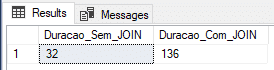
In the screenshot above, it was demonstrated that the time measured for insertion without join was not very satisfactory, falling well behind the insertion in @variable table and #temporary table, while the time with JOINS was the best measured so far, but it was not surprising at all.
In-Memory OLTP: Non-Durable
In this example, I will create the tables using the Non-Durable type (DURABILITY = SCHEMA_ONLY) and we will see if the performance gain in data insertion is as efficient as that.
Result:
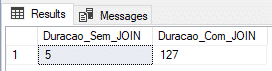
Here we managed to find a very interesting result, with the shortest time with JOIN and the 2nd shortest time without JOIN.
In-Memory OLTP: Non-Durable (all in memory)
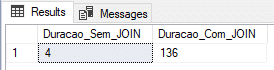
Finally, I will try to reduce the load time with joins, creating all the tables involved for memory and testing whether this will give us a good performance gain.
Script used:
SET STATISTICS TIME OFF
SET NOCOUNT ON


--------------------------------------------------------
-- Migrando tabelas em disco para In-Memory OLTP
--------------------------------------------------------

SET IDENTITY_INSERT dbo.Dim_Cliente_IMO OFF
GO

SET IDENTITY_INSERT dbo.Dim_Produto_IMO OFF
GO

SET IDENTITY_INSERT dbo.Dim_Forma_Pagamento_IMO OFF
GO


IF (OBJECT_ID('dirceuresende.dbo.Fato_Venda_IMO') IS NOT NULL) DROP TABLE dirceuresende.dbo.Fato_Venda_IMO
CREATE TABLE [dbo].[Fato_Venda_IMO]
(
[Codigo] INT IDENTITY(1,1) NOT NULL PRIMARY KEY NONCLUSTERED,
[Cod_Cliente] [int] NULL,
[Cod_Produto] [int] NULL,
[Cod_Forma_Pagamento] [int] NULL,
[Dt_Venda] [datetime] NULL,
[Vl_Venda] [float] NULL
) WITH( MEMORY_OPTIMIZED = ON, DURABILITY = SCHEMA_ONLY );
GO

INSERT INTO dbo.Fato_Venda_IMO
SELECT * FROM dbo.Fato_Venda


------------------------------------------------------
IF (OBJECT_ID('dirceuresende.dbo.Dim_Cliente_IMO') IS NOT NULL) DROP TABLE dirceuresende.dbo.Dim_Cliente_IMO
CREATE TABLE [dbo].[Dim_Cliente_IMO]
(
[Codigo] [int] NOT NULL IDENTITY(1, 1) PRIMARY KEY NONCLUSTERED,
[Ds_Nome] [varchar] (100) COLLATE Latin1_General_CI_AI NULL,
[Dt_Nascimento] [datetime] NULL,
[Sg_Sexo] [varchar] (20) COLLATE Latin1_General_CI_AI NULL,
[Sg_UF] [varchar] (2) COLLATE Latin1_General_CI_AI NULL
) WITH( MEMORY_OPTIMIZED = ON, DURABILITY = SCHEMA_ONLY );
GO

SET IDENTITY_INSERT dbo.Dim_Cliente_IMO ON


INSERT INTO dbo.Dim_Cliente_IMO
(
    Codigo,
    Ds_Nome,
    Dt_Nascimento,
    Sg_Sexo,
    Sg_UF
)
SELECT * FROM dbo.Dim_Cliente


SET IDENTITY_INSERT dbo.Dim_Cliente_IMO OFF

------------------------------------------------------
IF (OBJECT_ID('dirceuresende.dbo.Dim_Produto_IMO') IS NOT NULL) DROP TABLE dirceuresende.dbo.Dim_Produto_IMO
CREATE TABLE [dbo].[Dim_Produto_IMO]
(
[Codigo] [int] NOT NULL IDENTITY(1, 1) PRIMARY KEY NONCLUSTERED,
[Ds_Nome] [varchar] (100) COLLATE Latin1_General_CI_AI NULL,
[Peso] [int] NULL,
[Categoria] [varchar] (50) COLLATE Latin1_General_CI_AI NULL,
[Preco] [float] NULL
) WITH( MEMORY_OPTIMIZED = ON, DURABILITY = SCHEMA_ONLY );
GO

SET IDENTITY_INSERT dbo.Dim_Produto_IMO ON


INSERT INTO dbo.Dim_Produto_IMO
(
    Codigo,
    Ds_Nome,
    Peso,
    Categoria,
    Preco
)
SELECT * FROM dbo.Dim_Produto


SET IDENTITY_INSERT dbo.Dim_Produto_IMO OFF


------------------------------------------------------
IF (OBJECT_ID('dirceuresende.dbo.Dim_Forma_Pagamento_IMO') IS NOT NULL) DROP TABLE dirceuresende.dbo.Dim_Forma_Pagamento_IMO
CREATE TABLE [dbo].[Dim_Forma_Pagamento_IMO]
(
[Codigo] [int] NOT NULL IDENTITY(1, 1) PRIMARY KEY NONCLUSTERED,
[Ds_Nome] [varchar] (100) COLLATE Latin1_General_CI_AI NULL
) WITH( MEMORY_OPTIMIZED = ON, DURABILITY = SCHEMA_ONLY );
GO

SET IDENTITY_INSERT dbo.Dim_Forma_Pagamento_IMO ON


INSERT INTO dbo.Dim_Forma_Pagamento_IMO
(
    Codigo,
    Ds_Nome
)
SELECT * FROM dbo.Dim_Forma_Pagamento


SET IDENTITY_INSERT dbo.Dim_Forma_Pagamento_IMO OFF


--------------------------------------------------------
-- Inicitando os testes
--------------------------------------------------------


IF (OBJECT_ID('dirceuresende.dbo.Staging_Sem_JOIN') IS NOT NULL) DROP TABLE dirceuresende.dbo.Staging_Sem_JOIN
CREATE TABLE dirceuresende.dbo.Staging_Sem_JOIN
(
    Contador INT NOT NULL PRIMARY KEY NONCLUSTERED HASH WITH(BUCKET_COUNT = 100000),
    Nome VARCHAR(50),
    Idade INT,
    [Site] VARCHAR(200)
)
WITH ( MEMORY_OPTIMIZED = ON, DURABILITY = SCHEMA_ONLY );
GO

IF (OBJECT_ID('dirceuresende.dbo.Staging_Com_JOIN') IS NOT NULL) DROP TABLE dirceuresende.dbo.Staging_Com_JOIN
CREATE TABLE dirceuresende.dbo.Staging_Com_JOIN
(
    Contador INT IDENTITY(1,1) NOT NULL PRIMARY KEY NONCLUSTERED HASH WITH(BUCKET_COUNT = 10000000),
    [Dt_Venda] DATETIME,
    [Vl_Venda] FLOAT(8),
    [Nome_Cliente] VARCHAR(100),
    [Nome_Produto] VARCHAR(100),
    [Ds_Forma_Pagamento] VARCHAR(100)
)
WITH ( MEMORY_OPTIMIZED = ON, DURABILITY = SCHEMA_ONLY );
GO


DECLARE
    @Contador INT = 1,
    @Total INT = 100000,
    @Dt_Log DATETIME,
    @Qt_Duracao_1 INT,
    @Qt_Duracao_2 INT


SET @Dt_Log = GETDATE()

WHILE(@Contador <= @Total)
BEGIN

    -- Teste simples
    INSERT INTO dirceuresende.dbo.Staging_Sem_JOIN ( Contador, Nome, Idade, [Site] )
    VALUES (@Contador, 'Dirceu Resende', 31, 'https://dirceuresende.com/')

    SET @Contador += 1

END


SET @Qt_Duracao_1 = DATEDIFF(SECOND, @Dt_Log, GETDATE())


SET @Total = 10000
SET @Contador = 1
SET @Dt_Log = GETDATE()

WHILE(@Contador <= @Total)
BEGIN

    -- Teste com JOIN
    INSERT INTO dirceuresende.dbo.Staging_Com_JOIN
    SELECT A.Dt_Venda, A.Vl_Venda, B.Ds_Nome AS Nome_Cliente, C.Ds_Nome AS Nome_Produto, D.Ds_Nome AS Ds_Forma_Pagamento
    FROM dirceuresende.dbo.Fato_Venda_IMO A
    JOIN dirceuresende.dbo.Dim_Cliente_IMO B ON A.Cod_Cliente = B.Codigo
    JOIN dirceuresende.dbo.Dim_Produto_IMO C ON A.Cod_Produto = C.Codigo
    JOIN dirceuresende.dbo.Dim_Forma_Pagamento_IMO D ON A.Cod_Forma_Pagamento = D.Codigo

    SET @Contador += 1

END


SET @Qt_Duracao_2 = DATEDIFF(SECOND, @Dt_Log, GETDATE())


SELECT @Qt_Duracao_1 AS Duracao_Sem_JOIN, @Qt_Duracao_2 AS Duracao_Com_JOIN
Result:
Conclusion
In the tests above, it became clear that, for this scenario, In-Memory OLTP ends up being the best solution, both for the simplest example, just inserting data, and inserting data with joins.
Test summary:
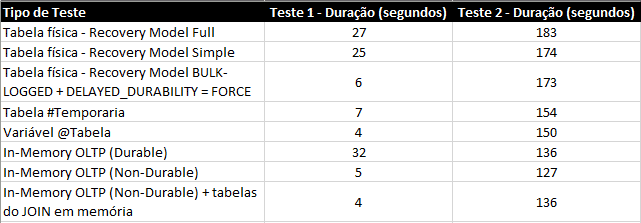
* Test 1 = INSERT only / Test 2 = INSERT with JOINS
If we compare the results with the physical tables, the result is very expressive and a great incentive for its use in BI scenarios, especially because, in the examples presented, the tables had only 100k records in a VM with 4 cores and 8GB of RAM.
The tendency is that the better the hardware and the greater the data volume, the greater the difference in performance between physical tables and in-memory tables. However, the result was not as expressive when compared to the table type variable, for example, which even makes sense, as both are stored completely in memory.
It is clear that an In-Memory table has several advantages over the table-type variable, especially the lifetime, since the table-type variable is only available during the batch execution and the In-Memory table is available as long as the SQL Server service remains active.
As I was not convinced by the test results, I decided to increase the data volume. Instead of 100k, how about inserting batches of 20 records, totaling 1 million records inserted per test and repeating 2 more times for each form of evaluation?
Let's look at the results:
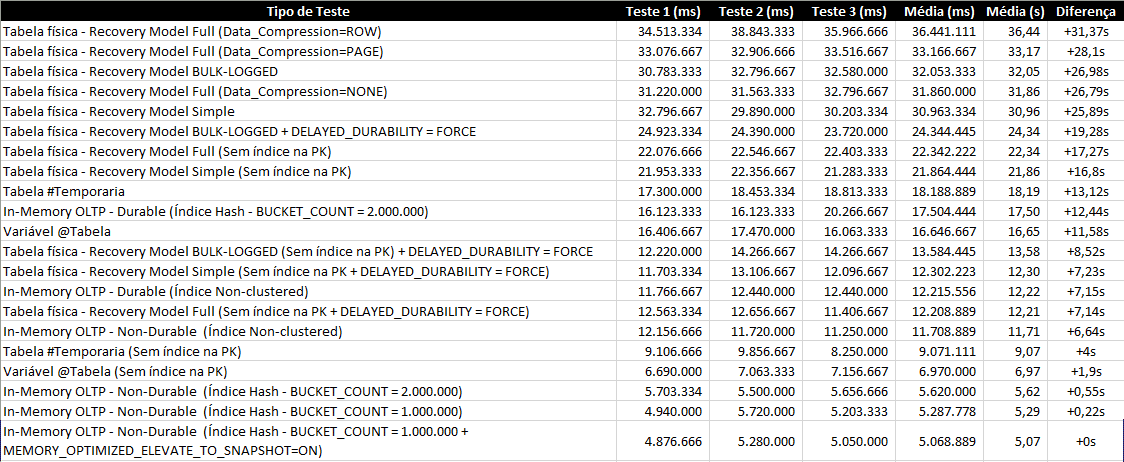
In this article, I only demonstrated its potential for writing, but In-Memory OLTP has very good performance for reading as well, especially if the table is accessed a lot.
I hope you liked this post. If you weren't familiar with In-Memory OLTP, I hope I have demonstrated some of the potential of this excellent SQL Server feature.
A hug and see you next time!

Comments (0)
Loading comments...