In this post I would like to share some solutions on how to compress and decompress files and directories using SQL Server. This is especially useful for creating ETL routines where you need to use these resources using T-SQL scripts or even to compress backup files generated in the Express version (which does not support compressed backups).
As in some alternatives I will use 7-zip, you can further customize the examples mentioned here by consulting the official binary documentation, very complete and exemplified.
Alternative #1: Using 7-zip and xp_cmdshell
View content
A simple way to implement this feature is using the 7-zip binary and the xp_cmdshell command in SQL Server. To use this feature, you will need to be a member of the sysadmin role.
To activate xp_cmdshell, simply run the command below:
sp_configure 'advanced options', 1
RECONFIGURE
GO

sp_configure 'xp_cmdshell', 1
RECONFIGURE
GO
Prerequisite: 7-zip
To be able to use this feature, you will need to download the 7-zip binaries in this link. You will need to download the “7-Zip Extra” version: standalone console version, 7z DLL, Plugin for Far Manager”, which comes in .7z format.
If you do not want to install 7-zip in your environment to be able to open this file, I will make the files related to the standalone console version (version 18.05) below: x64 version (recommended) | x86 version
After downloading the files, unzip them to a directory of your choice. For the examples in this article, I chose the “C:\Binn\” directory.
How to compress files and directories
To compress files and directories using 7-zip and xp_cmdshell, you can use the Stored Procedure below, which will make it easier to use on a daily basis.
USE [dirceuresende]
GO

CREATE PROCEDURE dbo.stpCompacta_Arquivo (
    @caminho VARCHAR(500),
    @filtro VARCHAR(500),
    @arquivoCompactado VARCHAR(500),
    @nivelCompactacao INT = 5,
    @recursivo BIT = 0,
    @senha VARCHAR(100) = NULL
)
AS
BEGIN


    DECLARE @caminhoBinario VARCHAR(255) = 'C:\Binn\7za.exe'
    DECLARE @argumentos VARCHAR(MAX) = 'a -tzip -mx' + CAST(@nivelCompactacao AS VARCHAR(2)) + ' "' + @arquivoCompactado + '"' + (CASE WHEN @recursivo = 1 THEN ' -r' ELSE '' END) + (CASE WHEN NULLIF(LTRIM(RTRIM(@senha)), '') IS NOT NULL THEN ' -p' + @senha ELSE '' END) + ' "' + @caminho + '\' + @filtro + '" -mmt';
    DECLARE @Comando VARCHAR(8000) = 'call "' + @caminhoBinario + '" ' + @argumentos

    -- PRINT @Comando
    EXEC xp_cmdshell @Comando

END
Usage example
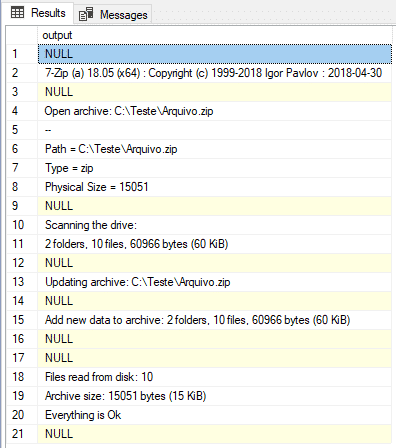
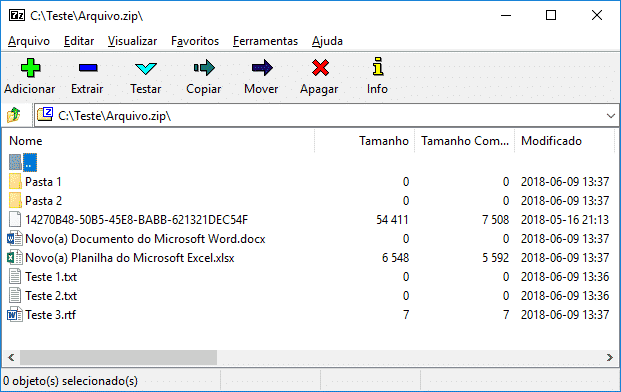
In this example, I will demonstrate how to compress all files and subdirectories in the “C:\Temporary\” directory, and saving them in the “C:\Test\Arquivo.zip” file, with a medium compression level (5):
/*

Compacta todos os arquivos com extensão .txt no diretório "C:\Temporario" (apenas na raiz, sem sub-diretórios),
usando compactação máxima (9) e protegendo o arquivo com a senha "dirceu"

*/

EXEC dbo.stpCompacta_Arquivo
    @caminho = 'C:\Temporario', -- varchar(500)
    @filtro = '*.txt', -- varchar(500)
    @arquivoCompactado = 'C:\Teste\Arquivo.zip', -- varchar(500)
    @nivelCompactacao = 9, -- int
    @recursivo = 0, -- bit
    @senha = 'dirceu' -- varchar(100)
How to unzip files and directories
Using the Stored Procedure below, we can easily unzip files (with and without password) into some directory as per our need. It is worth mentioning that, if the destination directory does not exist, it will be created.
USE [dirceuresende]
GO

CREATE PROCEDURE dbo.stpDescompacta_Arquivo (
    @arquivoCompactado VARCHAR(500),
    @pastaDestino VARCHAR(500),
    @filtro VARCHAR(500) = NULL,
    @senha VARCHAR(100) = NULL
)
AS
BEGIN


    DECLARE @caminhoBinario VARCHAR(255) = 'C:\Binn\7za.exe'
    DECLARE @argumentos VARCHAR(MAX) = 'x "' + @arquivoCompactado + '" -aoa -o"' + @pastaDestino + '" ' + ISNULL(@filtro, '') + '' + (CASE WHEN NULLIF(LTRIM(RTRIM(@senha)), '') IS NOT NULL THEN ' -p' + @senha ELSE '' END) + ' -r -mmt';
    DECLARE @Comando VARCHAR(8000) = 'call "' + @caminhoBinario + '" ' + @argumentos

    PRINT @Comando
    EXEC xp_cmdshell @Comando

END
Using the same solution as alternative #1, but this time, encapsulated in C# procedures with SQLCLR. The biggest advantage of this solution is in relation to permissions, which allows you to grant only EXECUTE access to these procedures and the user, without being a member of the sysadmin role, can use these resources.
Prerequisite: 7-zip
To be able to use this feature, you will need to download the 7-zip binaries in this link. You will need to download the “7-Zip Extra” version: standalone console version, 7z DLL, Plugin for Far Manager”, which comes in .7z format.
If you do not want to install 7-zip in your environment to be able to open this file, I will make the files related to the standalone console version (version 18.05) below: x64 version (recommended) | x86 version
After downloading the files, unzip them to a directory of your choice. For the examples in this article, I chose the “C:\Binn\” directory.
Solution source code
Below, I will provide the source code of the compression solution using 7-zip and SQLCLR.
Retorno.cs Class (Display alert and error messages)
using System;
using System.Data.SqlClient;
using Microsoft.SqlServer.Server;

namespace Bibliotecas.Model
{

    public static class Retorno
    {

        public static void Erro(string erro)
        {

            Mensagem(erro);

            throw new ApplicationException(erro);
        }


        public static void Mensagem(string mensagem)
        {

            using (var conexao = new SqlConnection("context connection=true"))
            {

                conexao.Open();

                using (var comando = new SqlCommand("IF ( (512 & @@OPTIONS) = 512 ) select 1 else select 0", conexao))
                {
                    if ((int)comando.ExecuteScalar() != 0) return;
                }

                var retorno = SqlContext.Pipe;
                retorno?.Send(mensagem.Length > 4000 ? mensagem.Substring(0, 4000) : mensagem);
            }

        }

        public static void RetornaReader(SqlDataReader dataReader)
        {
            var retorno = SqlContext.Pipe;
            retorno?.Send(dataReader);
        }
    }

    public class Ret : Exception
    {
        public Ret(string str) : base(str)
        {
        }
    }
}
stpCompacta_File.cs
using System;
using System.Data.SqlTypes;
using System.IO;
using System.Text;
using System.Diagnostics;
using Bibliotecas.Model;

public partial class StoredProcedures
{
    [Microsoft.SqlServer.Server.SqlProcedure]
    public static void stpCompacta_Arquivo(SqlString caminho, SqlString filtro, SqlString arquivoCompactado, SqlInt32 nivelCompactacao, SqlString senha)
    {


        string[] arquivos;

        #region tratamento de entradas

        if (nivelCompactacao.Value < 0 || nivelCompactacao.Value > 9)
        {
            Retorno.Erro("Parametro inválido na variavel nivelCompactacao, use de 0 a 9 para compactar, sendo 9 o nivel mais alto (5 recomendado).");
            return;
        }


        try
        {
            if (!Directory.Exists(caminho.Value))
            {
                Retorno.Erro($"O caminho especificado '{arquivoCompactado}' não existe ou está inacessivel.");
                return;
            }
        }
        catch
        {
            Retorno.Erro($"Erro ao converter caminho especificado ('{arquivoCompactado}').");
            return;
        }


        try
        {
            arquivos = Directory.GetFiles(caminho.Value, filtro.Value);
        }
        catch
        {
            Retorno.Erro($"Erro ao listar arquivos no caminho especificado ({arquivoCompactado}).");
            return;
        }


        var objetoArquivoCompactado = new FileInfo(arquivoCompactado.Value);
        var diretorioArquivoCompactado = objetoArquivoCompactado.Directory?.ToString();

        if (diretorioArquivoCompactado == null || !Directory.Exists(diretorioArquivoCompactado))
        {
            Retorno.Erro($"O caminho do arquivo compactado especificado ({diretorioArquivoCompactado}) não existe ou inacessível.");
            return;
        }


        if (objetoArquivoCompactado.Extension.Trim() != "")
        {
            try
            {
                objetoArquivoCompactado.Delete();
            }
            catch
            {
                Retorno.Erro($"o arquivo compactado especificado ({arquivoCompactado.Value}) está sendo usado.");
                return;
            }
        }
        else
        {
            Retorno.Erro($"O arquivo compactado especificado não possui uma extensão válida ({objetoArquivoCompactado.Extension.Trim()}).");
            return;
        }


        #endregion

        try
        {

            var argumentos = $@" a -tzip -mx{nivelCompactacao.Value} ""{arquivoCompactado.Value}""" + (!senha.IsNull && !string.IsNullOrEmpty(senha.Value) ? $" -p{senha.Value} " : " ") + $@"""{caminho.Value}\{filtro.Value}"" -mmt";

            using (var scriptProc = new Process { StartInfo = { FileName = @"C:\Binn\7za.exe", UseShellExecute = false, Arguments = argumentos, RedirectStandardOutput = true, RedirectStandardError = true, StandardOutputEncoding = Encoding.GetEncoding(850), StandardErrorEncoding = Encoding.GetEncoding(850), CreateNoWindow = true } })
            {

                scriptProc.Start();

                var output = scriptProc.StandardOutput.ReadToEnd();
                var erro = scriptProc.StandardError.ReadToEnd();


                if (output.Length > 0)
                {
                    //Retorno.Mensagem(output);
                }


                if (erro.Length > 0)
                {
                    Retorno.Erro(erro);
                }

            }

            var quantidadeArquivos = arquivos.Length;

            Retorno.Mensagem("Total de: (" + quantidadeArquivos + ") arquivos foram compactados em: " + arquivoCompactado.Value);
        }
        catch (Exception e)
        {
            Retorno.Erro("Erro : " + e.Message);
        }
    }

};
Alternative #3: Using SharpZipLib and SQLCLR (C#)
View content
To finish the alternatives in this post, I would like to share a solution using the lib SharpZipLib, which allows you to compress and decompress files using only C# code, without depending on external binaries as in the previous examples (7za.exe).
As the SharpZipLib library is quite large, it ends up being unfeasible to make all the source code available here in the post, as well as the T-SQL version. For this reason, I will provide links to download the source code files.
The complete Visual Studio solution, where you can edit the code freely, is available available at this link.
In this link here I am making the T-SQL source code available, to allow the creation of objects without having to install or open Visual Studio.
To better understand the @filtro parameter of this solution, since it is different from the previous alternatives (which use 7-zip), I recommend reading the official library documentation.


Comments (0)
Loading comments...