
Hey guys!
How are you?
In this article I would like to demonstrate to you how to create recursive queries with CTE (Common Table Expressions) in SQL Server. The CTE feature has been available since version 2005, and to this day, many people do not know about this interesting and useful feature in their everyday lives.
Introduction
A CTE is very similar in use to a subquery or derived table, with the advantage that the data set can be used more than once in the query, gaining performance (in this situation) and also improving the readability of the code. For these reasons, the use of CTE has been widespread as a replacement for other solutions mentioned.
Example of a query with CTE:
;WITH CTE1
AS (
    SELECT
        Id_Bairro,
        Nm_Cliente,
        COUNT(Id_Pedido) AS Qt_Pedidos
    FROM
        Clientes
        LEFT JOIN Pedidos ON Clientes.Id_Cliente = Pedidos.Id_Pedido
    GROUP BY
        Id_Bairro,
        Nm_Cliente
),
CTE2 AS (
    SELECT
        Nm_Bairro,
        COUNT(Nm_Cliente) AS Qt_Clientes,
        SUM(Qt_Pedidos) AS Qt_Pedidos
    FROM
        Bairro
        LEFT JOIN CTE1 ON Bairro.Id_Bairro = CTE1.Id_Bairro
    GROUP BY
        Nm_Bairro
)
SELECT
    Nm_Bairro,
    Qt_Clientes,
    Qt_Pedidos,
    CAST(Qt_Pedidos AS NUMERIC(15, 2)) / Qt_Clientes AS Media
FROM
    CTE2;
Example of a query with Subquery:
SELECT
    Nm_Bairro,
    Qt_Clientes,
    Qt_Pedidos,
    CAST(Qt_Pedidos AS NUMERIC(15, 2)) / Qt_Clientes AS Media
FROM
(
    SELECT
        Nm_Bairro,
        COUNT(Nm_Cliente) AS Qt_Clientes,
        SUM(Qt_Pedidos) AS Qt_Pedidos
    FROM
        Bairro
        LEFT JOIN
        (
            SELECT
                Id_Bairro,
                Nm_Cliente,
                COUNT(Id_Pedido) AS Qt_Pedidos
            FROM
                Clientes
                LEFT JOIN Pedidos ON Clientes.Id_Cliente = Pedidos.Id_Pedido
            GROUP BY
                Id_Bairro,
                Nm_Cliente
        ) AS Q1 ON Bairro.Id_Bairro = Q1.Id_Bairro
    GROUP BY
        Nm_Bairro
) AS Q2
Furthermore, a CTE provides the significant advantage of being able to self-reference, therefore creating a recursive CTE, which is executed repeatedly to return subsets of data until the complete result is obtained.
Recursive CTE is widely used to return hierarchical data, for example, displaying employees in an organization chart, which can have several hierarchical levels and I will demonstrate here an example of how recursive CTE works.
Examples of Recursive CTE
Example of recursive CTE using a sequence of numbers:
WITH CTE_Numerico (Nivel, Numero)
AS
(
    -- Âncora (nível 1)
    SELECT 1 AS Nivel, 1 AS Numero

    UNION ALL

    -- Níveis recursivos (Níveis N)
    SELECT Nivel + 1, Numero + Numero
    FROM CTE_Numerico
    WHERE Numero < 2048
 )
SELECT *
FROM CTE_Numerico
Result:

Example of recursive CTE using hierarchy:
Creation of the test mass – Employees of the company CLR Corporation
IF (OBJECT_ID('tempdb..#Funcionarios') IS NOT NULL) DROP TABLE #Funcionarios
CREATE TABLE #Funcionarios (
    Id_Empregado INT IDENTITY(1, 1) NOT NULL,
    Nm_Empregado VARCHAR(60) NOT NULL,
    Id_Superior INT NULL
)

INSERT INTO #Funcionarios(Nm_Empregado, Id_Superior)
VALUES ('Edvaldo Neves', NULL), ('Fabricio Amante', 1), ('Caio Lima', 1), ('Tiago Castro', 2)

INSERT INTO #Funcionarios(Nm_Empregado, Id_Superior)
VALUES ('Reginaldo Oliveira', 3), ('Fábio Merazzi', 3), ('Dirceu Resende', 2), ('Luiz Vitor Neves', 2)

INSERT INTO #Funcionarios(Nm_Empregado, Id_Superior)
VALUES ('Vithor Lima', 1), ('Edimar Lellis', 9), ('Lucas Fardim', 9), ('Aquila Loureiro', 9)

INSERT INTO #Funcionarios(Nm_Empregado, Id_Superior)
VALUES ('Rodrigo Almeida', 9), ('Flávio Castro', NULL), ('Raul Farias', 14), ('Logan Castro', 1)

INSERT INTO #Funcionarios(Nm_Empregado, Id_Superior)
VALUES('Fábio Amante', 3), ('Ariel Neves', 3), ('Leandro Galon', 7), ('Lucas Keller', 7)

INSERT INTO #Funcionarios(Nm_Empregado, Id_Superior)
VALUES('Richardson Folha', 19), ('Rafaela Giugliet', 20)

SELECT * FROM #Funcionarios
Structure of the fictitious company
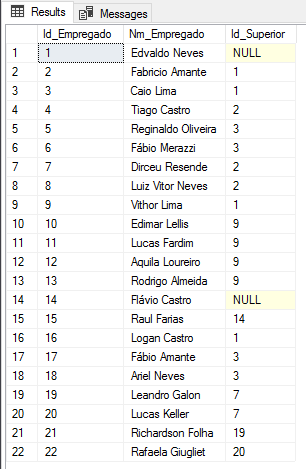
Given the above structure, I want to create the hierarchy levels of these employees. How would we do this without using CTE?
Example with manual hierarchy
A very common way to create a data hierarchy in SQL Server for a few levels is through manual insertions.
Although it is very simple (basically, Ctrl+C and Ctrl+V), when we need to automate this work or we have many levels in our hierarchy (which can even be variable), this solution ends up not serving us very well, leading us to look for a more robust solution.
Example of creating a manual hierarchy:
IF (OBJECT_ID('tempdb..#Hiearquia') IS NOT NULL) DROP TABLE #Hiearquia
CREATE TABLE [#Hiearquia]
(
    [Id_Empregado] INT NOT NULL,
    [Nm_Empregado] VARCHAR(60) NOT NULL,
    [Id_Superior] INT,
    [Nivel] INT
)

-- Nível 1
INSERT INTO #Hiearquia
SELECT Id_Empregado, Nm_Empregado, Id_Superior, 1 AS Nivel
FROM #Funcionarios
WHERE Id_Superior IS NULL

-- Nível 2
INSERT INTO #Hiearquia
SELECT A.Id_Empregado, A.Nm_Empregado, A.Id_Superior, 2 AS Nivel
FROM #Funcionarios A
JOIN #Hiearquia B ON A.Id_Superior = B.Id_Empregado
WHERE NOT EXISTS(SELECT NULL FROM #Hiearquia WHERE Id_Empregado = A.Id_Empregado)

-- Nível 3
INSERT INTO #Hiearquia
SELECT A.Id_Empregado, A.Nm_Empregado, A.Id_Superior, 3 AS Nivel
FROM #Funcionarios A
JOIN #Hiearquia B ON A.Id_Superior = B.Id_Empregado
WHERE NOT EXISTS(SELECT NULL FROM #Hiearquia WHERE Id_Empregado = A.Id_Empregado)

-- Nível 4
INSERT INTO #Hiearquia
SELECT A.Id_Empregado, A.Nm_Empregado, A.Id_Superior, 4 AS Nivel
FROM #Funcionarios A
JOIN #Hiearquia B ON A.Id_Superior = B.Id_Empregado
WHERE NOT EXISTS(SELECT NULL FROM #Hiearquia WHERE Id_Empregado = A.Id_Empregado)

-- Nível 5
INSERT INTO #Hiearquia
SELECT A.Id_Empregado, A.Nm_Empregado, A.Id_Superior, 5 AS Nivel
FROM #Funcionarios A
JOIN #Hiearquia B ON A.Id_Superior = B.Id_Empregado
WHERE NOT EXISTS(SELECT NULL FROM #Hiearquia WHERE Id_Empregado = A.Id_Empregado)


SELECT * FROM #Hiearquia
Result:
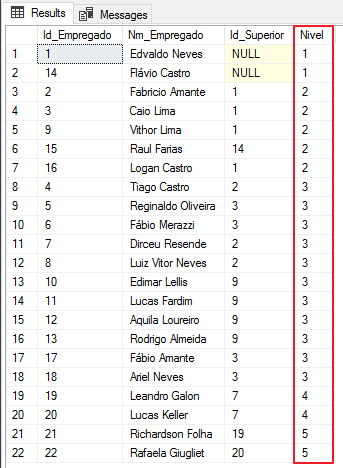
Example with LOOP WHILE
Aiming to create a more robust one than the previous one and that works with N levels of hierarchy, we can use a LOOP WHILE for this, which will create an iteration at each level starting from the anchor (first level) until the insert finds no more records to be inserted.
Example of insertion using LOOP:
IF (OBJECT_ID('tempdb..#Hiearquia') IS NOT NULL) DROP TABLE #Hiearquia
CREATE TABLE [#Hiearquia]
(
    [Id_Empregado] INT NOT NULL,
    [Nm_Empregado] VARCHAR(60) NOT NULL,
    [Id_Superior] INT,
    [Nivel] INT
)

-- Nível 1
INSERT INTO #Hiearquia
SELECT Id_Empregado, Nm_Empregado, Id_Superior, 1 AS Nivel
FROM #Funcionarios
WHERE Id_Superior IS NULL


DECLARE @Nivel INT = 2

WHILE(1=1)
BEGIN

    INSERT INTO #Hiearquia
    SELECT A.Id_Empregado, A.Nm_Empregado, A.Id_Superior, @Nivel AS Nivel
    FROM #Funcionarios A
    JOIN #Hiearquia B ON A.Id_Superior = B.Id_Empregado
    WHERE NOT EXISTS(SELECT NULL FROM #Hiearquia WHERE Id_Empregado = A.Id_Empregado)

    IF (@@ROWCOUNT <= 0) BREAK

    SET @Nivel += 1

END

SELECT * FROM #Hiearquia
Result:
As you can see, I used a while loop to query the table itself and thus chain the data and create the hierarchy.
But what about recursive CTE? Could it return this same result with just 1 SELECT?
A: Of course! Using this feature, we can create a query that will return the expected result with just one query.
Example with Recursive CTE
;WITH CTE_Recursivo AS (
    -- Nível 1 (Âncora)
    SELECT Id_Empregado, Nm_Empregado, Id_Superior, 1 AS Nivel
    FROM #Funcionarios
    WHERE Id_Superior IS NULL

    UNION ALL

    -- Níveis 2-N
    SELECT A.Id_Empregado, A.Nm_Empregado, A.Id_Superior, B.Nivel + 1 AS Nivel
    FROM #Funcionarios A
    JOIN CTE_Recursivo B ON A.Id_Superior = B.Id_Empregado
)
SELECT *
FROM CTE_Recursivo
Result:
Controlling the degree of recursion with MAXRECURSION
Now that you've seen how to use recursive CTE and how practical it can be, it's time to understand the risk of building a recursive CTE in an “infinite loop”. This happens when you don't program your query's recursion well and it can end up reaching N levels and even crashing your instance and consuming so much resources trying to resolve the query.
To avoid this type of situation, there is the query hint MAXRECURSION, which allows you to specify the maximum level of recursion. Upon reaching this level, SQL will abort the rest of the execution and show an error message with severity 16, as shown below:
;WITH CTE_Recursivo AS (
    -- Nível 1 (Âncora)
    SELECT Id_Empregado, Nm_Empregado, Id_Superior, 1 AS Nivel
    FROM Dacasa.dbo.Funcionarios_Teste
    WHERE Id_Superior IS NULL

    UNION ALL

    -- Níveis 2-N
    SELECT A.Id_Empregado, A.Nm_Empregado, A.Id_Superior, B.Nivel + 1 AS Nivel
    FROM Dacasa.dbo.Funcionarios_Teste A
    JOIN CTE_Recursivo B ON A.Id_Superior = B.Id_Empregado
)
SELECT *
FROM CTE_Recursivo
OPTION(MAXRECURSION 1)
Error message:
The statement is terminated. The maximum recursion 1 has been exhausted before statement completion.
Result:
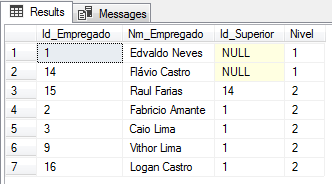
Note that using the hint OPTION(MAXRECURSION 1), only the primary level and 1 more hierarchy level were returned (levels 1 and 2). If we used the value MAXRECURSION 2, the primary level and 2 more hierarchy levels would be returned (level 1 to level 3).
As the exception generated by the MAXRECURSION hint is of severity 16, it causes an interruption in the rest of the routine and if it is a job, this job will return a failure. If you don't want this behavior and just want to limit the level of recursion, but without causing an error in the routine, simply encapsulate your CTE in a TRY..CATCH block:
BEGIN TRY

    ;WITH CTE_Recursivo AS (
        -- Nível 1 (Âncora)
        SELECT Id_Empregado, Nm_Empregado, Id_Superior, 1 AS Nivel
        FROM Dacasa.dbo.Funcionarios_Teste
        WHERE Id_Superior IS NULL

        UNION ALL

        -- Níveis 2-N
        SELECT A.Id_Empregado, A.Nm_Empregado, A.Id_Superior, B.Nivel + 1 AS Nivel
        FROM Dacasa.dbo.Funcionarios_Teste A
        JOIN CTE_Recursivo B ON A.Id_Superior = B.Id_Empregado
    )
    SELECT *
    FROM CTE_Recursivo
    OPTION(MAXRECURSION 1)

END TRY
BEGIN CATCH
END CATCH
Note: The MAXRECURSION hint parameter supports values from 1 to 32,767. If you want to use a recursion level above this value, simply do not use this hint or specify the value 0, which means no recursion limit.
Another way to demonstrate a very interesting use of recursive CTE is to generate sequences of numbers:
Example of recursive CTE to generate a sequence of 200 numbers:
;WITH CTE_Numerico AS
(
    SELECT 1 AS Numero
    UNION ALL
    SELECT Numero + 1 FROM CTE_Numerico
 )
SELECT * FROM CTE_Numerico
OPTION (MAXRECURSION 199)
Result:
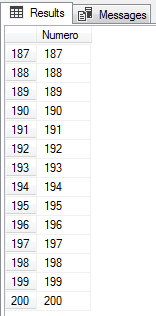
Using this code above, it was possible to limit 200 records using the hint MAXRECURSION(199), limiting 199 recursion levels. However, it is possible to guarantee this limitation in another way (and without generating an exception):
WITH CTE_Numerico AS
(
    SELECT 1 AS Numero
    UNION ALL
    SELECT Numero + 1 FROM CTE_Numerico
    WHERE Numero < 200
 )
SELECT * FROM CTE_Numerico
OPTION (MAXRECURSION 249)
Result:
So notice that, even though we specify that the recursion level is 249, that is, the maximum recursion level is 250 records (and in fact, 250 records should have been generated), as I limited the quantity to 200 records within the CTE query, it was possible to return only 200 records, making the MAXRECURSION hint unnecessary in this case.
With this, it was possible to demonstrate that it is possible to limit the records of a recursive CTE (in certain situations) even without using the MAXRECURSION hint.
Conclusion
In this article, I was able to demonstrate what a CTE is, in which situations we can use it, how it is constructed and some of the advantages it has over other solutions, such as derived tables and subquery.
Furthermore, it was possible to explain how a recursive CTE works, how it can be assembled and some examples where it can be especially useful.
I hope you enjoyed this article and that it was useful to you!
A hug and see you next time!

Comments (0)
Loading comments...