
Hey guys!
Is everything ok with you?
In this post, I would like to present to you a very useful tool in the daily lives of those who work with Performance Tuning and constantly need to activate the STATISTICS TIME and/or IO options to view some information about these queries that can help with the query optimization activity. (Want some tips on Performance Tuning? Access this post).
Anyone who has already used these parameters of the SET command knows that the formatting of the output is often not very intuitive, especially when there are several queries in the statement, using different tables, making it a little difficult to understand this information.
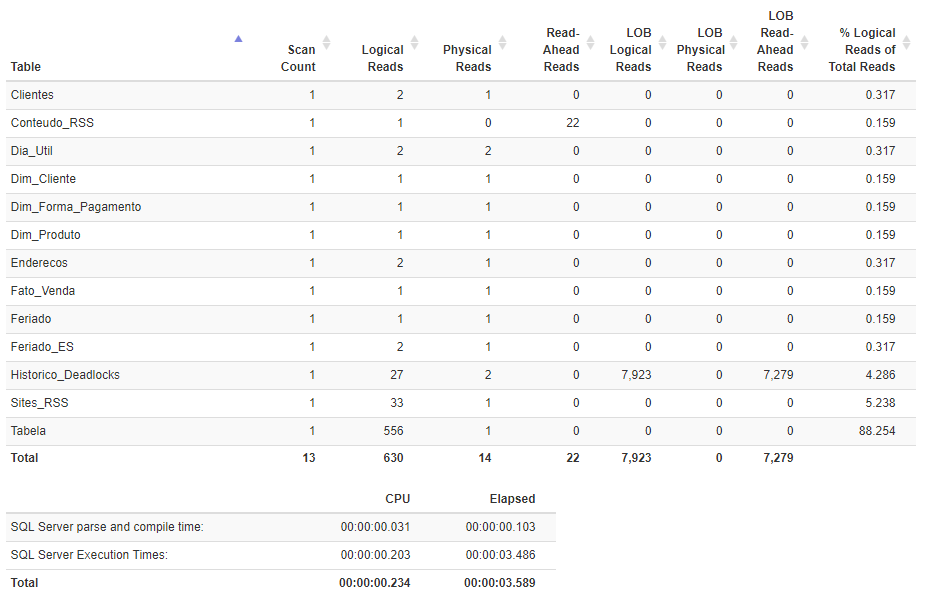
To help us with this Performance Tuning study, Richie Rump developed a Web application where you paste the output from the Messages tab of SQL Server Management Studio (SSMS) and this tool converts the information into the format of HTML tables, allowing a clear, objective and clean visualization, and in addition, allowing us to order the information, such as by the number of logical reads, for example.
If you want to learn about and start using Statistics Parser, just access the link http://statisticsparser.com/.
Usage example
I will demonstrate a practical example of how the Statistics Parser tool facilitates the analysis of this output
Standard output of STATISTICS TIME and STATISTICS IO
SQL Server parse and compile time:
   CPU time = 31 ms, elapsed time = 103 ms.

 SQL Server Execution Times:
   CPU time = 0 ms,  elapsed time = 0 ms.

 SQL Server Execution Times:
   CPU time = 0 ms,  elapsed time = 0 ms.

(10000 rows affected)
Table 'Tabela'. Scan count 1, logical reads 556, physical reads 1, read-ahead reads 0, lob logical reads 0, lob physical reads 0, lob read-ahead reads 0.
Table 'Sites_RSS'. Scan count 1, logical reads 33, physical reads 1, read-ahead reads 0, lob logical reads 0, lob physical reads 0, lob read-ahead reads 0.
Table 'Historico_Deadlocks'. Scan count 1, logical reads 27, physical reads 2, read-ahead reads 0, lob logical reads 7923, lob physical reads 0, lob read-ahead reads 7279.
Table 'Feriado_ES'. Scan count 1, logical reads 2, physical reads 1, read-ahead reads 0, lob logical reads 0, lob physical reads 0, lob read-ahead reads 0.
Table 'Feriado'. Scan count 1, logical reads 1, physical reads 1, read-ahead reads 0, lob logical reads 0, lob physical reads 0, lob read-ahead reads 0.
Table 'Fato_Venda'. Scan count 1, logical reads 1, physical reads 1, read-ahead reads 0, lob logical reads 0, lob physical reads 0, lob read-ahead reads 0.
Table 'Dim_Forma_Pagamento'. Scan count 1, logical reads 1, physical reads 1, read-ahead reads 0, lob logical reads 0, lob physical reads 0, lob read-ahead reads 0.
Table 'Enderecos'. Scan count 1, logical reads 2, physical reads 1, read-ahead reads 0, lob logical reads 0, lob physical reads 0, lob read-ahead reads 0.
Table 'Dim_Produto'. Scan count 1, logical reads 1, physical reads 1, read-ahead reads 0, lob logical reads 0, lob physical reads 0, lob read-ahead reads 0.
Table 'Dia_Util'. Scan count 1, logical reads 2, physical reads 2, read-ahead reads 0, lob logical reads 0, lob physical reads 0, lob read-ahead reads 0.
Table 'Dim_Cliente'. Scan count 1, logical reads 1, physical reads 1, read-ahead reads 0, lob logical reads 0, lob physical reads 0, lob read-ahead reads 0.
Table 'Conteudo_RSS'. Scan count 1, logical reads 1, physical reads 0, read-ahead reads 22, lob logical reads 0, lob physical reads 0, lob read-ahead reads 0.
Table 'Clientes'. Scan count 1, logical reads 2, physical reads 1, read-ahead reads 0, lob logical reads 0, lob physical reads 0, lob read-ahead reads 0.

 SQL Server Execution Times:
   CPU time = 203 ms,  elapsed time = 3486 ms.
Output using the Statistics Parser tool
Other alternatives
If you are looking for other more complete alternatives to Statistics Parser, I recommend SQLSentry Plan Explorer, an excellent tool that I personally really like and use whenever I need to optimize a query (I will soon make a post just about it)
Usage example

That's it, folks!
I hope you liked this post, hugs and see you next time!

Comments (0)
Loading comments...