
Hey guys!
Are you all right?
In this post I would like to comment on something very important in the daily lives of DBA's and Query Developers, which is database documentation. I rarely see environments where the columns or tables have a clear description of what this database object is about.
Introduction
For those who create queries all day long, such as BI analysts, this information makes understanding the queries and the accuracy of the information much easier. To insert this information into the database, we will use a very old feature of SQL Server, but which few people use or even know about, which is Extended Property.
Using system procedures, we can describe database objects using their own words to make it easier for other people to understand.
Once these descriptions are entered into the database, you can use tools to visualize this information as you develop your queries or even to generate complete database documentation from the Extended Property descriptions.
Unlike some database documentation tools, this feature stores the descriptions in the database itself, meaning that the time spent registering these descriptions is not wasted if you intend to change the documentation tool, and these descriptions will be saved in a safe place with backups (your bank has a backup, right?!).
How to document SQL Server databases
For documentation of SQL Server databases, we will use the resource called Extended Property and system procedures sp_addextendedproperty, sp_updateextendedproperty and sp_dropextendedproperty.
To be able to use these procedures, the user must be in the database roles db_owner or ddl_admin (this role does not allow adding descriptions for the database itself, users or roles) or have the ALTER/CONTROL privilege on the objects to which they want to add descriptions. And of course, server role users, such as sysadmin, can also use these procedures.
The types of objects that can be documented using Extended Property using these system SP’s (@level1type) are: AGGREGATE, DEFAULT, FUNCTION, LOGICAL FILE NAME, PROCEDURE, QUEUE, RULE, SYNONYM, TABLE, TABLE_TYPE, TYPE, VIEW and XML SCHEMA COLLECTION.
The subtypes of objects that can be documented (@level2type) are: COLUMN, CONSTRAINT, EVENT NOTIFICATION, INDEX, PARAMETER and TRIGGER. Subtypes (@level2type) depend on the type (@level1type) to define them, for example, to document a column, where you must define @level1type = 'TABLE' and @level2type = 'COLUMN', referencing which table this column is part of.
In order to facilitate the use of these procedures, I will provide here some procedures that will check whether the object in question already has an Extended Property and, if so, use sp_updateextendedproperty or, if not, use sp_addextendedproperty.
stpExtendedProperty_Table
View source codestpExtendedProperty_Column
View source codestpExtendedProperty_Trigger
View source codestpExtendedProperty_View
View source codestpExtendedProperty_Procedure
View source codestpExtendedProperty_Function
View source codestpExtendedProperty_User
View source codestpExtendedProperty_Database
View source codeCan I document objects using an interface?
In addition to allowing you to document your database objects using a line of code, you can also add Extended Property metadata using the SSMS (SQL Server Management Studio) interface and it is very simple, although it does not allow automation:
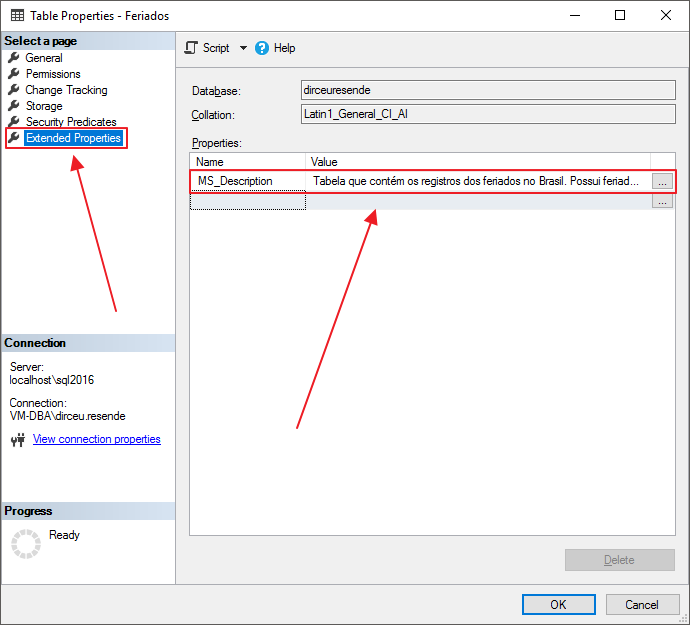
Example of Extended Property in a Table
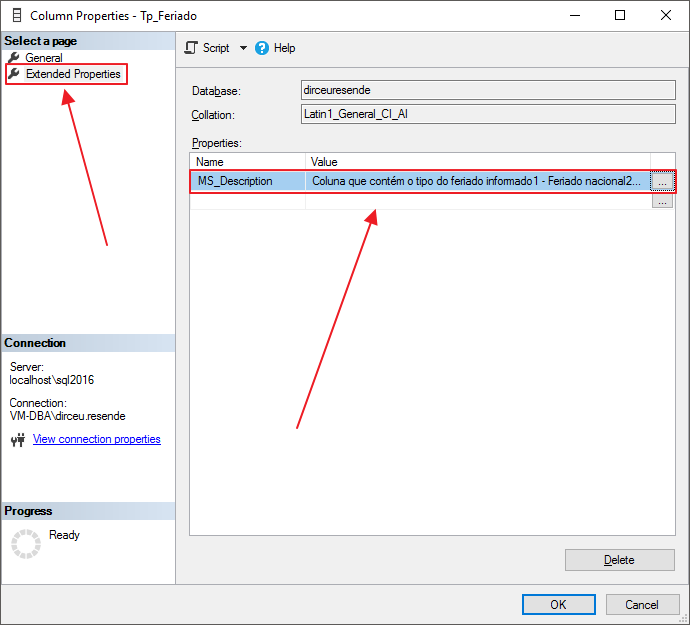
Example of Extended Property in a column
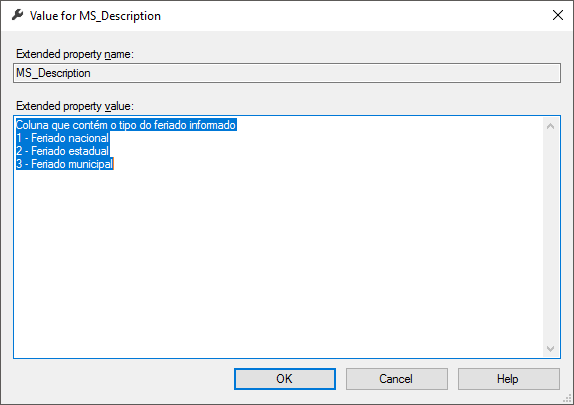
Example of a form to enter metadata and document the object in question
How to export documentation already made?
With the script below, you can easily generate and export all the Extended Property metadata you have in the desired database. This is useful for generating a script and applying it to another instance of your environment without having to restore the database to do so.
SELECT
    'EXEC sys.sp_addextendedproperty @name = ''' + REPLACE(CAST(A.name AS NVARCHAR(300)), '''', '''''') + ''' ,@value = ''' + REPLACE(CAST(A.value AS NVARCHAR(4000)), '''', '''''') + ''''
FROM
    sys.extended_properties A
WHERE
    class_desc = N'DATABASE';


SELECT
    'EXEC sys.sp_addextendedproperty @level0type = N''SCHEMA'', @level0name = [' + B.name + '] ,@name = ''' + REPLACE(CAST(A.name AS NVARCHAR(300)), '''', '''''') + ''' ,@value = ''' + REPLACE(CAST(A.value AS NVARCHAR(4000)), '''', '''''') + ''''
FROM
    sys.extended_properties A
    INNER JOIN sys.schemas B ON A.major_id = B.schema_id
WHERE
    A.class_desc = N'SCHEMA';


SELECT
    'EXEC sys.sp_addextendedproperty @level0type = N''SCHEMA'', @level0name = [' + B.name + '], @level1type = ''TABLE'', @level1name = [' + A.name + '] ,@name = ''' + REPLACE(CAST(C.name AS NVARCHAR(300)), '''', '''''') + ''' ,@value = ''' + REPLACE(CAST(C.value AS NVARCHAR(4000)), '''', '''''') + ''''
FROM
    sys.tables A
    INNER JOIN sys.schemas B ON A.schema_id = B.schema_id
    INNER JOIN sys.extended_properties C ON A.object_id = C.major_id
WHERE
    C.class = 1
    AND C.minor_id = 0
    AND
    (
        C.value <> '1'
        AND C.value <> 1
    );


SELECT
    'EXEC sys.sp_addextendedproperty @level0type = N''SCHEMA'', @level0name = [' + D.name + '], @level1type = ''TABLE'', @level1name = [' + C.name + '] , @level2type = ''COLUMN'', @level2name = [' + B.name + '] ,@name = ''' + REPLACE(CAST(A.name AS NVARCHAR(300)), '''', '''''') + ''' ,@value = ''' + REPLACE(CAST(A.value AS NVARCHAR(4000)), '''', '''''') + ''''
FROM
    sys.extended_properties A
    INNER JOIN sys.columns B ON A.major_id = B.object_id AND A.minor_id = B.column_id
    INNER JOIN sys.tables C ON A.major_id = C.object_id
    INNER JOIN sys.schemas D ON C.schema_id = D.schema_id
WHERE
    A.class = 1
    AND
    (
        A.value <> '1'
        AND A.value <> 1
    );


SELECT
    'EXEC sys.sp_addextendedproperty @level0type = N''SCHEMA'', @level0name = [' + B.name + '], @level1type = ''TABLE'', @level1name = [' + A.name + '] , @level2type = ''CONSTRAINT'', @level2name = [' + D.name + '] ,@name = ''' + REPLACE(CAST(C.name AS NVARCHAR(300)), '''', '''''') + ''' ,@value = ''' + REPLACE(CAST(C.value AS NVARCHAR(4000)), '''', '''''') + ''''
FROM
    sys.tables A
    INNER JOIN sys.schemas B ON A.schema_id = B.schema_id
    INNER JOIN sys.extended_properties C
    INNER JOIN sys.key_constraints D ON C.major_id = D.object_id ON A.object_id = D.parent_object_id
WHERE
    D.type_desc = N'PRIMARY_KEY_CONSTRAINT';


SELECT
    'EXEC sys.sp_addextendedproperty @level0type = N''SCHEMA'', @level0name = [' + B.name + '], @level1type = ''TABLE'', @level1name = [' + A.name + '] , @level2type = ''CONSTRAINT'', @level2name = [' + D.name + '] ,@name = ''' + REPLACE(CAST(C.name AS NVARCHAR(300)), '''', '''''') + ''' ,@value = ''' + REPLACE(CAST(C.value AS NVARCHAR(4000)), '''', '''''') + ''''
FROM
    sys.tables A
    INNER JOIN sys.schemas B ON A.schema_id = B.schema_id
    INNER JOIN sys.extended_properties C
    INNER JOIN sys.key_constraints D ON C.major_id = D.object_id ON A.object_id = D.parent_object_id
WHERE
    D.type_desc = N'UNIQUE_CONSTRAINT'
    AND
    (
        C.value <> '1'
        AND C.value <> 1
    );


SELECT
    'EXEC sys.sp_addextendedproperty @level0type = N''SCHEMA'', @level0name = [' + C.name + '], @level1type = ''TABLE'', @level1name = [' + D.name + '] , @level2type = ''CONSTRAINT'', @level2name = [' + B.name + '] ,@name = ''' + REPLACE(CAST(A.name AS NVARCHAR(300)), '''', '''''') + ''' ,@value = ''' + REPLACE(CAST(A.value AS NVARCHAR(4000)), '''', '''''') + ''''
FROM
    sys.extended_properties A
    INNER JOIN sys.check_constraints B ON A.major_id = B.object_id
    INNER JOIN sys.schemas C
    INNER JOIN sys.tables D ON C.schema_id = D.schema_id ON B.parent_object_id = D.object_id;


SELECT
    'EXEC sys.sp_addextendedproperty @level0type = N''SCHEMA'', @level0name = [' + D.name + '], @level1type = ''TABLE'', @level1name = [' + C.name + '] , @level2type = ''INDEX'', @level2name = [' + A.name + '] ,@name = ''' + REPLACE(CAST(B.name AS NVARCHAR(300)), '''', '''''') + ''' ,@value = ''' + REPLACE(CAST(B.value AS NVARCHAR(4000)), '''', '''''') + ''''
FROM
    sys.indexes A
    INNER JOIN sys.extended_properties B ON A.object_id = B.major_id AND A.index_id = B.minor_id
    INNER JOIN sys.tables C
    INNER JOIN sys.schemas D ON C.schema_id = D.schema_id ON A.object_id = C.object_id
WHERE
    B.class_desc = N'INDEX'
    AND A.is_primary_key = 0;


SELECT
    'EXEC sys.sp_addextendedproperty @level0type = N''SCHEMA'', @level0name = [' + D.name + '], @level1type = ''TABLE'', @level1name = [' + C.name + '] , @level2type = ''CONSTRAINT'', @level2name = [' + B.name + '] ,@name = ''' + REPLACE(CAST(A.name AS NVARCHAR(300)), '''', '''''') + ''' ,@value = ''' + REPLACE(CAST(A.value AS NVARCHAR(4000)), '''', '''''') + ''''
FROM
    sys.extended_properties A
    INNER JOIN sys.foreign_keys B ON A.major_id = B.object_id
    INNER JOIN sys.tables C ON B.parent_object_id = C.object_id
    INNER JOIN sys.schemas D ON C.schema_id = D.schema_id;


SELECT
    'EXEC sys.sp_addextendedproperty @level0type = N''SCHEMA'', @level0name = [' + B.name + '], @level1type = ''TABLE'', @level1name = [' + C.name + '] , @level2type = ''CONSTRAINT'', @level2name = [' + A.name + '] ,@name = ''' + REPLACE(CAST(D.name AS NVARCHAR(300)), '''', '''''') + ''' ,@value = ''' + REPLACE(CAST(D.value AS NVARCHAR(4000)), '''', '''''') + ''''
FROM
    sys.default_constraints A
    INNER JOIN sys.schemas B
    INNER JOIN sys.tables C ON B.schema_id = C.schema_id ON A.parent_object_id = C.object_id
    INNER JOIN sys.extended_properties D ON A.object_id = D.major_id;


SELECT
    'EXEC sys.sp_addextendedproperty @level0type = N''SCHEMA'', @level0name = [' + C.name + '], @level1type = ''VIEW'', @level1name = [' + B.name + '] ,@name = ''' + REPLACE(CAST(A.name AS NVARCHAR(300)), '''', '''''') + ''' ,@value = ''' + REPLACE(CAST(A.value AS NVARCHAR(4000)), '''', '''''') + ''''
FROM
    sys.extended_properties A
    INNER JOIN sys.views B ON A.major_id = B.object_id
    INNER JOIN sys.schemas C ON B.schema_id = C.schema_id
WHERE
    A.minor_id = 0;


SELECT
    'EXEC sys.sp_addextendedproperty @level0type = N''SCHEMA'', @level0name = [' + D.name + '], @level1type = ''VIEW'', @level1name = [' + C.name + '] , @level2type = ''COLUMN'', @level2name = [' + B.name + '] ,@name = ''' + REPLACE(CAST(A.name AS NVARCHAR(300)), '''', '''''') + ''' ,@value = ''' + REPLACE(CAST(A.value AS NVARCHAR(4000)), '''', '''''') + ''''
FROM
    sys.extended_properties A
    INNER JOIN sys.columns B ON A.major_id = B.object_id AND A.minor_id = B.column_id
    INNER JOIN sys.views C ON A.major_id = C.object_id
    INNER JOIN sys.schemas D ON C.schema_id = D.schema_id
WHERE
    A.class = 1
    AND
    (
        A.value <> '1'
        AND A.value <> 1
    );


SELECT
    'EXEC sys.sp_addextendedproperty @level0type = N''SCHEMA'', @level0name = [' + D.name + '], @level1type = ''VIEW'', @level1name = [' + C.name + '] , @level2type = ''INDEX'', @level2name = [' + A.name + '] ,@name = ''' + REPLACE(CAST(B.name AS NVARCHAR(300)), '''', '''''') + ''' ,@value = ''' + REPLACE(CAST(B.value AS NVARCHAR(4000)), '''', '''''') + ''''
FROM
    sys.indexes A
    INNER JOIN sys.extended_properties B ON A.object_id = B.major_id AND A.index_id = B.minor_id
    INNER JOIN sys.views C
    INNER JOIN sys.schemas D ON C.schema_id = D.schema_id ON A.object_id = C.object_id
WHERE
    B.class_desc = N'INDEX';


SELECT
    'EXEC sys.sp_addextendedproperty @level0type = N''SCHEMA'', @level0name = [' + C.name + '], @level1type = ''FUNCTION'', @level1name = [' + B.name + '] ,@name = ''' + REPLACE(CAST(A.name AS NVARCHAR(300)), '''', '''''') + ''' ,@value = ''' + REPLACE(CAST(A.value AS NVARCHAR(4000)), '''', '''''') + ''''
FROM
    sys.extended_properties A
    INNER JOIN sys.objects B ON A.major_id = B.object_id
    INNER JOIN sys.schemas C ON B.schema_id = C.schema_id
WHERE
    B.type_desc LIKE N'%FUNCTION%'
    AND A.minor_id = 0;


SELECT
    'EXEC sys.sp_addextendedproperty @level0type = N''SCHEMA'', @level0name = [' + C.name + '], @level1type = ''PROCEDURE'', @level1name = [' + B.name + '] ,@name = ''' + REPLACE(CAST(A.name AS NVARCHAR(300)), '''', '''''') + ''' ,@value = ''' + REPLACE(CAST(A.value AS NVARCHAR(4000)), '''', '''''') + ''''
FROM
    sys.extended_properties A
    INNER JOIN sys.procedures B ON A.major_id = B.object_id
    INNER JOIN sys.schemas C ON B.schema_id = C.schema_id
WHERE
    A.minor_id = 0;


SELECT
    'EXEC sys.sp_addextendedproperty @level0type = N''TRIGGER'', @level0name = [' + B.name + '] ,@name = ''' + REPLACE(CAST(A.name AS NVARCHAR(300)), '''', '''''') + ''' ,@value = ''' + REPLACE(CAST(A.value AS NVARCHAR(4000)), '''', '''''') + ''''
FROM
    sys.extended_properties A
    INNER JOIN sys.triggers B ON A.major_id = B.object_id
WHERE
    B.parent_class_desc = N'DATABASE';


SELECT
    'EXEC sys.sp_addextendedproperty @level0type = N''SCHEMA'', @level0name = [' + D.name + '], @level1type = ''TABLE'', @level1name = [' + A.name + '] , @level2type = ''TRIGGER'', @level2name = [' + B.name + '] ,@name = ''' + REPLACE(CAST(C.name AS NVARCHAR(300)), '''', '''''') + ''' ,@value = ''' + REPLACE(CAST(C.value AS NVARCHAR(4000)), '''', '''''') + ''''
FROM
    sys.tables A
    INNER JOIN sys.triggers B ON A.object_id = B.parent_id
    INNER JOIN sys.extended_properties C ON B.object_id = C.major_id
    INNER JOIN sys.schemas D ON A.schema_id = D.schema_id;


SELECT
    'EXEC sys.sp_addextendedproperty @level0type = N''SCHEMA'', @level0name = [' + D.name + '], @level1type = ''VIEW'', @level1name = [' + A.name + '] , @level2type = ''TRIGGER'', @level2name = [' + B.name + '] ,@name = ''' + REPLACE(CAST(C.name AS NVARCHAR(300)), '''', '''''') + ''' ,@value = ''' + REPLACE(CAST(C.value AS NVARCHAR(4000)), '''', '''''') + ''''
FROM
    sys.views A
    INNER JOIN sys.triggers B ON A.object_id = B.parent_id
    INNER JOIN sys.extended_properties C ON B.object_id = C.major_id
    INNER JOIN sys.schemas D ON A.schema_id = D.schema_id;


SELECT
    'EXEC sys.sp_addextendedproperty @level0type = N''PARTITION FUNCTION'', @level0name = [' + B.name + '] ,@name = ''' + REPLACE(CAST(A.name AS NVARCHAR(300)), '''', '''''') + ''' ,@value = ''' + REPLACE(CAST(A.value AS NVARCHAR(4000)), '''', '''''') + ''''
FROM
    sys.extended_properties A
    INNER JOIN sys.partition_functions B ON A.major_id = B.function_id;


SELECT
    'EXEC sys.sp_addextendedproperty @level0type = N''PARTITION SCHEME'', @level0name = [' + B.name + '] ,@name = ''' + REPLACE(CAST(A.name AS NVARCHAR(300)), '''', '''''') + ''' ,@value = ''' + REPLACE(CAST(A.value AS NVARCHAR(4000)), '''', '''''') + ''''
FROM
    sys.extended_properties A
    INNER JOIN sys.partition_schemes B ON A.major_id = B.function_id;


SELECT
    'EXEC sys.sp_addextendedproperty @level0type = N''FILEGROUP'', @level0name = [' + B.name + '] ,@name = ''' + REPLACE(CAST(A.name AS NVARCHAR(300)), '''', '''''') + ''' ,@value = ''' + REPLACE(CAST(A.value AS NVARCHAR(4000)), '''', '''''') + ''''
FROM
    sys.extended_properties A
    INNER JOIN sys.data_spaces B ON A.major_id = B.data_space_id
WHERE
    B.type_desc = 'ROWS_FILEGROUP';


SELECT
    'EXEC sys.sp_addextendedproperty @level0type = N''FILEGROUP'', @level0name = [' + C.name + '], @level1type = ''LOGICAL FILE NAME'', @level1name = ' + B.name + ' ,@name = ''' + REPLACE(CAST(A.name AS NVARCHAR(300)), '''', '''''') + ''' ,@value = ''' + REPLACE(CAST(A.value AS NVARCHAR(4000)), '''', '''''') + ''''
FROM
    sys.extended_properties A
    INNER JOIN sys.database_files B ON A.major_id = B.file_id
    INNER JOIN sys.data_spaces C ON B.data_space_id = C.data_space_id
WHERE
    A.class_desc = N'DATABASE_FILE';
How can I view this information?
And now we come to the most interesting part of the formatting work, which is viewing the registered metadata. This visualization can be of 2 types:
- Official documentation: Document in CHM, HTML, Word or PDF format, where you can view all the information, such as tables, Stored Procedures, Views,
etc, and their descriptions - During development: Tools that make it possible to view documentation in the SSMS itself, allowing you to access this information quickly, as you consult and access the objects.
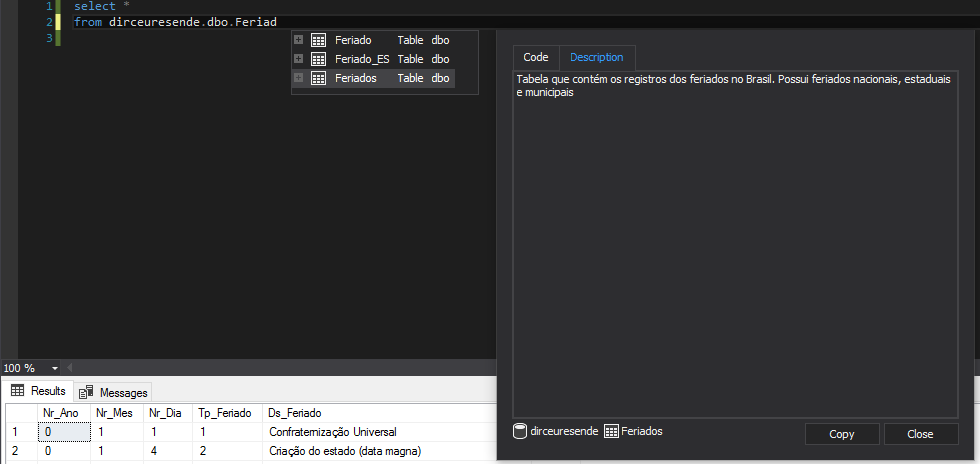
Apex SQL Complete
Tool free which aims to improve (A LOT) productivity when writing SQL Server queries in SSMS and is the main competitor of RedGate SQL Prompt.
One of the features of this tool is that it allows you to view metadata (Extended Property) of objects while you are programming, as shown below:
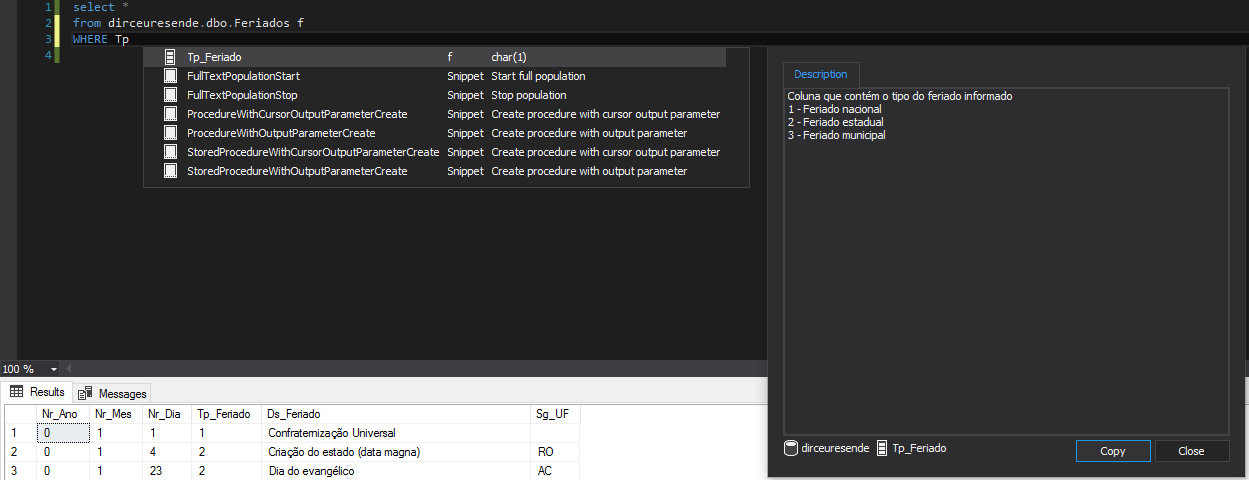
RedGate SQL Prompt
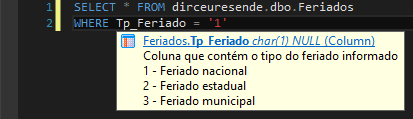
Commercial tool that aims to improve (a LOT) productivity when writing SQL Server queries in SSMS and is the market leader (rightfully so) in this segment. It really is a sensational resource, in which I even wrote an article SQL Server – Write T-SQL like a Ninja using Redgate SQL Prompt.
One of the features of this tool is that it allows you to view metadata (Extended Property) of objects while you are programming, as shown below:


RedGate SQLDoc
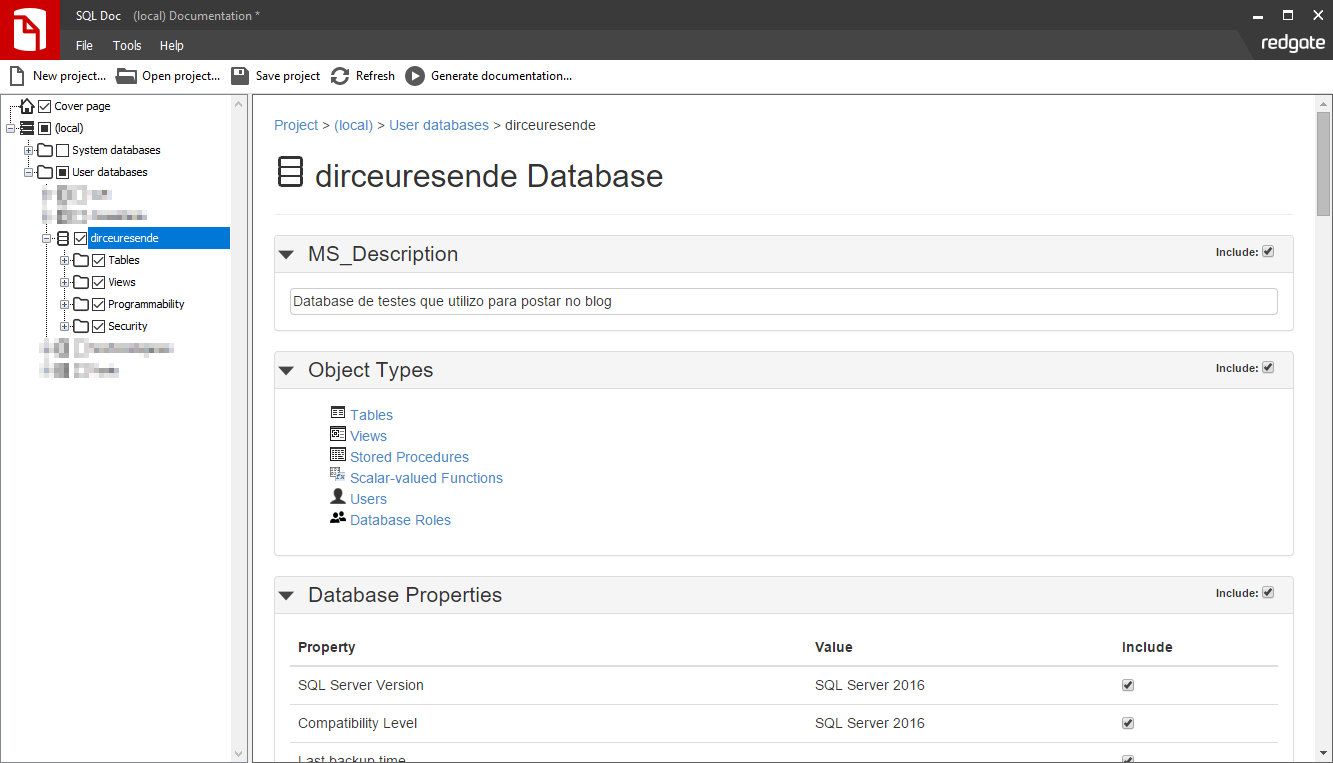
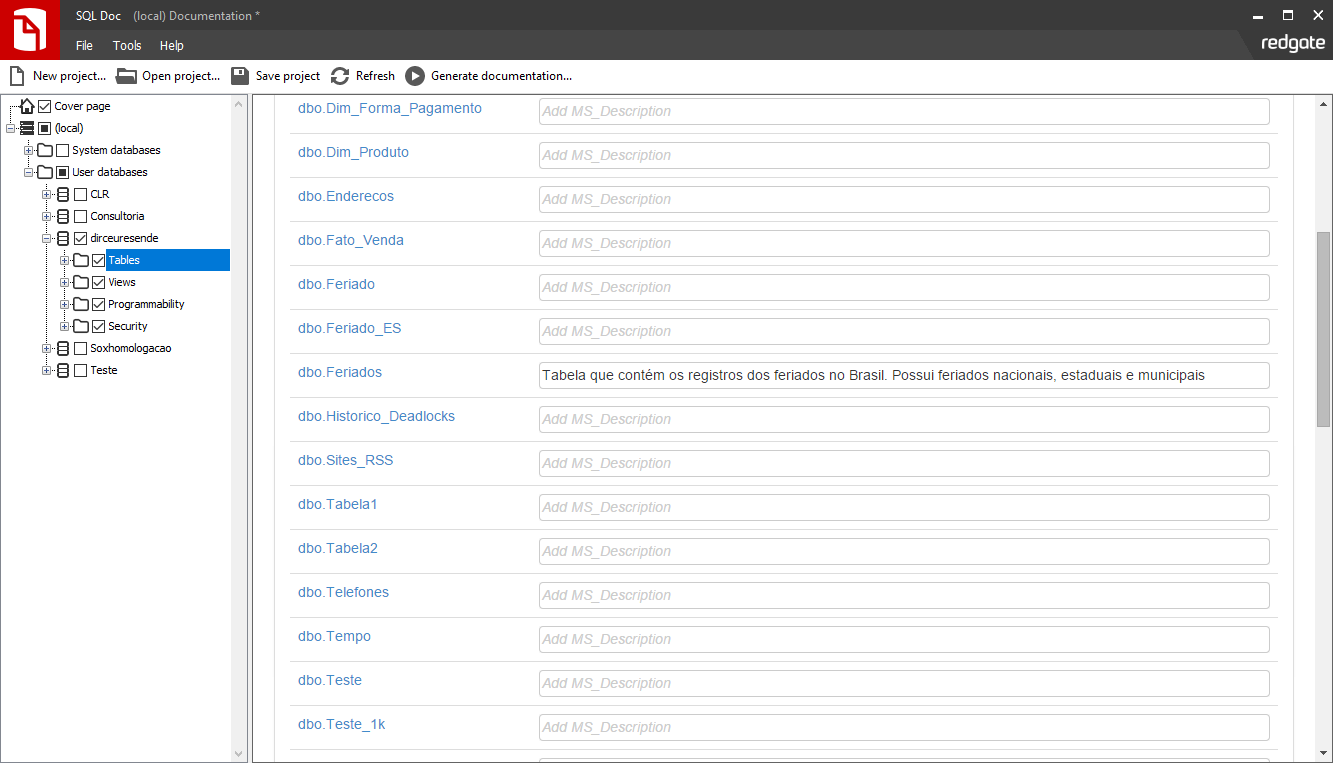
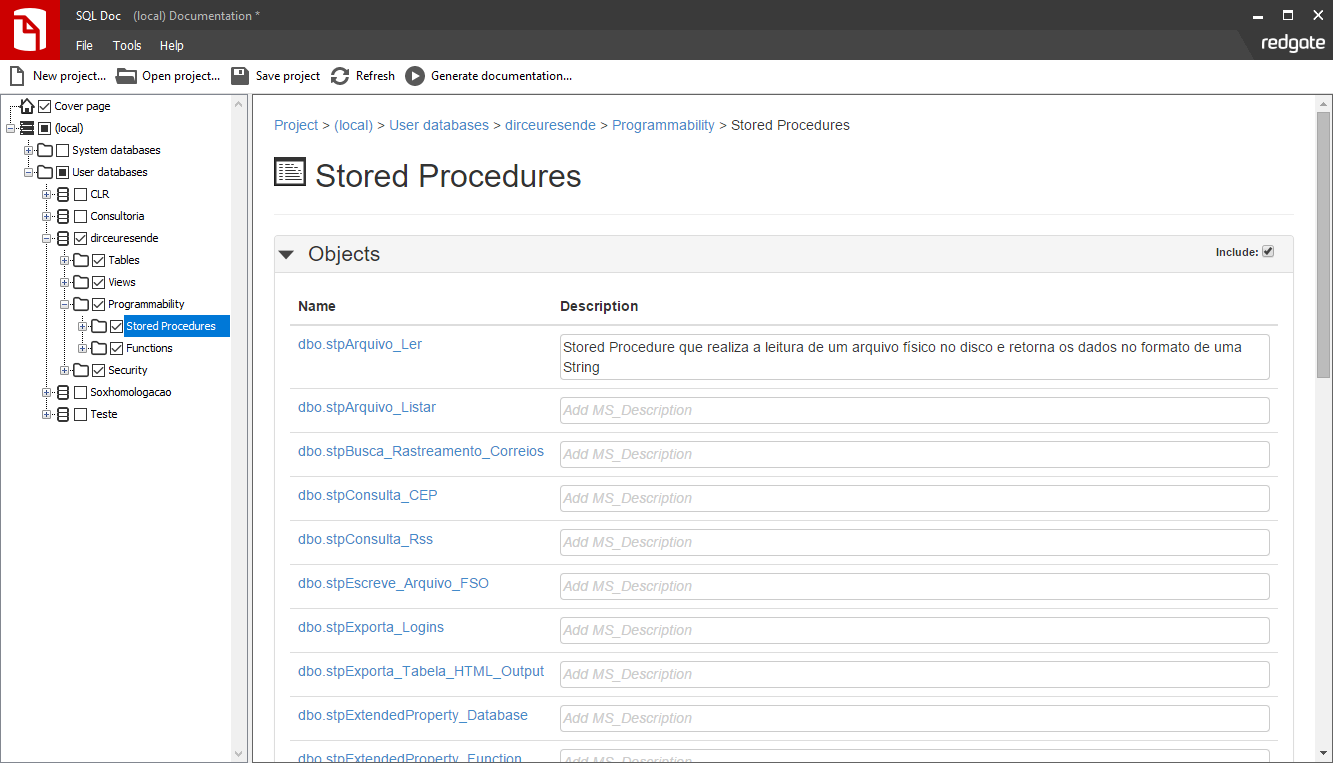
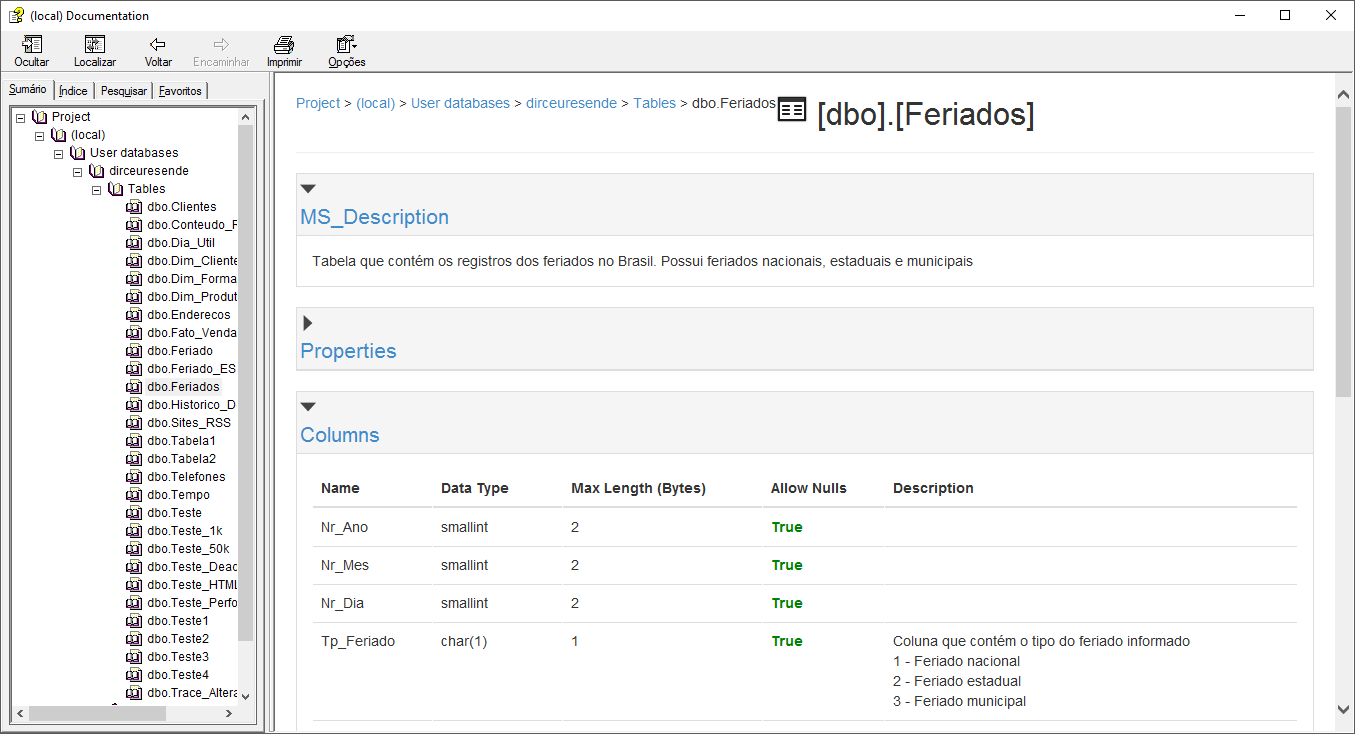
Using this commercial documentation tool from RedGate, you will be able to generate complete documentation of your databases, with information on statistics, indexes, tables, procedures and a series of technical information about your objects and instance databases, in addition to the metadata registered by you (Extended Property).
Examples:


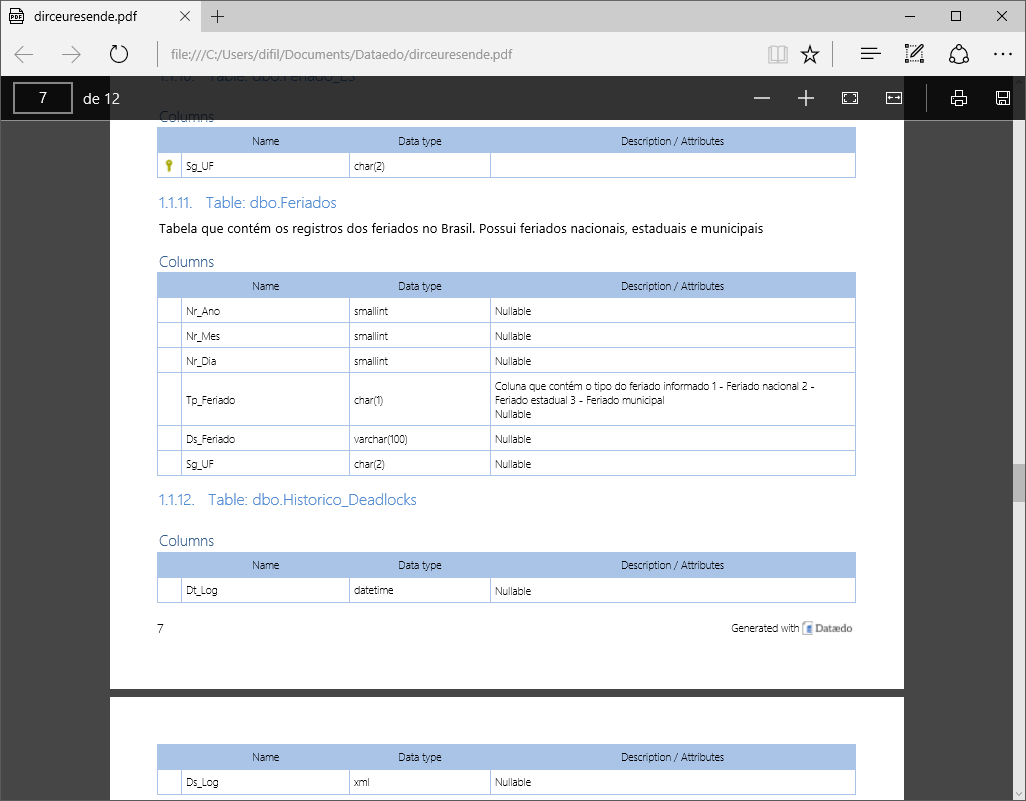
Dataedo
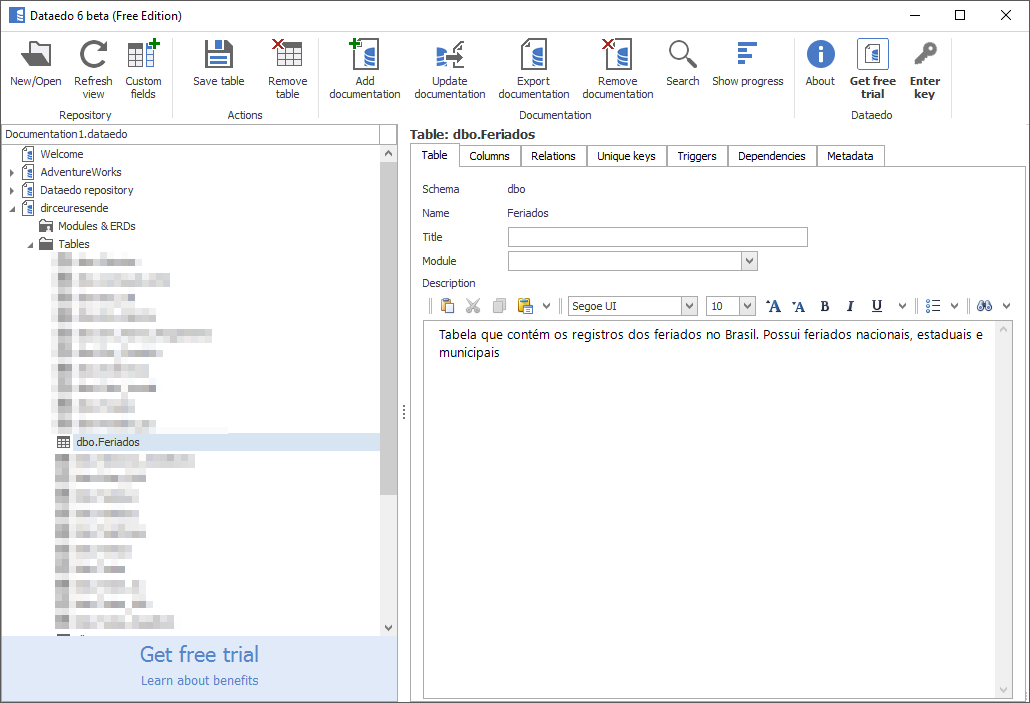
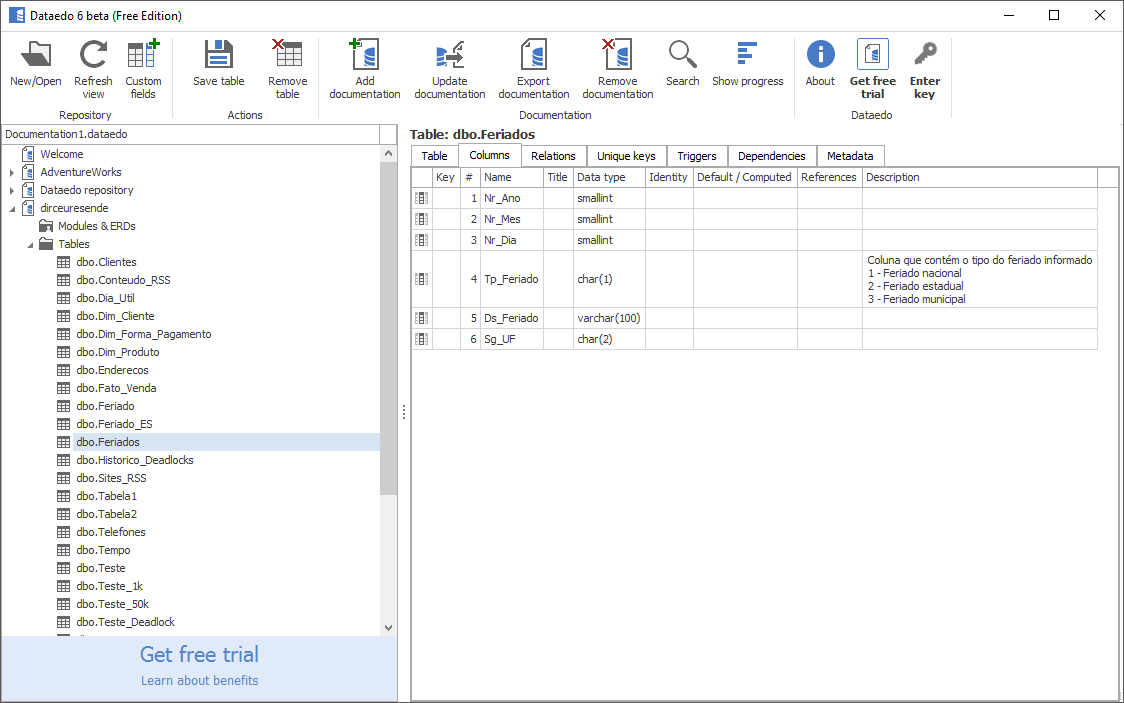
Using this commercial documentation tool (you can use a free, but with limitations), you will be able to generate complete documentation of your databases, with information on statistics, indexes, tables, procedures and a series of technical information about your objects and instance databases, in addition to the metadata registered by you (Extended Property).
Examples:
Want more options?
- ApexSQL Doc (examples)
- Dataedo
- DTM Schema Reporter (examples)
- dbdesc (examples)
- DBScribe 1.4 for SQL Server (examples)
- Document! X
- DOCxPRESS
- LiveDoco
- Red-Gate’s SQL Doc (demonstration)
- SchemaToDoc (examples)
- SQLDocKit
- SqlSpec (examples)
- SQL Data Dictionary
- SQLDoc
- SQL Documentation Tool (examples)
- SQL Help Builder
- T-SQL Source Code Unscrambler
- turtle SQL
Conclusion
As you can see, there are several ways to document and describe your database objects. And there are several tools to generate official documentation and also to view this information in real time, as you program.
Citing as an example a real case, in a certain company, there was documentation of bank objects, but in Excel spreadsheets shared on the network. This spreadsheet was not updated, the search for information was very poor and most people had to constantly search for the descriptions of each column in this spreadsheet, generating a huge waste of time for the BI and Development teams.
To improve the productivity of these teams, the DBA and I Caroline Goltara, we carried out a market analysis and chose the Redgate SQL Doc tool as the company's official documentation tool.
We imported, in an automated way, all the texts registered in the spreadsheets into the database (using the SP's demonstrated in this post) and the project was very successful, as this greatly speeded up the teams' productivity, as they used SQL Prompt there, loading the documentation metadata as soon as it was updated in the database.
Furthermore, the documentation generated in HTML format was made available on a Web server, updated and accessible to everyone.
I hope you liked this post and that it can be useful to you.
A hug and see you later.

Comments (0)
Loading comments...