
Hey guys!!!
In this article I would like to demonstrate how to improve the security of your SQL Server instances in a very simple way and using a combination of Concealment and Access Restriction techniques (remembering that in Security we have 3 main techniques: Concealment, Access Restriction and Encryption).
What I would like to discuss in this article is the VIEW ANY DATABASE privilege, granted by default to the public role, which, as the name suggests, allows all logins to the instance to be able to view all the databases created in it.
Through the Access Restriction technique, we will remove this privilege from the public role, so that through concealment, a possible attacker will not be able to identify the name of the instance's databases, making the success of their attacks very difficult.
A very common scenario that occurs on a daily basis is that the same instance houses several different applications. There is no point in protecting your application and your bank using all good practices, if one of these applications that shares the server has vulnerabilities and the user connecting to the bank has the sysadmin profile, for example, or even has restricted access but exposes the name of all the databases that are in the instance.
To demonstrate that this really exists, you can use the query below to identify users who have this permission in the bank:
SELECT
    A.[name],
    A.[sid],
    A.[type_desc],
    A.is_disabled,
    B.[permission_name],
    B.state_desc
FROM
    sys.server_principals A
    JOIN sys.server_permissions B ON A.principal_id = B.grantee_principal_id
WHERE
    B.[permission_name] = 'VIEW ANY DATABASE'
    AND B.[state] IN ('G', 'W')
Result:

Or if you only believe in practice tests, here we go:
USE [master]
GO
CREATE LOGIN [teste_view_any_database] WITH PASSWORD=N'teste123', DEFAULT_DATABASE=[master], CHECK_EXPIRATION=OFF, CHECK_POLICY=OFF
GO
I created the login “teste_view_any_database” with just the above command, without giving ANY permissions to this user. I'll connect to the instance with it and let's see what I can do:
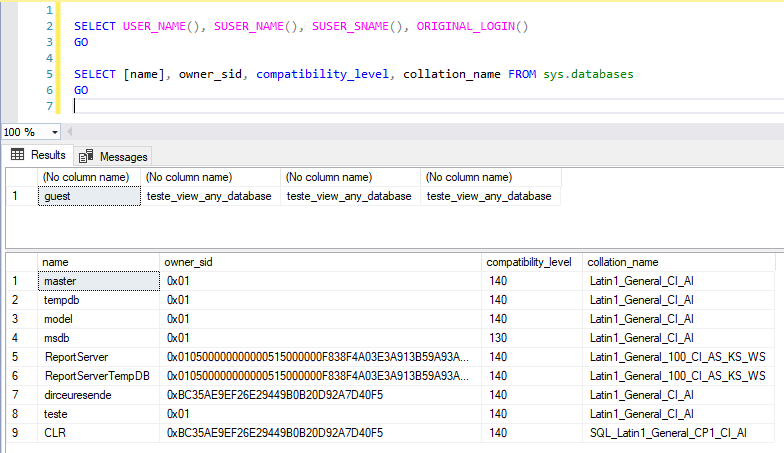
Without any permissions, I was able to list all databases and their properties. Now I'm going to remove the VIEW ANY DATABASE permission from the public role and test again:
REVOKE VIEW ANY DATABASE FROM [public]
GO
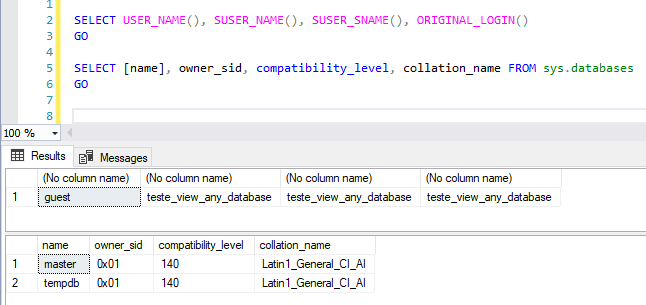
Now I will grant read access to one of the bases:
USE [dirceuresende]
GO

CREATE USER [teste_view_any_database] FOR LOGIN [teste_view_any_database]
GO

ALTER ROLE [db_datareader] ADD MEMBER [teste_view_any_database]
GO
Now I'm going to test whether the user can consult the data normally in the tables and whether he can consult information from this database:

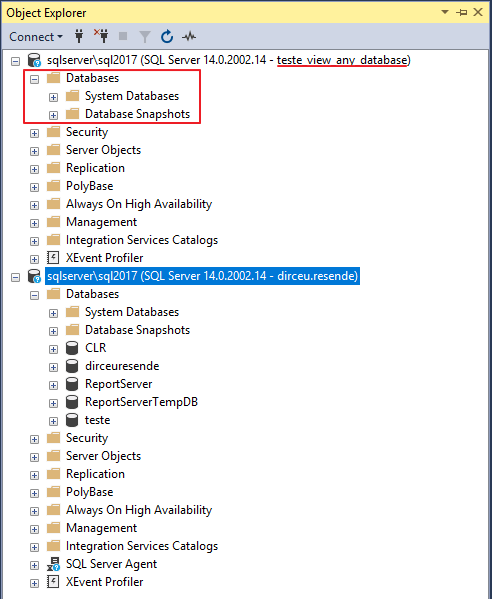
As you can see above, after removing this permission, the user can normally consult the data. What it will no longer be able to do is consult instance information through the DMV's sys.databases and sys.sysdatabases, nor open the list of databases through SQL Server Management Studio nor in the Object Explorer:
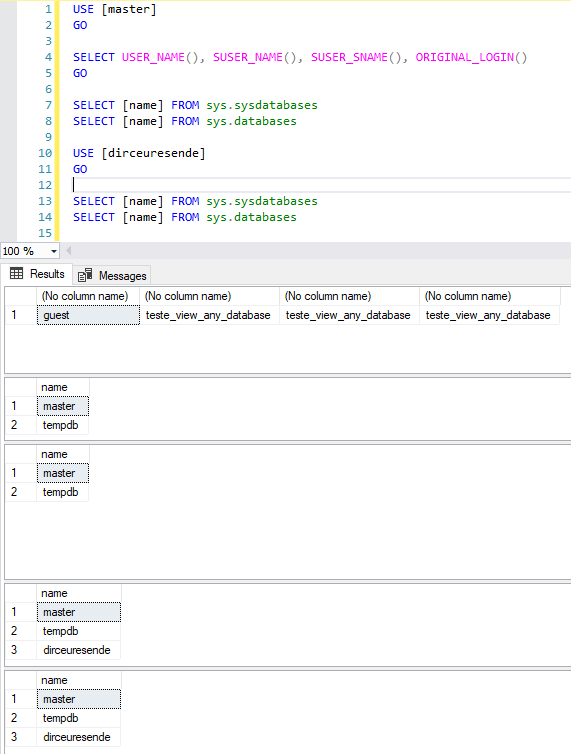
Even WITHOUT the VIEW ANY DATABASE permission, the login can use the USE [database] statement to switch between the active databases of the session in which they have access (CONNECT permission). When changing the session database, you will be able to consult the data from that database in the DMV’s sys.databases and sys.sysdatabases normally:
It is important to highlight that, if this user is the owner of the database (db_owner), he will be able to list this database even without VIEW ANY DATABASE permission:
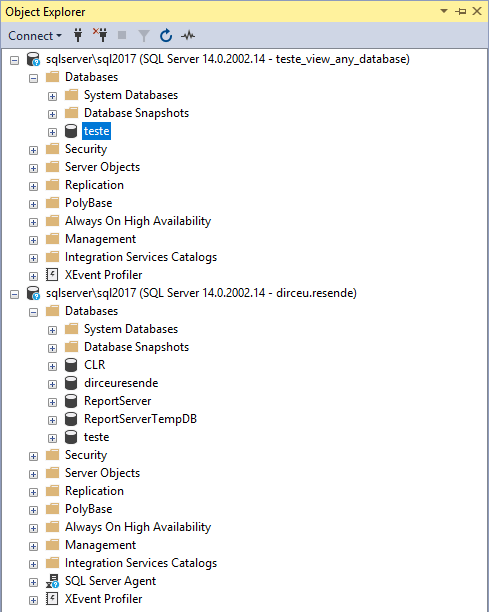
However, I understand that for a user who makes bank inquiries, this can be disruptive and greatly reduce their productivity. Therefore, a compromise would be to remove this permission from the public role and create a new role, which has this permission, but only human users (without system users) are part of this role:
USE [master]
GO

CREATE SERVER ROLE [Acesso_ViewAnyDatabase]
GO

GRANT VIEW ANY DATABASE TO [Acesso_ViewAnyDatabase]
GO

ALTER SERVER ROLE [Acesso_ViewAnyDatabase] ADD MEMBER [teste_view_any_database]
GO
In many companies, systems often use logins with SQL Server authentication and people connect using AD authentication. In this scenario, administration can be made even easier by adding the default AD group “Domain Users” to the Logins tab and releasing VIEW ANY DATABASE permission for this AD group. This way, all people users will be able to view the databases, but no system will have this access. The bad thing about this approach is that ALL AD users will have access to your database.
And finally, it is important to point out that I suggest not using DENY VIEW ANY DATABASE in the public role, since DENY overrides the GRANT permission and even granting specific access to users, the user will not be able to list the databases.
Remembering that sysadmin users can list databases normally even with REVOKE or DENY of this permission for the public role.
IMPORTANT: BEFORE removing this permission in production, TEST your systems several times to ensure they will not have any impact. If your system needs to list the instance's databases for some operation, it will definitely have an impact (unless it is db_owner, but then we have a permission problem, huh...)
Well guys, I hope you liked this post.
I believe that with small measures, when applied together, we can improve the security of our environment and make the “work” of potential invaders much more difficult.
A big hug and see you later.

Comments (0)
Loading comments...