
Hey guys!
Are you all right?
In this quick post I will demonstrate to you how to identify the occurrences of a specific character in a string or table, that is, count how many times the character “X” appears in each line of a table.
For the examples below, I will use 2 CLR SPs that I demonstrated how to create (in addition to other alternatives, for those who do not want to use CLR) in the articles below:
- SQL Server – How to export and import files with tabular data (Ex: CSV) using the CLR (C#)
- Importing CSV files into SQL Server database
- SQL Server – How to import text files into the database (OLE Automation, CLR, BCP, BULK INSERT, OPENROWSET)
Today I had a problem importing a CSV file with more than 40 thousand lines and the routine, which has been running daily for a long time without problems, returned the error message below.
IF (OBJECT_ID('tempdb..##Saida') IS NOT NULL) DROP TABLE ##Saida
EXEC CLR.dbo.stpImporta_CSV
    @Ds_Caminho_Arquivo = N'C:\Users\difil\Desktop\Teste.csv', -- nvarchar(max)
    @Ds_Separador = N'|', -- nvarchar(max)
    @Fl_Primeira_Linha_Cabecalho = 0, -- bit
    @Nr_Linha_Inicio = 0, -- int
    @Nr_Linhas_Retirar_Final = 0, -- int
    @Ds_Tabela_Destino = N'##Saida', -- nvarchar(max)
    @Ds_Codificacao = N'utf-8' -- nvarchar(max)
Msg 6522, Level 16, State 1, Procedure stpImporta_CSV, Line 0 [Batch Start Line 0]
A .NET Framework error occurred during execution of user-defined routine or aggregate “stpImporta_CSV”:
System.ApplicationException: Error: The input array is greater than the number of columns in this table.
or
Msg 6522, Level 16, State 1, Procedure stpImporta_CSV, Line 0 [Batch Start Line 0] A .NET Framework error occurred during execution of user-defined routine or aggregate “stpImporta_CSV”: System.ApplicationException: Error : Input array is longer than the number of columns in this table.
From the description of the error, it was clear that there was some problem in my CSV (probably a pipe, which is my separator character in the file, in the middle of the strings). I thought about some solutions I could create to identify which record was wrong, such as using a cursor, while loop and until I came up with a VERY SIMPLE, quick and extremely effective solution: Our good old SELECT.
CREATE TABLE #dirceuresende (
    Ds_Texto VARCHAR(MAX)
)

INSERT INTO #dirceuresende
EXEC CLR.dbo.stpImporta_Txt
    @caminho = N'C:\Users\difil\Desktop\Teste.csv' -- nvarchar(max)

SELECT *
FROM #dirceuresende
Example of imported CSV – 2 pipes separating Name, Age and Email
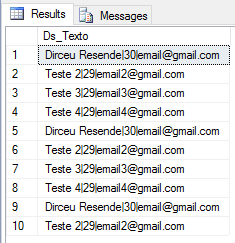
And now, with the query below, we can easily find out which records have a different number of pipes than the rest of the lines
SELECT *, LEN(Ds_Texto) - LEN(REPLACE(Ds_Texto, '|', '')) AS Qt_Pipes
FROM #dirceuresende
WHERE LEN(Ds_Texto) - LEN(REPLACE(Ds_Texto, '|', '')) != 2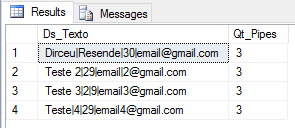
After that, just change the file, correct the lines and import again (and that's what I did in my case, where only 1 line had a problem).
The white space problem
In conversation with the Ariel Fernandez, he reminded me that when using the LEN() function, SQL Server applies an RTRIM() to the string implicitly, that is, if there are trailing white spaces, these spaces will be cut off in the calculation. For most cases, this will have no impact, but if the separator character we are looking for is exactly the space " ", this will be a problem:
-- 5 espaços em branco no inicio e no final da string
DECLARE @String VARCHAR(100) = N'     Dirceu 29 email     '
SELECT (LEN(@String) - LEN(REPLACE(@String, ' ', '')))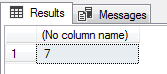
Notice that the string above has 5 blank spaces at the beginning and end of the string, as well as 2 more in the middle of the string which would be separators. When applying the LEN() function, the 5 trailing blank characters are removed and the final result will be 7 instead of 12.
To solve this problem, we can use the DATALENGTH function, which returns the number of bytes in a string (LEN returns the number of characters). With this, our query works correctly with the example above:
-- 5 espaços em branco no inicio e no final da string
DECLARE @String VARCHAR(100) = N'     Dirceu 29 email     '
SELECT (DATALENGTH(@String) - DATALENGTH(REPLACE(@String, ' ', '')))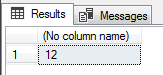
The DATALENGTH function and UNICODE strings
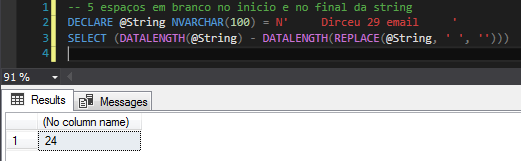
This solution seems to have solved our problem, but DATALENGTH has a peculiarity when we use Unicode data (NCHAR, NVARCHAR, etc.), as these data types record information in double-byte format, that is, 2 bytes are needed for each character in the string. As a result, the result of the DATALENGTH function ends up being doubled for these types of data, as shown below:
Using the SQL_VARIANT_PROPERTY function to identify the type of the variable
A more definitive solution to this would be to identify the type of input variable (or the type of the column) and if it is unicode, divide the datalength result by 2. To be able to identify the data type of our variable, we will use the SQL_VARIANT_PROPERTY() function:
DECLARE @String NVARCHAR(100) = N'     Dirceu 29 email     '

SELECT
    SQL_VARIANT_PROPERTY(@String, 'BaseType') AS [Base Type],
    SQL_VARIANT_PROPERTY(@String, 'Precision') AS [Precision],
    SQL_VARIANT_PROPERTY(@String, 'Scale') AS Scale,
    SQL_VARIANT_PROPERTY(@String, 'Collation') AS Collation,
    SQL_VARIANT_PROPERTY(@String, 'MaxLength') AS [MaxLength],
    SQL_VARIANT_PROPERTY(@String, 'TotalBytes') AS TotalBytes


DECLARE @String2 VARCHAR(100) = '     Dirceu 29 email     '

SELECT
    SQL_VARIANT_PROPERTY(@String2, 'BaseType') AS [Base Type],
    SQL_VARIANT_PROPERTY(@String2, 'Precision') AS [Precision],
    SQL_VARIANT_PROPERTY(@String2, 'Scale') AS Scale,
    SQL_VARIANT_PROPERTY(@String2, 'Collation') AS Collation,
    SQL_VARIANT_PROPERTY(@String2, 'MaxLength') AS [MaxLength],
    SQL_VARIANT_PROPERTY(@String2, 'TotalBytes') AS TotalBytes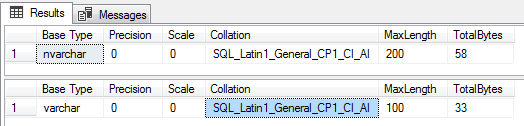
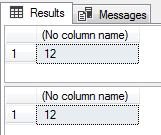
Now using this function for our needs, we can use it to identify the type of the variable and perform the correct calculation
Query evaluating a string in variable:
-- 5 espaços em branco no inicio e no final da string UNICODE
DECLARE @String NVARCHAR(100) = N'     Dirceu 29 email     '
SELECT (DATALENGTH(@String) - DATALENGTH(REPLACE(@String, ' ', ''))) / (CASE WHEN SQL_VARIANT_PROPERTY(@String, 'BaseType') = 'nvarchar' THEN 2 ELSE 1 END)

-- 5 espaços em branco no inicio e no final da string
DECLARE @String2 VARCHAR(100) = '     Dirceu 29 email     '
SELECT (DATALENGTH(@String2) - DATALENGTH(REPLACE(@String2, ' ', ''))) / (CASE WHEN SQL_VARIANT_PROPERTY(@String2, 'BaseType') = 'nvarchar' THEN 2 ELSE 1 END)
Query using a string in a table:
IF (OBJECT_ID('tempdb..#dirceuresende') IS NOT NULL) DROP TABLE #dirceuresende
CREATE TABLE #dirceuresende (
    Ds_Texto VARCHAR(4000)
)

INSERT INTO #dirceuresende
VALUES('     Dirceu 29 email      '), ('     Teste 30 email2      '), ('     Te ste 30 email2      ')


SELECT
    *,
    (DATALENGTH(Ds_Texto) - DATALENGTH(REPLACE(Ds_Texto, ' ', ''))) / (CASE WHEN SQL_VARIANT_PROPERTY(Ds_Texto, 'BaseType') = 'nvarchar' THEN 2 ELSE 1 END) AS Qt_Pipes
FROM
    #dirceuresende
WHERE
    (DATALENGTH(Ds_Texto) - DATALENGTH(REPLACE(Ds_Texto, ' ', ''))) / (CASE WHEN SQL_VARIANT_PROPERTY(Ds_Texto, 'BaseType') = 'nvarchar' THEN 2 ELSE 1 END) != 13
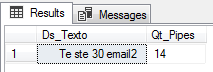
Identifying the record that has more spaces than the other lines:
SQL_VARIANT_PROPERTY function and strings with MAX size
Even with the above solution, we still have a potential problem. If the string or column is of type VARCHAR(MAX) or NVARCHAR(MAX), the SQL_VARIANT_PROPERTY() function presents errors when used. In this case, identifying the need to divide the result by 2 or not will have to be done by you, manually.
Example:
-- 5 espaços em branco no inicio e no final da string UNICODE
DECLARE @String NVARCHAR(MAX) = N'     Dirceu 29 email     '
SELECT (DATALENGTH(@String) - DATALENGTH(REPLACE(@String, ' ', ''))) / (CASE WHEN SQL_VARIANT_PROPERTY(@String, 'BaseType') = 'nvarchar' THEN 2 ELSE 1 END)

-- 5 espaços em branco no inicio e no final da string
DECLARE @String2 VARCHAR(MAX) = '     Dirceu 29 email     '
SELECT (DATALENGTH(@String2) - DATALENGTH(REPLACE(@String2, ' ', ''))) / (CASE WHEN SQL_VARIANT_PROPERTY(@String2, 'BaseType') = 'nvarchar' THEN 2 ELSE 1 END)
Result:
Msg 206, Level 16, State 2, Line 3
Operand type clash: nvarchar(max) is incompatible with sql_variant
Msg 206, Level 16, State 2, Line 7
Operand type clash: varchar(max) is incompatible with sql_variant
I hope you enjoyed this very simple and quick post and that this idea may be useful to you one day. If you want to know more about the differences between the LEN() and DATALENGTH() functions, take a read in this post here. It is in English, but it is very explanatory and complete.
Hugs!
How to identify occurrences of a specific character in a string or table count how many character characters string row
How to identify occurrences of a specific character in a string or table count how many character characters string row

Comments (0)
Loading comments...