In this post, I'm going to talk a little about the two OLEDB drivers most used in SQL Server for integrations with files, mainly Excel, which are Microsoft.ACE.OLEDB.12.0 and Microsoft.Jet.OLEDB.4.0. Once installed on the server, they allow you, through the database, to insert, query, update and delete data from Excel spreadsheets and text files using the OPENROWSET command.
OLE DB is an API developed by Microsoft based on COM. This API represents a COM interface library that allows universal access to files and also to various data sources, such as Oracle, SQL Server, Access databases and others.
How to check which OLEDB providers are installed
How to check which OLEDB providers are installed
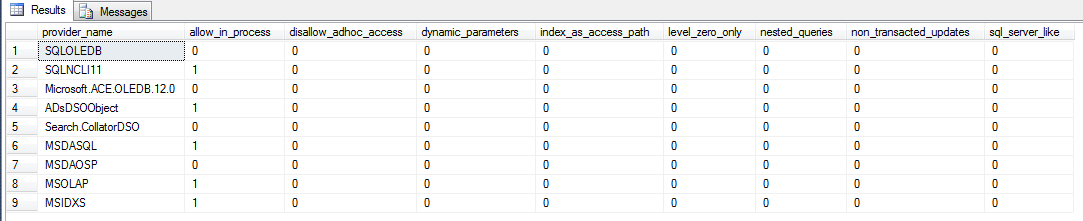
To check which providers you have installed, you can run this query:
EXEC master.dbo.sp_MSset_oledb_prop
SQL Server - Providers sp_MSset_oledb_prop
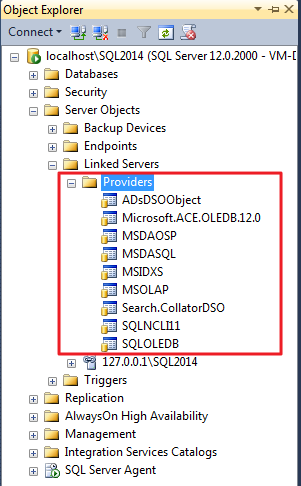
Or via Management Studio: SQL Server - Providers List
Differences between ACE OLEDB and Jet OLEDB
Differences between ACE OLEDB and Jet OLEDB
Very similar, but at the same time, different. For basic operations, such as INSERT, UPDATE, DELETE and SELECT, you will hardly notice any difference between these two OLEDB drivers, as they have the same parameters and work exactly the same way. But what changes between them? Why two drivers?
Launched in 1992, the JET driver has long served the needs of many developers, providing integrations between different data sources in an easy and practical way, abstracting technical issues. With the emergence of Windows on the x64 (64-bit) platform, JET began to no longer serve developers, since the driver only had native support on the x86 (32-bit) platform and to be able to access MDB banks and other data sources, it was necessary to use 32-bit software that acted as a proxy.
Aware of this scenario, Microsoft launched Office 2007, and with it, a new version of JET, now called Office Access Connectivity Engine (ACE), which allowed compatibility with JET 4.0 and its previous versions and supported the new Access format (.accdb), which brought several new features to Access, such as multi-valued fields, security improvements and encryption. Despite this, ACE did not maintain some important functions of JET version 4.0, such as user-level security and replication features.
With Access 2010, the ACE driver received support for the 64-bit platform, being considered, in essence, a 64-bit version of the JET driver.
Analyzing the 2 drivers, we see that they are very similar for simple operations, but when we involve union, join, nested queries and others, there is a good chance that the results will not be the same. The ACE driver does not have as much support for old files as JET, so much so that if you open these files in old versions of Access, for example, when you are performing a UNION on fields of type TEXT, where JET returns TEXT(255), ACE returns MEMO.
Therefore, if you are using a 32-bit operating system (which is currently not recommended), you can choose between ACE and JET. If you are using a 64-bit version, you will only be able to use ACE. My recommendation? Use ACE.
Installing the Microsoft Jet OLEDB driver
Installing the Microsoft Jet OLEDB driver
As I already mentioned, the JET OLEDB driver does not work in 64-bit environments. Therefore, I had to create another 32-bit VM to perform the installation and show it to you.
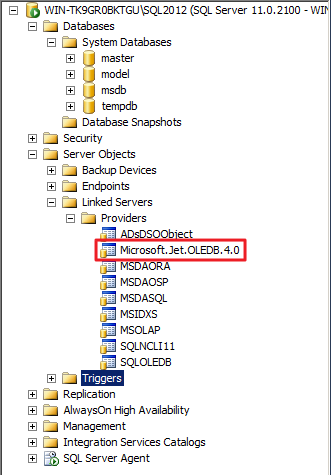
SQL Server - Microsoft.JET.OLEDB.4.0
As you can see, I am using Windows Server 2008 R2 x86 and SQL Server 2012 and the JET provider is now available for use without having to install anything. I just installed the operating system updates (newly installed) and then installed SQL Server.
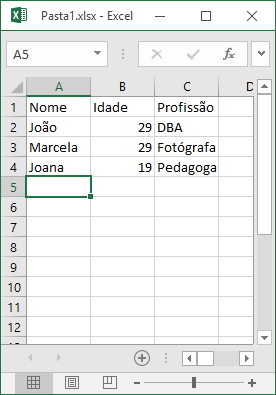
Example file: SQL Server - Microsoft ACE OLEDB 12.0 Openrowset Opendatasource Example File
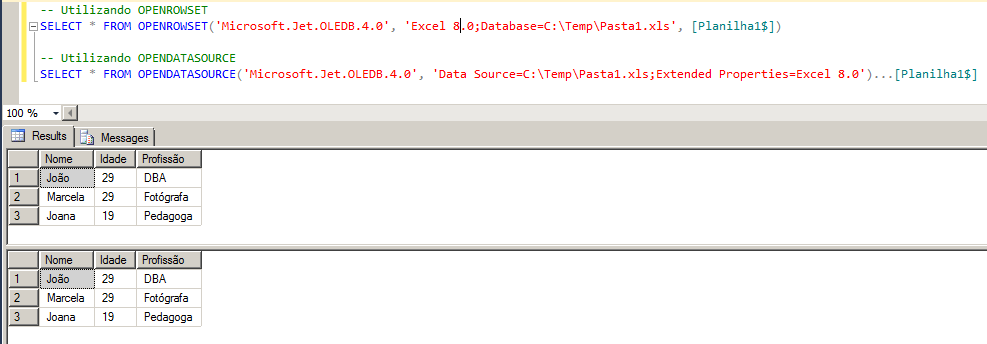
SQL Server - Microsoft.JET.OLEDB.4.0 OPENROWSET OPENDATASOURCE
Note that to use the JET driver, I had to convert my Office 2016 XLSX spreadsheet to the Office 2003 XLS format, and change the Excel version to 8.0 in my query.
If I try to import XLSX, we will see this error message:
Msg 7399, Level 16, State 1, Line 2
The OLE DB provider “Microsoft.Jet.OLEDB.4.0” for linked server “(null)” reported an error. The provider did not give any information about the error.
Msg 7303, Level 16, State 1, Line 2
Cannot initialize the data source object of OLE DB provider “Microsoft.Jet.OLEDB.4.0” for linked server “(null)”.
If I try to import the XLS, but don't change the Excel version to 8.0 in my query, we will see this error message:
OLE DB provider “Microsoft.Jet.OLEDB.4.0” for linked server “(null)” returned message “Unable to find installable ISAM.”.
Msg 7303, Level 16, State 1, Line 2
Cannot initialize the data source object of OLE DB provider “Microsoft.Jet.OLEDB.4.0” for linked server “(null)”.
The Microsoft.Jet.OLEDB.4.0 driver must be used on 32-bit operating systems, and supports Excel files up to version 2003. Above that, you must use ACE DB.
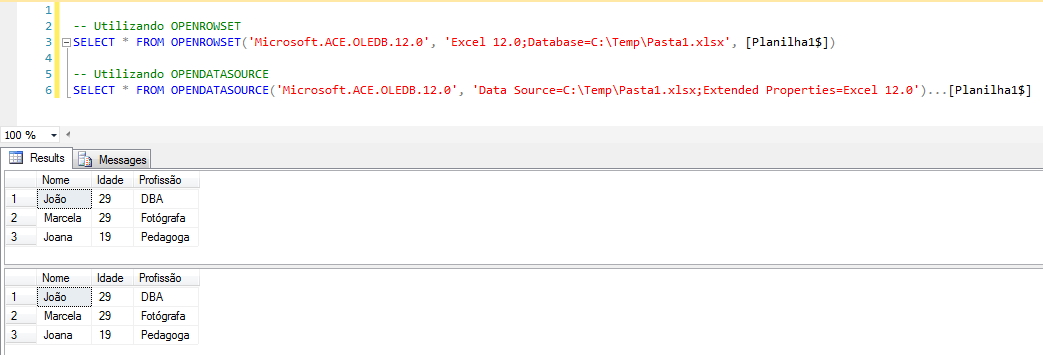
SQL Server - Microsoft ACE OLEDB 12.0 Openrowset Opendatasource
The Microsoft.ACE.OLEDB.12.0 driver can be used on 32-bit operating systems to open Excel files up to version 2007 and can be used on 64-bit operating systems and in this edition, it can open Excel files of any version.
It is worth noting that it is not possible to install the ACE OLEDB 64-bit driver if Microsoft Office 2007-2016 x86 (32-bit) is installed. In other words, if you are using SQL Server 64 bits and have installed Microsoft Office 32 bits, you will not be able to use the OPENROWSET/OPENDATASOURCE functions to open Excel files, and you may encounter this error message:
Msg 7403, Level 16, State 1, Line 1
The OLE DB provider “Microsoft.ACE.OLEDB.12.0” has not been registered.
How to enable distributed transactions
How to enable distributed transactions
One of the most common mistakes when using OLE DB providers is not enabling the Ad Hoc Distributed Queries feature. When this occurs, you will encounter this error message:
Msg 15281, Level 16, State 1, Line 1
SQL Server blocked access to STATEMENT ‘OpenRowset/OpenDatasource’ of component
‘Ad Hoc Distributed Queries’ because this component is turned off as part of
the security configuration for this server.
A system administrator can enable the use of ‘Ad Hoc Distributed Queries’
by using sp_configure.
For more information about enabling ‘Ad Hoc Distributed Queries’,
see “Surface Area Configuration” in SQL Server Books Online.
To solve this problem, it's very simple:
sp_configure 'Show Advanced Options', 1;
RECONFIGURE;
GO
sp_configure 'Ad Hoc Distributed Queries', 1;
RECONFIGURE;
GO
Configuring ACE OLEDB properties
Configuring ACE OLEDB properties
Another problem that may occur when trying to use the Microsoft ACE OLEDB driver is not enabling the AllowInProcess and DynamicParameters features and encountering the error message below:
Msg 7399, Level 16, State 1, Line 1
The OLE DB provider “Microsoft.ACE.OLEDB.12.0” for linked server “(null)” reported an error. The provider did not give any information about the error.
Msg 7330, Level 16, State 2, Line 1
Cannot fetch a row from OLE DB provider “Microsoft.ACE.OLEDB.12.0” for linked server “(null)”.
If this happens to you, simply run the commands below to enable these features:
EXEC master.dbo.sp_MSset_oledb_prop N'Microsoft.ACE.OLEDB.12.0', N'AllowInProcess', 1
GO
EXEC master.dbo.sp_MSset_oledb_prop N'Microsoft.ACE.OLEDB.12.0', N'DynamicParameters', 1
GO
Granting permissions to the TEMP directory (32-bit)
Granting permissions to the TEMP directory (32-bit)
This type of problem only occurs with SQL Server x86 (32 bits) and therefore should not bother so many people. This occurs because SQL Server creates temporary files during the execution of queries that use the provider, using the credentials of the user executing the query. The error message generated is something like this:
OLE DB provider “Microsoft.Jet.OLEDB.4.0” for linked server “(null)” returned message “Unspecified error”.
Msg 7303, Level 16, State 1, Line 1
Cannot initialize the data source object of OLE DB provider “Microsoft.Jet.OLEDB.4.0” for linked server “(null)”.
If SQL Server is running using the Network Service account, the temporary directory should be something like: C:\Windows\ServiceProfiles\NetworkService\AppData\Local\Temp
If SQL Server is running using the Local Service account, the temporary directory should be something like: C:\Windows\ServiceProfiles\LocalService\AppData\Local\Temp
In this case, we must grant read and write permission to all users in that directory or only to users who execute this type of query. This can be done with a command similar to this:
In the example above, I created the command to define permissions in case the SQL Server is running using the NetworkService account and the user used to execute the queries is “vs”.
That's it, folks!
Hugs and see you in the next post.


Comments (0)
Loading comments...