
A very common mistake among SQL developers is about the differences between the ISNULL and COALESCE functions, where the vast majority of people believe that it is just the fact that the ISNULL function allows only 1 input parameter to analyze null values, while the COALESCE function allows you to pass N input parameters.
However, there is another, very important difference that many people end up not paying attention to and that can make you spend a lot of time trying to debug a problem and that is what I will explain in this article.
I had an ETL process that gave an error because of this difference in data types between ISNULL and COALESCE and I ended up creating this article because I understood that other people might end up wasting time trying to understand what happened.
Difference #1 – Number of function parameters
The first big difference and the best known between the ISNULL and COALESCE functions is the number of parameters that the functions accept.
Creation of the test base
IF (OBJECT_ID('tempdb..#Teste1') IS NOT NULL) DROP TABLE #Teste1
CREATE TABLE #Teste1 (
   Coluna1 NUMERIC(10, 2),
   Coluna2 NUMERIC(10, 2),
   Coluna3 NUMERIC(10, 2)
)

INSERT INTO #Teste1
VALUES
    ('255.55', '4755.12', '145.55'),
    (NULL, NULL, NULL),
    (NULL, '4755.12', NULL),
    (NULL, NULL, '145.55')
Example:

Return the first non-null value of each row or 0 if all columns are NULL
-- COM ISNULL
SELECT
    ISNULL(Coluna1, ISNULL(Coluna2, ISNULL(Coluna3, 0)))
FROM
    #Teste1


-- COM COALESCE
SELECT
    COALESCE(Coluna1, Coluna2, Coluna3, 0)
FROM
    #Teste1
Result:
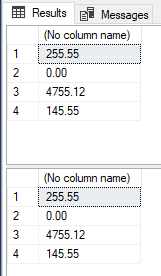
As we can see in the code above, the ISNULL function only accepts one input parameter, which can be a column or a value, and a parameter for you to define the replacement value if the first parameter is null. If you want to make comparisons between several columns/values, you will have to use the function several times, nested.
The COALESCE function, on the other hand, accepts several input parameters (at least 2 parameters and no maximum defined), making the use of this function simpler than ISNULL.
Difference #2 – Return data type
A difference that many people end up not noticing is in relation to the return data type: While the ISNULL function considers the data type of the first column as the function return data type, the COALESCE function return data type will be the same data type of the parameter that will be returned (the first non-null one).
In practice, this scenario causes the two functions to behave very differently.
Creation of the test base
IF (OBJECT_ID('tempdb..#Teste2') IS NOT NULL) DROP TABLE #Teste2
CREATE TABLE #Teste2 (
    Codigo INT,
    Valor VARCHAR(100)
)

INSERT INTO #Teste2
VALUES(1, '255.55'), (1, '0'), (2, '1'), (3, '1.99'), (4, NULL)
Let's return the largest value in the table grouped by code:
SELECT Codigo, MAX(Valor)
FROM #Teste2
GROUP BY Codigo
Result:
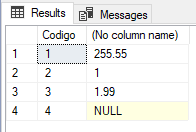
Hmm.. Code 4 returned NULL. I want to replace this value with 0 (zero).
SELECT Codigo, MAX(ISNULL(Valor,  0))
FROM #Teste2
GROUP BY Codigo
Result:
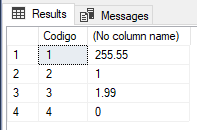
It worked as expected. But I prefer to use the COALESCE function, so I'll change the SQL code to use it:
SELECT Codigo, MAX(COALESCE(Valor,  0))
FROM #Teste2
GROUP BY Codigo
Result:
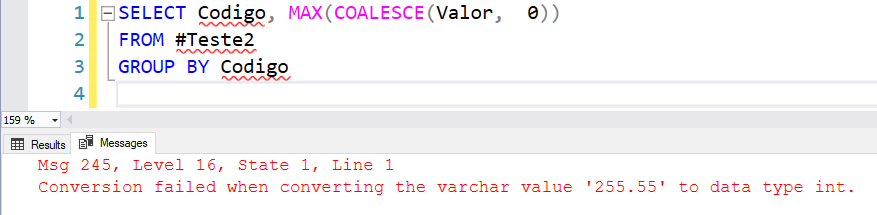
Error message:
Conversion failed when converting the varchar value ‘255.55’ to data type int.
What could have happened? With the ISNULL function it worked, but with the COALESCE function it gave an error!
This happens because, as I explained above, the return of the ISNULL function considers the data type of the first parameter, which is the Value column (VARCHAR). So the return of the function is the value ‘0’ (zero converted to string).
In the COALESCE function, the return data type is the same as the first non-null value, which would be the integer value 0 (zero). And with that, SQL will generate an error message when trying to convert the value '255.55' (as a string) to the integer data type (int):
Practical example:

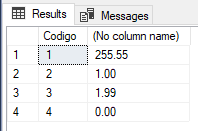
If you still want to use the COALESCE function, you will have to convert the input parameters to a common type so that all parameters can be converted by SQL Server.
SELECT
    Codigo,
    MAX(
        COALESCE(
            CAST(Valor AS NUMERIC(18, 2)
        ),  0)
    )
FROM
    #Teste2
GROUP BY
    Codigo
Result:
Difference #3 – Nullity of function return
Another difference that people don't pay attention to is the invalidity of the function's return. The null returned by the ISNULL function is always of the non-null type (NOT NULL) (assuming that the returned value is not null). On the other hand, the COALESCE function always returns data with the null type (NULL), even if the function returns a non-null value.
To make it easier to demonstrate, I will prepare two examples for you to visualize this better:
Example 1
I will create a table and use columns calculated with the ISNULL and COALESCE functions.
IF (OBJECT_ID('tempdb..#Teste2') IS NOT NULL) DROP TABLE #Teste2
CREATE TABLE #Teste2 (
    Valor VARCHAR(100) NOT NULL,
    ValorNaoNulo1 AS (ISNULL(Valor, 0)),
    ValorNaoNulo2 AS (COALESCE(Valor, 0)),
)
Let's look at the data type and nullability options for these columns:
SELECT
    A.[name],
    A.column_id,
    C.[name],
    A.max_length,
    A.[precision],
    A.scale,
    A.is_nullable
FROM
    tempdb.sys.columns     A
    JOIN tempdb.sys.tables B ON A.[object_id] = B.[object_id]
    JOIN tempdb.sys.types  C ON A.system_type_id = C.user_type_id
WHERE
    B.[name] LIKE '#Teste2%';
Result:
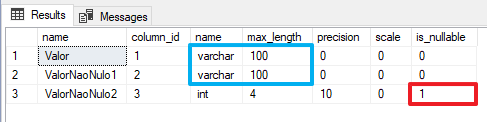
As we can see above, the data type of the ISNULL function followed the same type as the first parameter (Column Value = VARCHAR(100)), while the COALESCE function used as its return type the type of the first parameter that is guaranteed not to be null, which was the value 0 (zero), an integer.
Furthermore, the calculated column created using the ISNULL function was created with the null determined as NOT NULL, while the column created using the COALESCE function was created with the null determined as NULL, even though it always returns a non-null value because the last parameter is a fixed value 0.
That is, even though the COALESCE function always returns a non-null value in this example, the nullability of the column was defined as accepting null values.
Example 2
This example can already give you a headache if you try to create a primary key using calculated columns and the COALESCE function.
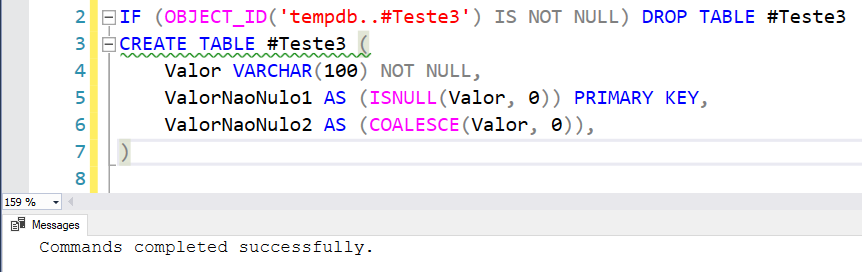
The command below works normally, creating a primary key in the “ValorNaoNulo1” column, being a column calculated using the ISNULL function:
IF (OBJECT_ID('tempdb..#Teste3') IS NOT NULL) DROP TABLE #Teste3
CREATE TABLE #Teste3 (
    Valor VARCHAR(100) NOT NULL,
    ValorNaoNulo1 AS (ISNULL(Valor, 0)) PRIMARY KEY,
    ValorNaoNulo2 AS (COALESCE(Valor, 0)),
)
Result:
However, if we try to create a primary key in the ValorNaoNulo2 column, which is a column calculated using the COALESCE function, we will see an error message:
IF (OBJECT_ID('tempdb..#Teste3') IS NOT NULL) DROP TABLE #Teste3
CREATE TABLE #Teste3 (
    Valor VARCHAR(100) NOT NULL,
    ValorNaoNulo1 AS (ISNULL(Valor, 0)),
    ValorNaoNulo2 AS (COALESCE(Valor, 0)) PRIMARY KEY,
)
Result:

Error message:
Cannot define PRIMARY KEY constraint on column ‘ValorNaoNulo2’ in table ‘#Teste3’. The computed column has to be persisted and not nullable.
Msg 1750, Level 16, State 0, Line 3
Could not create constraint or index. See previous errors.
As the error message makes clear, this happened because the calculated column was created allowing null values (because of the use of the COALESCE function) and to create a primary key, the column must have nullability set to NOT allowing null values (NOT NULL).
So that's it, folks!
I hope you liked this tip and a big hug!
References:
– https://docs.microsoft.com/en-us/sql/t-sql/functions/isnull-transact-sql
– https://docs.microsoft.com/en-us/sql/t-sql/language-elements/coalesce-transact-sql

Comments (0)
Loading comments...