Warning: preg_match(): Unknown modifier 'b' in /mnt/datadisk/www/src/Controllers/PostController.php on line 206 Querying Correios object tracking through SQL Server — Dirceu ResendeSkip to content
In today's post I'm going to bring something really cool, which is a Transact-SQL stored procedure where it is possible to query and track information about orders and objects using data from the Correios website itself in SQL Server. To do this, I will use the MSXML2.ServerXMLHTTP object and OLE Automation procedures.
This is very useful for e-Commerce companies that can use this SP to integrate Correios tracking into their systems and display the delivery progress of their products on the screen.
Before we start, let’s look at some prerequisites for using this procedure.:
– Enable the OLE Automation feature on your SQL Server server (see how in this post)
– fncRemove_HTML function to remove HTML tags from a varchar string (see more in this post)
– fncSplit_Texto function to break a string into substrings using a delimiter (see more in this post)
An important detail that I observed in the development of this SP is that if the number of characters in the XML returned by the sp_OAGetProperty procedure is greater than 4000 characters, the SP's return will be NULL, since the sp_OAGetProperty procedure has this limitation of 4000 characters. To get around this problem, instead of using an OUTPUT variable to capture the data, I insert it into a temporary table and then work with the data. 🙂
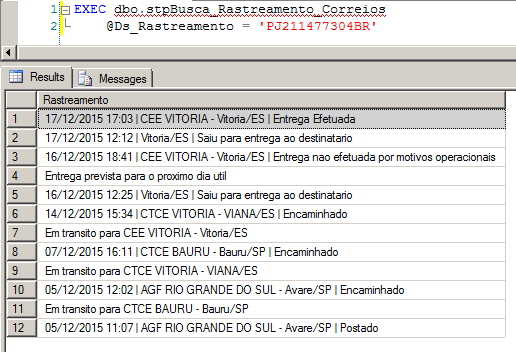
Examples of using SP
SQL Server - Object Tracking Postal Parcels
Implementing the Stored Procedure in your database
View source code
CREATE PROCEDURE [dbo].[stpBusca_Rastreamento_Correios] (
    @Ds_Rastreamento VARCHAR(13)
)
AS BEGIN


    SET NOCOUNT ON


    ------------------------------------------------------------------------
    -- RECUPERAÇÃO DAS INFORMAÇÕES
    ------------------------------------------------------------------------

    DECLARE
        @obj INT,
        @Url VARCHAR(8000),
        @xml VARCHAR(MAX),
        @resposta VARCHAR(MAX)


    IF (OBJECT_ID('tempdb..#xml') IS NOT NULL) DROP TABLE #xml
    CREATE TABLE #xml (
        Ds_Dados VARCHAR(MAX)
    )


    SET @Url = 'http://websro.correios.com.br/sro_bin/txect01$.QueryList?P_LINGUA=001&P_TIPO=001&P_COD_UNI=' + @Ds_Rastreamento


    EXEC sys.sp_OACreate @progid = 'MSXML2.ServerXMLHTTP', @objecttoken = @obj OUT, @context = 1
    EXEC sys.sp_OAMethod @obj, 'open', NULL, 'GET', @Url, false
    EXEC sys.sp_OAMethod @obj, 'setRequestHeader', NULL, 'Content-Type', 'application/x-www-form-urlencoded'
    EXEC sys.sp_OAMethod @obj, 'send'


    INSERT INTO #xml(Ds_Dados)
    EXEC sys.sp_OAGetProperty @obj, 'responseText' --, @resposta OUT


    EXEC sys.sp_OADestroy @obj


    SELECT TOP 1 @resposta = Ds_Dados FROM #xml


    SET @xml = @resposta COLLATE SQL_Latin1_General_CP1251_CS_AS


    ------------------------------------------------------------------------
    -- TRATAMENTO DOS DADOS
    ------------------------------------------------------------------------

    SET @xml = REPLACE(@xml, '</td><td>', ' | ')


    IF (OBJECT_ID('tempdb..#Dados') IS NOT NULL) DROP TABLE #Dados
    SELECT
        ROW_NUMBER() OVER(ORDER BY Id) AS Linha,
        LTRIM(RTRIM(REPLACE(Palavra, CHAR(13), ''))) AS Palavra
    INTO
        #Dados
    FROM
        dbo.fncSplitTexto(dbo.fncRemove_HTML(@xml), CHAR(10))
    WHERE
        NULLIF(REPLACE(Palavra, CHAR(13), ''), '') IS NOT NULL

    SELECT * FROM #Dados

    ------------------------------------------------------------------------
    -- RESULTADO FINAL
    ------------------------------------------------------------------------

    DECLARE @Qt_Linhas INT = (SELECT COUNT(*) FROM #Dados)

    IF ((SELECT COUNT(*) FROM #Dados WHERE Palavra LIKE '%nao possui dados sobre o objeto%') > 0)
    BEGIN

        SELECT Palavra AS Rastreamento
        FROM #Dados
        WHERE Palavra LIKE '%nao possui dados sobre o objeto%'

    END
    ELSE BEGIN

        SELECT Palavra AS Rastreamento
        FROM #Dados
        WHERE Linha > 7
        AND Linha < @Qt_Linhas

    END

END
That's it!
Did you like this procedure? Now you can create monitoring for your orders.. lol
sql server tsql transact sql query tracking orders objects mail
sql server tsql transact sql query tracking orders objects mail
Dirceu Resende
Database & BI Architect · Microsoft MVP · MCSE, MCSA, MCT, MTA, MCP.


Comentários (0)
Carregando comentários…