
Introduction
With the advent of GDPR, companies' concern with data security is growing more and more, and an area that was previously sometimes left aside is now in the spotlight more than ever. As a result, IT professionals, especially DBAs, have been looking for ways to reduce the risks of data exposure and one of the ways to do this is by encrypting data to prevent unauthorized access by third parties.
My idea in this article is to demonstrate a SQL Server solution that allows you to encrypt data, which is what Transparent Data Encryption (TDE), available since version 2008 of SQL Server, in Enterprise and Developer editions.
Don't forget to check out my post SQL Server 2016 – How to encrypt your data using Always Encrypted, another SQL Server data encryption solution, available since version 2016, in Express, Standard, Enterprise and Developer editions.
For the examples below, I will use the following script to generate the base:
IF (OBJECT_ID('dbo.Pessoa') IS NOT NULL) DROP TABLE dbo.Pessoa
CREATE TABLE dbo.Pessoa
(
    [Name] NVARCHAR(101),
    [BirthDate] DATE,
    [EmailAddress] NVARCHAR(50),
    [Phone] NVARCHAR(20)
)

INSERT INTO dbo.Pessoa
VALUES
( N'Jon Yang', N'1971-10-06T00:00:00', N'jon24@adventure-works.com', N'1 (11) 500 555-0162' ),
( N'Eugene Huang', N'1976-05-10T00:00:00', N'eugene10@adventure-works.com', N'1 (11) 500 555-0110' ),
( N'Ruben Torres', N'1971-02-09T00:00:00', N'ruben35@adventure-works.com', N'1 (11) 500 555-0184' ),
( N'Christy Zhu', N'1973-08-14T00:00:00', N'christy12@adventure-works.com', N'1 (11) 500 555-0162' ),
( N'Elizabeth Johnson', N'1979-08-05T00:00:00', N'elizabeth5@adventure-works.com', N'1 (11) 500 555-0131' ),
( N'Julio Ruiz', N'1976-08-01T00:00:00', N'julio1@adventure-works.com', N'1 (11) 500 555-0151' ),
( N'Janet Alvarez', N'1976-12-02T00:00:00', N'janet9@adventure-works.com', N'1 (11) 500 555-0184' ),
( N'Marco Mehta', N'1969-11-06T00:00:00', N'marco14@adventure-works.com', N'1 (11) 500 555-0126' ),
( N'Rob Verhoff', N'1975-07-04T00:00:00', N'rob4@adventure-works.com', N'1 (11) 500 555-0164' ),
( N'Shannon Carlson', N'1969-09-29T00:00:00', N'shannon38@adventure-works.com', N'1 (11) 500 555-0110' ),
( N'Jacquelyn Suarez', N'1969-08-05T00:00:00', N'jacquelyn20@adventure-works.com', N'1 (11) 500 555-0169' ),
( N'Curtis Lu', N'1969-05-03T00:00:00', N'curtis9@adventure-works.com', N'1 (11) 500 555-0117' ),
( N'Lauren Walker', N'1979-01-14T00:00:00', N'lauren41@adventure-works.com', N'717-555-0164' ),
( N'Ian Jenkins', N'1979-08-03T00:00:00', N'ian47@adventure-works.com', N'817-555-0185' ),
( N'Sydney Bennett', N'1973-11-06T00:00:00', N'sydney23@adventure-works.com', N'431-555-0156' ),
( N'Chloe Young', N'1984-08-26T00:00:00', N'chloe23@adventure-works.com', N'208-555-0142' ),
( N'Wyatt Hill', N'1984-10-25T00:00:00', N'wyatt32@adventure-works.com', N'135-555-0171' ),
( N'Shannon Wang', N'1949-12-24T00:00:00', N'shannon1@adventure-works.com', N'1 (11) 500 555-0195' ),
( N'Clarence Rai', N'1955-10-06T00:00:00', N'clarence32@adventure-works.com', N'1 (11) 500 555-0137' ),
( N'Luke Lal', N'1983-09-04T00:00:00', N'luke18@adventure-works.com', N'262-555-0112' )
Transparent Data Encryption (TDE)
TDE (Transparent Data Encryption) encrypts SQL Server data files, which is known as data encryption at rest. In a scenario where physical media (such as backup drives or tapes) is stolen, a malicious third party can restore or attach the database and browse the data. One solution to this is to encrypt sensitive data in the database and protect the keys used to encrypt the data with a certificate. This prevents someone without the keys from using the data, but this type of protection must be planned in advance.
TDE performs real-time I/O encryption and decryption of data and log files and protects data on disk, i.e. data and log files, providing the ability to comply with many laws, regulations and guidelines established in various industries. This allows software developers to encrypt data using AES and 3DES encryption algorithms, without changing existing applications.
With essentially a touch of magic, the entire contents of MDF files, LDF files, snapshots, tempdb and backups are encrypted. Encryption occurs in real time as data is written from memory to disk, and decryption occurs when data is read from disk and moved to memory. Encryption is done at the database level, so you can choose to encrypt as many databases as you want.
TDE is able to minimize resource utilization and hide its activities from user applications and the Relational Engine as all encryption/decryption occurs when data pages are moved between the buffer pool and disk. As SQL Server moves pages of data from the buffer pool to the MDF file, LDF file, or tempdb file, the data is encrypted in real time before it is written to disk. Conversely, as data pages are moved from the MDF or tempdb file to the buffer pool, they are decrypted. In other words, when data is on disk it is encrypted, but when it is in memory it is not encrypted.
Regarding performance, the penalty for using Transparent Data Encryption, according to Microsoft, is between 3 and 5% of performance drop only. A much smaller value when compared to the performance penalty when using Always Encrypted, for example.
Encryption uses a DEK (database encryption key), which is stored in the database boot record for availability during recovery. The DEK is a symmetric key protected by a certificate stored in the server's master database or an asymmetric key protected by an EKM module. TDE supports several different encryption options, such as AES with 128-bit, 192-bit, or 256-bit keys, or 3 Key Triple DES. You make your choice when implementing TDE.
Always Encrypted vs Transparent Data Encryption (TDE)
Below, I will list some similarities and differences between these two SQL Server encryption solutions:
| Always Encrypted | Transparent Data Encryption (TDE) |
|---|---|
| Column Level | Database level |
| Encryption on the client (using a driver) | Server-side encryption (Database Engine) |
| Server does not know encryption keys | Server knows the encryption keys |
| Data in memory is encrypted | Data in memory is unprotected (plain-text) |
| Data on the network is encrypted | Data on the network is unprotected (plain-text) |
| Only users with access to the key can view the original data. Not even the DBA can view the original data without the key. | DBA can view the original data without the key |
| Backups and log files are encrypted | Backups and log files are encrypted |
| Requires changes to the application (can be small or large, depending on the chosen encryption algorithm) | Does not require changes to the application |
| Available starting with SQL Server 2016 - All editions up to Express (Express and Standard starting with 2016 SP1) | Available starting with SQL Server 2008 - Enterprise and Developer only |
How to use Transparent Data Encryption (TDE)
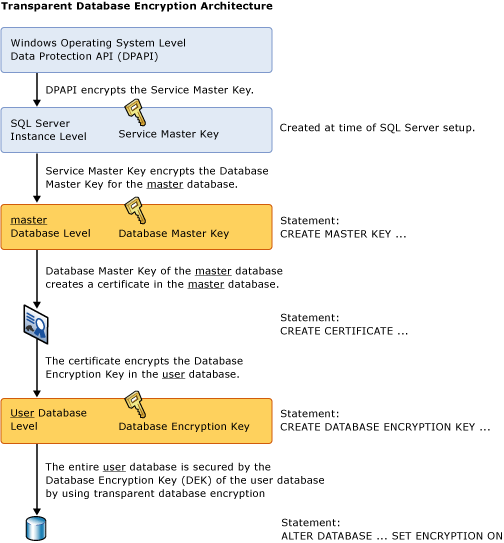
To implement Transparent Data Encryption (TDE), we must follow the 4 steps below:
- Create a master key: A master key is created for the first time. This key, accessible with a password, is used to protect a certificate, which will be created in the next step. This key is stored in the master database in an encrypted format.
- Create or obtain a certificate protected by the master key: This certificate is used to protect the database encryption key that we will create in the next step. Furthermore, this certificate is protected by the master key that we created in the previous step. The certificate is stored in the master database in an encrypted format.
- Create a database encryption key: This is the key that will be used by SQL Server to actually encrypt the data. It is protected by the certificate created in the previous step. This key is stored in the encrypted database and stored in an encrypted format.
- Enable TDE: Once all of the above have been created, a command will be executed to tell SQL Server to begin encrypting all data using the database encryption key created in the previous step. This process may take some time depending on the size of the database. Ideally, the database should not be used in production until the database has completed the initial encryption process.
The image below demonstrates this TDE architecture well:
To activate Transparent Data Encryption (TDE) on a database, you must use the commands below: (remember that tempdb is automatically encrypted when encryption is activated on any other database in the instance)
USE [master]
GO

CREATE MASTER KEY ENCRYPTION BY PASSWORD = 'dirceuresende123_usa_uma_senha_forte_aqui_talquei';
GO

CREATE CERTIFICATE MeuCertificadoDoServidor WITH SUBJECT = 'Meu Certificado da Instância';
GO

USE [dirceuresende]
GO

CREATE DATABASE ENCRYPTION KEY
WITH ALGORITHM = AES_256
ENCRYPTION BY SERVER CERTIFICATE MeuCertificadoDoServidor;
GO

ALTER DATABASE dirceuresende
SET ENCRYPTION ON;
GO
After executing these commands, your bank will be encrypted. To check which banks are encrypted or monitor the progress of the encryption process, use the query below:
SELECT
    A.[name],
    A.is_master_key_encrypted_by_server,
    A.is_encrypted,
    B.*
FROM
    sys.databases A
    JOIN sys.dm_database_encryption_keys B ON B.database_id = A.database_id
Result:

Remembering that the percent_complete column indicates the progress of the database encryption process and the encryption_state column indicates what state the encryption is currently in, the values of this column are:
0 = No database encryption keys present, no encryption
1 = No-encryption
2 = Encryption in progress
3 = Encrypted
4 = Key change in progress
5 = Decryption in progress
6 = Protection change in progress (the certificate or asymmetric key that is encrypting the database encryption key is being changed)
After you complete encryption of your database, you will see a warning message informing you that you MUST make a backup of your certificate and private key IMMEDIATELY. If you lose the certificate or private key and need to restore this database on another server, you will not be able to do so.
Warning: The certificate used for encrypting the database encryption key has not been backed up. You should immediately back up the certificate and the private key associated with the certificate. If the certificate ever becomes unavailable or if you must restore or attach the database on another server, you must have backups of both the certificate and the private key or you will not be able to open the database.
Command to backup the certificate and private key:
USE [master]
GO

BACKUP CERTIFICATE MeuCertificadoDoServidor
TO FILE =  'C:\Backups\Certificados\dirceuresende.cer'
WITH PRIVATE KEY ( FILE = 'C:\Backups\Certificados\dirceuresende_Key.pvk',
ENCRYPTION BY PASSWORD = 'dirceuresende123_usa_uma_senha_forte_aqui_talquei' );
GO
Restoring a bank with Transparent Data Encryption (TDE)
If you try to restore an encrypted backup file without restoring the master key first, you will encounter this error message:
Msg 33111, Level 16, State 3, Line 12
Cannot find server certificate with thumbprint ‘0xD98C862BF2A4B16D41DC8A96CBE819EFDCF33C00’.
Msg 3013, Level 16, State 1, Line 12
RESTORE DATABASE is terminating abnormally.
Now I will show you how to restore the database with TDE in another instance:
-- Cria uma nova master key.. Aqui você pode escolher uma nova senha
CREATE MASTER KEY ENCRYPTION BY PASSWORD = 'n6ApUO(i<8lRNT,2SF-{3LDzRUR;?MPd-Q-Fg3oec[wqMjKfp^';
GO

-- Cria o certificado na master
CREATE CERTIFICATE MeuCertificadoDoServidor
FROM FILE = 'C:\Backups\Certificados\dirceuresende.cer'
WITH PRIVATE KEY (
    FILE = 'C:\Backups\Certificados\dirceuresende_Key.pvk',
    DECRYPTION BY PASSWORD = 'dirceuresende123_usa_uma_senha_forte_aqui_talquei'
)

-- Restaura o banco
RESTORE DATABASE dirceuresende
    FROM DISK = 'C:\Backups\dirceuresende.bak'
    WITH REPLACE, STATS = 5,
    MOVE 'dirceuresende_Data' TO 'C:\Program Files\Microsoft SQL Server\MSSQL15.SQL2019\MSSQL\DATA\dirceuresende.mdf',
    MOVE 'dirceuresende_log' TO 'C:\Program Files\Microsoft SQL Server\MSSQL15.SQL2019\MSSQL\DATA\dirceuresende_log.ldf'
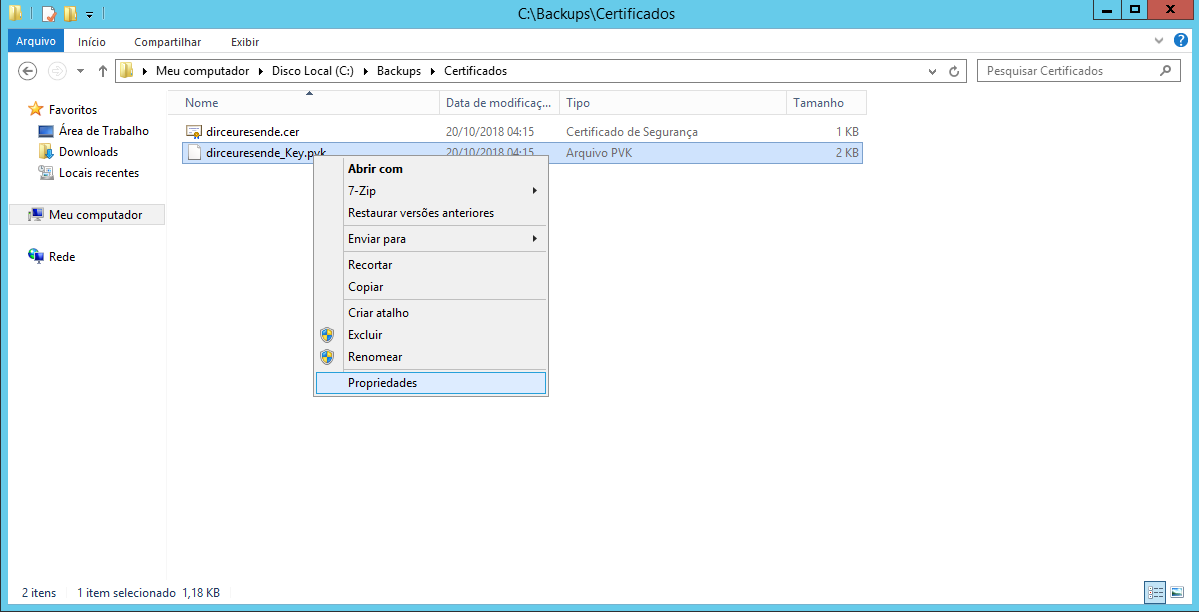
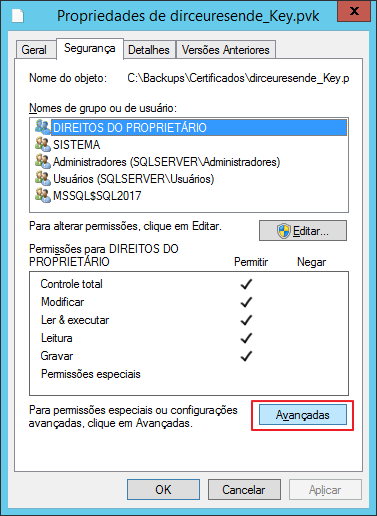
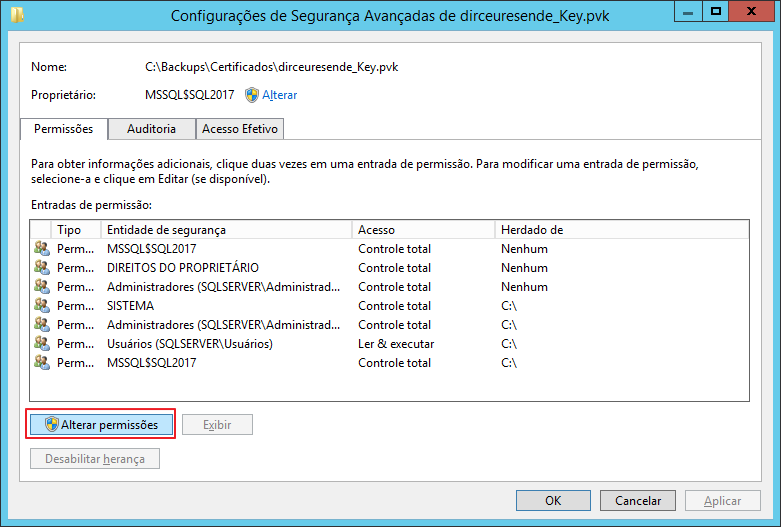
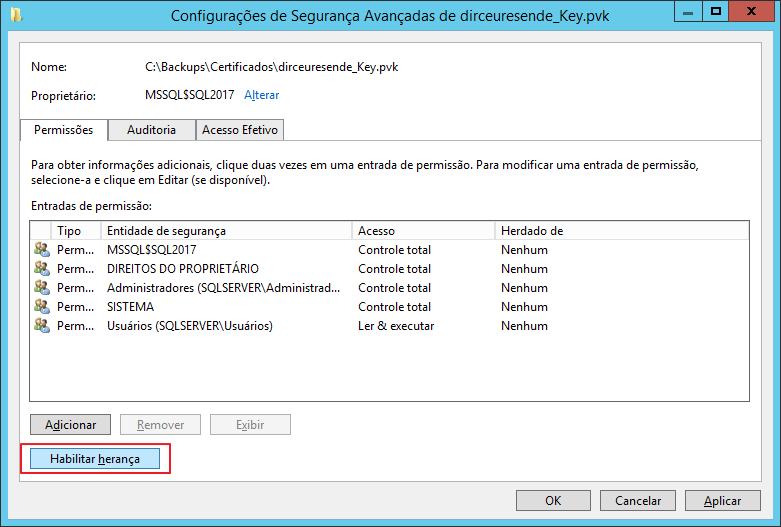
If you are encountering the error message below, you will probably need to correct the master key and private key permissions to enable inheritance:
The certificate, asymmetric key, or private key file is not valid or does not exist; or you do not have permissions for it.
To correct the inheritance of these 2 files, follow the steps below:
Transparent Data Encryption and transaction logs
Enabling a database to use TDE has the effect of clearing the remaining portion of the virtual transaction log to enforce the next virtual transaction log. This ensures that no clear text is left in the transaction logs after the database is set to encryption.
All data written to the transaction log before a change in the database encryption key will be encrypted using the previous database encryption key.
After a database encryption key has been modified twice, a log backup must be performed before the database encryption key can be modified again.
Transparent Data Encryption (TDE) and In-Memory OLTP
TDE can be enabled on a database that has In-Memory OLTP objects. In SQL Server 2016 and In-Memory OLTP log records, data is encrypted if TDE is enabled. In SQL Server 2014 In-Memory OLTP log records are encrypted if TDE is enabled, but files in the MEMORY_OPTIMIZED_DATA filegroup are not encrypted.
Limitations of Transparent Data Encryption (TDE)
- TDE does not protect data in memory, so sensitive data can be seen by anyone who has DBO rights to a database or SA rights to the SQL Server instance. In other words, TDE cannot prevent DBAs from viewing the data they want to see.
- TDE is not granular. The entire database is encrypted.
- TDE does not protect communications between client applications and SQL Server, so other encryption methods must be used to protect data that travels over the network and can be intercepted by malicious users.
- In TDE, all database files and filegroups are encrypted. If any database filegroup is marked READ ONLY, the database encryption operation will fail.
- FILESTREAM data is not encrypted.
- If one database is being used in database mirroring or log shipping, both databases are encrypted. Log transactions will be encrypted when sent between them.
- When any database on an instance of SQL Server has TDE enabled, the tempdb database is automatically encrypted, which can contribute to poor performance for both encrypted and unencrypted databases running on the same instance.
- Although fewer resources are required to implement TDE than column-level encryption, there will still be some overhead, which may prevent it from being used on SQL Servers that are experiencing CPU bottlenecks.
- Databases encrypted with TDE cannot take advantage of the new SQL Server 2008 backup compression. If you want to take advantage of both backup compression and encryption, you will need to use a third-party application such as SQL Backup, which allows you to perform both of these tasks without penalty.
Dynamic Data Masking
After demonstrating the use of this encryption solution, you may be wondering: “What about Dynamic Data Masking (DDM)???”. Well, to begin with, DDM is not a data encryption solution but rather a data masking solution.
While data encryption effectively prevents your data from being restored (including from backups) and accessed improperly, data masking with Dynamic Data Masking only restricts the content that is shown at the end of a SELECT command, that is, if you have access to a backup file, you can restore it in an instance where you are a sysadmin and will have free access to the previously masked data.
To learn more about Dynamic Data Masking, see the article SQL Server 2016 – Data masking with Dynamic Data Masking (DDM), where I demonstrate how to use it, restrictions and even how to “break” the masking and access the original data (even without having permission to do so).
Well guys, I hope you enjoyed this article and now start protecting your data better!
Big hug and see you next time!

Comentários (0)
Carregando comentários…