Hey guys!
In this article I would like to share with you a script for Kendal Van Dyke to identify/find Key Lookup occurrences through the plancache, which can be very useful to easily identify possible good candidates for a performance analysis.
As you know, KeyLookup occurrences generally cause a very large performance impact and can be easily corrected by creating/changing indexes.
What is and how to avoid Key Lookup and RID Lookup
As I already explained in the article Understanding how indexes work in SQL Server, when a query is performed on a table, the SQL Server query optimizer will determine the best data access method according to the statistics collected and choose the one with the lowest cost.
As the clustered index is the table itself, generating a large volume of data, the lowest cost non-clustered index is generally used for the query.
This can create a problem, as the non-clustered index will often be used to search for indexed information (Index Seek NonClustered), but not all columns requested in the select are part of the index.
When this happens, the clustered index will also have to be used to return the remaining information, using the pointer to the exact position of the information in the clustered index (or the ROWID, if the table does not have a clustered index).
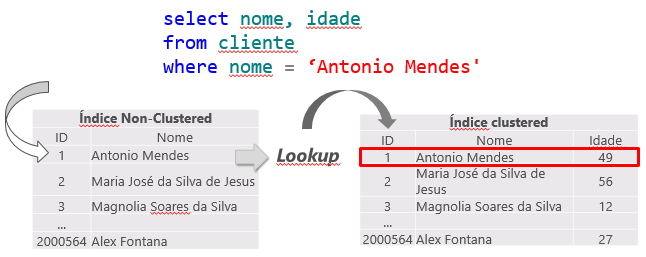
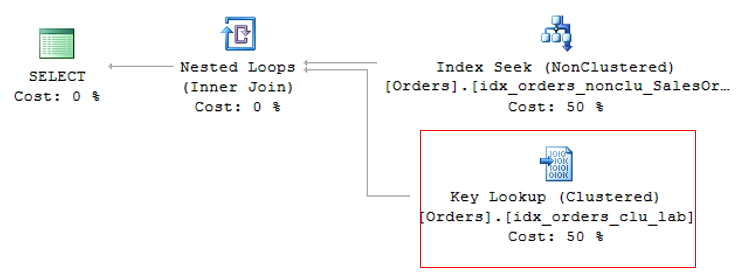
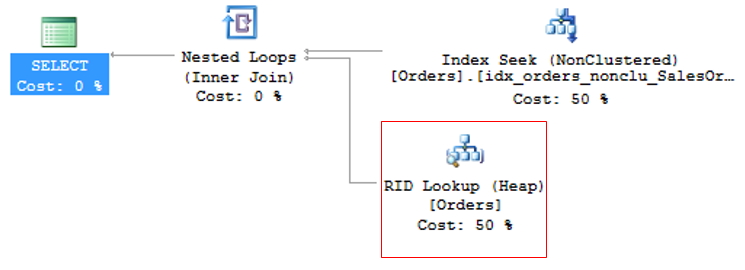
This operation is called Key Lookup, in the case of tables with a clustered index or RID Lookup (RID = Row ID) for tables that do not have a clustered index (called HEAP tables) and because it generates 2 read operations for a single query, it should be avoided whenever possible.
Key Lookup
RID Lookup
To avoid KeyLookup, simply use the Covering index technique, which consists of adding the main columns that are used in table queries to the NonClustered (INCLUDE) index. This means that the query optimizer can obtain all the information by reading only the chosen index, without having to also read the clustered index.
However, great attention must be paid to modeling the indices. It is not recommended to add all table columns to the non-clustered index, as it will become so large that it will no longer be effective and the query optimizer may even decide not to use it and prefer the Index Scan operator, which reads the entire index sequentially, damaging query performance.
To avoid RID Lookup, simply create the clustered index on the table and pay attention to Key Lookup events that may arise.
How to Identify/Find Key Lookup occurrences through plancache
Now that you understand what a Key Lookup is and how to fix it, let's now learn how to identify these events quickly and easily.
Method 1: Using a simple LIKE
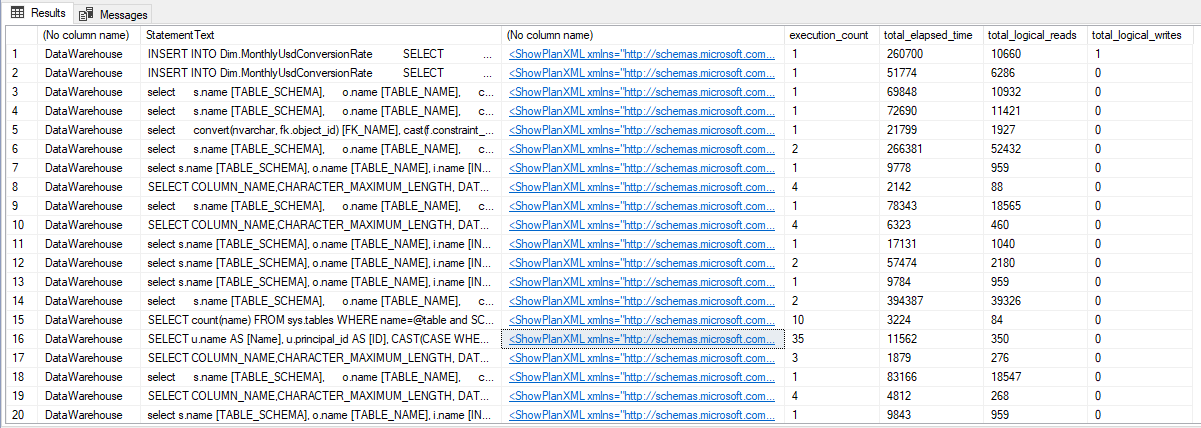
This query below is relatively simple, just making a query in some DMV's and a textual query using LIKE in the execution plan to search for the expression Lookup=”1″ inside XML. The result is usually very accurate, but false positives may appear.
SELECT
    DB_NAME([detqp].[dbid]),
    SUBSTRING([dest].[text], ( [deqs].[statement_start_offset] / 2 ) + 1, ( CASE [deqs].[statement_end_offset] WHEN -1 THEN DATALENGTH([dest].[text])ELSE [deqs].[statement_end_offset] END - [deqs].[statement_start_offset] ) / 2 + 1) AS [StatementText],
    CAST([detqp].[query_plan] AS XML),
    [deqs].[execution_count],
    [deqs].[total_elapsed_time],
    [deqs].[total_logical_reads],
    [deqs].[total_logical_writes]
FROM
    [sys].[dm_exec_query_stats] AS [deqs]
    CROSS APPLY [sys].dm_exec_text_query_plan([deqs].[plan_handle], [deqs].[statement_start_offset], [deqs].[statement_end_offset]) AS [detqp]
    CROSS APPLY [sys].dm_exec_sql_text([deqs].[sql_handle]) AS [dest]
WHERE
    [detqp].[query_plan] LIKE '%Lookup="1"%';
Result:
Method 2: Using XPath in the execution plan XML
This second method is much more complete, returning more information and using XPath formulas to navigate within the execution plan XML and return data more precisely and correctly.
/*********************************************************************************************
Find Key Lookups in Cached Plans v1.00 (2010-07-27)
(C) 2010, Kendal Van Dyke

Feedback: mailto:kendal.vandyke@gmail.com

License:
   This query is free to download and use for personal, educational, and internal
   corporate purposes, provided that this header is preserved. Redistribution or sale
   of this query, in whole or in part, is prohibited without the author's express
   written consent.

Note:
   Exercise caution when running this in production!

   The function sys.dm_exec_query_plan() is resource intensive and can put strain
   on a server when used to retrieve all cached query plans.

   Consider using TOP in the initial select statement (insert into @plans)
   to limit the impact of running this query or run during non-peak hours
*********************************************************************************************/
DECLARE @plans TABLE (
    [query_text]           NVARCHAR(MAX),
    [o_name]               sysname,
    [execution_plan]       XML,
    [last_execution_time]  DATETIME,
    [execution_count]      BIGINT,
    [total_worker_time]    BIGINT,
    [total_physical_reads] BIGINT,
    [total_logical_reads]  BIGINT
);


DECLARE @lookups TABLE (
    [table_name] sysname,
    [index_name] sysname,
    [index_cols] NVARCHAR(MAX)
);

WITH [query_stats]
AS (
    SELECT
        [sql_handle],
        [plan_handle],
        MAX([last_execution_time]) AS [last_execution_time],
        SUM([execution_count]) AS [execution_count],
        SUM([total_worker_time]) AS [total_worker_time],
        SUM([total_physical_reads]) AS [total_physical_reads],
        SUM([total_logical_reads]) AS [total_logical_reads]
    FROM
        [sys].[dm_exec_query_stats]
    GROUP BY
        [sql_handle],
        [plan_handle]
)
INSERT INTO @plans (
    [query_text],
    [o_name],
    [execution_plan],
    [last_execution_time],
    [execution_count],
    [total_worker_time],
    [total_physical_reads],
    [total_logical_reads]
)
SELECT /*TOP 50*/
    [sql_text].[text],
    CASE
        WHEN [sql_text].[objectid] IS NOT NULL THEN ISNULL(OBJECT_NAME([sql_text].[objectid], [sql_text].[dbid]), 'Unresolved')
        ELSE CAST('Ad-hoc\Prepared' AS sysname)
    END,
    [query_plan].[query_plan],
    [query_stats].[last_execution_time],
    [query_stats].[execution_count],
    [query_stats].[total_worker_time],
    [query_stats].[total_physical_reads],
    [query_stats].[total_logical_reads]
FROM
    [query_stats]
    CROSS APPLY [sys].dm_exec_sql_text([query_stats].[sql_handle]) AS [sql_text]
    CROSS APPLY [sys].dm_exec_query_plan([query_stats].[plan_handle]) AS [query_plan]
WHERE
    [query_plan].[query_plan] IS NOT NULL;


;WITH XMLNAMESPACES (
    DEFAULT 'http://schemas.microsoft.com/sqlserver/2004/07/showplan'
),
[lookups]
AS
    (
    SELECT
        DB_ID(REPLACE(REPLACE([keylookups].[keylookup].[value]('(Object/@Database)[1]', 'sysname'), '[', ''), ']', '')) AS [database_id],
        OBJECT_ID([keylookups].[keylookup].[value]('(Object/@Database)[1]', 'sysname') + '.' + [keylookups].[keylookup].[value]('(Object/@Schema)[1]', 'sysname') + '.' + [keylookups].[keylookup].[value]('(Object/@Table)[1]', 'sysname')) AS [object_id],
        [keylookups].[keylookup].[value]('(Object/@Database)[1]', 'sysname') AS [database],
        [keylookups].[keylookup].[value]('(Object/@Schema)[1]', 'sysname') AS [schema],
        [keylookups].[keylookup].[value]('(Object/@Table)[1]', 'sysname') AS [table],
        [keylookups].[keylookup].[value]('(Object/@Index)[1]', 'sysname') AS [index],
        REPLACE([keylookups].[keylookup].[query]('for $column in DefinedValues/DefinedValue/ColumnReference return string($column/@Column)').[value]('.', 'varchar(max)'), ' ', ', ') AS [columns],
        [plans].[query_text],
        [plans].[o_name],
        [plans].[execution_plan],
        [plans].[last_execution_time],
        [plans].[execution_count],
        [plans].[total_worker_time],
        [plans].[total_physical_reads],
        [plans].[total_logical_reads]
    FROM
        @plans AS [plans]
        CROSS APPLY [execution_plan].nodes('//RelOp/IndexScan[@Lookup="1"]') AS [keylookups]([keylookup])
    )
SELECT
    [lookups].[database],
    [lookups].[schema],
    [lookups].[table],
    [lookups].[index],
    [lookups].[columns],
    [index_stats].[user_lookups],
    [index_stats].[last_user_lookup],
    [lookups].[execution_count],
    [lookups].[total_worker_time],
    [lookups].[total_physical_reads],
    [lookups].[total_logical_reads],
    [lookups].[last_execution_time],
    [lookups].[o_name] AS [object_name],
    [lookups].[query_text],
    [lookups].[execution_plan]
FROM
    [lookups]
    JOIN [sys].[dm_db_index_usage_stats] AS [index_stats] ON [lookups].[database_id] = [index_stats].[database_id] AND [lookups].[object_id] = [index_stats].[object_id]
WHERE
    [index_stats].[user_lookups] > 0
    AND [lookups].[database] NOT IN ( '[master]', '[model]', '[msdb]', '[tempdb]' )
ORDER BY
    [index_stats].[user_lookups] DESC,
    [lookups].[total_physical_reads] DESC,
    [lookups].[total_logical_reads] DESC;
Result:

Using one of the queries above, you will easily identify the queries that are presenting the Key Lookup operator. Now that you know what it is and how to solve it, you can now analyze whether it is worth creating an index to cover this query or not (Increase in Disk Space + Increase in Writing Time vs Improvement in Reading).
Don't forget to also analyze the missing Indexes in your environment. To learn more about this, read the article SQL Server – How to identify all missing indexes in a database.
A big hug and see you next time!

Comentários (0)
Carregando comentários…