
Hey guys,
All very well?
Introduction
In this post I would like to demonstrate a very interesting feature of SQL Server, available from version 2016 onwards, which is Dynamic Data Masking (DDM) and which allows us to mask and hide sensitive information from certain users in a quick and practical way.
Unlike the encryption features of SQL Server Transparent Data Encryption (TDE) and Always Encrypted, which physically encrypt database data and files (even backups and log backups are generated already encrypted, and MDF, LDF and NDF files are also encrypted), Dynamic Data Masking data masking does not actually encrypt the data, it only applies a mask to queries performed on the database for non-privileged users.
To apply data masking, you must execute an ALTER command on the column you want to apply the mask (data masking is at column level) or you can add this definition in the CREATE of the table.
Limitations and restrictions
You cannot define a masking rule for the following column types:
- Encrypted columns (Always Encrypted)
- FILESTREAM
- A mask cannot be set on a computed column, but if the computed column depends on a column with a MASK, it will return masked data.
- A data-masked column cannot be a key for a FULLTEXT index.
Types of masks
In Dynamic Data Masking, you can define how data will be masked using some data masking functions, which will be detailed below:
| Function | Description | Examples |
|---|---|---|
| Default | Masking according to the data types of designated fields. For string data types, the original values will be replaced with XXXX characters. It is applicable to data types char, nchar, varchar, nvarchar, text and ntext For numeric data types, the original value will be replaced with the number 0 (zero). It is applicable to data types bigint, bit, decimal, int, money, numeric, smallint, smallmoney, tinyint, float and real. For date and time data types, the date 1900-01-01 00:00:00.0000000 will be used. It is applicable to data types date, datetime2, datetime, datetimeoffset, smalldatetime and team. For binary data types, the original value will be replaced with a single byte of ASCII 0 value. It is applicable to data types binary, varbinary and image. | ALTER TABLE dbo.DDM ALTER COLUMN Name ADD MASKED WITH(FUNCTION = 'default()') |
| The masking method that exposes the first letter of an email address and the constant suffix ".com" in the form of an email address Ex: [email protected] will be masked as [email protected] | ALTER TABLE dbo.DDM ALTER COLUMN Email ADD MASKED WITH(FUNCTION = 'email()') | |
| Random | The random(start_number, end_number) masking function allows you to replace a numeric value with a random number generated from a pre-defined range. Columns that have data types that accept decimal values can accept ranges in the form of decimal numbers or integers in the random() function. If the range is composed of 2 integers in a column that accepts decimal values, the random values generated will also have decimal places with random values (see examples). | ALTER TABLE dbo.DDM ALTER COLUMN Salary ADD MASKED WITH(FUNCTION = 'random(0.5, 0.99)') ALTER TABLE dbo.DDM ALTER COLUMN Weight ADD MASKED WITH(FUNCTION = 'random(70, 120)') |
| Partial | The partial(prefix, padding, suffix) masking function shows the first N letters (N = prefix) and last N letters (N = suffix) and adds a custom padding string S in between (S = padding). Note: if the original value is too short to complete the entire mask, part of the prefix or suffix will not be exposed, that is, if the string is "Dirceu" and the masking function is partial(4, "XXXX", 4), the string will be masked as "XXXX", not respecting the prefix and suffix values, which will not be shown. | ALTER TABLE dbo.DDM ALTER COLUMN CPF ADD MASKED WITH(FUNCTION = 'partial(0, "XXXXXXXXX", 2)') ALTER TABLE dbo.DDM ALTER COLUMN Cargo ADD MASKED WITH(FUNCTION = 'partial(3, "XXXXXXXXXXX", 4)') |
Examples and demonstrations
To better demonstrate the features and functions of Dynamic Data Masking, I prepared an example below, demonstrating how to create a table with some fields already masked, then we will visualize these fields with the mask.
I will change the table to mask more columns, preview the masked data (now with all columns) and then preview the result 5x to observe the behavior of the random() masking function when run multiple times.
Dynamic Data Masking Example
-- Criação da tabela de testes do Dynamic Data Masking
-- Máscaras criadas nas colunas "CPF" e "Nome" na criação na tabela
IF (OBJECT_ID('dbo.Teste_DDM') IS NOT NULL) DROP TABLE dbo.Teste_DDM
CREATE TABLE dbo.Teste_DDM (
    CPF VARCHAR(11) MASKED WITH(FUNCTION = 'partial(0, "XXXXXXXXX", 2)'),
    Nome VARCHAR(60) MASKED WITH(FUNCTION = 'default()'),
    Cargo VARCHAR(40),
    Data_Nascimento DATETIME,
    Email VARCHAR(100),
    Email_Corporativo VARCHAR(100),
    Salario NUMERIC(15, 2),
    Numero_Cartao VARCHAR(16),
    Peso INT,
    Altura FLOAT,
    Estado_Civil SMALLINT,
    Genero BIT
)

-- Inseração de registro na tabela de testes
INSERT INTO dbo.Teste_DDM
VALUES
(
    '12345678909', -- CPF - varchar(11)
    'Joãozinho da Silva', -- Nome - varchar(60)
    'Analista de Sistemas', -- Cargo - varchar(40)
    '1987-05-28', -- Data_Nascimento - datetime
    'joaozinho.silva@yahoo.com.br', -- Email - varchar(100)
    'joaozinho.silva@suaempresa.com', -- Email_Corporativo - varchar(100)
    12345.67, -- Salario - numeric(15, 2)
    '1234567890123456', -- Numero_Cartao - varchar(16)
    85, -- Peso - int
    1.81, -- Altura - float
    1, -- Estado_Civil - smallint
    1 -- Genero - bit
)

SELECT * FROM dbo.Teste_DDM
GO

-- Vamos criar um usuário para conseguirmos visualizar os dados mascarados
-- Lembre-se: Usuários com permissão db_owner ou sysadmin SEMPRE vão ver os dados sem máscara
IF (USER_ID('Teste_DDM') IS NULL)
    CREATE USER [Teste_DDM] WITHOUT LOGIN

GRANT SELECT ON dbo.Teste_DDM TO [Teste_DDM]


-- Visualizando os dados mascarados (Como se fosse o usuário Teste_DDM, que acabamos de criar)
EXECUTE AS USER = 'Teste_DDM'
GO
SELECT * FROM dbo.Teste_DDM
GO
REVERT -- Reverte as permissões para o seu usuário
GO


-- Vamos criar mais algumas máscaras na tabela
ALTER TABLE dbo.Teste_DDM ALTER COLUMN Cargo ADD MASKED WITH(FUNCTION = 'partial(4, "XXXX", 4)')
ALTER TABLE dbo.Teste_DDM ALTER COLUMN Data_Nascimento ADD MASKED WITH(FUNCTION = 'default()')
ALTER TABLE dbo.Teste_DDM ALTER COLUMN Email ADD MASKED WITH(FUNCTION = 'email()')
ALTER TABLE dbo.Teste_DDM ALTER COLUMN Email_Corporativo ADD MASKED WITH(FUNCTION = 'email()')
ALTER TABLE dbo.Teste_DDM ALTER COLUMN Salario ADD MASKED WITH(FUNCTION = 'random(0.5, 0.99)')
ALTER TABLE dbo.Teste_DDM ALTER COLUMN Numero_Cartao ADD MASKED WITH(FUNCTION = 'partial(4, "********", 4)')
ALTER TABLE dbo.Teste_DDM ALTER COLUMN Peso ADD MASKED WITH(FUNCTION = 'random(70, 120)')
ALTER TABLE dbo.Teste_DDM ALTER COLUMN Altura ADD MASKED WITH(FUNCTION = 'default()')
ALTER TABLE dbo.Teste_DDM ALTER COLUMN Estado_Civil ADD MASKED WITH(FUNCTION = 'default()')
ALTER TABLE dbo.Teste_DDM ALTER COLUMN Genero ADD MASKED WITH(FUNCTION = 'default()')


-- Visualizando os dados mascarados
EXECUTE AS USER = 'Teste_DDM'
GO
SELECT * FROM dbo.Teste_DDM
SELECT * FROM dbo.Teste_DDM
SELECT * FROM dbo.Teste_DDM
SELECT * FROM dbo.Teste_DDM
SELECT * FROM dbo.Teste_DDM
REVERT
Viewing the original data (with sysadmin user):

Viewing masked data after table creation (with regular user):
IF (OBJECT_ID('dbo.Teste_DDM') IS NOT NULL) DROP TABLE dbo.Teste_DDM
CREATE TABLE dbo.Teste_DDM (
    CPF VARCHAR(11) MASKED WITH(FUNCTION = 'partial(0, "XXXXXXXXX", 2)'),
    Nome VARCHAR(60) MASKED WITH(FUNCTION = 'default()'),
    ...
)

Viewing the masked data after all changes:
ALTER TABLE dbo.Teste_DDM ALTER COLUMN Cargo ADD MASKED WITH(FUNCTION = 'partial(4, "XXXX", 4)')
ALTER TABLE dbo.Teste_DDM ALTER COLUMN Data_Nascimento ADD MASKED WITH(FUNCTION = 'default()')
ALTER TABLE dbo.Teste_DDM ALTER COLUMN Email ADD MASKED WITH(FUNCTION = 'email()')
ALTER TABLE dbo.Teste_DDM ALTER COLUMN Email_Corporativo ADD MASKED WITH(FUNCTION = 'email()')
ALTER TABLE dbo.Teste_DDM ALTER COLUMN Salario ADD MASKED WITH(FUNCTION = 'random(0.5, 0.99)')
ALTER TABLE dbo.Teste_DDM ALTER COLUMN Numero_Cartao ADD MASKED WITH(FUNCTION = 'partial(4, "********", 4)')
ALTER TABLE dbo.Teste_DDM ALTER COLUMN Peso ADD MASKED WITH(FUNCTION = 'random(70, 120)')
ALTER TABLE dbo.Teste_DDM ALTER COLUMN Altura ADD MASKED WITH(FUNCTION = 'default()')
ALTER TABLE dbo.Teste_DDM ALTER COLUMN Estado_Civil ADD MASKED WITH(FUNCTION = 'default()')
ALTER TABLE dbo.Teste_DDM ALTER COLUMN Genero ADD MASKED WITH(FUNCTION = 'default()')

Security and Permissions
To create or change a table using Dynamic Data Masking, no special permissions are required, just the traditional permissions for creating/changing tables (CREATE TABLE and/or ALTER).
To add, change, or remove a column mask, the user must have ALTER ANY MASK and ALTER permissions.
Users with SELECT permission on a table will be able to view the table's data, and masked columns will display the masked data. For the user to be able to view the original data, that is, without masks, he must have the UNMASK permission (GRANT UNMASK TO [User]).
Furthermore, the CONTROL permission on the database includes the ALTER ANY MASK and UNMASK permissions, that is, users of the db_owner or sysadmin roles can view the original data of masked columns.
Which columns are masked?
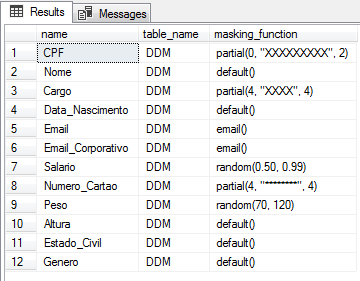
To identify which columns in your database are masked using Dynamic Data Masking, simply run the query below:
SELECT
    A.[name],
    B.[name] AS table_name,
    A.masking_function
FROM
    sys.masked_columns AS A
    JOIN sys.tables AS B ON A.[object_id] = B.[object_id]
WHERE
    A.is_masked = 1
Return example:
Breaking Down Dynamic Data Masking
Having presented the features of Dynamic Data Masking, we also need to mention that this method should not be the only way to guarantee the security of your data. Although it helps protect sensitive information, it has some flaws that allow unauthorized users to access this information using brute force techniques.
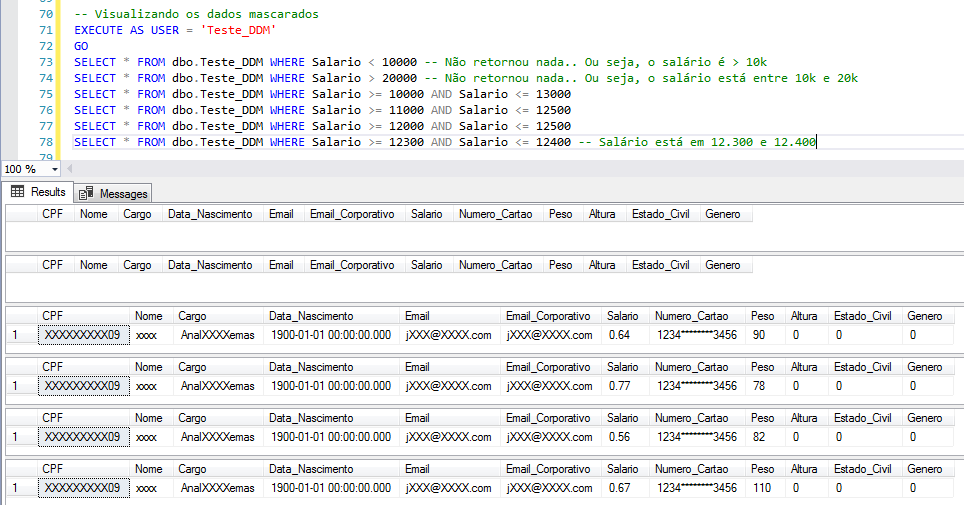
In the example above, I inserted a record in the table where the salary was R$12,345.67. Using brute force (or trial and error), we can find the approximate value of this salary (with patience or by creating an algorithm for this, until the exact value)
Example 1 – Numerical value:
In this example, I will demonstrate how it is possible to identify masked numeric values from simple SELECT’s in the table. In the example below, I only made 6 queries and was already able to discover a value very close to the real value. If I wanted to find out the exact value, a few more queries were enough to do so:
Want to find out the exact value? Let's use a simple script for this:
-- Simulando as permissões do usuário "Teste_DDM"
EXECUTE AS USER = 'Teste_DDM'
GO

-- Criando uma tabela de testes com vários números para tentar fazer o JOIN
IF (OBJECT_ID('tempdb..#Numeros') IS NOT NULL) DROP TABLE #Numeros
CREATE TABLE #Numeros ( Valor NUMERIC(15, 2) )

INSERT INTO #Numeros
VALUES(0.01)

DECLARE @Contador INT = 1, @Total INT = 100, @Maior_Valor NUMERIC(15, 2)

-- 33s
WHILE(@Contador <= @Total)
BEGIN

    SELECT @Maior_Valor = MAX(Valor) FROM #Numeros

    INSERT INTO #Numeros
    SELECT @Maior_Valor + ROW_NUMBER() OVER(ORDER BY [name], id) / 100.00
    FROM sys.syscolumns


    SET @Contador += 1

END

-- Verificando se foi possível identificar o valor do salário
SELECT A.*, B.Valor
FROM dbo.Teste_DDM A
JOIN #Numeros B ON A.Salario = B.Valor
Result: Joãozinho’s salary revealed!

Example 2 – Text
Here, I will demonstrate how to return the exact string that was masked using a character table and joining letter by letter with this table. Each letter in the masked string will join my character table to find out the original character.
-- Executando o código abaixo como um usuário SEM permissão de UNMASK
EXECUTE AS USER = 'Teste_DDM'
GO


------------------------------------------------------------------------
-- Criando a tabela com todos os caracteres da tabela ASCII
------------------------------------------------------------------------

IF (OBJECT_ID('tempdb..#Caracteres') IS NOT NULL) DROP TABLE #Caracteres
CREATE TABLE #Caracteres ( Caractere CHAR(1) )

-- DECLARE @Contador INT = 32, @Total INT = 255 /* Case SENSTIVE */
DECLARE @Contador INT = 32, @Total INT = 96 /* Case INSENSITIVE */

WHILE(@Contador <= @Total)
BEGIN

    INSERT INTO #Caracteres VALUES (CHAR(@Contador))

    SET @Contador += 1

END


------------------------------------------------------------------------
-- Fazendo os joins para recuperar o valor original da string mascarada
------------------------------------------------------------------------

DECLARE
    @Query VARCHAR(MAX),
    @Maior_Tamanho INT = 18, -- Tamanho máximo de caracteres da string em questão
    @Contador_Caractere INT = 1


SET @Query = '
SELECT
    A.Nome,'


SET @Contador_Caractere = 1

WHILE(@Contador_Caractere <= @Maior_Tamanho)
BEGIN

    SET @Query += '
    A' + CAST(@Contador_Caractere AS VARCHAR(20)) + '.Caractere' + (CASE WHEN @Contador_Caractere < @Maior_Tamanho THEN ',' ELSE '' END)

    SET @Contador_Caractere += 1

END


SET @Query += '
FROM
    dbo.Teste_DDM A'


SET @Contador_Caractere = 1

WHILE(@Contador_Caractere <= @Maior_Tamanho)
BEGIN

    SET @Query += '
    LEFT JOIN #Caracteres A' + CAST(@Contador_Caractere AS VARCHAR(20)) + ' ON SUBSTRING(A.Nome, ' + CAST(@Contador_Caractere AS VARCHAR(20)) + ', 1) = A' + CAST(@Contador_Caractere AS VARCHAR(20)) + '.Caractere'

    SET @Contador_Caractere += 1

END


-- Executa nossa query dinâmica e mostrando os valores originais
EXEC(@Query)
That's it, folks!
I hope you enjoyed this post and see you later!

Comentários (0)
Carregando comentários…