Hey guys!
All very well?

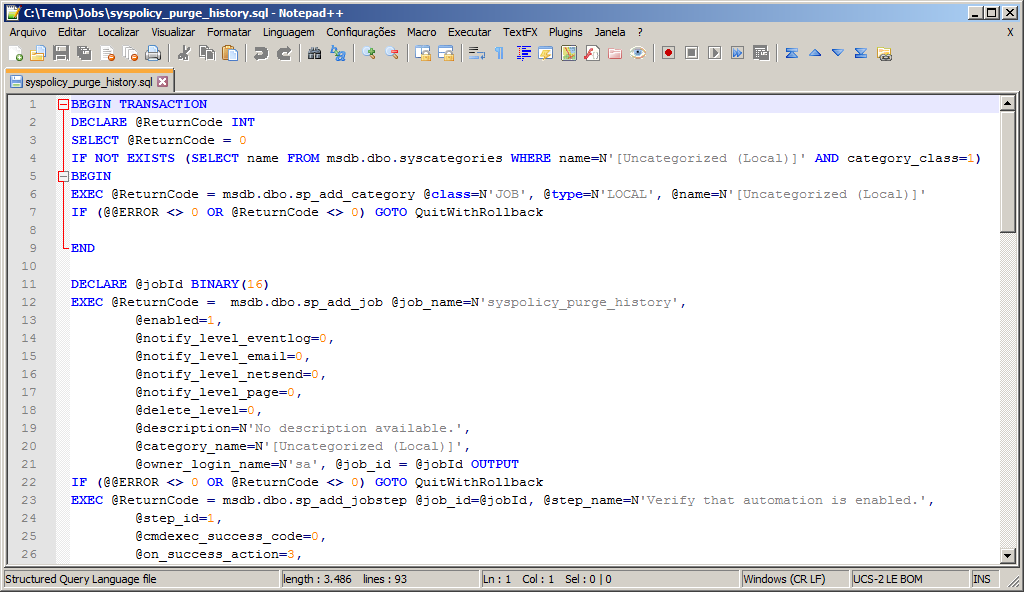
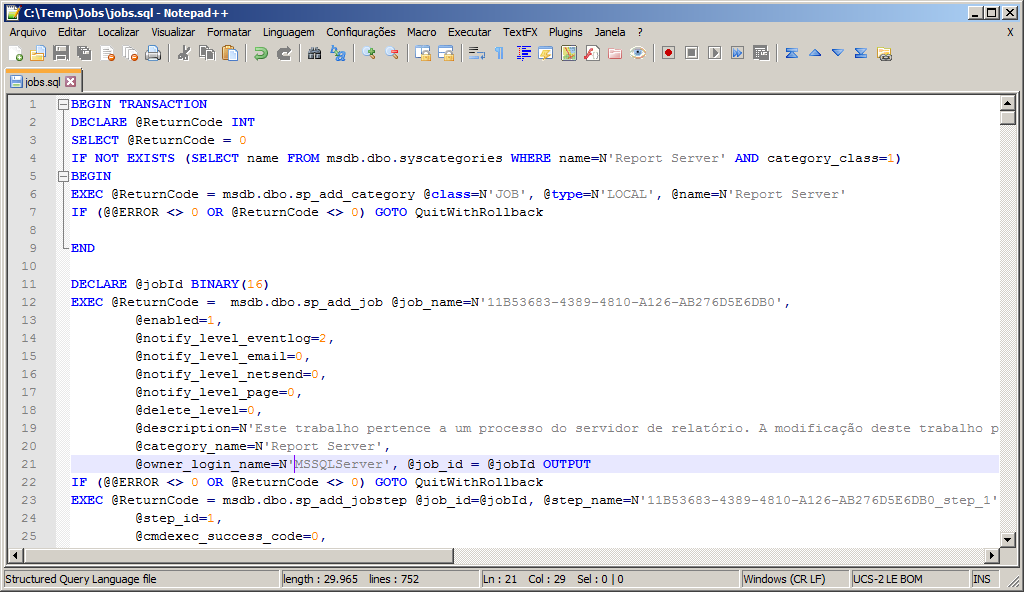
In this post I will demonstrate how to backup all SQL Server Agent jobs via command line (CLR C# or Powershell) and export the results to SQL scripts. You can choose to generate 1 script for each job or 1 single script with all jobs in your instance.

During the migration from SQL Server 2008 R2 to 2014, this script was especially useful, since there were just over 700 jobs in the report server instance and the task of saving the script for each one manually was not viable. Backing up/restoring the msdb database could be a solution (although I don't think it's highly recommended), but as these were different versions of SQL Server, we ruled out this hypothesis.

Remember that before restoring jobs in the new environment, you will need to have created logins in the new instance. If you don't know how to back up your logins and permissions, visit the post SQL Server – How to transfer logins between instances by generating backup of users, logins and permissions.

Prerequisites

As prerequisites for using the Stored Procedure stpJob_Backup, you will also need to create the objects below:

Utils.ExecutaScriptPowerShell (Click here to access the post)
View source code

public static string ExecutaScriptPowerShell(string dsScript, string servidor = "")
{

    var idArquivo = Guid.NewGuid();
    var arquivo = $@"C:\Temp\{idArquivo}.ps1";


    using (var fileStream = new FileStream(arquivo, FileMode.Create))
    {
        using (var sw = new StreamWriter(fileStream, Encoding.GetEncoding("UTF-8")) { NewLine = "\r\n" })
        {
            sw.Write(dsScript);
        }
    }


    string argumentos;
    if (string.IsNullOrEmpty(servidor))
    {
        argumentos = @"-ExecutionPolicy ByPass -File """ + arquivo + @""""; // -ExecutionPolicy Unrestricted
    }
    else
    {
        // Para funcionar, precisa executar antes no powershell da máquina destino: Enable-PSRemoting –Force
        argumentos = @"-ExecutionPolicy ByPass -Command { Invoke-Command -ComputerName " + servidor + @" -FilePath """ + arquivo + @""" }";
    }


    string output;
    string msgErro;

    using (var scriptProc = new Process { StartInfo = { FileName = "powershell", Arguments = argumentos, UseShellExecute = false, RedirectStandardOutput = true, RedirectStandardError = true, StandardOutputEncoding = Encoding.GetEncoding(850), CreateNoWindow = true } })
    {

        scriptProc.Start();
        scriptProc.WaitForExit(1000 * 60); // 60 segundos

        File.Delete(arquivo);
        //Retorno.Mensagem(argumentos);

        output = scriptProc.StandardOutput.ReadToEnd();

        msgErro = scriptProc.StandardError.ReadToEnd();
    }


    if (!string.IsNullOrEmpty(msgErro))
        output += "\nERRO: " + msgErro;


    return output;

}

Server.cs file source code
View source code

using System;
using System.Collections.Generic;
using System.Data.SqlClient;

namespace Bibliotecas.Model
{

    public class ServidorAtual
    {

        public string NomeServidor { get; set; }

        public ServidorAtual()
        {

            try
            {

                using (var conn = new SqlConnection(Servidor.Context))
                {

                    conn.Open();

                    using (var cmd = conn.CreateCommand())
                    {
                        cmd.CommandText = "SELECT @@SERVERNAME AS InstanceName";
                        NomeServidor = (string) cmd.ExecuteScalar();
                    }

                    var partes = NomeServidor.Split('\\');

                    if (partes.Length <= 1) return;
                    if (string.Equals(partes[0], partes[1], StringComparison.CurrentCultureIgnoreCase))
                        NomeServidor = partes[0];
                }

            }
            catch (Exception ex)
            {
                throw ex;
            }
        }

    }


    public static class Servidor
    {

        public static string Ds_Usuario => "Usuario";
        public static string Ds_Senha => "Senha";

        public static string PRODUCAO => "data source=PRODUCAO;initial catalog=CLR;persist security info=False;Enlist=False;packet size=4096;user id='" + Ds_Usuario + "';password='" + Ds_Senha + "'";
        public static string Context => "context connection=true";
        public static string Localhost => "data source=LOCALHOST;initial catalog=CLR;persist security info=False;Enlist=False;packet size=4096;user id='" + Ds_Usuario + "';password='" + Ds_Senha + "'";

        public static string getLocalhost()
        {

            var servidorAtual = new ServidorAtual().NomeServidor;
            return "data source=" + servidorAtual + ";initial catalog=CLR;persist security info=False;Enlist=False;packet size=4096;user id='" + Ds_Usuario + "';password='" + Ds_Senha + "'";

        }

        public static List<string> Servidores
        {
            get
            {
                var servidores = new List<string>
                {
                    PRODUCAO,
                    Localhost
                };

                return servidores;

            }
        }

    }

}

Return class source code (Click here to access the post)
View source code

using System;
using System.Data;
using System.Data.SqlClient;
using System.Diagnostics;
using Microsoft.SqlServer.Server;

namespace Bibliotecas.Model
{

    public static class Retorno
    {

        public static void Erro(string erro)
        {

            /*

            IF (OBJECT_ID('CLR.dbo.Log_Erro') IS NOT NULL) DROP TABLE CLR.dbo.Log_Erro
            CREATE TABLE CLR.dbo.Log_Erro (
	            Id_Erro INT IDENTITY(1,1),
	            Dt_Erro DATETIME DEFAULT GETDATE(),
	            Nm_Objeto VARCHAR(100),
	            Ds_Erro VARCHAR(MAX),
	            CONSTRAINT [PK_Log_Erro] PRIMARY KEY CLUSTERED (Id_Erro)
            )

            */

            using (var conexao = new SqlConnection(Servidor.getLocalhost()))
            {

                var Comando = new SqlCommand("INSERT INTO dbo.Log_Erro (Nm_Objeto, Ds_Erro) VALUES (@Nm_Objeto, @Ds_Erro)", Conexao);

                var stackTrace = new StackTrace();
                var objeto = stackTrace.GetFrame(1).GetMethod().Name;

                Comando.Parameters.Add(new SqlParameter("@Nm_Objeto", SqlDbType.VarChar, 100)).Value = objeto;
                Comando.Parameters.Add(new SqlParameter("@Ds_Erro", SqlDbType.VarChar, 8000)).Value = erro;
                Conexao.Open();

                Comando.ExecuteNonQuery();
            }
            

            throw new ApplicationException(erro);
        }


        public static void Mensagem(string mensagem)
        {

            using (var conexao = new SqlConnection(Servidor.Context))
            {

                var Comando = new SqlCommand("IF ( (512 & @@OPTIONS) = 512 ) select 1 else select 0", Conexao);
                Conexao.Open();

                if ((int) Comando.ExecuteScalar() != 0) return;

                var _retorno = SqlContext.Pipe;
                _retorno.Send(mensagem.Length > 4000 ? mensagem.Substring(0, 4000) : mensagem);
            }

        }

        public static void RetornaReader(SqlDataReader dataReader)
        {
            var _retorno = SqlContext.Pipe;
            _retorno.Send(dataReader);
        }
    }

    public class Ret : Exception
    {
        public Ret(string str) : base(str)
        {      
        }
    }
}

CLR Procedure source code (C#) stpJob_Backup

using System;
using System.Data.SqlTypes;
using Bibliotecas.Model;

public partial class StoredProcedures
{
    [Microsoft.SqlServer.Server.SqlProcedure]
    public static void stpJob_Backup(SqlString Ds_Servidor, SqlString Ds_Diretorio_Destino, SqlBoolean Fl_Arquivo_Unico)
    {


        try
        {

            var comando = @"
$ServerNameList = """ + Ds_Servidor.Value + @"""
[System.Reflection.Assembly]::LoadWithPartialName(""Microsoft.SqlServer.Smo"") | Out-Null

$objSQLConnection = New-Object System.Data.SqlClient.SqlConnection

foreach ($ServerName in $ServerNameList)
{

    Try
    {
        $objSQLConnection.ConnectionString = ""Server=$ServerName;Integrated Security=SSPI;""
        Write-Host ""Tentando se conectar na instância do servidor $ServerName..."" -NoNewline
        $objSQLConnection.Open() | Out-Null
        Write-Host ""Conectado.""
        $objSQLConnection.Close()
    }
    Catch
    {
        Write-Host -BackgroundColor Red -ForegroundColor White ""Falha""
        $errText = $Error[0].ToString()
        if ($errText.Contains(""network-related""))
            {Write-Host ""Erro de conexão à instância. Por favor, verifique o nome do servidor digitado, porta ou firewall.""}

        Write-Host $errText
        
        continue

    }

    $OutputFolder = """ + Ds_Diretorio_Destino.Value + @"""
    $DoesFolderExist = Test-Path $OutputFolder
    $null = if (!$DoesFolderExist){MKDIR ""$OutputFolder""}

    $srv = New-Object ""Microsoft.SqlServer.Management.Smo.Server"" $ServerName";


            if (Fl_Arquivo_Unico.Value)
            {
                comando += @"
    $srv.JobServer.Jobs | foreach {$_.Script() + ""GO`r`n""} | out-file ""$OutputFolder\jobs.sql""";
            }
            else
            {
                comando += @"
    $srv.JobServer.Jobs | foreach-object -process {out-file -filepath $(""$OutputFolder\"" + $($_.Name -replace '\\', '') + "".sql"") -inputobject $_.Script() }";
            }

            comando += @"
}";


            var saida = Utils.ExecutaScriptPowerShell(comando);
            Retorno.Mensagem(saida);


        }
        catch (Exception e)
        {
            Retorno.Erro("Erro : " + e.Message);
        }
    }

};

Usage examples

Now I will demonstrate how to use the Stored Procedure created to export the SQL script of all SQL Server Agent jobs. These are the current jobs for the instance.

Example 1:

In this example, I will demonstrate how to export the creation script for all jobs in the instance, with 1 sql file for each job.

EXEC CLR.dbo.stpJob_Backup
    @Ds_Servidor = N'VM-DBA', -- nvarchar(max)
    @Ds_Diretorio_Destino = N'C:\Temp\Jobs', -- nvarchar(max)
    @Fl_Arquivo_Unico = 0 -- bit

Result:

Example 2:

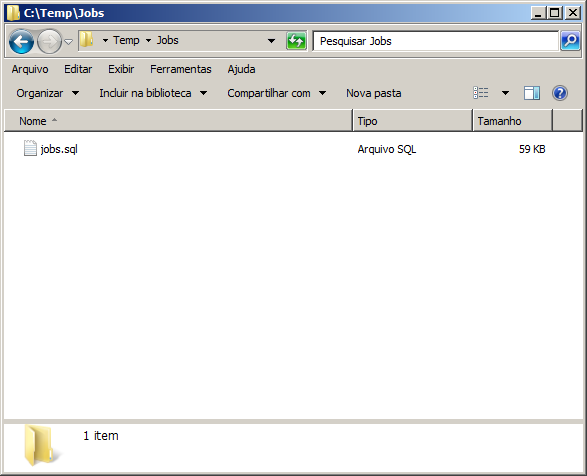
In this example, I will demonstrate how to export the creation script for all jobs in the instance, with 1 sql file containing the script for all jobs.

EXEC CLR.dbo.stpJob_Backup
    @Ds_Servidor = N'VM-DBA', -- nvarchar(max)
    @Ds_Diretorio_Destino = N'C:\Temp\Jobs', -- nvarchar(max)
    @Fl_Arquivo_Unico = 1 -- bit

Result:
Using only PowerShell and OLE Automation

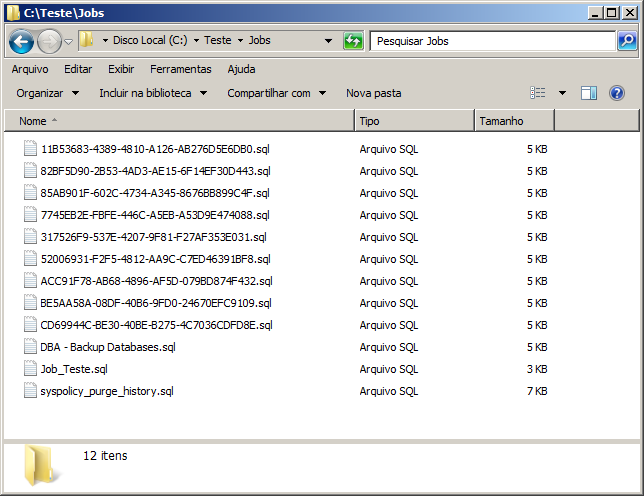
If you don't want to use the CLR for this solution and just want to use PowerShell for the database, you can do that too.

Prerequisites

As prerequisites for using the procedure below, we will need some functions for manipulating files. To do this, we will use OLE Automation to manipulate these files. To learn more about this, see the post File operations using OLE Automation in SQL Server.

stpWrite_File_FSO
View source code

CREATE PROCEDURE [dbo].[stpEscreve_Arquivo_FSO] (
    @String VARCHAR(MAX),
    @Ds_Arquivo VARCHAR(1501)
)
AS
BEGIN

    DECLARE
        @objFileSystem INT,
        @objTextStream INT,
        @objErrorObject INT,
        @strErrorMessage VARCHAR(1000),
        @Command VARCHAR(1000),
        @hr INT

    SET NOCOUNT ON

    SELECT
        @strErrorMessage = 'opening the File System Object'
    
    EXECUTE @hr = sp_OACreate
        'Scripting.FileSystemObject',
        @objFileSystem OUT

    
    IF @HR = 0
        SELECT
            @objErrorObject = @objFileSystem,
            @strErrorMessage = 'Creating file "' + @Ds_Arquivo + '"'
    
    
    IF @HR = 0
        EXECUTE @hr = sp_OAMethod
            @objFileSystem,
            'CreateTextFile',
            @objTextStream OUT,
            @Ds_Arquivo,
            2,
            True

    IF @HR = 0
        SELECT
            @objErrorObject = @objTextStream,
            @strErrorMessage = 'writing to the file "' + @Ds_Arquivo + '"'
    
    
    IF @HR = 0
        EXECUTE @hr = sp_OAMethod
            @objTextStream,
            'Write',
            NULL,
            @String

    
    IF @HR = 0
        SELECT
            @objErrorObject = @objTextStream,
            @strErrorMessage = 'closing the file "' + @Ds_Arquivo + '"'
    
    
    IF @HR = 0
        EXECUTE @hr = sp_OAMethod
            @objTextStream,
            'Close'

    
    IF @hr <> 0
    BEGIN
    
        DECLARE
            @Source VARCHAR(255),
            @Description VARCHAR(255),
            @Helpfile VARCHAR(255),
            @HelpID INT
    
        EXECUTE sp_OAGetErrorInfo
            @objErrorObject,
            @source OUTPUT,
            @Description OUTPUT,
            @Helpfile OUTPUT,
            @HelpID OUTPUT
        
        
        SELECT
            @strErrorMessage = 'Error whilst ' + COALESCE(@strErrorMessage, 'doing something') + ', ' + COALESCE(@Description, '')
        
        
        RAISERROR (@strErrorMessage,16,1)
        
    END
    
    
    EXECUTE sp_OADestroy
        @objTextStream
    
    EXECUTE sp_OADestroy
        @objTextStream
        
END

fncFile_Exists_FSO
View source code

CREATE FUNCTION [dbo].[fncArquivo_Existe_FSO] (
    @strArquivo VARCHAR(1000)
)
RETURNS INT 
AS 
BEGIN

    DECLARE	
        @hr INT,
        @objFileSystem INT,
        @retorno INT,
        @source VARCHAR(250),
        @description VARCHAR(2000)


    EXEC @hr = sp_OACreate
        'Scripting.FileSystemObject',
        @objFileSystem OUT
        
    IF @hr <> 0
    BEGIN
    
        EXEC sp_OAGetErrorInfo
            @objFileSystem,
            @source OUT,
            @description OUT
            
        RETURN 0
        
    END

    EXEC @hr = sp_OAMethod
        @objFileSystem,
        'FileExists',
        @retorno OUT,
        @strArquivo
        
    IF (@hr <> 0)
    BEGIN
    
        EXEC sp_OAGetErrorInfo
            @objFileSystem,
            @source OUT,
            @description OUT
            
        EXEC sp_OADestroy
            @objFileSystem
            
        RETURN 0
        
    END
    
    
    EXEC sp_OADestroy
        @objFileSystem
        
        
    RETURN @retorno

END

stpDelete_FSO_File
View source code

CREATE PROCEDURE [dbo].[stpApaga_Arquivo_FSO] (@strArquivo VARCHAR(1000))
AS 
BEGIN

    DECLARE	
        @hr INT,
        @objFileSystem INT,
        @source VARCHAR(250),
        @description VARCHAR(2000)


    EXEC @hr = sp_OACreate
        'Scripting.FileSystemObject',
        @objFileSystem OUT
        
    IF @hr <> 0
    BEGIN
    
        EXEC sp_OAGetErrorInfo
            @objFileSystem,
            @source OUT,
            @description OUT
        
    END

    
    IF (dbo.fncArquivo_Existe_FSO(@strArquivo) = 1)
    BEGIN
    
        EXEC @hr = sp_OAMethod
            @objFileSystem,
            'DeleteFile',
            NULL,
            @strArquivo
            
    END
    
    
    IF (@hr <> 0)
    BEGIN
    
        EXEC sp_OAGetErrorInfo
            @objFileSystem,
            @source OUT,
            @description OUT
            
        EXEC sp_OADestroy
            @objFileSystem
        
    END
    
    
    EXEC sp_OADestroy
        @objFileSystem
    

END

Stored Procedure stpExecuta_Script_Powershell

CREATE PROCEDURE [dbo].[stpExecuta_Script_Powershell]
    @Ds_Script [varchar](MAX),
    @Fl_Apaga_Script [bit] = 1
AS
BEGIN
    

    SET NOCOUNT ON
    

    DECLARE 
        @QuebraLinha VARCHAR(10) = CHAR(13) + CHAR(10),
        @arquivo VARCHAR(MAX),
        @diretorio VARCHAR(MAX) = 'C:\Temp\',
        @scriptPS VARCHAR(MAX) = CAST(NEWID() AS VARCHAR(50)) + '.ps1',
        @caminho VARCHAR(MAX)


    SET @caminho = @diretorio + @scriptPS
        
    
    EXEC dbo.stpEscreve_Arquivo_FSO
        @String = @Ds_Script, -- varchar(max)
        @Ds_Arquivo = @caminho -- varchar(1501)
    
    SET @scriptPS = @diretorio + @scriptPS
        
        
    DECLARE @cmd VARCHAR(4000)
    SET @cmd = 'powershell -ExecutionPolicy Unrestricted -File "' + @scriptPS + '"'
    
    
    DECLARE @Retorno TABLE (Ds_Texto VARCHAR(MAX))
    
    INSERT INTO @Retorno
    EXEC master.dbo.xp_cmdshell @cmd
    
    
    -- Apaga o script gerado
    IF (@Fl_Apaga_Script = 1)
    BEGIN
    
        EXEC dbo.stpApaga_Arquivo_FSO
            @strArquivo = @scriptPS -- varchar(1000)
        
    END
    

    SELECT * FROM @Retorno

    
END

Usage example:

DECLARE @Script VARCHAR(MAX) = '
$ServerNameList = "VM-DBA"
$OutputFolder = "C:\Teste\Jobs\"
$DoesFolderExist = Test-Path $OutputFolder
$null = if (!$DoesFolderExist){MKDIR "$OutputFolder"}

[System.Reflection.Assembly]::LoadWithPartialName("Microsoft.SqlServer.Smo") | Out-Null

$objSQLConnection = New-Object System.Data.SqlClient.SqlConnection

foreach ($ServerName in $ServerNameList)
{

    Try
    {
        $objSQLConnection.ConnectionString = "Server=$ServerName;Integrated Security=SSPI;"
        Write-Host "Tentando se conectar na instância do servidor $ServerName..." -NoNewline
        $objSQLConnection.Open() | Out-Null
        Write-Host "Conectado."
        $objSQLConnection.Close()
    }
    Catch
    {
        Write-Host -BackgroundColor Red -ForegroundColor White "Falha"
        $errText = $Error[0].ToString()
        if ($errText.Contains("network-related"))
            {Write-Host "Erro de conexão à instância. Por favor, verifique o nome do servidor digitado, porta ou firewall."}

        Write-Host $errText
        
        continue

    }

    $srv = New-Object "Microsoft.SqlServer.Management.Smo.Server" $ServerName

    # Arquivo único com todos os jobs
    # $srv.JobServer.Jobs | foreach {$_.Script() + "GO`r`n"} | out-file "$OutputFolder\jobs.sql"

    # Um arquivo por job
    $srv.JobServer.Jobs | foreach-object -process {out-file -filepath $("$OutputFolder\" + $($_.Name -replace "\\", "") + ".sql") -inputobject $_.Script() }

}'


EXEC dbo.stpExecuta_Script_Powershell
    @Ds_Script = @Script, -- varchar(max)
    @Fl_Apaga_Script = 0 -- bit

Result:
Using only PowerShell

If you just want to use PowerShell script manually, below is the complete script.

# Nome da sua máquina
$ServerNameList = "VM-DBA"

# Diretório para salvar os scripts
$OutputFolder = "C:\Jobs\"

$DoesFolderExist = Test-Path $OutputFolder
$null = if (!$DoesFolderExist){MKDIR "$OutputFolder"}

[System.Reflection.Assembly]::LoadWithPartialName("Microsoft.SqlServer.Smo") | Out-Null

$objSQLConnection = New-Object System.Data.SqlClient.SqlConnection

foreach ($ServerName in $ServerNameList)
{

    Try
    {
        $objSQLConnection.ConnectionString = "Server=$ServerName;Integrated Security=SSPI;"
        Write-Host "Tentando se conectar na instância do servidor $ServerName..." -NoNewline
        $objSQLConnection.Open() | Out-Null
        Write-Host "Conectado."
        $objSQLConnection.Close()
    }
    Catch
    {
        Write-Host -BackgroundColor Red -ForegroundColor White "Falha"
        $errText = $Error[0].ToString()
        if ($errText.Contains("network-related"))
            {Write-Host "Erro de conexão à instância. Por favor, verifique o nome do servidor digitado, porta ou firewall."}

        Write-Host $errText
        
        continue

    }

    $srv = New-Object "Microsoft.SqlServer.Management.Smo.Server" $ServerName
    
    # Arquivo único com todos os jobs
    # $srv.JobServer.Jobs | foreach {$_.Script() + "GO`r`n"} | out-file "$OutputFolder\jobs.sql"

    # Um arquivo por job
    $srv.JobServer.Jobs | foreach-object -process {out-file -filepath $("$OutputFolder\" + $($_.Name -replace "\\", "") + ".sql") -inputobject $_.Script() }

}

That's it, folks.
A big hug and see you next time.

SQL Server – How to backup all SQL Agent jobs via command line (CLR C# or Powershell) backup restore sql server agent jobs command line

SQL Server – How to backup all SQL Agent jobs via command line (CLR C# or Powershell) backup restore sql server agent jobs command line