
Hey guys,
Are you all right?
In this post I will demonstrate how to export the assembly of a CLR in SQL Server as a DLL and reverse engineer it into C# source code. The first time I needed to use this feature was when there was an assembly already created and compiled in the database and I needed to change the source code of a procedure, but the version that was in the database did not seem to be the same as the one in TFS (Team Foundation Server).
How to export the assembly of a CLR from the bank to DLL
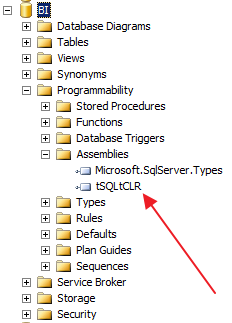
The first step to carry out this activity is to export the Assembly from the database to DLL. To do this, you will need to identify the assembly name and run one of the scripts below.
Identifying the assembly name
Exporting the assembly to DLL with OLE Automation
One way to export the Assembly to DLL is using OLE Automation. To do this, use the code below:
-- Habilitando o OLE Automation (Se já está habilitando, não precisa executar)
EXECUTE SP_CONFIGURE 'show advanced options', 1
RECONFIGURE WITH OVERRIDE
GO

EXEC sp_configure 'Ole Automation Procedures', 1;
RECONFIGURE WITH OVERRIDE
GO

DECLARE @IMG_PATH VARBINARY(MAX)
DECLARE @ObjectToken INT

SELECT
    @IMG_PATH = A.content
FROM
    sys.assembly_files      A   WITH(NOLOCK)
    JOIN sys.assemblies     B   WITH(NOLOCK) ON A.assembly_id = B.assembly_id
WHERE
    A.file_id = 1
    AND B.name = 'tSQLtCLR' -- nome do assembly

EXEC sp_OACreate 'ADODB.Stream', @ObjectToken OUTPUT
EXEC sp_OASetProperty @ObjectToken, 'Type', 1
EXEC sp_OAMethod @ObjectToken, 'Open'
EXEC sp_OAMethod @ObjectToken, 'Write', NULL, @IMG_PATH
EXEC sp_OAMethod @ObjectToken, 'SaveToFile', NULL, 'C:\Teste\myassembly.dll', 2 -- Nome do seu assembly
EXEC sp_OAMethod @ObjectToken, 'Close'
EXEC sp_OADestroy @ObjectToken

-- Desativando o OLE Automation (Execute apenas se não estava ativado antes)
EXEC sp_configure 'Ole Automation Procedures', 0;
RECONFIGURE WITH OVERRIDE
GO

EXECUTE SP_CONFIGURE 'show advanced options', 0
RECONFIGURE WITH OVERRIDE
GO
Exporting the assembly to DLL with CLR
Another way to export the Assembly to DLL is using the CLR itself.
using System;
using System.Data;
using System.Data.SqlClient;
using System.Data.SqlTypes;
using System.IO;

public partial class StoredProcedures
{
    [Microsoft.SqlServer.Server.SqlProcedure]
    public static void stpAssembly_Backup(SqlString Ds_Servidor, SqlString Ds_Database, SqlString Ds_Assembly, SqlString Ds_Diretorio_Destino)
    {

        var sql = "SELECT AF.content FROM " + Ds_Database.Value + @".[sys].assembly_files AF JOIN " + Ds_Database.Value + ".[sys].assemblies A ON AF.assembly_id = A.assembly_id where AF.file_id = 1 AND A.name = @assemblyname";

        using (var conn = new SqlConnection(Servidor.Localhost.Replace("LOCALHOST", Ds_Servidor.Value)))
        {

            conn.Open();

            using (var cmd = new SqlCommand(sql, conn))
            {

                var param = new SqlParameter("@assemblyname", SqlDbType.VarChar) { Value = Ds_Assembly.Value };
                cmd.Parameters.Add(param);

                using (var dr = cmd.ExecuteReader())
                {

                    dr.Read();

                    var bytes = dr.GetSqlBytes(0);
                    var nomeArquivo = Ds_Diretorio_Destino.Value + "/" + Ds_Assembly.Value + ((!Ds_Assembly.Value.ToLower().Contains(".dll")) ? ".dll" : "");

                    using (var bytestream = new FileStream(nomeArquivo, FileMode.CreateNew))
                    {
                        bytestream.Write(bytes.Value, 0, (int) bytes.Length);
                    }

                }
            }
        }

    }

}
Usage example:
EXEC CLR.dbo.stpAssembly_Backup
    @Ds_Servidor = N'vm-dba', -- nvarchar(max)
    @Ds_Database = N'BI', -- nvarchar(max)
    @Ds_Assembly = N'tSQLtCLR', -- nvarchar(max)
    @Ds_Diretorio_Destino = N'C:\Teste\' -- nvarchar(max)
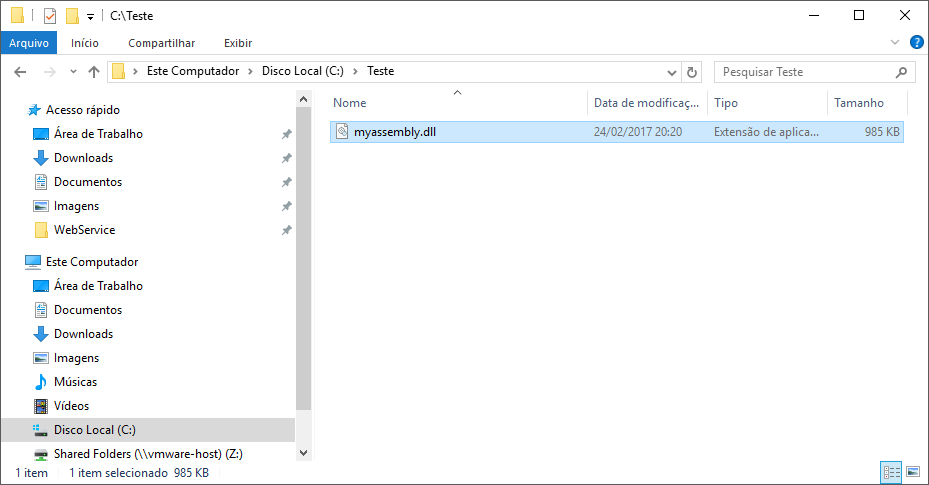
Result:
How to reverse engineer DLL to source code
Once you have successfully exported your CLR library assembly to a DLL file, you can back-engineer the source code. To do this, there are several tools, but I suggest the tool JetBrains dotPeek.
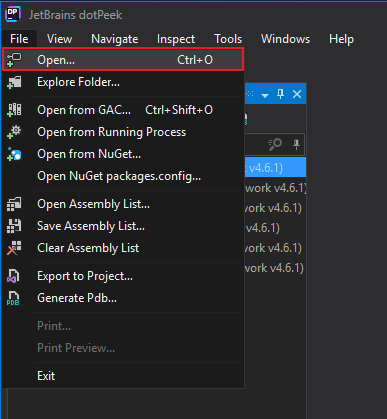
Once installed, you can open the dotPeek tool, click on the menu and select the “Open…” option.
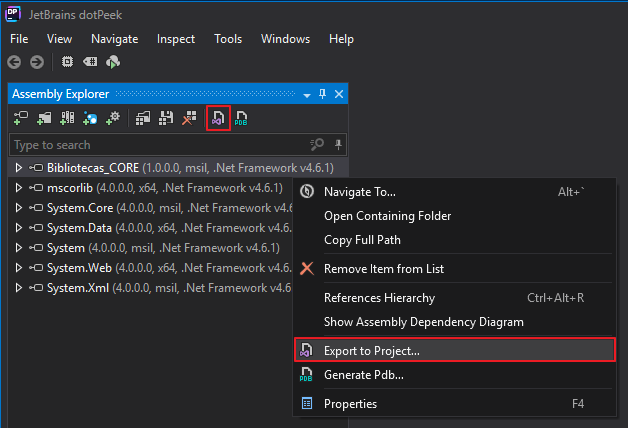
Now that your CLR will appear in the list, simply click on the button highlighted in the image below, or right-click on the library and select the “Export to Project” option or access the File > “Export to Project” menu.
Select where you want to save the source code and you can leave the default options checked.
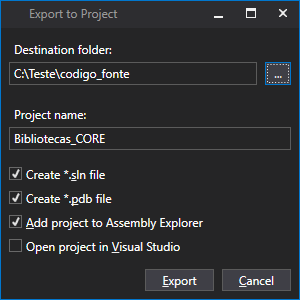
Ready. dotPeek reverse engineered your DLL and regenerated the original source code, as shown in the example below:
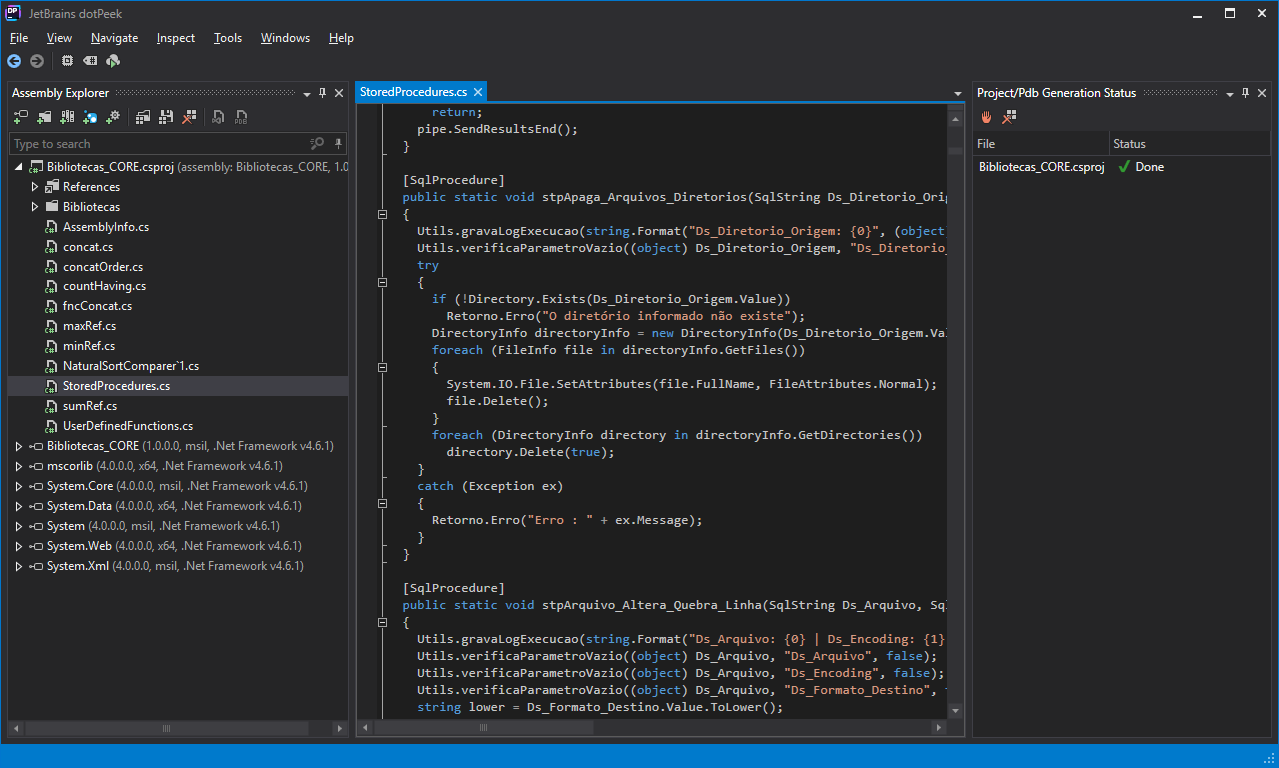
It is worth noting that some formatting, spacing and comments are not recovered through backup engineering, as this is lost when the code is compiled. Furthermore, this technique only applies to DLLs that have not undergone the obfuscation process (source code encryption).
That's it, folks.
I hope you liked this post.
Hug!
SQL Server database how to export save export the assembly from a CLR as DLL and reverse engineer it to source code C# csharp disassembly reverse engineering JetBrains dotPeek
SQL Server database how to export save export the assembly from a CLR as DLL and reverse engineer it to source code C# csharp disassembly reverse engineering JetBrains dotPeek

Comments (0)
Loading comments...