
Hey guys,
Are you all right?
In this post I will demonstrate a very interesting and common feature in the daily life of a DBA, which is monitoring disk space on the server. As a DBA, you must always have control over the server's disk space, so that you don't let this space reach critical levels and you have to try to resolve it at the last minute, with the database running the risk of stopping due to lack of disk space.
This post is a complement to my post SQL Server – How to identify and monitor the total disk space, free and used by database datafiles, where I demonstrated how to identify, analyze and monitor the disk space of database datafiles.
Disc information using DMV’s
In this first example, I will demonstrate how to identify disk space information using the sys.master_files view and the DMV dm_os_volume_stats (The dm_os_volume_stats view was made available starting with SQL Server 2008 R2 SP1).
SELECT DISTINCT
    VS.volume_mount_point [Montagem] ,
    VS.logical_volume_name AS [Volume] ,
    CAST(CAST(VS.total_bytes AS DECIMAL(19, 2)) / 1024 / 1024 / 1024 AS DECIMAL(10, 2)) AS [Total (GB)] ,
    CAST(CAST(VS.available_bytes AS DECIMAL(19, 2)) / 1024 / 1024 / 1024 AS DECIMAL(10, 2)) AS [Espaço Disponível (GB)] ,
    CAST(( CAST(VS.available_bytes AS DECIMAL(19, 2)) / CAST(VS.total_bytes AS DECIMAL(19, 2)) * 100 ) AS DECIMAL(10, 2)) AS [Espaço Disponível ( % )] ,
    CAST(( 100 - CAST(VS.available_bytes AS DECIMAL(19, 2)) / CAST(VS.total_bytes AS DECIMAL(19, 2)) * 100 ) AS DECIMAL(10, 2)) AS [Espaço em uso ( % )]
FROM
    sys.master_files AS MF
    CROSS APPLY [sys].[dm_os_volume_stats](MF.database_id, MF.file_id) AS VS
WHERE
    CAST(VS.available_bytes AS DECIMAL(19, 2)) / CAST(VS.total_bytes AS DECIMAL(19, 2)) * 100 < 100;
Result:

Disk information using xp_fixeddrives
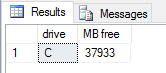
In this example, I will demonstrate how to return free disk space on the drives using the simple xp_fixeddrives procedure.
EXEC xp_fixeddrives;
Result:
Disk information using OLE Automation
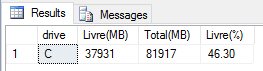
In this third example, I will demonstrate how to identify disk space information using Scripting.FileSystemObject and the GetDrive method, in addition to the xp_fixeddrives procedure.
--------------------------------------------------------------------------------
-- Habilitando o OLE Automation (Se não estiver ativado)
--------------------------------------------------------------------------------

DECLARE @Fl_Ole_Automation_Ativado BIT = (SELECT (CASE WHEN CAST([value] AS VARCHAR(MAX)) = '1' THEN 1 ELSE 0 END) FROM sys.configurations WHERE [name] = 'Ole Automation Procedures')

IF (@Fl_Ole_Automation_Ativado = 0)
BEGIN

    EXECUTE SP_CONFIGURE 'show advanced options', 1;
    RECONFIGURE WITH OVERRIDE;

    EXEC sp_configure 'Ole Automation Procedures', 1;
    RECONFIGURE WITH OVERRIDE;

END


--------------------------------------------------------------------------------
-- Código fonte
--------------------------------------------------------------------------------

IF (OBJECT_ID('tempdb..#drives') IS NOT NULL) DROP TABLE #drives
CREATE TABLE #drives (
    contador INT IDENTITY(1, 1),
    drive CHAR(1) PRIMARY KEY ,
    FreeSpace INT NULL ,
    TotalSize INT NULL
);

INSERT #drives ( drive, FreeSpace )
EXEC master.dbo.xp_fixeddrives;


DECLARE
    @handler INT,
    @fso INT,
    @drive CHAR(1),
    @odrive INT,
    @Tamanto_Total BIGINT,
    @Contador INT = 1,
    @Total INT = (SELECT COUNT(*) FROM #drives),
    @MB BIGINT = 1048576


EXEC @handler= sp_OACreate 'Scripting.FileSystemObject', @fso OUT
IF @handler <> 0
    EXEC sp_OAGetErrorInfo @fso


WHILE(@Contador <= @Total)
BEGIN

    SELECT @drive = drive
    FROM #drives
    WHERE contador = @Contador

    EXEC @handler = sp_OAMethod @fso, 'GetDrive', @odrive OUT, @drive
    IF @handler <> 0
        EXEC sp_OAGetErrorInfo @fso

    EXEC @handler = sp_OAGetProperty @odrive, 'TotalSize', @Tamanto_Total OUT
    IF @handler <> 0
        EXEC sp_OAGetErrorInfo @odrive


    UPDATE #drives
    SET
        TotalSize = @Tamanto_Total / @MB
    WHERE
        drive = @drive


    SET @Contador += 1


END


EXEC @handler= sp_OADestroy @fso
IF @handler <> 0
    EXEC sp_OAGetErrorInfo @fso


SELECT
    drive,
    FreeSpace AS 'Livre(MB)',
    TotalSize AS 'Total(MB)',
    CAST(( FreeSpace / ( TotalSize * 1.0 ) ) * 100.0 AS NUMERIC(18, 2)) AS 'Livre(%)'
FROM
    #drives
ORDER BY
    drive


--------------------------------------------------------------------------------
-- Desativando o OLE Automation (Se não estava habilitado antes)
--------------------------------------------------------------------------------

IF (@Fl_Ole_Automation_Ativado = 0)
BEGIN

    EXEC sp_configure 'Ole Automation Procedures', 0;
    RECONFIGURE WITH OVERRIDE;

    EXECUTE SP_CONFIGURE 'show advanced options', 0;
    RECONFIGURE WITH OVERRIDE;

END
Result:
Disk information using xp_cmdshell and WMIC
In this example, I will demonstrate how to identify disk space information using the WMIC (Windows Management Instrumentation Command-line) binary and the xp_cmdshell Stored Procedure.
--------------------------------------------------------------------------------
-- Habilitando o xp_cmdshell (Se não estiver ativado)
--------------------------------------------------------------------------------

DECLARE @Fl_Xp_CmdShell_Ativado BIT = (SELECT (CASE WHEN CAST([value] AS VARCHAR(MAX)) = '1' THEN 1 ELSE 0 END) FROM sys.configurations WHERE [name] = 'xp_cmdshell')

IF (@Fl_Xp_CmdShell_Ativado = 0)
BEGIN

    EXECUTE SP_CONFIGURE 'show advanced options', 1;
    RECONFIGURE WITH OVERRIDE;

    EXEC sp_configure 'xp_cmdshell', 1;
    RECONFIGURE WITH OVERRIDE;

END


--------------------------------------------------------------------------------
-- Código fonte
--------------------------------------------------------------------------------

IF (OBJECT_ID('tempdb..#Retorno_CmdShell') IS NOT NULL) DROP TABLE #Retorno_CmdShell
CREATE TABLE #Retorno_CmdShell (
    Id INT IDENTITY(1, 1),
    Descricao VARCHAR(MAX)
)

INSERT INTO #Retorno_CmdShell
EXEC master.dbo.xp_cmdshell 'wmic logicaldisk where drivetype=3 get Caption,FreeSpace,Size,FileSystem,VolumeName /FORMAT:list'


IF (OBJECT_ID('tempdb..#Informacoes_Disco') IS NOT NULL) DROP TABLE #Informacoes_Disco
CREATE TABLE #Informacoes_Disco (
    Ds_Drive NVARCHAR (256) COLLATE Latin1_General_CI_AI NULL,
    Ds_Volume NVARCHAR (256) COLLATE Latin1_General_CI_AI NULL,
    Ds_FileSystem NVARCHAR (128) COLLATE Latin1_General_CI_AI NULL,
    Qt_Tamanho NUMERIC(18, 2) NULL,
    Qt_Utilizado NUMERIC(18, 2) NULL,
    Qt_Livre NUMERIC(18, 2) NULL,
    Perc_Utilizado NUMERIC(18, 2) NULL,
    Perc_Livre NUMERIC(18, 2) NULL
)

DECLARE
    @Contador INT = 3,
    @Total INT = (SELECT COUNT(*) FROM #Retorno_CmdShell),
    @Ds_Drive VARCHAR(100),
    @Ds_Volume VARCHAR(100),
    @Ds_Filesystem VARCHAR(100),
    @Qt_Tamanho FLOAT,
    @Qt_Utilizado FLOAT,
    @Qt_Livre FLOAT,
    @Perc_Utilizado FLOAT,
    @Perc_Livre FLOAT


WHILE(@Contador <= @Total)
BEGIN


    SELECT @Ds_Drive = REPLACE(SUBSTRING(Descricao, CHARINDEX('=', Descricao) + 1, 99999999), CHAR(13), '')
    FROM #Retorno_CmdShell
    WHERE Id = @Contador


    -- Se chegou ao final, força sair do WHILE
    IF (NULLIF(@Ds_Drive, '') IS NULL)
        BREAK


    SELECT @Ds_Filesystem = REPLACE(SUBSTRING(Descricao, CHARINDEX('=', Descricao) + 1, 99999999), CHAR(13), '')
    FROM #Retorno_CmdShell
    WHERE Id = @Contador + 1

    SELECT @Qt_Livre = REPLACE(SUBSTRING(Descricao, CHARINDEX('=', Descricao) + 1, 99999999), CHAR(13), '')
    FROM #Retorno_CmdShell
    WHERE Id = @Contador + 2

    SELECT @Qt_Tamanho = REPLACE(SUBSTRING(Descricao, CHARINDEX('=', Descricao) + 1, 99999999), CHAR(13), '')
    FROM #Retorno_CmdShell
    WHERE Id = @Contador + 3

    SELECT @Ds_Volume = REPLACE(SUBSTRING(Descricao, CHARINDEX('=', Descricao) + 1, 99999999), CHAR(13), '')
    FROM #Retorno_CmdShell
    WHERE Id = @Contador + 4


    SELECT
        @Qt_Utilizado = @Qt_Tamanho - @Qt_Livre,
        @Perc_Utilizado = @Qt_Utilizado / @Qt_Tamanho,
        @Perc_Livre = @Qt_Livre / @Qt_Tamanho


    INSERT INTO #Informacoes_Disco (
        Ds_Drive ,
        Ds_Volume ,
        Ds_FileSystem ,
        Qt_Tamanho ,
        Qt_Utilizado ,
        Qt_Livre ,
        Perc_Utilizado ,
        Perc_Livre
    )
    VALUES  (
        @Ds_Drive, -- Ds_Drive - nvarchar(256)
        @Ds_Volume, -- Ds_Volume - nvarchar(256)
        @Ds_Filesystem, -- Ds_FileSystem - nvarchar(128)
        @Qt_Tamanho / 1073741824.0, -- Qt_Tamanho - float
        @Qt_Utilizado / 1073741824.0, -- Qt_Utilizado - float
        @Qt_Livre / 1073741824.0, -- Qt_Livre - float
        @Perc_Utilizado, -- Perc_Utilizado - float
        @Perc_Livre -- Perc_Livre - float
    )


    SET @Contador += 7


END


SELECT * FROM #Informacoes_Disco


--------------------------------------------------------------------------------
-- Desativando o xp_cmdshell (Se não estava habilitado antes)
--------------------------------------------------------------------------------

IF (@Fl_Xp_CmdShell_Ativado = 0)
BEGIN

    EXEC sp_configure 'xp_cmdshell', 0;
    RECONFIGURE WITH OVERRIDE;

    EXECUTE SP_CONFIGURE 'show advanced options', 0;
    RECONFIGURE WITH OVERRIDE;

END
Result:

Disk information using CLR
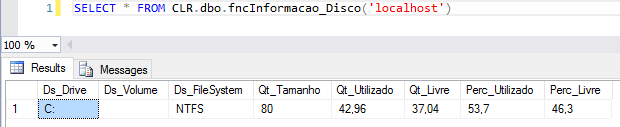
In this last example, I will demonstrate how to identify disk space information using the CLR.
using System;
using System.Collections;
using System.Data.SqlTypes;
using System.Diagnostics;
using System.Linq;
using System.Text;

public partial class UserDefinedFunctions
{

    private class InformacaoDisco
    {

        public SqlString Ds_Drive;
        public SqlString Ds_Volume;
        public SqlString Ds_FileSystem;
        public SqlDouble Qt_Tamanho;
        public SqlDouble Qt_Utilizado;
        public SqlDouble Qt_Livre;
        public SqlDouble Perc_Utilizado;
        public SqlDouble Perc_Livre;

        public InformacaoDisco(SqlString dsDrive, SqlString dsVolume, SqlString dsFileSystem, SqlDouble qtTamanho, SqlDouble qtUtilizado, SqlDouble qtLivre, SqlDouble percUtilizado, SqlDouble percLivre)
        {

            Ds_Drive = dsDrive;
            Ds_Volume = dsVolume;
            Ds_FileSystem = dsFileSystem;
            Qt_Tamanho = qtTamanho;
            Qt_Utilizado = qtUtilizado;
            Qt_Livre = qtLivre;
            Perc_Utilizado = percUtilizado;
            Perc_Livre = percLivre;

        }

    }

    [Microsoft.SqlServer.Server.SqlFunction(
        FillRowMethodName = "FillRow_Informacao_Disco",
        TableDefinition = "Ds_Drive NVARCHAR(10), Ds_Volume NVARCHAR(256), Ds_FileSystem NVARCHAR(128), Qt_Tamanho FLOAT, Qt_Utilizado FLOAT, Qt_Livre FLOAT, Perc_Utilizado FLOAT, Perc_Livre FLOAT"
    )]
    public static IEnumerable fncInformacao_Disco(string Ds_Servidor)
    {

        var informacaoDiscoCollection = new ArrayList();

        if (string.IsNullOrEmpty(Ds_Servidor))
            return informacaoDiscoCollection;


        var processStartInfo = new ProcessStartInfo
        {
            FileName = @"wmic",
            Arguments = "/node:\"" + Ds_Servidor + "\" logicaldisk where drivetype=3 get Caption,FreeSpace,Size,FileSystem,VolumeName /FORMAT:list",
            UseShellExecute = false,
            RedirectStandardOutput = true,
            RedirectStandardError = true,
            StandardOutputEncoding = Encoding.GetEncoding(850),
            CreateNoWindow = true
        };

        string output;
        using (var process = Process.Start(processStartInfo))
        {
            output = process?.StandardOutput.ReadToEnd();
        }


        var linhas = output?.Split('\n');
        var qtLinhas = (linhas?.Length - 1);

        for (var i = 1; i <= qtLinhas; i++)
        {

            var linha = linhas[i];

            if (linha.Trim().Length <= 0) continue;

            var parametro = linha.Split('=').First().Trim();
            if (parametro != "Caption") continue;

            var drive = linha.Split('=').Last().Trim();

            var volume = linhas[i + 4].Split('=').Last().Trim();
            var filesystem = linhas[i + 1].Split('=').Last().Trim();
            var espacoTotal = Convert.ToDouble(linhas[i + 3].Split('=').Last().Trim()) / 1073741824;
            var espacoLivre = Convert.ToDouble(linhas[i + 2].Split('=').Last().Trim()) / 1073741824;
            var espacoUtilizado = espacoTotal - espacoLivre;

            informacaoDiscoCollection.Add(new InformacaoDisco(
                drive,
                volume,
                filesystem,
                Math.Round(espacoTotal, 2),
                Math.Round(espacoUtilizado, 2),
                Math.Round(espacoLivre, 2),
                Math.Round((espacoUtilizado / espacoTotal) * 100, 2),
                Math.Round((espacoLivre / espacoTotal) * 100, 2)
            ));

        }


        return informacaoDiscoCollection;

    }

    protected static void FillRow_Informacao_Disco(object objInformacaoDisco, out SqlString dsDrive, out SqlString dsVolume, out SqlString dsFileSystem, out SqlDouble qtTamanho,
        out SqlDouble qtUtilizado, out SqlDouble qtLivre, out SqlDouble percUtilizado, out SqlDouble percLivre)
    {

        var informacaoDisco = (InformacaoDisco) objInformacaoDisco;

        dsDrive = informacaoDisco.Ds_Drive;
        dsVolume = informacaoDisco.Ds_Volume;
        dsFileSystem = informacaoDisco.Ds_FileSystem;
        qtTamanho = informacaoDisco.Qt_Tamanho;
        qtUtilizado = informacaoDisco.Qt_Utilizado;
        qtLivre = informacaoDisco.Qt_Livre;
        percUtilizado = informacaoDisco.Perc_Utilizado;
        percLivre = informacaoDisco.Perc_Livre;

    }

}
Result:
Monitoring free disk space
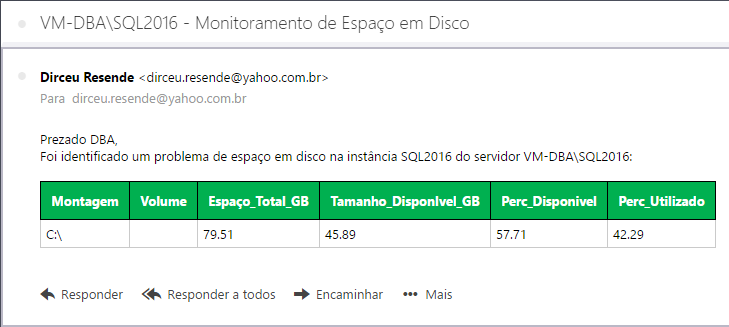
Guys, now that I've demonstrated several ways to check disk space on your server (there are several others on the internet), I'm going to show you how to monitor disk space on your server and send alerts via email. In this example, I will use the solution from the first example, as it is simple and practical to implement, but you can create this monitoring with any of the solutions presented above.
To help generate HTML codes, I will use stpExporta_Table_HTML_Output, but I could also use fncExporta_Query_HTML, available at:
- SQL Server – How to send the result of a query by email in HTML format using the CLR (C#)
- How to export data from a SQL Server table to HTML
To send the email, I will use the Stored Procedure msdb.dbo.sp_send_dbmail, from SQL Server DatabaseMail. If you haven't configured it yet or didn't know how to do it, find out more by accessing the post SQL Server – How to activate and configure Database mail to send and monitor emails through the database (sp_send_dbmail).
Monitoring source code:
IF (OBJECT_ID('dbo.stpMonitoramento_Espaco_Disco') IS NULL) EXEC('CREATE PROCEDURE dbo.stpMonitoramento_Espaco_Disco AS SELECT 1')
GO

ALTER PROCEDURE dbo.stpMonitoramento_Espaco_Disco (
    @Vl_Limite FLOAT = 80
)
AS BEGIN

    ------------------------------------------------------------
    -- GERAÇÃO DOS DADOS
    ------------------------------------------------------------

    IF (OBJECT_ID('tempdb..##Monitoramento_Espaco_Disco') IS NOT NULL) DROP TABLE ##Monitoramento_Espaco_Disco
    SELECT DISTINCT
        VS.volume_mount_point [Montagem] ,
        VS.logical_volume_name AS [Volume] ,
        CAST(CAST(VS.total_bytes AS DECIMAL(19, 2)) / 1024 / 1024 / 1024 AS DECIMAL(10, 2)) AS [Espaço_Total_GB] ,
        CAST(CAST(VS.available_bytes AS DECIMAL(19, 2)) / 1024 / 1024 / 1024 AS DECIMAL(10, 2)) AS [Tamanho_DisponIvel_GB] ,
        CAST(( CAST(VS.available_bytes AS DECIMAL(19, 2)) / CAST(VS.total_bytes AS DECIMAL(19, 2)) * 100 ) AS DECIMAL(10, 2)) AS [Perc_Disponivel] ,
        CAST(( 100 - CAST(VS.available_bytes AS DECIMAL(19, 2)) / CAST(VS.total_bytes AS DECIMAL(19, 2)) * 100 ) AS DECIMAL(10, 2)) AS [Perc_Utilizado]
    INTO
        ##Monitoramento_Espaco_Disco
    FROM
        sys.master_files AS MF
        CROSS APPLY [sys].[dm_os_volume_stats](MF.database_id, MF.file_id) AS VS
    WHERE
        CAST(VS.available_bytes AS DECIMAL(19, 2)) / CAST(VS.total_bytes AS DECIMAL(19, 2)) * 100 < 100;


    DELETE FROM ##Monitoramento_Espaco_Disco
    WHERE [Perc_Utilizado] < @Vl_Limite


    ------------------------------------------------------------
    -- ENVIA NOTIFICAÇÃO
    ------------------------------------------------------------

    IF ((SELECT COUNT(*) FROM ##Monitoramento_Espaco_Disco) > 0)
    BEGIN

        DECLARE
            @Ds_Saida VARCHAR(MAX),
            @Assunto VARCHAR(200) = @@SERVERNAME + ' - Monitoramento de Espaço em Disco',
            @Destinatario VARCHAR(MAX) = '[email protected]',
            @Mensagem VARCHAR(MAX)


        EXEC dbo.stpExporta_Tabela_HTML_Output
            @Ds_Tabela = '##Monitoramento_Espaco_Disco', -- varchar(max)
            @Fl_Aplica_Estilo_Padrao = 1 , -- bit
            @Ds_Saida = @Ds_Saida OUTPUT -- varchar(max)


        SET @Mensagem = '
Prezado DBA,<br/>
Foi identificado um problema de espaço em disco na instância ' + @@SERVICENAME + ' do servidor ' + @@SERVERNAME + ':<br/><br/>' + ISNULL(@Ds_Saida, '')


        -- Envia o e-mail
        EXEC msdb.dbo.sp_send_dbmail
            @profile_name = 'ProfileEnvioEmail' , -- sysname
            @recipients = @Destinatario , -- varchar(max)
            @subject = @Assunto, -- nvarchar(255)
            @body = @Mensagem, -- nvarchar(max)
            @body_format = 'HTML'

    END


END
Usage example:
-- Envia notificação se o % de espaço utilizado atingir 40%
EXEC dbo.stpMonitoramento_Espaco_Disco
    @Vl_Limite = 40 -- float
Result:
That's it, folks!
Until next time.
Hug.
SQL Server – how to identify query identify view monitor monitor disks, total, free and used disk space disk space used available command line command line transact sql query tsql
SQL Server – how to identify query identify view monitor monitor disks, total, free and used disk space disk space used available command line command line transact sql query tsql

Comments (0)
Loading comments...