
Hey guys,
Goodnight!
After writing my previous post where I talked about How to import text files into the database (OLE Automation, CLR, BCP, BULK INSERT, OPENROWSET), I ended up getting excited to write part 2, which is the reverse process, that is, exporting the data from SQL Server to a text file, which is exactly this post.
We often need to easily export data to a text file and I've seen several developers or DBA's desperate because they don't know how to do this efficiently.
Let's settle this once and for all.
Exporting through SQL Server Management StudioHow to export data from SQL Server Management Studio
Without a doubt, the simplest and easiest way to export data to a file in SQL Server is using the tool's own interface, which is Management Studio.
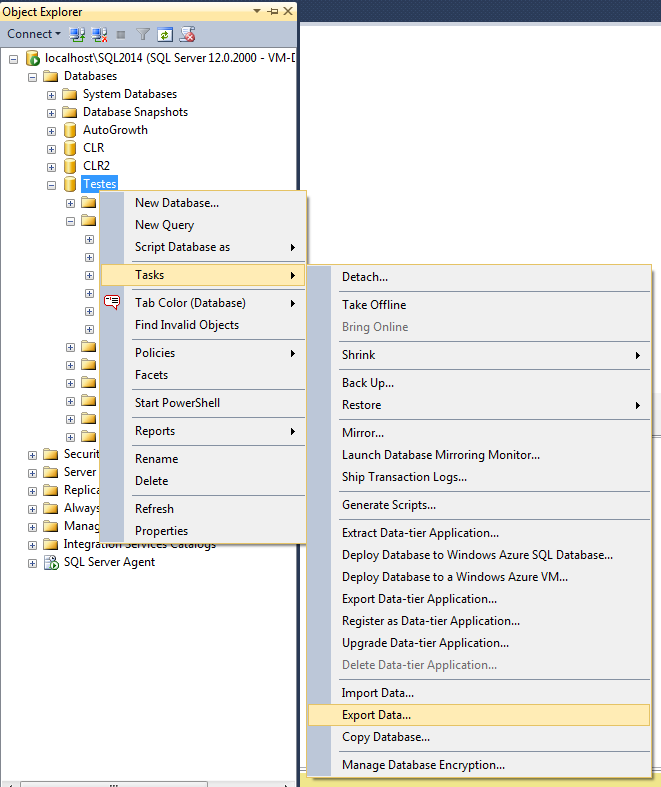
In the Object Explorer screen, right-click on the database that contains the tables you want to export and select the option “Tasks” -> “Export Data…”
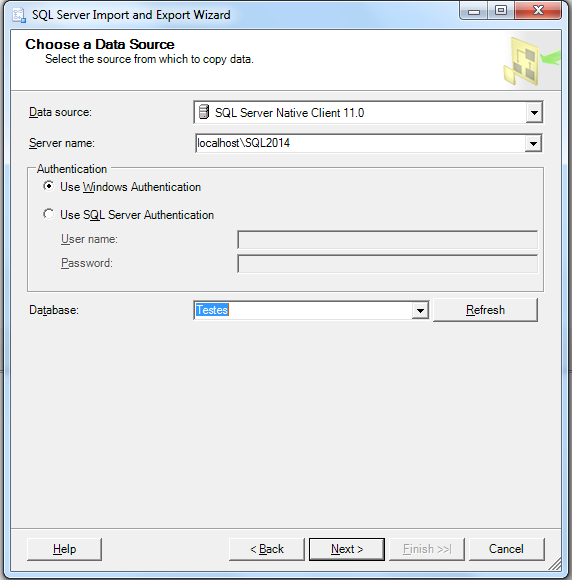
On this screen, you must choose the data source, configure the connection data and the database you will export.
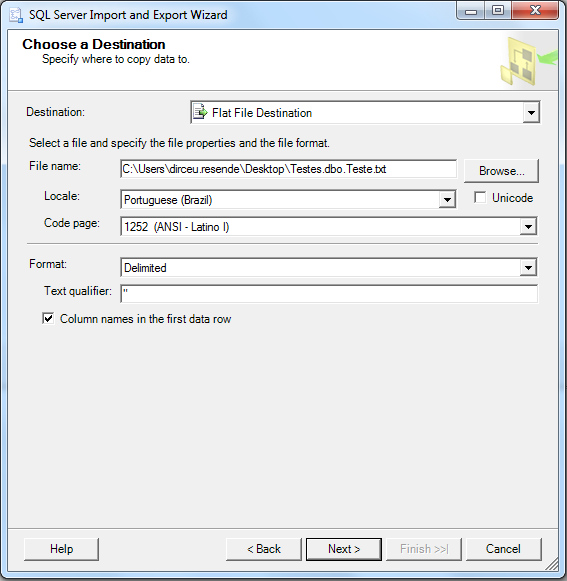
On this screen, you must choose the destination source of the data. For file, I chose “Flat File Destination”. We can define where the file with the data will be written, character encoding (ISO-8859, UTF-8, etc.), the format of the data in the file (delimited by some character, fixed size or aligned to the right), the text qualifier (e.g. if you define the quotation mark as a qualifier, your password will be something like this: “Dirceu”;”29″;”DBA”) and define whether the first line will contain the table header.
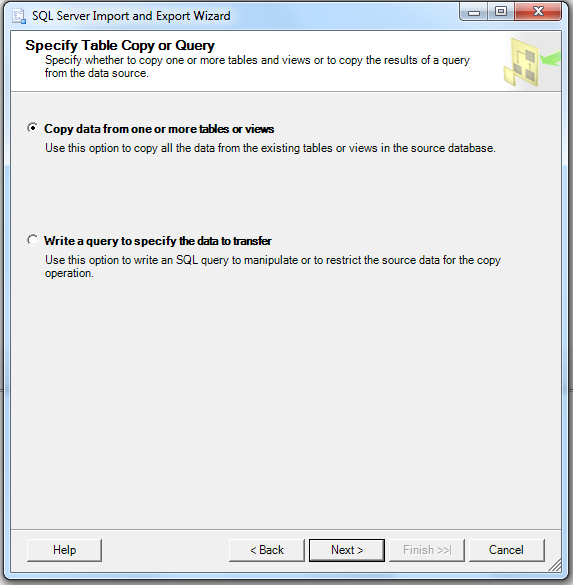
On this screen, you can define whether you want to select the objects you want to export (first option) or whether you want to write a query and the query result will be exported to the file. For this example, I will choose the first option.
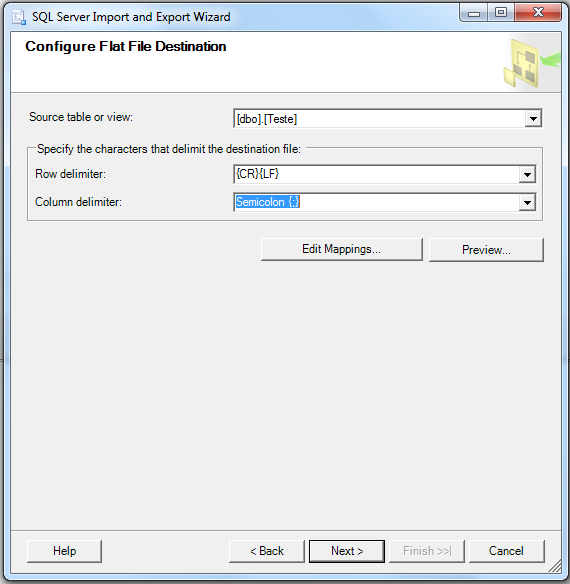
Here you can choose the object that will be exported and define the line break format (Windows = CRLF, UNIX = LF) and the column delimiter character
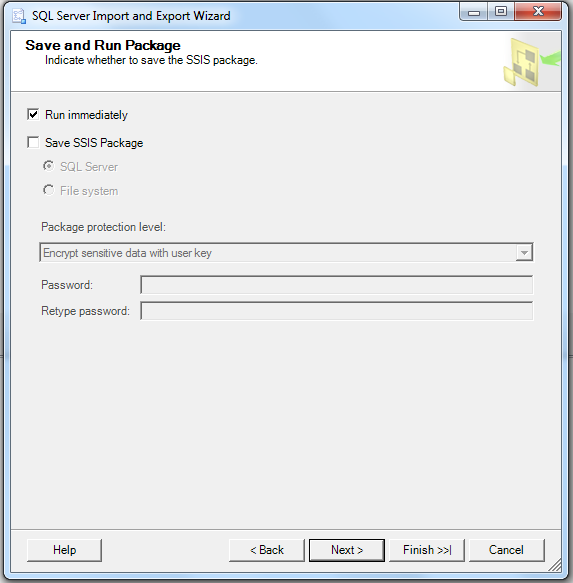
Finally, on this screen you define whether you want to export the data (Run immediately) and whether you want to generate an Integration Services (SSIS) package if you want to automate this task as a Job through SQL Agent or execute it manually without having to configure everything again.
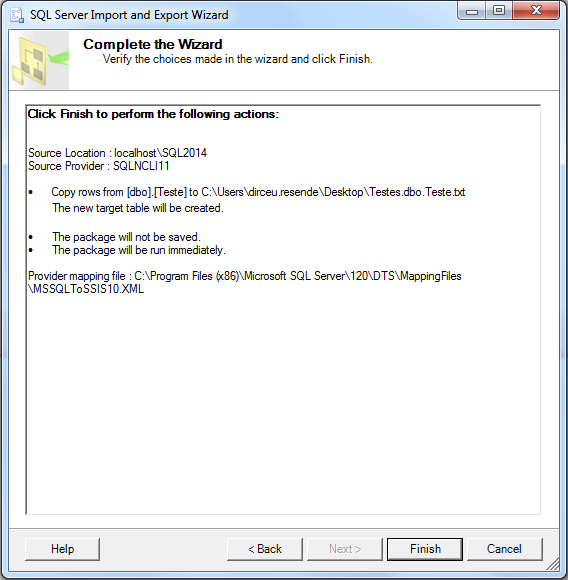
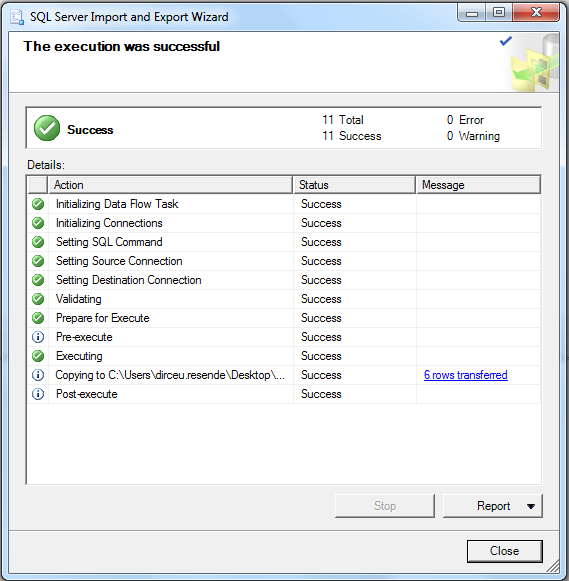
Although this is simple, exporting multiple tables ends up being cumbersome and impractical. For this reason, I will explain below how to do this via T-SQL.
How to export data from SQL Server to txt file with BCP
This is one of the options most used by DBA's, as it is simple, already installed with SQL Server and can be executed both in SSIS packages and in stored procedures (using xp_cmdshell)
Remembering that to use BCP, you will need to activate the xp_cmdshell feature. I personally don't like using xp_cmdshell or leaving it enabled in an instance, as it allows numerous vulnerabilities and any Windows Prompt command can be executed with this feature enabled.
To activate the feature and enable xp_cmdshell, run the following commands:
sp_configure 'show advanced options', 1;
GO
RECONFIGURE;
GO
sp_configure 'xp_cmdshell', 1;
GO
RECONFIGURE;
GO
Example of use:
-- Utilizando queryout, pode-se exportar o resultado de uma query
EXEC master.dbo.xp_cmdshell 'bcp "SELECT * FROM msdb.sys.tables" queryout "C:\Temp\bcp_queryout.csv" -c -t; -T -Slocalhost\SQL2014'

-- Utilizando out, pode-se exportar um objeto
EXEC master.dbo.xp_cmdshell 'bcp msdb.sys.tables out "C:\Temp\bcp_out.csv" -c -t, -T -Slocalhost\SQL2014'
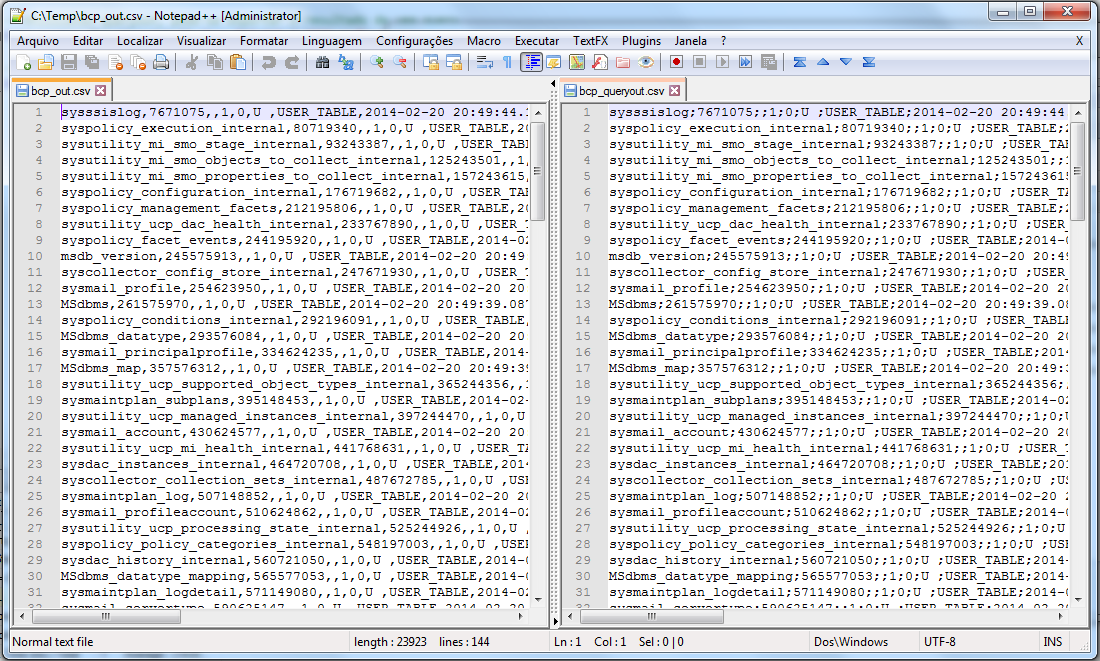
Where:
– out and queryout allow you to define how data is exported. OUT exports an object and QUERYOUT exports the result of a query.
– -c defines that all fields will be exported as characters (string)
– -t; allows you to define the field separator, not being limited to just 1 character as a separator. In the first example, I am using the “;” as a column separator.
– -T serves to inform that the connection will be made in Trusted Connection mode (Windows Authentication). If you want to use SQL Server authentication, just use -Uusuario and -Psenha.
– -S is used to inform the server\instance you want to connect to.
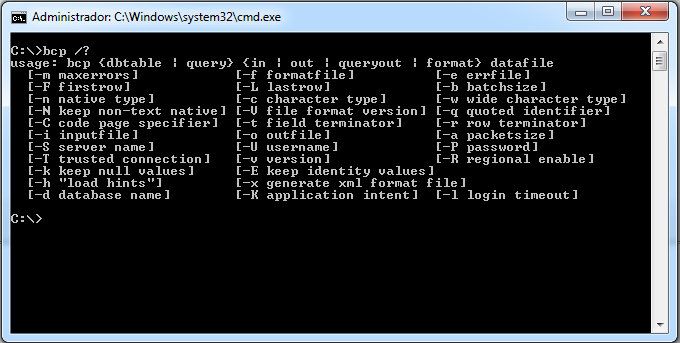
BCP Parameter Settings:
How to export text files to the database with OLE Automation
For those who are not familiar with this feature, it allows the DBA or Developer to perform a series of actions on the database using OLE DB, such as reading/writing/moving/copying/deleting files, creating spreadsheets in Excel and a series of other things. The syntax is a little similar to VBA and uses the Windows API for these operations.
For this purpose, we will use the Stored Procedures stpEscribe_Arquivo_FSO and SaveDelimitedColumns, as shown below:
Source code of the stpEscribe_Arquivo_FSO Procedure
CREATE PROCEDURE [dbo].[stpEscreve_Arquivo_FSO] (
    @String VARCHAR(MAX),
    @Ds_Arquivo VARCHAR(1501)
)
AS
BEGIN

    DECLARE
        @objFileSystem INT,
        @objTextStream INT,
        @objErrorObject INT,
        @strErrorMessage VARCHAR(1000),
        @Command VARCHAR(1000),
        @hr INT

    SET NOCOUNT ON

    SELECT
        @strErrorMessage = 'opening the File System Object'

    EXECUTE @hr = sp_OACreate
        'Scripting.FileSystemObject',
        @objFileSystem OUT


    IF @hr = 0
        SELECT
            @objErrorObject = @objFileSystem,
            @strErrorMessage = 'Creating file "' + @Ds_Arquivo + '"'


    IF @hr = 0
        EXECUTE @hr = sp_OAMethod
            @objFileSystem,
            'CreateTextFile',
            @objTextStream OUT,
            @Ds_Arquivo,
            2,
            True

    IF @hr = 0
        SELECT
            @objErrorObject = @objTextStream,
            @strErrorMessage = 'writing to the file "' + @Ds_Arquivo + '"'


    IF @hr = 0
        EXECUTE @hr = sp_OAMethod
            @objTextStream,
            'Write',
            NULL,
            @String


    IF @hr = 0
        SELECT
            @objErrorObject = @objTextStream,
            @strErrorMessage = 'closing the file "' + @Ds_Arquivo + '"'


    IF @hr = 0
        EXECUTE @hr = sp_OAMethod
            @objTextStream,
            'Close'


    IF @hr <> 0
    BEGIN

        DECLARE
            @Source VARCHAR(255),
            @Description VARCHAR(255),
            @Helpfile VARCHAR(255),
            @HelpID INT

        EXECUTE sp_OAGetErrorInfo
            @objErrorObject,
            @Source OUTPUT,
            @Description OUTPUT,
            @Helpfile OUTPUT,
            @HelpID OUTPUT


        SELECT
            @strErrorMessage = 'Error whilst ' + COALESCE(@strErrorMessage, 'doing something') + ', ' + COALESCE(@Description, '')


        RAISERROR (@strErrorMessage,16,1)

    END


    EXECUTE sp_OADestroy
        @objTextStream

    EXECUTE sp_OADestroy
        @objTextStream

END
Source Code of the SaveDelimitedColumns Procedure
To view the source code of this procedure, created by John Buoro, access this link or below:
CREATE PROCEDURE [dbo].[SaveDelimitedColumns]
    @PCWrite VARCHAR(1000) = NULL,
    @DBFetch VARCHAR(4000),
    @DBWhere VARCHAR(2000) = NULL,
    @DBThere VARCHAR(2000) = NULL,
    @DBUltra BIT = 1,
    @Delimiter VARCHAR(100) = 'CHAR(44)', -- Default is ,
    @TextQuote VARCHAR(100) = 'CHAR(34)', -- Default is "  Use SPACE(0) for none.
    @Header BIT = 0, -- Output header. Default is 0.
    @NullQuoted BIT = 0,
    @DateTimeStyle TINYINT = 120 -- CONVERT Date Time Style. Default is ODBC canonical yyyy-mm-dd hh:mi:ss(24h)
AS
BEGIN

    SET NOCOUNT ON;

    DECLARE @Return INT;
    DECLARE @Retain INT;
    DECLARE @Status INT;

    SET @Status = 0;

    DECLARE @TPre VARCHAR(10);

    DECLARE @TDo3 TINYINT;
    DECLARE @TDo4 TINYINT;

    SET @TPre = '';

    SET @TDo3 = LEN(@TPre);
    SET @TDo4 = LEN(@TPre) + 1;

    DECLARE @DBAE VARCHAR(40);
    DECLARE @Task VARCHAR(6000);
    DECLARE @Bank VARCHAR(4000);
    DECLARE @Cash VARCHAR(2000);
    DECLARE @Risk VARCHAR(2000);
    DECLARE @Next VARCHAR(8000);
    DECLARE @Save VARCHAR(8000);
    DECLARE @Work VARCHAR(8000);
    DECLARE @Wish VARCHAR(MAX);

    DECLARE @Name VARCHAR(100);
    DECLARE @Same VARCHAR(100);

    DECLARE @Rank SMALLINT;
    DECLARE @Kind VARCHAR(20);
    DECLARE @Mask BIT;
    DECLARE @Bond BIT;
    DECLARE @Size INT;
    DECLARE @Wide SMALLINT;
    DECLARE @More SMALLINT;

    DECLARE @DBAI VARCHAR(2000);
    DECLARE @DBAO VARCHAR(8000);
    DECLARE @DBAU VARCHAR(MAX);

    DECLARE @Fuse INT;
    DECLARE @File INT;

    DECLARE @HeaderString VARCHAR(8000);
    DECLARE @HeaderDone INT;

    SET @DBAE = '##SaveFile' + RIGHT(CONVERT(VARCHAR(10), @@SPID + 100000), 5);

    SET @Task = 'IF EXISTS (SELECT * FROM tempdb.dbo.sysobjects WHERE name = ' + CHAR(39) + @DBAE + CHAR(39) + ') DROP TABLE ' + @DBAE;

    EXECUTE ( @Task );

    SET @Bank = @TPre + @DBFetch;

    IF NOT EXISTS
    (
        SELECT
            *
        FROM
            sysobjects
        WHERE
            RTRIM(type) = 'U'
            AND name = @Bank
    )
    BEGIN
        SET @Bank = CASE WHEN LEFT(LTRIM(@DBFetch), 6) = 'SELECT' THEN '(' + @DBFetch + ')' ELSE @DBFetch END;
        SET @Bank = REPLACE(@Bank, CHAR(94), CHAR(39));
        SET @Bank = REPLACE(@Bank, CHAR(45) + CHAR(45), CHAR(32));
        SET @Bank = REPLACE(@Bank, CHAR(47) + CHAR(42), CHAR(32));
    END;

    IF @DBWhere IS NOT NULL
    BEGIN
        SET @Cash = REPLACE(@DBWhere, 'WHERE', CHAR(32));
        SET @Cash = REPLACE(@Cash, CHAR(94), CHAR(39));
        SET @Cash = REPLACE(@Cash, CHAR(45) + CHAR(45), CHAR(32));
        SET @Cash = REPLACE(@Cash, CHAR(47) + CHAR(42), CHAR(32));
    END;

    IF @DBThere IS NOT NULL
    BEGIN
        SET @Risk = REPLACE(@DBThere, 'ORDER BY', CHAR(32));
        SET @Risk = REPLACE(@Risk, CHAR(94), CHAR(39));
        SET @Risk = REPLACE(@Risk, CHAR(45) + CHAR(45), CHAR(32));
        SET @Risk = REPLACE(@Risk, CHAR(47) + CHAR(42), CHAR(32));
    END;

    SET @DBAI = '';
    SET @DBAO = '';
    SET @DBAU = '';

    SET @Task = 'SELECT * INTO ' + @DBAE + ' FROM (' + @Bank + ') AS T WHERE 0 = 1';

    IF @Status = 0
        EXECUTE ( @Task );
    SET @Return = @@ERROR;
    IF @Status = 0
        SET @Status = @Return;

    -- For all columns (Fields) in the table.
    DECLARE Fields CURSOR FAST_FORWARD FOR
    SELECT
        '[' + C.name + ']',
        C.colid,
        T.name,
        C.isnullable,
        C.iscomputed,
        C.length,
        C.prec,
        C.scale
    FROM
        tempdb.dbo.sysobjects AS O
        JOIN tempdb.dbo.syscolumns AS C ON O.id = C.id
        JOIN tempdb.dbo.systypes AS T ON C.xusertype = T.xusertype
    WHERE
        O.name = @DBAE
    ORDER BY
        C.colid;

    SET @Retain = @@ERROR;
    IF @Status = 0
        SET @Status = @Retain;

    OPEN Fields;

    SET @Retain = @@ERROR;
    IF @Status = 0
        SET @Status = @Retain;

    FETCH NEXT FROM Fields
    INTO
        @Same,
        @Rank,
        @Kind,
        @Mask,
        @Bond,
        @Size,
        @Wide,
        @More;

    SET @Retain = @@ERROR;
    IF @Status = 0
        SET @Status = @Retain;

    -- Convert to character for header.
    SET @HeaderString = '';
    DECLARE @sql NVARCHAR(4000);
    DECLARE @cDelimiter NVARCHAR(9);
    DECLARE @cTextQuote NVARCHAR(9);
    DECLARE @TypeFound BIT;
    SET @sql = N'select @cDelimiter = ' + @Delimiter;
    EXEC sp_executesql @sql, N'@cDelimiter varchar(9) output', @cDelimiter OUTPUT;
    SET @sql = N'select @cTextQuote = ' + @TextQuote;
    EXEC sp_executesql @sql, N'@cTextQuote varchar(9) output', @cTextQuote OUTPUT;

    WHILE @@FETCH_STATUS = 0
          AND @Status = 0
    BEGIN
        SET @TypeFound = 0;

        -- Build header.
        IF LEN(@HeaderString) > 0
            SET @HeaderString = @HeaderString + @cDelimiter + ISNULL(@cTextQuote + REPLACE(@Same, @cTextQuote, REPLICATE(@cTextQuote, 2)) + @cTextQuote, SPACE(0));
        IF LEN(@HeaderString) = 0
            SET @HeaderString = ISNULL(@cTextQuote + REPLACE(@Same, @cTextQuote, REPLICATE(@cTextQuote, 2)) + @cTextQuote, SPACE(0));

        IF @Kind IN ( 'char', 'nchar', 'varchar', 'nvarchar', 'text', 'ntext', 'sysname', 'xml' )
        BEGIN
            IF @NullQuoted = 0
            BEGIN
                IF @Rank = 1
                    SET @DBAU = ' ISNULL(' + @TextQuote + '+REPLACE(' + @Same + ' COLLATE SQL_Latin1_General_CP1_CI_AI,' + @TextQuote + ',REPLICATE(' + @TextQuote + ',2))+' + @TextQuote + ',SPACE(0))';
                IF @Rank > 1
                    SET @DBAU = @DBAU + '+' + @Delimiter + '+ISNULL(' + @TextQuote + '+REPLACE(' + @Same + ' COLLATE SQL_Latin1_General_CP1_CI_AI,' + @TextQuote + ',REPLICATE(' + @TextQuote + ',2))+' + @TextQuote + ',SPACE(0))';
            END;
            IF @NullQuoted = 1
            BEGIN
                IF @Rank = 1
                    SET @DBAU = ' ISNULL(' + @TextQuote + '+REPLACE(' + @Same + ' COLLATE SQL_Latin1_General_CP1_CI_AI,' + @TextQuote + ',REPLICATE(' + @TextQuote + ',2))+' + @TextQuote + ',' + @TextQuote + '+' + @TextQuote + ')';
                IF @Rank > 1
                    SET @DBAU = @DBAU + '+' + @Delimiter + '+ISNULL(' + @TextQuote + '+REPLACE(' + @Same + ' COLLATE SQL_Latin1_General_CP1_CI_AI,' + @TextQuote + ',REPLICATE(' + @TextQuote + ',2))+' + @TextQuote + ',' + @TextQuote + '+' + @TextQuote + ')';
            END;
            SET @TypeFound = 1;
        END;

        IF @Kind IN ( 'bit', 'tinyint', 'smallint', 'int', 'bigint' )
        BEGIN
            IF @NullQuoted = 0
            BEGIN
                IF @Rank = 1
                    SET @DBAU = ' ISNULL(CONVERT(varchar(128),' + @Same + '),SPACE(0))';
                IF @Rank > 1
                    SET @DBAU = @DBAU + '+' + @Delimiter + '+ISNULL(CONVERT(varchar(128),' + @Same + '),SPACE(0))';
            END;
            IF @NullQuoted = 1
            BEGIN
                IF @Rank = 1
                    SET @DBAU = ' ISNULL(CONVERT(varchar(128),' + @Same + '),' + @TextQuote + '+' + @TextQuote + ')';
                IF @Rank > 1
                    SET @DBAU = @DBAU + '+' + @Delimiter + '+ISNULL(CONVERT(varchar(128),' + @Same + '),' + @TextQuote + '+' + @TextQuote + ')';
            END;
            SET @TypeFound = 1;
        END;

        IF @Kind IN ( 'numeric', 'decimal', 'money', 'smallmoney', 'float', 'real' )
        BEGIN
            IF @NullQuoted = 0
            BEGIN
                IF @Rank = 1
                    SET @DBAU = ' ISNULL(CONVERT(varchar(128),' + @Same + '),SPACE(0))';
                IF @Rank > 1
                    SET @DBAU = @DBAU + '+' + @Delimiter + '+ISNULL(CONVERT(varchar(128),' + @Same + '),SPACE(0))';
            END;
            IF @NullQuoted = 1
            BEGIN
                IF @Rank = 1
                    SET @DBAU = ' ISNULL(CONVERT(varchar(128),' + @Same + '),' + @TextQuote + '+' + @TextQuote + ')';
                IF @Rank > 1
                    SET @DBAU = @DBAU + '+' + @Delimiter + '+ISNULL(CONVERT(varchar(128),' + @Same + '),' + @TextQuote + '+' + @TextQuote + ')';
            END;
            SET @TypeFound = 1;
        END;

        IF @Kind IN ( 'uniqueidentifier', 'geometry', 'geography' )
        BEGIN
            IF @NullQuoted = 0
            BEGIN
                IF @Rank = 1
                    SET @DBAU = ' ISNULL(' + @TextQuote + '+CONVERT(varchar(128),' + @Same + ')+' + @TextQuote + ',SPACE(0))';
                IF @Rank > 1
                    SET @DBAU = @DBAU + '+' + @Delimiter + '+ISNULL(' + @TextQuote + '+CONVERT(varchar(128),' + @Same + ')+' + @TextQuote + ',SPACE(0))';
            END;
            IF @NullQuoted = 1
            BEGIN
                IF @Rank = 1
                    SET @DBAU = ' ISNULL(' + @TextQuote + '+CONVERT(varchar(128),' + @Same + ')+' + @TextQuote + ',' + @TextQuote + '+' + @TextQuote + ')';
                IF @Rank > 1
                    SET @DBAU = @DBAU + '+' + @Delimiter + '+ISNULL(' + @TextQuote + '+CONVERT(varchar(128),' + @Same + ')+' + @TextQuote + ',' + @TextQuote + '+' + @TextQuote + ')';
            END;
            SET @TypeFound = 1;
        END;

        IF @Kind IN ( 'datetime2', 'datetime', 'smalldatetime', 'time', 'date', 'datetimeoffset' )
        BEGIN
            IF @NullQuoted = 0
            BEGIN
                IF @Rank = 1
                    SET @DBAU = ' ISNULL(' + @TextQuote + '+CONVERT(varchar(128),' + @Same + ',' + CONVERT(VARCHAR(3), @DateTimeStyle) + ')+' + @TextQuote + ',SPACE(0))';
                IF @Rank > 1
                    SET @DBAU = @DBAU + '+' + @Delimiter + '+ISNULL(' + @TextQuote + '+CONVERT(varchar(128),' + @Same + ',' + CONVERT(VARCHAR(3), @DateTimeStyle) + ')+' + @TextQuote + ',SPACE(0))';
            END;
            IF @NullQuoted = 1
            BEGIN
                IF @Rank = 1
                    SET @DBAU = ' ISNULL(' + @TextQuote + '+CONVERT(varchar(128),' + @Same + ',' + CONVERT(VARCHAR(3), @DateTimeStyle) + ')+' + @TextQuote + ',' + @TextQuote + '+' + @TextQuote + ')';
                IF @Rank > 1
                    SET @DBAU = @DBAU + '+' + @Delimiter + '+ISNULL(' + @TextQuote + '+CONVERT(varchar(128),' + @Same + ',' + CONVERT(VARCHAR(3), @DateTimeStyle) + ')+' + @TextQuote + ',' + @TextQuote + '+' + @TextQuote + ')';
            END;
            SET @TypeFound = 1;
        END;

        IF @TypeFound = 0
        BEGIN
            SET @Retain = 'ERROR: Data type ' + UPPER(@Kind) + ' was used but not supported by SaveDelimitedColumns.';
            SET @Status = @Retain;
        END;

        FETCH NEXT FROM Fields
        INTO
            @Same,
            @Rank,
            @Kind,
            @Mask,
            @Bond,
            @Size,
            @Wide,
            @More;

        SET @Retain = @@ERROR;
        IF @Status = 0
            SET @Status = @Retain;
    END;

    CLOSE Fields;
    DEALLOCATE Fields;

    IF LEN(@DBAU) = 0
        SET @DBAU = '*';

    IF @PCWrite IS NOT NULL
       AND ( @DBUltra = 0 )
       AND ( @Header = 1 )
    BEGIN
        SET @HeaderString = REPLACE(@HeaderString, '"', '""');
        SET @DBAI = ' SELECT ' + CHAR(39) + @HeaderString + CHAR(39) + ' UNION ALL SELECT ';
    END;
    ELSE
        SET @DBAI = ' SELECT ';

    SET @DBAO = ' FROM (' + @Bank + ') AS T' + CASE WHEN @DBWhere IS NULL THEN '' ELSE ' WHERE (' + @Cash + ') AND 0 = 0' END + CASE WHEN @DBThere IS NULL THEN '' ELSE ' ORDER BY ' + @Risk END;

    -- Output where @DBUltra = 0 (Uses XP_CMDSHELL \ BCP)
    IF @PCWrite IS NOT NULL
       AND @DBUltra = 0
    BEGIN
        SET @Wish = 'USE ' + DB_NAME() + @DBAI + @DBAU + @DBAO;
        SET @Work = 'BCP "' + @Wish + '" QUERYOUT "' + @PCWrite + '" -w -T -S "' + @@SERVERNAME + '" ';
        -- PRINT @Work
        EXECUTE @Return = master.dbo.xp_cmdshell @Work, NO_OUTPUT;
        SET @Retain = @@ERROR;
        IF @Status = 0
            SET @Status = @Retain;
        IF @Status = 0
            SET @Status = @Return;

        IF @Status <> 0
            GOTO ABORT;
    END;

    -- Output where @DBUltra = 1 (Uses Ole Automation)
    IF @PCWrite IS NOT NULL
       AND @DBUltra = 1
    BEGIN
        IF @Status = 0
            EXECUTE @Return = sp_OACreate 'Scripting.FileSystemObject', @Fuse OUTPUT;
        SET @Retain = @@ERROR;
        IF @Status = 0
            SET @Status = @Retain;
        IF @Status = 0
            SET @Status = @Return;

        IF @Status = 0
            EXECUTE @Return = sp_OAMethod @Fuse, 'CreateTextFile', @File OUTPUT, @PCWrite, -1;
        SET @Retain = @@ERROR;
        IF @Status = 0
            SET @Status = @Retain;
        IF @Status = 0
            SET @Status = @Return;

        IF @Status <> 0
            GOTO ABORT;
    END;

    SET @DBAI = 'DECLARE Records CURSOR GLOBAL FAST_FORWARD FOR' + @DBAI;


    IF @Status = 0
        EXECUTE ( @DBAI + @DBAU + @DBAO );
    SET @Return = @@ERROR;
    IF @Status = 0
        SET @Status = @Return;

    OPEN Records;
    SET @Retain = @@ERROR;
    IF @Status = 0
        SET @Status = @Retain;

    FETCH NEXT FROM Records
    INTO
        @Next;
    SET @Retain = @@ERROR;
    IF @Status = 0
        SET @Status = @Retain;

    -- Header.
    SET @HeaderDone = 0;
    WHILE @@FETCH_STATUS = 0
          AND @Status = 0
    BEGIN
        IF @PCWrite IS NOT NULL
           AND @DBUltra = 1
        BEGIN
            -- Write header (FILE).
            IF ( @Header = 1 )
               AND ( @HeaderDone = 0 )
            BEGIN
                SET @Save = @HeaderString + CHAR(13) + CHAR(10);
                IF @Status = 0
                    EXECUTE @Return = sp_OAMethod @File, 'Write', NULL, @Save;
                SET @HeaderDone = 1;
            END;

            -- Write the data (FILE).
            SET @Save = @Next + CHAR(13) + CHAR(10);
            IF @Status = 0
                EXECUTE @Return = sp_OAMethod @File, 'Write', NULL, @Save;
            IF @Status = 0
                SET @Status = @Return;
        END;

        IF @PCWrite IS NULL
        BEGIN
            -- Print header (TEXT).
            IF ( @Header = 1 )
               AND ( @HeaderDone = 0 )
            BEGIN
                PRINT @HeaderString + CHAR(13) + CHAR(10);
                SET @HeaderDone = 1;
            END;
            PRINT @Next;
        END;

        FETCH NEXT FROM Records
        INTO
            @Next;
        SET @Retain = @@ERROR;
        IF @Status = 0
            SET @Status = @Retain;
    END;

    CLOSE Records;
    DEALLOCATE Records;

    -- Close output file (Ole Automation)
    IF @PCWrite IS NOT NULL
       AND @DBUltra = 1
    BEGIN
        EXECUTE @Return = sp_OAMethod @File, 'Close', NULL;
        IF @Status = 0
            SET @Status = @Return;

        EXECUTE @Return = sp_OADestroy @File;
        IF @Status = 0
            SET @Status = @Return;

        EXECUTE @Return = sp_OADestroy @Fuse;
        IF @Status = 0
            SET @Status = @Return;
    END;

    ABORT: -- This label is referenced when OLE automation fails.

    IF @Status = 1 OR @Status NOT BETWEEN 0 AND 50000
        RAISERROR('SaveDelimitedColumns Windows Error [%d]', 16, 1, @Status);

    SET @Task = 'IF EXISTS (SELECT * FROM tempdb.dbo.sysobjects WHERE name = ' + CHAR(39) + @DBAE + CHAR(39) + ') DROP TABLE ' + @DBAE;
    EXECUTE ( @Task );

    RETURN ( @Status );

END;
GO
Example of use:
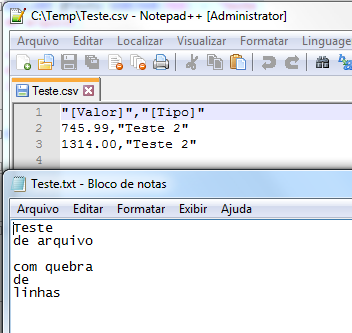
-- Exportando uma string para arquivo com OLE Automation
DECLARE @Texto VARCHAR(MAX) = 'Teste
de arquivo

com quebra
de
linhas
'

EXEC dbo.stpEscreve_Arquivo_FSO
    @String = @Texto, -- varchar(max)
    @Ds_Arquivo = 'C:\Temp\Teste.txt' -- varchar(1501)


-- Exportando para CSV com OLE Automation
EXEC dbo.SaveDelimitedColumns
    @DBFetch='select * from Testes.dbo.Teste',
    @DBWhere='Tipo = ^Teste 2^',
    @PCWrite='C:\Temp\Teste.csv',
    @Header = 1
How to export text files to the bank with CLR
The CLR allows you to create routines (stored prodecures, functions, triggers, etc.) written in C#, F# and VB.NET, compile them and execute them in the database natively, extending the capabilities of the DBMS, as it is possible to create a multitude of things that would not be possible using only Transact-SQL, such as file manipulation, uploading and downloading files via FTP, aggregation functions, integration with Webservices and much more.
For this purpose, we will use Stored Procedures stpExporta_Query_Txt and stpEscribe_Arquivo, as shown below:
Source code of the stpExporta_Query_Txt procedure
using System;
using System.Data;
using System.Data.SqlClient;
using System.IO;
using System.Globalization;
using System.Text;

public partial class StoredProcedures
{
    [Microsoft.SqlServer.Server.SqlProcedure]
    public static void stpExporta_Query_Txt(string query, string separador, string caminho, int Fl_Coluna)
    {

        var fileStream = new FileStream(caminho, FileMode.Create);
        var sw = new StreamWriter(fileStream, Encoding.Default);

        try
        {
            using (var conn = new SqlConnection("context connection=true"))
            {

                var getOutput = new SqlCommand
                {
                    CommandText = query,
                    CommandType = CommandType.Text,
                    CommandTimeout = 120,
                    Connection = conn
                };


                conn.Open();

                var exportData = getOutput.ExecuteReader();

                if (Fl_Coluna == 1)
                {
                    for (var i = 0; i < exportData.FieldCount; i++)
                    {
                        sw.Write(exportData.GetName(i));
                        if (i < exportData.FieldCount - 1)
                            sw.Write(separador);
                    }
                    sw.WriteLine();
                }

                if (string.IsNullOrEmpty(separador))
                {
                    while (exportData.Read())
                    {
                        for (var i = 0; i < exportData.FieldCount; i++)
                        {
                            sw.Write(Convert.ToString(exportData.GetValue(i), CultureInfo.GetCultureInfo("pt-BR")));
                            if (i < exportData.FieldCount - 1)
                                sw.Write(separador);
                        }
                        sw.WriteLine();
                    }
                }
                else
                {
                    var separadorTroca = new string(' ', separador.Length);

                    while (exportData.Read())
                    {
                        for (var i = 0; i < exportData.FieldCount; i++)
                        {
                            sw.Write(Convert.ToString(exportData.GetValue(i), CultureInfo.GetCultureInfo("pt-BR")).Replace(separador, separadorTroca));
                            if (i < exportData.FieldCount - 1)
                                sw.Write(separador);
                        }
                        sw.WriteLine();
                    }
                }


                conn.Close();
                sw.Close();
                conn.Dispose();
                getOutput.Dispose();

            }

        }
        catch (Exception e)
        {
            sw.Close();
            throw new ApplicationException("Erro : " + e.Message);
        }
    }
};
Source code of the stpEscribe_Arquivo procedure
using System;
using System.Data.SqlTypes;
using System.IO;
using System.Text;

public partial class StoredProcedures
{
    [Microsoft.SqlServer.Server.SqlProcedure]
    public static void stpEscreve_Arquivo(SqlString Ds_Texto, SqlString Ds_Caminho, SqlString Ds_Codificacao, SqlString Ds_Formato_Quebra_Linha, SqlBoolean Fl_Append)
    {


        if (!Ds_Texto.IsNull && !Ds_Caminho.IsNull && !Fl_Append.IsNull)
        {

            try
            {

                var dir = Path.GetDirectoryName(Ds_Caminho.Value);

                if (!Directory.Exists(dir))
                    Directory.CreateDirectory(dir);

            }
            catch (Exception e)
            {
                throw new ApplicationException("Erro : " + e.Message);
            }


            var encoding = (Ds_Codificacao.IsNull) ? "UTF-8" : Ds_Codificacao.Value;
            if (Ds_Codificacao.Value.Trim() == "")
                encoding = "UTF-8";

            var sb = new StringBuilder(Ds_Texto.Value);

            var fileStream = new FileStream(Ds_Caminho.Value, ((Fl_Append) ? FileMode.Append : FileMode.Create));
            var sw = new StreamWriter(fileStream, Encoding.GetEncoding(encoding));

            switch (Ds_Formato_Quebra_Linha.Value.ToLower())
            {
                case "unix":
                    sw.NewLine = "\n";
                    sb.Replace("\r", "");
                    break;
                case "mac":
                    sw.NewLine = "\r";
                    sb.Replace("\n", "");
                    break;
                default:
                    sw.NewLine = "\r\n";
                    break;
            }


            try
            {

                var texto = sb.ToString();

                sw.Write(texto);
                sw.Close();

            }
            catch (Exception e)
            {
                sw.Close();
                throw new ApplicationException("Erro : " + e.Message);
            }

        }
        else
            throw new ApplicationException("Os parâmetros de input estão vazios");

    }
};
Example of use:
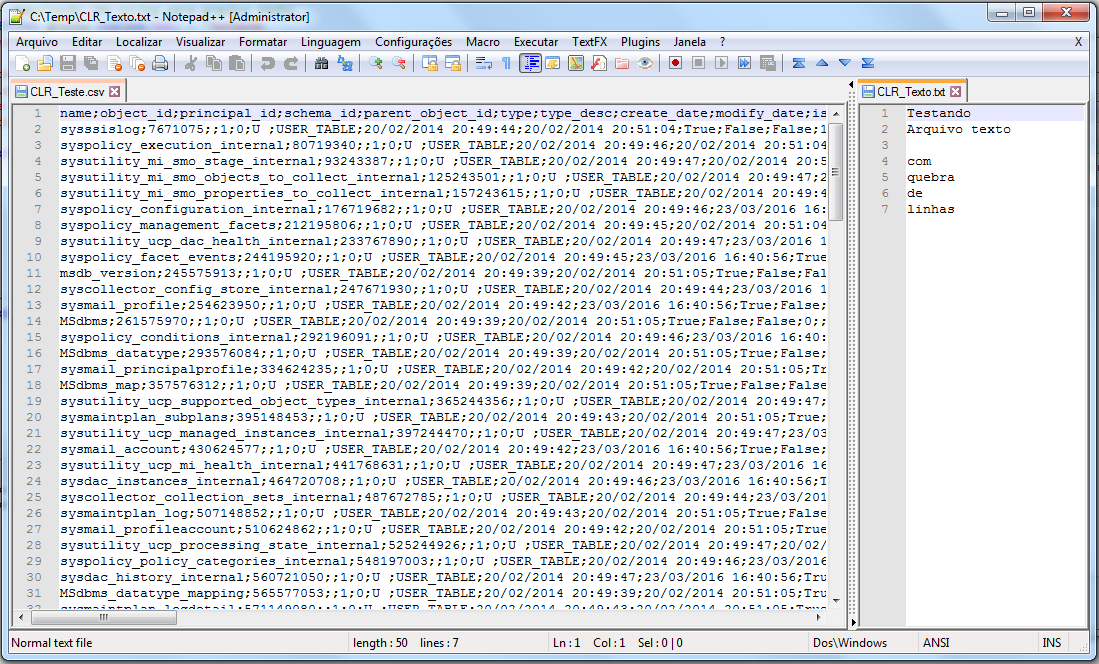
-- Exportando uma string para arquivo texto
DECLARE @Texto VARCHAR(MAX) = 'Testando
Arquivo texto

com
quebra
de
linhas'

EXEC CLR.dbo.stpEscreve_Arquivo
    @Ds_Texto = @Texto, -- nvarchar(max)
    @Ds_Caminho = N'C:\Temp\CLR_Texto.txt', -- nvarchar(max)
    @Ds_Codificacao = N'ISO-8859-1', -- nvarchar(max)
    @Ds_Formato_Quebra_Linha = N'windows', -- nvarchar(max)
    @Fl_Append = 0 -- bit


-- Exportando query para arquivo texto (CSV)
EXEC CLR.dbo.stpExporta_Query_Txt
    @query = N'SELECT * FROM sys.tables', -- nvarchar(max)
    @separador = N';', -- nvarchar(max)
    @caminho = N'C:\Temp\CLR_Teste.csv', -- nvarchar(max)
    @Fl_Coluna = 1 -- int
That's it, folks!
Until the next post.
sql server export data text file txt export data text files from database from database
sql server export data text file txt export data text files from database from database

Comentários (0)
Carregando comentários…