
Hey guys,
Good morning!
In this post I would like to show you different ways to import the content of a text file into a variable in SQL Server, so that you can use this information in the way that meets your needs.
I've already posted some ways to do this here on the blog, but on different topics and with different purposes, so I'd like to repost these solutions, as well as including a few more that I hadn't yet mentioned here and thus, centralize all these approaches.
OLE AutomationHow to import text files into the database with OLE Automation
For those who are not familiar with this feature, it allows the DBA or Developer to perform a series of actions on the database using OLE DB, such as reading/writing/moving/copying/deleting files, creating spreadsheets in Excel and a series of other things. The syntax is a little similar to VBA and uses the Windows API for these operations.
For this purpose, we will use the functions fncLer_Arquivo_FSO and fncLer_Arquivo_String_FSO, as shown below:
Source code of the fncRead_Arquivo_FSO function
CREATE FUNCTION [dbo].[fncLer_Arquivo_FSO] (
    @Ds_Arquivo VARCHAR(256)
)
RETURNS @Tabela_Final TABLE (
    Ds_Linha VARCHAR(8000)
)
AS
BEGIN

    DECLARE @OLEResult INT
    DECLARE @FileSystemObject INT
    DECLARE @FileID INT
    DECLARE @Message VARCHAR (8000)

    DECLARE @Tabela TABLE ( Ds_Linha varchar(8000) )

    EXECUTE @OLEResult = sp_OACreate 'Scripting.FileSystemObject', @FileSystemObject OUT
    IF @OLEResult <> 0
    BEGIN
        SET @Message = 'Scripting.FileSystemObject - Error code: ' + CONVERT (VARCHAR, @OLEResult)
        INSERT INTO @Tabela_Final SELECT @Message
        RETURN
    END

    EXEC @OLEResult = sp_OAMethod @FileSystemObject, 'OpenTextFile', @FileID OUT, @Ds_Arquivo, 1, 1
    IF @OLEResult <> 0
    BEGIN
        SET @Message = 'OpenTextFile - Error code: ' + CONVERT (VARCHAR, @OLEResult)
        INSERT INTO @Tabela_Final SELECT @Message
        RETURN
    END

    EXECUTE @OLEResult = sp_OAMethod @FileID, 'ReadLine', @Message OUT

    WHILE (@OLEResult >= 0)
    BEGIN

        INSERT INTO @Tabela(Ds_Linha) VALUES( @Message )
        EXECUTE @OLEResult = sp_OAMethod @FileID, 'ReadLine', @Message OUT

    END

    EXECUTE @OLEResult = sp_OADestroy @FileID
    EXECUTE @OLEResult = sp_OADestroy @FileSystemObject


    INSERT INTO @Tabela_Final
    SELECT Ds_Linha FROM @Tabela


    RETURN

END
Source code of the fncRead_Arquivo_String_FSO function
CREATE FUNCTION [dbo].[fncLer_Arquivo_String_FSO] (
    @Ds_Arquivo VARCHAR(256)
)
RETURNS VARCHAR(MAX)
AS
BEGIN

    DECLARE @OLEResult INT
    DECLARE @FileSystemObject INT
    DECLARE @FileID INT
    DECLARE @Message VARCHAR (8000)
    DECLARE @Retorno VARCHAR(MAX)

    EXECUTE @OLEResult = sp_OACreate 'Scripting.FileSystemObject', @FileSystemObject OUT
    IF @OLEResult <> 0
    BEGIN
        SET @Message = 'Scripting.FileSystemObject - Error code: ' + CONVERT (VARCHAR, @OLEResult)
        RETURN @Message
    END

    EXEC @OLEResult = sp_OAMethod @FileSystemObject, 'OpenTextFile', @FileID OUT, @Ds_Arquivo, 1, 1
    IF @OLEResult <> 0
    BEGIN
        SET @Message = 'OpenTextFile - Error code: ' + CONVERT (VARCHAR, @OLEResult)
        RETURN @Message
    END

    EXECUTE @OLEResult = sp_OAMethod @FileID, 'ReadLine', @Message OUT
    SET @Retorno = ISNULL(@Retorno, '') + ISNULL(@Message, '') + CHAR(13)

    WHILE (@OLEResult >= 0)
    BEGIN

        SET @Message = NULL
        EXECUTE @OLEResult = sp_OAMethod @FileID, 'ReadLine', @Message OUT
        SET @Retorno = ISNULL(@Retorno, '') + ISNULL(@Message, '') + CHAR(13)

    END

    EXECUTE @OLEResult = sp_OADestroy @FileID
    EXECUTE @OLEResult = sp_OADestroy @FileSystemObject


    RETURN @Retorno


END
Example of use:

Would you like to know a little more about OLE Automation?
– Enabling OLE Automation via T-SQL on SQL Server
– File operations using OLE Automation in SQL Server
– Consuming the Google Maps API using OLE Automation in SQL Server
– How to calculate shipping cost and delivery time using Correios WebService in SQL Server
– Querying Correios object tracking using SQL Server
– Consuming the Google Maps API to get information for an address or zip code in SQL Server
– How to query information from a CEP in SQL Server
How to import text files into the database with CLR
The CLR allows you to create routines (stored prodecures, functions, triggers, etc.) written in C#, F# and VB.NET, compile them and execute them in the database natively, extending the capabilities of the DBMS, as it is possible to create a multitude of things that would not be possible using only Transact-SQL, such as file manipulation, uploading and downloading files via FTP, aggregation functions, integration with Webservices and much more.
For this purpose, we will use the functions fncArquivo_Ler and fncArquivo_Ler_Retorna_String, as shown below:
Source code of the fncFile_Read function
using System.IO;
using System.Collections;
using System.Data.SqlTypes;

public partial class UserDefinedFunctions
{

    private class ArquivoLer
    {

        public SqlInt32 Nr_Linha;
        public SqlString Ds_Texto;

        public ArquivoLer(SqlInt32 nrLinha, SqlString dsTexto)
        {

            Nr_Linha = nrLinha;
            Ds_Texto = dsTexto;

        }

    }

    [Microsoft.SqlServer.Server.SqlFunction(
		FillRowMethodName = "FillRow_Arquivo_Ler",
		TableDefinition = "Nr_Linha INT, Ds_Texto NVARCHAR(MAX)"
	)]
    public static IEnumerable fncArquivo_Ler(string Ds_Caminho)
    {

        var ArquivoLerCollection = new ArrayList();

        if (string.IsNullOrEmpty(Ds_Caminho))
            return ArquivoLerCollection;

        var contador = 1;

        using (var sr = new StreamReader(Ds_Caminho))
        {

            while (sr.Peek() >= 0)
            {

                ArquivoLerCollection.Add(new ArquivoLer(
                    contador,
                    sr.ReadLine()
                ));

                contador++;

            }

            sr.Close();

        }

        return ArquivoLerCollection;

    }

    protected static void FillRow_Arquivo_Ler(object objArquivoLer, out SqlInt32 nrLinha, out SqlString dsTexto)
    {

        var ArquivoLer = (ArquivoLer) objArquivoLer;

        nrLinha = ArquivoLer.Nr_Linha;
        dsTexto = ArquivoLer.Ds_Texto;

    }

}
Source code of the function fncArquivo_Ler_Retorna_String
using System.Data.SqlTypes;
using System.IO;

public partial class UserDefinedFunctions
{
    [Microsoft.SqlServer.Server.SqlFunction]
    public static SqlString fncArquivo_Ler_Retorna_String(SqlString Ds_Caminho)
    {

        if (Ds_Caminho.IsNull)
            return SqlString.Null;


        if (!File.Exists(Ds_Caminho.Value))
            return SqlString.Null;


        using (var sr = new StreamReader(Ds_Caminho.Value))
        {
            return sr.ReadToEnd();
        }

    }
}
Example of use:
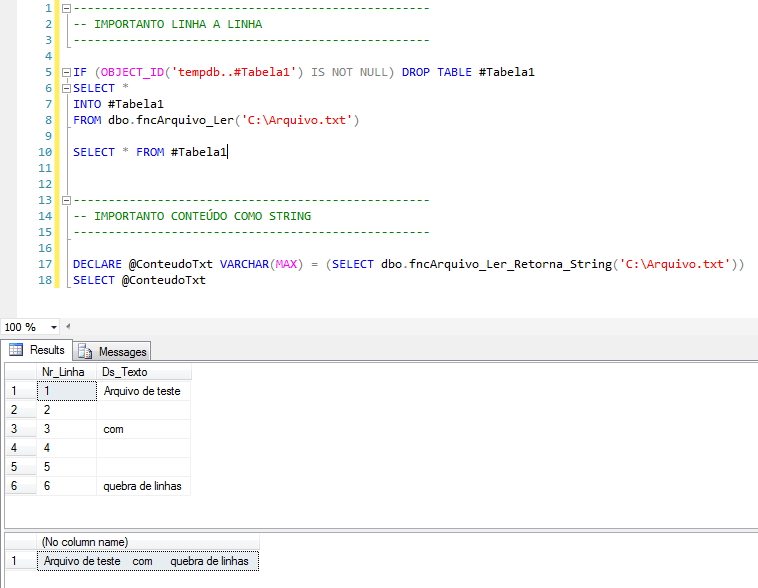
Would you like to know a little more about CLR?
– Introduction to SQL CLR (Common Language Runtime) in SQL Server
– SQL Server – How to list, read, write, copy, delete and move files with the CLR (C#)
– Performing POST and GET requests using CLR (C#) in SQL Server
How to import text files into the bank with BCP
This is one of the options most used by DBA's, as it is simple, already installed with SQL Server and can be executed both in SSIS packages and in stored procedures (using xp_cmdshell)
Remembering that to use BCP, you will need to activate the xp_cmdshell feature. I personally don't like using xp_cmdshell or leaving it enabled in an instance, as it allows numerous vulnerabilities and any Windows Prompt command can be executed with this feature enabled.
To activate the feature and enable xp_cmdshell, run the following commands:
sp_configure 'show advanced options', 1;
GO
RECONFIGURE;
GO
sp_configure 'xp_cmdshell', 1;
GO
RECONFIGURE;
GO
Example of use:
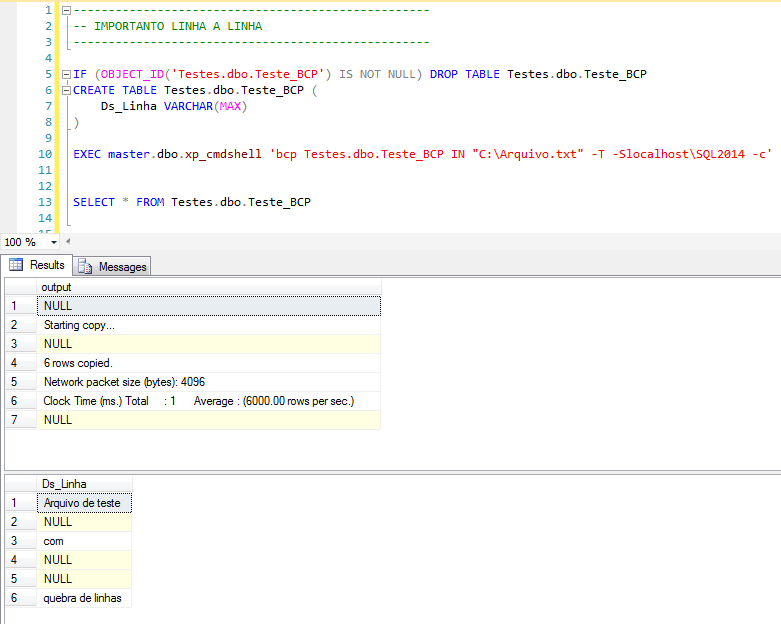
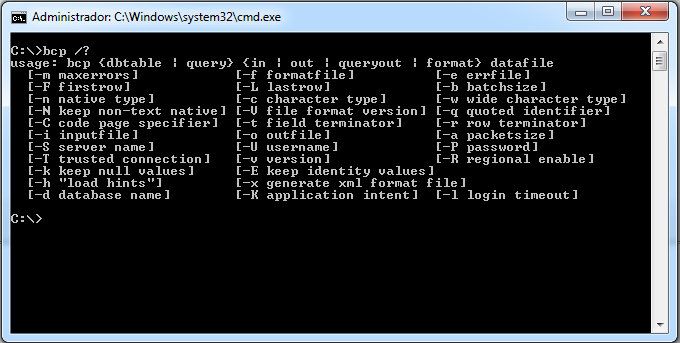
where:
How to import text files into the database with BULK INSERT
A solution that is not as well-known as the others but equally useful and powerful, BULK INSERT is a native SQL Server command that allows you to import text and CSV files without needing any external resources or enabling anything in your instance. It's the simplest way to start importing files into your database.
Examples of use:
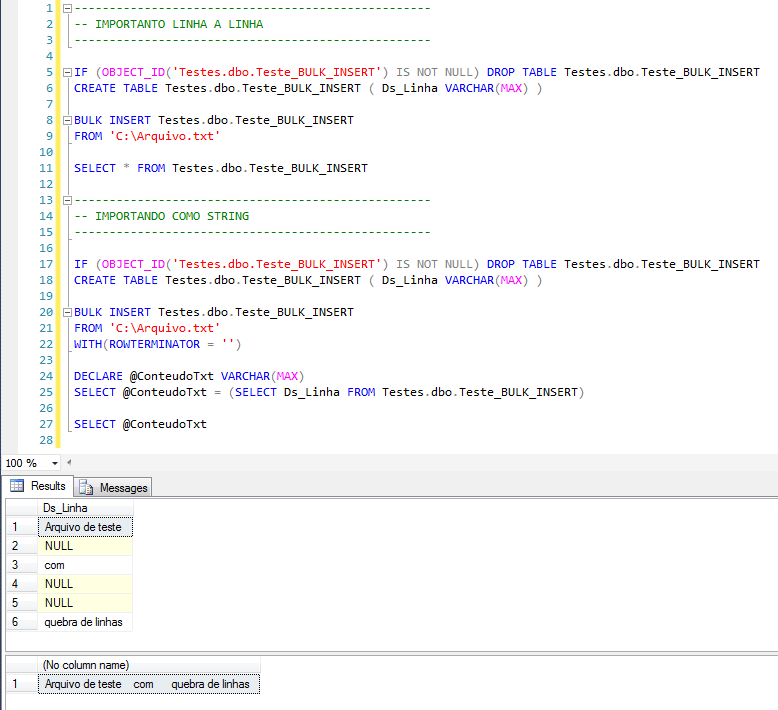
Note: As you can see, blank lines are imported as NULL by BULK INSERT.
How to import text files into the database with OPENROWSET(BULK)
Another database-native and very fast solution is to use OPENROWSET together with the BULK option to load text files into the database. It is widely used for importing XML files and I will show you an easy way to import text files:
Examples of use:
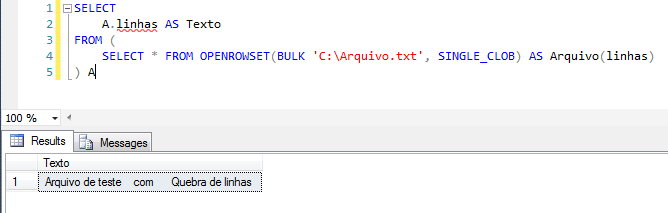
Where:
- SINGLE_BLOB returns the file contents as varbinary(max) – Recommended for XML files
- SINGLE_CLOB returns the file contents as varchar(max)
- SINGLE_NCLOB returns the file contents as nvarchar(max)
For text files, I generally use SINGLE_CLOB, but when the file encoding is UNICODE, you must use SINGLE_NCLOB, otherwise you will encounter this error message:
SINGLE_CLOB requires a double-byte character set (DBCS) (char) input file. The file specified is Unicode.
How to import text files into the database with OPENROWSET(OLEDB)
Another alternative to importing text files is to use OPENROWSET again, but now using the Microsoft ACE OLEDB provider. This solution is used to import both text files, returning each line of the file as a table record, and to import CSV files.
Remember that the “Microsoft.ACE.OLEDB.12.0” provider is not installed by default in SQL Server. It needs to be installed manually. To learn more about this, see my post SQL Server – How to install Microsoft.ACE.OLEDB.12.0 and Microsoft.Jet.OLEDB.4.0 drivers.
Examples of use:
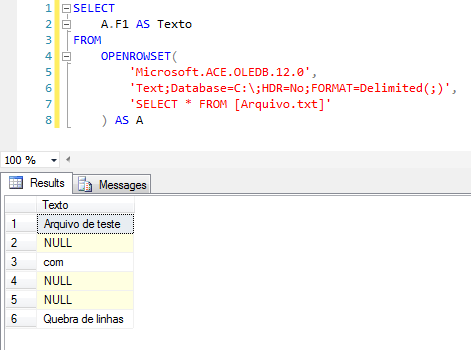
To import CSV files, you must use the parameters HDR=Yes;FORMAT=Delimited(;). HDR=Yes which means that the first line of the file is the header and FORMAT=Delimited(;) which means that the columns will be separated by the “;” character.
One of the advantages of CLR and OLE Automation is the fact that they are functions instead of SP, which allows them to use the resource within other functions. Furthermore, empty lines are returned as empty strings, while in the other two solutions they are returned as NULL.
If you want to know how to export database data to text files, find out more by accessing the post SQL Server – How to export database data to text file (CLR, OLE, BCP)
That's it, folks!
Thanks for visiting and see you in the next post.
sql import data from text files to database import data from text files to database
sql import data from text files to database import data from text files to database

Comments (0)
Loading comments...