
Hey guys,
Goodnight!
In this post I will talk about an error that occurs when trying to use the OPENROWSET or OPENQUERY command to access data from a remote server where the linked server used does not have a fixed user and the connection user does not belong to the sysadmin role, which represents the majority of cases. (another error reported by Henry Mauri.. hahaha)
Msg 7416, Level 16, State 2, Line 22
Access to the remote server is denied because no login-mapping exists.
This error is very similar to the “double hop” scenario that occurs in Kerberos, where a client application is on computer 1, BizTalk RFID is on computer 2, and the resource that requires the credentials (such as a SQL Server RFIDsink server) is on computer 3, but in this post I will show a solution just using SQL Server. If you want to delve deeper into solving the problem using Kerberos, read in this post.
Simulating the error in your environment
A practical way to simulate this problem is to create a new linked server with the parameter @useself=N’True’, informing that the same user will be used on both ends of the connection, which will be the currently connected user, and then try to use this linked server.
As already mentioned above, this error message only appears when the user executing the query NO is part of the sysadmin role and the connection user is using SQL Server authentication (instead of Windows Authentication).
----------------------------------
-- CRIAÇÃO DO LINKED SERVER
----------------------------------
USE [master]
GO

DECLARE @instancia NVARCHAR(200) = N'127.0.0.1\SQL2014'

IF ((SELECT COUNT(*) FROM sys.servers WHERE name = @instancia) > 0)
    EXEC master.dbo.sp_dropserver @server=@instancia, @droplogins='droplogins'

EXEC master.dbo.sp_addlinkedserver @server = @instancia, @srvproduct=N'SQL Server'
EXEC master.dbo.sp_addlinkedsrvlogin @rmtsrvname=@instancia,@useself=N'True',@locallogin=NULL,@rmtuser=NULL,@rmtpassword=NULL

----------------------------------
-- CRIAÇÃO DA TABELA DE TESTES
----------------------------------

SELECT *
FROM OPENROWSET('SQLNCLI', 'Server=127.0.0.1;Trusted_Connection=yes;', 'SELECT * FROM Testes.dbo.Teste') AS a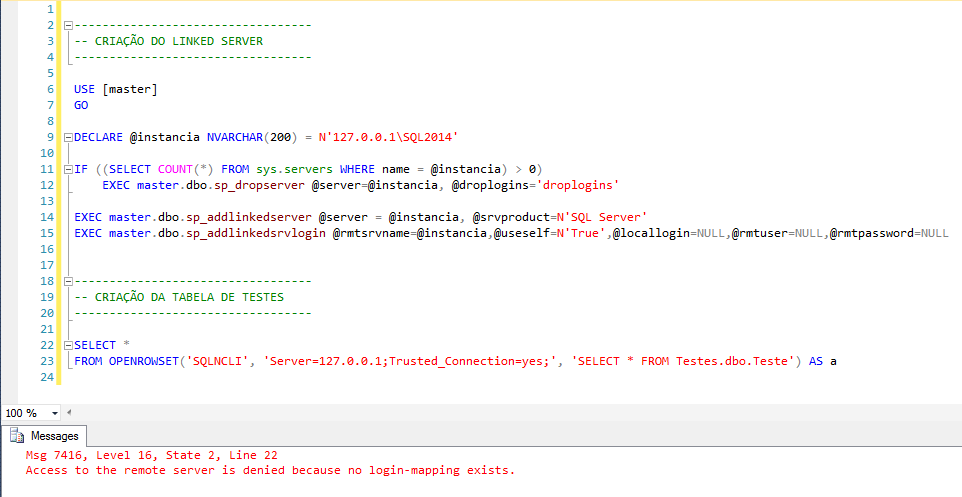
How to solve the problem
From what I mentioned above, it is clear that if the user making the connection is added to the sysadmin role, this problem will stop occurring, but I don't even consider this a solution. Granting privileges (even more than sysadmin) just to stop error messages is never a solution.
I am also not very much in favor of fixing the username and password on the Linked Server, so that all users with access to the server can use this Linked Server in an untraceable way. Always check the option “Be made using the login’s current security context” on LinkedServer.
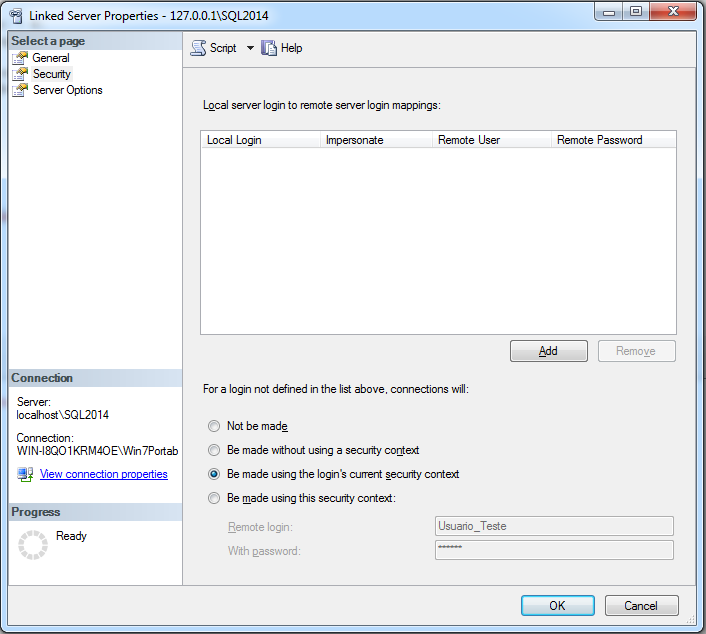
A good solution would be to use Windows Authentication, but as the development team of the company where this problem occurred would not even consider changing the authentication of all applications to Windows Authentication, the best solution I found for this problem was to create a new user only for OPENROWSET and OPENQUERY uses, with access restricted only to queries performed with these two commands (which are very few) and set this username and password in OPENROWSET, looking like this:
SELECT *
FROM OPENROWSET('SQLNCLI', 'server=127.0.0.1\SQL2014;Uid=Usuario_Teste;Pwd=aaa', 'SELECT * FROM Testes.dbo.Teste') AS a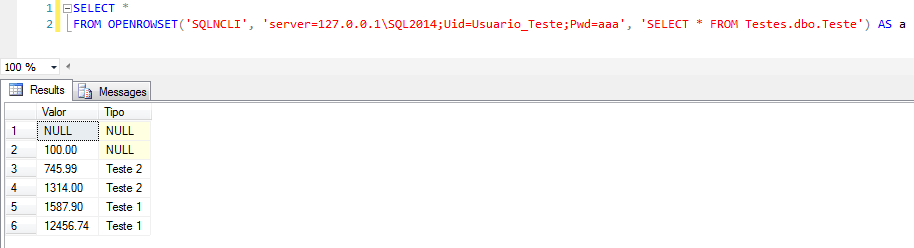
And that's it, folks!
If you know of a different solution to this problem, leave your suggestion in the comments.
Hugs and see you later!

Comments (0)
Loading comments...