
Hey guys!
In this post, I would like to share with you a script to identify all missing indexes (Missing indexes) from a database in SQL Server, Managed Instance or Azure SQL Database. Remembering that to run this script, you will need “View server state” permission on the instance.
I had already shared this script in the articles Understanding how indexes work in SQL Server and SQL Server – Useful day-to-day DBA queries that you always have to look for on the Internet, but Google did not correctly index those searching for this script.
A reflection on indexes
One of the day-to-day tasks of a DBA is to identify indexes in the database that could improve the performance of queries that are impacting the environment. This should always be the objective of an index: Improve the performance of queries that are impacting the environment or could have a gain in a critical process.
In most environments, you will not be able to create indexes to cover all queries that come into the database. Indexes have a storage cost (they take up space; indexes often take up more space than the table itself) and they reduce the performance of writing operations, in addition to requiring maintenance processes such as reorganize/rebuild to keep fragmentation low.
For these reasons mentioned above, you cannot create indexes without any control. Indexes must be very well thought out to try to have the best possible cost-benefit. If an index is not being used, it must be deleted.
Another tip I always talk about is: Many times, you will need to create several non-clustered indexes, because your clustered index was poorly planned. Always evaluate whether the clustered index is optimized for the way queries are made to the database. There is no point in creating the clustered index on the autoincrement column, if it is not used as a filter in the main queries.
Don't just focus on numbers and large execution time reductions. If an index is serving to reduce the time of a query from 1 hour to 1 second, but it is a query that is only executed once a day, in the early hours of the morning, and is not bringing any big gains, it is not helping. It would have been better to try to optimize a query that took 5 seconds and now it takes 0ms, but is executed 1 million times a day.
Always try to think carefully about the value that the index will add to the company's processes before creating it. As I said, you cannot create an index for each query that arrives in the database. Focus on what really matters and is actually a problem, causing the system to slow down, making a client wait while the data is loaded, things like that.
What are missing indexes?
In order to help DBAs quickly identify situations where an index could make a difference, SQL Server has a set of DMVs dm_db_missing_index_% which provide information about these missing indexes (Missing indexes).
This information is automatically generated by the SQL Server Engine based on cached execution plans, that is, based on the queries that have already been sent to the database, SQL Server identifies some indexes that could cover these queries to provide better performance, considering the already existing indexes, filtered columns and returned columns.
After this analysis, the result is available for consultation using the script that I will share with you, and the DBA can quickly analyze the suggestions and identify what makes sense to create and what does not.
Do not create indexes without analyzing them first, even if they are Missing indexes returned by this script. The best possible index will not always be returned and, often, there is already an index very similar to the one suggested, where it is worth merging the existing index with the suggested index, changing the current index and only including the new suggested columns. This is much better than keeping 2 indexes almost the same.
And believe me: It is very common to see several and several indexes created on clients, where the DBA did not want to go through the trouble of even renaming the indexes, let alone analyzing whether there are better ways to create the suggested index.
How to identify all missing indexes in a database
With the query below, you will be able to view SQL Server index suggestions based on Missing Index statistics. To generate this data, the set of Missing Index DMVs (dm_db_missing_index_%) will be used.
SELECT
    db.[name] AS [DatabaseName],
    id.[object_id] AS [ObjectID],
    OBJECT_NAME(id.[object_id], db.[database_id]) AS [ObjectName],
    gs.avg_total_user_cost * ( gs.avg_user_impact / 100.0 ) * ( gs.user_seeks + gs.user_scans ) AS ImprovementMeasure,
    gs.[user_seeks] * gs.[avg_total_user_cost] * ( gs.[avg_user_impact] * 0.01 ) AS [IndexAdvantage],
    'CREATE INDEX [IX_' + OBJECT_NAME(id.[object_id], db.[database_id]) + '_' + REPLACE(REPLACE(REPLACE(ISNULL(id.[equality_columns], ''), ', ', '_'), '[', ''), ']', '') + CASE WHEN id.[equality_columns] IS NOT NULL AND id.[inequality_columns] IS NOT NULL THEN '_' ELSE '' END + REPLACE(REPLACE(REPLACE(ISNULL(id.[inequality_columns], ''), ', ', '_'), '[', ''), ']', '') + '_' + LEFT(CAST(NEWID() AS [NVARCHAR](64)), 5) + ']' + ' ON ' + id.[statement] + ' (' + ISNULL(id.[equality_columns], '') + CASE WHEN id.[equality_columns] IS NOT NULL AND id.[inequality_columns] IS NOT NULL THEN ',' ELSE '' END + ISNULL(id.[inequality_columns], '') + ')' + ISNULL(' INCLUDE (' + id.[included_columns] + ')', '') AS [ProposedIndex],
    id.[statement] AS [FullyQualifiedObjectName],
    id.[equality_columns] AS [EqualityColumns],
    id.[inequality_columns] AS [InEqualityColumns],
    id.[included_columns] AS [IncludedColumns],
    gs.[unique_compiles] AS [UniqueCompiles],
    gs.[user_seeks] AS [UserSeeks],
    gs.[user_scans] AS [UserScans],
    gs.[last_user_seek] AS [LastUserSeekTime],
    gs.[last_user_scan] AS [LastUserScanTime],
    gs.[avg_total_user_cost] AS [AvgTotalUserCost],
    gs.[avg_user_impact] AS [AvgUserImpact],
    gs.[system_seeks] AS [SystemSeeks],
    gs.[system_scans] AS [SystemScans],
    gs.[last_system_seek] AS [LastSystemSeekTime],
    gs.[last_system_scan] AS [LastSystemScanTime],
    gs.[avg_total_system_cost] AS [AvgTotalSystemCost],
    gs.[avg_system_impact] AS [AvgSystemImpact],
    CAST(CURRENT_TIMESTAMP AS [SMALLDATETIME]) AS [CollectionDate]
FROM
    [sys].[dm_db_missing_index_group_stats] gs WITH ( NOLOCK )
    JOIN [sys].[dm_db_missing_index_groups] ig WITH ( NOLOCK ) ON gs.[group_handle] = ig.[index_group_handle]
    JOIN [sys].[dm_db_missing_index_details] id WITH ( NOLOCK ) ON ig.[index_handle] = id.[index_handle]
    JOIN [sys].[databases] db WITH ( NOLOCK ) ON db.[database_id] = id.[database_id]
WHERE
    db.[database_id] = DB_ID()
    --AND gs.avg_total_user_cost * ( gs.avg_user_impact / 100.0 ) * ( gs.user_seeks + gs.user_scans ) > 10
ORDER BY
    [IndexAdvantage] DESC
OPTION ( RECOMPILE );
Result:
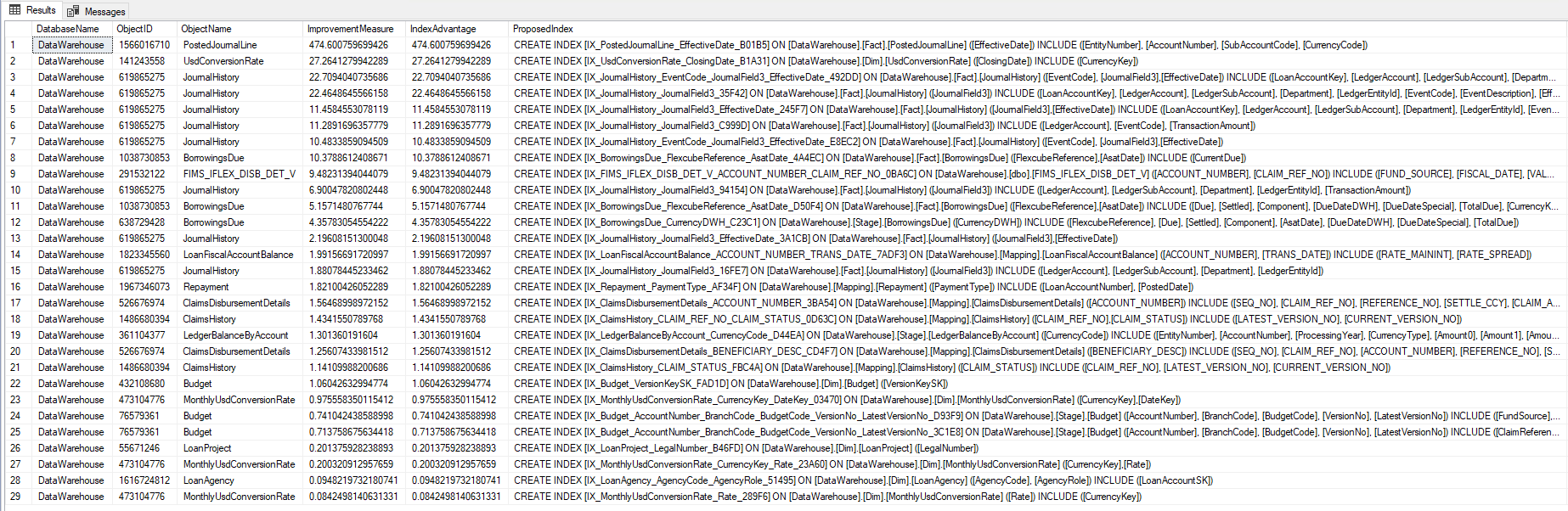
As you saw, in the script above, we used SQL Server DMVs to identify the missing indexes in the base. Another alternative, which even allows us to see the execution plan, is to go directly to the DMV's of the plancache, and extract this data from the execution plan's XML.
IF (OBJECT_ID('tempdb..#MissingIndexInfo') IS NOT NULL) DROP TABLE #MissingIndexInfo
;WITH XMLNAMESPACES
(
    DEFAULT 'http://schemas.microsoft.com/sqlserver/2004/07/showplan'
)
SELECT
    query_plan,
    n.value('(@StatementText)[1]', 'VARCHAR(4000)') AS sql_text,
    n.value('(//MissingIndexGroup/@Impact)[1]', 'FLOAT') AS impact,
    DB_ID(REPLACE(REPLACE(n.value('(//MissingIndex/@Database)[1]', 'VARCHAR(128)'), '[', ''), ']', '')) AS database_id,
    OBJECT_ID(n.value('(//MissingIndex/@Database)[1]', 'VARCHAR(128)') + '.' + n.value('(//MissingIndex/@Schema)[1]', 'VARCHAR(128)') + '.' + n.value('(//MissingIndex/@Table)[1]', 'VARCHAR(128)')) AS OBJECT_ID,
    n.value('(//MissingIndex/@Database)[1]', 'VARCHAR(128)') + '.' + n.value('(//MissingIndex/@Schema)[1]', 'VARCHAR(128)') + '.' + n.value('(//MissingIndex/@Table)[1]', 'VARCHAR(128)') AS statement,
    (
        SELECT DISTINCT
            c.value('(@Name)[1]', 'VARCHAR(128)') + ', '
        FROM
            n.nodes('//ColumnGroup') AS t(cg)
            CROSS APPLY cg.nodes('Column') AS r(c)
        WHERE
            cg.value('(@Usage)[1]', 'VARCHAR(128)') = 'EQUALITY'
        FOR XML PATH('')
    ) AS equality_columns,
    (
        SELECT DISTINCT
            c.value('(@Name)[1]', 'VARCHAR(128)') + ', '
        FROM
            n.nodes('//ColumnGroup') AS t(cg)
            CROSS APPLY cg.nodes('Column') AS r(c)
        WHERE
            cg.value('(@Usage)[1]', 'VARCHAR(128)') = 'INEQUALITY'
        FOR XML PATH('')
    ) AS inequality_columns,
    (
        SELECT DISTINCT
            c.value('(@Name)[1]', 'VARCHAR(128)') + ', '
        FROM
            n.nodes('//ColumnGroup') AS t(cg)
            CROSS APPLY cg.nodes('Column') AS r(c)
        WHERE
            cg.value('(@Usage)[1]', 'VARCHAR(128)') = 'INCLUDE'
        FOR XML PATH('')
    ) AS include_columns
INTO
    #MissingIndexInfo
FROM
(
    SELECT
        query_plan
    FROM
    (
        SELECT DISTINCT
            plan_handle
        FROM
            sys.dm_exec_query_stats WITH ( NOLOCK )
    ) AS qs
    OUTER APPLY sys.dm_exec_query_plan(qs.plan_handle) tp
    WHERE
        tp.query_plan.exist('//MissingIndex') = 1
) AS tab(query_plan)
CROSS APPLY query_plan.nodes('//StmtSimple') AS q(n)
WHERE
    n.exist('QueryPlan/MissingIndexes') = 1;


-- Trim trailing comma from lists
UPDATE
    #MissingIndexInfo
SET
    equality_columns = LEFT(equality_columns, LEN(equality_columns) - 1),
    inequality_columns = LEFT(inequality_columns, LEN(inequality_columns) - 1),
    include_columns = LEFT(include_columns, LEN(include_columns) - 1);

SELECT
    *
FROM
    #MissingIndexInfo
ORDER BY
    [impact] DESC;
Result:
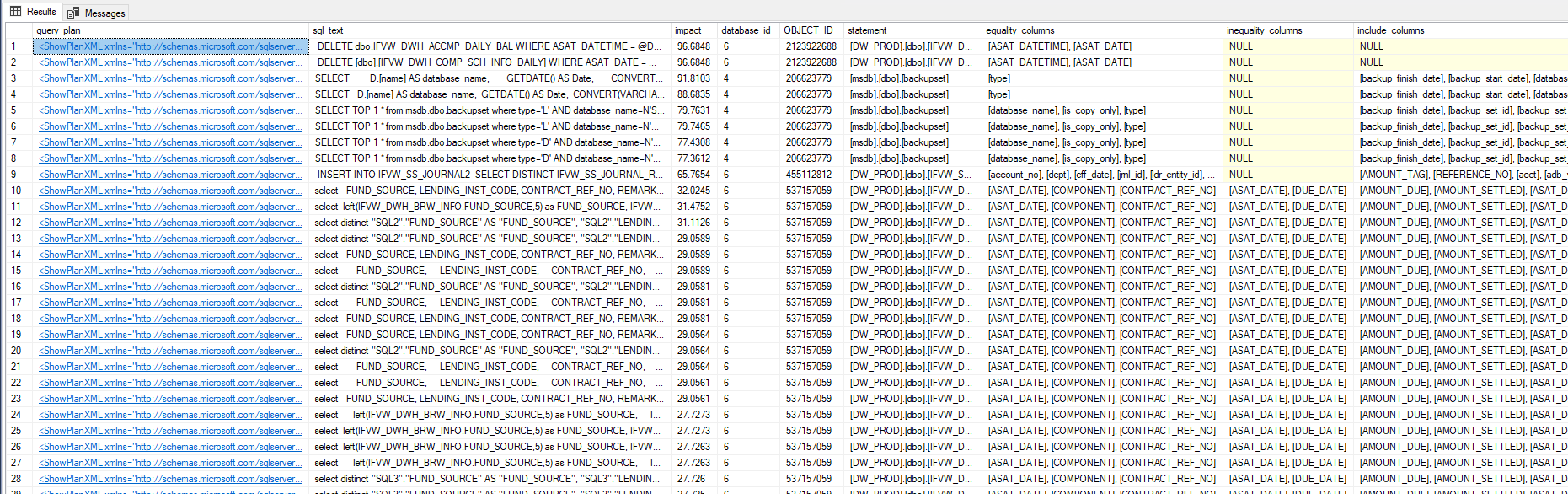
Now just click on the XML (first column – query_plan) to view the execution plan (and see the Missing index warning)

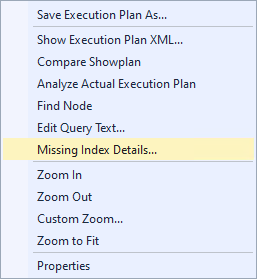
Right-click and select the “Missing Index Details…” option.
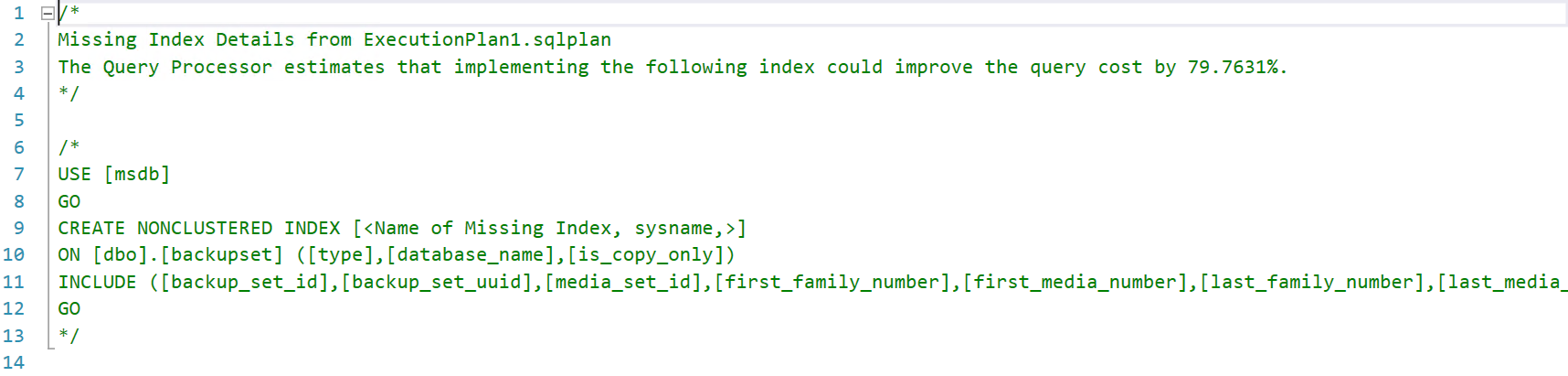
And check the automatically generated script for creating the index:
To better understand performance tuning and understand what Seek, Scan, etc. operation is, read the article SQL Server – Introduction to the study of Performance Tuning.
Conclusion
Closing this article, I hope you liked this tip. It will certainly be very useful in your day-to-day life as a DBA, especially for beginners.
Remember my tips and don't create every suggested index and always analyze before creating it to see if this index could be better optimized or merged with an existing one.
Also analyze whether this index will really add value to the business or will just take up disk space and improve a query that will not make a difference, such as a query executed once a day, in the early hours of the morning.
And that's it, folks!
A big hug and see you in the next post!

Comentários (0)
Carregando comentários…