
Faaala guys!!
In this post I would like to address a very common subject in a DBA's day-to-day life, which is the users' default schema in the database, which may or may not be different from the default (dbo), as defined by IT.
What is schema in SQL Server? What is it for?
Click here to view the content of this topicSchema is basically a collection of objects that aims to group several objects from a department, area or purpose, whether for reasons of organizing tables, Stored Procedures, etc., or for reasons of access control and security.
Organization of tables
One of the purposes of using a schema is to better organize the objects in the database. When all your objects are in the same schema, there can only be one “Addresses” table, for example. If you try to create a new table with the same name, SQL Server will alert you that a table with that name already exists and interrupt your command.
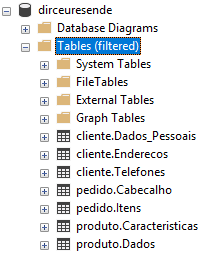
When we use schemas to organize objects, we can have an “Addresses” table in the customer schema, which are the addresses of customers, and we can have the “Addresses” table in the Suppliers schema, which are the addresses of the company's suppliers. This type of organization of database objects makes the purpose of tables, procedures, functions, etc., much more intuitive.
A very classic way to organize objects is in BI projects. It is quite common for BI architects to use dim (Dimension), facto (Fact Tables), stg (Staging) and other schemas to organize the layers and purposes of each table, where, for example, the stg.Clientes table is the “Customers” table that was imported at the source and loaded into the Staging layer and the dim.Clientes table is already the customer dimension, a table already treated and prepared to be used in BI projects.
Access control and security
Another very important purpose for using schemas is when we talk about access control and security. As you may know, in SQL Server we can release permissions on individual tables (Ex: GRANT SELECT ON dbo.Table TO usuario) and also at a global level in the database (Ex: GRANT SELECT TO usuario), where he will have access to all objects in that database.
This type of approach ends up making access control difficult in environments with hundreds or thousands of objects when they are all in the same schema, as you either have to analyze each object individually or grant permission to them all.
One way to improve control over object permissions is by using schemas, acting as an intermediate level between individual access and global access, where you can release SELECT permission only on the client schema, for example. The user who received this permission will be able to consult all tables in the client schema, but only these objects (unless he has other permissions).
When you group your objects using a schema by department, purpose or system, for example, control ends up being much simpler than having to individually control each table or Stored Procedure.
“Private” tables
Another purpose of using schemas is to create “private” tables, where the tables are created, by default, in a schema equal to the user name when using AD authentication and an undefined default owner.
This means that the user can create test tables with any name he wants, since although the [dbo].Clientes table exists, the [DOMINIO\dirceu.resende].Clientes table does not. Furthermore, it is easy to identify who owns certain “temporary” tables created in the database.
All this without impacting other users or the application.
FAQ: Basic questions about Schemas
Where are my database schemas?
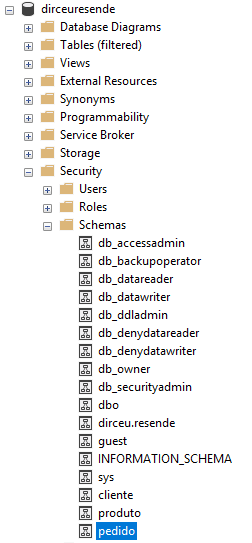
Display of example database schemas
How are tables organized in schemas?
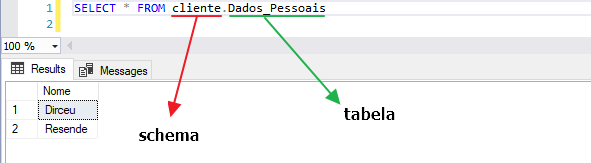
How do I query data from tables with custom schemas?
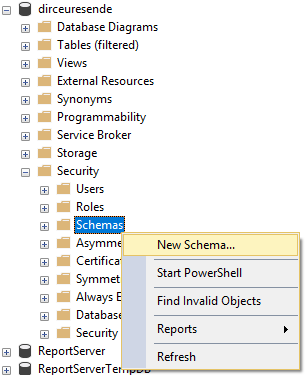
How do I create a new schema?
How do I change a user's default schema?
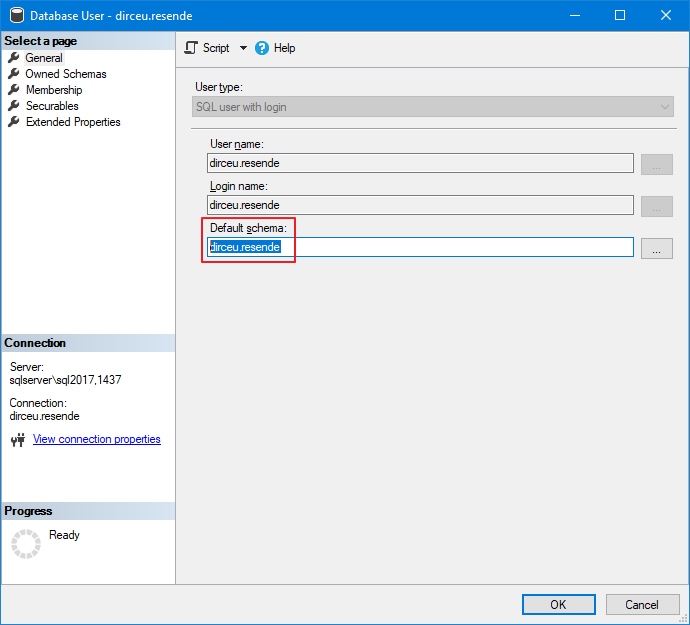
How to identify users with default schema equal to username
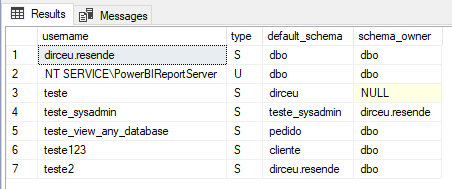
In a DBA's day-to-day life, it is common to find environments where the default schema of some users with Windows authentication was not defined at creation, thus assigning a new schema equal to that user's name. As a result, users who do not have much database knowledge end up creating several private objects in the environment (without knowing it) and complaining to the DBA that other processes and users do not see the tables they create.
To help you with this mission, I will provide a simple script to identify which schema each user has and who owns these schemas.
SELECT
    A.[name] AS username,
    A.type,
    A.[default_schema_name] AS [default_schema],
    C.[name] AS [schema_owner]
FROM
    sys.database_principals A
    LEFT JOIN sys.schemas B ON A.default_schema_name = B.[name]
    LEFT JOIN sys.database_principals C ON B.principal_id = C.principal_id
WHERE
    A.[type] IN ('U', 'S', 'G')
    AND A.principal_id > 4
ORDER BY
    1
Result:
And now, how to identify users with a default schema other than the default (dbo):
SELECT
    A.[name] AS username,
    A.type,
    A.[default_schema_name] AS [default_schema],
    C.[name] AS [schema_owner],
    'ALTER USER [' + A.[name] + '] WITH DEFAULT_SCHEMA=[dbo]' AS change_schema,
    'ALTER USER [' + A.[name] + '] WITH DEFAULT_SCHEMA=[' + A.[default_schema_name] + ']' AS current_schema
FROM
    sys.database_principals A
    LEFT JOIN sys.schemas B ON A.default_schema_name = B.[name]
    LEFT JOIN sys.database_principals C ON B.principal_id = C.principal_id
WHERE
    A.[type] IN ('U', 'S', 'G')
    AND A.principal_id > 4
    AND (B.[schema_id] IS NULL OR B.[name] NOT IN ('dbo', 'guest'))
ORDER BY
    1
Result:

How to identify users who own a schema
Another very common task is to identify schemas that are properties of certain users. This scenario prevents users from being deleted, with the error message below:
Msg 15138, Level 16, State 1, Line 41
The principal database owns a schema in the database, and cannot be dropped.
To be able to delete this user, you will first have to delete the schemas where he is the owner or migrate the ownership of these schemas to another user. The script below will help you identify what these schemas are:
SELECT
    B.[name] AS [schema],
    A.[name] AS [schema_owner],
    'DROP SCHEMA [' + B.[name] + '];' AS drop_schema,
    'CREATE SCHEMA [' + B.[name] + ']; ALTER AUTHORIZATION ON SCHEMA::[' + B.[name] + '] TO [' + A.[name] + '];' AS create_schema
FROM
    sys.database_principals A
    JOIN sys.schemas B ON A.principal_id = B.principal_id
WHERE
    A.[type] IN ('U', 'S', 'G')
    AND A.principal_id > 4
ORDER BY
    2
Result:

How to change the default schema in all databases
To apply the previous script to all databases, let's use the well-known sp_MSforeachdb:
IF (OBJECT_ID('tempdb..#Dados') IS NOT NULL) DROP TABLE #Dados
CREATE TABLE #Dados
(
    [database] NVARCHAR(128),
    [username] NVARCHAR(128),
    [type] CHAR(1),
    [default_schema] NVARCHAR(128),
    [schema_owner] NVARCHAR(128),
    [change_schema] NVARCHAR(MAX),
    [current_schema] NVARCHAR(MAX)
)

INSERT INTO #Dados
EXEC master.dbo.sp_MSforeachdb '

IF (''?'' NOT IN (''master'', ''msdb'', ''model'', ''tempdb''))
BEGIN

    SELECT
        ''?'' AS [database],
        A.[name] AS username,
        A.type,
        A.[default_schema_name] AS [default_schema],
        C.[name] AS [schema_owner],
        ''USE [?]; ALTER USER ['' + A.[name] + ''] WITH DEFAULT_SCHEMA=[dbo]'' AS change_schema,
        ''USE [?]; ALTER USER ['' + A.[name] + ''] WITH DEFAULT_SCHEMA=['' + A.[default_schema_name] + '']'' AS current_schema
    FROM
        [?].sys.database_principals A
        LEFT JOIN [?].sys.schemas B ON A.default_schema_name = B.[name]
        LEFT JOIN [?].sys.database_principals C ON B.principal_id = C.principal_id
    WHERE
        A.[type] IN (''U'', ''S'', ''G'')
        AND A.principal_id > 4
        AND (B.[schema_id] IS NULL OR B.[name] NOT IN (''dbo'', ''guest''))

END'


SELECT * FROM #Dados
Result:

How to identify objects created in schemas other than the default
Another common task in a DBA's daily routine is to identify objects that were created in user schemas and move them to the dbo schema (or any other schema), when necessary. To do this, I will provide the script below:
SELECT
    A.[name] AS [object],
    A.[type_desc],
    A.create_date,
    A.modify_date,
    A.[default_schema_name] AS [schema_name],
    C.[type_desc] AS [user_type],
    'ALTER SCHEMA [dbo] TRANSFER [' + B.[name] + '].[' + A.[name] + '];' AS [to_default_schema]
FROM
    sys.objects A
    JOIN sys.schemas B ON B.[schema_id] = A.[schema_id]
    JOIN sys.database_principals C ON B.[name] = C.[name]
WHERE
    C.[type] IN (''U'', ''S'', ''G'')
    AND C.principal_id > 4
    AND C.is_fixed_role = 0
ORDER BY
    1
Result:

What if I want to move objects from one schema to another?
DECLARE
    @schema_origem VARCHAR(128) = 'dirceu.resende',
    @schema_destino VARCHAR(128) = 'clientes'

SELECT
    A.[name] AS [object],
    A.[type_desc],
    A.create_date,
    A.modify_date,
    B.[name] AS [schema_name],
    C.[type_desc] AS [user_type],
    'ALTER SCHEMA [' + @schema_destino + '] TRANSFER [' + B.[name] + '].[' + A.[name] + '];' AS [to_default_schema]
FROM
    sys.objects A
    JOIN sys.schemas B ON B.[schema_id] = A.[schema_id]
    JOIN sys.database_principals C ON B.[name] = C.[name]
WHERE
    B.[name] = @schema_origem
ORDER BY
    1
Result:

Stored Procedure to unify standard schema and objects
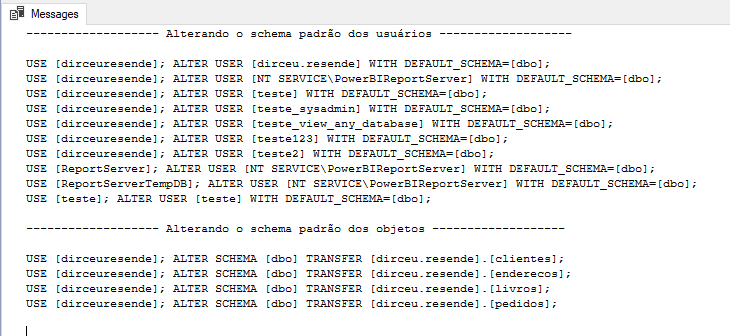
If you are looking for a very practical solution to reset the default schema of all users to the default (dbo) and move all private objects to the dbo schema as well, use the Stored Procedure below:
IF (OBJECT_ID('dbo.stpRedefine_Schema_Padrao') IS NULL) EXEC('CREATE PROCEDURE dbo.stpRedefine_Schema_Padrao AS SELECT 1')
GO

ALTER PROCEDURE dbo.stpRedefine_Schema_Padrao (
    @Fl_Altera_Usuarios BIT = 1,
    @Fl_Altera_Objetos BIT = 1,
    @Fl_Debug BIT = 0
)
AS
BEGIN


    SET NOCOUNT ON


    DECLARE @Comando VARCHAR(MAX)


    IF (@Fl_Altera_Usuarios = 1)
    BEGIN


        IF (OBJECT_ID('tempdb..#Usuarios') IS NOT NULL) DROP TABLE #Usuarios
        CREATE TABLE #Usuarios
        (
            [database] NVARCHAR(128),
            [username] NVARCHAR(128),
            [type] CHAR(1),
            [default_schema] NVARCHAR(128),
            [schema_owner] NVARCHAR(128),
            [change_schema] NVARCHAR(MAX),
            [current_schema] NVARCHAR(MAX)
        )

        INSERT INTO #Usuarios
        EXEC master.dbo.sp_MSforeachdb '

        IF (''?'' NOT IN (''master'', ''msdb'', ''model'', ''tempdb''))
        BEGIN

            SELECT
                ''?'' AS [database],
                A.[name] AS username,
                A.type,
                A.[default_schema_name] AS [default_schema],
                C.[name] AS [schema_owner],
                ''USE [?]; ALTER USER ['' + A.[name] + ''] WITH DEFAULT_SCHEMA=[dbo];'' AS change_schema,
                ''USE [?]; ALTER USER ['' + A.[name] + ''] WITH DEFAULT_SCHEMA=['' + A.[default_schema_name] + ''];'' AS current_schema
            FROM
                [?].sys.database_principals A
                LEFT JOIN [?].sys.schemas B ON A.default_schema_name = B.[name]
                LEFT JOIN [?].sys.database_principals C ON B.principal_id = C.principal_id
            WHERE
                A.[type] IN (''U'', ''S'', ''G'')
                AND A.principal_id > 4
                AND (B.[schema_id] IS NULL OR B.[name] NOT IN (''dbo'', ''guest''))

        END'


        SET @Comando = ''

        SELECT @Comando += change_schema + CHAR(10)
        FROM #Usuarios
        ORDER BY [database], username


        IF (@Fl_Debug = 1)
        BEGIN
            PRINT '------------------- Alterando o schema padrão dos usuários -------------------'
            PRINT ''
            PRINT @Comando
        END
        ELSE
            EXEC(@Comando)


    END


    IF (@Fl_Altera_Objetos = 1)
    BEGIN


        IF (OBJECT_ID('tempdb..#Objetos') IS NOT NULL) DROP TABLE #Objetos
        CREATE TABLE #Objetos
        (
            [database] NVARCHAR(128),
            [object] NVARCHAR(128),
            [type] VARCHAR(30),
            [schema_name] NVARCHAR(128),
            [schema_owner] NVARCHAR(128),
            [change_schema] NVARCHAR(MAX)
        )


        INSERT INTO #Objetos
        EXEC master.sys.sp_MSforeachdb '
        IF (''?'' NOT IN (''master'', ''msdb'', ''model'', ''tempdb''))
        BEGIN

            SELECT
                ''?'' AS [database],
                A.[name] AS [object],
                A.[type_desc],
                A.[default_schema_name] AS [schema_name],
                C.[type_desc] AS [user_type],
                ''USE [?]; ALTER SCHEMA [dbo] TRANSFER ['' + B.[name] + ''].['' + A.[name] + ''];'' AS [to_default_schema]
            FROM
                [?].sys.objects A
                JOIN [?].sys.schemas B ON B.[schema_id] = A.[schema_id]
                JOIN [?].sys.database_principals C ON B.[name] = C.[name]
            WHERE
                C.[type] IN (''U'', ''S'', ''G'')
                AND C.principal_id > 4
                AND C.is_fixed_role = 0

        END'


        SET @Comando = ''

        SELECT @Comando += change_schema + CHAR(10)
        FROM #Objetos
        ORDER BY [database], [object]


        IF (@Fl_Debug = 1)
        BEGIN
            PRINT '------------------- Alterando o schema padrão dos objetos -------------------'
            PRINT ''
            PRINT @Comando
        END
        ELSE
            EXEC(@Comando)


    END


END
Usage example:
EXEC dbo.stpRedefine_Schema_Padrao
    @Fl_Altera_Usuarios = 1, -- bit
    @Fl_Altera_Objetos = 1, -- bit
    @Fl_Debug = 1 -- bit
Result:
References
– https://pt.stackoverflow.com/questions/21031/o-que-s%C3%A3o-schemas-quais-as-vantagens-de-us%C3%A1-lo
– https://www.devmedia.com.br/schemas-no-sql-server/24328
– http://www.informit.com/articles/article.aspx?p=1216889&seqNum=2
– https://blog.sqlauthority.com/2009/09/07/sql-server-importance-of-database-schemas-in-sql-server/
– https://www.quackit.com/sql_server/sql_server_2008/tutorial/sql_server_database_schemas.cfm

Comentários (0)
Carregando comentários…