
Hey guys!
In this article I would like to share with you a query that allows you to identify which queries are using a certain index. This type of analysis can be especially useful for identifying which queries are causing an index to have more scan operations than seeks, for example.
The idea for this post came from a question in a Whatsapp group that I participate in.
This post is part of a series of articles related to performance, which contains the posts below:
– Understanding how indexes work in SQL Server
– SQL Server – Performance comparison between Scalar Function and CLR Scalar Function
– SQL Server – Introduction to the study of Performance Tuning
– SQL Server – How to identify a slow or heavy query in your database
– SQL Server – How to identify queries that use a certain index through the plan cache
Creating data for tests
To demonstrate how this query returns data, I will create a new table, insert some records and perform some simple queries so that the database statistics capture these operations and I can check which ones used which indexes:
IF (OBJECT_ID('dbo.Teste') IS NOT NULL) DROP TABLE dbo.Teste
GO

CREATE TABLE dbo.Teste (
    Id INT IDENTITY(1,1) NOT NULL PRIMARY KEY CLUSTERED, -- Índice clustered no ID
    Nome VARCHAR(100) NOT NULL
) WITH(DATA_COMPRESSION=PAGE)

-- Índice non-clustered no nome
CREATE NONCLUSTERED INDEX SK01_Teste ON dbo.Teste(Nome) WITH(DATA_COMPRESSION=PAGE)


INSERT INTO dbo.Teste(Nome)
VALUES
('Dirceu'), ('Resende'),
('Tiago'), ('Neves'),
('Fabricio'), ('Lima'),
('Luiz'), ('Lima'),
('Alan'), ('Mairink'),
('Arthur'), ('Luz'),
('Fabiano'), ('Amorim'),
('Rodrigo'), ('Ribeiro')


SELECT * FROM dbo.Teste WHERE Id = 2 -- Deve utilizar o índice clustered (seek)
SELECT * FROM dbo.Teste WHERE Id = 99 -- Deve utilizar o índice clustered (seek)
SELECT * FROM dbo.Teste WHERE Nome = 'Dirceu' -- Deve utilizar o índice non-clustered "SK01_Teste" (seek)
SELECT * FROM dbo.Teste WHERE Nome = 'Resende' -- Deve utilizar o índice non-clustered "SK01_Teste" (seek)
SELECT * FROM dbo.Teste -- Deve utilizar o índice non-clustered (scan)
Identifying the use of indexes
Once we have created the data for testing and run some queries, we will identify which queries used the clustered index. Before that, I need to identify the name of this index:
SELECT *
FROM sys.indexes
WHERE [object_id] = OBJECT_ID('dbo.Teste')
Now, let's consult the queries that used this clustered index (PK__Teste__3214EC075F9CA38E):
SELECT
    SUBSTRING(C.[text], ( A.statement_start_offset / 2 ) + 1, ( CASE A.statement_end_offset WHEN -1 THEN DATALENGTH(C.[text]) ELSE A.statement_end_offset END - A.statement_start_offset ) / 2 + 1) AS sqltext,
    A.execution_count,
    A.total_logical_reads / execution_count AS avg_logical_reads,
    A.total_logical_writes / execution_count AS avg_logical_writes,
    A.total_worker_time / execution_count AS avg_cpu_time,
    A.last_elapsed_time / execution_count AS avg_elapsed_time,
    A.total_rows / execution_count AS avg_rows,
    A.creation_time,
    A.last_execution_time,
    CAST(query_plan AS XML) AS plan_xml,
    B.query_plan,
    C.[text]
FROM
    sys.dm_exec_query_stats AS A
    CROSS APPLY sys.dm_exec_text_query_plan(A.plan_handle, A.statement_start_offset, A.statement_end_offset) AS B
    CROSS APPLY sys.dm_exec_sql_text(A.[sql_handle]) AS C
WHERE
    B.query_plan LIKE '%PK__Teste__3214EC075F9CA38E%'
    AND B.query_plan NOT LIKE '%dm_exec_text_query_plan%'
ORDER BY
    A.last_execution_time DESC
OPTION(RECOMPILE)
Result:

Let's also consult the queries that used the non-clustered index SK01_Teste:
SELECT
    SUBSTRING(C.[text], ( A.statement_start_offset / 2 ) + 1, ( CASE A.statement_end_offset WHEN -1 THEN DATALENGTH(C.[text]) ELSE A.statement_end_offset END - A.statement_start_offset ) / 2 + 1) AS sqltext,
    A.execution_count,
    A.total_logical_reads / execution_count AS avg_logical_reads,
    A.total_logical_writes / execution_count AS avg_logical_writes,
    A.total_worker_time / execution_count AS avg_cpu_time,
    A.last_elapsed_time / execution_count AS avg_elapsed_time,
    A.total_rows / execution_count AS avg_rows,
    A.creation_time,
    A.last_execution_time,
    CAST(query_plan AS XML) AS plan_xml,
    B.query_plan,
    C.[text]
FROM
    sys.dm_exec_query_stats AS A
    CROSS APPLY sys.dm_exec_text_query_plan(A.plan_handle, A.statement_start_offset, A.statement_end_offset) AS B
    CROSS APPLY sys.dm_exec_sql_text(A.[sql_handle]) AS C
WHERE
    B.query_plan LIKE '%SK01_Teste%'
    AND B.query_plan NOT LIKE '%dm_exec_text_query_plan%'
ORDER BY
    A.last_execution_time DESC
OPTION(RECOMPILE)
Result:

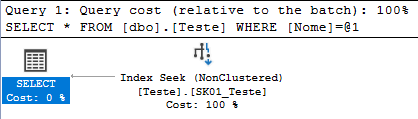
By clicking on the “plan_xml” column, we can view the execution plan for this query and analyze how the index appeared in the plan cache:
Some observations
It is important to always remember that the plan cache is “lost” when the SQL Server service is restarted or failed over, that is, you will not be able to have a very long history of queries that use a given index.
Another cool point that I would like to highlight is that the plan cache has an amount of memory that it can use to store plans. SQL Server cannot (and should not) save all plans for all queries, so it must optimize to save only the plans it judges to be the most important. Therefore, you will not always be able to retrieve information from a given query in the plan cache, as the plan may have already been discarded due to memory and storage limit issues, even if SQL has not been restarted.
Finally, it is nice to observe and confirm that INSERT/DELETE/UPDATE operations end up “using” all the table indexes. Any specific index that you consult with the query above will have INSERT/UPDATE/DELETE records between the commands that used the index (as long as these plans are still in the plan cache), as the indexes need to be updated in table write operations.
Well folks, that's it! I hope you liked this article.
A hug and see you later!

Comentários (0)
Carregando comentários…