Hey guys!!
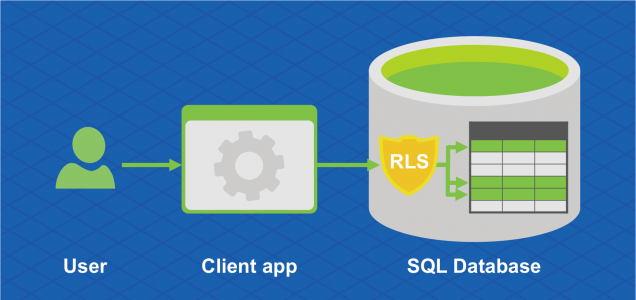
In this article, I would like to present to you a very interesting security feature that Microsoft SQL Server gained from version 2016, which is Row Level Security (RLS).
How Row Level Security (RLS) works
View contentThis simplifies the design and security of systems and applications, ensuring that, for example, employees can access only those rows of data that are relevant to their department or restrict customer access to only data relevant to that customer's company. All of this is done at the database level, without having to make any changes to the application.
It is worth mentioning that there are 2 types of use of RLS:
- Line filter (FILTER PREDICATE): Allows you to apply a row filter to queries performed with SELECT, returning only records that the user can view
- Blocking operations (BLOCK PREDICATE): Allows you to block certain operations at row level, which the user in question could not perform (Ex: INSERT into a table using a User_Id different from theirs)
How to implement Row Level Security (RLS)
View contentCreating test data for the example
USE [dirceuresende]
GO

------------------------------------------------------------------------
-- Criação das tabelas de Usuários e Pedidos
------------------------------------------------------------------------

IF (OBJECT_ID('dbo.Usuarios') IS NOT NULL) DROP TABLE dbo.Usuarios
CREATE TABLE dbo.Usuarios (
    Id_Usuario INT NOT NULL IDENTITY(1,1) PRIMARY KEY,
    Cd_Usuario NVARCHAR(50) NOT NULL,
    Nm_Usuario NVARCHAR(100) NOT NULL
)

INSERT INTO dbo.Usuarios
(
    Cd_Usuario,
    Nm_Usuario
)
VALUES ('dirceu.resende', 'Dirceu Resende'), ('tiago.neves', 'Tiago Neves'), ('fabricio.lima', 'Fabrício Lima'), ('vithor.silva', 'Vithor Silva')


IF (OBJECT_ID('dbo.Pedidos') IS NOT NULL) DROP TABLE dbo.Pedidos
CREATE TABLE dbo.Pedidos (
    Id_Pedido INT NOT NULL IDENTITY(1,1) PRIMARY KEY,
    Dt_Pedido DATETIME DEFAULT GETDATE() NOT NULL,
    Id_Usuario INT NOT NULL CONSTRAINT [FK_Usuario] FOREIGN KEY(Id_Usuario) REFERENCES dbo.Usuarios(Id_Usuario),
    Id_Cliente INT NOT NULL,
    Id_Produto INT NOT NULL
)
GO

INSERT INTO dbo.Pedidos
(
    Dt_Pedido,
    Id_Usuario,
    Id_Cliente,
    Id_Produto
)
SELECT
    (SELECT DATEADD(DAY, CAST(RAND() * 365 AS INT), '2017-01-01')) AS Dt_Pedido,
    (SELECT TOP 1 Id_Usuario FROM dbo.Usuarios ORDER BY NEWID()) AS Id_Usuario,
    (SELECT CAST(RAND() * 1000 AS INT)) AS Id_Cliente,
    (SELECT CAST(RAND() * 1000 AS INT)) AS Id_Produto
GO 15

SELECT * FROM dbo.Pedidos
Result:

Creation of users used in tests and permissions
Now I will create some users in the database to test RLS and give these users permission to access the Orders and Users tables.
CREATE USER [dirceu.resende] WITHOUT LOGIN
GO

CREATE USER [tiago.neves] WITHOUT LOGIN
GO

CREATE USER [fabricio.lima] WITHOUT LOGIN
GO

CREATE USER [vithor.silva] WITHOUT LOGIN
GO

GRANT SELECT ON dbo.Pedidos TO [dirceu.resende]
GRANT SELECT ON dbo.Usuarios TO [dirceu.resende]
GRANT SELECT ON dbo.Pedidos TO [tiago.neves]
GRANT SELECT ON dbo.Usuarios TO [tiago.neves]
GRANT SELECT ON dbo.Pedidos TO [fabricio.lima]
GRANT SELECT ON dbo.Usuarios TO [fabricio.lima]
GRANT SELECT ON dbo.Pedidos TO [vithor.silva]
GRANT SELECT ON dbo.Usuarios TO [vithor.silva]
Creation of the “rls” schema
As a good practice, I will also create a new schema (rls) to add the functions that will be created for use with RLS. As you will need to create 1 function for each criteria or filter that you want to apply RLS to and 1 policy for each table, it is more organized for all these functions to be in a dedicated schema.
USE [dirceuresende]
GO

CREATE SCHEMA [rls]
GO
Creation of the fncId_Usuario function
Using the fncId_Usuario function, I can apply a filter to all tables (if I create policies for this) that have a field with the user identifier. In this function, the User_Id that is in the table in question is informed and the function will search the user table for the identifier (User_Id) of the logged in user who is performing the SELECT on the table.
It is worth remembering that the filter is applied even for sysadmin users. In other words, even the sysadmin user will only be able to view records where the User_Id is the same as that user's Id (or he will not be able to view any records).
IF (OBJECT_ID('rls.fncId_Usuario') IS NOT NULL) DROP FUNCTION [rls].fncId_Usuario
GO

CREATE FUNCTION [rls].fncId_Usuario (
    @Id_Usuario INT
)
RETURNS TABLE
WITH SCHEMABINDING
AS
RETURN
    SELECT 1 AS Retorno
    WHERE @Id_Usuario = (SELECT Id_Usuario FROM dbo.Usuarios WHERE Cd_Usuario = USER_NAME())
GO
Creation of the rls.Pedidos policy
With the command below, we will apply the rls.Pedidos policy using the fncId_Usuario function and thus activate Row Level Security (RLS) in the Orders table.
IF (OBJECT_ID('rls.Pedidos') IS NOT NULL) DROP SECURITY POLICY [rls].Pedidos
GO

CREATE SECURITY POLICY [rls].Pedidos
    ADD FILTER PREDICATE [rls].fncId_Usuario(Id_Usuario) ON dbo.Pedidos WITH (STATE = ON)
Row Level Security Tests:
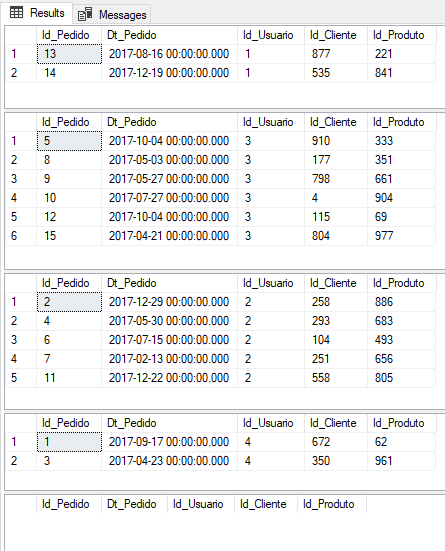
Now let's get down to practical testing and see how Row Level Security actually works.
EXEC('SELECT * FROM dbo.Pedidos') AS USER = 'dirceu.resende'
EXEC('SELECT * FROM dbo.Pedidos') AS USER = 'fabricio.lima'
EXEC('SELECT * FROM dbo.Pedidos') AS USER = 'tiago.neves'
EXEC('SELECT * FROM dbo.Pedidos') AS USER = 'vithor.silva'

-- Consulta utilizando um login sysadmin (Sem personificar outro usuário)
SELECT * FROM dbo.Pedidos
Result:
Another example for Row Level Security (RLS)
View contentCreation of the role and policy
IF (OBJECT_ID('rls.fncUsuario') IS NOT NULL) DROP FUNCTION [rls].fncUsuario
GO

CREATE FUNCTION [rls].fncUsuario (
    @Login NVARCHAR(100)
)
RETURNS TABLE
WITH SCHEMABINDING
AS
RETURN
    SELECT 1 AS Retorno
    WHERE @Login = USER_NAME()
    OR IS_MEMBER('db_owner') = 1
    OR IS_SRVROLEMEMBER('sysadmin') = 1
GO

IF (OBJECT_ID('rls.Usuarios') IS NOT NULL) DROP SECURITY POLICY [rls].Usuarios
GO

CREATE SECURITY POLICY [rls].Usuarios
    ADD FILTER PREDICATE [rls].fncUsuario(Cd_Usuario) ON dbo.Usuarios WITH (STATE = ON)
Real RLS Tests
-------------------------------------------------------------------------------
-- Testes do Row Level Security em um cenário real
-------------------------------------------------------------------------------

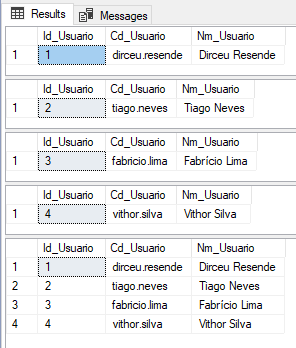
EXEC('SELECT * FROM dbo.Usuarios') AS USER = 'dirceu.resende'
EXEC('SELECT * FROM dbo.Usuarios') AS USER = 'tiago.neves'
EXEC('SELECT * FROM dbo.Usuarios') AS USER = 'fabricio.lima'
EXEC('SELECT * FROM dbo.Usuarios') AS USER = 'vithor.silva'

-- Consulta utilizando um login sysadmin (Sem personificar outro usuário)
SELECT * FROM dbo.Usuarios
Result:
Using Row Level Security (RLS) BLOCK PREDICATE
View contentIt is worth remembering that we can use the FILTER and BLOCK predicates at the same time, in the same policy.
Policy source code
IF (OBJECT_ID('rls.Usuarios_Blk') IS NOT NULL) DROP SECURITY POLICY [rls].Usuarios_Blk
GO

CREATE SECURITY POLICY [rls].Usuarios_Blk
    ADD BLOCK PREDICATE [rls].fncUsuario(Cd_Usuario) ON dbo.Usuarios AFTER INSERT,
    ADD BLOCK PREDICATE [rls].fncUsuario(Cd_Usuario) ON dbo.Usuarios AFTER UPDATE
WITH (STATE = ON)

-- Libera as permissões para permitir o insert e update na tabela Usuarios para o login "dirceu.resende"
GRANT INSERT, UPDATE ON dbo.Usuarios TO [dirceu.resende]
GO
Now, let's impersonate the user “dirceu.resende” and try to insert a user with another login into the table other than “dirceu.resende”:
EXECUTE AS USER = 'dirceu.resende'
GO

INSERT INTO dbo.Usuarios
(
    Cd_Usuario,
    Nm_Usuario
)
VALUES
(
    'edvaldo.castro', -- Cd_Usuario - nvarchar(60)
    'Edvaldo Castro' -- Nm_Usuario - varchar(60)
)
Result:
The attempted operation failed because the target object ‘dirceuresende.dbo.Usuarios’ has a block predicate that conflicts with this operation. If the operation is performed on a view, the block predicate might be enforced on the underlying table. Modify the operation to target only the rows that are allowed by the block predicate.
The statement has been terminated.
As you could see, it was not possible to insert the record, as BLOCK PREDICATE prevented the insertion since the Cd_Usuario that was being inserted was not what the user “dirceu.resende” had permission to insert.
The same happens when we try to perform an UPDATE:
EXECUTE AS USER = 'dirceu.resende'
GO

UPDATE dbo.Usuarios
SET Nm_Usuario = 'Teste'
WHERE Cd_Usuario = 'fabricio.lima'
Result:
The attempted operation failed because the target object ‘dirceuresende.dbo.Usuarios’ has a block predicate that conflicts with this operation. If the operation is performed on a view, the block predicate might be enforced on the underlying table. Modify the operation to target only the rows that are allowed by the block predicate.
The statement has been terminated.
However, if we try to update the logged-in user's own records, we see that the operation is carried out successfully:
EXECUTE AS USER = 'dirceu.resende'
GO

UPDATE dbo.Usuarios
SET Nm_Usuario = 'Teste'
WHERE Cd_Usuario = 'dirceu.resende'
Result:
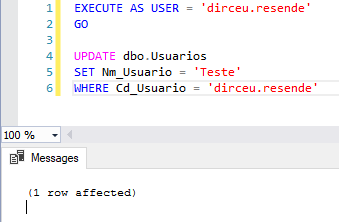
As we created 2 more conditions in the fncUsuario function to allow sysadmin and/or db_owner users to access the data, these 2 user profiles will also be able to insert/update the data normally:

Best practices for Row Level Security
View contentRow Level Security and its impact on performance
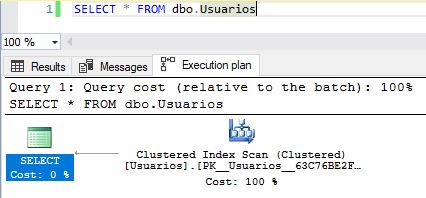
View contentExecution plan WITHOUT RLS enabled
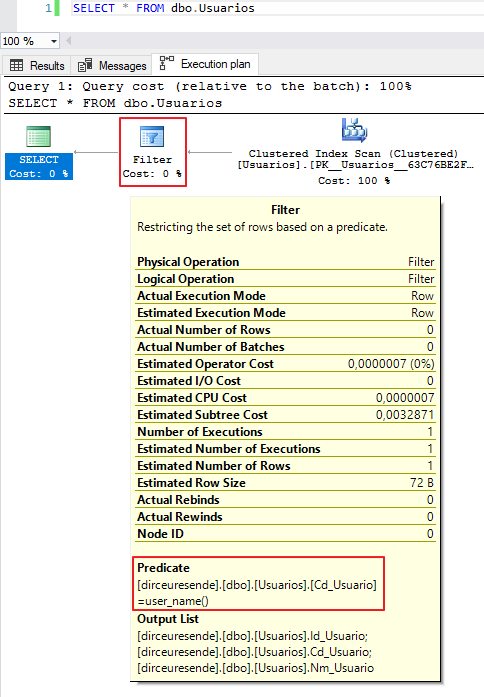
Execution plan WITH RLS enabled
How to disable Row Level Security (RLS)
View contentRow Level Security (RLS) and cross-feature compatibility
View contentReferences: https://docs.microsoft.com/en-us/sql/relational-databases/security/row-level-security
That's it, folks!
A hug and see you next time.

Comentários (0)
Carregando comentários…