Through this post, I would like to show you a very interesting and useful resource, which are Temporal Tables. As I already mentioned about them in the post SQL Server 2016 – List of new features and features, where it is possible to retrieve data from a table at any point in time. This means that you can “travel through time”, visualizing what the data in a given table was at a specific date and time, using simple SQL queries.
This resource has a wide range of possibilities and uses, of which I can highlight the Slowly changing dimensions of BI, to implement a dimension whose vision is that of a certain date, and also for the purposes of Audit, comparing the past with the current. All this without having to create triggers or any manual control.
It is worth mentioning that this feature is available in all editions of SQL Server, including the Web Edition and Express.
How do Temporal Tables work?
View content
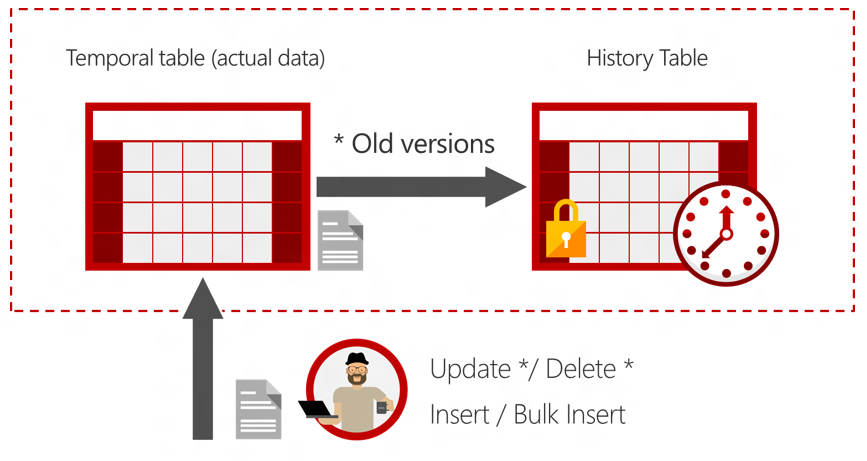
A temporal table is nothing more than a common table, which has a system versioning to record changed data in a history table (defined by you) with two columns of type DATETIME2 to control the validity of the record and thus allow this feature to work. The original table will always maintain the current data and the history table will record old records, as shown in the image below:
When querying the data specifying the desired date, the records from the 2 tables will be considered, transparently for you, as I will demonstrate below in the next topic.
Constraints of a Temporal Table
View content
An important part of the process of implementing a new feature is understanding how it works and its restrictions, which I will list below:
The table in question must have a PRIMARY KEY defined to be able to use the versioning feature. Otherwise, you will see a message like this:
Msg 13553, Level 16, State 1, Line 4
System versioned temporal table ‘dirceuresende.dbo.Table_Temporal’ must have primary key defined.
Once you create a table with this feature enabled, you will not be able to perform the TRUNCATE TABLE operation on this table, resulting in the following error message:
Msg 13545, Level 16, State 1, Line 58
Truncate failed on table ‘dirceuresende.dbo.Temporal_Table’ because it is not supported operation on system-versioned tables.
You will no longer be able to delete the table that has active versioning. To do this, you will need to stop versioning and then delete the table. Otherwise, you will see the following error message:
Msg 13552, Level 16, State 1, Line 58
Drop table operation failed on table ‘dirceuresende.dbo.Table_Temporal’ because it is not supported operation on system-versioned temporal tables.
In-memory OLTP cannot be used
INSTEAD OF triggers are not allowed. AFTER triggers only allowed in the current table (Cannot create in the historical table).
The historical table cannot have constraints
Msg 13564, Level 16, State 1, Line 1
Adding CHECK constraint to a temporal history table ‘dirceuresende.dbo.Table_Temporal_Historico’ is not allowed.
Msg 1750, Level 16, State 0, Line 1
Could not create constraint or index. See previous errors.
Data in the historical table cannot be modified manually (UPDATE, DELETE, INSERT, etc.)
Msg 13560, Level 16, State 1, Line 1
Cannot delete rows from a temporal history table ‘dirceuresende.dbo.Table_Temporal_Historico’.
INSERT and UPDATE statements cannot reference columns from the SYSTEM_TIME period
Msg 13537, Level 16, State 1, Line 5
Cannot update GENERATED ALWAYS columns in table ‘dirceuresende.dbo.Table_Temporal’.
Which tables are temporal in my database?
View content
To check which tables have the system versioning feature activated, simply run this query below:
SELECT
    A.[name],
    A.[object_id],
    A.temporal_type,
    A.temporal_type_desc,
    A.history_table_id,
    B.[name]
FROM
    sys.tables A
    LEFT JOIN sys.tables B ON B.[object_id] = A.history_table_id
ORDER BY
    A.temporal_type DESC
Result:
How to create a Temporal Table (Versioned)?
View content
To create a table with system versioning enabled, you will need to create 2 columns in your table to determine the validity of records:
Dt_Inicio DATETIME2 GENERATED ALWAYS AS ROW START
Dt_Fim DATETIME2 GENERATED ALWAYS AS ROW END
And the PERIOD FOR SYSTEM_TIME (Dt_Start, Dt_Fim) clause will also be added after these columns and also the WITH clause (SYSTEM_VERSIONING = ON (HISTORY_TABLE = dbo.Table_Historico)) at the end of the CREATE command for your table.
Now I will demonstrate a complete CREATE TABLE to make it easier to understand how to create a temporal table:
USE [dirceuresende]
GO

CREATE TABLE dbo.Tabela_Temporal (

    -- Dados normais da tabela
    Id INT IDENTITY(1,1) NOT NULL PRIMARY KEY,
    Ds_Nome VARCHAR(100) NOT NULL,
    Dt_Nascimento DATETIME NOT NULL,
    Nr_Telefone VARCHAR(15) NOT NULL,
    Nr_CPF VARCHAR(14) NOT NULL,

    -- Informações referentes ao versionamento (Temporal table)
    Dt_Inicio DATETIME2(0) GENERATED ALWAYS AS ROW START,
    Dt_Fim DATETIME2(0) GENERATED ALWAYS AS ROW END,
    PERIOD FOR SYSTEM_TIME (Dt_Inicio, Dt_Fim)
) WITH (SYSTEM_VERSIONING = ON (HISTORY_TABLE = dbo.Tabela_Temporal_Historico))
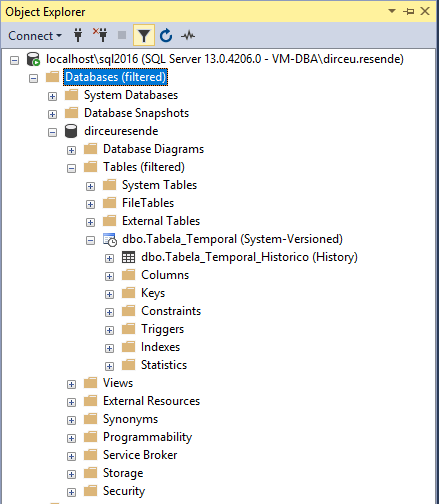
After creating a temporal table (system versioning), the SQL Server Management Studio Object Explorer screen will show the table as follows:
How to convert a common table to a Temporal Table?
View content
To convert a common table to a Temporal Table, simply execute some ALTER TABLE commands to create the period definition columns (Dt_Start and Dt_End) and activate versioning in the table, as per the example below:
USE [dirceuresende]
GO

-- Criação normal de uma tabela
CREATE TABLE dbo.Tabela_Comum (
    Id INT IDENTITY(1,1) NOT NULL PRIMARY KEY,
    Ds_Nome VARCHAR(100) NOT NULL,
    Dt_Nascimento DATETIME NOT NULL,
    Nr_Telefone VARCHAR(15) NOT NULL,
    Nr_CPF VARCHAR(14) NOT NULL,
) WITH(DATA_COMPRESSION=PAGE)


-- Crio as colunas de metadados para controlar a validade dos registros
ALTER TABLE dbo.Tabela_Comum ADD
    Dt_Inicio DATETIME2 GENERATED ALWAYS AS ROW START NOT NULL,
    Dt_Fim DATETIME2 GENERATED ALWAYS AS ROW END NOT NULL,
    PERIOD FOR SYSTEM_TIME (Dt_Inicio, Dt_Fim)


-- Ativo o versionamento na tabela
ALTER TABLE dbo.Tabela_Comum SET (SYSTEM_VERSIONING=ON (HISTORY_TABLE = dbo.Tabela_Comum_Historico))
What if the table already has records? Well, in this case, just create the columns with a constraint to include a DEFAULT value in the columns that will be created now and that have no value:
USE [dirceuresende]
GO

-- Criação normal de uma tabela
CREATE TABLE dbo.Tabela_Comum (
    Id INT IDENTITY(1,1) NOT NULL PRIMARY KEY,
    Ds_Nome VARCHAR(100) NOT NULL,
    Dt_Nascimento DATETIME NOT NULL,
    Nr_Telefone VARCHAR(15) NOT NULL,
    Nr_CPF VARCHAR(14) NOT NULL,
) WITH(DATA_COMPRESSION=PAGE)


INSERT INTO dbo.Tabela_Comum
(
    Ds_Nome,
    Dt_Nascimento,
    Nr_Telefone,
    Nr_CPF
)
VALUES
(
    'Dirceu Resende', -- Ds_Nome - varchar(100)
    '1990-01-01', -- Dt_Nascimento - datetime
    '2799999999', -- Nr_Telefone - varchar(15)
    '11111111111' -- Nr_CPF - varchar(14)
)


-- Crio as colunas de metadados para controlar a validade dos registros
ALTER TABLE dbo.Tabela_Comum ADD
    Dt_Inicio DATETIME2 GENERATED ALWAYS AS ROW START CONSTRAINT DF_Tabela_Comum_Dt_Inicio DEFAULT SYSUTCDATETIME() NOT NULL,
    Dt_Fim DATETIME2 GENERATED ALWAYS AS ROW END CONSTRAINT DF_Tabela_Comum_Dt_Fim DEFAULT '9999-12-31 23:59:59.9999999' NOT NULL,
    PERIOD FOR SYSTEM_TIME (Dt_Inicio, Dt_Fim)


-- Ativo o versionamento na tabela
ALTER TABLE dbo.Tabela_Comum SET (SYSTEM_VERSIONING=ON (HISTORY_TABLE = dbo.Tabela_Comum_Historico))
With the query above, you will create new columns with Dt_Start = current date/time and Dt_End = maximum date of datetime2, that is, all records in the table will be considered current records.
How to query data from the Temporal Table?
View content
Now that we have created our table with system versioning activated, transforming our table into a temporal table, let's generate some information and then see how we can query it:
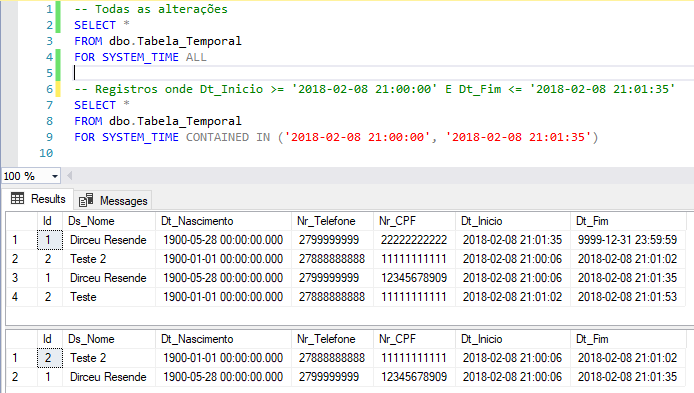
In the examples above, I used the AS OF ‘data’ clause. There are 5 types of clauses to specify the desired date range:
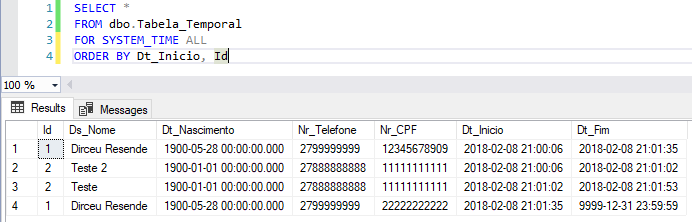
ALL: Returns all changes made to the table
Example:
AS OF: Point-in-time feature, i.e., returns data at a specific date and time
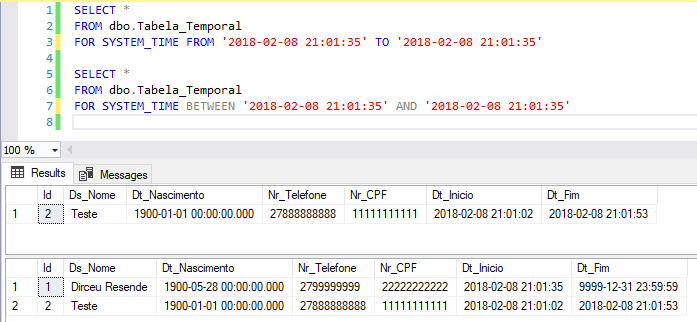
FROM TO : Returns all records whose Dt_Inicial field < entered end date and Dt_Final field > reported start date.
Example:
BETWEEN AND : Returns all records whose Dt_Inicial field <= entered end date and Dt_Final field > reported start date. This clause is very similar to the FROM... TO.. with the only difference being that the first condition also considers records with equality in the condition (<=), while the FROM.. TO.. clause does not (only <)
Example:
CONTAINED IN ( , ): Returns all records whose Dt_Inicial >= initial date entered and field Dt_Final <= final date entered.
Example:
How to disable versioning of a Temporal Table?
View content
If you no longer want to use the system versioning feature, transforming a temporal table into a common table and deleting all metadata and temporal table structure, simply use the commands below:
ALTER TABLE dbo.Tabela_Temporal SET (SYSTEM_VERSIONING = OFF);
ALTER TABLE dbo.Tabela_Temporal DROP PERIOD FOR SYSTEM_TIME;
ALTER TABLE dbo.Tabela_Temporal DROP COLUMN Dt_Inicio, Dt_Fim;
If you just want to temporarily disable the versioning feature, but don't want to delete the information, you can use the command below:
ALTER TABLE dbo.Tabela_Temporal SET (SYSTEM_VERSIONING = OFF);
Will my history table grow forever?
View content
One thing to be careful about when activating this feature on your instance is related to the disk space consumed by the history table. By default, the table will grow indefinitely until disk space is exhausted. To control this, you can create a job that will perform the data cleaning process, keeping only the most recent data, as shown in the examples below:
Azure SQL Database
ALTER DATABASE CURRENT SET TEMPORAL_HISTORY_RETENTION ON
GO

ALTER TABLE [dbo].[Tabela_Temporal] SET (SYSTEM_VERSIONING = ON (HISTORY_RETENTION_PERIOD = 30 DAYS))
GO
SQL Server (On-Premise)
ALTER TABLE dbo.Tabela_Temporal SET (SYSTEM_VERSIONING = OFF)
GO

DELETE FROM dbo.Tabela_Temporal_Historico
WHERE Dt_Fim <= DATEADD(DAY, -30, GETDATE())

ALTER TABLE dbo.Tabela_Temporal
SET (SYSTEM_VERSIONING = ON (HISTORY_TABLE = [dbo].[Tabela_Temporal_Historico], DATA_CONSISTENCY_CHECK = ON))






Comments (0)
Loading comments...